2023 TOYOTA RAV4 HYBRID Charging System Malfunction
[x] Cancel search: Charging System MalfunctionPage 72 of 586

721-4. Hybrid system
■Charging the 12-volt battery
P.487
■After the 12-volt battery has dis-
charged or when the terminal
has been removed and installed
during replace, etc.
The gasoline engine may not stop
even if the vehicle is being driven by
the hybrid battery (traction battery).
If this continues for a few days, con-
tact your To yota dealer.
■Sounds and vibrations specific
to a Hybrid Electric Vehicle
There may be no engine sound or
vibration even though the vehicle is
able to move with the “READY” indi-
cator is illuminate d. For safety,
make sure to shift the shift lever to P
and apply the parking brake when
parked.
The following sounds or vibrations
may occur when the hybrid system
is operating and are not a malfunc-
tion:
●Motor sounds may be heard from
the engine compartment.
●Sounds may be heard from the
hybrid battery (traction battery)
under the rear seats when the
hybrid system starts or stops.
●Relay operating sounds such as a
snap or soft clank will be emitted
from the hybrid battery (traction
battery), under the rear seats,
when the hybrid system is started
or stopped.
●Sounds from the hybrid system
may be heard when the back door
is open.
●Sounds may be heard from the
transmission when the gasoline
engine starts or stops, when driv-
ing at low speeds, or during idling.
●Engine sounds may be heard
when accelerating sharply.
●Sounds may be heard due to
regenerative braking when the
brake pedal is dep ressed or as
the accelerator pedal is released.
●Vibration may be felt when the
gasoline engine starts or stops.
●Cooling fan sounds may be heard
from the air intake vent under the
rear seat.
■Maintenance, repair, recycling,
and disposal
Contact your Toyota dealer regard-
ing maintenance, repair, recycling
and disposal. Do n ot dispose of the
vehicle yourself.
When driving with the gasoline
engine stopped, a sound, which
changes in accordance with the
driving speed, will be played in
order to warn people nearby of
the vehicle’s approach. The
sound will stop when the vehicle
speed exceeds approximately
22 mph (35 km/h).
■Acoustic Vehicle Alerting Sys-
tem
In the following cases, the Acoustic
Vehicle Alerting System may be dif-
ficult for surrounding people to hear.
●In very noisy areas
●In the wind or the rain
Also, as the Acoust ic Vehicle Alert-
ing System is installed on the front
of the vehicle, it may be more diffi-
cult to hear from the rear of the vehi-
cle compared to the front.
■If “Proximity Notification Sys-
tem Malfunction Visit Your
Dealer” is displayed on the
multi-information display
The system may be malfunctioning.
Have the vehicle inspected by your
Toyota dealer.
Acoustic Vehicle Alerting
System
Page 89 of 586
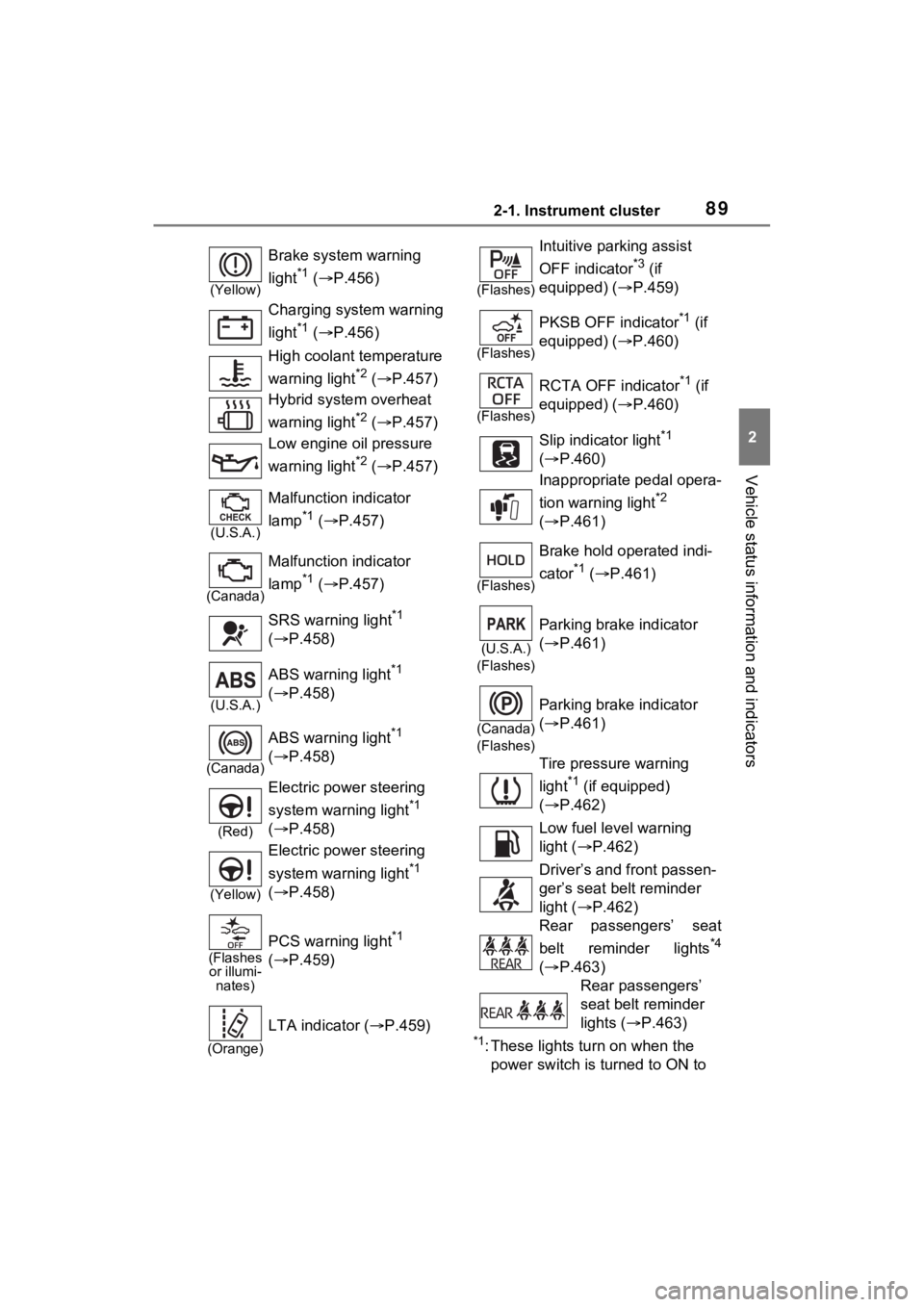
892-1. Instrument cluster
2
Vehicle status information and indicators
*1: These lights turn on when the
power switch is turned to ON to
(Yellow)
Brake system warning
light
*1 ( P.456)
Charging system warning
light
*1 ( P.456)
High coolant temperature
warning light
*2 ( P.457)
Hybrid system overheat
warning light
*2 ( P.457)
Low engine oil pressure
warning light
*2 ( P.457)
(U.S.A.)
Malfunction indicator
lamp
*1 ( P.457)
(Canada)
Malfunction indicator
lamp
*1 ( P.457)
SRS warning light
*1
( P.458)
(U.S.A.)
ABS warning light*1
( P.458)
(Canada)
ABS warning light*1
( P.458)
(Red)
Electric power steering
system warning light
*1
( P.458)
(Yellow)
Electric power steering
system warning light
*1
( P.458)
(Flashes
or illumi- nates)
PCS warning light*1
( P.459)
(Orange)
LTA indicator ( P.459)
(Flashes)
Intuitive parking assist
OFF indicator
*3 (if
equipped) ( P.459)
(Flashes)
PKSB OFF indicator*1 (if
equipped) ( P.460)
(Flashes)
RCTA OFF indicator*1 (if
equipped) ( P.460)
Slip indicator light
*1
( P.460)
Inappropriate pedal opera-
tion warning light
*2
( P.461)
(Flashes)
Brake hold operated indi-
cator
*1 ( P.461)
(U.S.A.)
(Flashes)
Parking brake indicator
( P.461)
(Canada)
(Flashes)
Parking brake indicator
( P.461)
Tire pressure warning
light
*1 (if equipped)
( P.462)
Low fuel level warning
light ( P.462)
Driver’s and front passen-
ger’s seat belt reminder
light ( P.462)
Rear passengers’ seat
belt reminder lights
*4
( P.463)
Rear passengers’
seat belt reminder
lights ( P.463)
Page 241 of 586

2394-3. Operating the lights and wipers
4
Driving
erly if an object is placed on the sen-
sor, or anything that blocks the
sensor is affixed to the windshield.
Doing so interfere s with the sensor
detecting the level of ambient light
and may cause the automatic head-
light system to malfunction.
■Automatic light off system
●When the headlights are on: The
lights turn off 30 seconds after the
power switch is turned to ACC or
OFF and a door is opened and
closed. (The lights turn off imme-
diately if on the key is
pressed after all the doors are
closed.)
●When only the tail lights are on:
The tail lights turn off automati-
cally if the power switch is turned
to ACC or OFF and the driver’s
door is opened.
To turn the lights on again, turn the
power switch to ON, or turn the light
switch to the , or posi-
tion once and then back to or
position.
■Light reminder buzzer
A buzzer sounds when the power
switch is turned to OFF and the
driver’s door is opened while the
lights are turned on.
■Windshield wiper linked head-
light illumination (if equipped)
When driving during daytime with
the headlight switch turned to , if the windshield wipers are used, the
headlights will turn o
n automatically
after several seconds to help
enhance the visibility of your vehi-
cle.
■12-volt battery-saving function
In order to prevent the 12-volt bat-
tery of the vehicle from discharging,
if the headlights and/or tail lights are
on when the power switch is turned
to OFF, the battery saving function
will operate and au tomatically turn
off all the lights af ter approximately
20 minutes.
When any of the following are per-
formed, the battery-saving function
is canceled once and then reacti-
vated. All the light s will turn off auto-
matically 20 minutes after the
battery-saving function has been
reactivated:
●When the headlight switch is oper-
ated
●When a door is opened or closed
■If “Headlight System Malfunc-
tion Visit Your Dealer” is dis-
played on the multi-information
display
The system may be malfunctioning.
Have the vehicle inspected by your
Toyota dealer.
■Customization
Settings (e.g. light sensor sensitiv-
ity) can be changed.
(Customizable features: P.527)
NOTICE
■To prevent 12-volt battery dis-
charge
Do not leave the lights on longer
than necessary when the hybrid
system is not running.
Page 368 of 586
3665-4. Using the other interior features
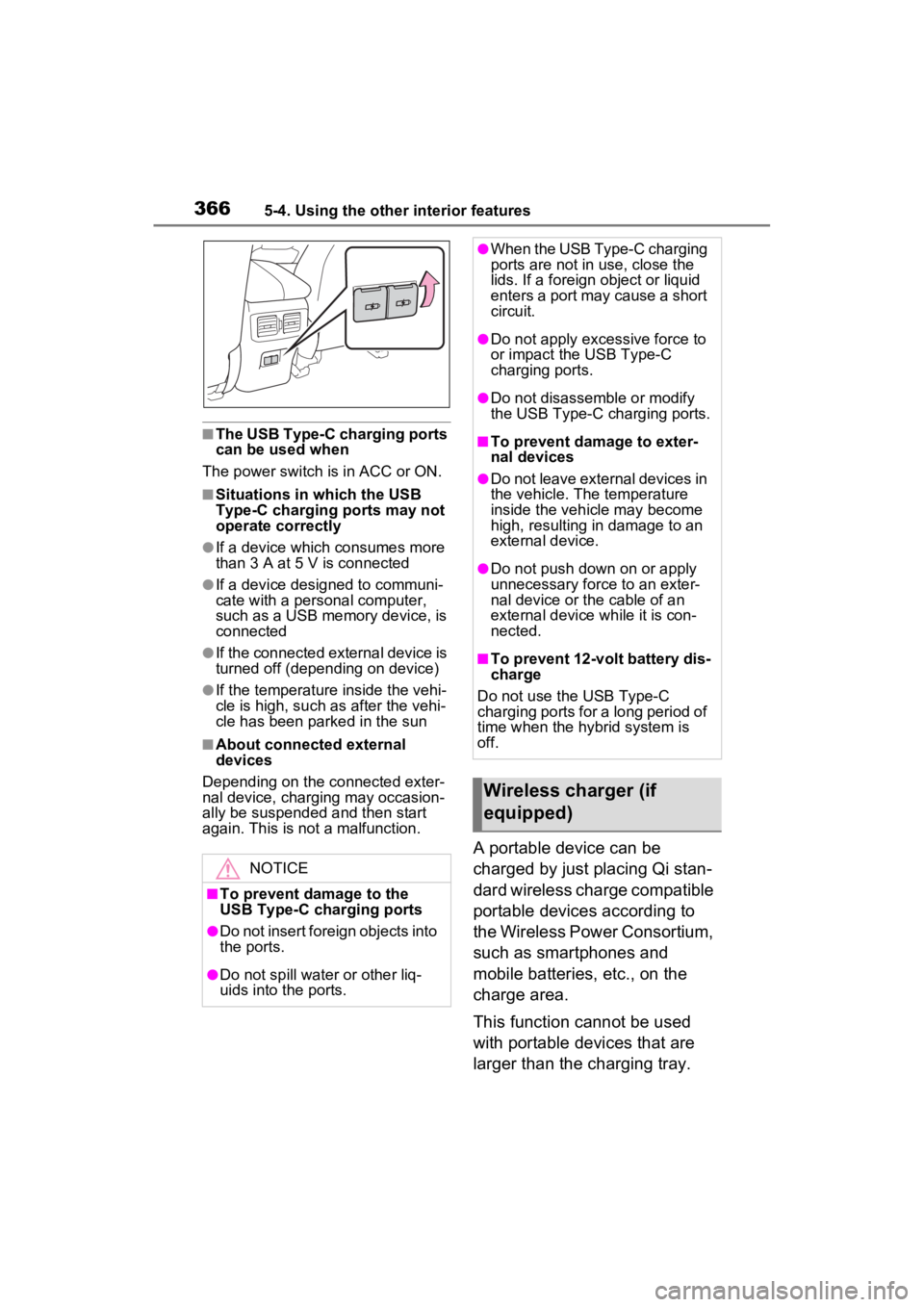
■The USB Type-C charging ports
can be used when
The power switch i s in ACC or ON.
■Situations in which the USB
Type-C charging ports may not
operate correctly
●If a device which consumes more
than 3 A at 5 V is connected
●If a device designed to communi-
cate with a personal computer,
such as a USB memory device, is
connected
●If the connected external device is
turned off (depending on device)
●If the temperature inside the vehi-
cle is high, such as after the vehi-
cle has been park ed in the sun
■About connected external
devices
Depending on the connected exter-
nal device, charging may occasion-
ally be suspended and then start
again. This is not a malfunction.
A portable device can be
charged by just placing Qi stan-
dard wireless charge compatible
portable devices according to
the Wireless Power Consortium,
such as smartphones and
mobile batteries, etc., on the
charge area.
This function cannot be used
with portable devices that are
larger than the charging tray.
NOTICE
■To prevent damage to the
USB Type-C charging ports
●Do not insert foreign objects into
the ports.
●Do not spill water or other liq-
uids into the ports.
●When the USB Type-C charging
ports are not in use, close the
lids. If a foreign object or liquid
enters a port may cause a short
circuit.
●Do not apply excessive force to
or impact the USB Type-C
charging ports.
●Do not disassemble or modify
the USB Type-C charging ports.
■To prevent damage to exter-
nal devices
●Do not leave external devices in
the vehicle. The temperature
inside the vehicle may become
high, resulting in damage to an
external device.
●Do not push down on or apply
unnecessary force to an exter-
nal device or the cable of an
external device while it is con-
nected.
■To prevent 12-volt battery dis-
charge
Do not use the USB Type-C
charging ports for a long period of
time when the hybrid system is
off.
Wireless charger (if
equipped)
Page 375 of 586
3735-4. Using the other interior features
5
Interior features
Fold down the armrest for use.
NOTICE
●When the portable device is in
contact with, or is covered by
any of the following metallic
objects:
• A card that has metal on it, such as aluminum foil, etc.
• A pack of cigarettes that includes aluminum foil
• A wallet or bag that is made of metal
• Coins
• A heating pad
• CDs, DVDs or other media
• A metal accessory
• A case or cover made of metal
• Casing which has magnet in it on the charging side of the por-
table device
●Electric wave type wireless
remote controls are being used
nearby
●The electronic key is not inside
the vehicle
●2 or more portable devices are
placed on the charging tray at
the same time
If charging is abnormal or the
operation indicator light contin-
ues to flash for any other reason,
the wireless charger may be mal-
functioning. Conta ct your Toyota
dealer.
■To prevent malfunctions and
data corruptions
●When charging, bringing a
credit, or other magnetic card,
or magnetic storage media
close to the charge area may
clear any stored data due to
magnetic influence. Also, do not
bring a wristwatch or other pre-
cision instrument close to the
charge area since doing so may
cause it to malfunction.
●Do not charge with a non-con-
tact IC card such as a transpor-
tation system IC card inserted
between the charging side of a
portable device and the charge
area. The IC chip may become
extremely hot and damage the
portable device or IC card. Be
especially careful not to charge
a portable device inside a case
or cover with a non-contact IC
card attached.
●Do not leave portable devices
inside the vehicle. The inside of
the vehicle can become hot in
extreme heat, which could
cause a malfunction.
■To prevent 12-volt battery dis-
charge
Do not use the wireless charger
for a long period of time when the
hybrid system is stopped.
Armrest
Page 458 of 586
4567-2. Steps to take in an emergency
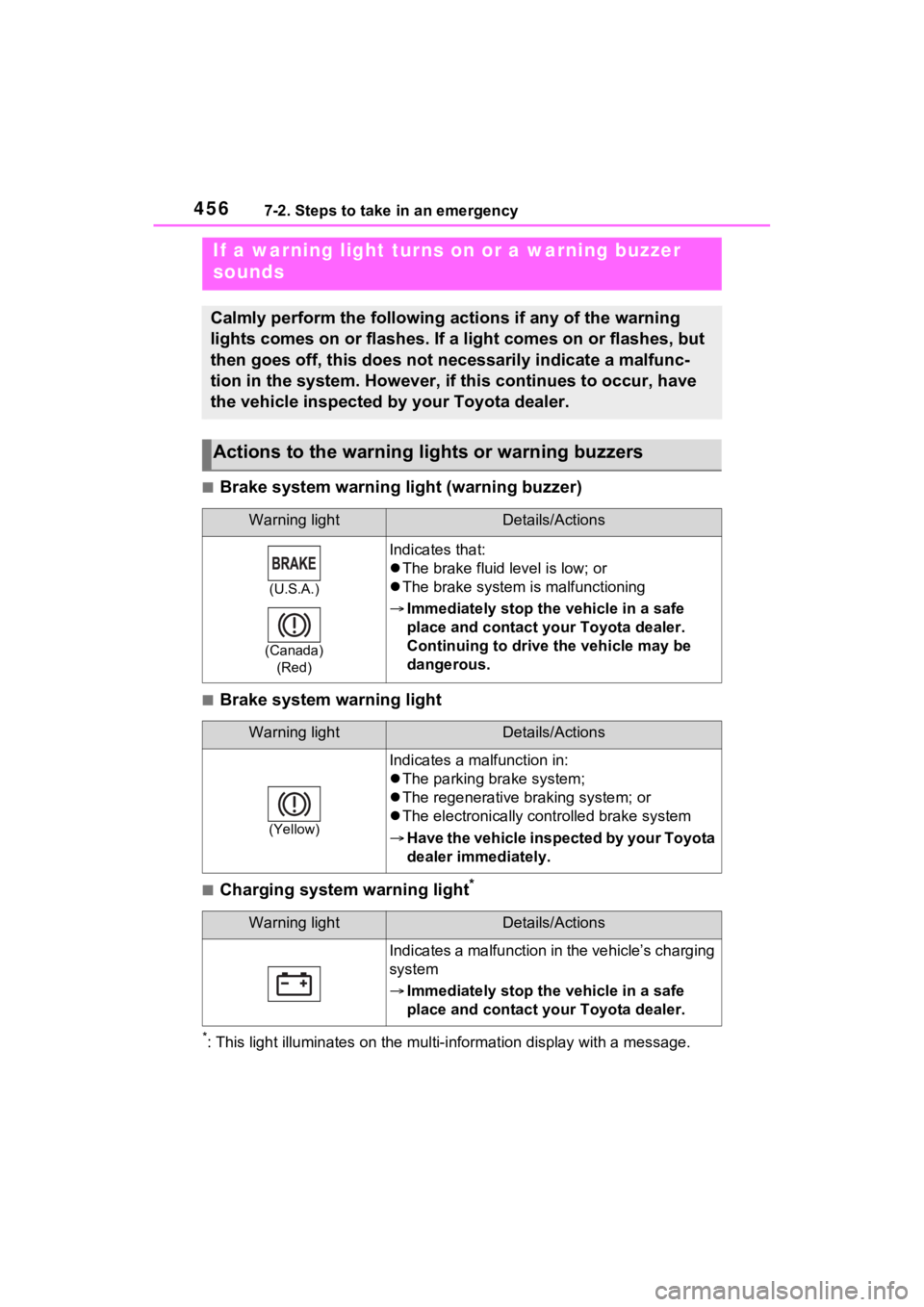
■Brake system warning light (warning buzzer)
■Brake system warning light
■Charging system warning light*
*: This light illuminates on the mu lti-information display with a message.
If a warning light turns on or a warning buzzer
sounds
Calmly perform the following actions if any of the warning
lights comes on or flashes. If a light comes on or flashes, but
then goes off, this does not necessarily indicate a malfunc-
tion in the system. However, if this continues to occur, have
the vehicle inspected by your Toyota dealer.
Actions to the warning lights or warning buzzers
Warning lightDetails/Actions
(U.S.A.)
(Canada) (Red)
Indicates that:
The brake fluid level is low; or
The brake system is malfunctioning
Immediately stop the vehicle in a safe
place and contact your Toyota dealer.
Continuing to drive the vehicle may be
dangerous.
Warning lightDetails/Actions
(Yellow)
Indicates a malfunction in:
The parking brake system;
The regenerative braking system; or
The electronically controlled brake system
Have the vehicle inspected by your Toyota
dealer immediately.
Warning lightDetails/Actions
Indicates a malfunction in the vehicle’s charging
system
Immediately stop the vehicle in a safe
place and contact your Toyota dealer.
Page 471 of 586

4697-2. Steps to take in an emergency
7
When trouble arises
distance on the maintenance sched-
ule*.
Comes on approximately 5000
miles (8000 km) after the message
has been reset. (The indicator will
not work properly unless the mes-
sage has been reset.)
Perform the necessary mainte-
nance. Please reset the message
after the maintenance is performed.
( P.391)
*: Refer to the separate “Scheduled
Maintenance Guide” or “Owner’
Manual Supplement” for the main-
tenance interval applicable to your
vehicle.
■If “Engine Maintenance
Required Visit Your Dealer” is
shown
The engine or an engine component
is malfunctioning. Have the vehicle
inspected by your Toyota dealer
immediately.
■If a message that indicates the
malfunction of front camera is
displayed
The following sys tems may be sus-
pended until the pr oblem shown in
the message is resolved. ( P.255,
456)
●PCS (Pre-Collis ion System)
●LTA (Lane Tracing Assist)
●AHB (Automatic High Beam)
●RSA (Road Sign Assist)*
●Dynamic radar cruise control with
full-speed range
*: If equipped
■If a message that indicates the
malfunction of radar sensor is
displayed
The following sys tems may be sus-
pended until the pr oblem shown in
the message is resolved. ( P.255,
P.456)
●PCS (Pre-Collis ion System)
●LTA (Lane Tracing Assist)
●Dynamic radar cruise control with
full-speed range
■If “Radar Cruise Control
Unavailable See Owner’s Man-
ual” is shown
The dynamic radar cruise control
with full-speed range system is sus-
pended temporarily or until the prob-
lem shown in the message is
resolved. (causes and coping meth-
ods: P.255)
■If “Radar Cruise Control
Unavailable” is shown
The dynamic radar cruise control
with full-speed range system cannot
be used temporarily. Use the sys-
tem when it becomes available
again.
■Warning buzzer
P.463
WARNING
■If a warning light comes on or
a warning buzzer sounds
when a warning message is
shown on the multi-informa-
tion display
P.464
NOTICE
■“High Power Consumption
Partial Limit On AC/Heater
Operation” is frequently
shown
There is a possible malfunction
relating to the charging system or
the 12-volt battery may be deteri-
orating. Have the vehicle
inspected by your Toyota dealer.
Page 489 of 586
4877-2. Steps to take in an emergency
7
When trouble arises
have the vehicle inspected at
your Toyota dealer as soon as
possible.
■Starting the hybrid system
when the 12-volt battery is dis-
charged
The hybrid system cannot be
started by push-starting.
■To prevent 12-vol t battery dis-
charge
●Turn off the headlights and the
audio system while the hybrid sys-
tem is off.
●Turn off any unnec essary electri-
cal components when the vehicle
is running at a low speed for an
extended period, such as in heavy
traffic.
■When the 12-volt battery is
removed or discharged
●Information stor ed in the ECU is
cleared. When the 12-volt battery
is depleted, have the vehicle
inspected at your Toyota dealer.
●Some systems may require initial-
ization. ( P.531)
■When removing the 12-volt bat-
tery terminals
When the 12-volt battery terminals
are removed, the information stored
in the ECU is cleared. Before
removing the 12-volt battery termi-
nals, contact your Toyota dealer.
■Charging the 1 2-volt battery
The electricity stor ed in the 12-volt
battery will discharge gradually even
when the vehicle is not in use, due
to natural discharge and the drain-
ing effects of certa in electrical appli-
ances. If the vehicle is left for a long
time, the 12-volt battery may dis-
charge, and the hybrid system may
be unable to start. (The 12-volt bat-
tery recharges aut omatically while
the hybrid system is operating.)
■When recharging or replacing
the 12-volt battery (vehicles
without smart key system)
The hybrid system may not start on
the first attempt after the 12-volt bat-
tery has recharged but will start nor-
mally after the second attempt. This
is not a malfunction.
■When recharging or replacing
the 12-volt battery (vehicles
with smart key system)
●In some cases, it may not be pos-
sible to unlock the doors using the
smart key system when the 12-
volt battery is discharged. Use the
wireless remote c ontrol or the
mechanical key to lock or unlock
the doors.
●The hybrid syste m may not start
on the first attempt after the 12-
volt battery has recharged but will
start normally after the second
attempt. This is n ot a malfunction.
●The power switch mode is memo-
rized by the vehicle. When the 12-
volt battery is reconnected, the
system will return to the mode it
was in before the 12-volt battery
was discharged. Before discon-
necting the 12-volt battery, turn
the power switch to OFF.
If you are unsure what mode the
power switch was in before the
12-volt battery discharged, be
especially careful when recon-
necting the 12-volt battery.
■When replacing t he 12-volt bat-
tery
●Use a 12-volt battery that con-
forms to European regulations.
Type A:
Use a battery that the case size is
same as the previous one (LN1), 20
hours rate capacity (20HR) is equiv-
alent (45Ah) or greater, and perfor-
mance rating (CCA) is equivalent
(285A) or greater.
Type B: