2023 TOYOTA RAIZE temperature
[x] Cancel search: temperaturePage 97 of 516

952-1. Instrument cluster
RAIZE_OM_General_BZ358E
Instrument cluster
2
⬛About average fuel economy
⚫Immediately after the engine switch has been turned “ON”, it shows the
value when the engine was stopped last.
⚫Fuel economy is not displayed if the da ta cannot be received when refresh-
ing the display, or if in valid data is received.
⬛About cruising distance
⚫Refreshing time for display depend s on driving conditions (running,
stopped).
⚫Note that the cruising distance data shown as when you receive your new
vehicle does not necessarily represent the correct value.
⚫When a malfunction is detected, cruising distance data may not be displayed
for a while.
⬛About outside temperature
⚫When the outside temperature cannot be measured correctly, it shows “- -°C”.
⚫Under the following conditions, the outside temperature may not be dis-
played properly, or update of temperat ure indication may be delayed. These
phenomena are not considered a failure.
⦁ When the vehicle is stopped or is running at low speeds (approx. 20 km/h
[12.4 mph] or lower)
⦁ When the outside temperature drastically changes (in a garage, or at the
entrance/exit of a tunnel)
⚫The outside temperature indication may change depending on the vehicle
conditions, such as speed and wind direction.
⬛About road surface freezing warning indication
⚫Indication of road surface freezing warnin g is just a guide. Be sure to check
the actual condition of the road.
⚫When the engine switch is turned “ON” , the warning will not be displayed if
the outside temperature is already 3°C (37 ℉) or below.
⚫Once the road surface freezing warning is displayed, the warning will not
appear again until the outside temperature becomes 4°C (39 ℉) or higher
and then goes down to 3°C (37 ℉) or lower.
RAIZE_OM_General_BZ358E.book 95 ページ 2022年5月17日 火曜日 午後1時59分
Page 99 of 516

972-1. Instrument cluster
RAIZE_OM_General_BZ358E
Instrument cluster
2
WARNING
⬛Caution while driving
For safety reasons, do not operate the display change button or the clock
adjustment switch while driving. Doing so is dangerous and may lead to an
accident such as incorrect op eration of the steering wheel.
Stop the vehicle to operate it. While drivin g, keep the time that you look at the
display to the minimum necessary.
⬛When changing settings
As the engine needs to be running duri ng setting up the display, ensure that
the vehicle is parked in a place with adeq uate ventilation. In a closed area such
as a garage, exhaust gases including harmful carbon monoxide (CO) may col-
lect and enter the vehicle. This may cau se death or a serious health hazard.
NOTICE
⬛Screen display at low temperatures
When the display screen temperature is extremely low, the display changes
may be delayed. Allow the interior of th e vehicle to warm up before using it.
⬛When changing display settings
Make sure that the engine is running, as otherwise the battery may discharge.
⬛About cruising distance
Even if the value indicated for cruising distance seems sufficient, try to fill the
fuel tank when the fuel gauge nears “E”, or the low fuel level warning light
turns on.
RAIZE_OM_General_BZ358E.book 97 ページ 2022年5月17日 火曜日 午後1時59分
Page 101 of 516

992-1. Instrument cluster
RAIZE_OM_General_BZ358E
Instrument cluster
2
hOutside temperature indication
⦁Displays the outside temperature.
Outside temperature: the temperature is shown in a range from -30°C to 60°C (-
22℉ to 140℉ ).
⦁Road surface freezing warning is displayed when the outside temper-
ature becomes 3°C (37 ℉) or lower.
Temperature indicator blinks indicating th e road surface may possibly be frozen.
iMaintenance icon
This icon turns on when notification is needed.
When this is lit, check the maintenance screen and after the maintenance, set again
the maintenance period. ( ➞P. 111)
Display change
Press the display change button to switch screens, or change the settings.
a / / / switches
⦁Switches menus.
⦁ Switches contents, feeds page, and
moves cursor
b ENTER switch
⦁Selects and confirms items.
⦁ Resets items for running information
(➞ P. 101) by pressing and holding
this.
c TRIP switch
Switches display for trip information.
(➞ P. 100)
d RETURN switch
Goes back to the previous screen.
Goes back to the initial screen by
pressing and holding this.
4
31
121
1
KBRO210463E
RAIZE_OM_General_BZ358E.book 99 ページ 2022年5月17日 火曜日 午後1時59分
Page 117 of 516

1152-1. Instrument cluster
RAIZE_OM_General_BZ358E
Instrument cluster
2
⬛“Settings” operation
⚫The operation will be temporarily suspended if any of the following condi-
tions occur during the “Settings” operation.
⦁When warning messages are displayed
⦁ When the vehicle starts driving
⚫If the settings cannot be changed even after performing the operation, the
“Settings Failed” message will appear.
⬛When battery terminals are connected/disconnected
Clock data is reset when battery terminals are connected or disconnected.
⬛Liquid crystal display
➞ P. 8 5
⬛About notification screen
⚫Notification screen is displayed once a day.
⚫Birthday, and Anniversary day set to Fe bruary 29 are displayed on March 1,
except the leap year.
WARNING
⬛Caution while driving
For safety reasons, do not use the oper ation button while driving. Doing so is
dangerous and may lead to an accident such as incorrect operation of the
steering wheel.
Stop the vehicle to operate it. While drivin g, keep the time that you look at the
display to the minimum necessary.
⬛When changing settings
➞ P. 9 7
NOTICE
⬛Screen display at low temperatures
➞P. 9 7
⬛When changing display settings
➞P. 9 7
⬛About cruising distance
➞P. 9 7
RAIZE_OM_General_BZ358E.book 115 ページ 2022年5月17日 火曜日 午後1時59分
Page 122 of 516
1203-1. Keys
RAIZE_OM_General_BZ358E✽
: If equipped
NOTICE
⬛To prevent damage to the keys
⚫Do not leave the keys in direct sunlight or expose them to high temperatures
⚫Do not put the electronic key✽ in the back pockets of your pants or clothes
⚫Do not drop the keys, subject them to strong shocks or bend them
⚫Do not expose the keys to high humidity for long periods of time
⚫Do not wet the keys or wash them in an ultrasonic washer or the like
⚫Do not attach metallic or magnetic materials to th e keys or place the keys
close to such materials
⚫Do not disassemble the keys
⚫Do not put stickers or the like on the surface of the keys
⚫Do not place the keys near magnetic products such as TVs, audio devices,
electromagnetic cookers, or electro- medical devices such as low-frequency
therapy devices
⬛When carrying the keys
Keep the key at least 10 cm (3.9 in.) away from any electrical equipment with its
power turned on. When the key is placed wi thin 10 cm (3.9 in.) from such elec-
trical equipment, it may interfere wi th its radio waves and may not function
properly.
⬛When bringing your vehicle to a Toyo ta dealer due to malfunction of the
key-free system
✽
Bring all the electronic keys that came with your vehicle.
⬛If you have lost your electronic key✽
If you do nothing after losing your electronic key, you will face a greater risk of
theft. Bring all other electronic keys that came with your vehicle and visit a Toy-
ota dealer immediately.
RAIZE_OM_General_BZ358E.book 120 ページ 2022年5月17日 火曜日 午後1時59分
Page 231 of 516
2294-5. Using the driving support systems
RAIZE_OM_General_BZ358E
Driving
4
⚫The projection range may be different depending on the vehicle and
road conditions.
⚫The projection range of the rear-view camera is limited. The camera
does not capture items located near both edges of the bumper or those
located under the bumper.
⚫Since the rear-view camera uses a special lens, the distance in the cam-
era view is different from the actual distance.
⚫The colors of the rear-view camera image may appear different from the
actual colors.
⚫Anything placed above the rear-view camera may not appear on the
monitor.
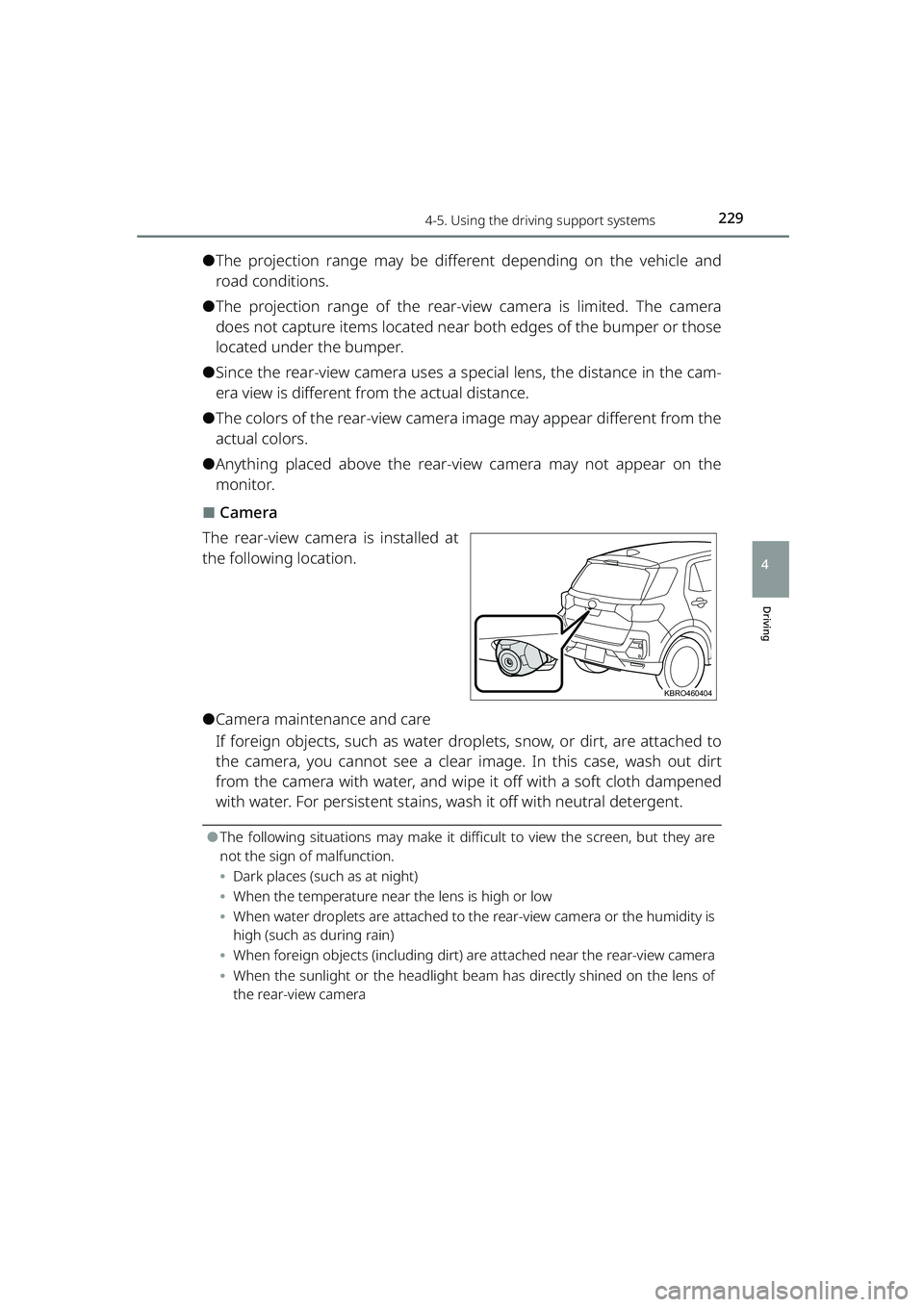
⬛Camera
The rear-view camera is installed at
the following location.
⚫Camera maintenance and care
If foreign objects, such as water dr oplets, snow, or dirt, are attached to
the camera, you cannot see a clear image. In this case, wash out dirt
from the camera with water, and wipe it off with a soft cloth dampened
with water. For persistent stains, wash it off with neutral detergent.
⚫The following situations may make it diff icult to view the screen, but they are
not the sign of malfunction.
⦁ Dark places (such as at night)
⦁ When the temperature near the lens is high or low
⦁ When water droplets are attached to th e rear-view camera or the humidity is
high (such as during rain)
⦁ When foreign objects (including dirt) are attached near the rear-view camera
⦁ When the sunlight or the headlight be am has directly shined on the lens of
the rear-view camera
KBRO460404
RAIZE_OM_General_BZ358E.book 229 ページ 2022年5月17日 火曜日 午後1時59分
Page 232 of 516
2304-5. Using the driving support systems
RAIZE_OM_General_BZ358E
WARNING
⬛Rear-view camera
Failure to observe the following may cause death or serious injury.
⚫Do not overly rely on the rear-view camera. Just as when you drive a vehicle
without the rear-view camera, make su re to check the safety around and
behind your vehicle and drive carefully. Be particularly careful not to collide
with the parked vehicles nearby, obstacles, or people.
⚫When you back up, make sure to check the safety around and behind your
vehicle and drive carefully.
⚫Never drive the vehicle while looking at the screen only.
The image displayed on the screen ma y be different from the actual situa-
tion. Note that the projection range of the camera is limited. Never back up
while looking at the screen only. Doing so could get your vehicle hit or lead
to an unforeseen accident. Be sure to confirm the safety around by visually
checking the surroundings with your ey es or using the inside rear view mir-
ror and the outside rear view mirrors before driving.
⚫Never use it in the situations listed below.
⦁ Frozen, slippery or snowy roads
⦁ When tire chains or spare tires are used
⦁ When the back door is not closed fully
⦁ On a non-flat road surface such as slopes
⚫If the outside temperature is low, the screen may be come dark and the
image may become blurry. Especially since the moving objects may appear
blurred or disappear from the screen, always check the safety around you
directly with your eyes while driving.
RAIZE_OM_General_BZ358E.book 230 ページ 2022年5月17日 火曜日 午後1時59分
Page 233 of 516
2314-5. Using the driving support systems
RAIZE_OM_General_BZ358E
Driving
4
NOTICE
⬛Camera handling
⚫Be careful with the following since they could cause the rear-view camera to
malfunction.
⦁Do not install any item around the camera, which could interfere with the
camera’s field of view (such as an item blocking the view or light-emitting
objects, items made of shiny materials).
⦁ Do not apply strong impact to the ca mera unit, such as hitting it hard or
bumping it against another object. Doing so could cause the camera posi-
tion or mounting angle to be deviated.
⦁ The camera unit has a waterproof structure. Do not remove, disassemble
or alter it.
⦁ When you wash the camera lens, use water to wash the dirt off from the
camera and wipe it off with a so ft cloth dampened with water.
If you rub the camera lens too hard, it could scratch the camera lens, and
you will not be able to see clear images.
⦁ The camera’s cover is made of resin. Do not allow organic solvents, body
wax, oil film remover, and glass coating agent to get attached to it. If they
get attached, wipe it off immediately.
⦁ Do not expose it to rapid temperature changes, such as by pouring hot
water over it in cold weather.
⦁ Do not splash water directly to the camera or areas around the camera
using a high-pressure washer during a car wash. The high water pressure
adds stress and may prevent the system from working properly.
⚫Applying shock to the camera unit may cause the camera to malfunction.
Have the vehicle inspected at your Toyo ta dealer in your earliest conveni-
ence.
RAIZE_OM_General_BZ358E.book 231 ページ 2022年5月17日 火曜日 午後1時59分