2023 TOYOTA MIRAI trunk
[x] Cancel search: trunkPage 139 of 572

1394-2. Opening, closing and locking the doors and trunk
Owners Manual_USA_M62064_en
4
Before driving
doors detecting the electronic key
can be used to unl ock the vehicle.
●Even if the electronic key is not
inside the vehicle, it may be possi-
ble to start the fuel cell system if
the electronic key is near the win-
dow.
●The doors may unlock or lock if a
large amount of water splashes on
the door handle, such as in the
rain or in a car wash, when the
electronic key is within the effec-
tive range. (The doors will auto-
matically be locked after
approximately 60 seconds if the
doors are not opened and closed.)
●If the wireless remote control is
used to lock the doors when the
electronic key is near the vehicle,
there is a possib ility that the door
may not be unlocke d by the entry
function. (Use the wireless remote
control to unloc k the doors.)
●Touching the door lock sensor
while wearing gloves may delay or
prevent lock operation.
●When the lock op eration is per-
formed using the lock sensor, rec-
ognition signals will be shown up
to two consecutive times. After
this, no recogniti on signals will be
given.
●If the door handle becomes wet
while the electronic key is within
the effective ran ge, the door may
lock and unlock repeatedly. In this
case, follow the fo llowing correc-
tion procedures to wash the vehi-
cle:
• Place the electronic key in a loca- tion 6 ft. (2 m) or more away from
the vehicle. (Take care to ensure
that the key is not stolen.)
• Set the electronic key to battery- saving mode to disable the smart
key system. ( P.137)
●If the electronic key is inside the
vehicle and a door handle
becomes wet during a car wash, a
message may be shown on the
multi-informatio n display and a buzzer will sound outside the vehi-
cle. To turn off the alarm, lock all
the doors.
●The lock sensor may not work
properly if it comes into contact
with ice, snow, m
ud, etc. Clean
the lock sensor and attempt to
operate it again.
●A sudden approach to the effec-
tive range or door handle may pre-
vent the doors from being
unlocked. In this case, return the
door handle to the original position
and check that t he doors unlock
before pulling the door handle
again.
●If there is another electronic key in
the detection area, it may take
slightly longer to unlock the doors
after the door handle is gripped.
■When the vehicle is not driven
for extended periods
●To prevent theft of the vehicle, do
not leave the electronic key within
6 ft. (2 m) of the vehicle.
●The smart key system can be
deactivated in advance.
●Setting the electronic key to bat-
tery-saving mode helps to reduce
key battery depletion. ( P.137)
■To operate the system properly
●Make sure to carry the electronic
key when operating the system.
Do not get the electronic key too
close to the vehicle when operat-
ing the system from the outside of
the vehicle.
Depending on the position and hold-
ing condition of the electronic key,
the key may not be detected cor-
rectly and the system may not oper-
ate properly. (The alarm may go off
accidentally, or the door lock pre-
vention function m ay not operate.)
●Do not leave the electronic key
inside the trunk.
The key confinement prevention
function may not operate, depend-
Page 140 of 572

1404-2. Opening, closing and locking the doors and trunk
Owners Manual_USA_M62064_ening on the location of the key (the
inside edge of the
trunk), condi-
tions (inside a met al bag, close to
metallic objects) and the radio
waves in the surrounding area.
( P.134)
■If the smart key system does
not operate properly
●Locking and unlocking the doors
and trunk: P. 4 8 3
●Starting the fuel cell system:
P. 4 8 4
■Customization
Some functions can be customized.
( P.512)
■If the smart key system has
been deactivated in a custom-
ized setting
●Locking and unlocking the doors
and opening the trunk:
Use the wireless remote control or
mechanical key. ( P.127, 134,
483)
●Starting the fuel cell system and
changing power switch modes:
P. 4 8 4
●Stopping the fuel cell system:
P. 1 8 2
■Certification
P. 5 6 0
WARNING
■Caution regarding interfer-
ence with electronic devices
●People with implantable car-
diac pacemakers, cardiac
resynchronization therapy-
pacemakers or implantable car-
dioverter defibrillators should
keep away from the smart key
system antennas. ( P.136)
The radio waves may affect the
operation of such devices. If
necessary, the entry function
can be disabled. Ask your Toy-
ota dealer for details, such as
the frequency of radio waves
and timing of the emitted radio
waves. Then, consult your doc-
tor to see if you should disable
the entry function.
●Users of any electrical medical
device other than implantable
cardiac pacemakers, cardiac
resynchronization therapy-
pacemakers or implantable car-
dioverter defibrillators should
consult the manufacturer of the
device for information about its
operation under the influence of
radio waves.
Radio waves could have unex-
pected effects on the operation
of such medical devices.
Ask your Toyota dealer for details
on disabling the entry function.
Page 152 of 572

1524-4. Adjusting the steering wheel and mirrors
Owners Manual_USA_M62064_endisplayed image are bothering
you, change to optical mirror
mode.
●When the trunk is open, the Digital
Rear-view Mirror image may not
display properly. Before driving,
make sure the trunk is closed.
●If the display is difficult to see due
to reflected light, close the elec-
tronic sunshade for the panoramic
moon roof (if equipped).
●Any of the following conditions
may occur when d
riving in the
dark, such as at night. None of
them indicates that a malfunction
has occurred.
• Colors of objects in the displayed image may differ f rom their actual
color.
• Depending on the height of the lights of the vehicle behind, the
area around the vehicle may
appear white and blurry.
• Automatic image adjustment for
brighter surrounding image may
cause flickering.
If it is difficult to see the displayed
image or flickering bothers you,
change to optical mirror mode.
●The Digital Rear-view Mirror may
become hot while it is in digital
mirror mode.
This is not a malfunction.
●Depending on your physical con-
dition or age, it may take longer
than usual to focus on the dis-
played image. In this case,
change to optical mirror mode.
●Do not let passengers stare at the
displayed image when the vehicle
is being driven, as doing so may
cause motion sickness.
■When the system malfunctions
If the symbol show n in the illustra-
tion is displayed when using the
Digital Rear-view Mirror in digital
mirror mode, the system may be
malfunctioning. The symbol will dis-
appear in a few seconds. Operate
the lever, change to optical mirror mode and have the vehicle
inspected by your Toyota dealer.
■Adjusting the mirror height
The height of the rear view mir-
ror can be adjusted to suit your
driving posture.
Change to optical mirror mode,
adjusting the height of the rear
view mirror by moving it up and
down.
Vehicles without Toyota
Teammate Advanced Drive
Adjusting the mirror
Page 158 of 572
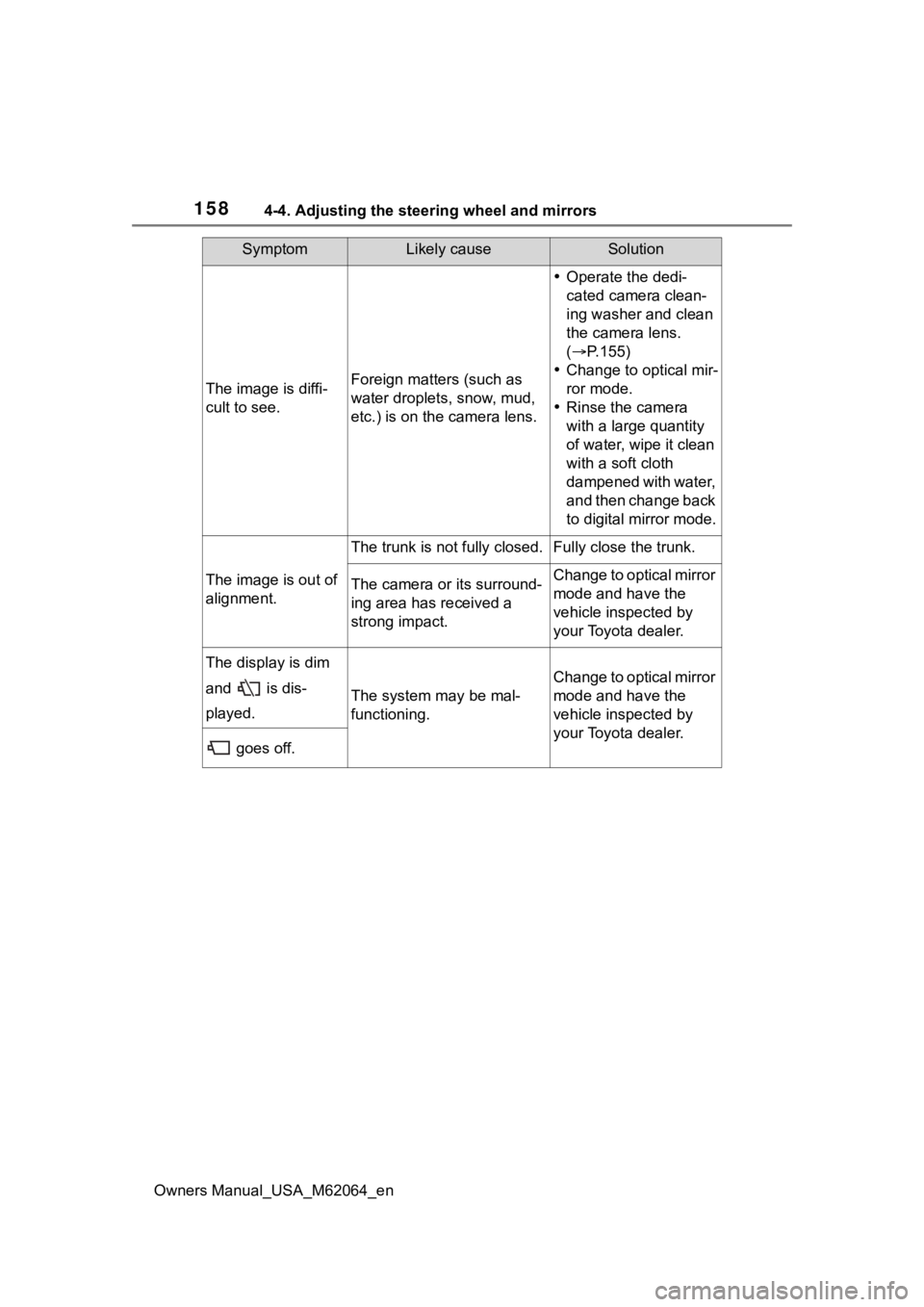
1584-4. Adjusting the steering wheel and mirrors
Owners Manual_USA_M62064_en
The image is diffi-
cult to see.Foreign matters (such as
water droplets, snow, mud,
etc.) is on the camera lens.
Operate the dedi-
cated camera clean-
ing washer and clean
the camera lens.
( P.155)
Change to optical mir-
ror mode.
Rinse the camera
with a large quantity
of water, wipe it clean
with a soft cloth
dampened with water,
and then change back
to digital mirror mode.
The image is out of
alignment.
The trunk is not fully closed.Fully close the trunk.
The camera or its surround-
ing area has received a
strong impact.Change to optical mirror
mode and have the
vehicle inspected by
your Toyota dealer.
The display is dim
and is dis-
played.
The system may be mal-
functioning.
Change to optical mirror
mode and have the
vehicle inspected by
your Toyota dealer.
goes off.
SymptomLikely causeSolution
Page 177 of 572

1775-1. Before driving
Owners Manual_USA_M62064_en
5
Driving
WARNING
■Things that must not be car-
ried in the trunk
The following things may cause a
fire if loaded in the trunk:
●Receptacles co ntaining gaso-
line
●Aerosol cans
■Storage precautions
Observe the following precau-
tions.
Failure to do so m ay prevent the
pedals from being depressed
properly, may block the driver’s
vision, or may result in items hit-
ting the driver or passengers, pos-
sibly causing an accident.
●Stow cargo and luggage in the
trunk whenever possible.
●Do not place cargo or luggage
in or on the following locations.
• At the feet of the driver
• On the front passenger or rear seats (when stacking items)
• On the package tray
• On the instrument panel
• On the dashboard
●Secure all items in the occupant
compartment.
■Capacity and distribution
●Do not exceed the maximum
axle weight rating or the total
vehicle weight rating.
●Even if the tota l load of occu-
pant’s weight and the cargo
load is less than the total load
capacity, do not apply the load
unevenly. Improper loading may
cause deteriorat ion of steering
or braking control which may
cause death or serious injury.
NOTICE
■Roof film (vehicles with elec-
tronic sunshade)
Do not attach a roof carrier on the
roof film. It may damage the film
surface.
Page 199 of 572

1995-3. Operating the lights and wipers
Owners Manual_USA_M62064_en
5
Driving
■Headlight control sensor
The sensor may not function prop-
erly if an object is placed on the sen-
sor, or anything that blocks the
sensor is affixed to the windshield.
Doing so interfere s with the sensor
detecting the level of ambient light
and may cause the automatic head-
light system to malfunction.
■Automatic light off system
●When the headlights are on: The
headlights and tail lights turn off
30 seconds after the driver’s door
is opened and clos ed if the power
switch is turned to ACC or off.
(The lights turn off immediately if
on the key is pressed after all
the doors are closed.)
●When only the tail lights are on:
The tail lights tu rn off automati-
cally if the power switch is turned
to ACC or off and the driver’s door
is opened.
To turn the lights on again, turn the
power switch to ON, or turn the light
switch off once and then back to
or .
■Light reminder buzzer
A buzzer sounds when the power
switch is turned off or turned to ACC
and the driver’s door is opened
while the lights are turned on.
■Automatic headlight leveling
system (if equipped)
The level of the headlights is auto-
matically adjusted according to the
number of passengers and the load-
ing condition of the vehicle to ensure that the headlights do not
interfere with other road users.
■Windshield wiper linked head-
light illumination
When driving during daytime with
the headlight switch turned to , if
the windshield wipers are used, the
headlights will turn o n automatically
after several seconds to help
enhance the visibility of your vehi-
cle.
■12-volt battery-saving function
In order to prevent the 12-volt bat-
tery of the vehicle from discharging,
if the headlights and/or tail lights are
on when the power switch is turned
off the 12-volt battery saving func-
tion will operate and automatically
turn off all the lig hts after approxi-
mately 20 minutes. When the power
switch is turned to ON, the 12-volt
battery-saving function will be dis-
abled.
When any of the following are per-
formed, the 12-volt battery-saving
function is canceled once and then
reactivated. All the lights will turn off
automatically 20 minutes after the
12-volt battery-saving function has
been reactivated:
●When the headlight switch is oper-
ated
●When a door or the trunk is
opened or closed
■Customization
Some functions can be customized.
( P.512)
NOTICE
■To prevent 12-volt battery dis-
charge
Do not leave the lights on longer
than necessary when the fuel cell
system is off.
Page 278 of 572

2785-5. Using the driving support systems
Owners Manual_USA_M62064_en
Location of the rear cameraPedestrian detection icon
Displayed automatically when a
pedestrian is detected.
Use the meter control switches
to enable/disable the RCD func-
tion. (
P.106)
1 Press or to select .
2 Press or to select
“RCD” and then press .
When the RCD function is disabled,
the RCD OFF indicator ( P.97) illu-
minates.
Each time the power switch is
turned ON, the RCD function will be
enabled automatically.
If the rear camera detection
function detects a pedestrian in
the detection area, the buzzer
and pedestrian detection will
operate as follows:
WARNING
●Do not disassemble, remodel or
paint the camera.
●Do not attach accessories or
stickers to the camera.
●Do not install ma rket protection
parts (bumper trim, etc.) to the
rear bumper.
●Maintain suitable tire air pres-
sure.
●Make sure the trunk is com-
pletely closed.
■RCD function is turned off
In the following situations the sys-
tem turns off. The RCD function
may not operate properly and
thus there is the danger that an
accident may occur.
●The contents mentioned above
are not observed
●Suspensions other than Toyota
genuine parts are installed
System components
Display of RCD
Turning the RCD function
on/off
When a pedestrian is
detected
Page 279 of 572

2795-5. Using the driving support systems
Owners Manual_USA_M62064_en
5
Driving
If a pedestrian is detected in
area
Buzzer: Sounds repeatedly
Pedestrian detection icon:
Blinks
If a pedestrian is detected in
area
Buzzer (When the vehicle is
stationary): Sounds 3 times
Buzzer (When the vehicle is
backing up, when a pedes-
trian approaches the rear of
the vehicle): Sounds repeat-
edly
Pedestrian detection icon:
Blinks
If the system determines that
your vehicle may collide with
a pedestrian in area
Buzzer: Sounds repeatedly
Pedestrian detection icon:
Blinks
■The rear camera detection func-
tion is operational when
●The power switch is in ON.
●RCD function is on.
●The shift position is in R.
●Advanced Park is not operating.
■Setting the buzzer volume
The buzzer volume can be adjusted
on the multi-information display.
Use the meter control switches to
change settings. ( P.106)
■Muting a buzzer temporarily
When an object i s detected, the
temporary mute switch is displayed
on the multimedia display system.
Select to mute a buzzer of the
intuitive parking assist, RCTA and
RCD all together.
Mute will be cancele d automatically
in the following situations:
●When the shift lever is changed.
●When the vehicle speed exceeds
a certain speed.
●When there is a malfunction in a
sensor or the system is temporar-
ily unavailable.
●When the operati ng function is
disabled manually.
●When the power switch is turned
off.
■If “Rear Camera Detection
Unavailable Remo ve the Dirt of
Rear Camera” is displayed on
the multi-info rmation display
The rear camera lens may be dirty
or covered with snow or ice. In such
cases, if it is removed from the rear
camera lens, the system should
return to normal. (It may be neces-
sary to drive the v ehicle for some
time before the system returns to
normal.)
■If “Rear Camera Detection
Unavailable” is displayed on
the multi-info rmation display
●If the trunk is not fully closed,
close the trunk tightly.
●If this message is displayed only