2023 TOYOTA COROLLA CROSS ECO mode
[x] Cancel search: ECO modePage 121 of 500

1213-2. Opening, closing and locking the doors
3
Before driving
●If the wireless remote control is
used to lock the doors when the
electronic key is near the vehicle,
there is a possib ility that the door
may not be unlocke d by the entry
function. (Use the wireless remote
control to unloc k the doors.)
●If the doors have been locked
from outside of the vehicle and are
then not unlocked using the wire-
less remote contr ol or smart key
system, the engine cannot be
started using the smart key sys-
tem. (However, if the doors have
been locked from inside the vehi-
cle, the engine can be started
using the smart key system.)
If it is necessary to start the
engine, it can be started using the
procedure in “If the electronic key
dose not operate properly”
( P.418).
●Touching the door lock or unlock
sensor while wearing gloves may
prevent lock or unlock operation.
●When the lock op eration is per-
formed using the lock sensor, rec-
ognition signals will be shown up
to two consecutive times. After
this, no recogniti on signals will be
given.
●If the door handle becomes wet
while the electronic key is within
the effective ran ge, the door may
lock and unlock repeatedly. In that
case, follow the fo llowing correc-
tion procedures to wash the vehi-
cle:
• Place the electronic key in a loca- tion 6 ft. (2 m) or more away from
the vehicle. (Take care to ensure
that the key is not stolen.)
• Set the electronic key to bat- tery-saving mode to disable the
smart key system. ( P. 1 1 9 )
●If the electronic key is inside the
vehicle and a door handle
becomes wet during a car wash, a
message may be shown on the
multi-information display and a
buzzer will sound outside the vehi-
cle. To turn off the alarm, lock all the doors.
●The lock sensor may not work
properly if it comes into contact
with ice, snow, m
ud, etc. Clean
the lock sensor and attempt to
operate it again.
●A sudden handle operation or a
handle operation immediately
after entering the effective range
may prevent the doors from being
unlocked. Touch the door unlock
sensor and check that the doors
are unlocked befo re pulling the
door handle again.
●If there is another electronic key in
the detection area, it may take
slightly longer to unlock the doors
after the door handle is gripped.
●Fingernails may scrape against
the door during operation of the
door handle. Be careful not to
injure fingernails or damage the
surface of the door.
■When the vehicle is not driven
for extended periods
●To prevent theft of the vehicle, do
not leave the electronic key within
6 ft. (2 m) of the vehicle.
●The smart key system can be
deactivated in advance. ( P.449)
●Setting the electronic key to bat-
tery-saving mode helps to reduce
key battery depletion. ( P. 1 1 9 )
■To operate the system properly
Make sure to carry the electronic
key when operating the system. Do
not get the electronic key too close
to the vehicle when operating the
system from the out side of the vehi-
cle.
Depending on the position and hold-
ing condition of the electronic key,
the key may not be detected cor-
rectly and the system may not oper-
ate properly. (The alarm may go off
accidentally, or the door lock pre-
vention function m ay not operate.)
Page 143 of 500

1434-1. Before driving
4
Driving
WARNING
●During normal driving, do not
turn off the engine. Turning the
engine off while driving will not
cause loss of steering or brak-
ing control, but the power assist
to these systems will be lost.
This will make it more difficult to
steer and brake, so you should
pull over and stop the vehicle as
soon as it is safe to do so.
However, in the event of an
emergency, such as if it
becomes impossible to stop the
vehicle in the normal way:
P. 3 8 2
●Use engine braking (downshift)
to maintain a safe speed when
driving down a steep hill.
Using the brakes continuously
may cause the brakes to over-
heat and lose effectiveness.
(
P.168)
●Do not adjust the positions of
the steering wheel, the seat, or
the inside or outside rear view
mirrors while driving.
Doing so may result in a loss of
vehicle control.
●Always check that all passen-
gers’ arms, heads or other parts
of their body are not outside the
vehicle.
●AWD models: Do not drive the
vehicle off-road.
This is not an AWD vehicle
designed for off-road driving.
Proceed with all due caution if it
becomes unavoidable to drive
off-road.
●AWD models: Do not drive
across a river or through other
bodies of water.
This may cause electric/elec-
tronic components to short cir-
cuit, damage the engine or
cause other serious damage to
the vehicle.
●Do not drive in excess of the
speed limit. Even if the legal
speed limit permits it, do not
drive over 85 mph (140 km/h)
unless your vehicle has
high-speed capability tires. Driv-
ing over 85 mph (140 km/h)
may result in tire failure, loss of
control and possible injury. Be
sure to consult a tire dealer to
determine whether the tires on
your vehicle are high-speed
capability tires or not before
driving at such speeds.
■When driving on slippery
road surfaces
●Sudden braking, acceleration
and steering may cause tire
slippage and reduce your ability
to control the vehicle.
●Sudden acceleration, engine
braking due to shifting, or
changes in engine speed could
cause the vehicle to skid.
●After driving through a puddle,
lightly depress the brake pedal
to make sure that the brakes
are functioning properly. Wet
brake pads may prevent the
brakes from functioning prop-
erly. If the brakes on only one
side are wet and not functioning
properly, steering control may
be affected.
■When shifting the shift lever
●Do not let the vehicle roll back-
ward while a fo rward driving
position is selected, or roll for-
ward while the shift lever is in R.
Doing so may cause the engine
to stall or lead to poor brake and
steering performance, resulting
in an accident or damage to the
vehicle.
Page 146 of 500

1464-1. Before driving
WARNING
■If the vehicle becomes stuck
(AWD models)
Do not spin the wheels exces-
sively when a driven wheel is up
in the air, or the vehicle is stuck in
sand, mud, etc. This may damage
the driveline components or pro-
pel the vehicle forward or back-
ward, causing an accident.
NOTICE
■When driving the vehicle
●Do not depress t he accelerator
and brake pedals at the same
time during drivin g, as this may
restrain the engine output.
●Do not use the accelerator
pedal or depress the accelera-
tor and brake pedals at the
same time to hold the vehicle on
a hill.
■When parking the vehicle
Always set the parking brake and
shift the shift lever to P. Failure to
do so may cause the vehicle to
move or the vehi cle may acceler-
ate suddenly if the accelerator
pedal is accidentally depressed.
■Avoiding damage to vehicle
parts
●Do not turn the steering wheel
fully in either direction and hold
it there for an extended period
of time.
Doing so may damage the
power steering motor.
●When driving over bumps in the
road, drive as slowly as possible
to avoid damagi ng the wheels,
underside of the vehicle, etc.
■If you get a flat tire while driv-
ing
A flat or damaged tire may cause
the following situations. Hold the
steering wheel firmly and gradu-
ally depress the brake pedal to
slow down the vehicle.
●It may be difficult to control your
vehicle.
●The vehicle will make abnormal
sounds or vibrations.
●The vehicle will lean abnor-
mally.
Information on what to do in case
of a flat tire ( P.405)
■When encountering flooded
roads
Do not drive on a road that has
flooded after h eavy rain etc.
Doing so may cause the following
serious damage to the vehicle:
●Engine stalling
●Short in electrical components
●Engine damage caused by
water immersion
In the event that you drive on a
flooded road and the vehicle
becomes flooded or stuck in mud
or sand, be sure to have your Toy-
ota dealer check the following:
●Brake function
●Changes in the quantity and
quality of the engine oil, tran-
saxle fluid, transfer oil (AWD
models), rear dif ferential oil
(AWD models), etc.
●Lubricant condition for the pro-
peller shaft (AWD models),
bearings and suspension joints
(where possible), and the func-
tion of all joints, bearings, etc.
Page 152 of 500

1524-1. Before driving
■Matching trailer ball height to
trailer coupler height
No matter which class of tow hitch
applies, for a more safe trailer
hookup, the trailer ball setup must
be the proper height for the coupler
on the trailer.
Coupler
Trailer ball
■Before towing
Check that the following conditions
are met:
●Ensure that your vehicle’s tires
are properly inflated. ( P.434)
●Trailer tires are inflated according
to the trailer manufacturer’s rec-
ommendation.
●All trailer lights work as required
by law.
●All lights work each time you con-
nect them.
●The trailer ball is set at the proper
height for the coupler on the
trailer.
●The trailer is level when it is
hitched.
Do not drive if th e trailer is not
level, and check for improper
tongue weight, overloading, worn
suspension, or other possible
causes.
●The trailer cargo is securely
loaded.
●The rear view mirr ors conform to
all applicable fede ral, state/provin-
cial or local regulations. If they do
not, install rear view mirrors
appropriate for towing purposes.
■Break-in schedule
If your vehicle is new or equipped
with any new power train compo-
nents (such as an engine, transaxle,
transfer [AWD models], rear differ-
ential [AWD models] or wheel bear-
ing), Toyota recommends that you
do not tow a trailer until the vehicle
has been driven for over 500 miles
(800 km).
After the vehicle has been driven for
over 500 miles (800 km), you can
start towing. However, for the next
500 miles (800 km), drive the vehi-
cle at a speed of less than 50 mph
(80 km/h) when towing a trailer, and
avoid full throttle acceleration.
■Maintenance
●If you tow a trailer, your vehicle
will require more fr equent mainte-
nance due to the additional load.
(See “Scheduled Maintenance
Guide” or “Owner ’s Manual Sup-
plement”.)
●Retighten the fixing bolts of the
towing ball and bracket after
approximately 600 miles (1000
km) of tra iler towing.
Toyota warranties do not
apply to damage or mal-
function caused by towing a
trailer for commercial pur-
poses.
Contact your Toyota dealer
for further information
about additional require-
ments such as a towing kit,
etc.
Page 156 of 500
1564-1. Before driving
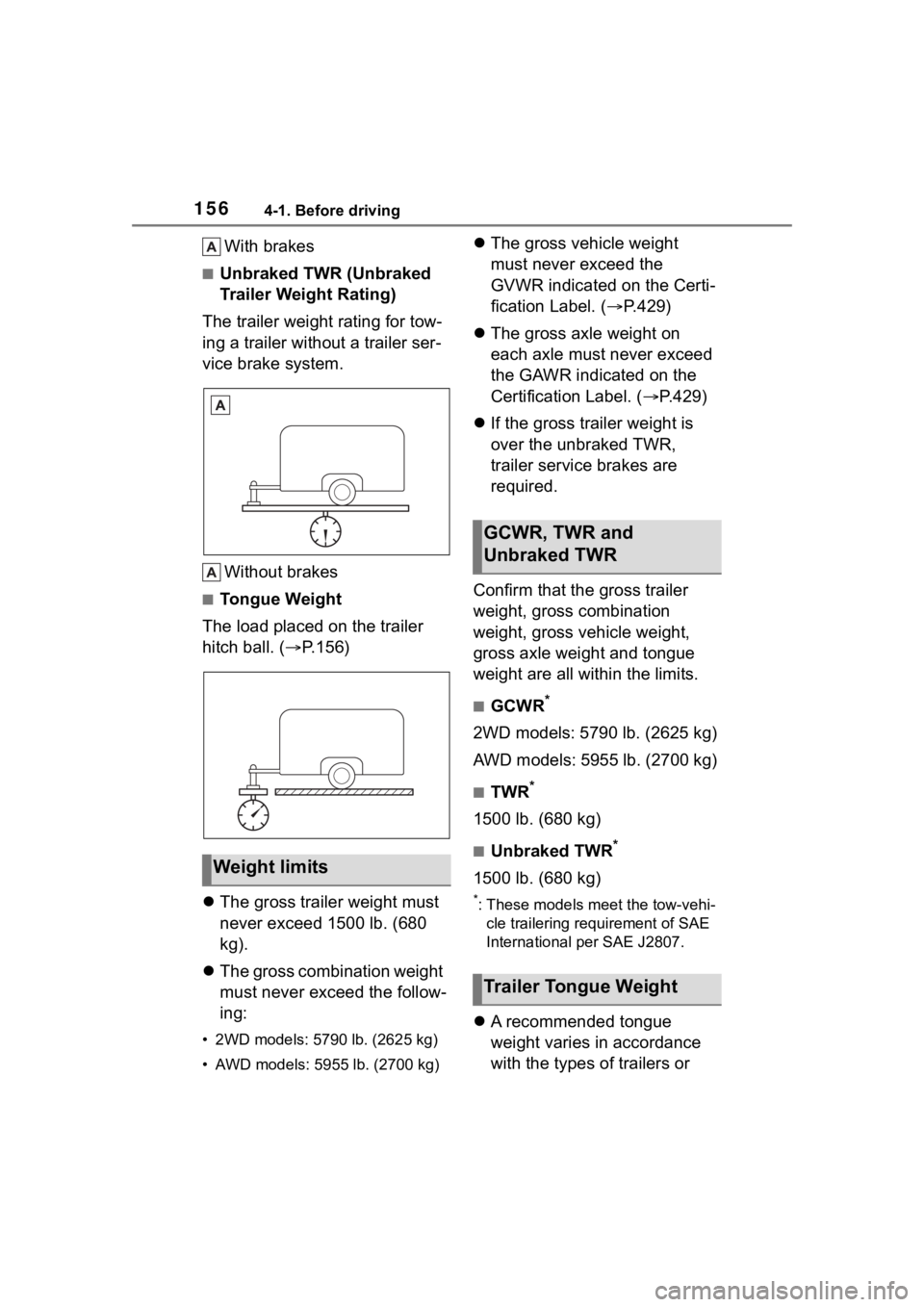
With brakes
■Unbraked TWR (Unbraked
Trailer Weight Rating)
The trailer weight rating for tow-
ing a trailer without a trailer ser-
vice brake system.
Without brakes
■Tongue Weight
The load placed on the trailer
hitch ball. ( P.156)
The gross trailer weight must
never exceed 1500 lb. (680
kg).
The gross combination weight
must never exceed the follow-
ing:
• 2WD models: 5790 lb. (2625 kg)
• AWD models: 5955 lb. (2700 kg)
The gross vehicle weight
must never exceed the
GVWR indicated on the Certi-
fication Label. ( P.429)
The gross axle weight on
each axle must never exceed
the GAWR indicated on the
Certification Label. ( P.429)
If the gross trailer weight is
over the unbraked TWR,
trailer service brakes are
required.
Confirm that the gross trailer
weight, gross combination
weight, gross vehicle weight,
gross axle weight and tongue
weight are all within the limits.
■GCWR*
2WD models: 5790 lb. (2625 kg)
AWD models: 5955 lb. (2700 kg)
■TWR*
1500 lb. (680 kg)
■Unbraked TWR*
1500 lb. (680 kg)
*: These models meet the tow-vehi- cle trailering requirement of SAE
International per SAE J2807.
A recommended tongue
weight varies in accordance
with the types of trailers or
Weight limits
GCWR, TWR and
Unbraked TWR
Trailer Tongue Weight
Page 163 of 500

1634-2. Driving procedures
4
Driving
All electrical components can be
used.
4 START ( “START” position)
For starting the engine.
■Turning the key from ACC to
OFF
1 Shift the shift lever to P.
2 Push in the key and turn it to
OFF.
■Key reminder function
A buzzer sounds if the driver’s door
is opened while the engine switch is
in OFF or ACC to r emind you to
remove the key.
1 Check that the parking brake
is set. ( P.172)
2 Check that the shift lever is in
P.
3 Firmly depress the brake
pedal.
and a message will be dis-
played on the multi-information dis-
play.
If it is not displ ayed, the engine
cannot be started.
4 Press the engine switch
shortly and firmly.
When operating the engine switch,
one short, firm press is enough. It is
not necessary to press and hold the
switch.
The engine will crank until it starts
or for up to 30 seconds, whichever
is less.
Continue depressing the brake
pedal until the engine is completely
started.
The engine can be started from any
WARNING
■Caution when driving
Do not turn the engine switch to
OFF while driving. If, in an emer-
gency, you must turn the engine
off while the vehicle is moving,
turn the engine switch only to
ACC to stop the engine. An acci-
dent may result i f the engine is
stopped while driving. ( P.382)
NOTICE
■To prevent battery discharge
Do not leave the engine switch in
ACC or ON for long periods of
time without the engine running.
Engine (ignition)
switch (vehicles with
a smar t key system)
Performing the following
operations when carrying
the electronic key on your
person starts the engine or
changes engine switch
modes.
Starting the engine
Page 164 of 500

1644-2. Driving procedures
engine switch mode.
■Engine switch illumination
According to the situation, the
engine switch illumi nation operates
as follows.
●When a door is opened, or the
engine switch mode is changed
from ACC or ON to off, the engine
switch illumination comes on.
●When depressing the brake pedal
with carrying the electronic key on
your person, the engine switch
illumination blinks.
●When the engine switch mode is
in ACC or ON, the engine switch
illumination is constantly illumi-
nated.
■If the engine does not start
●The engine immobilizer system
may not have been deactivated.
( P. 6 8 )
Contact your Toyota dealer.
●If a message related to start-up is
shown on the multi-information
display, read the message and fol-
low the instructions.
■If the battery is discharged
The engine cannot be started using
the smart key system. Refer to
P.419to restart the engine.
■Electronic key battery depletion
P. 9 8
■Conditions affecting operation
P. 1 1 9
■Notes for the entry function
P.120
■Electronic key battery
P.368
■Operation of the engine switch
●If the switch is not pressed shortly
and firmly, the engine switch
mode may not change or the
engine may not start.
●If attempting to restart the engine
immediately after turning the
engine switch off, the engine may
not start in some cases. After turn-
ing the engine switch off, please
wait a few seconds before restart-
ing the engine.
■Customization
If the smart key system has been
deactivated in a customized setting,
refer to P.417.
WARNING
■When starting the engine
Always start the engine while sit-
ting in the driver’s seat. Do not
depress the accelerator pedal
while starting the engine under
any circumstances.
Doing so may cause an accident
resulting in death o r serious injury.
NOTICE
■When starting the engine
●Do not race a cold engine.
●If the engine becomes difficult to
start or stalls frequently, have
your vehicle checked by your
Toyota dealer immediately.
Page 168 of 500
1684-2. Driving procedures
*: To improve fuel efficiency and reduce noise, shift the shift lever
to D for normal driving.
■To protect the continuously
variable transmission
If the transmission fluid tempera-
ture is high, “Transmission Oil Temp
High Stop in a Safe Place and See
Owner’s Manual” will be displayed
while driving, make sure to return to
D position driving and reduce speed
by easing off the accelerator pedal.
Stop the vehicle in a safe place, shift
the shift lever to P and let the engine
idle until the warning message goes
out.
When the warning message goes out, the vehicle can be driven again.
If the warning message does not go
out after waiting a while, have your
vehicle inspected by your Toyota
dealer.
■Restraining sudden start
(Drive-Start Control)
P.147
■After recharging/reconnecting
the battery
P.421
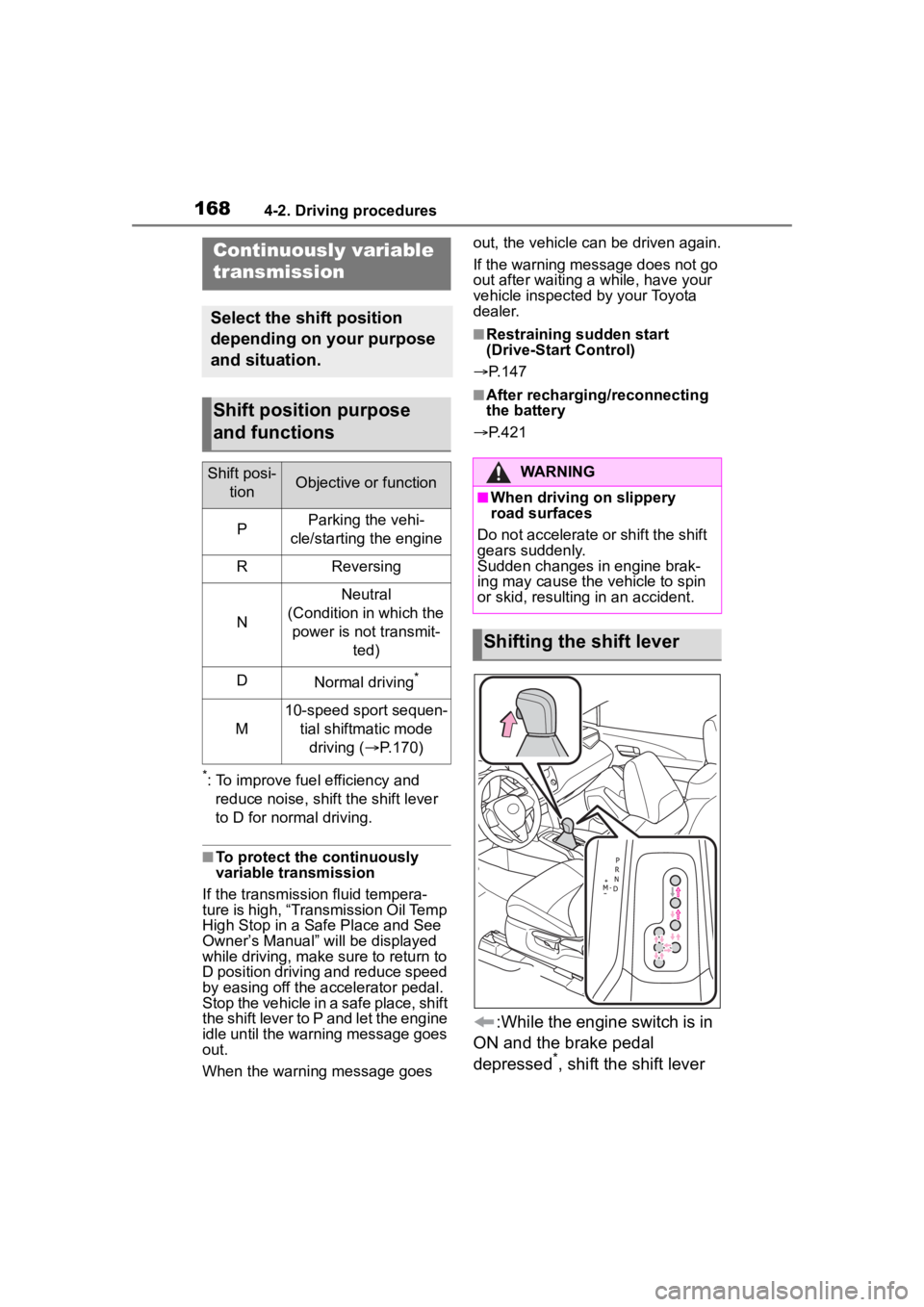
:While the engine switch is in
ON and the brake pedal
depressed
*, shift the shift lever
Continuously variable
transmission
Select the shift position
depending on your purpose
and situation.
Shift position purpose
and functions
Shift posi- tionObjective or function
PParking the vehi-
cle/starting the engine
RReversing
N
Neutral
(Condition in which the power is not transmit- ted)
DNormal driving*
M
10-speed sport sequen-tial shiftmatic mode driving ( P.170)
WARNING
■When driving on slippery
road surfaces
Do not accelerate or shift the shift
gears suddenly.
Sudden changes in engine brak-
ing may cause the vehicle to spin
or skid, resulting in an accident.
Shifting the shift lever