2023 TOYOTA CAMRY phone
[x] Cancel search: phonePage 411 of 708
4095-4. Other interior features
CAMRY_HV_EE
5
Interior features
A portable device, such as a smartphone or mobile battery, can be
charged by just placing it on the charging area, provided the device is
compatible with the Qi wireless charging standard created by the
Wireless Power Consortium.
The wireless charger cannot be used with a portable device that is
larger than the charging area. Additionally, depending on the portable
device, the wireless charger may not operate properly. Refer to the
operation manual of the portable device.
?The “Qi” logo
The “Qi” logo is a trademark of the Wireless Power Consortium.
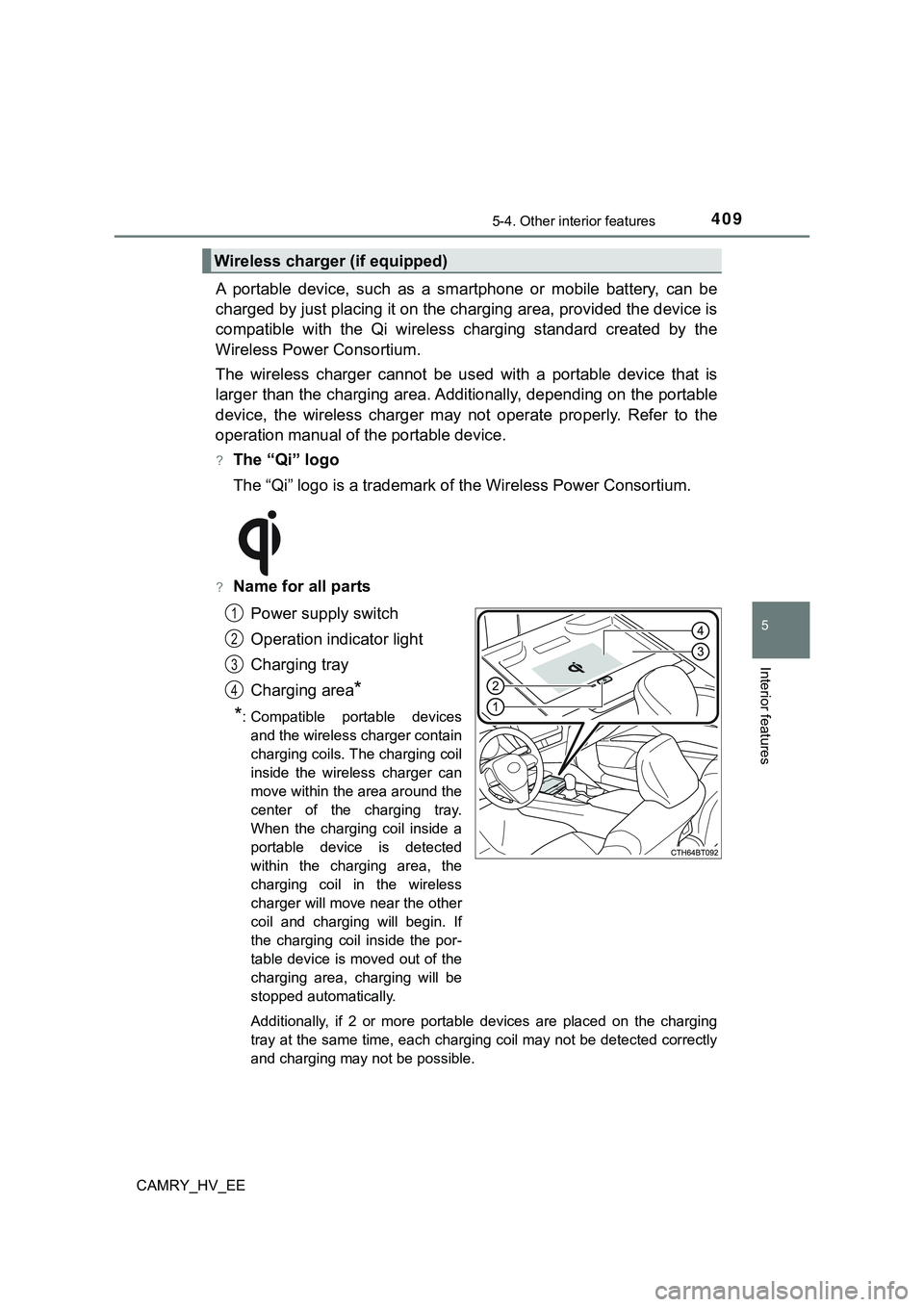
?Name for all parts
Power supply switch
Operation indicator light
Charging tray
Charging area
*
*
: Compatible portable devices
and the wireless charger contain
charging coils. The charging coil
inside the wireless charger can
move within the area around the
center of the charging tray.
When the charging coil inside a
portable device is detected
within the charging area, the
charging coil in the wireless
charger will move near the other
coil and charging will begin. If
the charging coil inside the por-
table device is moved out of the
charging area, charging will be
stopped automatically.
Additionally, if 2 or more portable devices are placed on the charging
tray at the same time, each charging coil may not be detected correctly
and charging may not be possible.
Wireless charger (if equipped)
1
2
3
4
Page 413 of 708
4115-4. Other interior features
CAMRY_HV_EE
5
Interior features
?Rapid charging function
?Portable devices, such as the following, can be rapidly charged.
• Rapid charging capable devices which conform to WPC Ver
1.2.4.
• 7.5 W charging capable iPhones (iPhone 8 and later)
?To turn the rapid charging function on, press the power supply
switch 3 times while charging is being performed. If rapid
charging is possible, the operation indicator will change from illu-
minated (orange) to alternating between (green) and (orange).
?When charging is finished, the rapid charging function will turn
off. To perform rapid charging again, turn the rapid charging func-
tion back on.
?Operation indicator light status
*1: While in standby, charging power is not output. If a metal object is placed
on the charging tray in this state, the object will not heat up.
*2: Depending on the portable device, the operation indicator light may stay
illuminated (orange) after charging has completed.
Operation indicator lightState
OffThe Wireless charger is off
Green (illuminated)Standby (charging is possible)*1
Charging is complete*2
Orange (illuminated)
A portable device has been placed on the
charging area (identifying the portable
device)
Charging in progress
Illuminated between green
and orange alternately
A portable device, such as the following, is
being rapidly charged
• Rapid charging capable device which con-
forms to WPC Ver 1.2.4.
• 7.5 W charging capable iPhone (iPhone 8
and later)
Page 415 of 708

4135-4. Other interior features
CAMRY_HV_EE
5
Interior features
?The wireless charger can be operated when
The power switch is in ACCESSORY or ON mode.
?Portable devices that can be charged
?Portable devices compatible with the Qi wireless charging standard can be
charged by the wireless charger. However, compatibility with all devices
<005a004b004c0046004b0003005000480048005700030057004b004800030034004c0003005a004c00550048004f00480056005600030046004b00440055004a004c0051004a0003005600570044005100470044005500470003004c005600030051005200
570003004a0058004400550044005100570048004800470011[
?The wireless charger is designed to supply low power electricity (5 W or
less) to a cellular phone, smartphone, or other portable device.
?However, portable devices, such as the following, can be charged with more
than 5 W.
• 7.5 W charging compatible iPhones can be charged at 7.5 W or less.
• Portable devices which conform to WPC Ver 1.2.4 can be charged at 10
W or less.
?Using the smart entry & start system
During charging, when the smart entry & start system searches for an elec-
tronic key, charging may be temporarily suspended.
?If a cover or accessory is attached to the portable device
Do not charge a portable device if a cover or accessory which is not Qi com-
patible is attached. Depending on the type of cover and/or accessory
attached, it may not be possible to charge the portable device. If the portable
device is placed on the charging area and does not charge, remove the cover
and/or accessories.
?If interference is heard in AM radio broadcasts while charging
?Turn off the wireless charger and check if the noise is reduced. If noise is
reduced, press and hold the power supply switch of the wireless charger for
2 seconds. The frequency of the wireless charger is changed and noise may
be reduced. When the frequency is changed, the operation indicator light
will blink (orange) 2 times.
?Rapid charging for iPhones is performed using a specific radio wave fre-
quency.
Depending on the version of iOS installed, while the frequency is being
changed, rapid charging may not be performed.
?Charging precautions
While charging, the wireless charger and the portable device will become
warm. This is not a malfunction.
If a portable device becomes warm while charging and charging stops due to
the protection function of the portable device, wait until the portable device
cools down and charge it again.
Also, to decrease the temperature inside the wireless charger, a fan may
operate. This does not indicate a malfunction.
Page 418 of 708
4165-4. Other interior features
CAMRY_HV_EE
NOTICE
?To prevent failure or damage to data
?Do not place magnetic cards, such as a credit card, or magnetic recording
media, close to the wireless charger while charging. Otherwise, data may
be erased due to the influence of magnetism.
Additionally, do not bring precision instruments such as wrist watches,
close to the wireless charger, as such objects may malfunction.
?Do not perform charging with a contactless smart card, such as a credit
card, between the charging surface of a portable device and the charging
area. The IC chip in the card may become extremely hot, possibly damag-
ing the portable device or smart card.
Be extra careful to not charge a portable device with a case or cover which
a contactless smart card can be inserted.
?Do not leave portable devices in the cabin. The temperature inside the
cabin may become high when parked in the sun, and cause damage to the
device.
?When the OS of a smartphone has been updated
When the OS version of a smartphone has been changed, the charging
specifications may have changed. If the WPC compatibility version is
changed, the rapid charging function may no longer be able to be used. For
details, check for information on the website for the smartphone manufac-
turer.
?To prevent 12-volt battery discharge
Do not use the wireless charger for a long period of time with the hybrid sys-
tem stopped.