Page 138 of 628

1382-2. Charging
Owners Manual_USA_M42C01_en
Refer to the following tables and carry out the appropriate correction
procedures.
■Cannot charge at desired time
The DC charging connector is still
connected.
For safety, the EV system can not be
started when the DC charging con-
nector is connected. ( P.102)
Remove the DC charging connector
immediately after the charging is
completed.
The DC charging system is malfunc-
tioning
• Depending on the type of malfunc-
tion, the EV system can be started
after closing the charging port lid.
• If the EV system can not be started, contact your Toyota dealer.
When charging schedule func tion does not operate nor-
mally
Likely causeCorrection procedure
Likely causeCorrection procedure
The vehicle calendar and clock are
not set correctly.Check the calendar setting and set it
to the correct date. ( P.158)
AC charging connector is not con-
nected to vehicleBefore using the charging schedule,
connect the AC charging connector.
AC charging connector was con-
nected after set time
Connect the AC charging connector
before the time set in “Start”.
When the charging mode is set to
“Start-Stop”, the traction battery will
charge even if the start time has
passed, if the AC charging connector
is connected befor e the stop time.
Page 139 of 628

1392-2. Charging
Owners Manual_USA_M42C01_en
2
Electric Vehicle system
■Charging starts, even though the charging schedule is regis-
tered
Likely causeCorrection procedure
“Charge Now” is set to on
When charging according to the
charging schedule, set “Charge
Now” to off. ( P.124, 128)
Charging schedule is set to offCheck that charging schedule is not
set to off. ( P. 1 1 8 )
AC charging connector was removed
and reinserted while charging indica-
tor of the charging port was flashing
If the AC charging connector is
removed and reinserted while the
charging indicator is flashing, the
charging schedule is canceled. Tem-
porarily remove the AC charging
connector, and then reconnect it.
The Remote Air Conditioning Sys-
tem was operated
When the Remote Air Conditioning
System is operated, the system will
start charging, even if the charging
schedule is registered. To carry out
charging using the charging sched-
ule, stop the Remote Air Condition-
ing System, and then reconnect the
AC charging connector.
Outside temperature is low and trac-
tion battery warming control ( P. 9 9 )
operated
When traction battery warming
control operates, the charging
schedules are ignored and
charging starts. In order to protect
the traction battery , allow charging
to continue.
After removing and installing the
12-volt battery, the charging
schedule setting may become
invalid due to the in itial setting of
the traction battery warming con-
trol system even wh en the outside
temperature is not low.
In this case, after a few runs, the
system’s initial settings will be
completed and the charging
schedule settings will take effect
when the outside temperature is
not low.
Page 140 of 628
1402-2. Charging
Owners Manual_USA_M42C01_en
When a door is opened with the power switch off, after charging, a
message is displayed in the multi-information display.
When this occurs, follo w the instructions displayed on the scre en.
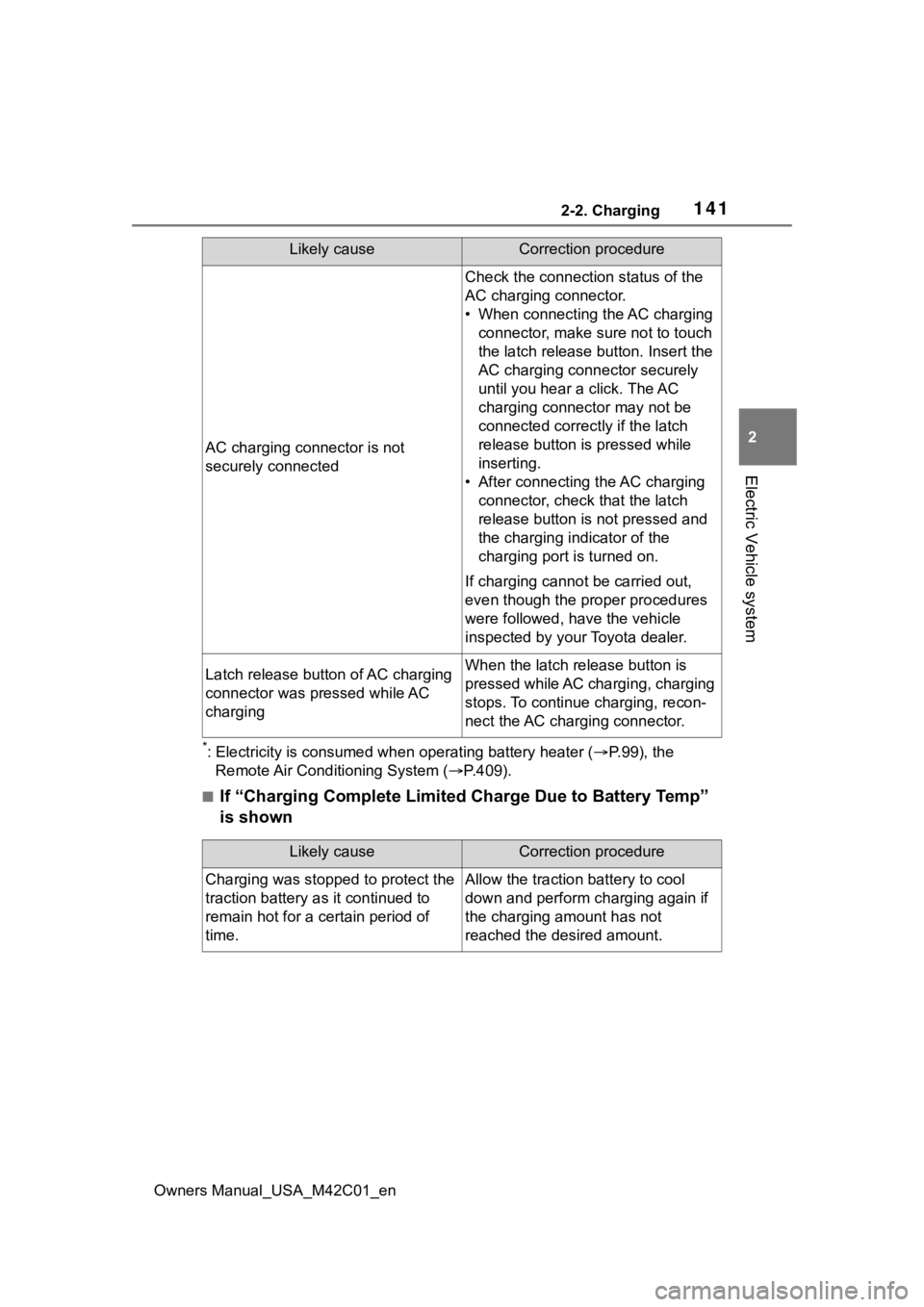
■If “Charging Stopped Due to Pulled Charging Connector” is
shown
When charging related message is displayed
Likely causeCorrection procedure
AC charging connector is removed
while AC charging
When the AC charging connector is
removed while AC charging,
charging stops. If you want to fully
charge the traction battery, recon-
nect the AC charging connector.After the traction battery is fully
charged, the AC charging connector
is removed while the traction battery
is being recharged again because
electricity-consuming functions
* have
been used and the remaining charge
is now reduced.
Page 141 of 628
1412-2. Charging
Owners Manual_USA_M42C01_en
2
Electric Vehicle system
*: Electricity is consumed wh en operating battery heater ( P.99), the
Remote Air Conditioning System ( P.409).
■If “Charging Complete Limited Charge Due to Battery Temp”
is shown
AC charging connector is not
securely connected
Check the connection status of the
AC charging connector.
• When connecting the AC charging
connector, make sure not to touch
the latch release button. Insert the
AC charging connector securely
until you hear a click. The AC
charging connector may not be
connected correctly if the latch
release button is pressed while
inserting.
• After connecting the AC charging connector, check that the latch
release button is not pressed and
the charging indicator of the
charging port is turned on.
If charging cannot be carried out,
even though the proper procedures
were followed, h ave the vehicle
inspected by your Toyota dealer.
Latch release button of AC charging
connector was pressed while AC
chargingWhen the latch release button is
pressed while AC charging, charging
stops. To continue charging, recon-
nect the AC charging connector.
Likely causeCorrection procedure
Likely causeCorrection procedure
Charging was stopped to protect the
traction battery as it continued to
remain hot for a certain period of
time.Allow the traction battery to cool
down and perform ch arging again if
the charging amount has not
reached the desired amount.
Page 143 of 628

1432-2. Charging
Owners Manual_USA_M42C01_en
2
Electric Vehicle system
■If “Charging Stopped High Energy Use See Owner’s Manual”
is shown
■If “Charging System Malfunction See Owner’s Manual” is
shown
The AC charger is not com-
patible with the vehicle
Check if it is possible to charge with the AC
charging cable equipped with the vehicle.
If charging cannot be carried out even when
using the genuine AC charging cable, contact
your Toyota dealer.
The DC charger is malfunc-
tioning.If the message above is displayed when DC
charging has not stopp ed operations, the DC
charger may be damaged, so do not use that
DC charger. Check if it is possible to charge
with another DC charger.
The DC charger is not com-
patible with the vehicle.
Likely causeCorrection procedure
Likely causeCorrection procedure
Power is being consumed by electri-
cal components of vehicle
Check the following items, and then
carry out charging again.
• If the headlights and audio are turned on, tur n them off.
• Turn the power switch off.
If charging cannot be carried out,
even after performing the above, the
12-volt battery may not be suffi-
ciently charged. Operate the EV sys-
tem and wait for approximately 15
minutes or more to charge the
12-volt battery.
Likely causeCorrection procedure
Malfunction occurred in charging
systemHave the vehicle inspected by your
Toyota dealer.
Page 144 of 628

1442-2. Charging
Owners Manual_USA_M42C01_en
■If “The Traction Battery Temp is low System put priority on
charging to preserve battery condition” is shown
■If “Check Charging System Close Charging Port Lid See
Owner’s Manual” is shown
■If “Charging Stopped Time Limit Reached” is shown
Likely causeCorrection procedure
The traction battery warming control
is operated ( P. 9 9 )
When the traction battery warming
control operates, the charging
schedule is not used and charging is
performed.
This is a control to protect the trac-
tion battery, and not a malfunction.
Likely causeCorrection procedure
System check is not completed prop-
erly after DC charging.
The EV system can not be started
until the system check is completed
properly. Perform a system check
following the procedures on P.115.
Likely causeCorrection procedure
The DC charging is not completed
within the restric ted time with DC
charger.
• Depending on the type of DC char- ger, the timer may be set to stop
charging after a certain time.
Check with the charging station
manager.
Depending on the condition of the
vehicle, the charging time may
become longer than normal, and the
DC charging may not be completed
within the restricted time.
• When the A/C, headlights, audio system, etc., are turned on, the
electricity consum ption of the vehi-
cle will be increas ed. Perform the
DC charging after turning off all of
the above.
• The temperature of the traction battery may be low. Perform the
DC charging after warming up the
traction battery.
Page 149 of 628

1493-1. Instrument cluster
Owners Manual_USA_M42C01_en
3
Vehicle status information and indicators
*1: These lights come on when the power switch is turned to ON to
indicate that a system check is
being performed. They will turn
off after the EV system is started,
or after a few seconds. There
may be a malfunction in a sys-
tem if the lights do not come on,
or turn off. Have the vehicle
inspected by your Toyota dealer.
*2: This light illuminates on the multi-information display with a
message.
The indicators inform the driver
of the operating state of the
vehicle’s various systems.
Inappropriate pedal oper-
ation warning light
*2
( P.514)
(Red)
Electric power steering
system warning light
*1
( P.515)
(Yellow)
Electric power steering
system warning light
*1
( P.515)
Traction battery charge
warning light ( P.515)
Driver’s and front passen-
ger’s seat belt reminder
light ( P.515)
Rear passengers’
seat belt reminder
lights ( P.516)
Tire pressure warning
light
*1 ( P.516)
(Orange)
LDA indicator ( P.516)
(Orange)
LTA indicator (P.516)
Driving assist information
indicator
*1 ( P.517)
(Flashes)
Intuitive parking assist
OFF indicator
*1 (if
equipped) ( P.517)
(Orange)
Cruise control indicator
( P.517)
(Orange)
Dynamic radar cruise con-
trol indicator ( P.518)
(Flashes
or illumi- nates)PCS warning light*1
( P.518)
Slip indicator
*1 ( P.518)
(U.S.A.)
(Flashes)
Parking brake indicator
( P.518)
(Canada)
(Flashes)
Parking brake indicator
( P.518)
(Flashes)
Brake hold operated indi-
cator
*1 ( P.519)
WARNING
■If a safety system warning
light does not come on
Should a safety system light such
as the ABS and SRS warning light
not come on when you start the
EV system, this c ould mean that
these systems are not available to
help protect you in an accident,
which could result in death or seri-
ous injury. Have the vehicle
inspected by you r Toyota dealer
immediately if this occurs.
Indicators
Page 152 of 628
1523-1. Instrument cluster
Owners Manual_USA_M42C01_en
■Locations of gauges and meters
The units of measure may differ depending on the intended destination of
the vehicle.
Multi-information display
Presents the driver with a variety of vehicle data (P.155)
Displays warning messages if a malfunction occurs (P.522)
Display/hide for the mu lti-information display can be changed. ( P.154)
Outside temperature
Displays the outside temperature within the range of -40°F (-40 °C) to 140°F
(60°C)
Power meter ( P.153)
Displays EV system output or regeneration level
Speedometer
Displays the vehicle speed
Clock ( P.154)
Shift position indicator ( P.236)
SOC (State of Charge) gauge
Displays the amount of charge rem aining in the traction battery.
Gauges and meters
The meters display various drive information.
Meter display

