2023 PEUGEOT EXPERT ECO mode
[x] Cancel search: ECO modePage 24 of 348
22
Dashboard instruments
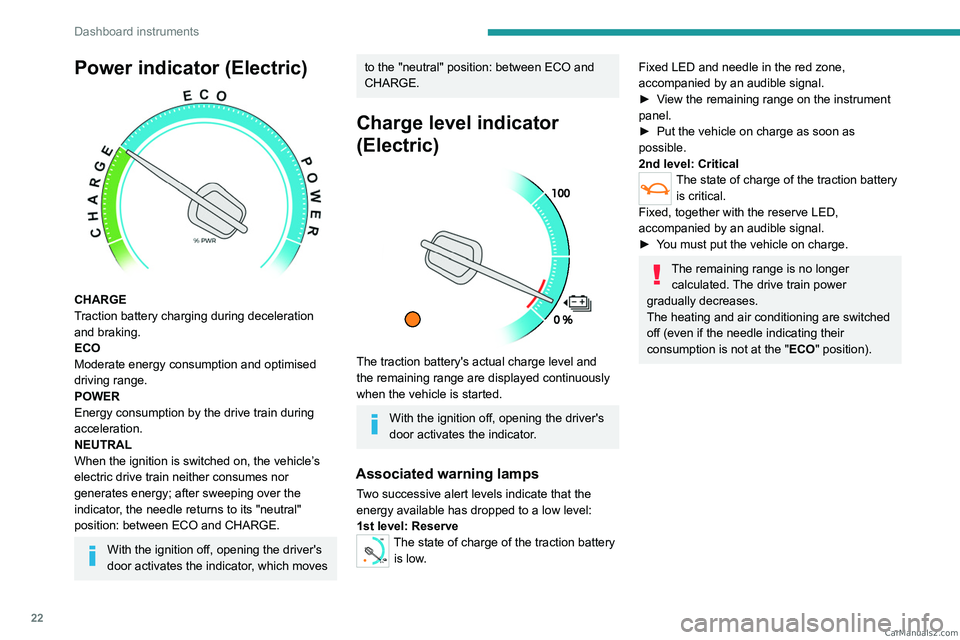
Power indicator (Electric)
CHARGE
Traction battery charging during deceleration
and braking.
ECO
Moderate energy consumption and optimised
driving range.
POWER
Energy consumption by the drive train during
acceleration.
NEUTRAL
When the ignition is switched on, the vehicle’s
electric drive train neither consumes nor
generates energy; after sweeping over the
indicator, the needle returns to its "neutral"
position: between ECO and CHARGE.
With the ignition off, opening the driver's
door activates the indicator, which moves
to the "neutral" position: between ECO and
CHARGE.
Charge level indicator
(Electric)
The traction battery's actual charge level and
the remaining range are displayed continuously
when the vehicle is started.
With the ignition off, opening the driver's
door activates the indicator.
Associated warning lamps
Two successive alert levels indicate that the
energy available has dropped to a low level:
1st level: Reserve
0 %
100
The state of charge of the traction battery
is low.
Fixed LED and needle in the red zone,
accompanied by an audible signal.
►
V
iew the remaining range on the instrument
panel.
►
Put the vehicle on charge as soon as
possible.
2nd level: Critical
The state of charge of the traction battery is critical.
Fixed, together with the reserve LED,
accompanied by an audible signal.
►
Y
ou must put the vehicle on charge.
The remaining range is no longer calculated. The drive train power
gradually decreases.
The heating and air conditioning are switched
off (even if the needle indicating their
consumption is not at the "ECO" position). CarM an uals 2 .c o m
Page 25 of 348
23
Dashboard instruments
1Thermal comfort
consumption indicator
(Electric)
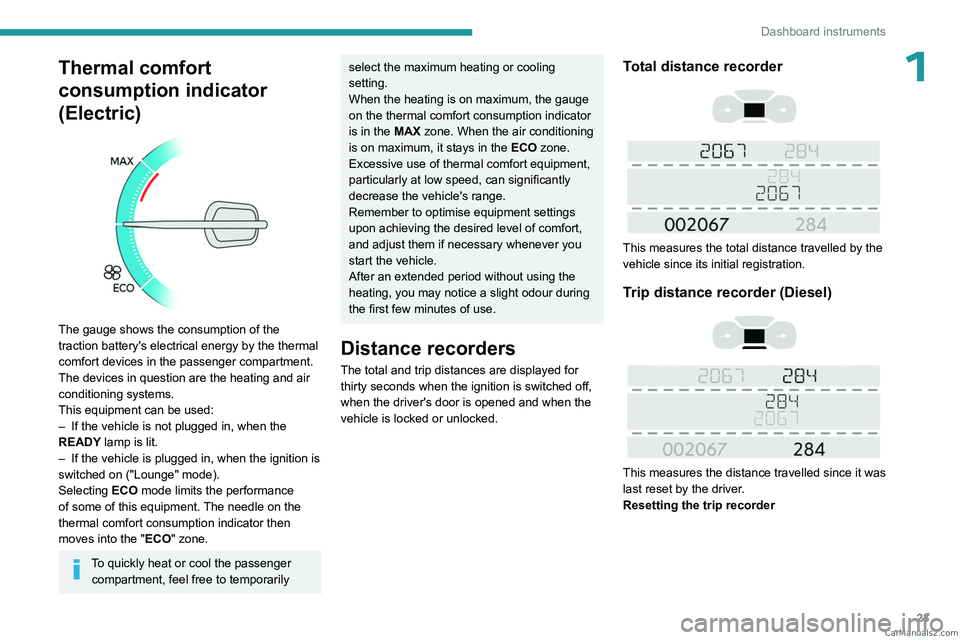
The gauge shows the consumption of the
traction battery's electrical energy by the thermal
comfort devices in the passenger compartment.
The devices in question are the heating and air
conditioning systems.
This equipment can be used:
–
If the vehicle is not plugged in, when the
READY
lamp is lit.
–
If the vehicle is plugged in, when the ignition is
switched on ("Lounge" mode).
Selecting ECO
mode limits the performance
of some of this equipment. The needle on the
thermal comfort consumption indicator then
moves into the "ECO" zone.
To quickly heat or cool the passenger compartment, feel free to temporarily
select the maximum heating or cooling
setting.
When the heating is on maximum, the gauge
on the thermal comfort consumption indicator
is in the MAX zone. When the air conditioning
is on maximum, it stays in the ECO zone.
Excessive use of thermal comfort equipment,
particularly at low speed, can significantly
decrease the vehicle's range.
Remember to optimise equipment settings
upon achieving the desired level of comfort,
and adjust them if necessary whenever you
start the vehicle.
After an extended period without using the
heating, you may notice a slight odour during
the first few minutes of use.
Distance recorders
The total and trip distances are displayed for thirty seconds when the ignition is switched off,
when the driver's door is opened and when the
vehicle is locked or unlocked.
Total distance recorder
This measures the total distance travelled by the
vehicle since its initial registration.
Trip distance recorder (Diesel)
This measures the distance travelled since it was
last reset by the driver.
Resetting the trip recorder
CarM an uals 2 .c o m
Page 27 of 348

25
Dashboard instruments
1– Current consumption.
– Stop & Start time counter (Diesel).
–
T
rip "1" followed by (depending on version)
trip "2" including average speed, average
consumption and distance travelled for each trip.
Trips "1" and "2" are independent but their use
is identical.
For example, trip "1" can be used for daily
figures and trip " 2" for monthly figures.
Trip reset
The reset is performed when the trip counter is
displayed.
► Press the button on the end of the wiper
control stalk for more than two seconds.
► Press the knob on the steering wheel for
more than two seconds.
► Press this button for more than 2 seconds.
Definitions
Range
(miles or km)
(Traction battery charge level percentage)
(Electric)
Distance that can still be travelled with the
fuel remaining in the tank (based on the
average fuel consumption over the last few miles
(kilometres) travelled).
This value may vary following a change in driving
style or terrain, leading to a significant change in
current fuel consumption.
When the range falls below 19 miles (30
km),
dashes are displayed.
After filling with at least 5 litres of fuel, the range
is recalculated and is displayed if it exceeds 62
miles (100
km).
Dashes appearing permanently in place of
numbers while driving indicates a malfunction. Consult a PEUGEOT dealer or a qualified
workshop.
Current consumption
(mpg or l/100 km or km/l)
(miles/kWh or kWh/100 km or km/kWh) (Electric)
/Calculated during the last few
seconds.
This function is only displayed at speeds above
19 mph (30
km/h) (Diesel).
Average consumption
(mpg or l/100 km or km/l)
(miles/kWh or kWh/100 km or km/kWh) (Electric)
/Calculated since the last trip
computer reset.
Average speed
(mph or km/h)Calculated since the last trip computer
reset.
Distance travelled
(miles or km)Calculated since the last trip computer
reset.
Stop & Start time counter
(minutes/seconds or hours/minutes)
If your vehicle is fitted with the Stop & Start
function, a time counter calculates the time spent
in STOP mode during a journey. CarM an uals 2 .c o m
Page 29 of 348

27
Dashboard instruments
1Upper bar
Certain information is displayed permanently in
the upper bar of the touch screen:
–
T
ime and outside temperature (a blue warning
lamp appears if there is a risk of ice).
–
Reminder of information from the
RadioMedia
and Telephone menus and
navigation instructions (depending on
equipment).
–
Notifications.
– Access to the Settings.
Energy menu (Electric)
This menu is only available with 3D Connected
Navigation.
Depending on version, this is accessible either:
– directly, by pressing the button near the
touch screen.
– via the Applications menu.
Flow
The page displays a real-time representation of
the electric drive train’s operation.
1.Active driving mode
2. Electric motor
3. Estimated traction battery charge level
4. Energy flows
The energy flows have a specific colour for each
type of driving:
A. Blue: energy consumption
B. Green: energy recovery
Statistics
This page shows electrical energy consumption
statistics.
– Blue bar chart: directly consumed energy
supplied by the traction battery .
–
Green bar chart: energy recovered during
deceleration and braking, used to recharge the
battery
.
The average result for the current trip is stated in
kWh/100 km.
►
Y
ou can change the displayed time scale by
pressing the
-
or + buttons.
A current trip is any trip of more than 20 minutes without switching off the ignition.
Charging
This page allows you to programme deferred
charging.
For more information on Charging the traction
battery, refer to the corresponding section.
Remotely operable
additional functions
(Electric)
(Depending on country of sale)
The following functions are
available from the MYPEUGEOT
APP application, which is
accessible from a smartphone:
–
Managing the traction battery charging
(deferred charging).
–
Managing the temperature pre-conditioning.
–
V
iewing the state of charge and range of the
vehicle. CarM an uals 2 .c o m
Page 33 of 348

31
Access
2the "hands-free" functions are set to
hibernation mode after 21 days without use.
To restore these functions, press one of the
remote control buttons or start the engine with
the electronic key in the reader.
For more information on starting with the
Keyless Entry and Start system, refer to the
corresponding section.
Electrical interference
The electronic key may not work if it is
close to an electronic device (e.g.
mobile
telephone (switched on or on standby), laptop
computer, strong magnetic fields). If this
occurs, move the electronic key away from
the electronic device.
Accumulations (water, dust, grime, salt, etc.) on the inner surface of the door
handle may affect detection.
If cleaning the inner surface of the door
handle using a cloth does not restore
detection, contact a PEUGEOT dealer or a
qualified workshop.
A sudden splash of water (stream of water,
high pressure jet washer, etc.) may be
identified by the system as the desire to open
the vehicle.
Unlocking/Complete or
selective unlocking
Unlocking/Complete
unlocking
Unlocking is signalled by rapid flashing of
the direction indicators for a few
seconds.
Depending on version, the door mirrors unfold
and the alarm is deactivated.
With the key
► To unlock the vehicle fully, turn the key in the
front left-hand door lock towards the front of the
vehicle.
If the vehicle has an alarm, it will not be
deactivated. Opening a door will trigger the
alarm, which can be stopped by switching the
ignition on.
With the remote control
► Press this button to unlock the vehicle.
Using the remote control with electric
sliding side door(s)
► To fully unlock the vehicle and open
the side door, press and hold this button
until the door has opened.
With Keyless Entry and Start on your
person
To unlock the vehicle, the remote control must be
in recognition zone A.
►
T
o unlock the vehicle fully, pass your hand
behind one of the door handles (front door(s),
manual sliding side door(s) or left-hand side-
hinged door) and then pull the handle to open
the corresponding door.
With electric sliding side door(s)
► With the Keyless Entry and Start on your
person, pass your hand behind the handle
to unlock the vehicle, then pull and release
the handle.
This action also causes the
corresponding door to open. CarM an uals 2 .c o m
Page 39 of 348

37
Access
2Without Keyless Entry and Start
► Switch the ignition off.
► T urn the key to position 2 (Ignition on) .
►
Immediately press the closed padlock button
for a few seconds.
►
Switch off the ignition and remove the key
from the ignition switch.
The remote control is now fully operational
again.
With Keyless Entry and Start
► Insert the mechanical key (incorporated into
the remote control) into the lock to open the
vehicle.
►
Place the electronic key against the back-up
reader on the steering column and hold it there
until the ignition is switched on.
►
W
ith a manual gearbox, place the gear lever
in neutral then fully depress the clutch pedal.
►
W
ith an automatic gearbox or drive
selector, while in mode
P
, depress the brake
pedal.
►
Switch on the ignition by pressing the
"
START/STOP" button.
If the fault persists after reinitialisation, contact
a PEUGEOT dealer or a qualified workshop
without delay.
Central locking
Manual
► Press this button to lock/unlock the vehicle
(doors, tailgate or side-hinged doors) from inside
the passenger compartment.
The indicator lamp comes on to confirm the
central locking of the vehicle.
Central locking does not take place if any
of the doors are open.
When locking/deadlocking from the
outside
When the vehicle is locked or deadlocked
from the outside, the indicator lamp flashes
and the button is deactivated.
►
After normal locking, pull one of the
interior door controls to unlock the vehicle.
►
After deadlocking, you must use the
remote control, the "Keyless Entry and
Start" system or the built-in key to unlock the
vehicle.
Driving with the doors locked makes
access for the emergency services more
difficult
in an emergency.
When transporting an oversized load
(tailgate or side-hinged doors open),
press the button to lock only the cab doors. CarM an uals 2 .c o m
Page 72 of 348

70
Ease of use and comfort
USB socket
The socket can be used to connect a portable
device or a USB memory stick.
The socket reads audio files that are sent to your
audio system to be played through the vehicle's
speakers.
These files can be managed using the steering-
mounted controls or those on the audio system.
The USB socket also allows a smartphone to be connected by
Android Auto
® or CarPlay®, enabling certain
smartphone applications to be used on the touch
screen.
For best results, use a cable made or approved
by the device manufacturer.
These applications can be managed using the
steering-mounted controls or the audio system
controls.
When the USB socket is used, the
portable device charges automatically.
While charging, a message is displayed if the
power drawn by the portable device exceeds
the current supplied by the vehicle.
For more information about how to use this
equipment, refer to the sections describing
the audio and telematics systems.
220 V socket
Depending on version, a 220 V/50 Hz socket
(maximum power: 120 W) is located underneath
the front right-hand seat and therefore
accessible from row 2.
This socket works with the engine running, as
well as in STOP mode of
Stop & Start.
► Lift the cover.
► Check that the indicator lamp is on green.
►
Connect your multimedia or other electrical
device (telephone charger
, laptop computer,
CD-DVD player, bottle warmer, etc.).
In the event of a malfunction, the
green indicator lamp flashes.
Have it checked by a PEUGEOT dealer or a
qualified workshop.
Connect only one device to the socket at
a time (do not use an extension lead or
multi-socket) and only connect devices with
Class
II insulation (indicated on the device).
Do not use devices with metallic cases.
If the power consumption becomes too
high and when required by the vehicle's
electrical system (particular weather
conditions, electrical overload, etc.), the
power supply to the socket will be cut off; the
green indicator lamp goes off
Load space cover
► To remove it, lift it up. CarM an uals 2 .c o m
Page 80 of 348

78
Ease of use and comfort
When towing a large load on a steep gradient
in high temperatures, switching off the air
conditioning increases the available engine
power, enhancing the towing capacity.
Avoid driving for too long with the ventilation off or with prolonged operation
of interior air recirculation. Risk of misting and
deterioration of the air quality!
If the interior temperature is very high
after the vehicle has stood for a long
time in the sunshine, air the passenger
compartment for a few moments.
Put the air flow control at a setting high
enough to quickly change the air in the
passenger compartment.
Condensation created by the air
conditioning results in a discharge of
water underneath the vehicle. This is perfectly
normal.
Servicing the ventilation and air
conditioning system
►
Ensure that the passenger compartment
filter is in good condition and have the filter
elements replaced regularly
.
We recommend using a composite passenger
compartment filter. Its specific active additive
helps protect against polluting gases and bad
smells.
► To ensure correct operation of the
air conditioning system, have it checked
according to the recommendations in the
Manufacturer’s service schedule.
Contains R134A fluorinated
greenhouse gases
Depending on version and country of sale, the
air conditioning system may contain R134A
fluorinated greenhouse gases. Gas capacity
0.5
kg (+/- 0.025 kg), GWP index 1430 (CO
2 equivalent: 0.715 t).
Stop & Start
The heating and air conditioning systems
only work when the engine is running.
Temporarily deactivate the Stop & Start
system to maintain a comfortable temperature
in the passenger compartment.
For more information on Stop & Start, refer
to the corresponding section.
ECO driving mode
Selecting this mode reduces electrical
energy consumption, but restricts the
performance of the heating and air
conditioning systems, although it does not
deactivate them.
Heating
Manual air conditioning
The air conditioning system only operates with the engine running.
1. Temperature.
2. Air flow.
3. Air distribution.
4. Interior air recirculation.
5. Air conditioning on/off.
Air flow
► Turn the thumbwheel 2 to obtain a
comfortable air flow.
If you set the air flow control to the
minimum position (off), the temperature
in the vehicle will no longer be controlled. A
slight air flow can still be felt however,
resulting from the forward movement of the
vehicle. CarM an uals 2 .c o m