2023 NISSAN PATHFINDER Car play
[x] Cancel search: Car playPage 247 of 665

Locking doors
1. Push the P (Park) button, place the igni-tion switch in the LOCK position and
make sure you carry the Intelligent Key
with you.
2. Close all doors.
3. Push any door handle lock sensor while carrying the Intelligent Key with you.
4. All doors will lock.
5. The hazard indicator lights flash twice and the outside buzzer sounds twice.
NOTE:
• Lock sensors for all doors can be deac-tivated when the Ext. Door Switch fea-
ture is switched to OFF using the “Ve-
hicle Settings” menu in the vehicle
information display. For additional in-
formation, see “Vehicle information
display 7 inch (18 cm) Type A” (P. 2-23)
or “Vehicle information display 12.3
inch (31 cm) Type B” (P. 2-48). • Doors do not lock with the door handle
lock sensor with the Intelligent Key in-
side the vehicle and a beep sounds to
warn you. However, when an Intelligent
Key is inside the vehicle, doors can be
locked with another Intelligent Key.
• Touching the door lock sensor while wearing gloves may delay or prevent
lock operation. Remove the gloves and
touch the lock sensor again.
• If the door handle becomes wet while the electronic key is within the effec-
tive range, the door may lock and un-
lock repeatedly. In this case, follow the
following correction procedures to
wash the vehicle:– Place the electronic key in a location 6 f t. (2 m) or more away from the
vehicle. (Take care to ensure that the
key is not stolen.)
– If the electronic key is inside the ve- hicle and a door handle becomes
wet during a car wash, a buzzer will
sound outside the vehicle. To turn off
the alarm, away the key from the in-
side vehicle.
• The lock sensor may not work properly if it comes in contact with ice, snow,
mud, etc. Clean the lock sensor and at-
tempt to operate it again.
LPD3373LPD3269
3-10Pre-driving checks and adjustments
Page 249 of 665

Unlocking doors
1. Carry the Intelligent Key.
2. Wrap your hand around the door handleto activate the capacitive unlock sensor
OA.
• When unlocking from the driver’s door handle, the driver’s door will unlock.
Unwrap your hand from the driver’s
door handle and touch the lock sen-
sor
OBwithin 60 seconds to unlock all
doors. • When unlocking from the front pas-
senger door, rear doors (if so
equipped) or lif tgate, all vehicle doors
will unlock.
• To allow driver and passenger doors to unlock at the same time from driv-
er’s door handle, turn off the Selective
Unlock feature in the vehicle settings
menu. For additional information, see
“Vehicle Settings” (P. 2-33) or “Vehicle
Settings” (P. 2-60).
3. The hazard indicator lights flash once and the outside buzzer sounds once.
NOTE:
Lock sensors for all doors can be deacti-
vated when the Ext. Door Switch feature
is switched to OFF using the “Vehicle Set-
tings” menu on the vehicle information
display. For additional information, see
“Vehicle information display 7 inch (18
cm) Type A” (P. 2-23) or “Vehicle informa-
tion display 12.3 inch (31 cm) Type B”
(P. 2-48).
LPD3373LPD3185LPD3270
3-12Pre-driving checks and adjustments
Page 255 of 665

TROUBLESHOOTING GUIDE
Verif y the location of all Intelligent Keys that
are programmed for the vehicle. If another
Intelligent Key is in range or inside the ve-
hicle, the vehicle system may respond dif-
ferently than expected.
SymptomPossible CauseRemedy
When shif ting the shif t position to the
P (Park) position The Push ignition to OFF warning ap-
pears in the display. The ignition switch is in the ACC or ON
position.Place the ignition switch in the OFF
position.
When opening the driver's door to get
out of the vehicle The Door/Lif tgate Open warning ap-
pears on the display and the inside
warning chime sounds continuously. The ignition switch is in the ACC or ON
position.
Place the ignition switch in the OFF
position.
When closing the door af ter getting
out of the vehicle The No Key Detected warning appears
on the display, the outside chime
sounds three times and the inside
warning chime sounds for approxi-
mately 3 seconds.
The ignition switch is in the ACC or ON
position.
Place the ignition switch in the OFF
position.
The Rear Door Alert warning message
appears on the display, the horn
sounds three times twice, or a “Check
Rear Seat For All Articles” warning ap-
pears on the display. The Rear Door Alert is activated.
Check the back seat for all articles,
press the OK button to clear the Rear
Door Alert warning message.
When closing the door with the inside
lock knob turned to LOCK The outside chime sounds for approxi-
mately 3 seconds and all the doors
unlock.
The Intelligent Key is inside the vehicle. Carry the Intelligent Key with you.
When touching the door handle lock
sensor or the
button on the In-
telligent Key to lock the door The outside chime sounds for approxi-
mately 2 seconds.
The Intelligent Key is inside the vehicle. Carry the Intelligent Key with you.
3-18Pre-driving checks and adjustments
Page 256 of 665

SymptomPossible CauseRemedy
When pushing the ignition switch to
start the engine The Key low battery warning appears
on the display.
The battery charge is low.Replace the battery with a new one.
For additional information, see “Battery
replacement” (P. 8-24).
The No Key Detected warning appears
on the display, the outside chime
sounds three times and the inside
warning chime sounds for approxi-
mately 3 seconds. The Intelligent Key is not in the vehicle. Carry the Intelligent Key with you.
When pushing the ignition switch The Key System Error warning mes-
sage in the vehicle information display
appears. It warns of a malfunction with the Intel-
ligent Key system.
It is recommended that you visit a
NISSAN dealer.
Pre-driving checks and adjustments3-19
Page 280 of 665

Restarting the entry/exit function
If the battery cable is disconnected or if the
fuse opens, the stored memory positions
may be lost and some of the functions will
be restricted.
1. Drive the vehicle over 25 mph (40 km/h).
OR
2. Open and close the driver's door morethan two times with the ignition switch
in the OFF position.
The entry/exit function should now work
properly.
SETTING MEMORY FUNCTION
The position of the following settings can
be linked to the Intelligent Key and the
memorized settings can be available for
each Intelligent Key.
• Climate control system
• Audio system
To use the memory function, set the cli-
mate and audio systems to the driver's
preferred settings. Lock the doors with the
Intelligent Key. Each Intelligent Key may be
set with the driver's individual preferences.
When a new Intelligent Key is used, “Con-
nection with the key has been done” will be displayed on the vehicle information dis-
play and the memorized settings are
available.
To engage the memorized settings, per-
form the following:
1. Carry the Intelligent Key that is linked to
the memorized settings.
2. Unlock the doors by wrapping hand around the capacitive door handle or
the
button on the Intelligent Key.
3. Place the ignition switch in the ON posi- tion. The settings linked to the Intelligent
Key will start.
For additional information on using the cli-
mate control system, see “Heater and air
conditioner (automatic)” (P. 4-32).
SYSTEM OPERATION
The memory seat system will not work or
will stop operating under the following
conditions:
• When the vehicle speed is above 4 mph (7 km/h).
• When any of the memory switches are pushed while the memory seat is
operating. • When the switch for the driver’s seat and
steering wheel is pushed while the
memory seat is operating.
• When the seat has already been moved to the memorized position.
• When no seat position is stored in the memory switch.
• When the shif t position is moved from P (Park) position to any other position.
Pre-driving checks and adjustments3-43
Page 282 of 665

4 Monitor, climate, audio, phone and
voice recognition systems
NissanConnect® Owner’s Manual...............4-2
RearView Monitor (if so equipped) ...............4-3
RearView Monitor system operation ..........4-4
How to read the displayed lines ..............4-4
Difference between predicted and
actual distances .............................4-5
How to park with predicted course
lines ..........................................4-7
Adjusting the screen .........................4-8
How to turn on and off predicted
course lines ..................................4-8
RearView Monitor system limitations .........4-8
System maintenance ........................4-9
Intelligent Around View® Monitor
(if so equipped) ................................. 4-10
Intelligent Around View® Monitor
system operation ............................ 4-11
Difference between predicted and
actual distances ............................ 4-16
How to park with predicted course
lines ......................................... 4-17
How to switch the display ...................4-18
Off-road mode (for 4WD model)
(if so equipped) .............................. 4-19
Adjusting the screen ........................ 4-19
Intelligent Around View® Monitor
system limitations .......................... 4-20System maintenance
.......................4-22
Camera aiding sonar (parking sensor)
(if so equipped) ................................. 4-23
Sonar system operation .....................4-23
Turning on and off the sonar function .......4-24
Sonar system limitations ....................4-25
System maintenance .......................4-25
Moving Object Detection (MOD)
(if so equipped) ................................. 4-26
MOD system operation ......................4-27
Turning MOD on and off .....................4-29
MOD system limitations .....................4-29
System maintenance .......................4-30
Vents .......................................... 4-31
Heater and air conditioner (automatic) .........4-32
Automatic operation ........................ 4-33
Manual operation ........................... 4-34
Operating tips ............................... 4-36
Rear automatic air conditioning system .....4-37
Servicing air conditioner ........................4-39
Antenna ........................................ 4-39
R
oof Mounted Antenna ......................4-39
Car phone or CB radio .......................... 4-40
iPod®/iPhone® ................................. 4-40
Page 283 of 665
Refer to the digital NissanConnect® Own-
er’s manual using the QR code on this
page, or your printed NissanConnect®
Owner’s manual (if so equipped). This
manual includes the following information:
• NissanConnect® Services (if so equipped)
• Navigation system (if so equipped)
• Audio system
• Apple CarPlay®
• Android Auto™
• Bluetooth® Hands-Free Phone system
• Viewing information
• Other settings• Voice recognition
• General system information
LHA5681
NISSANCONNECT® OWNER’S
MANUAL
4-2Monitor, climate, audio, phone and voice recognition systems
Page 293 of 665
When the camera is first activated with the
bird’s-eye view in the display, a red icon (if so
equipped) will flash on the screen. This in-
dicates that the sonar system is activated.
For additional information, see “Front and
Rear Sonar System (RSS)” (P. 5-183).
Available views
WARNING
• The distance guide lines and the ve-
hicle width lines should be used as a
reference only when the vehicle is on
a paved, level surface. The apparent
distance viewed on the monitor may
be different than the actual distance
between the vehicle and displayed
objects.
• Use the displayed lines and the
bird’s-eye view as a reference. The
lines and the bird’s-eye view are
greatly affected by the number of oc-
cupants, cargo, fuel level, vehicle po-
sition, road condition and road
grade.
• If the tires are replaced with different
sized tires, the predicted course lines
and the bird's-eye view may be dis-
played incorrectly. •
When driving the vehicle up a hill, ob-
jects viewed in the monitor are fur-
ther than they appear. When driving
the vehicle down a hill, objects
viewed in the monitor are closer than
they appear.
• Objects in the rear view will appear
visually opposite compared to when
viewed in the monitor and outside
mirrors.
• Use the mirrors or actually look to
properly judge distances to other
objects.
• On a snow-covered or slippery road,
there may be a difference between
the predicted course lines and the
actual course line.
• The vehicle width and predicted
course lines are wider than the actual
width and course.
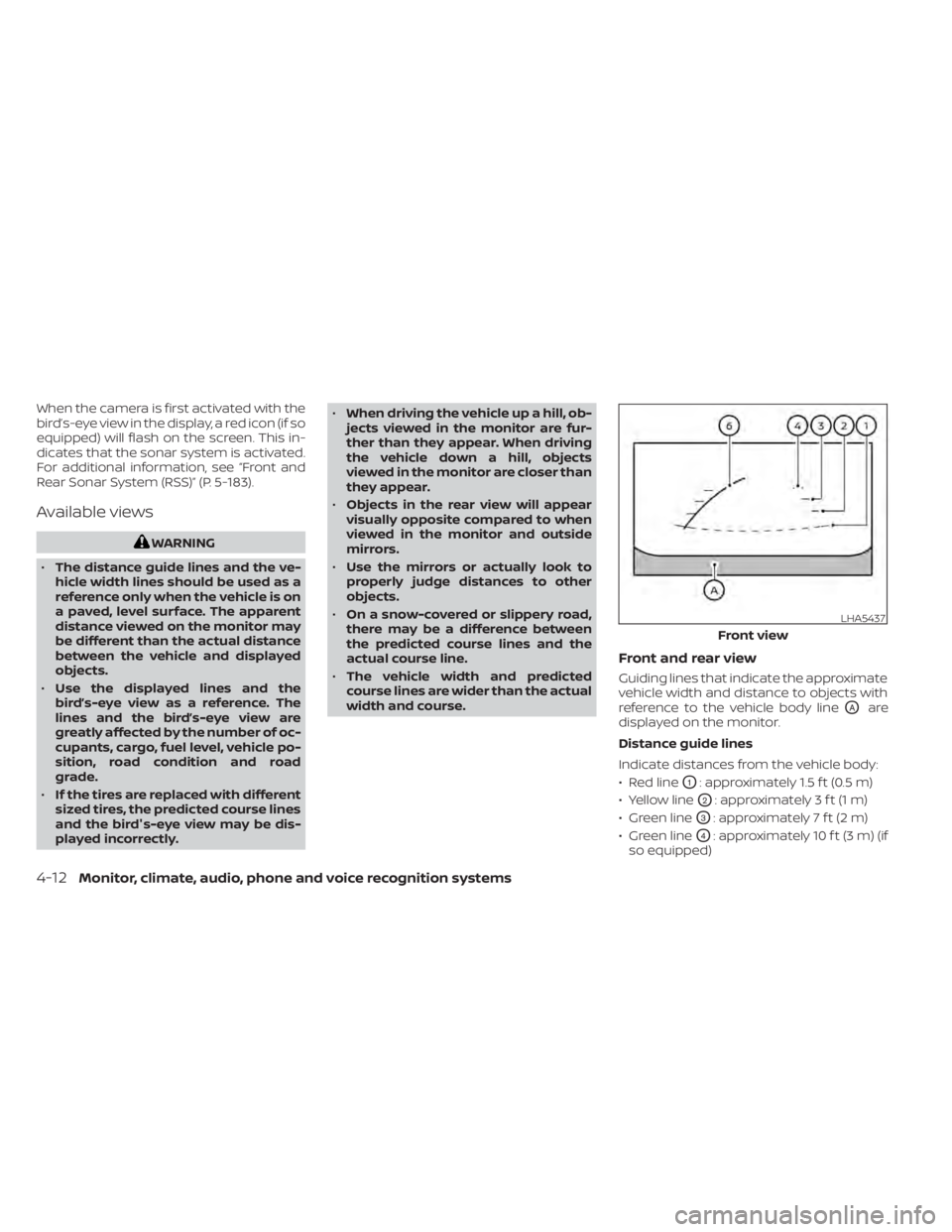
Front and rear view
Guiding lines that indicate the approximate
vehicle width and distance to objects with
reference to the vehicle body line
OAare
displayed on the monitor.
Distance guide lines
Indicate distances from the vehicle body:
• Red line
O1: approximately 1.5 f t (0.5 m)
• Yellow line
O2: approximately 3 f t (1 m)
• Green line
O3: approximately 7 f t (2 m)
• Green line
O4: approximately 10 f t (3 m) (if
so equipped)
LHA5437
Front view
4-12Monitor, climate, audio, phone and voice recognition systems