2023 NISSAN PATHFINDER Car play
[x] Cancel search: Car playPage 6 of 665

Genuine NISSAN accessory roof rack attach-
ments may be available through a NISSAN
dealer. It is recommended that you visit a
NISSAN dealer for additional information.
The service load capacity for the tubular
roof rack is 220 lbs. (100 kg.).
Be careful that your vehicle does not exceed
the Gross Vehicle Weight Rating (GVWR) or its
Gross Axle Weight Rating (GAWR front and
rear).
For additional information regarding GVWR
and GAWR, refer to:
• F.M.V.S.S. or C.V.M.S.S. certification label
(located on the driver’s door pillar).
TIRE CHAINS
WARNING
Do not use tire chains with vehicles
equipped with 265/60R18 size tires.
Use of tire chains on this tire size would
cause damage to the suspension com-
ponents or the vehicle’s body compo-
nents. This damage could cause you to
lose control of the vehicle, leading to an
accident resulting in possible injury or
death.Use of tire chains may be prohibited ac-
cording to location. Check the local laws
before installing tire chains. When installing
tire chains, make sure they are the proper
size for the tires on your vehicle and are
installed according to the chain manufac-
turer's suggestions.Use only SAE class “S”
chains.Class “S” chains are used on ve-
hicles with restricted tire to vehicle clear-
ance. Vehicles that can use Class “S” chains
are designed to meet the minimum clear-
ances between the tire and the closest
vehicle suspension or body component re-
quired to accommodate the use of a win-
ter traction device (tire chains or cables).
The minimum clearances are determined
using the factory equipped tire size. Other
types may damage your vehicle. Use chain
tensioners when recommended by the
tire chain manufacturer to ensure a tight
fit. Loose end links of the tire chain must
be secured or removed to prevent the
possibility of whipping action damage to
the fenders or underbody. If possible, avoid
fully loading your vehicle when using tire
chains. In addition, drive at a reduced speed.
Otherwise, your vehicle may be damaged
and/or vehicle handling and performance
may be adversely affected.
Do not use tire chains on dry roads. Driving
with chains in such conditions can cause
damage to the various mechanisms of the
vehicle due to some overstress.
OFF-ROAD MODE (for Rock Creek)
When the shif t lever is out of the R (Reverse)
position, selecting the Drive Mode Selector
(SAND or MUD/RUT) affects the Intelligent
Around View® Monitor display as follows:
1. Selecting the Drive Mode Selector (SAND
or MUD/RUT) position will activate the
Intelligent Around View® Monitor. The
front view/front-side view split screen
will be displayed.
2. When the vehicle is shif ted to the Drive
Mode Selector (SAND or MUD/RUT) posi-
tion with the bird’s-eye view displayed,
the passenger side of the display will
change to the front-side view.
When in the off-road mode, the Intelligent
Around View® Monitor will not return to the
previous screen.
The screen displayed on the Intelligent
Around View® Monitor will automatically re-
turn to the previous screen 3 minutes af ter
the vehicle was shif ted out of the Drive
Mode Selector (SAND or MUD/RUT) position.
Page 55 of 665
SEAT BELT MAINTENANCE
•To clean the seat belt webbing, apply a
mild soap solution or any solution rec-
ommended for cleaning upholstery or
carpet. Then wipe with a cloth and allow
the seat belts to dry in the shade. Do not
allow the seat belts to retract until they
are completely dry.
• If dirt builds up in the shoulder belt
guide of the seat belt anchors, the seat
belts may retract slowly. Wipe the shoul-
der belt guide with a clean, dry cloth.
• Periodically check to see that the seat
belt and the metal components, such
as buckles, tongues, retractors, flexible
wires and anchors, work properly. If loose
parts, deterioration, cuts or other dam-
age on the webbing is found, the entire
seat belt assembly should be replaced.WARNING
Do not allow children to play with the
seat belts. Most seating positions are
equipped with Automatic Locking Re-
tractor (ALR) mode seat belts. If the seat
belt becomes wrapped around a child’s
neck with the ALR mode activated, the
child can be seriously injured or killed if
the seat belt retracts and becomes
tight. This can occur even if the vehicle
is parked. Unbuckle the seat belt to re-
lease the child. If the seat belt cannot
be unbuckled or is already unbuckled,
release the child by cutting the seat
belt with a suitable tool (such as a knife
or scissors) to release the seat belt.
Children need adults to help protect them.
They need to be properly restrained.
In addition to the general information in
this manual, child safety information is
available from many other sources, includ-
ing doctors, teachers, government traffic
safety offices, and community organiza-
tions. Every child is different, so be sure to
learn the best way to transport your child.
There are three basic types of child re-
straint systems:
• Rear-facing child restraints • Forward-facing child restraints
• Booster seats
The proper restraint depends on the child's
size. Generally, infants up to about 1 year
and less than 20 lbs. (9 kg) should be placed
in rear-facing child restraints. Forward-
facing child restraints are available for chil-
dren who outgrow rear-facing child re-
straints and are at least 1 year old. Booster
seats are used to help position a vehicle
lap/shoulder belt on a child who can no
longer use a forward-facing child restraint.
WARNING
Infants and children need special pro-
tection. The vehicle's seat belts may
not fit them properly. The shoulder belt
may come too close to the face or neck.
The lap belt may not fit over their small
hip bones. In an accident, an improp-
erly fitting seat belt could cause serious
or fatal injury. Always use appropriate
child restraints.
All U.S. states and Canadian provinces or
territories require the use of approved child
restraints for infants and small children. For
additional information, see “Child re-
straints” (P. 1-33).
CHILD SAFETY
1-30Safety-Seats, seat belts and supplemental restraint system
Page 109 of 665

Horn........................................... 2-89
Climate controlled seat switches
(if so equipped) ................................. 2-90
Heated seat switches (if so equipped) ..........2-91
Heated 2nd row seat switches
(if so equipped) ................................. 2-92
Heated steering wheel switch (if so equipped) . . 2-93
Hill descent control switch (if so equipped) .....2-94
Steering Assist switch (for vehicles with
ProPILOT Assist) (if so equipped) ................2-95
Head Up Display (HUD) (if so equipped) .........2-95
HowtousetheHUD......................... 2-96
Driver Assistance/Navigation linking ........2-97
Emergency call (SOS) button (if so equipped) . . . 2-98 Emergency support ......................... 2-98
Rear Door Alert ................................ 2-100
Power outlets ................................. 2-101
12v outlets ................................. 2-101
120v outlet (if so equipped) .................2-102
USB/iPod® charging ports .....................2-103
Wireless charger (if so equipped) ..............2-104
Wireless charger indicator ..................2-105Wireless charger operation
.................2-105
Extended storage switch ......................2-106
Storage ....................................... 2-107
Front-door pockets ........................ 2-107
Lower console storage tray ................2-108
Seatback pockets (if so equipped) ..........2-108
Storagetrays............................... 2-109
Glovebox .................................. 2-110
Console box ................................ 2-110
2nd row console (if so equipped) ...........2-110
Overhead sunglasses storage ...............2-111
Cup holders ................................ 2-112
Cargo area storage bin .....................2-114
Luggage hooks ............................ 2-115
Roof rack (if so equipped) ..................2-116
Windows ....................................... 2-117
Power windows .............................
2-117
R
ear door sunshade (if so equipped) .......2-120
Power moonroof (if so equipped) ..............2-120
Automatic moonroof and sunshade .......2-121
Interior lights .................................. 2-123
Map lights .................................. 2-123
Page 121 of 665

CHECKING LIGHTS
With all doors closed, apply the parking
brake, fasten the seat belts and place the
ignition switch in the ON position without
starting the engine. The following lights (if
so equipped) will come on:
or,,,,,
The following lights (if so equipped) will
come on briefly and then go off:
,or,or,,,,,,,
If any light does not come on or operate in
a way other than described, it may indicate
a burned-out bulb and/or a system mal-
function. Have the system checked. It is
recommended that you visit a NISSAN
dealer for this service.
Some indicators and warnings are also dis-
played on the vehicle information display
between the speedometer and tachom-
eter. For additional information, see “Ve-
hicle information display–7 inch (18 cm)
Type A” (P. 2-23) or “Vehicle information
display—12.3 inch (31 cm) Type B” (P. 2-48).
WARNING/INDICATOR LIGHTS (red)
For additional information on warnings
and indicators, see “Vehicle information
display–7 inch (18 cm) Type A” (P. 2-23) or
“Vehicle information display—12.3 inch (31
cm) Type B” (P. 2-48).
orBrake warning
light
Low brake fluid warning light
When the ignition switch is placed in the ON
position, the light warns of a low brake fluid
level. If the light comes on while the engine
is running with the parking brake not ap-
plied, stop the vehicle and perform the
following:
1. Check the brake fluid level. Add brakefluid as necessary. For additional infor-
mation, see “Brake fluid” (P. 8-11).
2. If the brake fluid level is correct, have the warning system checked. It is recom-
mended that you visit a NISSAN dealer
for this service.
WARNING
• Your brake system may not be work-
ing properly if the warning light is on.
Driving could be dangerous. If you
judge it to be safe, drive carefully to
the nearest service station for re-
pairs. Otherwise, have your vehicle
towed because driving it could be
dangerous.
• Pressing the brake pedal with the en-
gine stopped and/or a low brake
fluid level may increase your stop-
ping distance and braking will re-
quire greater pedal effort as well as
pedal travel.
• If the brake fluid level is below the
MINIMUM or MIN mark on the brake
fluid reservoir, do not drive until the
brake system has been checked. It is
recommended that you visit a
NISSAN dealer for this service.
2-14Instruments and controls
Page 187 of 665

•The rain-sensing auto wipers are in-
tended for use during rain. If the
switch is lef t in the AUTO position, the
wipers may operate unexpectedly
when dirt, fingerprints, oil film or in-
sects are stuck on or around the sen-
sor. The wipers may also operate
when exhaust gas or moisture affect
the rain sensor.
• When the windshield glass is coated
with water repellent, the speed of the
rain-sensing auto wipers may be
higher even though the amount of
the rainfall is small.
• Be sure to turn off the rain-sensing
auto wiper system when you use a
car wash.
• The rain-sensing auto wipers may
not operate if rain does not hit the
rain sensor even if it is raining.
• Using Genuine NISSAN wiper blades
is recommended for proper opera-
tion of the rain-sensing auto wiper
system. For additional information,
see “Windshield wiper blades”
(P. 8-18). The rain-sensing auto wiper system can
automatically turn on the wipers and ad-
just the wiper speed depending on the
rainfall and the vehicle speed by using the
rain sensor located on the upper part of
the windshield.
To set the rain-sensing auto wiper system,
place the lever in the AUTO position
O1. The
wiper will sweep once while the ignition
switch is in the ON position.
The rain sensor sensitivity level can be ad-
justed by turning the knob toward the rear
O2(Low) or toward the frontO3(High).
– High — High sensitive operation
– Low — Low sensitive operation
To turn the rain-sensing auto wiper system
off, rotate the lever to the OFF position, or
rotate the lever to the low or high position.
The rain-sensing feature may be disabled.
For additional information, see “Vehicle in-
formation display–7 inch (18 cm) Type A”
(P. 2-23) or “Vehicle information display—12.3
inch (31 cm) Type B” (P. 2-48).
REAR SWITCH OPERATION
WARNING
In freezing temperatures the washer
solution may freeze on the rear window
and obscure your vision which may
lead to an accident. Warm the rear win-
dow with the defroster before you
wash the rear window.
LIC4682
2-80Instruments and controls
Page 204 of 665
–– Speed Limit Sign
–– Audio
–– TEL/SMS
• Reset
NOTE:
• Emergency information may display even if the HUD is turned off.
• If the HUD is turned off, the settings items are grayed out and cannot be
modified until the HUD is turned back
on.
This product includes the following
sof tware.
(1) Panasonic Corporation or sof tware de-
veloped for Panasonic Corporation
(2) Third-party sof tware licensed to Pana-
sonic Corporation
(3) Open source sof tware
Regarding (3) Open source sof tware, it in-
cludes open source sof tware (OSS), includ-
ing various sof tware to which license infor-
mation applies.
Refer to the license web site at:
http://car.panasonic.jp/oss/i02lln39.
DRIVER ASSISTANCE/NAVIGATION
LINKING
The HUD will display driver assistance and
navigation information.
The driver assistance display will show
warning situations for the following sys-
tems:
• Automatic Emergency Braking (AEB) with Pedestrian Detection
• Lane Departure Warning (LDW)
• Intelligent Forward Collision Warning (IFCW)
• Hands-free warning (for vehicles with ProPILOT Assist) (if so equipped)
• Traffic Sign Recognition (TSR) (if so equipped)
The navigation system linking display will
show the following items:
• Intersection names
• Arrows indicating turning direction
• Distance to the next intersection The Audio System linking display will show
the following items:
• Songs
• Radio stations
The TEL/SMS linking display will show the
following items:
• Caller’s name or phone number
Instruments and controls2-97
Page 207 of 665

•An indicator light on the Emergency
call (SOS) button shows the readiness
of the emergency support system. If
the indicator light is not illuminated,
pressing the Emergency Call (SOS) but-
ton does not connect your vehicle to
the Response Specialist. The indicator
light blinks while connected to the
NissanConnect® Services Response
Center.
• Even when the indicator light is illumi-
nated, connection to the
NissanConnect® Services Response
Center may not be possible. If this oc-
curs in an emergency situation, con-
tact the authorities by other means.
• To avoid disconnecting the line, keep
the engine running during an emer-
gency call, if it is safe to do so. The Rear Door Alert system functions un-
der certain conditions to indicate there
may be an object or passenger in the rear
seat(s). Check the seat(s) before exiting the
vehicle.
The Rear Door Alert system is initially dis-
abled. The driver can enable the system
using the vehicle information display. For
additional information, see “Vehicle infor-
mation display–7 inch (18 cm) Type A”
(P. 2-23) or “Vehicle information display—12.3
inch (31 cm) Type B” (P. 2-48).
When the system is enabled:
• The system is activated when a rear door
is opened and closed within 10 minutes of
the vehicle being driven. When the driver
door is closed and the system is acti-
vated, a visual message appears in the
vehicle information display. For additional
information, see “Rear Door Alert is acti-
vated” (P. 2-66).
• If a rear door is opened and closed but the vehicle is not driven within approxi-
mately 10 minutes, the system will not be
activated. A rear door must be opened
and closed and the car driven within 10
minutes for the system to activate. When the Rear Door Alert system is acti-
vated:
• When the driver puts the vehicle in the P
(Park) position, a notification message
appears in the vehicle information dis-
play with the options to “Dismiss Mes-
sage” or “Disable Alert” if desired.• Select “Disable Alert” to temporarily disable for that stop.
• No selection or ‘Dismiss Message” will keep the alert enabled for that stop.
• If the alert is enabled when a driver exits the vehicle, a message will appear in the
vehicle information display that states
“Check Back Seat For All Articles.”
If “Horn & Alert” setting is selected:
• An audible horn sound will occur af ter a short time unless a rear door is
opened and closed within a short time
to deactivate the alert.
• If the doors are locked before the alert is deactivated by opening a rear door,
the horn will sound.
• If the lif tgate is opened before a rear door is opened, the horn will be de-
layed until af ter the lif tgate is closed.
REAR DOOR ALERT
2-100Instruments and controls
Page 245 of 665
In such cases, correct the operating condi-
tions before using the Intelligent Key func-
tion or use the mechanical key.
Although the life of the battery varies de-
pending on the operating conditions, the
battery’s life is approximately two years. If
the battery is discharged, replace it with a
new one.
When the Intelligent Key battery is low, a
yellow indicator illuminates with the mes-
sage “Key Battery Low” in the vehicle infor-
mation display. For additional information,
see “Vehicle information display 7 inch (18
cm) Type A” (P. 2-23) or “Vehicle information
display 12.3 inch (31 cm) Type B” (P. 2-48).
Since the Intelligent Key is capable of re-
ceiving radio waves, if the key is lef t near
equipment which transmits strong radio
waves, such as signals from a TV and per-
sonal computer, the battery life may be-
come shorter.
For additional information, see “Battery re-
placement” (P. 8-24).
As many as four Intelligent Keys can be
registered and used with one vehicle. For
information about the purchase and use of
additional Intelligent Keys, it is recom-
mended that you visit a NISSAN dealer.
OPERATING RANGE
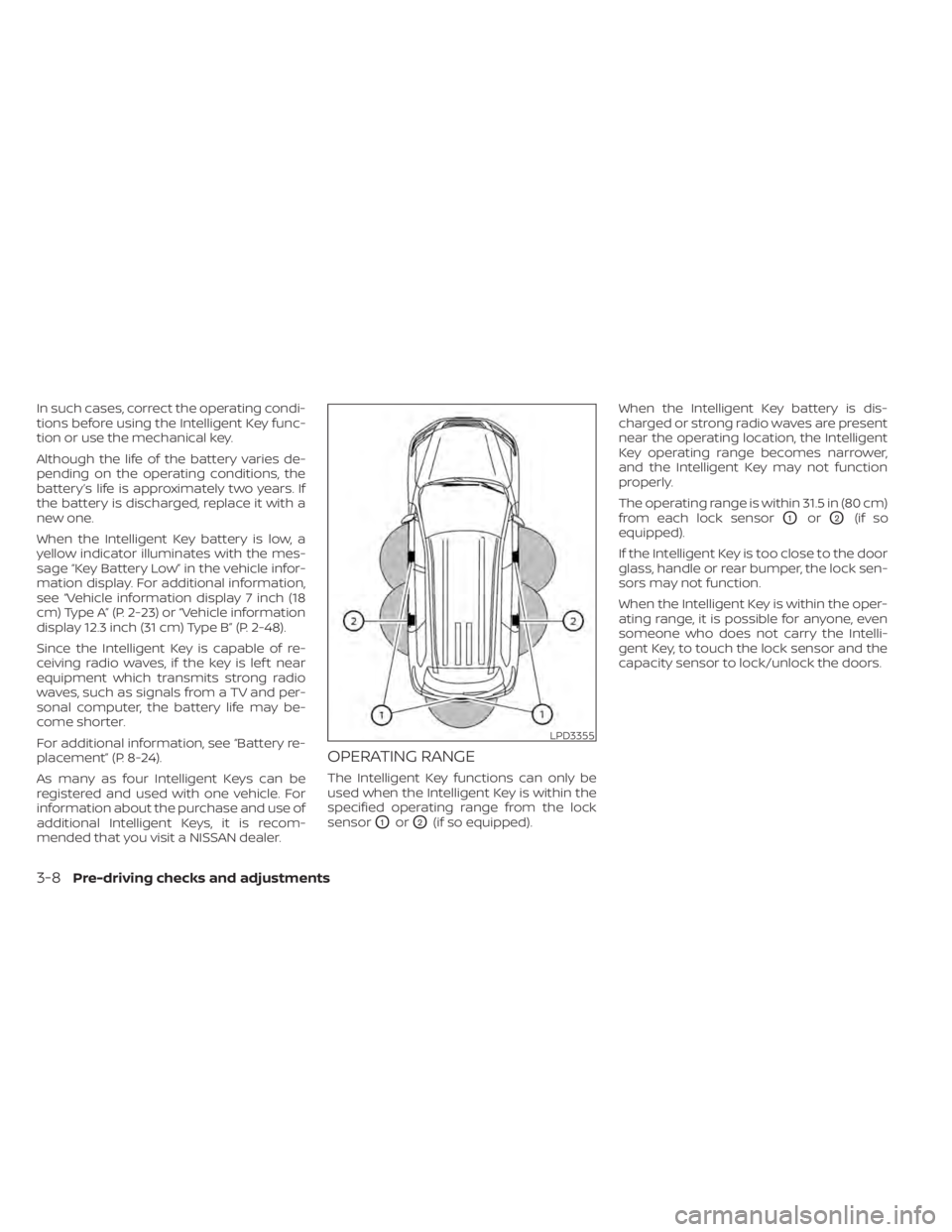
The Intelligent Key functions can only be
used when the Intelligent Key is within the
specified operating range from the lock
sensor
O1orO2(if so equipped).When the Intelligent Key battery is dis-
charged or strong radio waves are present
near the operating location, the Intelligent
Key operating range becomes narrower,
and the Intelligent Key may not function
properly.
The operating range is within 31.5 in (80 cm)
from each lock sensor
O1orO2(if so
equipped).
If the Intelligent Key is too close to the door
glass, handle or rear bumper, the lock sen-
sors may not function.
When the Intelligent Key is within the oper-
ating range, it is possible for anyone, even
someone who does not carry the Intelli-
gent Key, to touch the lock sensor and the
capacity sensor to lock/unlock the doors.
LPD3355
3-8Pre-driving checks and adjustments