2023 NISSAN KICKS park assist
[x] Cancel search: park assistPage 21 of 558
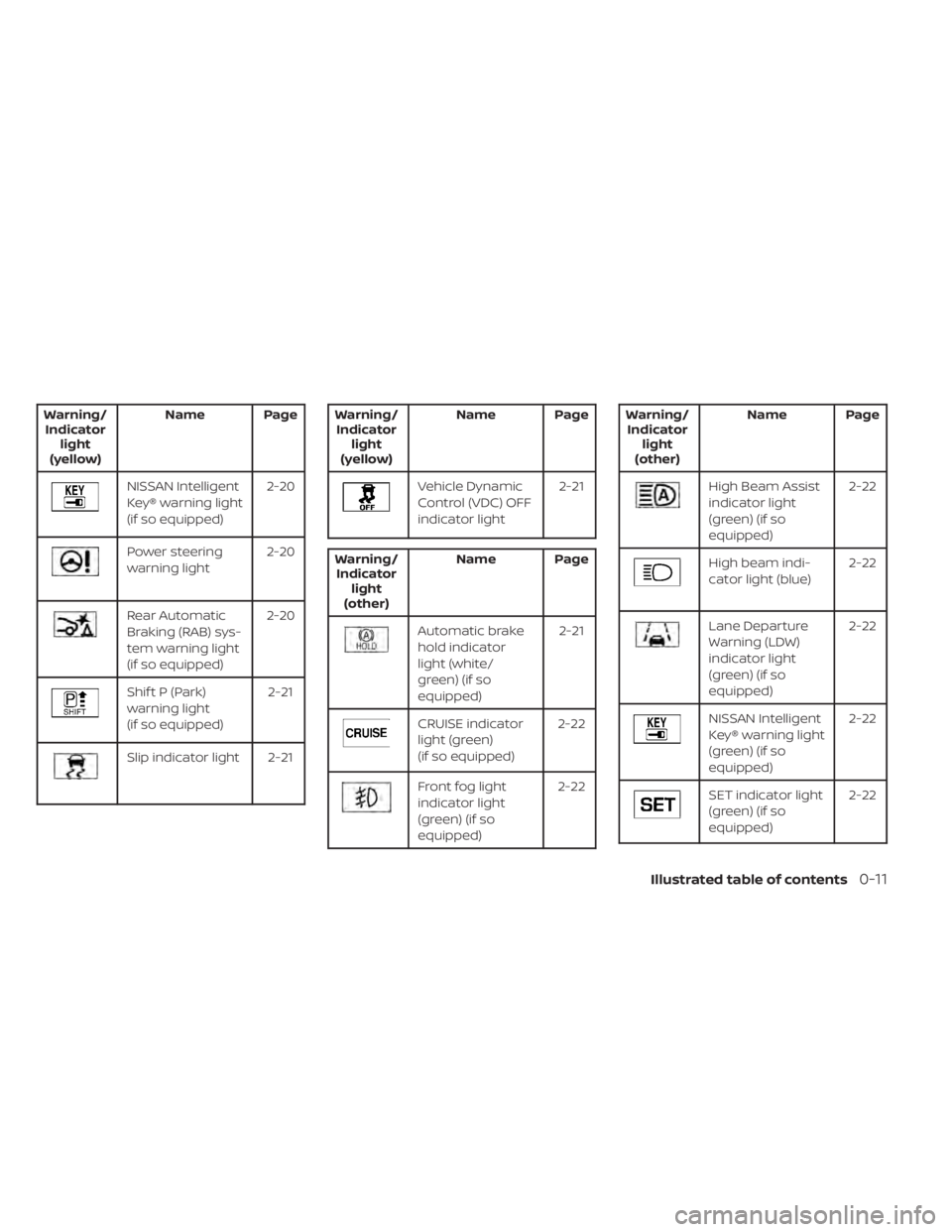
Warning/Indicator light
(yellow) Name Page
NISSAN Intelligent
Key® warning light
(if so equipped)
2-20
Power steering
warning light
2-20
Rear Automatic
Braking (RAB) sys-
tem warning light
(if so equipped)2-20
Shif t P (Park)
warning light
(if so equipped)
2-21
Slip indicator light 2-21
Warning/
Indicator light
(yellow) Name Page
Vehicle Dynamic
Control (VDC) OFF
indicator light
2-21
Warning/
Indicator light
(other) Name Page
Automatic brake
hold indicator
light (white/
green) (if so
equipped) 2-21
CRUISE indicator
light (green)
(if so equipped)
2-22
Front fog light
indicator light
(green) (if so
equipped)2-22
Warning/
Indicator light
(other) Name Page
High Beam Assist
indicator light
(green) (if so
equipped) 2-22
High beam indi-
cator light (blue)
2-22
Lane Departure
Warning (LDW)
indicator light
(green) (if so
equipped)2-22
NISSAN Intelligent
Key® warning light
(green) (if so
equipped)
2-22
SET indicator light
(green) (if so
equipped)
2-22
Illustrated table of contents0-11
Page 99 of 558
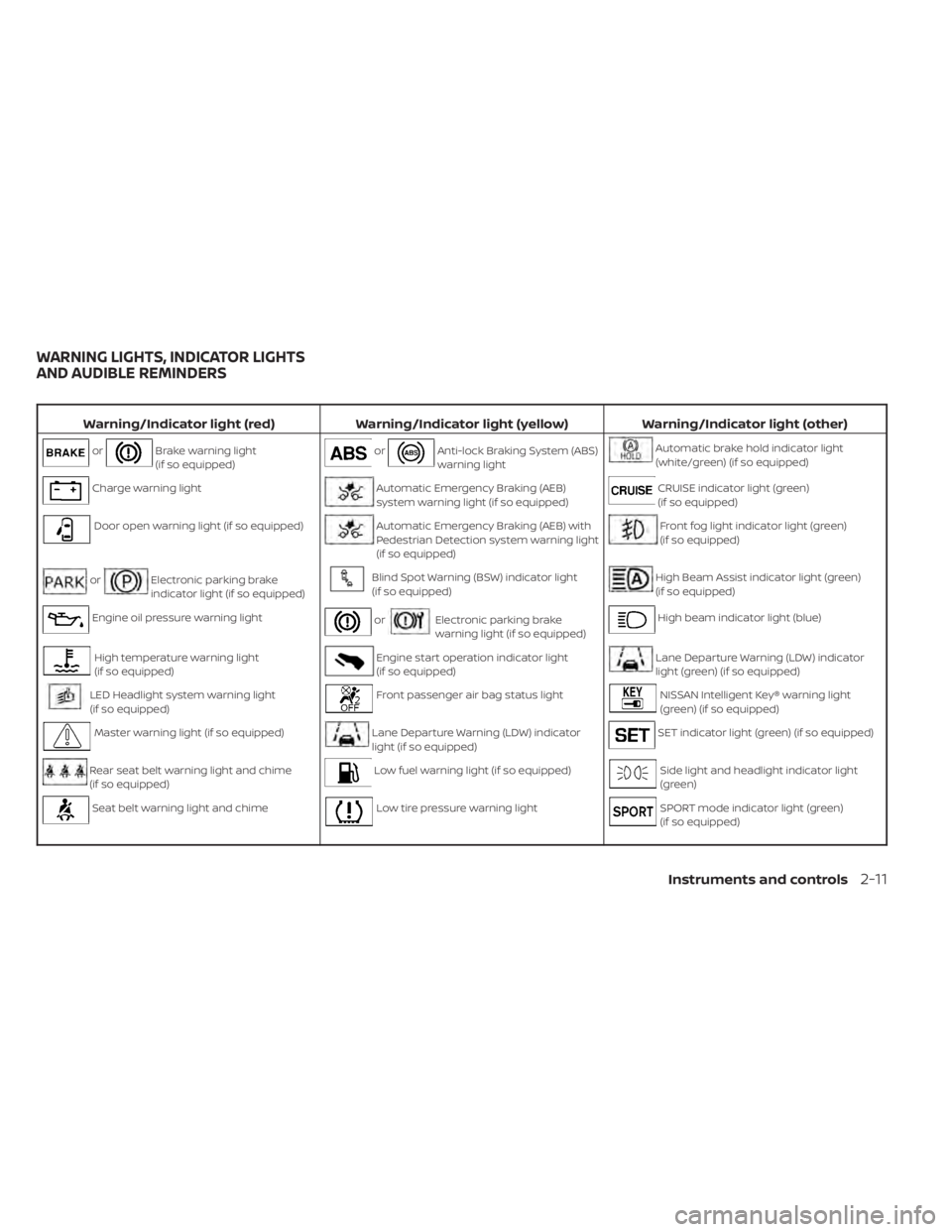
Warning/Indicator light (red)Warning/Indicator light (yellow) Warning/Indicator light (other)
orBrake warning light
(if so equipped)orAnti-lock Braking System (ABS)
warning lightAutomatic brake hold indicator light
(white/green) (if so equipped)
Charge warning lightAutomatic Emergency Braking (AEB)
system warning light (if so equipped)CRUISE indicator light (green)
(if so equipped)
Door open warning light (if so equipped)Automatic Emergency Braking (AEB) with
Pedestrian Detection system warning light
(if so equipped)Front fog light indicator light (green)
(if so equipped)
orElectronic parking brake
indicator light (if so equipped)Blind Spot Warning (BSW) indicator light
(if so equipped)High Beam Assist indicator light (green)
(if so equipped)
Engine oil pressure warning lightorElectronic parking brake
warning light (if so equipped)High beam indicator light (blue)
High temperature warning light
(if so equipped)Engine start operation indicator light
(if so equipped)Lane Departure Warning (LDW) indicator
light (green) (if so equipped)
LED Headlight system warning light
(if so equipped)Front passenger air bag status lightNISSAN Intelligent Key® warning light
(green) (if so equipped)
Master warning light (if so equipped)Lane Departure Warning (LDW) indicator
light (if so equipped)SET indicator light (green) (if so equipped)
Rear seat belt warning light and chime
(if so equipped)Low fuel warning light (if so equipped)Side light and headlight indicator light
(green)
Seat belt warning light and chimeLow tire pressure warning lightSPORT mode indicator light (green)
(if so equipped)
WARNING LIGHTS, INDICATOR LIGHTS
AND AUDIBLE REMINDERS
Instruments and controls2-11
Page 114 of 558
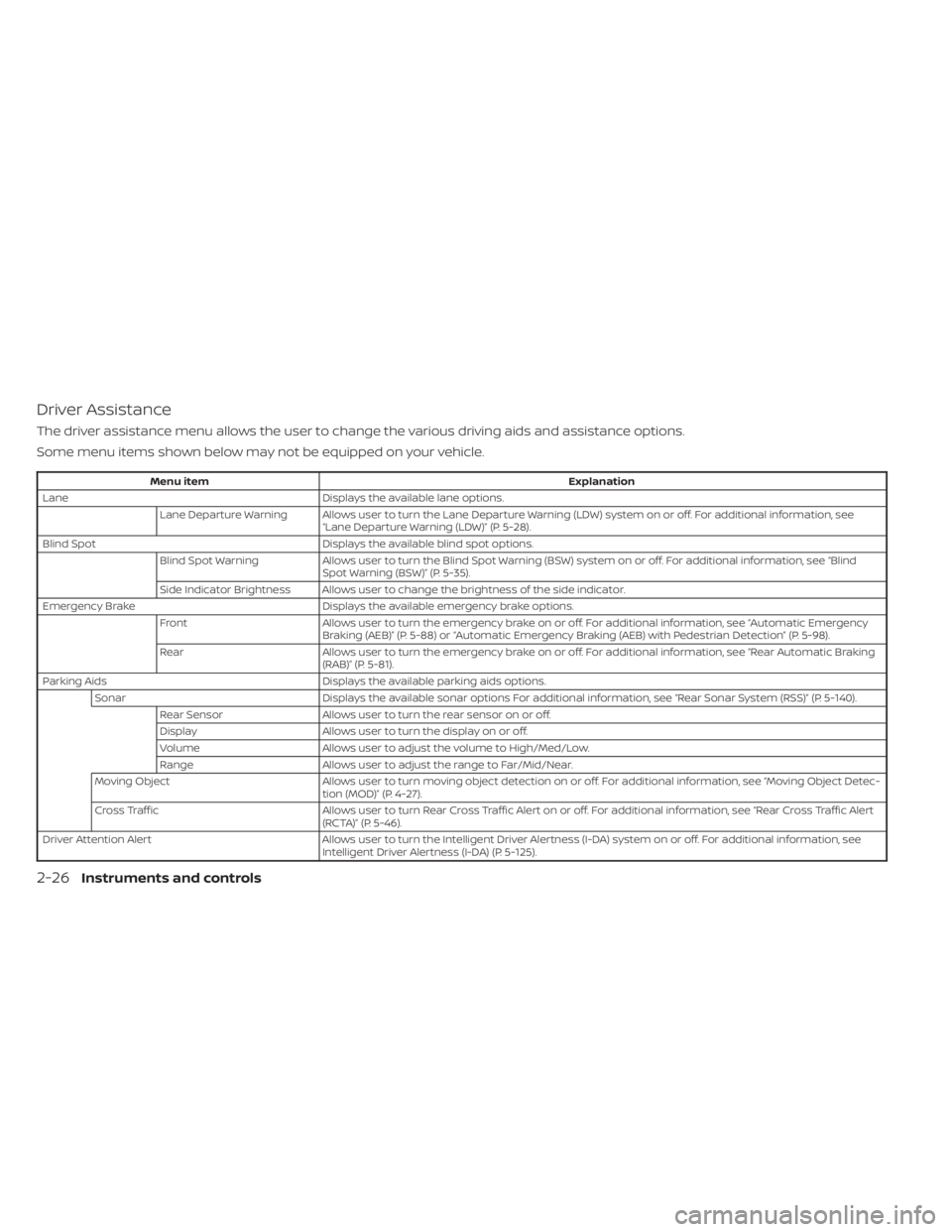
Driver Assistance
The driver assistance menu allows the user to change the various driving aids and assistance options.
Some menu items shown below may not be equipped on your vehicle.
Menu itemExplanation
Lane Displays the available lane options.
Lane Departure Warning Allows user to turn the Lane Departure Warning (LDW) system on or off. For additional information, see “Lane Departure Warning (LDW)” (P. 5-28).
Blind Spot Displays the available blind spot options.
Blind Spot Warning Allows user to turn the Blind Spot Warning (BSW) system on or off. For additional information, see “Blind
Spot Warning (BSW)” (P. 5-35).
Side Indicator Brightness Allows user to change the brightness of the side indicator.
Emergency Brake Displays the available emergency brake options.
Front Allows user to turn the emergency brake on or off. For additional information, see “Automatic Emergency
Braking (AEB)” (P. 5-88) or “Automatic Emergency Braking (AEB) with Pedestrian Detection” (P. 5-98).
Rear Allows user to turn the emergency brake on or off. For additional information, see “Rear Automatic Braking
(RAB)” (P. 5-81).
Parking Aids Displays the available parking aids options.
Sonar Displays the available sonar options For additional information, see “Rear Sonar System (RSS)” (P. 5-140).
Rear Sensor Allows user to turn the rear sensor on or off.
Display Allows user to turn the display on or off.
Volume Allows user to adjust the volume to High/Med/Low.
Range Allows user to adjust the range to Far/Mid/Near.
Moving Object Allows user to turn moving object detection on or off. For additional information, see “Moving Object Detec-
tion (MOD)” (P. 4-27).
Cross Traffic Allows user to turn Rear Cross Traffic Alert on or off. For additional information, see “Rear Cross Traffic Alert
(RCTA)” (P. 5-46).
Driver Attention Alert Allows user to turn the Intelligent Driver Alertness (I-DA) system on or off. For additional information, see
Intelligent Driver Alertness (I-DA) (P. 5-125).
2-26Instruments and controls
Page 182 of 558
Thebutton will be on the NISSAN
Intelligent Key® if the vehicle has Remote
Engine Start. This feature allows the engine
to start from outside the vehicle.
Vehicles with a manual climate control sys-
tem (if so equipped) will default to the last
used heating or cooling mode.
Vehicles with an automatic climate control
system (if so equipped) may default to ei-
ther heating or cooling mode depending
on outside and cabin temperatures. For
additional information, see “Remote Engine
Start with Intelligent Climate Control”
(P. 4-41). Laws in some local communities may re-
strict or prohibit the use of Remote Engine
Start, or the amount of time a parked ve-
hicle engine may idle. For example, some
laws require a person using Remote Engine
Start to have the vehicle in view or may
restrict idling time except in freezing tem-
peratures. Check local regulations for any
requirements.
Other conditions may affect the function of
the Remote Engine Start feature. For addi-
tional information, see “Conditions the Re-
mote Engine Start will not work” (P. 3-20).
Other conditions can affect the perfor-
mance of the Intelligent Key transmitter.
For additional information, see “NISSAN In-
telligent Key® system” (P. 3-6).
REMOTE ENGINE START
OPERATING RANGE
WARNING
• To help avoid risk of injury or death
through unintended operation of the
vehicle and/or its systems, including
entrapment in windows or inadver-
tent door lock activation, do not
leave children, people who require
the assistance of others or pets unat-
tended in your vehicle. Additionally,
the temperature inside a closed ve-
hicle on a warm day can quickly be-
come high enough to cause a signifi-
cant risk of injury or death to people
and pets.
• Do not use Remote Engine Start in
closed spaces such as a garage. Do
not breathe exhaust gases; they con-
tain colorless and odorless carbon
monoxide. Carbon monoxide is dan-
gerous. It can cause unconscious-
ness or death.
LPD2995
REMOTE ENGINE START (if so
equipped)
3-18Pre-driving checks and adjustments
Page 225 of 558
• When the shif t lever is in the D (Drive)position and the vehicle speed is below
approximately 5 mph (8 km/h), the MOD
system detects moving objects in the
front view.
• When the shif t lever is in the R (Reverse) position and the vehicle speed is below
approximately 5 mph (8 km/h), the MOD
system detects moving objects in the
rear view. The MOD system will not oper-
ate if the lif tgate is open. The MOD system does not detect moving
objects in the front-side view. The MOD
icon is not displayed on the screen when in
this view.
When the MOD system detects moving ob-
jects near the vehicle, a chime will be heard
when in front or rear view and a yellow
frame will be displayed on the view where
the objects are detected. While the MOD
system continues to detect moving ob-
jects, the yellow frame continues to be
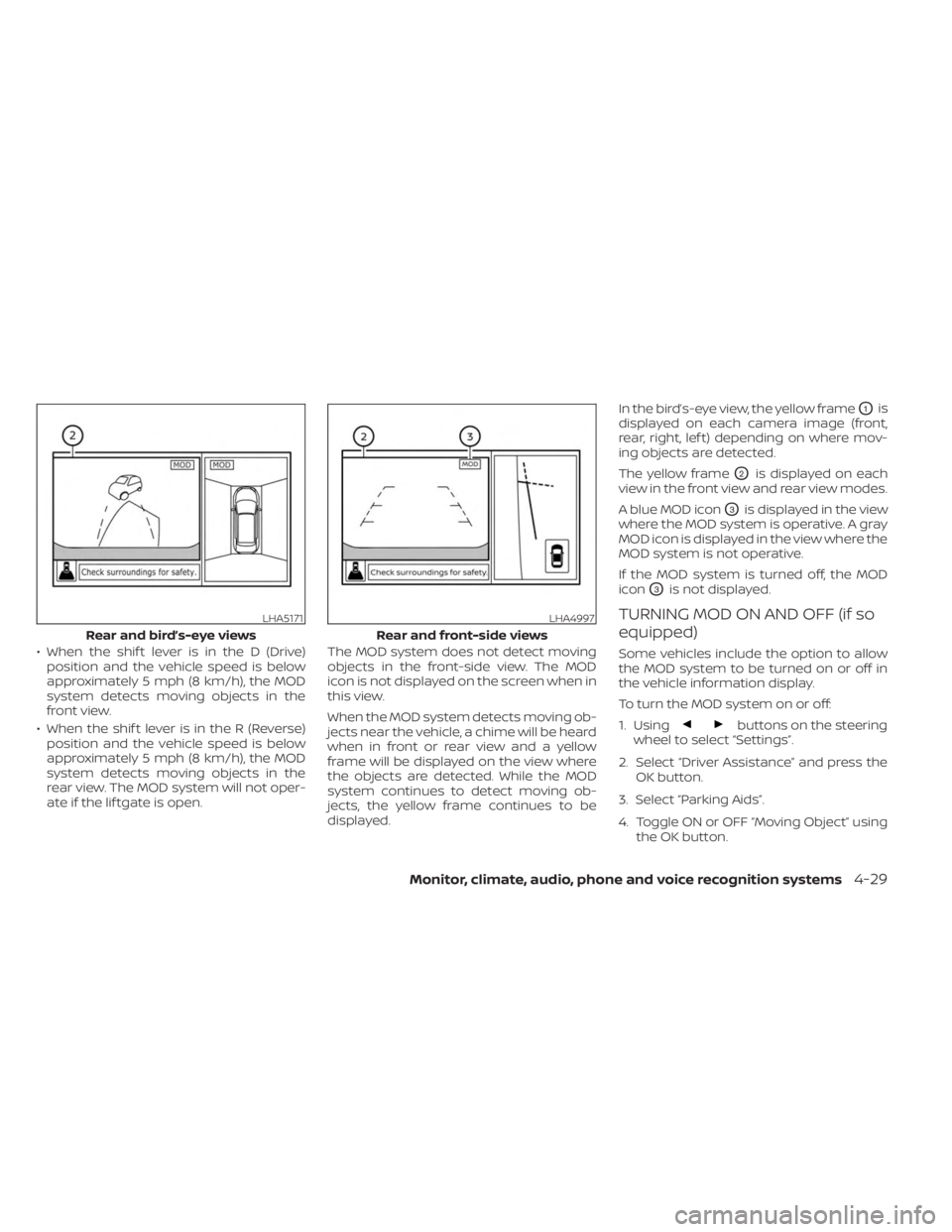
displayed. In the bird’s-eye view, the yellow frame
O1is
displayed on each camera image (front,
rear, right, lef t) depending on where mov-
ing objects are detected.
The yellow frame
O2is displayed on each
view in the front view and rear view modes.
A blue MOD icon
O3is displayed in the view
where the MOD system is operative. A gray
MOD icon is displayed in the view where the
MOD system is not operative.
If the MOD system is turned off, the MOD
icon
O3is not displayed.
TURNING MOD ON AND OFF (if so
equipped)
Some vehicles include the option to allow
the MOD system to be turned on or off in
the vehicle information display.
To turn the MOD system on or off:
1. Using
buttons on the steering
wheel to select “Settings”.
2. Select “Driver Assistance” and press the OK button.
3. Select “Parking Aids”.
4. Toggle ON or OFF “Moving Object” using the OK button.
LHA5171
Rear and bird’s-eye views
LHA4997
Rear and front-side views
Monitor, climate, audio, phone and voice recognition systems4-29
Page 281 of 558
I-FCW system limitations...................5-116
System temporarily unavailable ............5-121
System malfunction ........................ 5-123
System maintenance ......................5-124
Intelligent Driver Alertness (I-DA)
(if so equipped) ................................ 5-125
Intelligent Driver Alertness system
operation .................................. 5-126
How to enable/disable the Intelligent
Driver Alertness (I-DA) system ..............5-126
Intelligent Driver Alertness (I-DA)
system limitations ......................... 5-127
Break-in schedule ............................. 5-128
Fuel efficient driving tips .......................5-128
Increasing fuel economy ......................5-129
Parking/parking on hills .......................5-130
Power steering ................................ 5-131
Brake system ................................. 5-132
Brake precautions .......................... 5-132
Anti-lock Braking System (ABS) .............5-132
Brake Assist ................................ 5-134
Vehicle Dynamic Control (VDC) system ........5-134
Brake force distribution ....................5-136Chassis Control (if so equipped)
...............5-137
Intelligent Trace Control (I-TC) ..............5-137
Intelligent Engine Brake (I-EB) ...............5-138
Active Ride Control (ARC) ...................5-138
Hill Start Assist ................................ 5-139
Rear Sonar System (RSS) (if so equipped) ......5-140
System operation .......................... 5-141
How to enable/disable the sonar
system ..................................... 5-142
Sonar limitations ........................... 5-144
System temporarily unavailable ............5-144
System maintenance ......................5-144
Cold weather driving .......................... 5-145
Freeing a frozen door lock ..................5-145
Antifreeze .................................. 5-145
Battery..................................... 5-145
Dr
aining of coolant water ..................5-145
Tire equipment ............................. 5-145
Special winter equipment ..................5-146
Driving on snow or ice ......................5-146
Parking brake .............................. 5-146
Engine block heater (if so equipped) ........5-146
Page 300 of 558
its normal operating condition. If it does
not return to its normal operating condi-
tion, have the transmission checked and
repaired, if necessary. It is recommended
that you visit a NISSAN dealer for this
service.
WARNING
When the high fluid temperature pro-
tection mode or fail-safe operation oc-
curs, vehicle speed may be gradually
reduced. The reduced speed may be
lower than other traffic, which could in-
crease the chance of a collision. Be es-
pecially careful when driving. If neces-
sary, pull to the side of the road at a safe
place and allow the transmission to re-
turn to normal operation, or have it re-
paired if necessary.
WARNING
• Be sure the parking brake is fully re-
leased before driving. Failure to do so
can cause brake failure and lead to
an accident.
• Do not release the parking brake
from outside the vehicle.
• Do not use the shif t lever in place of
the parking brake. When parking, be
sure the parking brake is fully
engaged.
• To help avoid risk of injury or death
through unintended operation of the
vehicle and/or its systems, do not
leave children, people who require
the assistance of others or pets unat-
tended in your vehicle. Additionally,
the temperature inside a closed ve-
hicle on a warm day can quickly be-
come high enough to cause a signifi-
cant risk of injury or death to people
and pets.
HAND TYPE
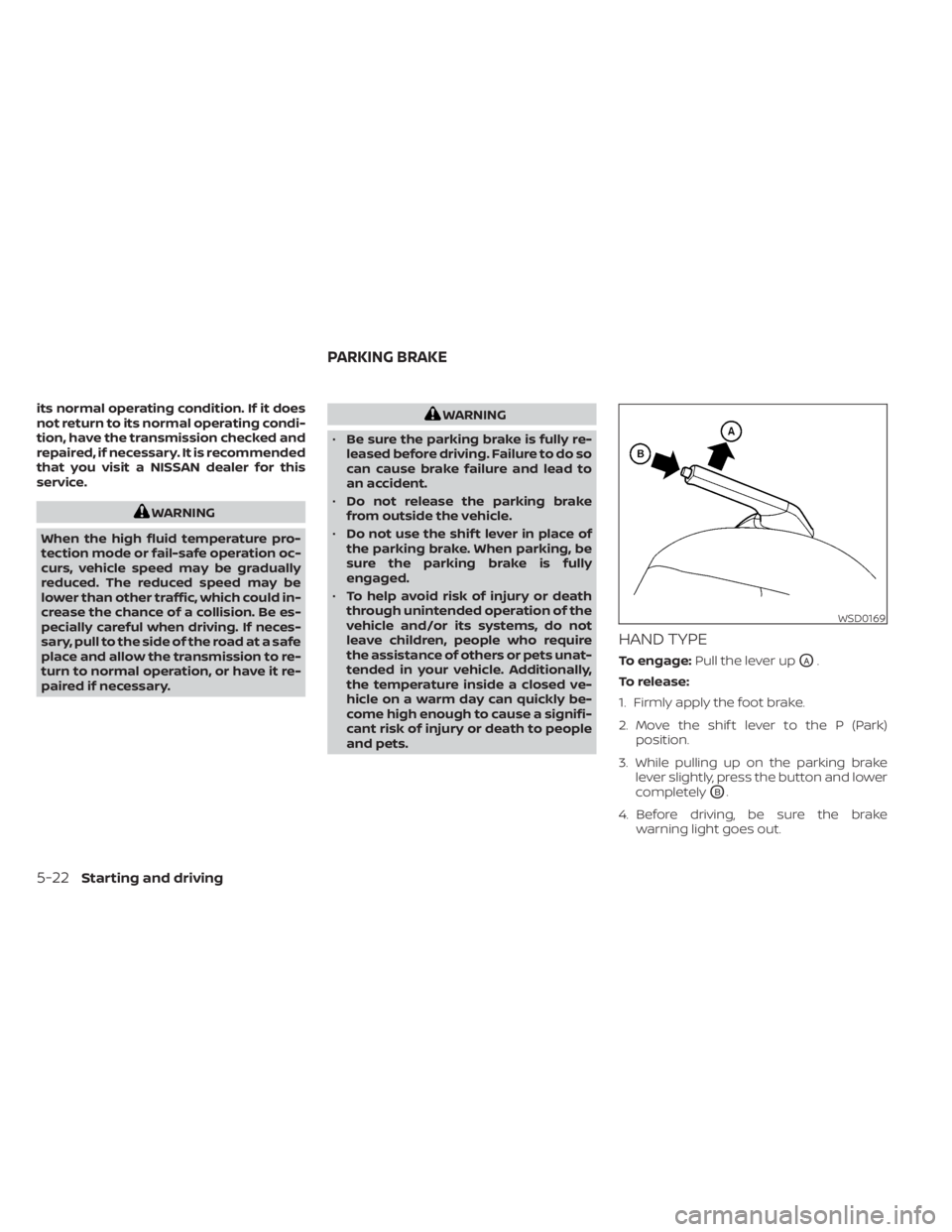
To engage: Pull the lever upOA.
To release:
1. Firmly apply the foot brake.
2. Move the shif t lever to the P (Park) position.
3. While pulling up on the parking brake lever slightly, press the button and lower
completely
OB.
4. Before driving, be sure the brake warning light goes out.
WSD0169
PARKING BRAKE
5-22Starting and driving
Page 324 of 558
2. L’utilisateur de l’appareil doit acceptertout brouillage radioélectrique subi,
même si le brouillage est susceptible
d’en compromettre le fonctionnement.
Bandes de fréquences: 24.05–24.25GHz
Puissance émise: Moins de 20 milliwattsWARNING
Failure to follow the warnings and in-
structions for proper use of the RCTA
could result in serious injury or death.
• The RCTA system is not a replace-
ment for proper driving procedures
and is not designed to prevent con-
tact with vehicles or objects. When
backing out of a parking space, al-
ways use the side and rear mirrors
and turn and look in the direction
your vehicle will move. Never rely
solely on the RCTA system.
The RCTA system will assist you when
backing out from a parking space. When
the vehicle is in reverse, the system is de-
signed to detect other vehicles approach-
ing from the right or lef t of the vehicle. If the
system detects cross traffic, it will alert you.
REAR CROSS TRAFFIC ALERT (RCTA)
(if so equipped)
5-46Starting and driving