2023 LINCOLN CORSAIR service
[x] Cancel search: servicePage 239 of 690
WHAT IS THE HIGH VOLTAGE
BATTERY
The high voltage battery is a highlysophisticated lithium ion battery system, usedto store electrified energy to power thevehicle.
HIGH VOLTAGE BATTERY
PRECAUTIONS
WARNING: This battery pack shouldonly be serviced by an authorized electricvehicle technician. Improper handling canresult in personal injury or death.
WARNING: Keep your hands andclothing clear of the cooling fan.
WARNING: Apply the parking brake,shift into park (P), switch the ignition offand remove the key before you open thehood or have any service or repair workcompleted. If you do not switch the ignitionoff, the engine could restart at any time.Failure to follow this instruction could resultin personal injury or death.
WARNING: Do not touch theelectronic ignition system parts after youhave switched the ignition on or when theengine is running. The system operates athigh voltage. Failure to adhere to thiswarning could result in serious personalinjury or death.
Your vehicle consists of various high-voltagecomponents and wiring. All of thehigh-voltage power flows through specificwiring assemblies labeled as such or coveredwith a solid orange convolute, or orangestriped tape, or both. Do not come in contactwith these components.
RECYCLING AND DISPOSING OF
THE HIGH VOLTAGE BATTERY
Please recycle in accordance with localregulations.
235
2023 Corsair (CTF) Canada/United States of America, enUSA, Edition date: 202208, DOMHigh Voltage Battery - Plug-In Hybrid Electric Vehicle (PHEV)
Page 244 of 690
WARNING: This equipment hasarcing or sparking parts. Do not expose toflammable vapors. Position this equipmentat least 18 in (450 mm) above the floor.
WARNING: Do not connect ordisconnect any pluggable components ofthe charging equipment when in use orcharging. Failure to follow this instruct cancause damage to the charging equipment.
WARNING: Do not use the chargingequipment in temperatures outside of theoperation range of -22°F (-30°C) to 122°F(50°C).
WARNING: Store the chargingequipment in a clean dry place betweenthe temperatures of -22°F (-30°C) to 185°F(85°C).
WARNING: Do not plug the chargingequipment into an electrical outlet that issubmerged in water or covered in snow.
WARNING: Do not use chargingequipment in severe rain, snow orelectrical storm.
WARNING: Do not allow chargingequipment to be immersed in water orliquids. Failure to follow this warning couldresult in fire, electric shock, or seriouspersonal injury or death.
WARNING: When using the chargingequipment avoid moisture, water, snowand foreign objects at all times.
WARNING: Do not replace the plugon the connector. There are critical safetydevices in the plug, and the chargingequipment will not operate, if the plug isreplaced. Failure to follow this instructioncould result in electric shock, personalinjury, death, or fire.
WARNING: Charging equipmentcontains no user modifiable or repairableparts. If the charging equipment plug doesnot properly fit into the wall outlet, have aqualified electrician install the correct walloutlet. Failure to follow this instructioncould result in personal injury or death.
WARNING: High voltage is presentin your electric meter housing and powerdistribution service panel. Contact withhigh voltage can cause death or seriouspersonal injury.
WARNING: Visually inspect thecharging equipment before each use. Donot use the charging equipment if it isdamaged.
WARNING: Keep charging equipmentinside when not in use. Stow the controlbox on the hanger or all the chargingequipment in the bag after use to preventdamage to the charging equipment andpersonal injury.
240
2023 Corsair (CTF) Canada/United States of America, enUSA, Edition date: 202208, DOMCharging Your Vehicle - Plug-In Hybrid Electric Vehicle (PHEV)
Page 250 of 690

Note:When plugging into an unfamiliar walloutlet, let the vehicle charge for severalminutes before leaving it unattended. Thered indicator illuminates if not charging. Theunit turns off if a breaker or infrastructureground fault circuit interrupter (GFCI) istripped. You can view vehicle chargingstatus remotely via the Lincoln Way app.
Mobile Power Cord Auto-Restart
Auto-restart helps make sure that yourvehicle is charged and ready for use whenneeded. A charge could be interrupted iferrors are detected. Charging resumes oncethe error is no longer detected. The redindicator illuminates during an errorcondition.
The exception to the immediate auto-restartis when the interruption is due to a chargerground fault circuit interrupter (GFCI) event.The charger attempts to restart 15 minutesafter a ground fault circuit interrupter (GFCI)event. After the fourth attempt to restart, thecharger shuts down and the red indicatorstays on.
If the fault persists, do not continue to try tocharge your vehicle. Contact your authorizeddealer.
MOVING AND STORAGEINSTRUCTIONS
Make sure you wrap the mobile power cordafter charging. Store the mobile power cordin the storage bag supplied with the mobilepower cord.
When charging is complete, replace themobile power cord in the luggagecompartment.
Note:Do not hold the mobile power cord bythe power cable. Hold the complete unit andcarefully place back in the storage bag.
Note:To remove the connector, firmly graspthe connector by the cable or plug and pullaway from the control box.
CARE INSTRUCTIONS
Do not use cleaners or solvents as this coulddamage your mobile power cord. Do notplace stress on the charger cables. If the unitoverheats, remove the mobile power cordfrom direct sunlight.
SAFETY FEATURES
The charger includes the following safetyfeatures to protect against the risk of electricshock:
•Service ground check: The chargerconstantly checks for the presence of aservice ground connection. If the serviceground ever fails, the charger redindicator turns on and shuts down powerto the vehicle.
•Thermal event sensor: Charger modulesenses out-of-ordinary thermal eventsand decreases the charging current orshuts the unit down if required.
246
2023 Corsair (CTF) Canada/United States of America, enUSA, Edition date: 202208, DOMCharging Your Vehicle - Plug-In Hybrid Electric Vehicle (PHEV)
Page 267 of 690
2.Remove the access cover located to thebottom left hand side of the steeringcolumn on the lower instrument panelusing a plastic wedge or pry tool.
Note:Do not pull the tether.
3.Sit in the driver seat.
4.Power your vehicle on without your footon the brake pedal.
Note: Do not attempt this procedure whenthe engine is running. Failure to follow thisinstruction could result in vehicle damagenot covered by the vehicle warranty.
5.Press and hold the brake pedal.
6.Pull the tether towards you until the leverengages.
Note:Do not use excessive force. Failure tofollow this instruction could result in vehicledamage not covered by the vehiclewarranty.
Note:A message appears when your vehicleis out of park (P). If you do not receive amessage attempt the procedure again.
Note: A warning lamp could illuminate.
7.Release the parking brake. See WhatIs the Electric Parking Brake (page 272).
8.Switch your vehicle off.
9.Release the brake pedal.
Note:Your vehicle is free to roll.
10.Disconnect the negative battery cablefrom the battery as soon as it is safe todo so.
Note:If your vehicle detects wheel speedwhen the battery is connected, the electronicparking brake could apply.
Returning Your Vehicle to NormalMode
1.Connect the negative battery cable tothe battery as soon as it is safe to do so.
Note:If your vehicle detects wheel speedwhen the battery is connected, the electronicparking brake could apply.
2.Apply the parking brake. See What Isthe Electric Parking Brake (page 272).
Note:If the battery has run out of charge,use an external power source to apply theparking brake.
3.Sit in the driver seat.
4.Press and hold the brake pedal.
Note:Do not start your vehicle.
5.Pull the tether towards you until you feela hard stop.
6.Release tension and return tether to thestowed position.
7.Start your vehicle.
8.Confirm the instrument cluster displayspark (P).
Note:If the instrument cluster does notdisplay park (P), the warning lamp remainsilluminated, or a message persists contactan authorized dealer for service.
9.Switch your vehicle off.
10.Release the brake pedal.
11.Install the access cover.
263
2023 Corsair (CTF) Canada/United States of America, enUSA, Edition date: 202208, DOMAutomatic Transmission
Page 269 of 690
AUTOMATIC TRANSMISSION –
TROUBLESHOOTING
AUTOMATIC TRANSMISSION –INFORMATION MESSAGES
DescriptionMessage
The electric parkingbrake is not fullyapplied.
Park Brake NotApplied
A reminder to shiftinto park. In addition,this message istypically after recon-necting or rechar-ging the battery untilyou cycle the igni-tion to the on mode.
Transmission Not inPark
Displays when thereis a system fault andthe park brakeneeds to be pressedbefore exiting thevehicle. See yourauthorized dealer.
SHIFT SYS FAULTApply Park BrakeBefore Exiting theVehicle
DescriptionMessage
The system hasdetected a fault thatrequires service. Have your vehiclechecked as soon aspossible.
TransmissionMalfunction ServiceNow
Displays when youshift into neutral (N).Select L To ConfirmStay In Neutral Mode
Displays to confirmthat your vehicle hasentered Stay inNeutral Mode.
Stay in Neutral ModeEngaged
The system hasdetected a fault thatrequires service. Have your vehiclechecked as soon aspossible.
Select M To ConfirmStay In Neutral Mode
265
2023 Corsair (CTF) Canada/United States of America, enUSA, Edition date: 202208, DOMAutomatic Transmission
Page 271 of 690
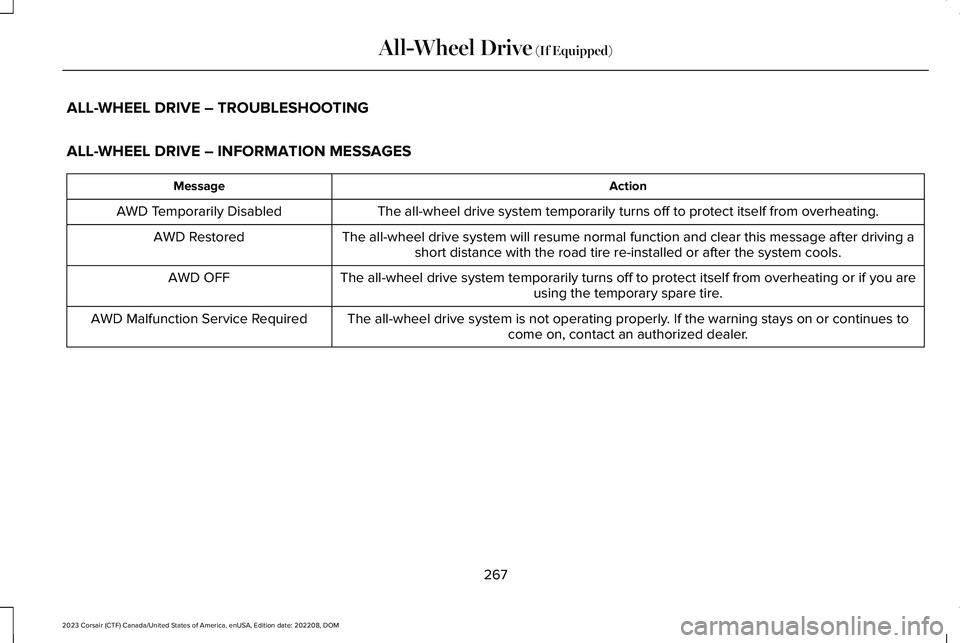
ALL-WHEEL DRIVE – TROUBLESHOOTING
ALL-WHEEL DRIVE – INFORMATION MESSAGES
ActionMessage
The all-wheel drive system temporarily turns off to protect itself from overheating.AWD Temporarily Disabled
The all-wheel drive system will resume normal function and clear this message after driving ashort distance with the road tire re-installed or after the system cools.AWD Restored
The all-wheel drive system temporarily turns off to protect itself from overheating or if you areusing the temporary spare tire.AWD OFF
The all-wheel drive system is not operating properly. If the warning stays on or continues tocome on, contact an authorized dealer.AWD Malfunction Service Required
267
2023 Corsair (CTF) Canada/United States of America, enUSA, Edition date: 202208, DOMAll-Wheel Drive (If Equipped)
Page 277 of 690

4.Press the accelerator pedal until enginehas developed sufficient torque toprevent your vehicle from rolling downthe hill.
5.Release the switch and pull away in anormal manner.
AUTOMATICALLY RELEASING THE
ELECTRIC PARKING BRAKE
1.Close the driver door.
2.Shift into gear.
3.Press the accelerator pedal and pull awayin a normal manner.
ELECTRIC PARKING BRAKE
AUDIBLE WARNING
Sounds when the parking brake is on andyour vehicle is moving. If the warning tonecontinues after you have released theparking brake, this indicates a malfunction.Have your vehicle checked as soon aspossible.
RELEASING THE ELECTRIC
PARKING BRAKE IF THE VEHICLE
BATTERY HAS RUN OUT OF
CHARGE
WARNING: The electric parkingbrake does not operate if the vehiclebattery has run out of charge.
Connect a booster battery to the vehiclebattery to release the electric parking brakeif the vehicle battery has run out of charge.See Jump Starting the Vehicle (page 402).
ELECTRIC PARKING BRAKE –
TROUBLESHOOTING
ELECTRIC PARKING BRAKE –WARNING LAMPS
Brake System
It illuminates red when you applythe parking brake and your vehicleis on. If the lamp flashes when theparking brake has been released,this indicates the parking brakesystem requires service. Have your vehiclechecked as soon as possible.
Note:Lamps may vary depending on region.
Electric Parking Brake
When the lamp illuminates yellow,it indicates a malfunction in theelectric parking brake. Have yourvehicle checked as soon as possible.
Note:Lamps may vary depending on region.
273
2023 Corsair (CTF) Canada/United States of America, enUSA, Edition date: 202208, DOMElectric Parking BrakeE270480 E67024 E67024 E146190
Page 278 of 690
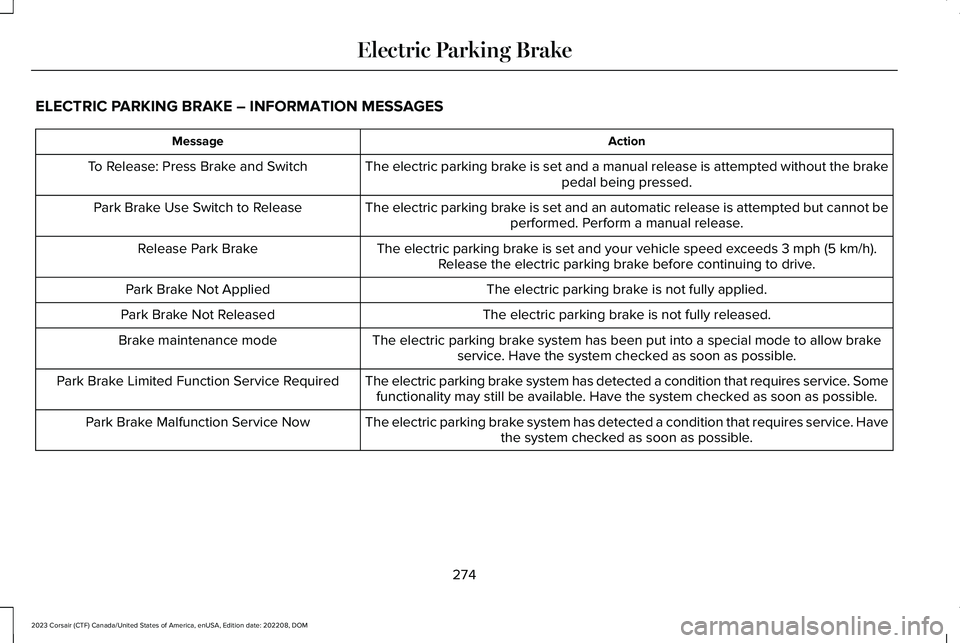
ELECTRIC PARKING BRAKE – INFORMATION MESSAGES
ActionMessage
The electric parking brake is set and a manual release is attempted without the brakepedal being pressed.To Release: Press Brake and Switch
The electric parking brake is set and an automatic release is attempted but cannot beperformed. Perform a manual release.Park Brake Use Switch to Release
The electric parking brake is set and your vehicle speed exceeds 3 mph (5 km/h).Release the electric parking brake before continuing to drive.Release Park Brake
The electric parking brake is not fully applied.Park Brake Not Applied
The electric parking brake is not fully released.Park Brake Not Released
The electric parking brake system has been put into a special mode to allow brakeservice. Have the system checked as soon as possible.Brake maintenance mode
The electric parking brake system has detected a condition that requires service. Somefunctionality may still be available. Have the system checked as soon as possible.Park Brake Limited Function Service Required
The electric parking brake system has detected a condition that requires service. Havethe system checked as soon as possible.Park Brake Malfunction Service Now
274
2023 Corsair (CTF) Canada/United States of America, enUSA, Edition date: 202208, DOMElectric Parking Brake