2023 LINCOLN CORSAIR mirror
[x] Cancel search: mirrorPage 361 of 690

WHAT IS CROSS TRAFFIC ALERT
The system alerts you of vehiclesapproaching from the sides behind yourvehicle when you shift into reverse (R).
HOW DOES CROSS TRAFFIC
ALERT WORK
Cross traffic alert detects vehicles thatapproach at a speed between 4–37 mph(6–60 km/h). Coverage decreases when thesensors are partially, mostly or fullyobstructed.
The sensor on the left-hand side is onlypartially obstructed and zone coverage onthe right-hand side is maximized.
Zone coverage also decreases when parkingat narrow angles. The sensor on the left-handside is mostly obstructed and zone coverageon that side is severely reduced.
Note: Slowly reversing helps increase thecoverage area and effectiveness.
CROSS TRAFFIC ALERT
PRECAUTIONS
WARNING: Do not use the crosstraffic alert system as a replacement forusing the interior and exterior mirrors orlooking over your shoulder beforereversing out of a parking space. The crosstraffic alert system is not a replacement forcareful driving.
WARNING: The system may notoperate properly during severe weatherconditions, for example snow, ice, heavyrain and spray. Always drive with due careand attention. Failure to take care mayresult in a crash.
357
2023 Corsair (CTF) Canada/United States of America, enUSA, Edition date: 202208, DOMCross Traffic AlertE142440 E142441
Page 363 of 690

Note:Do not cover the sensors with bumperstickers, repair compound or other objects.
Note:Blocked sensors may affect systemaccuracy.
If something is blocking the sensors, amessage may appear in the informationdisplay when you shift into reverse (R).
Note:Bike and cargo racks could causefalse alerts due to obstruction of the sensor.We recommend switching the feature offwhen using a bike or cargo rack.
CROSS TRAFFIC ALERT
INDICATORS
When the cross traffic alert detectsan approaching vehicle, a tonesounds, a warning lamp illuminatesin the relevant exterior mirror and arrowsappear in the information display to showwhich side the vehicle is approaching from.
If the system malfunctions, a messageappears in the instrument cluster. Have yourvehicle checked as soon as possible.
Note:If arrows do not display, a messageappears in the information display.
Note:In some conditions, the system couldalert you, even when there is nothing in thedetection zone, for example a vehiclepassing further away from your vehicle.
359
2023 Corsair (CTF) Canada/United States of America, enUSA, Edition date: 202208, DOMCross Traffic AlertE268294
Page 376 of 690

WHAT IS DRIVER ALERT
Driver alert alerts you if it determines thatyou are becoming drowsy or if your drivingdeteriorates.
HOW DOES DRIVER ALERT WORK
Driver Alert calculates your alertness levelbased on your driving behavior in relation tothe lane markings and other factors throughuse of the front camera sensor behind theinterior mirror.
DRIVER ALERT PRECAUTIONS
WARNING: You are responsible forcontrolling your vehicle at all times. Thesystem is designed to be an aid and doesnot relieve you of your responsibility todrive with due care and attention. Failureto follow this instruction could result in theloss of control of your vehicle, personalinjury or death.
WARNING: Take regular rest breaksif you feel tired. Do not wait for the systemto warn you.
WARNING: Certain driving styles mayresult in the system warning you even ifyou are not feeling tired.
WARNING: In cold and severeweather conditions the system may notfunction. Rain, snow and spray can all limitsensor performance.
WARNING: The system will notoperate if the sensor cannot track the roadlane markings.
WARNING: If damage occurs in theimmediate area surrounding the sensor,have your vehicle checked as soon aspossible.
WARNING: The system may notcorrectly operate if your vehicle is fittedwith a suspension kit not approved by us.
WARNING: The system may notoperate properly if the sensor is blocked.Keep the windshield free from obstruction.
Note:If something is blocking the cameraor damaged the windshield, Driver Alert maynot function.
372
2023 Corsair (CTF) Canada/United States of America, enUSA, Edition date: 202208, DOMDriver AlertE309385
Page 378 of 690

WHAT IS SPEED SIGN
RECOGNITION
Speed sign recognition detects speed limitsigns to inform you of the current speed limit.Detected speed signs appear in theinstrument cluster display.
HOW DOES SPEED SIGN
RECOGNITION WORK
Speed sign recognition uses a sensor behindthe interior mirror to detect speed signs.
If your vehicle has speed sign recognitionwith navigation, stored speed sign data mayinfluence the indicated speed limit value.
SPEED SIGN RECOGNITION
PRECAUTIONS
WARNING: You are responsible forcontrolling your vehicle at all times. Thesystem is designed to be an aid and doesnot relieve you of your responsibility todrive with due care and attention. Failureto follow this instruction could result in theloss of control of your vehicle, personalinjury or death.
WARNING: In cold and severeweather conditions the system may notfunction. Rain, snow and spray can all limitsensor performance.
WARNING: The system may notoperate properly if the sensor is blocked.Keep the windshield free from obstruction.
WARNING: Do not performwindshield repairs in the area surroundingthe sensor.
WARNING: The system may notcorrectly operate if your vehicle is fittedwith a suspension kit not approved byFord.
WARNING: Not all traffic signs canbe recognized by the system anddisplayed correctly.
Note:Always fit our original parts whenreplacing headlamp bulbs. Other bulbs mayreduce system performance. See ExteriorBulb Specification Chart (page 450).
SPEED SIGN RECOGNITION
LIMITATIONS
Speed sign recognition may not operatecorrectly due to:
•Outdated map data.
•Incorrect recognition of speed limits bythe sensor of signs on parallel roads orexit ramps.
•Missed recognition of faded, dirty, ordistorted signs.
374
2023 Corsair (CTF) Canada/United States of America, enUSA, Edition date: 202208, DOMSpeed Sign Recognition
Page 427 of 690
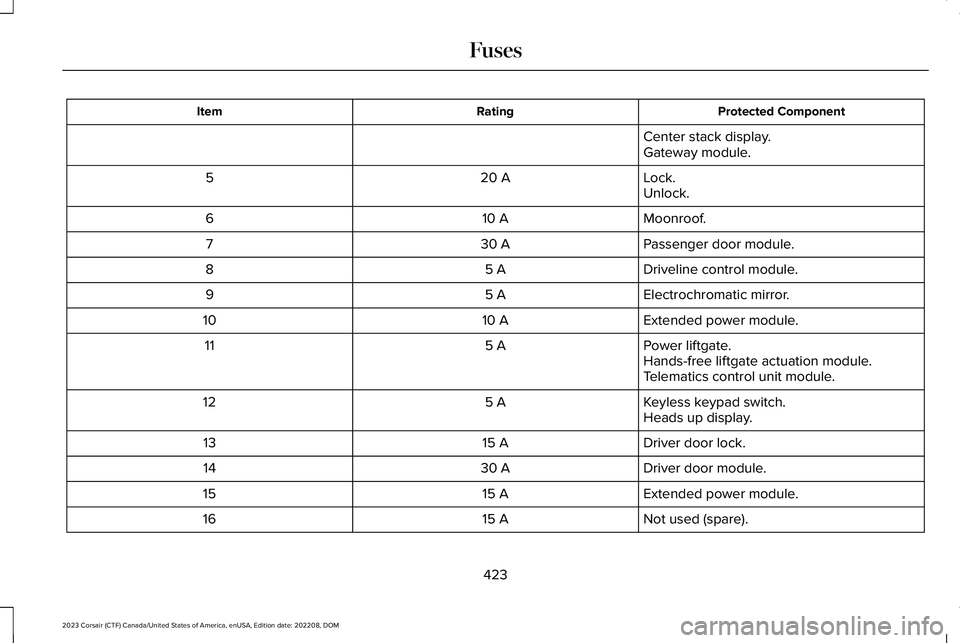
Protected ComponentRatingItem
Center stack display.Gateway module.
Lock.20 A5Unlock.
Moonroof.10 A6
Passenger door module.30 A7
Driveline control module.5 A8
Electrochromatic mirror.5 A9
Extended power module.10 A10
Power liftgate.5 A11Hands-free liftgate actuation module.Telematics control unit module.
Keyless keypad switch.5 A12Heads up display.
Driver door lock.15 A13
Driver door module.30 A14
Extended power module.15 A15
Not used (spare).15 A16
423
2023 Corsair (CTF) Canada/United States of America, enUSA, Edition date: 202208, DOMFuses
Page 552 of 690
HOW DO PERSONAL PROFILES
WORK
This feature allows you to create multiplepersonal profiles enabling users topersonalize vehicle’s settings such as seatsand mirrors, as well as non-positional settingslike radio, navigation, driver assist systemsettings. Positional settings are saved byholding a memory seat button.Non-positional settings are saved youchange a setting while a profile is active. Youcan create one profile for each presetmemory seat button along with a guestprofile.
Recalling and Changing a Profile
You can recall a profile using thetouchscreen or the preset button youselected when you created your profile. Youcan also link a remote control and a mobiledevice to your profile, which are used torecall it.
ENABLING OR DISABLING
PERSONAL PROFILES
1.Switch the vehicle on and leave thevehicle in park (P).
2.Press Settings on the touchscreen.
3.Press Personal Profiles.
4.Switch Personal Profiles on or off.
When enabled:
•Unlocking a door with a remote controlor mobile device that is not linked to adriver profile does not change the activeprofile, but remains in the last knownprofile. It does not change the positionalsettings.
•Pressing a memory seat button that isnot linked to a driver profile or saved toa preset setting does not change theactive profile, but remains in the lastknown profile. It does not change thepositional settings.
•Pressing a memory seat button that isnot linked to a driver profile but is savedto a preset setting does not change theactive profile, but remains in the lastknown profile. It recalls the positionalsettings that you saved to that memoryseat button.
548
2023 Corsair (CTF) Canada/United States of America, enUSA, Edition date: 202208, DOMPersonal Profiles
Page 666 of 690

Predictive Speed Assist –Troubleshooting.............................................325
Adaptive Cruise Control AutomaticCancellation.................................................314Adaptive Cruise Control Indicators..........318Adaptive Cruise Control Limitations..........311Adaptive Cruise Control Precautions......310Adaptive Cruise Control –Troubleshooting.........................................325Adaptive Cruise Control – InformationMessages.........................................................325
Adaptive Cruise Control Videos...............327Adaptive Front Lighting...............................125How Does Adaptive Front LightingWork...................................................................125Switching Adaptive Front Lighting On andOff.......................................................................127
Adaptive Front Lighting –Troubleshooting..........................................127Adaptive Front Lighting – InformationMessages..........................................................127
Adjusting the Exterior Mirrors....................134Adjusting the Headlamps...........................448Adjusting the Instrument Panel LightingBrightness....................................................129Adjusting the Map.........................................551Changing the Format of the Map....................551Zooming the Map In and Out...........................551
Adjusting the Seatbelt Height.....................60Adjusting the Seatbelts DuringPregnancy......................................................59Adjusting the Sound Settings...................522Adjusting the Steering Wheel - VehiclesWith: Manual Adjustable SteeringColumn............................................................111Adjusting the Steering Wheel - VehiclesWith: Power Adjustable SteeringColumn............................................................111Adjusting the Volume...................................521Aid Mode........................................................344How Does Aid Mode Work..............................345What Is Aid Mode...............................................344
Airbag Precautions.........................................68Airbags..............................................................65Front Passenger Sensing System....................69
Air ConditioningSee: Climate Control..........................................168
Air Conditioning System Capacity andSpecification - 2.0L EcoBoost™..............507Air Conditioning System Capacity andSpecification - 2.5L, Plug-In HybridElectric Vehicle (PHEV)............................509Alert and Aid Mode......................................345How Does Alert and Aid Mode Work............345What Is Alert and Aid Mode.............................345
Alert Mode......................................................344How Does Alert Mode Work............................344What Is Alert Mode.............................................344
Alexa Built-In.................................................536Alexa Built-In Requirements......................536Alexa Built-In Settings.................................536All-Wheel Drive.............................................266All-Wheel Drive – Troubleshooting................267
All-Wheel Drive Limitations.......................266All-Wheel Drive Precautions.....................266All-Wheel Drive – Troubleshooting..........267All-Wheel Drive – InformationMessages.........................................................267
AM/FM Radio.................................................523AM/FM Radio Limitations.................................523Selecting a Radio Station.................................523
Ambient Lighting...........................................129Adjusting Ambient Lighting..............................129Switching Ambient Lighting On and Off........129
Anti-Lock Braking System..........................268Anti-Lock Braking System Indicators............268Anti-Lock Braking System Limitations..........268
Anti-Theft Alarm System..............................107Arming the Anti-Theft Alarm System.............108Disarming the Anti-Theft Alarm System........108How Does the Anti-Theft Alarm SystemWork...................................................................107What Are the Inclination Sensors...................108
662
2023 Corsair (CTF) Canada/United States of America, enUSA, Edition date: 202208, DOMIndex
Page 667 of 690

What Are the Interior Sensors.........................108What Is the Anti-Theft Alarm System.............107What Is the Battery Backup Alarm..................108What Is the Perimeter Alarm............................108
Anti-Theft Alarm System Settings.............108Setting the Alarm Security Level.....................109Switching Ask on Exit On and Off...................109What are the Alarm Security Levels...............108What Is Ask on Exit.............................................109
Appendices...................................................655Applying the Electric Parking Brake........272Applying the Electric Parking Brake in anEmergency..................................................272App Precautions...........................................545App Requirements.......................................545Apps.................................................................545Audio System.................................................521AM/FM Radio.......................................................523Audio System – Troubleshooting..................528Digital Radio.........................................................524Satellite Radio.....................................................525
Audio System Precautions..........................521Audio System – Troubleshooting............528Audio System – Information Messages.......528
Audio System Videos...................................531Auto Air Refresh.............................................174Auto Air Refresh Hints........................................177Auto Air Refresh Indicators...............................176
Automatically Refreshing the Interior Air......176Checking the Interior Air Quality.....................174How Does Auto Air Refresh Work...................174Manually Refreshing the Interior Air...............176What Is Auto Air Refresh....................................174
Auto-Dimming Exterior Mirror....................135What Is the Auto-Dimming ExteriorMirror..................................................................135
Auto-Dimming Interior Mirror.....................133Auto-Dimming Interior Mirror Limitations......133What Is the Auto-Dimming InteriorMirror..................................................................133
Auto Hold.......................................................284Auto Hold Indicators...................................285Auto Hold Videos.........................................285Autolamps........................................................119Autolamp Settings................................................119What Are Autolamps...........................................119
Autolock............................................................89Autolock Requirements.......................................89What Is Autolock...................................................89
Automatically Releasing the ElectricParking Brake.............................................273Automatic Crash Shutoff............................406Automatic Crash Shutoff Precautions...........406Re-Enabling Your Vehicle.................................406What Is Automatic Crash Shutoff...................406
Automatic Emergency Braking.................368Switching Automatic Emergency Braking Onand Off..............................................................368What Is Automatic Emergency Braking........368
Automatic Engine Stop...............................209How Does Automatic Engine StopWork..................................................................209Overriding Automatic Engine Stop................209Switching Automatic Engine Stop On andOff......................................................................209What Is Automatic Engine Stop......................209
Automatic High Beam Control....................121Automatic High Beam ControlIndicators..........................................................123Automatic High Beam ControlLimitations.........................................................123Automatic High Beam ControlPrecautions......................................................122Automatic High Beam ControlRequirements...................................................122How Does Automatic High Beam ControlWork....................................................................121Overriding Automatic High BeamControl...............................................................123Switching Automatic High Beam Control Onand Off...............................................................123
663
2023 Corsair (CTF) Canada/United States of America, enUSA, Edition date: 202208, DOMIndex