2023 LINCOLN AVIATOR Interior light
[x] Cancel search: Interior lightPage 6 of 681

Daytime Running Lamps - Vehicles With:
Configurable Daytime Running Lamps
........................................................................1 1 3
Daytime Running Lamps - Vehicles With:
Daytime Running Lamps (DRL) ..............113
Front Fog Lamps ...........................................113
Adaptive Headlamps ....................................114
Direction Indicators ......................................116
Welcome Lighting .........................................116
Interior Lamps .................................................117
Ambient Lighting ...........................................117
Automatic High Beam Control
What Is Automatic High Beam Control
........................................................................119
Switching Automatic High Beam Control
On and Off ..................................................119
Automatic High Beam Control Indicators
.......................................................................120
Overriding Automatic High Beam Control
.......................................................................120
Windows and Mirrors
Power Windows .............................................121
Global Opening and Closing ....................122Exterior Mirrors .............................................122
Interior Mirror ................................................124
Sun Visors ......................................................125
Moonroof ........................................................125
Instrument Cluster
Gauges ...........................................................128
Warning Lamps and Indicators ..................131
Audible Warnings and Indicators .............135
Information Displays
General Information .....................................136
Personalized Settings .................................140
Information Messages ................................142
Climate Control
Automatic Climate Control ........................165
Hints on Controlling the Interior Climate
.......................................................................168
Rear Passenger Climate Controls -
Vehicles With: Quadruple Zone
Automatic Temperature Control ..........169Rear Passenger Climate Controls -
Vehicles With: Triple Zone Automatic
Temperature Control ...............................170
Heated Rear Window ...................................171
Heated Exterior Mirrors ...............................171
Remote Start ..................................................172
Interior Air Quality
What Is the Cabin Air Filter ........................173
Replacing the Cabin Air Filter ...................173
What Is Auto Air Refresh .............................173
How Does Auto Air Refresh Work ............173
Checking the Interior Air Quality ..............173
Auto Air Refresh Indicators ........................174
Refreshing the Interior Air ..........................174
Auto Air Refresh Hints .................................175
Interior Air Quality – Troubleshooting
.......................................................................1 7 5
Seats
Sitting in the Correct Position ...................176
Head Restraints .............................................177
Power Seats ...................................................179
Memory Function .........................................184
3
Table of Contents
Page 16 of 681

Headlamp high beams
E270968
Headlamps on
Heated rear window
E163171
Hill descent control
E270945
Horn control
Interior luggage compartment
release
Jack
E161353
Keep out of reach of children
Lighting control
Low fuel level
Low tire pressure warning
Maintain correct fluid level
Malfunction Indicator Lamp (MIL)
Note operating instructions
Panic alarm
E139213
Parking aid
Parking lamps
E270849
Passenger airbag activated
E270850
Passenger airbag deactivated
Power steering fluid
Power windows front/rear
Power window lockout
E231159
Requires registered technician
E65963E65963Safety alert
See Owner's Manual
E231158
See Service Manual
Side airbag
Shield the eyes
E138639
Stability control
13
Introduction
Page 92 of 681
Illuminated Entry
The interior lamps and some exterior lamps
illuminate when you unlock the doors with
the remote control.
The illuminated entry system turns off the
lights if:
• The ignition is on.
• You press the remote control lock button.
• More than 25 seconds have elapsed.
The lights do not turn off if:
• You turn them on with the lamp control.
• Any door is open.
Illuminated Exit
The interior lamps and some exterior lamps
illuminate when all doors are closed and you
switch the ignition off.
The lamps turn off if all the doors remain
closed and:
• More than 25 seconds have elapsed.
• You press the push button ignition
switch.
Battery Saver
If you leave the courtesy lamps, interior
lamps or headlamps on, the battery saver
shuts them off 10 minutes after you switch
the ignition off.
Battery Saver for Intelligent Access Keys
If you leave the ignition switched on, it shuts
off when it detects a certain amount of
battery drain, or after 30 minutes.
Opening the Luggage Compartment
From Inside Your Vehicle
E138633
With the transmission in park (P),
press the button on the instrument
panel.
With the Remote Control
E306276
Press twice within three seconds
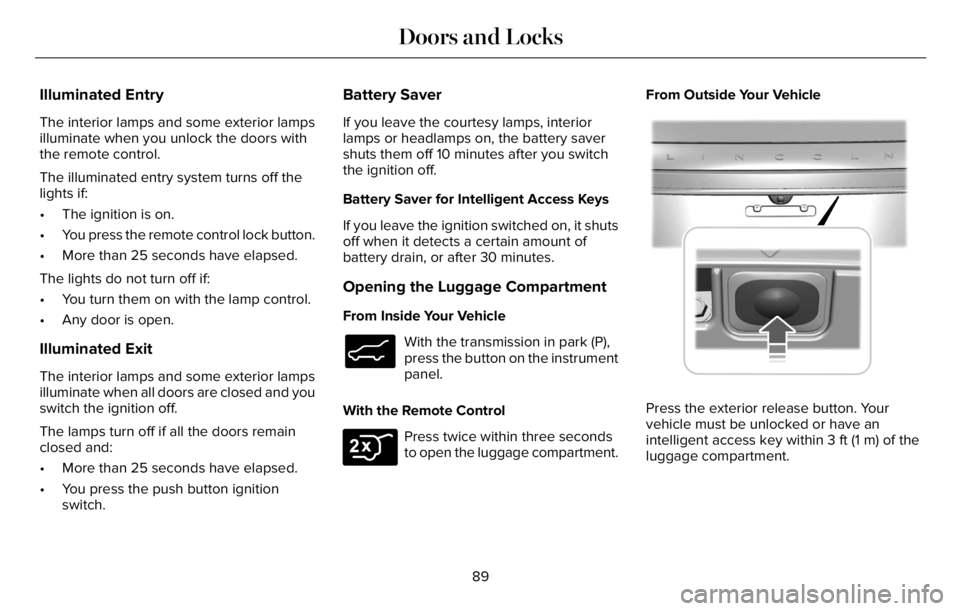
to open the luggage compartment.From Outside Your Vehicle
E291416E291416
Press the exterior release button. Your
vehicle must be unlocked or have an
intelligent access key within 3 ft (1 m) of the
luggage compartment.
89
Doors and Locks
Page 114 of 681

GENERAL INFORMATION
Condensation in the Exterior Front
Lamps and Rear Lamps
Exterior front lamps and rear lamps have
vents to accommodate normal changes in
air pressure.
Condensation can be a natural by-product
of this design. When moist air enters the
lamp assembly through the vents, there is a
possibility that condensation can occur when
the temperature is cold. When normal
condensation occurs, a fine mist can form on
the interior of the lens. The fine mist
eventually clears and exits through the vents
during normal operation.
Clearing time may take as long as 48 hours
under dry weather conditions.
Examples of acceptable condensation are:
• The presence of a fine mist (no streaks,
drip marks or large droplets).
• A fine mist covers less than 50% of the
lens.Examples of unacceptable condensation are:
• A water puddle inside the lamp.
• Streaks, drip marks or large droplets
present on the interior of the lens.
If you see any unacceptable condensation,
have your vehicle checked by an authorized
dealer.
LIGHTING CONTROL
Lighting Control Selections
E281338
Press the toggle switch upward or downward
to make a selection.
Note:An indicator illuminates next to the
active selection.
E265031
Lamps off.
Parking lamps, instrument panel
lamps, license plate lamps and rear
lamps.
E281240
Autolamps.
E270968
Headlamps on.
Note:The lighting control defaults to
autolamps each time you switch your vehicle
on.
Switching High Beam Headlamps On
and Off
EE2731182
111
Lighting
Page 120 of 681

1. Select Settings. See Settings (page 555).
2. Select Vehicle.
3. Select Lighting.
INTERIOR LAMPS
The lamps turn on under the following
conditions:
• You open any door.
• You press a button on the remote control.
• You press the all lamps on button on the
overhead console.
Front Interior Lamp
E301059E301059E301059
The front interior lamp switches are on the
overhead console.Note:The position of each button on the
overhead console depends on your vehicle.
All Lamps On or Off
Press to switch all interior lamps
on or off.
Individual Map Lamps
Touch the lamp lens to switch the map lamps
on and off.
Interior Lamp Function
Press to switch the interior lamp
function on and off.
When the interior lamp function is off and
you open a door, the courtesy and door
lamps stay off.
When the interior lamp function is on and
you open a door, the courtesy and door
lamps turn on.
Note:The indicator lamp lights amber when
the door function is off.
Rear Interior Lamps
E281231
The rear interior lamps may be above the
rear seat or above the rear windows.
Press to switch the lamps on or off.
Note:If the rear lamps are switched on
through the overhead console, you cannot
switch them off with the rear lamp switch.
AMBIENT LIGHTING (IF EQUIPPED)
Use the touchscreen to select the following:
117
Lighting
Page 127 of 681

To reset the power-fold feature, use the
power-folding mirror control to fold and
unfold the mirrors. You may hear a loud noise
as you reset the power-folding mirrors. This
sound is normal. Repeat this process as
needed each time you manually fold the
mirrors.
Heated Exterior Mirrors
See Heated Exterior Mirrors (page 171).
Memory Mirrors
You can save and recall the mirror positions
through the memory function. See Memory
Function (page 184).
Auto-dimming Feature
The driver exterior mirror dims when the
interior auto-dimming mirror turns on.
Direction Indicator Mirrors
When the vehicle is running, the
forward-facing portion of the appropriate
mirror housing blinks when you switch on
the direction indicator.
Lincoln Welcome Mat Projection Lamp
The lamps on the bottom part of the exterior
mirror lower housing light when you use your
transmitter to unlock the doors or when you
open a door.
360-Degree Camera (If Equipped)
See 360 Degree Camera (page 300).
Blind Spot Information System (If Equipped)
See Blind Spot Information System (page
326).
INTERIOR MIRROR
WARNING: Do not adjust the mirrors
when your vehicle is moving. This could
result in the loss of control of your vehicle,
serious personal injury or death.
Note:Do not clean the housing or glass of
any mirror with harsh abrasives, fuel or other
petroleum or ammonia-based cleaning
products.You can adjust the interior mirror to your
preference. Some mirrors also have a second
pivot point. This lets you move the mirror
head up or down and from side to side.
Auto-Dimming Mirror
Note: Do not block the sensors on the front
and back of the mirror. A rear center
passenger or raised rear center head
restraint may also block light from reaching
the sensor.
The mirror dims to reduce the effect of bright
light from behind. It returns to normal when
the bright light from behind is no longer
present or if you shift into reverse (R).
124
Windows and Mirrors
Page 170 of 681

Auto Mode Indicator Status
Description Auto Mode Indicator Status
One indicator illuminated. • The blower motor speed is reduced.
• Use this setting to minimize the amount of noise from the blower motor.
• This setting increases the time taken to cool the interior.
Two indicators illuminated. • The blower motor speed is moderate.
Three indicators illuminated. • The blower motor speed is increased.
• Use this setting to reduce the time taken to cool the interior.
• This setting increases the amount of noise from the blower motor.
Switching the Air Conditioning On and
Off
Press and release the button.
Use air conditioning with recirculated air to
improve cooling performance and efficiency.Note:In certain conditions, such as
maximum defrost, the air conditioning
compressor may continue to operate even
though you switch off the air conditioning.
Note:The A/C LED light may turn on and off
based on the temperature setting or the
current conditions.
Switching the Climate Control On and
Off
Press and release the button.
Note:Your vehicle may not have a physical
button. You can use the touchscreen to turn
the climate control on and off.
167
Climate Control
Page 219 of 681

• The trailer is not connected.
• If you select Normal, Conserve, or
Slippery.
• You are not in 4H or 4L.
• You have not selected Manual shift
mode.
• Hill descent control is not active.
• You have not selected Tow haul, Excite,
Deep, or Slow Climb.
Note:When in Excite mode, Start/Stop can
be enabled by pressing the Auto-Start-Stop
button.
E121377
The green Auto-Start-Stop
indicator light on the instrument
cluster will illuminate to indicate
when the automatic engine stop occurs.
E146361
If the instrument cluster is
equipped with a grey
Auto-Start-Stop indicator light, it
illuminates when automatic engine stop is
not available due to one of the above noted
conditions not being met.Automatic Engine Restart
Any of the following conditions will result in
an automatic restart of the engine:
• You have removed your foot from the
brake pedal.
• You press the accelerator pedal.
• You press the accelerator and the brake
pedal at the same time.
• The driver safety belt becomes
unfastened or the driver door is ajar.
• Your vehicle is moving.
• The interior compartment does not meet
customer comfort when air conditioning
or heat is on.
• Fogging of the windows could occur and
the air conditioning is on.
• The battery is not within optimal
operating conditions.
• You have exceeded the maximum engine
off time.
• When you press the Auto-Start-Stop
button with the engine automatically
stopped.• The front defroster is turned to the Max
setting.
• When you shift into park (P), the engine
will restart.
Any of the following conditions may result in
an automatic restart of the engine:
• You have increased the blower fan speed
or changed the climate control
temperature.
• You have an electrical accessory turned
on or plugged in.
Note:You may notice that the climate seat
fan fluctuates during an automatic restart.
Disabling Auto-Start-Stop
E287975
Press the button on the instrument
panel to access the
Auto-Start-Stop feature on the
touchscreen. Use the touchscreen to
deactivate the feature.
Deactivating the feature lasts only 1 key
cycle. Use the touchscreen to restore
Auto-Start-Stop function.
216
Unique Driving Characteristics