Page 33 of 112

32
RX500h/RX350h_QG_U
While the vehicle is stopped, pull and hold the parking brake switch until a buzzer sounds
and a message is shown on th e multi-information display.
When the automatic mode is turned on, the parking brake operates as follows.
● When the shift position is shifted from P, th e parking brake will be released, and the park-
ing brake indicator light will turn off.
● When the shift position is shifted to P, the parking brake will be set, and the parking brake
indicator light will turn on.
Operate the shift lever and P position switch with the vehicle stopped and the brake pedal
depressed.
The auto function may not operate if the shift lever is moved extremely quickly. In this situa-
tion, apply the parking brake manually.
While the vehicle is stopped and depressing the brake pedal, press and hold the parking
brake switch until a buzzer sounds and a message is shown on the multi-information display.
Turning the automatic mode on
Turning the automatic mode off
Page 37 of 112

36
RX500h/RX350h_QG_U
Vehicles with a head-up display
Center display
Steering switch
The function of each swit ch differs depending on th e conditions and settings.
When a switch is touched, th e function of each switch is displayed on the head-up dis-
play. If the head-up display is off, or when it is not possible to display content on the
head-up display, the functions will be di splayed on the multi-information display.
Also, preferred functions for each swit ch can be set on the center display.
Switch function change switch
Each time this switch is pressed, the functions will change.
Switch icon display
The icon of each switch will be displayed. The touched switch will be highlighted. ( )
Switch function guide display
The function guide for the touc hed switch will be displayed.
A
B
C
D
F
E
The head-up display may seem dark or hard to see when viewed through sunglasses,
especially polarized sunglasses.
Adjust the brightness of the head-up display or remove your sunglasses.
Page 39 of 112
38
RX500h/RX350h_QG_U
■EV driving ratio since starting (If equipped)
Displays the percentage of EV driving since starting.
It is reset each time the hybrid system stops.
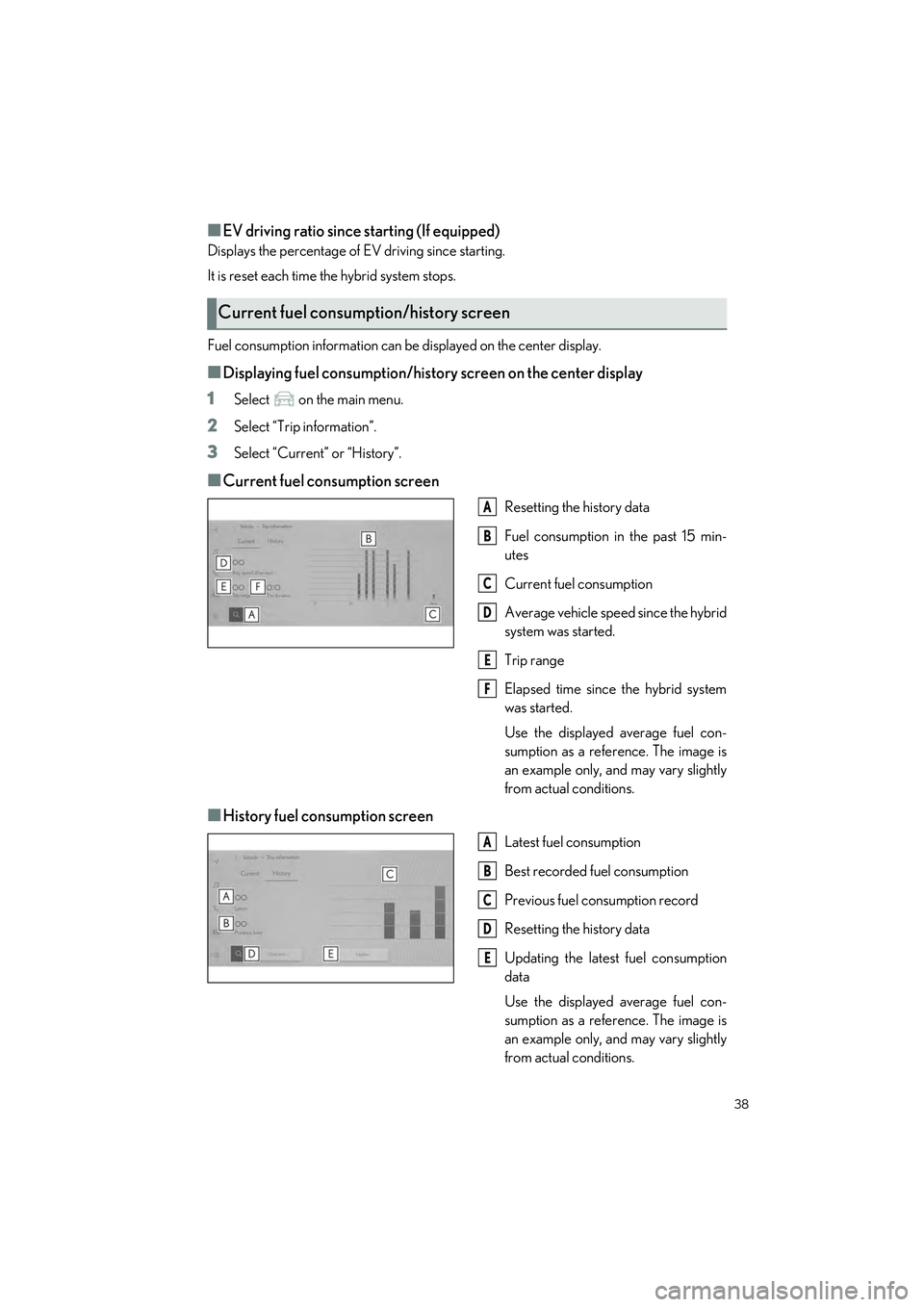
Fuel consumption information can be displayed on the center display.
■Displaying fuel consumption/history screen on the center display
1
Select on the main menu.
2Select “Trip information”.
3Select “Current” or “History”.
■Current fuel consumption screen
Resetting the history data
Fuel consumption in the past 15 min-
utes
Current fuel consumption
Average vehicle speed since the hybrid
system was started.
Trip range
Elapsed time since the hybrid system
was started.
Use the displayed average fuel con-
sumption as a refe rence. The image is
an example only, and may vary slightly
from actual conditions.
■History fuel consumption screen
Latest fuel consumption
Best recorded fuel consumption
Previous fuel consumption record
Resetting the history data
Updating the latest fuel consumption
data
Use the displayed average fuel con-
sumption as a refe rence. The image is
an example only, and may vary slightly
from actual conditions.
Current fuel consumption/history screen
A
B
C
D
E
F
A
B
C
D
E
Page 40 of 112
39
RX500h/RX350h_QG_U
U.S.A.
Canada
1 The side marker, parking, tail,
license plate, inst rument panel lights,
and daytime running lights turn on.
2 The headlights and all lights listed
above (except daytime running lights)
turn on.
3 The headlights, daytime running
lights and all the lights listed above turn
on and off automatically.
(When the power switch is in ON.)
4 (U.S.A.) Off
1With the headlights on, push the lever
away from you to turn on the high
beams.
Pull the lever toward you to the center
position to turn the high beams off.
2Pull the lever toward you and release it
to flash the high beams once.
You can flash the high beams with the
headlights on or off.
Headlights Switch
A
B
Turning on the high beam headlights
Page 41 of 112
40
RX500h/RX350h_QG_U
1Press the Adaptive High-beam System
switch.
2Turn the headlight switch to the or position.
When the headlight switch lever is in
the low beam positi on, the AHS will be
enabled and the AHS indicator will illu-
minate.
AHS (Adaptive High-bea m System) (if equipped)
The Adaptive High-beam System uses a front camera located on the upper portion of the
windshield to detect the brightness of the lights of vehicles ahead, streetlights, etc., and
automatically controls the light distribution of the headlights.
Using the Adaptive High-beam System
Page 43 of 112
42
RX500h/RX350h_QG_U
1Press the Automatic High Beam
switch.
2Turn the headlight switch to the or position.
When the headlight switch lever is in
the low beam position, the AHB system
will be enabled and the AHB indicator
will illuminate.
AHB (Automatic High Beam) (if equipped)
The Automatic High Beam uses a front camera located on the upper portion of the wind-
shield to detect the brightness of the lights of vehicles ahead, streetlights, etc., and auto-
matically changes the head lights between the high beams and low beams.
Using the Automatic High Beam system
Page 45 of 112
44
RX500h/RX350h_QG_U
1 (U.S.A.) or (Canada)
Turns the fog lights off
2 Turns the fog lights on
Fog Light Switch
The fog lights secure excellent vi sibility in difficult driving conditions, such as in rain and
fog.
Page 47 of 112
46
RX500h/RX350h_QG_U
8 Washer/wiper dual operation
Pulling the lever operates the wipers
and washer.
(After operating seve ral times, the wip-
ers operate once more time after a
short delay to prevent dripping. How-
ever, the dripping prevention does not
operate while the vehicle is moving.)
Vehicles with headlight cleaners:
When the power switch is in ON and
the headlights are on, if the lever is
pulled, the headlight cleaners will
operate once. After this, the headlight
cleaners will operate every 5th time
the lever is pulled.


