Page 95 of 112
94
RX500h/RX350h_QG_U
Vehicles with Digital Rearview Mirror
HomeLink
® logo
Appears while HomeLink
® is operat-
ing. When the menu button is pressed,
the logo disappears even while the
HomeLink
® is operating.
Garage door operation indicators
HomeLink
® indicator light
Illuminates above each button
selected.
Buttons
■Before programming HomeLink®
● During programming, it is possible that gara ge doors, gates, or other devices may oper-
ate. For this reason, make su re that people and objects ar e clear of the garage door or
other devices to prevent injury or other potential harm.
● It is recommended that a new battery be placed in the remote control transmitter for
more accurate programming.
● Garage door opener motors manufactured after 1995 may be equipped with rolling
code protection. If this is the case, you may need a stepladder or other sturdy, safe device
to reach the “Learn” or “Smart” button on the garage door opener motor.
A
B
C
D
Programming the HomeLink®
Page 96 of 112
95
RX500h/RX350h_QG_U
■Programming HomeLink®
Steps 1 through 3 must be performed within 60 seconds, otherwise the HomeLink® indica-
tor light will stop flashing and programming will not be successfully completed.
1Press and release the HomeLink® button you want to program and check that the
HomeLink
® indicator light flashes (orange).
2Point the remote control transmitter for the device at the rear view mirror, 1 to 3 in. (25
to 75 mm) from the HomeLink
® buttons.
Keep the HomeLink
® indicator light in view while programming.
Vehicles with auto anti-glare inside rear view mirror
Vehicles with Digital Rearview Mirror
3Program a device.
Vehicles with auto anti-glare inside rear view mirror
Page 97 of 112
96
RX500h/RX350h_QG_U
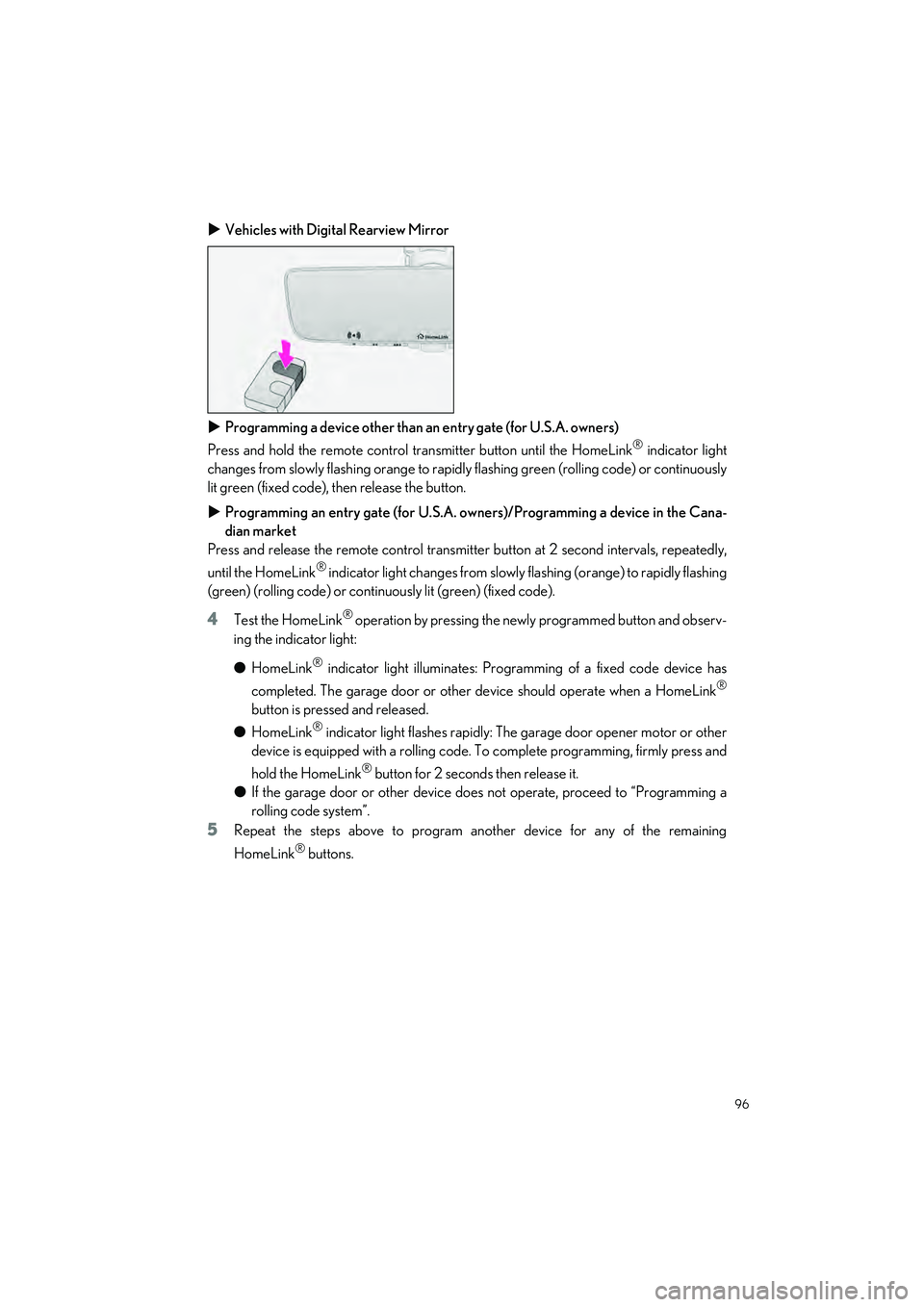
Vehicles with Digital Rearview Mirror
Programming a device other than an entry gate (for U.S.A. owners)
Press and hold the remote control transmitter button until the HomeLink
® indicator light
changes from slowly flashing orange to rapidl y flashing green (rolling code) or continuously
lit green (fixed code), then release the button.
Programming an entry gate (for U.S.A. owners)/Programming a device in the Cana-
dian market
Press and release the remote control transmitter button at 2 second intervals, repeatedly,
until the HomeLink
® indicator light changes from slowly flashing (orange) to rapidly flashing
(green) (rolling code) or continuo usly lit (green) (fixed code).
4Test the HomeLink® operation by pressing the newly programmed button and observ-
ing the indicator light:
● HomeLink
® indicator light illuminates: Programming of a fixed code device has
completed. The garage door or other device should operate when a HomeLink
®
button is pressed and released.
● HomeLink
® indicator light flashes rapidly: The garage door opener motor or other
device is equipped with a rolling code. To complete programming, firmly press and
hold the HomeLink
® button for 2 seconds then release it.
● If the garage door or other device does not operate, proceed to “Programming a
rolling code system”.
5Repeat the steps above to program another device for any of the remaining
HomeLink
® buttons.
Page 99 of 112

98
RX500h/RX350h_QG_U
Vehicles with Digital Rearview Mirror
■Enabling 2-way communication with a ga rage door (only available for compat-
ible devices)
When enabled, 2-way communication allows yo u to check the status of the opening and
closing of a garage door through indicators in your vehicle.
2-way communication is only av ailable if the garage door opener motor used is a compati-
ble device. (To check device compatib ility, refer to www.homelink.com.)
1Within 5 seconds after programming the garage door opener has been completed, if
the garage door opener motor is trained to HomeLink
®, both garage door operation
indicators will flash rapidly (green) and the light on the garage door opener motor will
blink twice, indicating that 2-way communication is enabled.
If the indicators do not flash, perform
2 and 3 within the first 10 presses of the HomeLink®
button after programmin g has been completed.
2Press a programmed HomeLink® button to operate a garage door.
3Within 1 minute of pressing the HomeLink® button, after the garage door operation
has stopped, press the “Learn ” or “Smart” button on the garage door opener motor.
Within 5 seconds of the establishment of 2-way communication with the garage door
opener, both garage door operation indicators in th e vehicle will flash rapidly (green)
and the light on the garage do or opener motor will blink twice, indicating that 2-way
communication is enabled.
■Reprogramming a single HomeLink® button
When the following procedure is performed, buttons which already have devices registered
to them can be overwritten:
1Press and hold the desired HomeLink® button.
2When the HomeLink® indicator starts flashing orange, release the HomeLink® button
and perform “Programming HomeLink
®” 1 (it takes 20 seconds for the HomeLink®
indicator to start flashing).
Page 100 of 112

99
RX500h/RX350h_QG_U
Press the appropriate HomeLink® button. The HomeLink® indicator light should turn on.
The status of the opening and closing of a garage door is shown by the indicators.\
Vehicles with auto anti-glare inside rear view mirror
Opening
Closing
Vehicles with Digital Rearview Mirror
Opening
Closing
This function is only available if the garage door opener motor used is a compatible device.
(To check device co mpatibility, refer to www.homelink.com.)
The indicators can operate within approximatel y 820 ft. (250 m) of the garage door. How-
ever, if there are obstructions between the gara ge door and the vehicle, such as houses and
trees, feedback signals from the garage door may not be received.
To recall the previous door operation status, press and release either HomeLink
® buttons
and or and (vehicles with auto anti-glare inside rear view
mirror), and or and (veh icles with Digital Rearview Mir-
ror), simultaneously. The last recorded status will be displayed for 3 seconds.
Operating HomeLink®
A
B
A
B
ColorStatus
Orange (flashing)Currently opening/closing
GreenOpening/closing has completed
Red (flashing)Feedback signals cannot be received
Page 101 of 112
100
What to do if...
RX500h/RX350h_QG_U
What to do if...
List of Warning/Indicator Lights
Immediately stop the vehicle in a safe place and contact your Lexus dealer. Continu-
ing to drive the vehicle may be dangerous.
(U.S.A.)Brake system warning light
(red)
(Canada)
Immediately stop the vehicle in a safe place and contact your Lexus dealer.
Charging system warning light
(U.S.A.)Malfunction indicator lamp
Low engine oil pressure
warning light
(Canada)
Have the vehicle inspected by your Lexus dealer immediately.
(yellow)
Brake system warning lightIntuitive parking assist OFF
indicator (if equipped)
SRS warning light
(illuminates)
Slip indicator
(U.S.A.)ABS warning light
(flashes)
(U.S.A.)
Parking brake indicator
(Canada)(flashes)
(Canada)
(Red or
yellow)
Electric power steering
system warning light
(flashes)
Brake hold operated indicator
(Blinking and
then continu-
ously on)Tire pressure warning light
For further information, refe r to the “OWNER’S MANUAL”.
Page 102 of 112
What to do if...
101
RX500h/RX350h_QG_U
Follow the correction procedures.
Inappropriate pedal
operation warning light
(orange)
LTA indicator
Low fuel level warning
light
(orange)
LDA indicator
Driver’s and front
passenger’s seat belt
reminder light
(orange)
Dynamic radar cruise control
indicator
(Vehicles without a head-up display)Rear passengers’
seat belt reminder
light(orange)
Cruise control indicator
(Vehicles with a
head-up display)(orange)
PDA indicator
(Illuminates without
blinking)
Tire pressure warning
light
*
Driving assist information
indicator
Intuitive parking assist
OFF indicator
(if equipped)
(flashes) (U.S.A.)
Parking brake indicator
(orange)
PCS warning light(flashes)
(Canada)
Stop and check.
High coolant temperature
warning lightHybrid system overheat warn-
ing light
For further information, refe r to the “OWNER’S MANUAL”.
Page 103 of 112
102
What to do if...
RX500h/RX350h_QG_U
See the “OWNER’S MANUAL”
Turn signal indicator
Intuitive parking assist
OFF indicator
(if equipped)
(U.S.A.)
Headlight indicatorDriving assist information
indicator
(Canada)
Tail light indicator
(flashes)
Slip indicator
Headlight high beam indicatorVSC OFF indicator
AHS indicator (if equipped)
AHB indicator (if equipped)“READY” indicator
Fog light indicator
(U.S.A.)Parking brake indicator
PCS warning light
(Canada)
(green/white)
Cruise control indicatorBrake hold standby
indicator
(green/white)
Dynamic radar cruise control
indicatorBrake hold operated
indicator
(green/white)
LDA indicatorEV indicator
LDA OFF indicator
(if equipped)Low outside temperature
indicator
(green/white)
LTA indicator
(green/white)
PDA indicator
BSM outside rear view mirror
indicatorsStop light indicator
For further information, refer to the “OWNER’S MANUAL”.


