Page 169 of 348

Co")
7-13
A
Vehicle control commands are recognizable in English only.
A
Some commands may not be supported, depending on the vehicle model and f\
unctions.
Rear-seat function commands (if equipped)
Command Function
Passenger Talk Turn on the Passenger Talk.
Quiet Mode
Turn off Quiet Mode Turn on or off the Quiet Mode.
A
Some commands may not be supported, depending on the vehicle model and f\
unctions.
Search commands
Command Function
Search settings for
You can search for a setting menu.
For example, say "Search settings for Bluetooth" or "Search
settings for Display."
> See "Configuring system settings."
Other commands
Command
Function
Help Move to the help screen.
Line <1 to 4>* Select an item with the designated number on a list. Simple
numbers, such as "One" or "Two," can be recognized.
Yes* Accept a notification asking for your confirmation in an
exceptional situation.
No* Deny a notification asking for your confirmation in an
exceptional situation.
Next* If there are more than five items on a list, scroll to the next page.
Previous* If you scroll to the next page of a list, scroll back to the previous
page.
Manual Input* When using the Dial Number command, open the keypad to
enter a phone number manually.
Go Back* Returns to the previous step.
Exit End voice recognition.
* These commands are available only in certain situations.
Page 170 of 348

7-14
Available voice commands (Type2)
You can view the voice commands that can be recognized by the system.
A
Depending on vehicle model or specifications, the screen layout and available commands
may differ. Check the screen type for your vehicle model and view the appropriate
instructions.
Call commands
Command Function
Call You can make a call to one of your mobile phone's contacts. Say
a contact's name to begin a call.
Call The system dials the phone number of that contact. If the
contact has multiple phone numbers, select a phone number.
Call on Mobile The system dials the phone number saved as "Mobile" for that
contact.
Call at Work The system dials the phone number saved as "Work" for that
contact.
Call at Home The system dials the phone number saved as "Home" for that
contact.
Call on Other The system dials a phone number saved as other than "Mobile",
"Work", or "Home" for that contact.
Dial Number You can make a call. Say a phone number to begin a call.
Dial You can make a call immediately to that phone number.
Send Message You can send a text message to one of your mobile phone's
contacts. Say a contact's name and then enter the message
content by following the guidance.
This command is available only if Kia Connect is activated.
Send Message to
You can send a text message to that specific contact. Enter the
message content by following the guidance.
This command is available only if Kia Connect is activated.
Send Message to
You can send a text message to that contact more directly.
This command is available only if Kia Connect is activated.
Change Bluetooth
Device You can search for and connect another Bluetooth device.
A
To use call commands, your mobile phone must be connected to the system via Bluetooth
and your contacts must be downloaded.
> See "Connecting a Bluetooth device."
A
Some functions may not be available, depending on the connected mobile p\
hone.
Page 172 of 348

7-16
A
When you use a command starting with "Find," the system searches for locations within
the state or province where your vehicle is currently located. To search for locations in
another state or province, say the state or province name first and then say the location
you want.
A
Some commands, such as "Cancel Route" or "Show Route," are available only when a
destination is set.
Radio commands
Command Function
FM <87.5 to 107.9> Turn on the FM radio with that frequency.
AM <530 to 1710> Turn on the AM radio with that frequency.
SiriusXM <0 to 999> Turn on the SiriusXM radio with that channel number.
Tune to SiriusXM
<0 to 999> Tune on the SiriusXM radio with that channel number.
Tune to
Turn on the SiriusXM radio with that channel name.
A
Some commands are recognizable in English only.
A
Some commands may not be supported, depending on the vehicle model and f\
unctions.
Vehicle control commands (if equipped)
Command Function
Climate On/Off Turn on or off the climate control.
Air Conditioner
On/Off Can turn on or off the air conditioner.
Heat On/Off Can turn on or off the heater.
Fan High/Low Used to set the fan level.
Set Fan to windshield/
Face/Feet Used to set the air direction.
Warmer/Cooler Set the climate control temperature.
Open/Close all windows Open or close all windows.
Open/Close the
windows Open or close the driver-side window.
Open/Close the
passenger's window Open or close the passenger-side window.
Page 174 of 348
7-18
A
Vehicle control commands are recognizable in English only.
A
Some commands may not be supported, depending on the vehicle model and f\
unctions.
Rear-seat function commands (if equipped)
Command Function
Passenger Talk Turn on the Passenger Talk.
Quiet Mode
Turn off Quiet Mode Turn on or off the Quiet Mode.
A
Some commands may not be supported, depending on the vehicle model and f\
unctions.
Search commands
Command Function
Search settings for
You can search for a setting menu.
For example, say "Search settings for Bluetooth" or "Search
settings for Display."
> See "Configuring system settings."
Page 178 of 348

7-22
POI nameMidas
Mobil
Napa
O'Reilly Auto Parts
PETRO-CANADA
Sears Auto Center
Shell
TEXACO
AAMCO Transmissions
ACDelco
Big O Tires
CARQUEST
Meineke Car Care Center
Monro Muffler Brake & Service
Napa Autocare Center
Pep Boys
Quick Lane
Safelite AutoGlass
Tires Plus
Valvoline Instant Oil Change
Roadside Assistance
Auto Parts
Car Washes
Automobile Dealerships
Motorcycle Dealerships
EV Charging Stations ChargePoint
EVgo
Blink
SemaConnect
Greenlots
Electrify America
FLO
Kia Auto ServiceTravel
POI name
Airports
Hotels Americas Best Value Inn
AmericInn
Andaz
Ascend Collection
Baymont Inn & Suites
Best Western
Cambria Suites
Canadas Best Value Inn
Candlewood Suites
Clarion Hotel
Comfort INN
Comfort Suites
CONRAD
Country Inn & Suites by Carlson
COURTYARD by Marriott
Crowne Plaza
Days Inn
DELTA
Doubletree
Econo Lodge
Embassy Suites
Grand Residences by Marriott
Hampton Inn
Hawthorn Suites
Hilton
Hilton Garden Inn
Hilton Grand Vacations
Holiday Inn
Holiday Inn Express Hotel & Suites
Homewood Suites
Hotel Indigo
Page 185 of 348
7-29
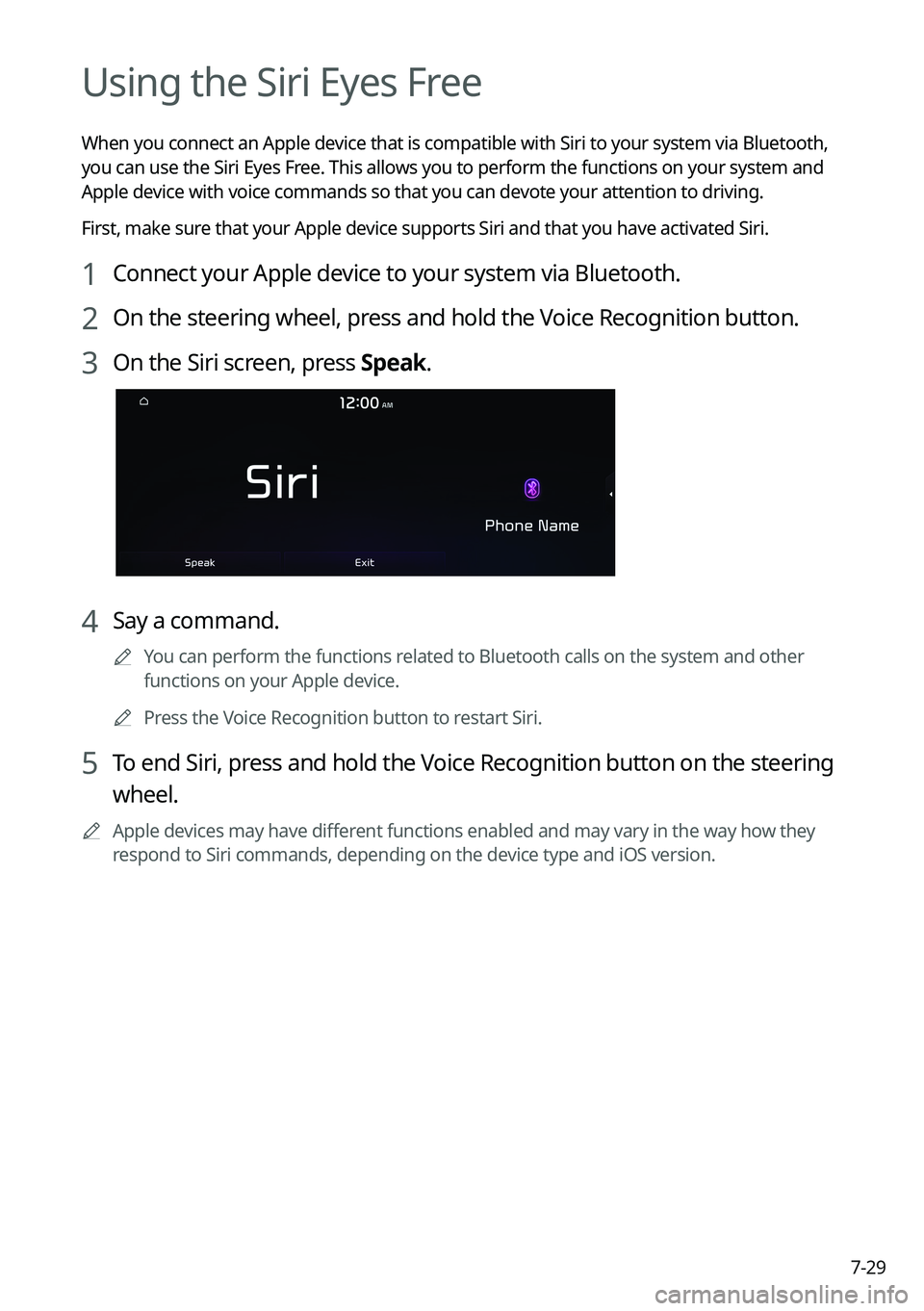
Using the Siri Eyes Free
When you connect an Apple device that is compatible with Siri to your system via Bluetooth,
you can use the Siri Eyes Free. This allows you to perform the functions on your system and
Apple device with voice commands so that you can devote your attention to driving.
First, make sure that your Apple device supports Siri and that you have activated Siri.
1 Connect your Apple device to your system via Bluetooth.
2 On the steering wheel, press and hold the Voice Recognition button.
3 On the Siri screen, press Speak.
4 Say a command.
A
You can perform the functions related to Bluetooth calls on the system and other
functions on your Apple device.
A
Press the Voice Recognition button to restart Siri.
5 To end Siri, press and hold the Voice Recognition button on the steering
wheel.
A
Apple devices may have different functions enabled and may vary in the way how they
respond to Siri commands, depending on the device type and iOS version.
Page 186 of 348
7-30
Voice Memo
You can use the microphone on the vehicle to record and play voice memos.
Running the voice memo
On the All Menus screen, press Voice Memo.
Voice memo screen
ae
cdb
a a Returns to the previous step.
b b Displays the list of recorded voice memos.
c c Starts or pauses the recording.
d d Stops recording.
e e The list of menu items appears.
�Display Off: Turns off the screen. To switch the screen back on, press the screen or
briefly press the power button.
�Delete: Can delete a voice memo.
�Save to USB Device: Can record a voice memo to a USB storage device. Check that
the USB device is compatible.
> See "USB storage devices."
�Storage Information: Can see the file size of recorded voice memos.
�User's Manual on Web (QR Code): Displays the QR code that provides access to the
online user manual for the system.
�Split Screen: Can turn on or off the split screen mode.
Page 187 of 348
7-31
Recording a voice memo
1 On the Voice Memo screen, press .
It starts recording a voice memo.
2 When recording is finished, press on the screen or press the End
Call button on the steering wheel.
The voice memo is automatically saved.
A
To adjust the recording sound volume during voice recording, drag the control bar.
A
To temporarily stop recording, press
.
A
When recording starts, the other audio functions are muted or playback is paused.
A
When you make or receive a call while recording, the recording is paused.
A
When you make an emergency call or you are connected to an emergency call
after airbag deployment, the recording is stopped and the recorded voice memo is
automatically saved.
Playing a voice memo
You can select and play a recorded voice memo.
From the list of Voice Memos, press the desired voice memo.

Com")