Page 159 of 348

7-3
A
Voice recognition may not work properly when:
The sunroof or windows are open so the wind is strong.
The fan speed of the air conditioner or heater is high.
The vehicle is passing through a tunnel.
The vehicle is driving on an unpaved road and its noise and vibration are loud.
Noise is loud due to a heavy rain or storm.
A
When using speech recognition from the rear seats, some commands may not be
supported depending on the vehicle model and type.
A
Special characters included in a contact are not recognized by voice (e.g., School_John,
John!).
A
Voice recognition is supported only for certain languages. If you change the sy\
stem
language, voice recognition may not be supported.
Using the voice recognition function (Type1)
1 On the steering wheel, press the Voice Recognition button.
Voice recognition starts along with voice guidance.
A
To skip the voice guidance, press the Voice Recognition button on the steering wheel.
2 When a beep sound is heard, say a command to perform (e.g.
navigation, music, call).
> See "Available voice commands (Type1)" or " Viewing the voice
recognition help."
The recognized command appears in text at the top of the screen and the corresponding
function is performed.
A
When an additional command is required to perform, the commands that can be
followed in the next step appear on the screen. Say a command or press a command.
A
When there are several similar commands, say a command number to perform.
A
The screen may differ depending on the vehicle and specifications.
Page 160 of 348
7-4
3 To end the voice recognition, perform one of the following methods:
�In standby mode for voice recognition, say "Exit
".
�On the voice recognition screen, press Exit.
�On the steering wheel, press and hold the Voice Recognition button.
A
When the Voice Recognition button is pressed in standby mode for voice recognition,
the standby time is extended.
A
When the voice recognition is not available, press the Voice Recognition button on
the steering wheel and use the voice recognition on your smartphone via phone
projection.
> See "Using the phone projection function."
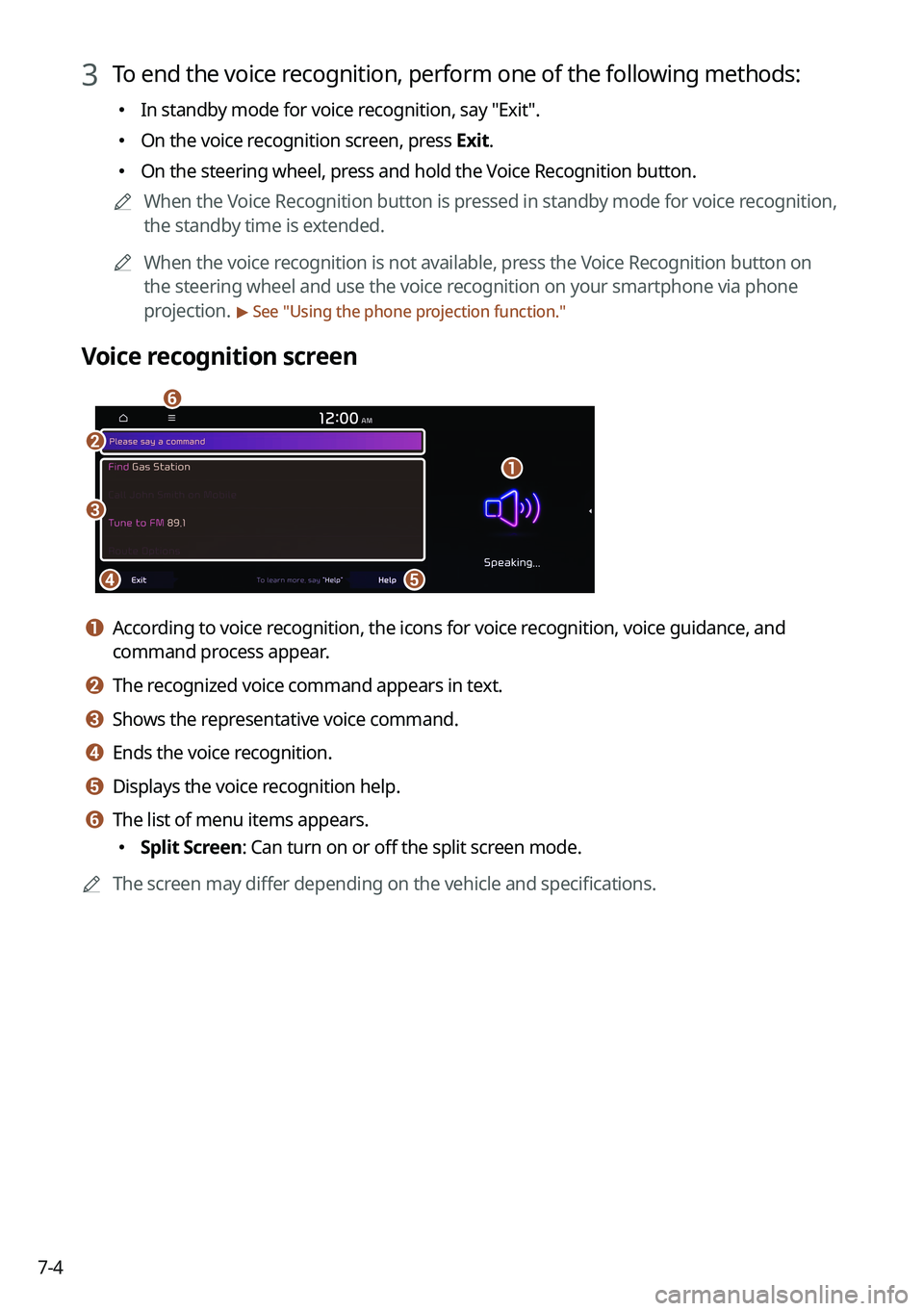
Voice recognition screen
b
a
de
f
c
a a According to voice recognition, the icons for voice recognition, voice guidance, and
command process appear.
b b The recognized voice command appears in text.
c c Shows the representative voice command.
d d Ends the voice recognition.
e e Displays the voice recognition help.
f f The list of menu items appears.
� Split Screen: Can turn on or off the split screen mode.
A
The screen may differ depending on the vehicle and specifications.
Page 161 of 348
7-5
Adjusting the voice guidance volume
Adjust the voice guidance volume when the system volume is so low or high and it interferes
with your driving.
When the voice recognition is active, use the Volume knob on the control
panel.
Viewing the voice recognition help
You can see more details on how to perform various functions by voice commands.
Page 162 of 348
7-6
�To see more details on how to use voice commands for each function, press next
to the function name.
4 After seeing the help, perform any of the following methods.
�On the help screen, press Exit.
�In standby mode for voice recognition, say "Exit
".
A
The screen may differ depending on the vehicle and specifications.
Voice recognition Help
g
a
b
de
f
c
a a Returns to the previous step.
b b The function list appears.
A
To see the list of voice commands that can be used for each function, press or say the
function.
c c You can see the usages for each function.
d d Ends the voice recognition.
e e You can see the entire help for use of voice commands.
f f According to voice recognition, the icons for voice recognition, voice guidance, and
command process appear.
g g The list of menu items appears.
�Split Screen: Can turn on or off the split screen mode.
A
The screen may differ depending on the vehicle and specifications.
Page 163 of 348

7-7
Using the voice recognition function (Type2)
1 Press the Voice Recognition button on the steering wheel. After a beep
sound, say your voice command.
A
If you press the Voice Recognition button when the system is waiting for a voice
command, the standby time is extended.
A
If you press the Voice Recognition button in the middle of voice guidance on the voice
recognition function, the voice guidance is skipped.
2 When a beep sound is heard, say a voice command as required (e.g.,
radio).
> See "Available voice commands (Type2)" or " Viewing available voice commands."
A
Some functions may require additional commands.
A
If multiple search results are found, follow the on-screen instructions to say the
number you want to run.
A
The screen may differ depending on the vehicle and specifications.
Ending voice recognition mode
To end the voice recognition, perform one of the following methods:
�In standby mode for voice recognition, say "Exit
".
�On the voice recognition screen, press Exit.
�On the steering wheel, press and hold the Voice Recognition button.
Page 164 of 348
7-8
Using voice recognition via phone projection
Use the voice recognition function on your smartphone via phone projection. > See "Using the
phone projection function."
Adjusting the voice guidance volume
When voice recognition mode is on, you can adjust the volume by using either the volume
button on the steering wheel or the volume knob.
Viewing available voice commands
Turn on voice recognition mode and then say "All functions" to view all commands that are
available for use.
A
The All functions screen can be controlled by touch only and does not recognize voice
commands.
A
To redirect to the Voice Recognition screen, press the Voice Recognition button.
A
Press Exit to end voice recognition.
A
Some functions may not be supported depending on the vehicle's options.
AThe screen may differ depending on the vehicle and specifications.
Page 165 of 348
7-9
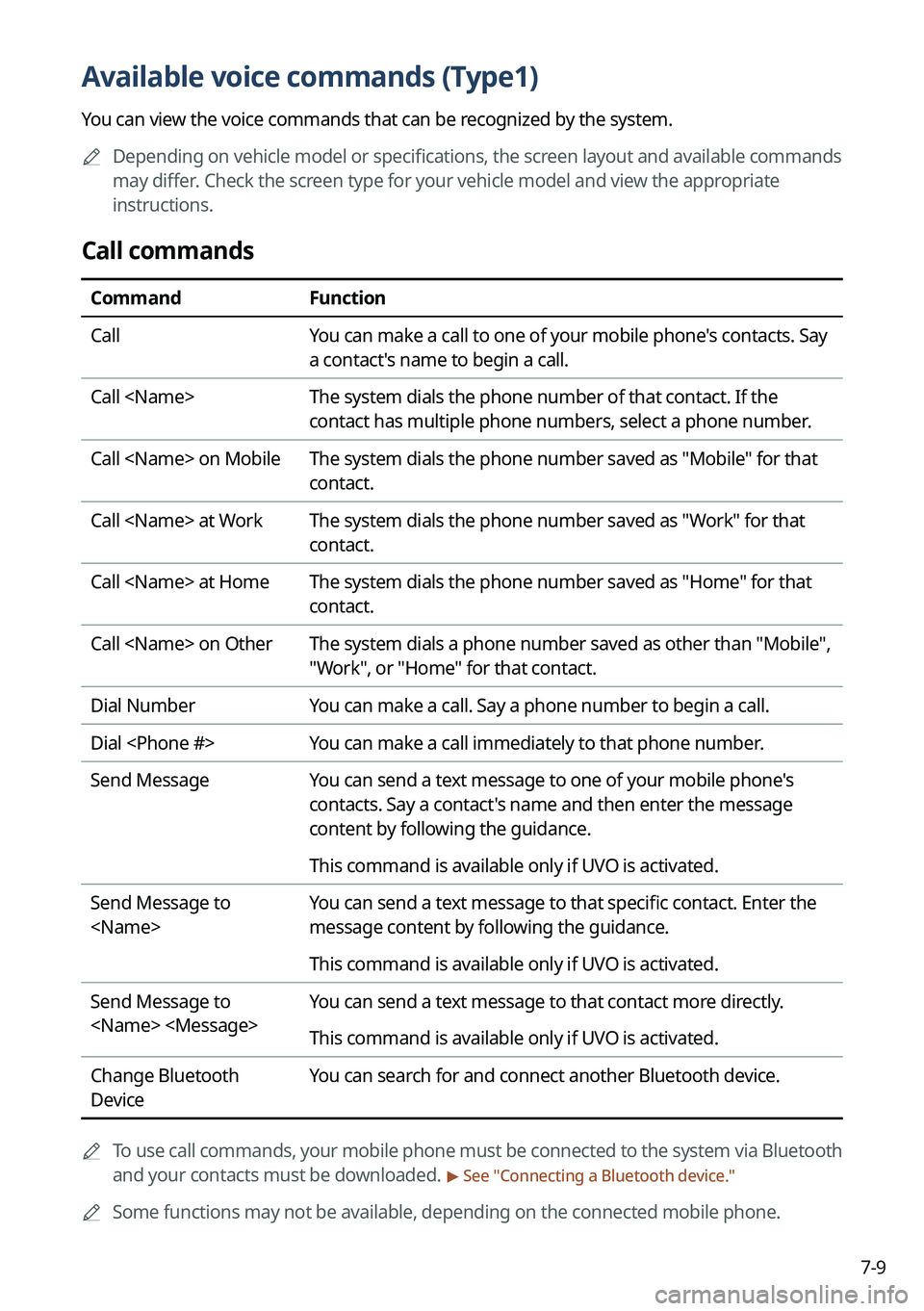
Available voice commands (Type1)
You can view the voice commands that can be recognized by the system.
A
Depending on vehicle model or specifications, the screen layout and available commands
may differ. Check the screen type for your vehicle model and view the appropriate
instructions.
Call commands
Command Function
Call You can make a call to one of your mobile phone's contacts. Say
a contact's name to begin a call.
Call The system dials the phone number of that contact. If the
contact has multiple phone numbers, select a phone number.
Call on Mobile The system dials the phone number saved as "Mobile" for that
contact.
Call at Work The system dials the phone number saved as "Work" for that
contact.
Call at Home The system dials the phone number saved as "Home" for that
contact.
Call on Other The system dials a phone number saved as other than "Mobile",
"Work", or "Home" for that contact.
Dial Number You can make a call. Say a phone number to begin a call.
Dial You can make a call immediately to that phone number.
Send Message You can send a text message to one of your mobile phone's
contacts. Say a contact's name and then enter the message
content by following the guidance.
This command is available only if UVO is activated.
Send Message to
You can send a text message to that specific contact. Enter the
message content by following the guidance.
This command is available only if UVO is activated.
Send Message to
You can send a text message to that contact more directly.
This command is available only if UVO is activated.
Change Bluetooth
Device You can search for and connect another Bluetooth device.
A
To use call commands, your mobile phone must be connected to the system via Bluetooth
and your contacts must be downloaded.
> See "Connecting a Bluetooth device."
A
Some functions may not be available, depending on the connected mobile p\
hone.
Page 167 of 348

7-11
A
When you use a command starting with "Find," the system searches for locations within
the state or province where your vehicle is currently located. To search for locations in
another state or province, say the state or province name first and then say the location
you want.
A
Some commands, such as "Cancel Route" or "Show Route," are available only when a
destination is set.
Radio commands
Command Function
FM <87.5 to 107.9> Turn on the FM radio with that frequency.
AM <530 to 1710> Turn on the AM radio with that frequency.
SiriusXM <0 to 999> Turn on the SiriusXM radio with that channel number.
Tune to SiriusXM
<0 to 999> Tune on the SiriusXM radio with that channel number.
Tune to
Turn on the SiriusXM radio with that channel name.
A
Some commands are recognizable in English only.
A
Some commands may not be supported, depending on the vehicle model and f\
unctions.
Vehicle control commands (if equipped)
Command Function
Climate On/Off Turn on or off the climate control.
Air Conditioner
On/Off Can turn on or off the air conditioner.
Heat On/Off Can turn on or off the heater.
Fan High/Low Used to set the fan level.
Set Fan to windshield/
Face/Feet Used to set the air direction.
Warmer/Cooler Set the climate control temperature.
Open/Close all windows Open or close all windows.
Open/Close the
windows Open or close the driver-side window.
Open/Close the
passenger's window Open or close the passenger-side window.


