2023 HYUNDAI SONATA door lock
[x] Cancel search: door lockPage 158 of 555
Convenience Features
5-12
Mechanical key
If the Smart Key does not operate
normally, you can lock or unlock the
driver’s door by using the mechanical
key.
OFE048007
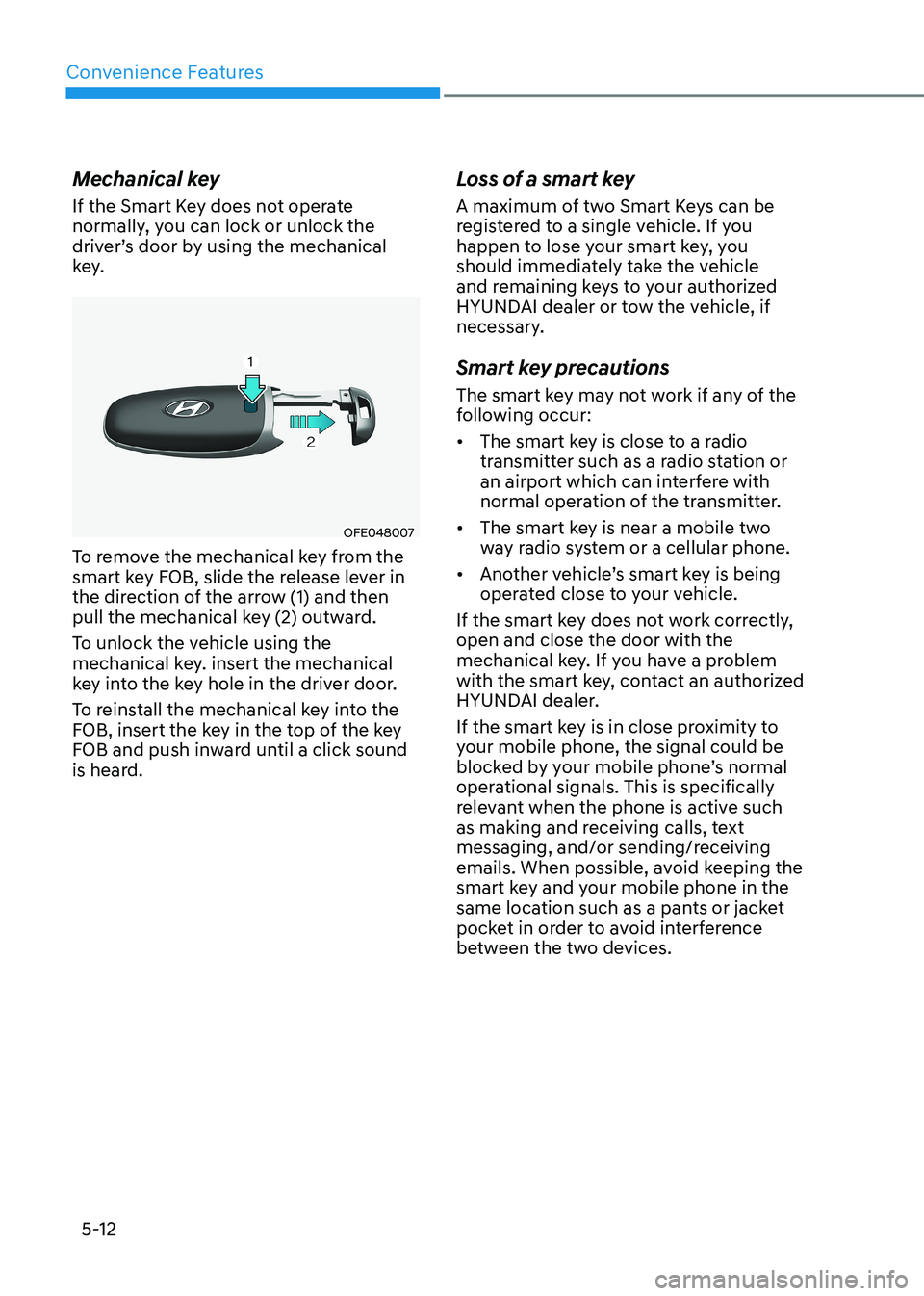
To remove the mechanical key from the
smart key FOB, slide the release lever in
the direction of the arrow (1) and then
pull the mechanical key (2) outward.
To unlock the vehicle using the
mechanical key. insert the mechanical
key into the key hole in the driver door.
To reinstall the mechanical key into the
FOB, insert the key in the top of the key
FOB and push inward until a click sound
is heard. Loss of a smart key
A maximum of two Smart Keys can be
registered to a single vehicle. If you
happen to lose your smart key, you
should immediately take the vehicle
and remaining keys to your authorized
HYUNDAI dealer or tow the vehicle, if
necessary.
Smart key precautions
The smart key may not work if any of the
following occur: •
The smart key is close to a radio
transmitter such as a radio station or
an airport which can interfere with
normal operation of the transmitter.
• The smart key is near a mobile two
way radio system or a cellular phone.
• Another vehicle’s smart key is being
operated close to your vehicle.
If the smart key does not work correctly, open and close the door with the
mechanical key. If you have a problem
with the smart key, contact an authorized
HYUNDAI dealer.
If the smart key is in close proximity to
your mobile phone, the signal could be
blocked by your mobile phone’s normal
operational signals. This is specifically
relevant when the phone is active such
as making and receiving calls, text
messaging, and/or sending/receiving
emails. When possible, avoid keeping the
smart key and your mobile phone in the
same location such as a pants or jacket
pocket in order to avoid interference
between the two devices.
Page 162 of 555
Convenience Features
5-16
Door locks
Operating Door Locks from
Outside the Vehicle
Mechanical key
ODN8059011
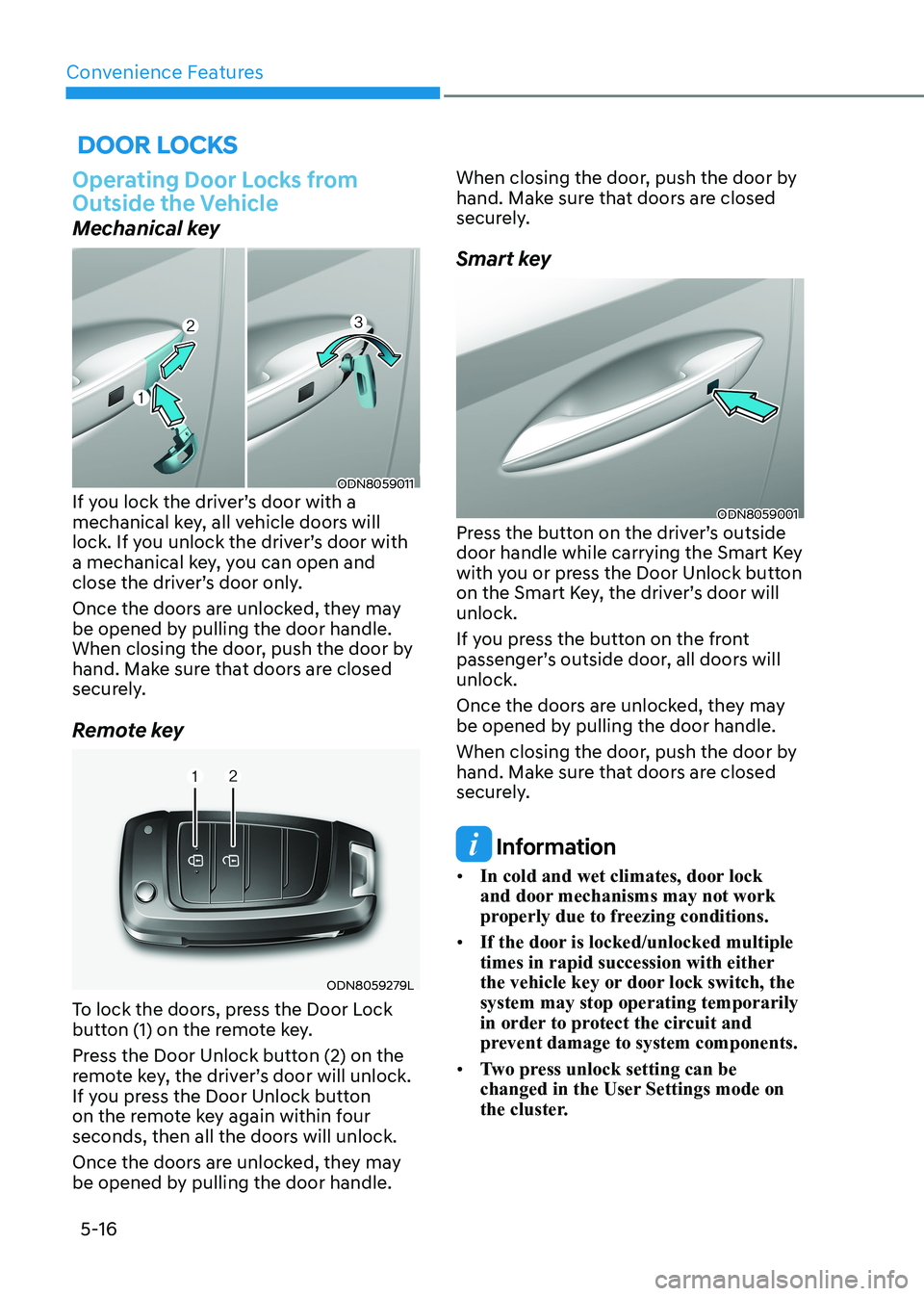
If you lock the driver’s door with a
mechanical key, all vehicle doors will
lock. If you unlock the driver’s door with
a mechanical key, you can open and
close the driver’s door only.
Once the doors are unlocked, they may
be opened by pulling the door handle.
When closing the door, push the door by
hand. Make sure that doors are closed
securely.
Remote key
ODN8059279L
To lock the doors, press the Door Lock
button (1) on the remote key.
Press the Door Unlock button (2) on the
remote key, the driver’s door will unlock.
If you press the Door Unlock button
on the remote key again within four
seconds, then all the doors will unlock.
Once the doors are unlocked, they may
be opened by pulling the door handle. When closing the door, push the door by
hand. Make sure that doors are closed
securely.
Smart key
ODN8059001
Press the button on the driver’s outside
door handle while carrying the Smart Key
with you or press the Door Unlock button
on the Smart Key, the driver’s door will unlock.
If you press the button on the front
passenger’s outside door, all doors will unlock.
Once the doors are unlocked, they may
be opened by pulling the door handle.
When closing the door, push the door by
hand. Make sure that doors are closed
securely.
Information
• In cold and wet climates, door lock
and door mechanisms may not work
properly due to freezing conditions.
• If the door is locked/unlocked multiple
times in rapid succession with either
the vehicle key or door lock switch, the system may stop operating temporarily
in order to protect the circuit and
prevent damage to system components.
• Two press unlock setting can be
changed in the User Settings mode on
the cluster.
Page 163 of 555
05
5-17
In case of an emergency
ODN8059291
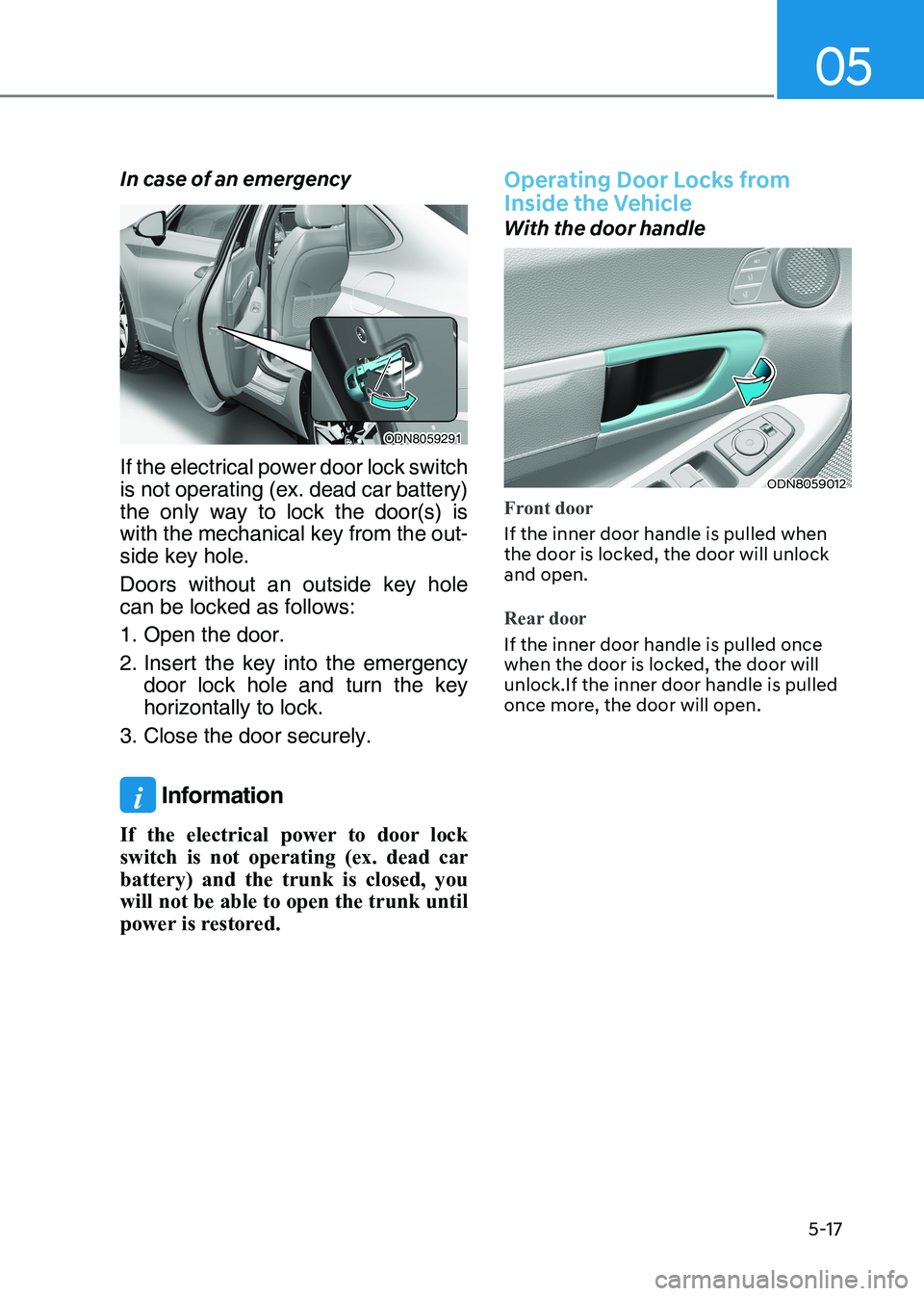
If the electrical power door lock switch
is not operating (ex. dead car battery)
the only way to lock the door(s) is
with the mechanical key from the out -
side key hole.
Doors without an outside key hole can be locked as follows:
1. Open the door.
2. Insert the key into the emergency door lock hole and turn the key horizontally to lock.
3. Close the door securely.
i Information
If the electrical power to door lock
switch is not operating (ex. dead car
battery) and the trunk is closed, you
will not be able to open the trunk until
power is restored.
Operating Door Locks from
Inside the Vehicle
With the door handle
ODN8059012
Front door
If the inner door handle is pulled when
the door is locked, the door will unlock and open.
Rear door
If the inner door handle is pulled once
when the door is locked, the door will unlock.If the inner door handle is pulled
once more, the door will open.
Page 164 of 555
Convenience Features
5-18
Information
If a power door lock ever fails to function
while you are in the vehicle try one or
more of the following techniques to exit: • Operate the door unlock feature
repeatedly (both electronic and manual) while simultaneously pulling
on the door handle.
• Operate the other door locks and
handles, front and rear.
• Lower a front window and use the
mechanical key to unlock the door from outside. With the central door lock switch„„Driver’s door
ODN8A059013
„„Front passenger’s door
ODN8059014
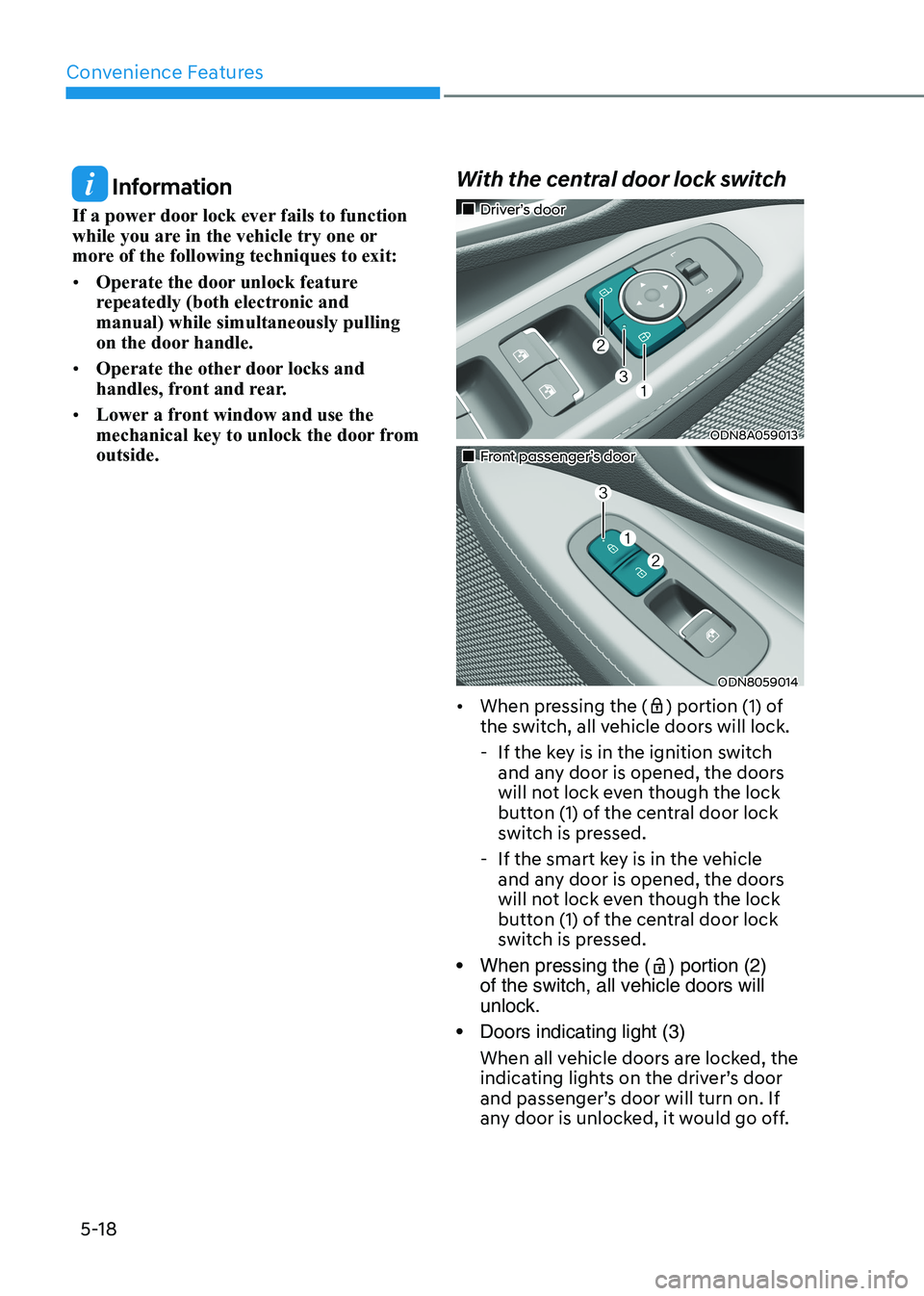
• When pressing the (
) portion (1) of
the switch, all vehicle doors will lock.
- If the key is in the ignition switch and any door is opened, the doors
will not lock even though the lock
button (1) of the central door lock
switch is pressed.
- If the smart key is in the vehicle and any door is opened, the doors
will not lock even though the lock
button (1) of the central door lock
switch is pressed.
• When pressing the (
) portion (2)
of the switch, all vehicle doors will unlock.
• Doors indicating light (3)
When all vehicle doors are locked, the
indicating lights on the driver’s door
and passenger’s door will turn on. If
any door is unlocked, it would go off.
Page 165 of 555
05
5-19
WARNING
• The doors should always be fully
closed and locked while the
vehicle is in motion. If the doors
are unlocked, the risk of being
thrown from the vehicle in a crash is
increased.
• Do not pull the inner door handle of
the driver’s or passenger’s door while
the vehicle is moving.
WARNING
Do not leave children or animals
unattended in your vehicle. An enclosed
vehicle can become extremely hot,
causing death or serious injury to
unattended children or animals who
cannot escape the vehicle.
Children might operate features of the
vehicle that could injure them, or they
could encounter other harm, possibly
from someone gaining entry to the
vehicle.
WARNING
Always secure your vehicle.
Leaving your vehicle unlocked increases
the potential risk to you or others from
someone hiding in your vehicle.
To secure your vehicle, while depressing
the brake, move the shift button to the
P (Park) position, engage the parking
brake, and place the ignition switch
in the LOCK/OFF position, close all
windows, lock all doors, and always
take the key with you.
CAUTION
Opening a door when something is
approaching may cause damage or
injury. Be careful when opening doors
and watch for vehicles, motorcycles,
bicycles or pedestrians approaching the
vehicle in the path of the door.
WARNING
If you stay in the vehicle for a long time
while the weather is very hot or cold,
there are risks of injuries or danger to
life. Do not lock the vehicle from the
outside when someone is in the vehicle.
WARNING
Opening a door when something is
approaching may cause damage or
injury. Be careful when opening doors
and watch for vehicles, motorcycles,
bicycles or pedestrians approaching the
vehicle in the path of the door.
Page 166 of 555
Convenience Features
5-20
Automatic Door Lock and Unlock
Features
Your vehicle is equipped with features
that will automatically lock or unlock
your vehicle based on settings you select
in the LCD cluster display.
Auto LOCK - Enable on Speed
When this feature is set in the LCD
cluster display, all the doors will be
locked automatically when the vehicle
exceeds 15 km/h (9 mph).
Auto LOCK - Enable on Shift
When this feature is set in the LCD
cluster display, all the doors will be
locked automatically when the vehicle is
shifted out of P (Park) while the engine is running.
Auto UNLOCK - Enable on Shift
When this feature is set in the LCD
cluster display, all the doors will be
unlocked automatically when the vehicle
is shifted back into P (Park).
For more information on these features,
refer to the LCD Display section later in
this chapter.
Additional Unlock Safety Feature -
Air Bag Deployment
As an additional safety feature, all doors
will be automatically unlocked when an
impact causes the air bags to deploy.
Child-Protector Rear Door Locks
ODN8059015L
The child safety lock is provided to help
prevent children seated in the rear from
accidentally opening the rear doors. The
rear door safety locks should be used
whenever children are in the vehicle.
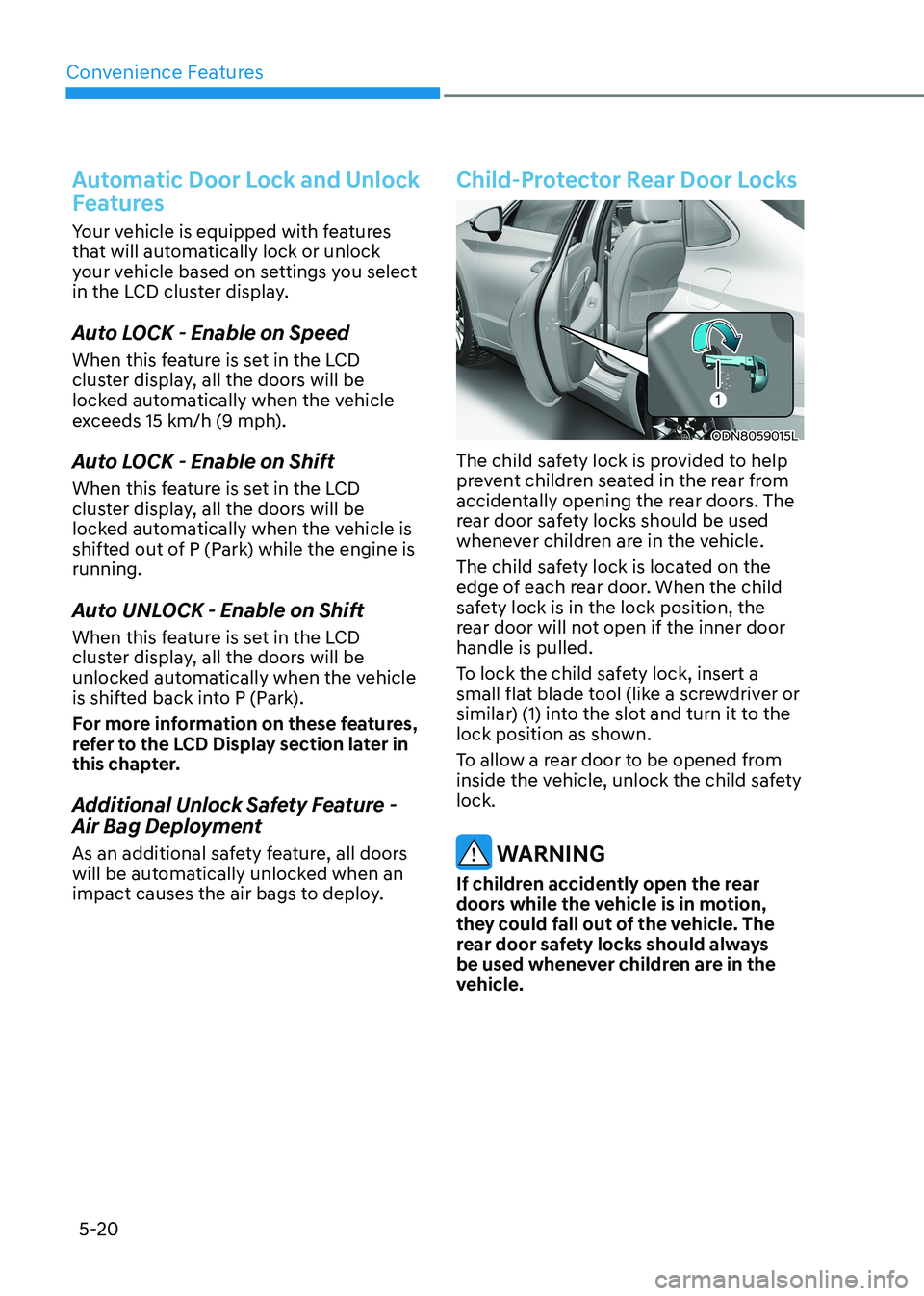
The child safety lock is located on the
edge of each rear door. When the child
safety lock is in the lock position, the
rear door will not open if the inner door handle is pulled.
To lock the child safety lock, insert a
small flat blade tool (like a screwdriver or
similar) (1) into the slot and turn it to the
lock position as shown.
To allow a rear door to be opened from
inside the vehicle, unlock the child safety lock.
WARNING
If children accidently open the rear
doors while the vehicle is in motion,
they could fall out of the vehicle. The
rear door safety locks should always
be used whenever children are in the
vehicle.
Page 167 of 555
05
5-21
Rear Occupant Alert (ROA)
System
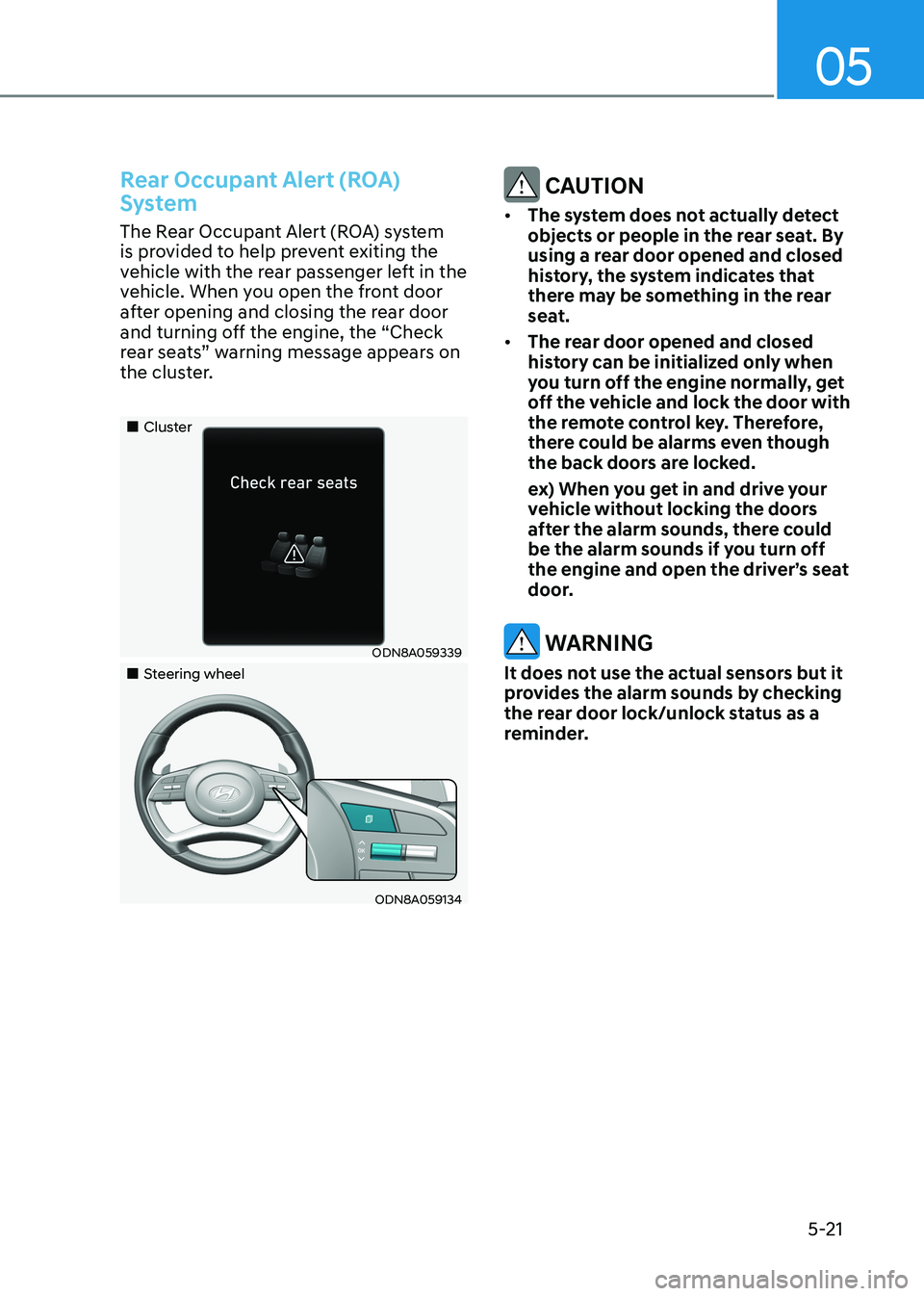
The Rear Occupant Alert (ROA) system
is provided to help prevent exiting the
vehicle with the rear passenger left in the
vehicle. When you open the front door
after opening and closing the rear door
and turning off the engine, the “Check
rear seats” warning message appears on
the cluster.
„„Cluster
ODN8A059339
„„Steering wheel
ODN8A059134
CAUTION
• The system does not actually detect
objects or people in the rear seat. By
using a rear door opened and closed
history, the system indicates that
there may be something in the rear
seat.
• The rear door opened and closed
history can be initialized only when
you turn off the engine normally, get
off the vehicle and lock the door with
the remote control key. Therefore,
there could be alarms even though
the back doors are locked.
ex) When you get in and drive your vehicle without locking the doors
after the alarm sounds, there could
be the alarm sounds if you turn off
the engine and open the driver’s seat
door.
WARNING
It does not use the actual sensors but it
provides the alarm sounds by checking
the rear door lock/unlock status as a
reminder.
Page 169 of 555
05
5-23
This system helps to protect your vehicle
and valuables. The horn will sound and
the hazard warning lights will blink
continuously if any of the following occur:
- A door is opened without using the remote key or smart key.
- The trunk is opened without using the remote key or smart key.
- The engine hood is opened.
The alarm continues for 30 seconds, then
the system resets. To turn off the alarm,
unlock the doors with the remote key or
smart key.
The Theft Alarm System automatically
sets 30 seconds after you lock the doors
and the trunk. For the system to activate,
you must lock the doors and the trunk
from outside the vehicle with the remote
key or smart key or by pressing the
button on the outside of the door handle
with the smart key in your possession.
The hazard warning lights will blink and
the chime will sound once to indicate the
system is armed.
Once the security system is set, opening
any door, the trunk, or the hood without
using the remote key or smart key will
cause the alarm to activate.
The Theft Alarm System will not set if the
hood, the trunk, or any door is not fully
closed. If the system will not set, check
the hood, the trunk, or the doors are fully closed.
Do not attempt to alter this system or
add other devices to it.
Information
• Do not lock the doors until all passengers have left the vehicle. If the
remaining passenger leaves the vehicle when the system is armed, the alarm will be activated.
• If the vehicle is not disarmed with the
remote key or smart key, open the doors by using the mechanical key and place the ignition switch in the
ON position (for remote key) or start
the engine (for smart key) by directly
pressing the ignition switch with the
smart key.
• If the system is disarmed by unlocking
the vehicle, but neither a door or the trunk is opened within 30 seconds, the
doors will relock and the system will
rearm automatically.
ThefT-AlArm SySTem