2023 HYUNDAI NEXO fuel cap
[x] Cancel search: fuel capPage 15 of 558
1-6
Your vehicle at a glanceF
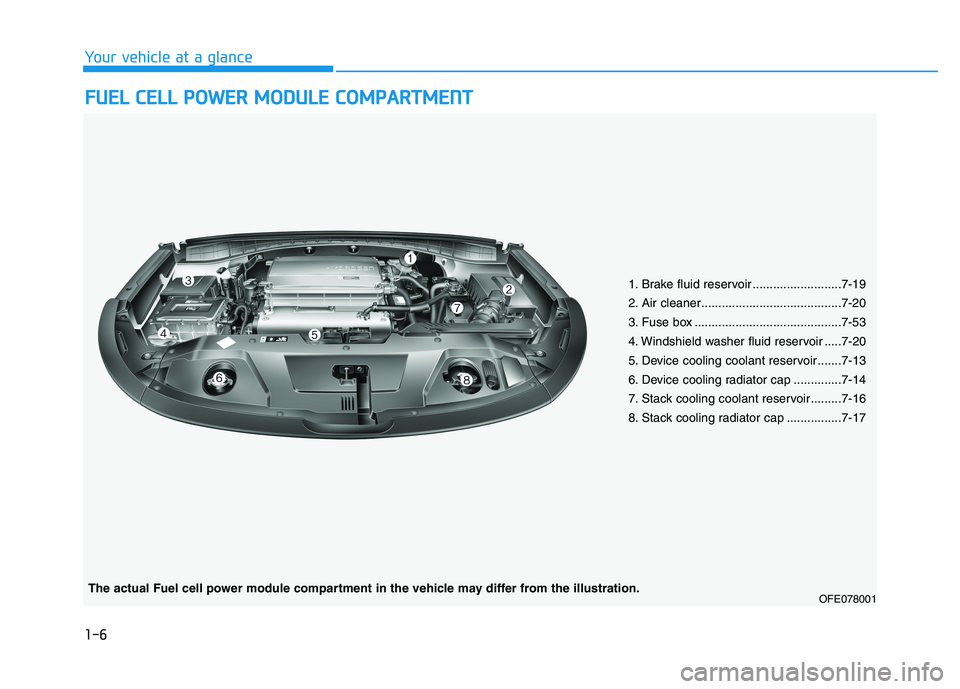
F UU EELL CC EE LLLL PP OO WW EERR MM OODDUU LLEE CC OO MM PPAA RRTTMM EENN TT
1. Brake fluid reservoir ..........................7-19
2. Air cleaner.........................................7-20
3. Fuse box ...........................................7-53
4. Windshield washer fluid reservoir .....7-20
5. Device cooling coolant reservoir .......7-13
6. Device cooling radiator cap ..............7-14
7. Stack cooling coolant reservoir.........7-16
8. Stack cooling radiator cap ................7-17
OFE078001
The actual Fuel cell power module compartment in the vehicle may differ from the illustration.
Page 142 of 558
3-55
Convenient features of your vehicle
3
Fuel Filler Door
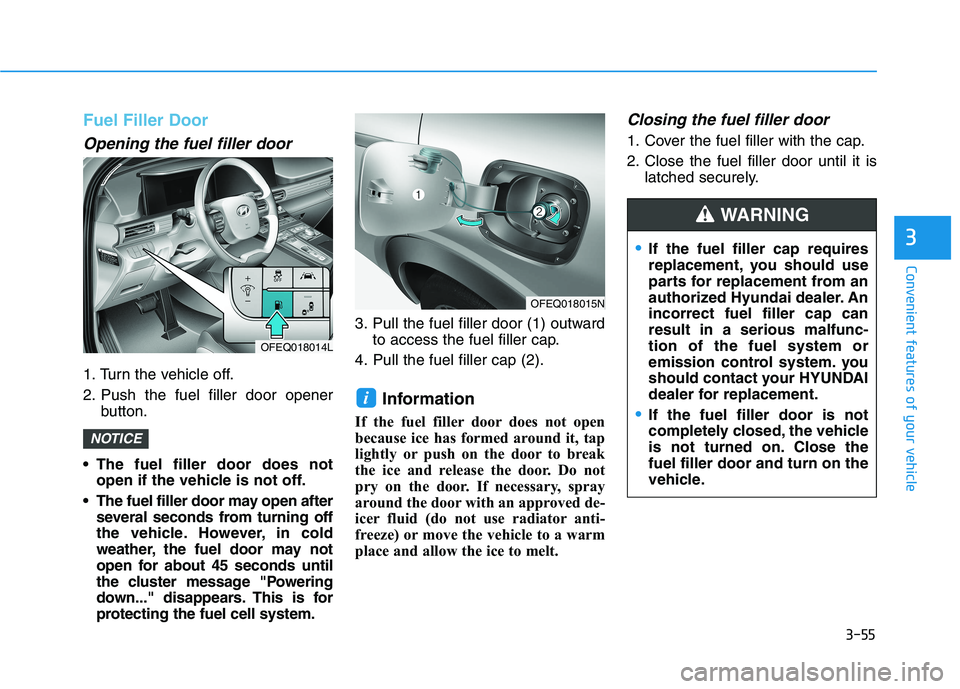
Opening the fuel filler door
1. Turn the vehicle off.
2. Push the fuel filler door openerbutton.
The fuel filler door does not open if the vehicle is not off.
The fuel filler door may open after several seconds from turning off
the vehicle. However, in cold
weather, the fuel door may not
open for about 45 seconds until
the cluster message "Powering
down..." disappears. This is for
protecting the fuel cell system. 3. Pull the fuel filler door (1) outward
to access the fuel filler cap.
4. Pull the fuel filler cap (2).
Information
If the fuel filler door does not open
because ice has formed around it, tap
lightly or push on the door to break
the ice and release the door. Do not
pry on the door. If necessary, spray
around the door with an approved de-
icer fluid (do not use radiator anti-
freeze) or move the vehicle to a warm
place and allow the ice to melt.
Closing the fuel filler door
1. Cover the fuel filler with the cap.
2. Close the fuel filler door until it is latched securely.
i
NOTICE
OFEQ018014L
OFEQ018015N
If the fuel filler cap requires
replacement, you should use
parts for replacement from an
authorized Hyundai dealer. Anincorrect fuel filler cap canresult in a serious malfunc-tion of the fuel system or
emission control system. you
should contact your HYUNDAI
dealer for replacement.
If the fuel filler door is not
completely closed, the vehicle
is not turned on. Close thefuel filler door and turn on the
vehicle.
WARNING
Page 143 of 558
3-56
Convenient features of your vehicle
Refueling dangers
Automotive fuels are flammable
materials. When refueling, please
note the following guidelines
carefully. Failure to follow these
guidelines may result in severe
personal injury, severe burns or
death by fire or explosion.
Read and follow all warning posted at the gas station facil-
ity.
Before touching the fuel noz-
zle, you should eliminate
potentially dangerous static
electricity discharge by touch-
ing another metal part of the
vehicle, a safe distance away
from the fuel filler neck, noz-
zle, or other gas source.
Do not get back into a vehicle
once you have begun refueling
since you can generate static
electricity by touching, rubbing
or sliding against any item or
fabric (polyester, satin, nylon,
etc.) capable of producing stat-
ic electricity. Static electricity
discharge can ignite fuel
vapors resulting in rapid burn-
ing. If you must reenter the
vehicle, you should once again
eliminate potentially danger-
ous static electricity discharge
by touching a metal part of the
vehicle, away from the fuel filler
neck, nozzle or other gasoline
source.
Do not use cellular phones
while refueling. Electric current
and/or electronic interference
from cellular phones can
potentially ignite fuel vapors
causing a fire.
When refueling, always shut
the power off. Once refueling
is complete, check to makesure the filler cap and filler
door are securely closed,
before starting the vehicle.
DO NOT use matches or a
lighter and DO NOT SMOKE or
leave a lit cigarette in your
vehicle while at a gas station
especially during refueling.
Automotive fuel is highly
flammable and can, when
ignited, result in fire.
If a fire breaks out during refu-
eling, leave the vicinity of the
vehicle, and immediately con-
tact the manager of the gasstation and then contact the
local fire department. Follow
any safety instructions they
provide.
WARNING
Page 148 of 558
3-61
Convenient features of your vehicle
3
- Fuel Cell StackOverheats
If the gauge pointer moves
beyond the normal range area
toward the "H" position, it indi-
cates overheating that may dam-
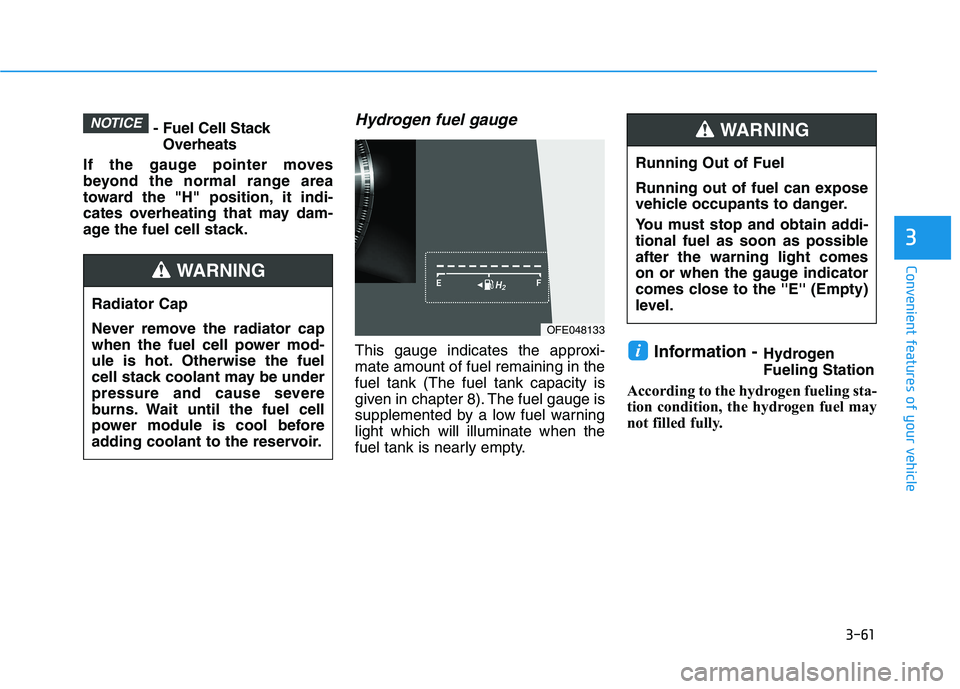
age the fuel cell stack.Hydrogen fuel gauge
This gauge indicates the approxi-mate amount of fuel remaining in thefuel tank (The fuel tank capacity is
given in chapter 8). The fuel gauge is
supplemented by a low fuel warninglight which will illuminate when the
fuel tank is nearly empty. Information -
HydrogenFueling Station
According to the hydrogen fueling sta-
tion condition, the hydrogen fuel may
not filled fully.i
NOTICE
Running Out of Fuel
Running out of fuel can expose
vehicle occupants to danger.
You must stop and obtain addi-
tional fuel as soon as possibleafter the warning light comes
on or when the gauge indicator
comes close to the ''E'' (Empty)
level.
WARNING
Radiator Cap
Never remove the radiator cap
when the fuel cell power mod-
ule is hot. Otherwise the fuel
cell stack coolant may be under
pressure and cause severe
burns. Wait until the fuel cell
power module is cool before
adding coolant to the reservoir.
WARNING
OFE048133
Page 242 of 558
3-155
Convenient features of your vehicle
3
Air conditioning
Your HYUNDAI vehicle air condition- ing system is filled with R-1234yf
refrigerant.
1. Start the vehicle.
2. Press the air conditioning button.
3. Select the Face Level mode.
4. Set the air intake control toRecirculation mode temporarily to
allow the cabin to cool quickly.
When the desired temperature inthe cabin is reached, change the
air intake control back to Fresh
mode.
5. Adjust the fan speed control and temperature control to maintain
maximum comfort.
When maximum cooling is desired,
set the temperature control to the
MAX A/C position, then set the fanspeed control to the highest setting. When using the air conditioning
system, monitor the temperature
gauge closely while driving up
hills or in heavy traffic when out-
side temperatures. Air condition-
ing system operation when climb-ing a steep grade or in high out-side ambient temperatures can
cause fuel cell stack overheating.
Continue to use the fan, but turn the air conditioning system off if
the temperature gauge indicates
fuel cell stack overheating.
Air conditioning system operation
tips
If the vehicle has been parked in
direct sunlight during hot weather,
open the windows for a short time
to let the hot air inside the vehicle
escape.
After sufficient cooling has been achieved, switch back from recircu-
lation mode to fresh mode. To help reduce moisture inside of
the windows on rainy or humid
days, decrease the humidity inside
the vehicle by operating the airconditioning system with the win-
dows and sunroof closed.
Use the air conditioning system every month only for a few minutes
to ensure maximum system per-
formance.
If you operate air conditioner exces- sively, the difference between the
temperature of the outside air andthat of the windshield could cause
the outer surface of the windshield
to fog up, causing loss of visibility. In
this case, set the mode selection
knob or button to the position
and fan speed control to the lowerspeed.
NOTICE
Page 396 of 558
5-129
Driving your vehicle
5
Certification label
The certification label is located on
the driver’s door sill at the center pil-
lar and shows the maximum allow-
able weight of the fully loaded vehi-
cle. This is called the GVWR (Gross
Vehicle Weight Rating). The GVWR
includes the weight of the vehicle, all
occupants, fuel and cargo.
This label also tells you the maxi-
mum weight that can be supported
by the front and rear axles, called
Gross Axle Weight Rating (GAWR).
The total weight of the vehicle,
including all occupants, accessories,
cargo, and trailer tongue load must
not exceed the Gross Vehicle WeightRating (GVWR) or the Gross Axle
Weight Rating (GAWR). To find out
the actual loads on your front and
rear axles, you need to go to a weigh
station and weigh your vehicle. Be
sure to spread out your load equally
on both sides of the centerline.Overloading your vehicle may
cause damage. Repairs would not
be covered by your warranty. Do
not overload your vehicle.
NOTICE
Overloading
Never exceed the GVWR for
your vehicle, the GAWR for
either the front or rear axle
and vehicle capacity weight.Exceeding these ratings can
affect your vehicle's handling
and braking ability, and causean accident.
Do not overload your vehicle.
Overloading your vehicle can
cause heat buildup in your
vehicle's tires and possible
tire failure, increased stop-ping distances and poor vehi-
cle handling-all of which mayresult in a crash.
WARNING
Page 427 of 558
7-3
7
Maintenance
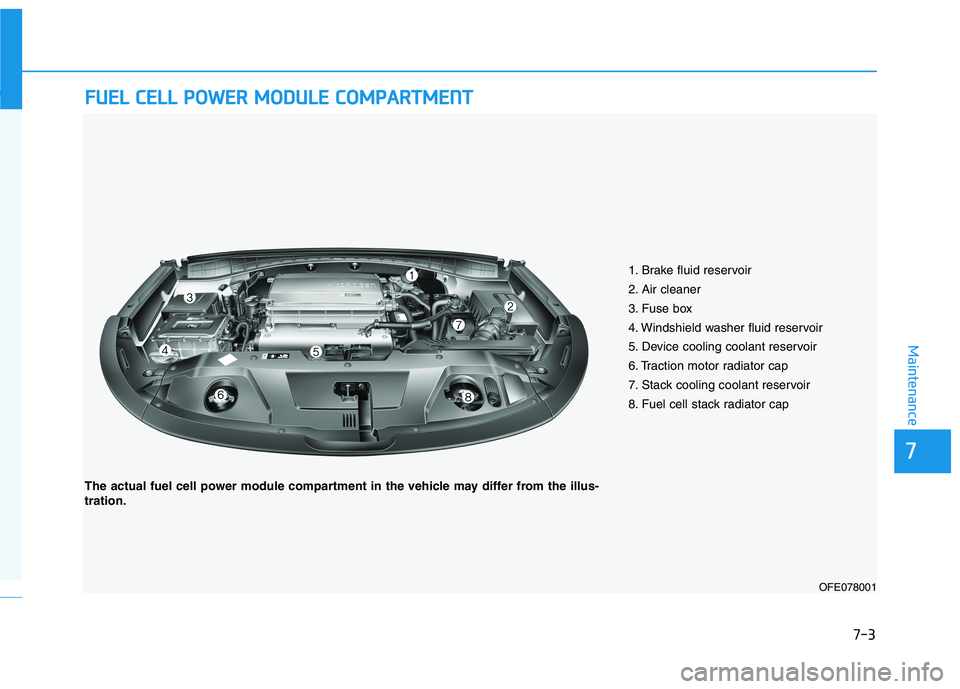
FFUU EELL CC EE LLLL PP OO WW EERR MM OODDUU LLEE CC OO MM PPAA RRTTMM EENN TT
1. Brake fluid reservoir
2. Air cleaner
3. Fuse box
4. Windshield washer fluid reservoir
5. Device cooling coolant reservoir
6. Traction motor radiator cap
7. Stack cooling coolant reservoir
8. Fuel cell stack radiator cap
OFE078001
The actual fuel cell power module compartment in the vehicle may differ from the illus- tration.
Page 438 of 558
7-14
Maintenance
For mixing percentage, refer to the
following table:Information
If in doubt about the mix ratio, a 50%
water and 50% antifreeze mix is the
easiest to mix together as it will be the
same quantity of each. It is suitable to
use for most temperature ranges of
-35°C (-31°F) and higher.
i
Ambient
Temperature Mixture Percentage
(volume)
Antifreeze Water
-15°C (5°F) 35 65
-25°C (-13°F) 40 60
-35°C (-31°F) 50 50
-45°C (-49°F) 60 40
Never remove the
radiator cap or the drain plug while the
radiator is hot. Hotcoolant and steam
may blow out under pressure,
causing serious injury.
WARNING
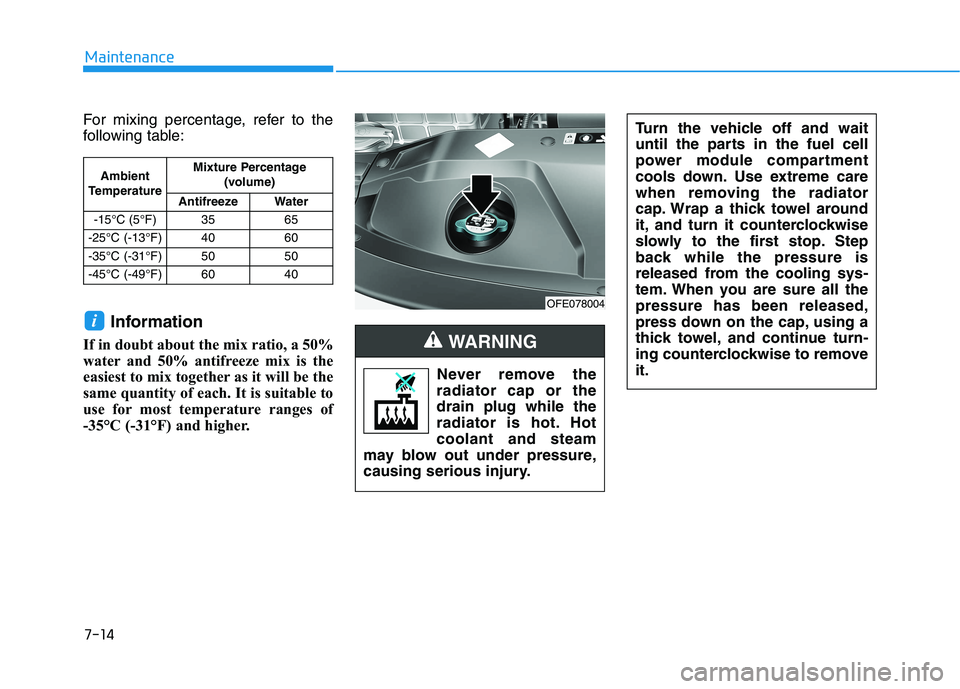
OFE078004 Turn the vehicle off and wait
until the parts in the fuel cell
power module compartment
cools down. Use extreme care
when removing the radiator
cap. Wrap a thick towel around
it, and turn it counterclockwise
slowly to the first stop. Step
back while the pressure is
released from the cooling sys-
tem. When you are sure all thepressure has been released,
press down on the cap, using a
thick towel, and continue turn-
ing counterclockwise to removeit.