2023 HYUNDAI NEXO key battery
[x] Cancel search: key batteryPage 95 of 558
3-8
Convenient features of your vehicle
Smart key precautions
The smart key may not work if any of
the following occur:
The smart key is close to a radiotransmitter such as a radio station
or an airport which can interfere
with normal operation of the trans-
mitter.
The smart key is near a mobile two way radio system or a cellular
phone.
Another vehicle's smart key is being operated close to your vehicle.
If the smart key does not work cor-
rectly, open and close the door with
the mechanical key. If you have a
problem with the smart key, contact
an authorized HYUNDAI dealer. If the smart key is in close proximity
to your mobile phone, the signal
could be blocked by your mobile
phone's normal operational signals.
This is specifically relevant when the
phone is active such as making and
receiving calls, text messaging,
and/or sending/receiving emails.
When possible, avoid keeping the
remote key and your mobile phone inthe same location such as a pants or
jacket pocket in order to avoid inter-
ference between the two devices.
Keep the smart key away from
electromagnetic materials that
blocks electromagnetic waves to
the key surface.
Always have the smart key with
you when leaving the vehicle. If
the smart key is left near the vehi-
cle, the vehicle battery may be dis-
charged. Information
This device complies with Industry
Canada RSS-210 standard.
Operation is subject to the following
three conditions:
1. This device may not cause harmful interference.
2. This device must accept any inter- ference received, including interfer-
ence that may cause undesired
operation.
3. Changes or modifications not expressly approved by the party
responsible for compliance could
void the user's authority to operate
the device.i
NOTICE
NOTICE
Page 96 of 558
3-9
Convenient features of your vehicle
Battery replacement
If the Smart Key is not working prop-
erly, try replacing the battery with a
new one.Battery Type: CR2032
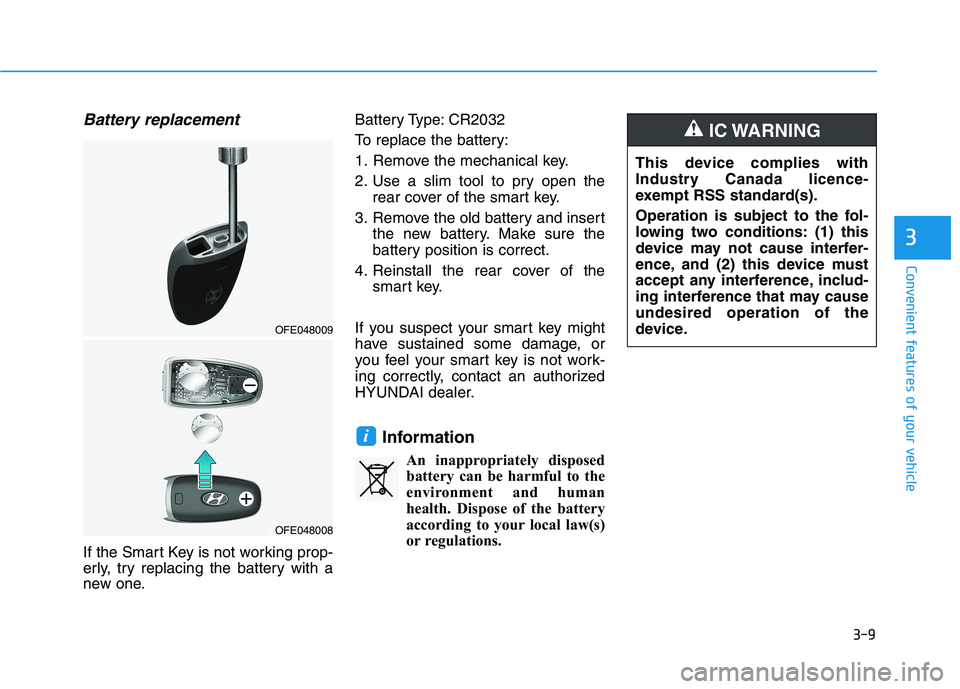
To replace the battery:
1. Remove the mechanical key.
2. Use a slim tool to pry open the
rear cover of the smart key.
3. Remove the old battery and insert the new battery. Make sure the
battery position is correct.
4. Reinstall the rear cover of the smart key.
If you suspect your smart key might
have sustained some damage, or
you feel your smart key is not work-
ing correctly, contact an authorized
HYUNDAI dealer.
InformationAn inappropriately disposedbattery can be harmful to the
environment and human
health. Dispose of the battery
according to your local law(s)
or regulations.
i
3
OFE048009
OFE048008
This device complies with
Industry Canada licence-
exempt RSS standard(s).
Operation is subject to the fol-
lowing two conditions: (1) this
device may not cause interfer-
ence, and (2) this device must
accept any interference, includ-
ing interference that may causeundesired operation of the
device.
IC WARNING
Page 102 of 558
3-15
Convenient features of your vehicle
3
If the inner door handle of eitherthe driver door or passenger door
is pulled when the door lock button
is in the lock position, the button is
unlocked and the door will open.
The doors cannot be locked if the smart key is inside the vehicle and
any of the doors are open.
Information
If a power door lock ever fails to func-
tion while you are in the vehicle try
one or more of the following tech-
niques to exit:
Operate the door unlock feature repeatedly (both electronic and
manual) while simultaneously
pulling on the door handle.
Operate the other door locks and handles, front and rear.
Lower a front window and use the mechanical key to unlock the door
from outside. Information
When the vehicle's battery run out
and you leave the vehicle, make sure
all the doors are locked. You can lock
the driver's door with a key and the
rest of the doors with the lock button
above the door inside handle.With the central door lock switch
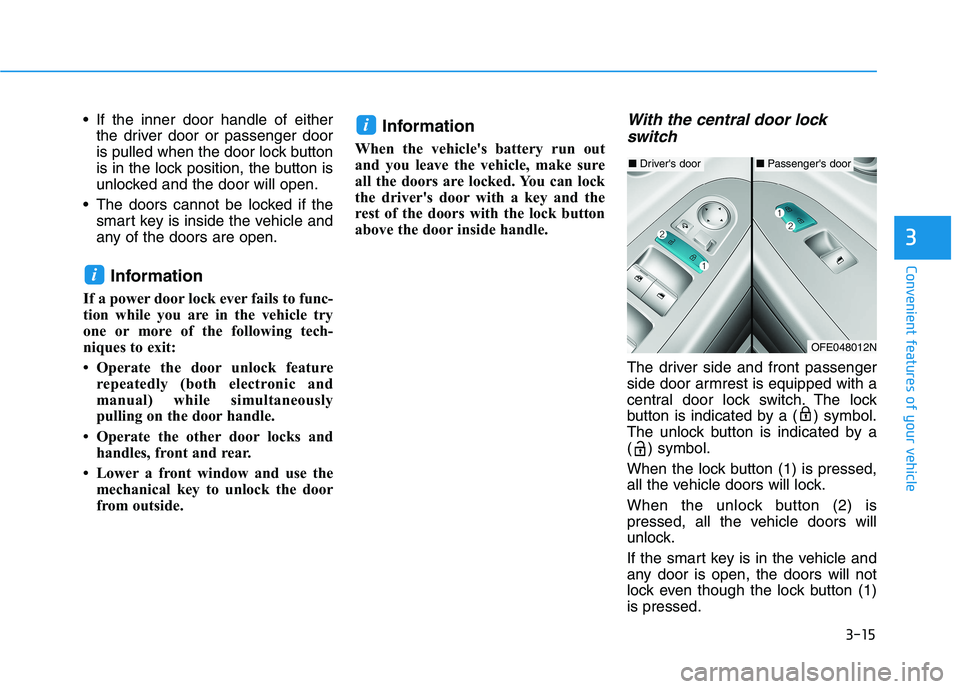
The driver side and front passenger
side door armrest is equipped with a
central door lock switch. The lock
button is indicated by a ( ) symbol.
The unlock button is indicated by a
( ) symbol.
When the lock button (1) is pressed,
all the vehicle doors will lock.
When the unlock button (2) is
pressed, all the vehicle doors will
unlock.
If the smart key is in the vehicle and
any door is open, the doors will not
lock even though the lock button (1)is pressed.
i
i
■ Driver's door■Passenger's door
OFE048012N
Page 119 of 558
3-32
Convenient features of your vehicle
Folding the side view mirror
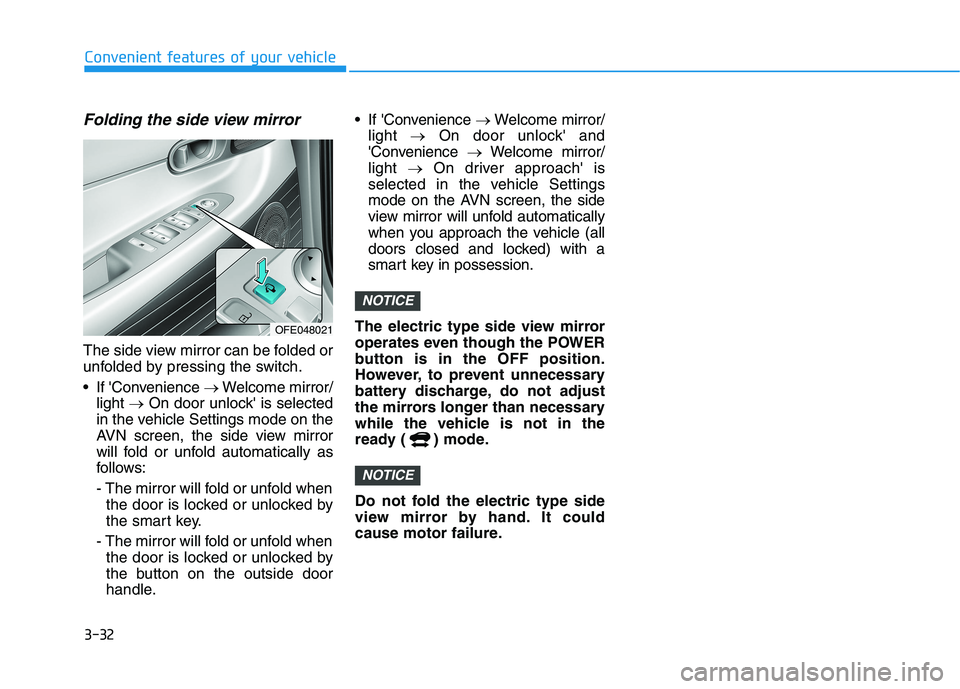
The side view mirror can be folded or
unfolded by pressing the switch.
If 'Convenience Welcome mirror/
light On door unlock' is selected
in the vehicle Settings mode on the
AVN screen, the side view mirror
will fold or unfold automatically as
follows:
- The mirror will fold or unfold when the door is locked or unlocked by
the smart key.
- The mirror will fold or unfold when the door is locked or unlocked by
the button on the outside door
handle. If 'Convenience
Welcome mirror/
light On door unlock' and
'Convenience Welcome mirror/
light On driver approach' is
selected in the vehicle Settings
mode on the AVN screen, the side
view mirror will unfold automatically
when you approach the vehicle (all
doors closed and locked) with a
smart key in possession.
The electric type side view mirror
operates even though the POWER
button is in the OFF position.
However, to prevent unnecessary
battery discharge, do not adjust
the mirrors longer than necessary
while the vehicle is not in the
ready ( ) mode.
Do not fold the electric type side
view mirror by hand. It could
cause motor failure.
NOTICE
NOTICE
OFE048021
Page 133 of 558
3-46
Convenient features of your vehicle
Do not close or open the power
tailgate manually. This may cause
damage to the power tailgate. If it
is necessary to close or open the
power tailgate manually when the
battery is discharged or discon-
nected, do not apply excessive
force.
Opening the tailgate
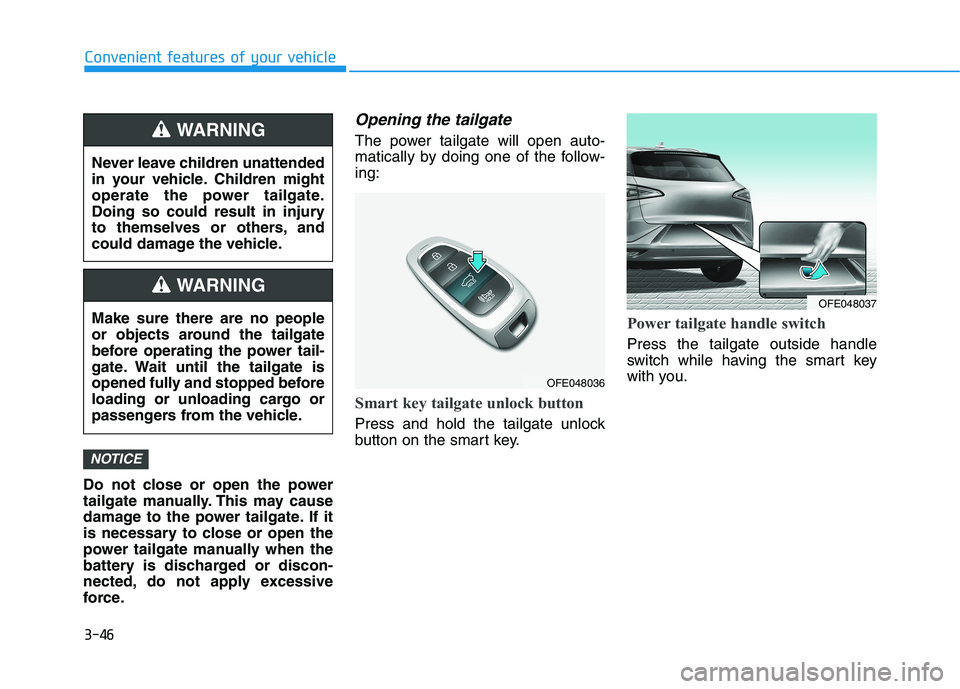
The power tailgate will open auto-
matically by doing one of the follow-ing:
Smart key tailgate unlock button
Press and hold the tailgate unlock
button on the smart key.
Power tailgate handle switch
Press the tailgate outside handle
switch while having the smart key
with you.
NOTICE
Never leave children unattended
in your vehicle. Children might
operate the power tailgate.
Doing so could result in injury
to themselves or others, and
could damage the vehicle.
WARNING
Make sure there are no people
or objects around the tailgate
before operating the power tail-
gate. Wait until the tailgate is
opened fully and stopped before
loading or unloading cargo or
passengers from the vehicle.
WARNING
OFE048036
OFE048037
Page 161 of 558
3-74
Convenient features of your vehicle
Immobilizer IndicatorLight
This indicator light illuminates for
up to 30 seconds:
When the vehicle detects the smart
key in the vehicle with the POWER
button in the ACC or ON position.
- At this time, you can start the vehi- cle.
- The indicator light goes off after starting the vehicle.
This indicator light blinks for a few
seconds:
When the smart key is not in the
vehicle.
- At this time, you cannot start thevehicle.
This indicator light illuminates for
2 seconds and goes off:
If the smart key is in the vehicle and
the POWER button is ON, but the
vehicle cannot detect the smart key.
In this case, have your vehicle inspect-
ed by an authorized HYUNDAI dealer.
This indicator light blinks:
When the battery voltage of thesmart key is low.
- At this time, you can not start thevehicle. However, you can start the
if you press the POWER button
with the smart key. (For more
details, refer to "Starting the
vehicle" in chapter 5) .
When there is a malfunction with the immobilizer system.
In this case, have your vehicle
inspected by an authorized HYUNDAI
dealer.
Turn Signal Indicator
Light
This indicator light blinks:
When you operate the turn signal
indicator.
If any of the following occurs, there
may be a malfunction with the turnsignal system.
- The turn signal indicator light illu-minates but does not blink
- The turn signal indicator light blinks rapidly
- The turn signal indicator light does not illuminate at all
If either of these conditions occur,
have your vehicle inspected by an
authorized HYUNDAI dealer.
Page 163 of 558
3-76
LCD Display Messages
Shift to P
This warning message is displayed if
you try to turn off the vehicle with the
gear in the N (Neutral) position.
At this time, the POWER button
changes to the ACC position (If you
press the POWER button once more,
it will turn to the ON position).
Low Key Battery
This warning message is displayed if
the battery of the smart key is dis-
charged while changing the POWER
button to the OFF position.
Press POWER button whileturning wheel
This warning message is displayed if
the steering wheel does not unlock
normally when the POWER button ispressed.
You should press the POWER button
while turning the steering wheel rightand left.
Check Steering Wheel LockSystem
This warning message is displayed if
the steering wheel does not lock nor-
mally while the POWER buttonchanges to the OFF position.
Press brake pedal to start vehicle
This warning message is displayed if
the POWER button changes to the
ACC position twice by pressing the
button repeatedly without depressing
the brake pedal.
You can start the vehicle by depress-
ing the brake pedal.
Key not in vehicle
This warning message is displayed if
the smart key is not in the vehicle
when you press the POWER button.
When attempting to start the vehicle,
always have the smart key with you.
Convenient features of your vehicle
Page 182 of 558

3-95
Convenient features of your vehicle
3
One-touch turn signal function
To activate the One Touch Turn
Signal function, push the turn signal
lever up or down to position (B) andthen release it.
The lane change signals will blink 3,
5 or 7 times.
You can activate or deactivate the
One Touch Turn Signal function or
choose the number of blinks (3, 5, or
7) from the Vehicle Settings mode in
the AVN screen.
For more details, refer to the sepa-
rately supplied Navigation manual.
Battery saver function
The purpose of this feature is to pre-
vent the battery from being dis-
charged. The system automatically
turns off the parking lamp when the
driver turns the vehicle off and opens
the driver-side door.
With this feature, the parking lamps
will turn off automatically if the driver
parks on the side of road at night.
If necessary, to keep the lamps on
when the vehicle is turned off, perform
the following:
1) Open the driver-side door.
2) Turn the parking lamps OFF andON again using the headlamp
switch on the steering column.
Headlight time-out function
(if equipped)
If the POWER button is placed in the
ACC position or the OFF positionwith the headlamps ON, the head-
lamps (and/or parking lamps) remain
on for about 5 minutes. However, if
the driver's door is opened and
closed, the headlights are turned off
after 15 seconds. Also, with the vehi-
cle off if the driver's door is openedand closed, the headlamps (and/or
parking lamps) are turned off after 15
seconds.
The headlamps (and/or parking
lamps) can be turned off by pressing
the lock button on the smart key
twice or turning the light switch to the
OFF or AUTO position.
You can activate or deactivate the
Headlamp Delay function from the
Vehicle Settings mode (Light) on the
AVN screen.
For more details, refer to the sepa-
rately supplied Navigation manual.