2023 HYUNDAI NEXO reset
[x] Cancel search: resetPage 269 of 558
5
Blind-Spot View Monitor System ......................5-77Operating Conditions ......................................................5-77
Blind-Spot View Monitor system warning ...............5-78
Lane Keeping Assist (LKA) System ...................5-79 LKA System Operation...................................................5-81
Warning Light and Message.........................................5-83
Limitations of the System .............................................5-85
LKA System Function Change......................................5-86
Lane Following Assist (LFA) System.................5-87 LFA Operation ..................................................................5-88
Warning Message............................................................5-90
Limitations of the System .............................................5-92
Driver Attention Warning (DAW) System .........5-94 System Setting and Activation.....................................5-94
Resetting the System .....................................................5-95
System Standby ...............................................................5-96
System Malfunction .......................................................5-96
Smart Cruise Control With Stop &
Go System .............................................................5-98 Smart Cruise Control Switch ........................................5-99
To Adjust the Sensitivity of
Smart Cruise Control ....................................................5-100 To Convert to Cruise Control Mode .........................5-100
Smart Cruise Control Speed .......................................5-101 Smart Cruise Control Vehicle-to-Vehicle
Distance ...........................................................................5-105
Sensor to Detect Distance to the Vehicle Ahead .5-108
Limitations of the System...........................................5-110
Declaration of conformity ................................5-115
Leading Vehicle Departure Alert .....................5-116 System Setting and Activation ..................................5-116
Special Driving Conditions ................................5-118 Hazardous Driving Conditions....................................5-118
Rocking the Vehicle ......................................................5-118
Smooth Cornering .........................................................5-119
Driving at Night .............................................................5-119
Driving in the Rain ........................................................5-119
Driving in Flooded Areas.............................................5-120
Highway Driving ............................................................5-120
Reducing the Risk of a Rollover ...............................5-121
Winter Driving ....................................................5-122 Snow or Icy Conditions................................................5-122
Winter Precautions .......................................................5-123
Vehicle Load Limit..............................................5-125 Tire Loading Information Label .................................5-125
Trailer Towing .....................................................5-130
Page 304 of 558
5-37
Driving your vehicle
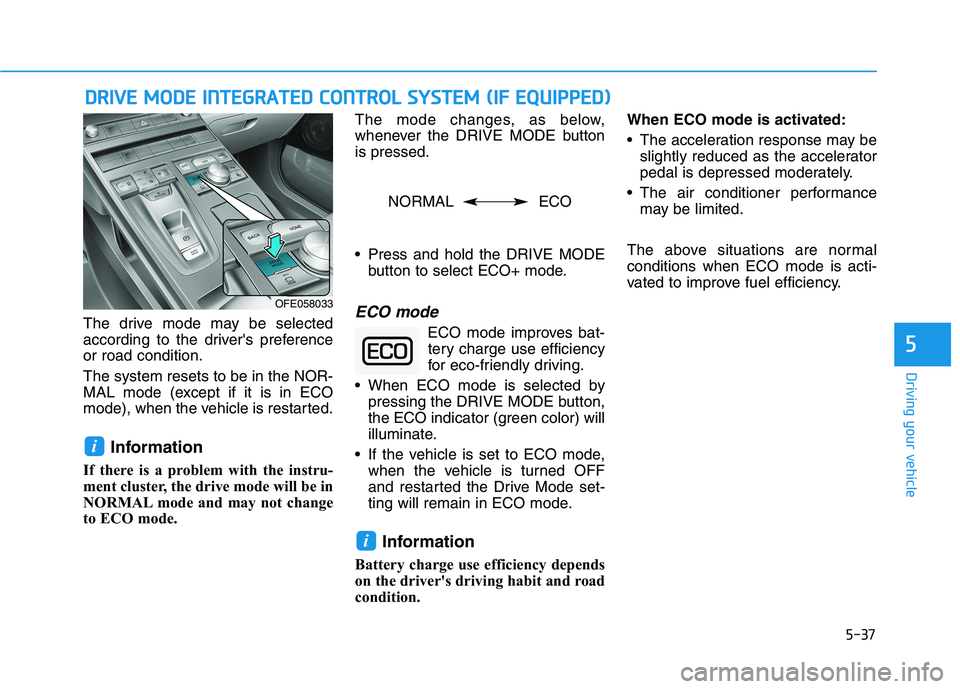
The drive mode may be selected
according to the driver's preferenceor road condition. The system resets to be in the NOR-
MAL mode (except if it is in ECO
mode), when the vehicle is restarted.Information
If there is a problem with the instru-
ment cluster, the drive mode will be in
NORMAL mode and may not change
to ECO mode. The mode changes, as below,
whenever the DRIVE MODE buttonis pressed.
Press and hold the DRIVE MODE
button to select ECO+ mode.ECO mode
ECO mode improves bat-tery charge use efficiency
for eco-friendly driving.
When ECO mode is selected by pressing the DRIVE MODE button,
the ECO indicator (green color) will
illuminate.
If the vehicle is set to ECO mode, when the vehicle is turned OFF
and restarted the Drive Mode set-
ting will remain in ECO mode.
Information
Battery charge use efficiency depends
on the driver's driving habit and road
condition. When ECO mode is activated:
The acceleration response may be
slightly reduced as the accelerator
pedal is depressed moderately.
The air conditioner performance may be limited.
The above situations are normalconditions when ECO mode is acti-
vated to improve fuel efficiency.
i
i
DD RRIIVV EE MM OODDEE IINN TTEEGG RRAA TTEEDD CC OO NNTTRR OO LL SS YY SSTT EEMM (( IIFF EE QQ UUIIPP PPEEDD ))
5
OFE058033
NORMAL ECO
Page 362 of 558
5-95
Driving your vehicle
5
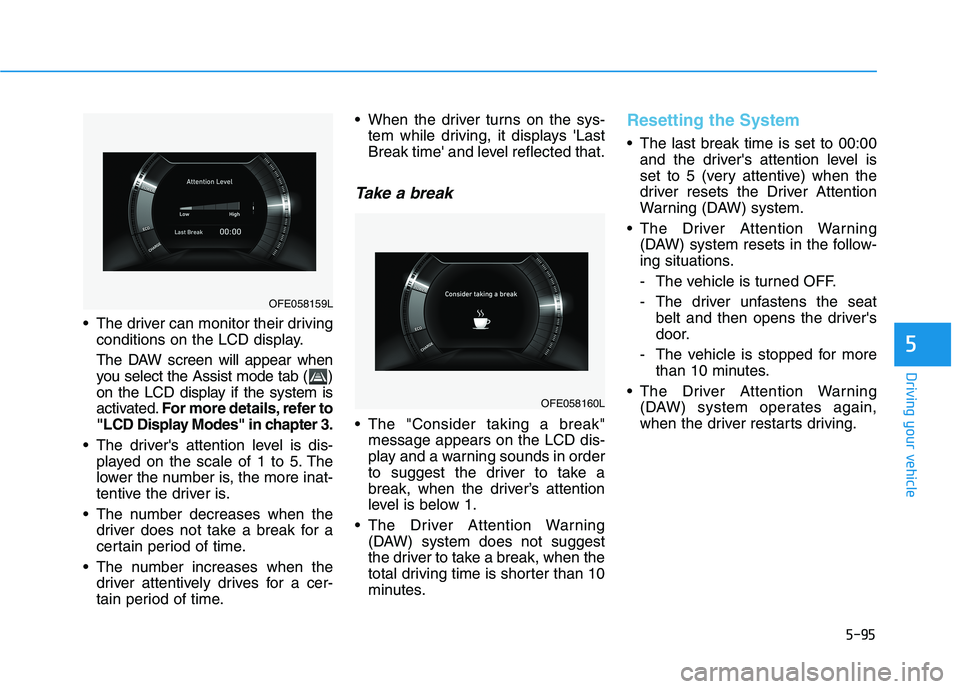
The driver can monitor their drivingconditions on the LCD display.
The DAW screen will appear when
you select the Assist mode tab ( )
on the LCD display if the system is
activated. For more details, refer to
"LCD Display Modes" in chapter 3.
The driver's attention level is dis- played on the scale of 1 to 5. The
lower the number is, the more inat-
tentive the driver is.
The number decreases when the driver does not take a break for a
certain period of time.
The number increases when the driver attentively drives for a cer-
tain period of time. When the driver turns on the sys-
tem while driving, it displays 'Last
Break time' and level reflected that.
Take a break
The "Consider taking a break"message appears on the LCD dis-
play and a warning sounds in order
to suggest the driver to take a
break, when the driver’s attention
level is below 1.
The Driver Attention Warning (DAW) system does not suggest
the driver to take a break, when the
total driving time is shorter than 10
minutes.
Resetting the System
The last break time is set to 00:00and the driver's attention level is
set to 5 (very attentive) when the
driver resets the Driver Attention
Warning (DAW) system.
The Driver Attention Warning (DAW) system resets in the follow-
ing situations.
- The vehicle is turned OFF.
- The driver unfastens the seat belt and then opens the driver's
door.
- The vehicle is stopped for more than 10 minutes.
The Driver Attention Warning (DAW) system operates again,
when the driver restarts driving.
OFE058160L
OFE058159L
Page 401 of 558
6-4
If you have a flat tire while driving
If a tire goes flat while you are driv- ing:
1. Take your foot off the acceleratorpedal and let the vehicle slow
down while driving straight ahead.
Do not apply the brakes immedi-ately or attempt to pull off the road
as this may cause a loss of con-
trol. When the vehicle has slowed
to such a speed that it is safe to do
so, brake carefully and pull off the
road. Drive off the road as far as
possible and park on firm, level
ground. If you are on a divided
highway, do not park in the medi-
an area between the two traffic
lanes.
2. When the vehicle is stopped, turn on your emergency hazard flash-
ers, set the parking brake and shift
gear to the P(Park) position.
3. Have all passengers get out of the vehicle. Be sure they all get out on
the side of the vehicle that is away
from traffic.
If the vehicle stalls while driv- ing
1. Reduce your speed gradually,keeping a straight line. Move cau-
tiously off the road to a safe place.
2. Turn on your emergency flashers.
3. Try to start the vehicle again. If your vehicle will not start, contact
an authorized HYUNDAI dealer. Be sure the shift lever is in P
(Park). The vehicle starts only
when the shift lever is in P (Park).
This vehicle does not have a regu- lar 12V battery that needs periodic
replacement. It is lithium ion poly-
mer type integrated into the high
voltage battery. The vehicle has a
12V battery protection system that
cuts 12V battery from vehicle draw
to prevent full discharge. If vehicle
will not start, first try pressing the
12V Battery Reset switch (left side
of the steering wheel near the fuel
door open switch) to reconnect the
12V battery, but you must start
vehicle within 15 seconds of press-
ing the 12V Battery Reset switch.
After starting vehicle, operate the
vehicle safely outdoors in ready
mode stopped and/or drive it for 30
minutes total to charge the 12V
battery fully.
Check the fuel level and add fuel if necessary.
Do not push or pull the vehicle to start it.
If the vehicle still does not start, call
an authorized HYUNDAI dealer for
assistance.
What to do in an emergency
I
IFF TT HH EE VV EEHH IICC LLEE WW IILL LL NN OO TT
S
S TT AA RRTT
Page 402 of 558
6-5
What to do in an emergency
6
Before Jump Starting
This vehicle does not have a regular
12V battery that needs periodic
replacement. It is lithium ion polymer
type integrated into the high voltage
battery. The vehicle has a 12V bat-
tery protection system that cuts 12V
battery from vehicle draw to prevent
full discharge.
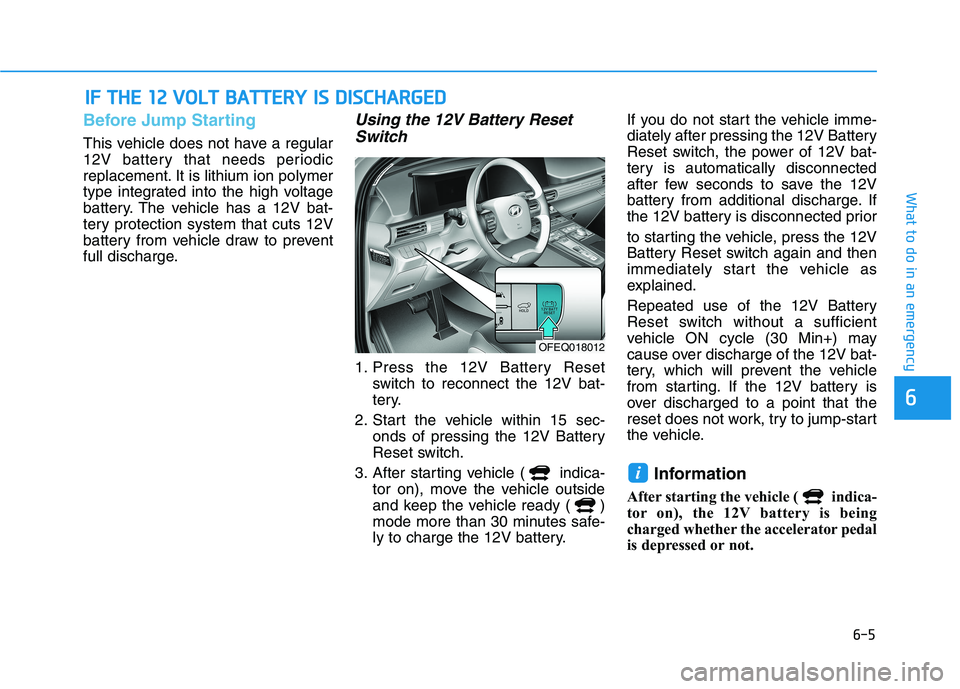
Using the 12V Battery ResetSwitch
1. Press the 12V Battery Reset switch to reconnect the 12V bat-
tery.
2. Start the vehicle within 15 sec- onds of pressing the 12V Battery
Reset switch.
3. After starting vehicle ( indica- tor on), move the vehicle outside
and keep the vehicle ready ( )
mode more than 30 minutes safe-
ly to charge the 12V battery. If you do not start the vehicle imme-
diately after pressing the 12V Battery
Reset switch, the power of 12V bat-
tery is automatically disconnected
after few seconds to save the 12V
battery from additional discharge. If
the 12V battery is disconnected prior
to starting the vehicle, press the 12V
Battery Reset switch again and then
immediately start the vehicle as
explained.
Repeated use of the 12V Battery
Reset switch without a sufficient
vehicle ON cycle (30 Min+) may
cause over discharge of the 12V bat-
tery, which will prevent the vehicle
from starting. If the 12V battery is
over discharged to a point that the
reset does not work, try to jump-start
the vehicle.
Information
After starting the vehicle ( indica-
tor on), the 12V battery is being
charged whether the accelerator pedal
is depressed or not.
i
II FF TT HH EE 11 22 VV OO LLTT BB AA TTTT EERR YY IISS DD IISS CC HH AARRGG EEDD
OFEQ018012
Page 403 of 558
6-6
What to do in an emergency
The following items may need to be
reset after the battery has been dis-
charged or the battery has been dis-
connected. See chapter 3 or 4 for:
Power Windows
Trip Computer
Climate Control System
Clock
Audio System
Sunroof
Driver Position Memory System
External power source using 12V
battery
The use of external power acces-
sories may reduce performance
and function of the vehicle.
Especially, the use of dash cam-
eras may shut off the power of the
vehicle prior to the dash camera's
automatic shut-down.
If the power of the vehicle is shut
off, start the vehicle as explained.
(refer to "Using the 12V Battery
Switch")Jump Starting
In the event vehicle still does not
have a functional 12V battery (check
if interior lights will not turn on) then
you can try a jump start using a 12V
booster pack or jumper cables from
another vehicle's 12V battery
according to the following instruc-
tions.1. Position the vehicles close enough
that the jumper cables will reach,
but do not allow the vehicles totouch.
2. Avoid fans or any moving parts in the fuel cell power module com-
partment at all times, even when
the vehicles are turned off.
3. Turn off all electrical devices such as radios, lights, air conditioning,
etc. Put the vehicles in P (Park)
and set the parking brake. Turn
both vehicles OFF.
NOTICE
Jump starting can be danger-
ous if done incorrectly. Follow
the jump starting procedure in
this section to avoid serious
injury or damage to your vehi-
cle. If in doubt about how to
properly jump start your vehi-
cle, we strongly recommend
that you have a service techni-
cian or towing service do it for
you.
CAUTION
Page 404 of 558
6-7
What to do in an emergency
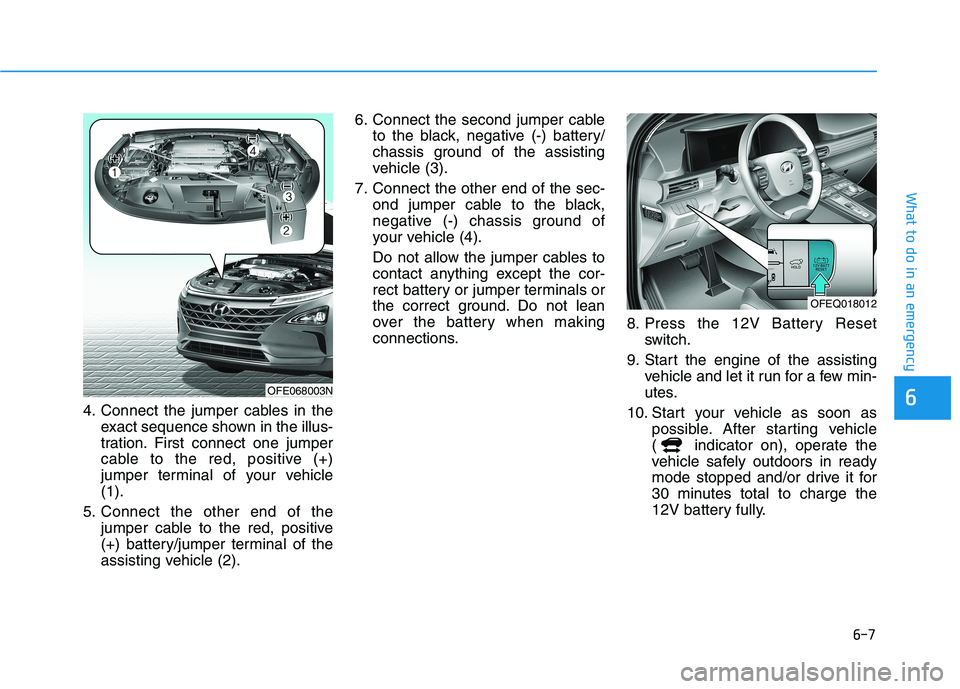
64. Connect the jumper cables in theexact sequence shown in the illus-
tration. First connect one jumper
cable to the red, positive (+)
jumper terminal of your vehicle(1).
5. Connect the other end of the jumper cable to the red, positive
(+) battery/jumper terminal of the
assisting vehicle (2). 6. Connect the second jumper cable
to the black, negative (-) battery/
chassis ground of the assisting
vehicle (3).
7. Connect the other end of the sec- ond jumper cable to the black,
negative (-) chassis ground of
your vehicle (4).
Do not allow the jumper cables to
contact anything except the cor-
rect battery or jumper terminals or
the correct ground. Do not lean
over the battery when making
connections. 8. Press the 12V Battery Reset
switch.
9. Start the engine of the assisting vehicle and let it run for a few min-
utes.
10. Start your vehicle as soon as possible. After starting vehicle
( indicator on), operate the
vehicle safely outdoors in ready
mode stopped and/or drive it for
30 minutes total to charge the
12V battery fully.
OFE068003N
OFEQ018012
Page 425 of 558
7
Maintenance
7
Maintenance
Fuel Cell Power Module Compartment ...............7-3
Maintenance Services ...........................................7-4Owner's Responsibility .....................................................7-4
Owner Maintenance Precautions..................................7-4
Owner Maintenance ..............................................7-5 Owner Maintenance Schedule .......................................7-6
Scheduled Maintenance Services........................7-7 Normal Maintenance Schedule ......................................7-8
Maintenance Under Severe Usage Conditions ........7-10
Explanation of Scheduled Maintenance Items ..7-12
Device Cooling Coolant .......................................7-13 Checking the Coolant Level ..........................................7-13
Changing Coolant ............................................................7-15
Stack Cooling Coolant .........................................7-16 Checking the Coolant Level ..........................................7-16
Changing Coolant ............................................................7-18
Brake Fluid ............................................................7-19 Checking the Brake Fluid Level ...................................7-19
Washer Fluid .........................................................7-20 Checking the Washer Fluid Level................................7-20
Air Cleaner ............................................................7-20 Filter Replacement ..........................................................7-20
Climate Control Air Filter ....................................7-22 Filter Inspection ...............................................................7-22 Wiper Blades.........................................................7-24
Blade Inspection ..............................................................7-24
Blade Replacement .........................................................7-24
12V Battery ...........................................................7-27 Battery Recharging ........................................................7-28
Reset Features.................................................................7-28
Tires and Wheels .................................................7-29 Tire Care ............................................................................7-29
Recommended Cold Tire Inflation Pressures ...........7-30
Check Tire Inflation Pressure ......................................7-31
Tire Rotation.....................................................................7-32
Wheel Alignment and Tire Balance ............................7-33
Tire Replacement ............................................................7-33
Wheel Replacement ........................................................7-34
Tire Traction .....................................................................7-34
Tire Maintenance ............................................................7-34
Tire Sidewall Labeling ....................................................7-34
Tire Terminology and Definitions................................7-38
All Season Tires ...............................................................7-42
Summer Tires ...................................................................7-42
Snow Tires ........................................................................7-42
Radial-Ply Tires ...............................................................7-42
Low Aspect Ratio Tires..................................................7-43
7