Page 224 of 814
Continued223
uuOperating the Switches Around the Steering Wheel uLights
Controls
The headlights automatically come on when th e wipers are used several times within
a certain number of intervals with the headlight switch in AUTO.
The headlights automatically go off a few mi nutes later if the wipers are stopped.
The headlights, all other exterior lights, and the instrument panel lights turn off 15
seconds after you set the power mode to VEHICLE OFF, take the remote with you,
and close the driver’s door.
If you set the power mode to VEHICLE OFF with the headlight switch on, but do not
open the door, the lights turn off after 10 minu tes (3 minutes, if the switch is in the
AUTO position).
The lights turn on again when you unlock or open the driver’s door. If you unlock
the door, but do not open it within 15 seconds, the lights go off. If you open the
driver’s door, you will hear a reminder chime alerting you that the lights are on.
■Headlight Integration with Wipers
■Automatic Lighting Off Feature
1 Headlight Integration with Wipers
This feature activates while the headlights are off in
AUTO .
The instrument panel br ightness does not change
when the headlights come on.
At dark ambient light leve ls, the automatic lighting
control feature turns on the headlights, regardless of
the number of wiper sweeps.
You can turn the headlight integration with wipers
function on and off.
2 Settings
* P. 140
2 How to Customize the Vehicle Settings
P. 444
Models with 7-in. Color Touchscreen
Models with 9-in. Color Touchscreen
1 Automatic Lighting Off Feature
You can change the headlight auto off timer setting.
2 Settings
* P. 140
2 How to Customize the Vehicle Settings
P. 444
Models with 7-in. Color Touchscreen
Models with 9-in. Color Touchscreen
* Not available on all models
23 PILOT-31T906000_03.book 223 ページ 2022年10月31日 月曜日 午前10時26分
Page 230 of 814
229
uuOperating the Switches Around the Steering Wheel uWipers and Washers
Continued
Controls
Wipers and Washers
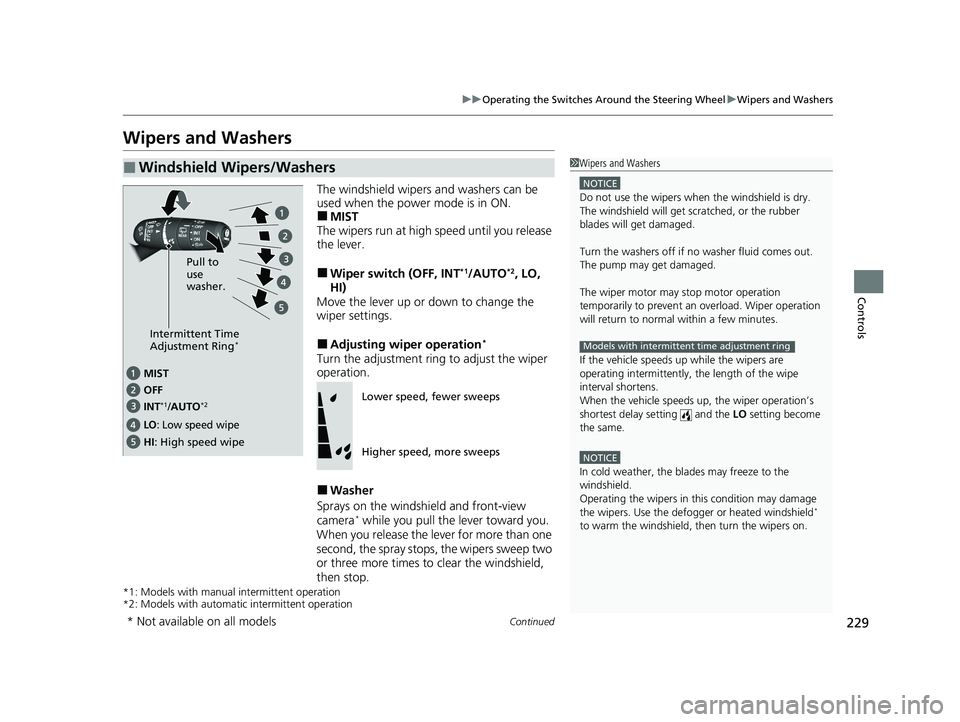
The windshield wipers and washers can be
used when the power mode is in ON.
■MIST
The wipers run at high speed until you release
the lever.
■Wiper switch (OFF, INT*1/AUTO*2, LO,
HI)
Move the lever up or down to change the
wiper settings.
■Adjusting wiper operation*
Turn the adjustment ring to adjust the wiper
operation.
■Washer
Sprays on the windshield and front-view
camera
* while you pull the lever toward you.
When you release the le ver for more than one
second, the spray stops, the wipers sweep two
or three more times to clear the windshield,
then stop.
*1: Models with manual intermittent operation
*2: Models with automati c intermittent operation
■Windshield Wipers/Washers1Wipers and Washers
NOTICE
Do not use the wipers when the windshield is dry.
The windshield will get sc ratched, or the rubber
blades will get damaged.
Turn the washers off if no washer fluid comes out.
The pump may get damaged.
The wiper motor may stop motor operation
temporarily to prevent an overload. Wiper operation
will return to normal within a few minutes.
If the vehicle speeds up while the wipers are
operating intermittently, the length of the wipe
interval shortens.
When the vehicle speeds up, the wiper operation’s
shortest delay se tting and the LO setting become
the same.
NOTICE
In cold weather, the blades may freeze to the
windshield.
Operating the wipers in th is condition may damage
the wipers. Use the defogge r or heated windshield
*
to warm the windshield, then turn the wipers on.
Models with intermittent time adjustment ringIntermittent Time
Adjustment Ring*
MIST
INT
*1/AUTO*2OFF
LO: Low speed wipe
HI: High speed wipe Pull to
use
washer.
Lower speed, fewer sweeps
Higher speed, more sweeps
* Not available on all models
23 PILOT-31T906000_03.book 229 ページ 2022年10月31日 月曜日 午前10時26分
Page 569 of 814
568
uuHonda Sensing ®u
Driving
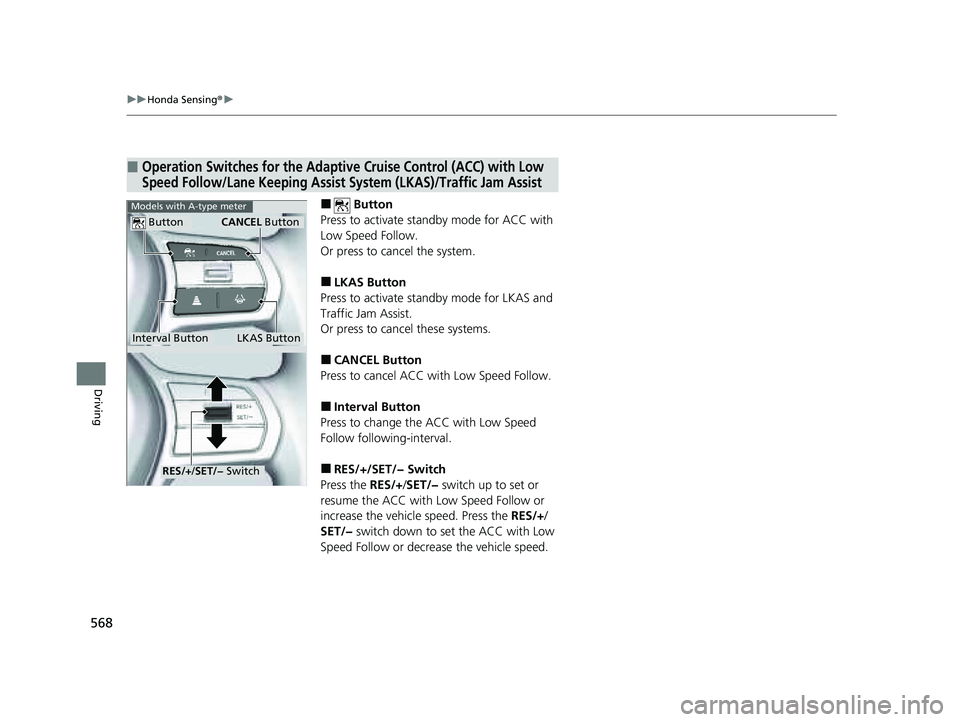
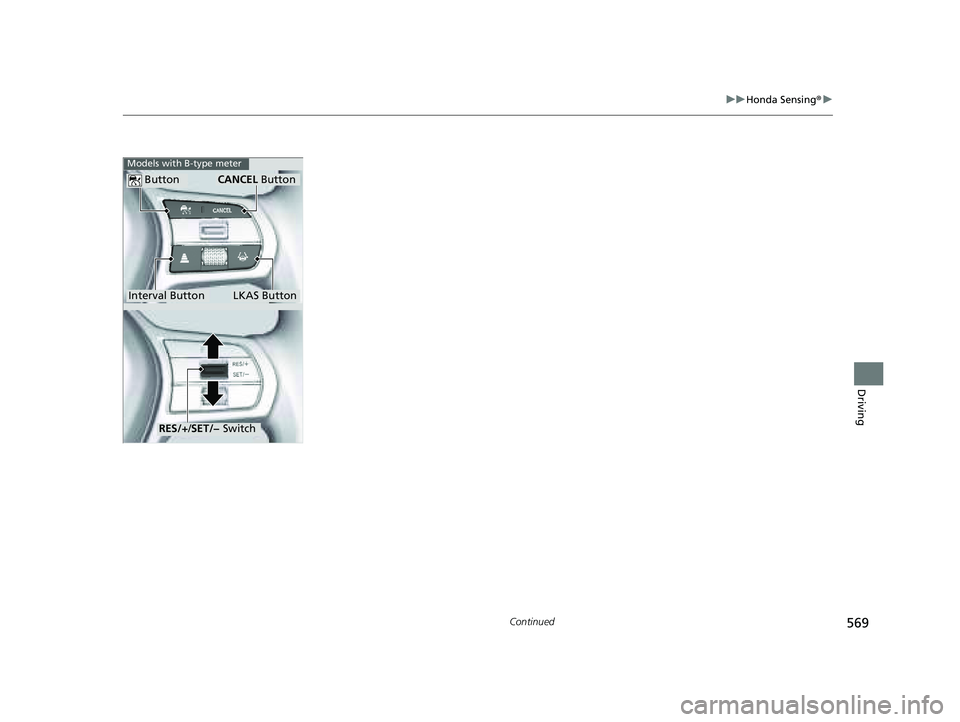
■ Button
Press to activate standby mode for ACC with
Low Speed Follow.
Or press to cancel the system.
■LKAS Button
Press to activate standby mode for LKAS and
Traffic Jam Assist.
Or press to cancel these systems.
■CANCEL Button
Press to cancel ACC with Low Speed Follow.
■Interval Button
Press to change the ACC with Low Speed
Follow following-interval.
■RES/+/SET/− Switch
Press the RES/+/SET/− switch up to set or
resume the ACC with Low Speed Follow or
increase the vehicl e speed. Press the RES/+/
SET/− switch down to set the ACC with Low
Speed Follow or decrease the vehicle speed.
■Operation Switches for the Adaptive Cruise Control (ACC) with Low
Speed Follow/Lane Keeping Assist System (LKAS)/Traffic Jam Assist
Interval Button
Button
LKAS Button
CANCEL Button
Models with A-type meter
RES/+/SET/− Switch
23 PILOT-31T906000_03.book 568 ページ 2022年10月31日 月曜日 午前10時26分
Page 570 of 814
569
uuHonda Sensing ®u
Continued
Driving
Interval Button
Button
LKAS Button
CANCEL Button
Models with B-type meter
RES/+/SET/− Switch
23 PILOT-31T906000_03.book 569 ページ 2022年10月31日 月曜日 午前10時26分
Page 572 of 814
571
uuHonda Sensing ®u
Driving
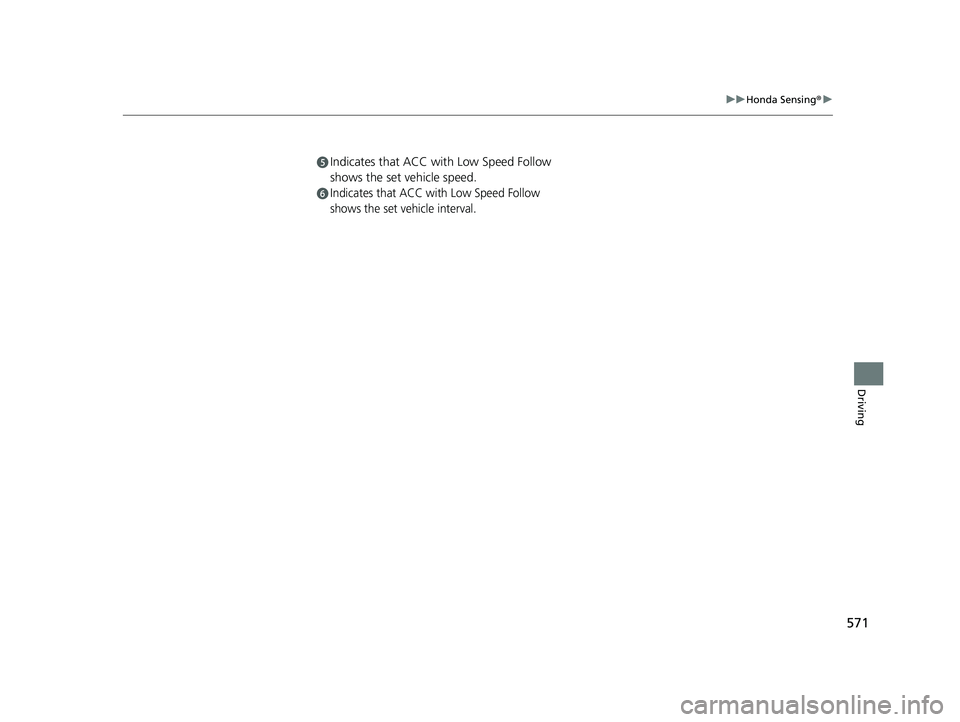
eIndicates that ACC with Low Speed Follow
shows the set vehicle speed.
fIndicates that ACC with Low Speed Follow
shows the set vehicle interval.
23 PILOT-31T906000_03.book 571 ページ 2022年10月31日 月曜日 午前10時26分
Page 591 of 814

590
uuHonda Sensing ®u Adaptive Cruise Control (ACC) with Low Speed Follow
Driving
Adaptive Cruise Control (A CC) with Low Speed Follow
Helps maintain a constant vehicle speed a nd a set following-interval behind a vehicle
detected ahead of yours and, if the detect ed vehicle comes to a stop, can decelerate
and stop your vehicle, without you having to keep your foot on the brake or the
accelerator.
When ACC with Low Speed Follow slows y our vehicle by applying the brakes, your
vehicle’s brake lights will illuminate.1 Adaptive Cruise Control (ACC) with Low Speed Follow
3WARNING
Improper use of ACC with Low Speed
Follow can lead to a crash.
Use ACC with Low Speed Follow only when
driving on expressways and in good road
and weather conditions.
3WARNING
ACC with Low Speed Follow has limited
braking capability and may not stop your
vehicle in time to avoid a collision with a
vehicle that quickly stops in front of you.
Always be prepared to apply the brake
pedal if the conditions require.
When to use
■Vehicle speed for ACC wi th Low Speed Follow: A vehicle is detected ahead
within ACC with Low Speed Follow range – ACC with Low Speed Follow
operates at speeds up to 90 mph (145 km/h).
No vehicle is detected within ACC with Low Speed Follow range – ACC with
Low Speed Follow operates at the speed of 25 mph (40 km/h) or above.
■Shift position for ACC with Low Speed Follow: In ( D or (S.
A front sensor
camera is located
behind the
rearview mirror.
The radar sensor is
behind the Honda
emblem on the
front grille.
23 PILOT-31T906000_03.book 590 ページ 2022年10月31日 月曜日 午前10時26分
Page 592 of 814

Continued591
uuHonda Sensing ®u Adaptive Cruise Control (ACC) with Low Speed Follow
Driving
■How to activate the system1Adaptive Cruise Control (ACC) with Low Speed Follow
Important Reminder
As with any system, there are limits to ACC with Low
Speed Follow. Use the brake pedal whenever
necessary, and always keep a safe interval between
your vehicle and other vehicles.
For directions on the prop er handling of the radar
sensor, refer to the following page. 2 Radar Sensor P. 650
You can read about handling information for the
camera equipped with this system. 2 Front Sensor Camera P. 648
3WARNING
Exiting a vehicle that has been stopped
while the ACC with Low Speed Follow
system is operating can result in the vehicle
moving without operator control.
A vehicle that moves without operator
control can cause a crash, resulting in
serious injury or death.
Never exit a vehicle when the vehicle is
stopped by ACC with Low Speed Follow.
How to use
■Press the button on the
steering wheel.
(white) is on in the gauge
ACC with Low Speed Follow is ready to use.
23 PILOT-31T906000_03.book 591 ページ 2022年10月31日 月曜日 午前10時26分
Page 593 of 814

uuHonda Sensing ®u Adaptive Cruise Control (ACC) with Low Speed Follow
592
Driving
*1 : Models with A-type meter
*2 : Models with B-type meter
When driving at about 25 mph (40 km/h) or above: Take your foot off the
pedal and press the RES/+/SET/− switch up or down when you reach the desired
speed. The moment you release the switch, the set speed is fixed, and ACC with
Low Speed Follow begins.
When you use ACC with Low Speed Follow, Stra ight Driving Assist (a feature of the
Electric Power Steering system) is activated.
By enabling the steering system to automatically compensate for natural steering pull,
Straight Driving Assist makes it easier for you to keep your vehicle in a straight line.
■To Set the Vehicle Speed1To Set the Vehicle Speed
The radar sensor for ACC with Low Speed Follow is shared
with the Collision Mitigation Braking System
TM (CMBSTM).
2 Collision Mitigation Braking SystemTM
(CMBSTM) P. 572
ACC with Low Speed Follow may not work properly
under certain conditions.
2 ACC with Low Speed Follow Conditions
and Limitations P. 599
When not using ACC with Low Speed Follow: Turn
off adaptive cruise by pressing the button.
Do not use ACC with Low Speed Follow under the
following conditions:
•On roads with frequent la ne-change or continuous
stop and go traffic, ACC with Low Speed Follow
cannot keep an appropriate distance between your
vehicle and the vehicle ahead of you.
•On roads with sharp turns.•On roads with toll collection facilities or other
objects between lanes of traffic, or in parking
areas, or faci lities with driv e through access.
•On roads with bad weather (rain, fog, snow, etc.),
ACC with Low Speed Follow may not detect the
distance between your vehicle and the vehicle
ahead of you properly.
•On roads with slippery or icy surfaces. The wheels
may spin out and your vehi cle may lose the control
on the condition.
•On roads with steep uphill or steep downhill slopes.
•On roads with undulating slopes.
On when ACC with Low
Speed Follow begins RES/+
/SET/− Switch
(green)
Interval Up or down
*1
*2
23 PILOT-31T906000_03.book 592 ページ 2022年10月31日 月曜日 午前10時26分