2023 HONDA PILOT interval
[x] Cancel search: intervalPage 10 of 814

9
Quick Reference Guide❚ Headlights/ Turn Signals (P220, 222)
❚ Fog Lights* (P224)
❚Paddle Shifter (Shift down) (P541)
❚Paddle Shifter (Shift up) (P541)
❚ Lane Keeping Assist System (LKAS)
Button
(P616)
❚Horn (Press an area around .)
❚Left Selector Wheel (P126)
❚ Adaptive Cruise Control (ACC) with Low
Speed Follow Buttons
(P591)
❚Right Selector Wheel* (P155)
❚ Wipers/Washers (P229)
❚ Camera Button* (P675)
❚ Heated Steering Wheel Button* (P279)
❚ Interval Button (P569)
❚Bluetooth ® HandsFreeLink ® Buttons (P459, 479)
❚Audio Remote Controls (P296)
❚ (home) Button* (P126)
* Not available on all models
23 PILOT-31T906000_03.book 9 ページ 2022年10月31日 月曜日 午前10時26分
Page 31 of 814

30
Quick Reference Guide
Honda Sensing®(P567)
Honda Sensing ® is a driver support system
which employs the use of two distinctly
different kinds of sensors: a radar sensor
located behind the Honda emblem and a
front sensor camera mounted to the interior
side of the windshield behind the rearview
mirror.
Honda Sensing ® is a driver support system
which employs the use of three distinctly
different kinds of sensors: a radar sensor
located behind the Honda emblem, a front
sensor camera mounted to the interior side
of the windshield behind the rearview
mirror, and the sonar sensors located in the
front and rear bumpers.
Models without Low Speed Braking Control
Models with Low Speed Braking Control
Front Sensor Camera Radar Sensor
Sonar Se
nsors
*
Collision Mitigation
Braking System
TM
(CMBS
TM) (P572)
The system can assist you when it
determines there is a possibility of your
vehicle colliding with a vehicle (including
motorcycles) ahead from behind, an
oncoming vehicle in front, a pedestrian, or
someone riding a bicycle (moving bicycle).
The CMBS
TM is designed to alert you when
the potential for a collision is determined, as
well as assist in reducing speed, avoiding
collisions, and reducing collision severity.
Low Speed Braking
Control
* (P584)
Using sonar sensors located on the front and
rear bumpers, this system can detect if there
is danger of a potential collision with a wall
or other obstacle during normal driving or
when the accelerator pedal is depressed
with too much force. The system then assists
in avoiding collisions and reducing damage
from impact through a ssistive braking and/
or assistive driving power suppression.
Adaptive Cruise Control
(ACC) with Low Speed
Follow
(P590)
Helps maintain a constant vehicle speed and
a set following-interval behind a vehicle
detected ahead of yours and, if the detected
vehicle comes to a stop, can decelerate and
stop your vehicle, without you having to
keep your foot on the brake or the
accelerator.
Lane Keeping Assist
System (LKAS)
(P612)
Provides steering input to help keep the
vehicle in the middle of a detected lane and
provides tactile and visual alerts if the
vehicle is detected drifting out of its lane.
23 PILOT-31T906000_03.book 30 ページ 2022年10月31日 月曜日 午前10時26分
Page 100 of 814

99
uuIndicators u
Continued
Instrument Panel
*1 : When you set the power mode to ON, these indicators come on to indicate that system checks are being performed. They go off a few seconds later or after the engine
has started. If an indicator does not come on or turn off, ther e may be a malfunction in the corresponding system. To resolve the issue, follow the instructions in the
owner's manual.
Auto High-Beam
Indicator
High Beam
Indicator
Fog Light
Indicator*
System Message
Indicator Adaptive Cruise Control
(ACC) with Low Speed
Follow Indicator
(Amber)Lane Keeping Assist
System (LKAS) Indicator
(Amber)
Safety Support
Indicator (Green/Gray)
Auto Idle Stop System
Indicator (Amber)
P. 113
P. 108
P. 108
P. 115
P. 108 Immobilizer System
Indicator
P.
112
Se
curity System Alarm
Indicator
P.
112
P. 109
P. 116
P. 120
*1
Adaptive Cruise Control
(ACC) with Low Speed
Follow Indicator
(White/Green) P. 115
*1
Lane Keeping Assist
System (LKAS) Indicator
(White/Green)
P. 116
*1 *1Safety Support
Indicator (Amber)
P. 117
*1
SNOW Mode
Indicator
P. 110
Auto Idle Stop Off
Indicator
P. 113
Auto
Idle Stop
Suspen
d Indicator P. 114
ECON Mode
Indicator
P. 110
Low Temperature
Indicator* P. 111
Cruise Mode Indicator
(Whi
te/Green)
P. 116
Adaptive Cruise Control
(ACC) with Low Speed
Follow Interval
Indicator
*
P. 116
*1
Auto Idle Stop
Indicator (Green)
P. 113
Hill Descent Control
System Indicator
(White/Green)
P. 109*1
NORMAL Mode
Indicator
P. 110
SPORT Mode
Indicator* P. 110
SAND Mode
Indicator* P. 111
TOW Mode
Indicator
P. 111
TRAIL Mode
Indicator* P. 111
* Not available on all models
23 PILOT-31T906000_03.book 99 ページ 2022年10月31日 月曜日 午前10時26分
Page 106 of 814

105
uuIndicators u
Continued
Instrument Panel
IndicatorNameOn/BlinkingExplanation
Seat Belt Reminder
Indicator
●Blinks and the beeper sounds for a few
seconds if you are not wearing a seat belt
when you set the power mode to ON, then
the indicator comes on.
●If the front passenger is not wearing a seat
belt, the indicator comes on a few seconds
later.
●Comes on for a while when the rear seat
belt is unfastened while the power mode in
ON.
●Blinks while driving if you and/or any
passenger has not fastened a seat belt. The
beeper sounds and the indicator blinks at
regular intervals.
●The beeper stops and the indicator goes off when
you and the passengers fasten their seat belts.
●Stays on after you and/or the passengers have
fastened the seat belt(s) - A detection error may
have occurred in the sensor. Have your vehicle
checked by a dealer.
2 Seat Belt Reminder P. 45
Low Fuel Indicator
(Amber)
●Comes on when the fuel reserve is running
low (approximately 2.77 U.S. gal/10.5 Liter
left).●Refuel your vehicle as soon as possible.
●Blinks if there is a problem with the fuel
gauge.●Have your vehicle checked by a dealer.
23 PILOT-31T906000_03.book 105 ページ 2022年10月31日 月曜日 午前10時26分
Page 117 of 814
116
uuIndicators u
Instrument Panel
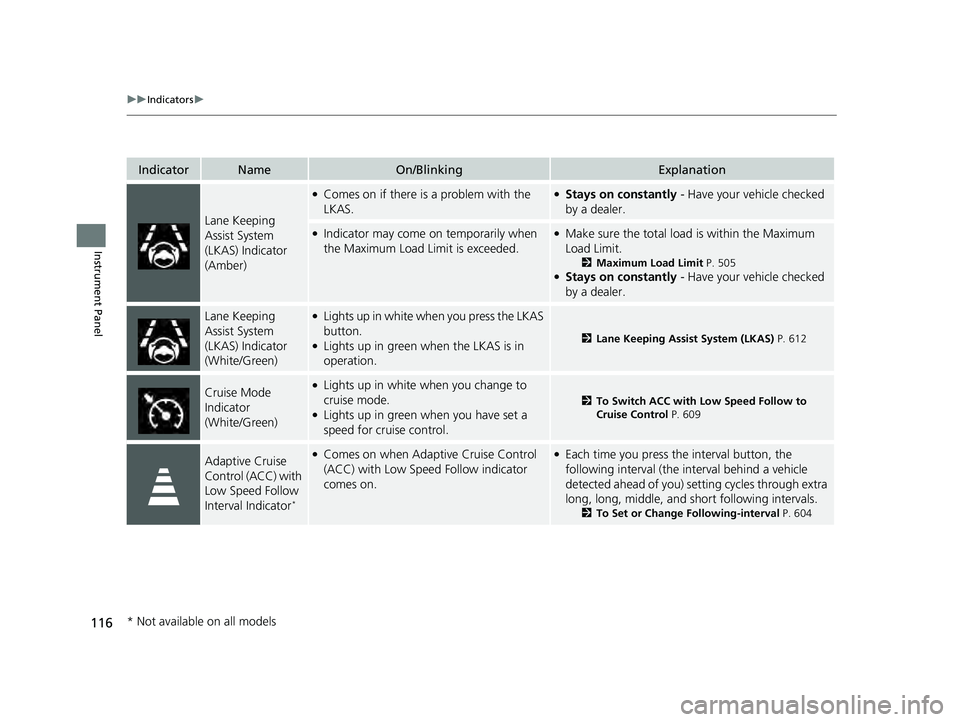
IndicatorNameOn/BlinkingExplanation
Lane Keeping
Assist System
(LKAS) Indicator
(Amber)
●Comes on if there is a problem with the
LKAS.●Stays on constantly - Have your vehicle checked
by a dealer.
●Indicator may come on temporarily when
the Maximum Load Limit is exceeded.●Make sure the total load is within the Maximum
Load Limit.
2 Maximum Load Limit P. 505●Stays on constantly - Have your vehicle checked
by a dealer.
Lane Keeping
Assist System
(LKAS) Indicator
(White/Green)●Lights up in white wh en you press the LKAS
button.
●Lights up in green when the LKAS is in
operation.2 Lane Keeping Assist System (LKAS) P. 612
Cruise Mode
Indicator
(White/Green)●Lights up in white when you change to
cruise mode.
●Lights up in green when you have set a
speed for cruise control.
2To Switch ACC with Low Speed Follow to
Cruise Control P. 609
Adaptive Cruise
Control (ACC) with
Low Speed Follow
Interval Indicator
*
●Comes on when Adaptive Cruise Control
(ACC) with Low Speed Follow indicator
comes on.●Each time you press the interval button, the
following interval (the interval behind a vehicle
detected ahead of you) se tting cycles through extra
long, long, middle, and short following intervals.
2 To Set or Change Following-interval P. 604
* Not available on all models
23 PILOT-31T906000_03.book 116 ページ 2022年10月31日 月曜日 午前10時26分
Page 129 of 814
uuGauges and Displays uDriver Information Interface (A-type Meter)
128
Instrument Panel
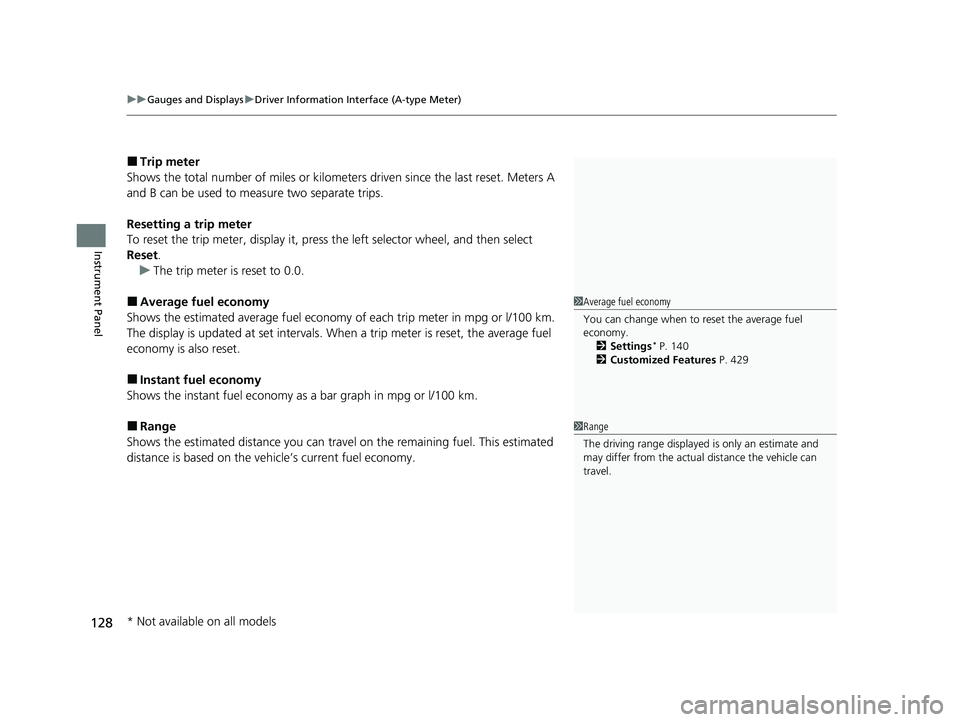
■Trip meter
Shows the total number of miles or kilomete rs driven since the last reset. Meters A
and B can be used to measure two separate trips.
Resetting a trip meter
To reset the trip meter, display it, press the left selector wheel, and then select
Reset .
u The trip meter is reset to 0.0.
■Average fuel economy
Shows the estimated average fuel economy of each trip meter in mpg or l/100 km.
The display is updated at set intervals. When a trip meter is reset, the average fuel
economy is also reset.
■Instant fuel economy
Shows the instant fuel economy as a bar graph in mpg or l/100 km.
■Range
Shows the estimated distance you can trave l on the remaining fuel. This estimated
distance is based on the vehicle’s current fuel economy.
1 Average fuel economy
You can change when to reset the average fuel
economy.
2 Settings
* P. 140
2 Customized Features P. 429
1Range
The driving range displayed is only an estimate and
may differ from the actual distance the vehicle can
travel.
* Not available on all models
23 PILOT-31T906000_03.book 128 ページ 2022年10月31日 月曜日 午前10時26分
Page 158 of 814
Continued157
uuGauges and Displays uDriver Information Interface Right Side Area (B-type-Meter)
Instrument Panel
■Average fuel economy
Shows the estimated average fuel economy of each trip meter in mpg or l/100 km.
The display is updated at set intervals. Wh en a trip meter is reset, the average fuel
economy is also reset.
■Instant fuel economy
Shows the instant fuel economy as a bar graph in mpg or l/100 km.
■Range
Shows the estimated distance you can trave l on the remaining fuel. This estimated
distance is based on the vehicle’s current fuel economy.
1 Average fuel economy
You can change when to reset the average fuel
economy.
2 Customized Features P. 429
1Range
The driving range displayed is only an estimate and
may differ from the actual distance the vehicle can
travel.
23 PILOT-31T906000_03.book 157 ページ 2022年10月31日 月曜日 午前10時26分
Page 209 of 814
uuSecurity System uSecurity System Alarm
208
Controls
■When the security sy stem alarm activates
The horn sounds intermittently, and some exterior lights flash.
■To deactivate the security system alarm
Unlock the vehicle using the key, remote transmitter, or keyless access system. The
system, along with the horn and flashing lights, is deactivated.
■Setting the security system alarm
The security system alarm automatically sets when the following conditions have
been met:
• The power mode is set to VEHICLE OFF.
• The hood is closed.
• All doors and the tailgate are locked from outside with the remo te transmitter or
keyless access system.
■When the security system alarm sets
The security system alarm indicator in the instrument panel blinks and the blinking
interval changes after about 15 seconds.
■To cancel the security system alarm
The security system alarm is canceled when the vehicle is unlocked using the remote
transmitter or keyless access system, or wh en the power mode is set to ON. The
security system alarm indicator goes off at the same time.
1 Security System Alarm
Do not set the security system alarm when someone
is in the vehicle or a window is open. The system can
accidentally activate when:
•Unlocking the door with the lock tab.•Opening the hood with the hood release.
•Opening the tailgate with the power tailgate
button on the dashboard.
If the battery goes dead after you have set the
security system alarm, the security alarm may go off
once the battery is re charged or replaced.
If this occurs, deactivate the security system alarm by
unlocking a door using the ke y, remote transmitter,
or keyless access system.
Models with power tailgate
23 PILOT-31T906000_03.book 208 ページ 2022年10月31日 月曜日 午前10時26分