2023 HONDA PASSPORT charging
[x] Cancel search: chargingPage 227 of 610
uuAudio System uAuxiliary Input Jack
226
Features
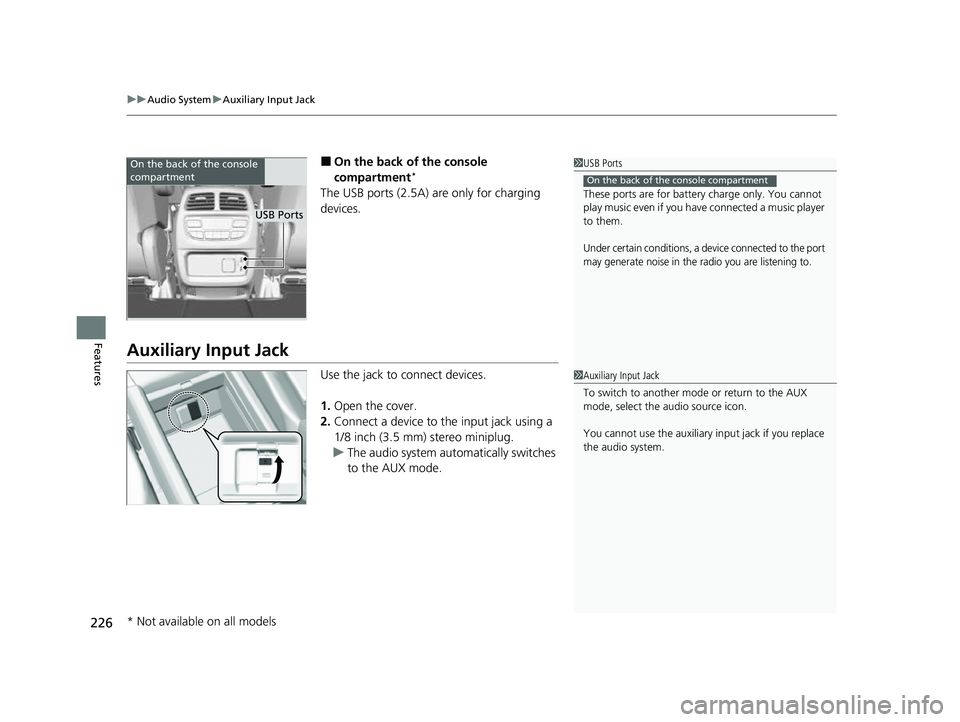
■On the back of the console
compartment*
The USB ports (2.5A) are only for charging
devices.
Auxiliary Input Jack
Use the jack to connect devices.
1. Open the cover.
2. Connect a device to the input jack using a
1/8 inch (3.5 mm) stereo miniplug.
u The audio system automatically switches
to the AUX mode.
1USB Ports
These ports are for battery charge only. You cannot
play music even if you have connected a music player
to them.
Under certain conditions, a device connected to the port
may generate noise in the radio you are listening to.
On the back of the console compartment
On the back of the console
compartment
USB Ports
1 Auxiliary Input Jack
To switch to another mode or return to the AUX
mode, select the audio source icon.
You cannot use the auxiliary input jack if you replace
the audio system.
* Not available on all models
23 PASSPORT-31TGS6400.book 226 ページ 2022年8月5日 金曜日 午後9時2分
Page 316 of 610

315
uuGeneral Information on the Audio System uHonda App License Agreement
Continued
Features
E. Information Collection and Storage
1. Information Collection , Use, Transmission and Storage of Data. Consent to Use of Data:
You agree that HONDA and PROVIDERS may
collect and use your information gathered in any manner as part of product support services related to the SOFTWARE or related services.
HONDA may share such information with third parties, including, without limitation, PR OVIDERS, third party software and services
suppliers, their affiliates and/or their designated agents, solely to improve their products or to provide services or technolo gies to you.
HONDA, third party software and syst ems suppliers, their affiliates and/or their de signated agent may disclose this information to others,
but not in a form that pe rsonally identifies you.
2. Information Storage.
Depending on the type of mult imedia system you have in your VEHICLE, certain information may be stored for ease
of use of the SOFTWARE including, without limitation, search hi story, location history in certain applications, previous and saved
destinations, map locations within certain applications, and device numbers and contact information.
(a) Vehicle Health Information.
Your VEHICLE may remotely transmit information re garding the status and health of your VEHICLE
(“VEHICLE INFORMATION”) to HONDA without notification to you. VEHICLE INFORMATION may contain VEHICLE maintenance and
malfunction status that is derived from VEHICLE diagnostic data and includes, but is not limited to, status of powered doors and windows,
battery life data, battery charging data, VE HICLE speed, coolant temperature, air comp ressor revolution, output power, warning codes,
diagnostic trouble codes, fuel injection volume, and engine rotati ons per minute. VEHICLE HEALTH INFORMATION may be used by HON DA
for research and development, to deliver HONDA SERVICES and informat ion to you, and to contact you, and is retained only for a period
of time necessary to fulfill these goals.
(b) VEHICLE Geolocation Data (non-navigation/map based).
If you opt-in to geolocation-based SERVICES, your vehicle’s geolocation data
(latitude and longitude) will be automatically sent from your VEHICLE to HONDA and PROVIDERS.
(c) You understand that the inputting or uploading of information to your VEHICLE’s multimedia system or the SOFTWARE or SERVIC ES is
at your own risk and that HONDA is not responsible for unauthori zed access to or use of any personal or other information. All information
uploaded to the SOFTWARE and SERVICES may be stored on your VEHICLES’s multimedia system and you understand that the security and
safety of your VEHICLE’s multimedia system is your sole responsibility.
23 PASSPORT-31TGS6400.book 315 ページ 2022年8月5日 金曜日 午後9時2分
Page 410 of 610
![HONDA PASSPORT 2023 Owners Manual Continued409
uuWhen Driving uShifting
Driving
■If you want to keep the transmission in (N position [car wash mode]
With the engine running:
1. Press and hold the brake pedal.
2. Select
(N, then rel](/manual-img/13/58875/w960_58875-409.png "HONDA PASSPORT 2023 Owners Manual Continued409
uuWhen Driving uShifting
Driving
■If you want to keep the transmission in (N position [car wash mode]
With the engine running:
1. Press and hold the brake pedal.
2. Select
(N, then rel")
Continued409
uuWhen Driving uShifting
Driving
■If you want to keep the transmission in (N position [car wash mode]
With the engine running:
1. Press and hold the brake pedal.
2. Select
(N, then release the button to display (Neutral) (N hold mode on the driver
information interface.
3. Press and hold
(N again for two seconds.
u This puts the vehicle in car wash mode which must be used when your vehicle
is pulled through a conveyor type automatic car wash where you or an
attendant do not remain in the vehicle.
If the ENGINE START/STOP button is pressed
after car wash mode has been activated, the
power mode will change to ACCESSORY and a
message will be displayed on the driver
information interface. u For 15 minutes the gear position remains
in
(N with the power mode in
ACCESSORY. After that, the position
automatically changes to
( P and the
power mode changes to OFF.
u Manually changing to
(P cancels
ACCESSORY mode. The
(P indicator
comes on and the power mode changes
to OFF. You must always shift to
(P
when car wash mode is no longer
needed.
1If you want to keep the transmission in ( N position [car wash mode]
To keep the vehicle (N position, you can also follow
this procedure:
While the power mode is on, select
( N, and then
within five seconds, press the ENGINE START/STOP
button.
Note that the transmiss ion may not stay in
(N
position while any of the following indicators is on:
•Transmission system indicator.
•Malfunction indicator lamp.•Charging system indicator.
23 PASSPORT-31TGS6400.book 409 ページ 2022年8月5日 金曜日 午後9時2分
Page 541 of 610
540
uuBattery uCharging the AGM Battery
Maintenance
Charging the AGM Battery
AGM labeled batteries like those installe d in your vehicle require a compatible
charger to be properly charged. Damage to the battery can result if the battery is
charged improperly or with the wrong equi pment. For more information on how to
charge your vehicle’s AGM battery, consult a dealer.1Battery
The battery installed in this vehicle is specifically
designed for a model wi th Auto Idle Stop.
Using a battery other than this specified type may
shorten the battery life, a nd prevent Auto Idle Stop
from activating. If you need to replace the battery,
make sure to select the specified type and size. Ask a
dealer for more details.
23 PASSPORT-31TGS6400.book 540 ページ 2022年8月5日 金曜日 午後9時2分
Page 552 of 610

551
Handling the Unexpected
This chapter explains how to handle unexpected troubles.
ToolsTypes of Tools .................................. 552
If a Tire Goes Flat Changing a Flat Tire ......................... 553
Engine Does Not Start Checking the Engine ........................ 561
If the Keyless Remote Battery is Weak .. 563
Emergency Engine Stop ................... 564
If the Battery Is Dead ....................... 565
Overheating How to Handle Overheating ............. 568 Indicator, Coming On/Blinking
If the Engine Oil Low Warning Appears ........ 570If the Charging System Indicator Comes
On ................................................. 571
If the Malfunction Indicator Lamp Comes On or Blinks ................................... 571
If the Brake System Indicator (Red) Comes
On ................................................. 572
If the Electric Power Steering (EPS) System Indicator Comes On ....................... 572
If the Low Tire Pressure/Tire Pressure Monitoring System (TPMS) Indicator
Comes On or Blinks........................ 573 If the Transmission I
ndicator Blinks along
with the Warning Message ............ 574
Fuses Fuse Locations ................................. 575
Inspecting and Changing Fuses ........ 579
Emergency Towing ........................... 580
If You Cannot Unlock the Fuel Fill Door.. 581
Refueling
Refueling From a Portable Fuel
Container ................................... 582
If You Cannot Open the Tailgate .... 583
23 PASSPORT-31TGS6400.book 551 ページ 2022年8月5日 金曜日 午後9時2分
Page 567 of 610

566
uuIf the Battery Is Dead uJump Starting Procedure
Handling the Unexpected
5. Connect the other end of the first jumper
cable to the booster battery + terminal.
u Use a 12-volt booster battery only.
u When using an automotive battery
charger to boost your 12-volt battery,
select a lower charging voltage than 15-
volts. Check the charger manual for the
proper setting.
6. Connect the second jumper cable to the
booster battery - terminal.
7. Connect the other end of the second
jumper cable to the engine hanger as
shown. Do not connect this jumper cable to
any other part.
8. If your vehicle is connected to another
vehicle, start the assi sting vehicle’s engine
and increase its rpm slightly.
9. Attempt to start your vehicle’s engine. If it
turns over slowly, check that the jumper
cables have good metal-to-metal contact.
Booster Battery
23 PASSPORT-31TGS6400.book 566 ページ 2022年8月5日 金曜日 午後9時2分
Page 572 of 610

571
uuIndicator, Coming On/Blinking uIf the Charging System Indicator Comes On
Handling the Unexpected
If the Charging System Indicator Comes On
■Reasons for the indicator to come on
Comes on when there is a prob lem with the charging system.
■What to do when the indicator comes on
Turn off the climate control system, rear defogger, and other electrical
systems, and immediately co ntact a dealer for repairs.
If the Malfunction Indicator Lamp Comes On or Blinks
■Reasons for the indicator la mp to come on or blink
• Comes on when there is a problem with the engine emissions control
system.
• Blinks when engine misfiring is detected.
■What to do when the indicator lamp comes on
Avoid high speeds and immediately get your vehicle inspected at a
dealer.
■What to do when the indicator lamp blinks
Park the vehicle in a safe place with no flammable items and wait at least
10 minutes or more with the engine stopped until it cools.
1 If the Charging System Indicator Comes On
If you need to stop temporarily, do not turn off the
engine. Restarting the engi ne may rapidly discharge
the battery.
1 If the Malfunction Indicato r Lamp Comes On or Blinks
NOTICE
If you drive with the malf unction indicator lamp on,
the emissions control system and the engine could be
damaged.
If the malfunction indicator lamp blinks again when
restarting the engine, drive to the nearest dealer at
31 mph (50 km/h) or less. Have your vehicle
inspected.
23 PASSPORT-31TGS6400.book 571 ページ 2022年8月5日 金曜日 午後9時2分
Page 601 of 610
600
Index
USB Port .................................................. 225
Wallpaper Setup ...................................... 234
Wi-Fi Connection ..................................... 294
Audio/Information Screen ........................ 231
Authorized Manuals ................................. 596
Auto Door Locking/Unlocking ................. 142
Customize ............................................... 343
Auto High-Beam ....................................... 169
Indicator .................................................... 89
Auto Idle Stop ........................................... 413
OFF Button .............................................. 414
Auto Idle Stop Indicator (Green) ............... 91
Auto Idle Stop OFF Indicator ..................... 91
Auto Idle Stop Suspend Indicator .............. 91
Auto Idle Stop System Indicator (Amber) ..................................................... 91
Automatic Intermittent Wipers ............... 173
Automatic Lighting .................................. 165
Automatic Transmission ........................... 404
Creeping ................................................. 404
Fluid ........................................................ 519
Kickdown ................................................ 404
Operating the Shift Button....................... 407
Shifting.................................................... 405
Auxiliary Input Jack .................................. 226
Average Fuel Economy ............................. 115B
Back-Up Light........................................... 525
Battery ...................................................... 539
Charging System Indicator................. 83, 571
If the Battery Is Dead ............................... 565
Maintenance (Checking the Battery) ........ 539
Belts (Seat) .................................................. 39
Beverage Holders ..................................... 199
Blind Spot Information System ................ 424
Bluetooth® Audio..................................... 285
Bluetooth® HandsFreeLink ®................... 351
Booster Seats (For Children) ...................... 78
Brake System ............................................ 477
Anti-lock Brake System (ABS)................... 479
Brake Assist System ................................. 480
Fluid ........................................................ 520
Foot Brake............................................... 478
Indicator............................................ 82, 572
Parking Brake .......................................... 477
Brightness Control (Instrument Panel).... 177
Bulb Replacement .................................... 521
Back-Up Lights ........................................ 525
Brake lights ............................................. 524
Daytime Running Lights........................... 522
Fog Lights ............................................... 523
Front Side Marker Lights.......................... 522
Front Turn Signal Lights ........................... 523
Headlights ............................................... 521
High-Mount Brake Light .......................... 525
Parking Lights.......................................... 522
Rear License Plate Lights .......................... 525 Rear Side Marker Lights .......................... 524
Rear Turn Signal Lights............................ 524
Side Turn Signal/Emergency Indicator
Lights .................................................... 524
Taillights ................................................. 524
Bulb Specifications ................................... 586
C
Car Wash Mode........................................ 409
Carbon Monoxide Gas ............................... 79
Carrying Cargo ................................. 379, 381
Certification Label ................................... 588
Changing Bulbs ........................................ 521
Charging System Indicator ................ 83, 571
Child Safety ................................................ 64
Childproof Door Locks ............................ 141
Child Seat ................................................... 64
Booster Seats ............................................ 78
Child Seat for Infants ................................ 66
Child Seat for Small Children .................... 67
Installing a Child Seat with a Lap/ Shoulder Seat Belt ................................... 72
Larger Children ......................................... 77
Rear-facing Child Seat............................... 66
Selecting a Child Seat ............................... 68
Childproof Door Locks ............................. 141
Cleaning the Exterior ............................... 546
Cleaning the Interior ............................... 544
Climate Control System ........................... 215
Changing the Mode................................ 215
23 PASSPORT-31TGS6400.book 600 ページ 2022年8月5日 金曜日 午後9時2分