Page 7 of 610

Contents
This owner’s manual should be considered a permanent part of the
vehicle and should remain with the vehicle when it is sold.
The Navigation Manual is available online at owners.honda.com
(U.S.) or honda.ca (Canada). If you are the first registered owner
of your vehicle, you may request a complimentary printed
copy of the Navigation Manual within the first six months of
vehicle purchase. To request a copy, visit owners.honda.com. In
Canada, please request a copy from your Honda dealer.
This owner’s manual covers all models of your vehicle. You may find
descriptions of equipment and features that are not on your
particular model.
Images throughout this owner’s manu al (including the front cover)
represent features and equipment that are available on some, but
not all, models. Your particular mo del may not have some of these
features.
This owner’s manual is for vehicles sold in the United States and
Canada.
The information and specifications in cluded in this publication were
in effect at the time of approval for printing. Honda Motor Co., Ltd.
reserves the right, however, to discontinue or change specifications
or design at any time without notice and without incurring any
obligation.2 Safe Driving P. 33
For Safe Driving P. 34 Seat Belts P. 39 Airbags P. 49
2Instrument Panel P. 81
Indicators P. 82 Gauges and Displays P. 109
2Controls P. 125
Clock P. 126 Locking and Unlocking the Doors P. 128
Opening and Closing the Windows P. 156 Moonroof* P. 159
Adjusting the Seats P. 183
2 Features P. 223
Audio System P. 224
General Information on the Audio System P. 307
Bluetooth® HandsFreeLink ® P. 351
2 Driving P. 377
Before Driving P. 378 Towing a Trailer P. 384
Parking Your Vehicle P. 481Multi-View Rear Camera P. 492
2Maintenance P. 499
Before Performing Maintenance P. 500 Maintenance MinderTM P. 503
Checking and Maintaining Wiper Blades P. 526
Remote Transmitter Care P. 541
Accessories and Modifications P. 549
2 Handling the Unexpected P. 551
Tools P. 552 If a Tire Goes Flat P. 553
Indicator, Coming On/Blinking P. 570 Fuses P. 575
Refueling P. 582 If You Cannot Open the Tailgate P. 583
2Information P. 585
Specifications P. 586 Identification Numbers P. 588
Emissions Testing P. 591 Warranty Coverages P. 593
23 PASSPORT-31TGS6400.book 6 ページ 2022年8月5日 金曜日 午後9時2分
Page 8 of 610

Contents
Child Safety P. 64Exhaust Gas Hazard P. 79Safety Labels P. 80
Opening and Closing the Tailgate P. 143 Security System P. 153
Operating the Switches Around the Steering Wheel P. 160 Adjusting the Mirrors P. 181
Interior Lights/Interior Convenience It ems P. 194 Climate Control System P. 215
Audio System Basic Operation P. 230 Audio Error Messages P. 304
Customized Features P. 329 HomeLink ® Universal Transceiver* P. 348
Off-Highway Driving Guidelines P. 394 When Driving P. 396 Honda Sensing ® P. 432 Braking P. 477
Refueling P. 494 Fuel Economy and CO
2 Emissions P. 497
Maintenance Under the Hood P. 509 Replacing Light Bulbs P. 521
Checking and Maintaining Tires P. 530 Battery P. 539
Climate Control System Maintenance P. 542 Cleaning P. 544
Engine Does Not Start P. 561If the Battery Is Dead P. 565Overheating P. 568
Emergency Towing P. 580 If You Cannot Unlock the Fuel Fill Door P. 581
Devices that Emit Radio Waves P. 589 Reporting Safety Defects P. 590
Authorized Manuals P. 596 Customer Service Information P. 597
Quick Reference GuideP. 8
Safe DrivingP. 33
Instrument PanelP. 81
ControlsP. 125
FeaturesP. 223
DrivingP. 377
MaintenanceP. 499
Handling the UnexpectedP. 551
InformationP. 585
IndexP. 599
23 PASSPORT-31TGS6400.book 7 ページ 2022年8月5日 金曜日 午後9時2分
Page 11 of 610
Visual Index
10
Quick Reference Guide❚Power Window Switches (P156)
❚Memory Buttons* (P179)
❚SET Button* (P179)
❚Master Door Lock Switch (P141)
❚Power Tailgate Button* (P147)
❚Fuel Fill Door Release Button
(P495)
❚Door Mirror Controls (P182)
❚Driver’s Front Airbag (P52)
❚Hood Release Handle (P510)
❚Glove Box (P197)
❚Interior Fuse Box (P578)
❚Parking Brake (P477)
❚Interior Fuse Box (P577)
❚Accessory Power Socket (P201)
❚USB Port (P225)
❚Rearview Mirror (P181)
❚HomeLink® Buttons* (P349)
❚Passenger’s Front Airbag (P52)
❚Accessory Power Socket (P201)
❚Auxiliary Input Jack (P226)
❚USB Port (P225)
❚Snow Button* (P419)
❚Mode Button* (P419)
❚Auto Idle Stop OFF Button (P414)
❚Shift Button (P405)
23 PASSPORT-31TGS6400.book 10 ページ 2022年8月5日 金曜日 午後9時2分
Page 13 of 610
Visual Index
12
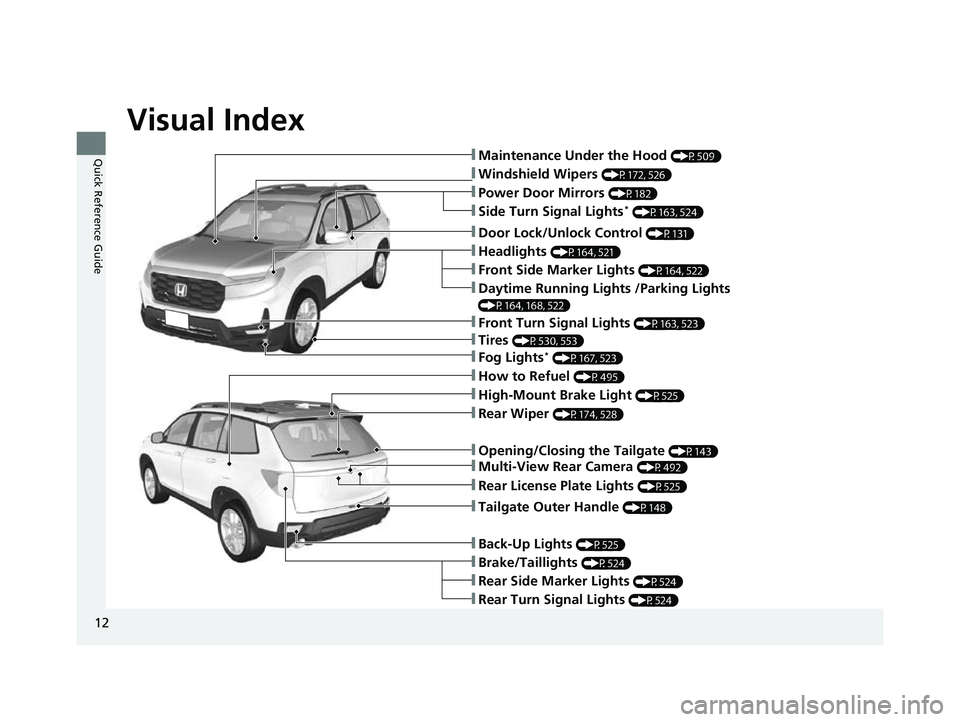
Quick Reference Guide❚Maintenance Under the Hood (P509)
❚Windshield Wipers (P172, 526)
❚Tires (P530, 553)
❚Power Door Mirrors (P182)
❚Headlights (P164, 521)
❚Front Side Marker Lights (P164, 522)
❚Side Turn Signal Lights* (P163, 524)
❚Daytime Running Lights /Parking Lights
(P164, 168, 522)
❚How to Refuel (P495)
❚High-Mount Brake Light (P525)
❚Rear Wiper (P174, 528)
❚Rear Side Marker Lights (P524)
❚Rear Turn Signal Lights (P524)
❚Brake/Taillights (P524)
❚Opening/Closing the Tailgate (P143)
❚Door Lock/Unlock Control (P131)
❚Fog Lights* (P167, 523)
❚Front Turn Signal Lights (P163, 523)
❚Back-Up Lights (P525)
❚Tailgate Outer Handle (P148)
❚Multi-View Rear Camera (P492)
❚Rear License Plate Lights (P525)
23 PASSPORT-31TGS6400.book 12 ページ 2022年8月5日 金曜日 午後9時2分
Page 19 of 610
18
Quick Reference Guide
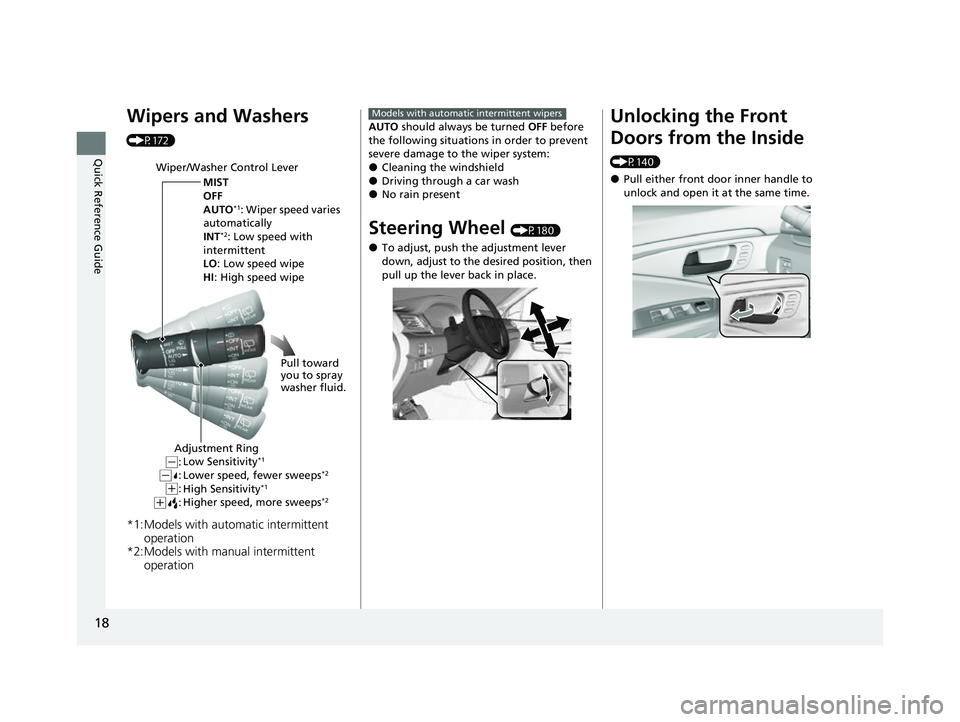
Wipers and Washers
(P172)
*1:Models with automatic intermittent operation
*2:Models with manual intermittent operation
Wiper/Washer Control Lever
MIST
OFF
AUTO
*1: Wiper speed varies
automatically
INT
*2: Low speed with
intermittent
LO: Low speed wipe
HI : High speed wipe
Pull toward
you to spray
washer fluid.
Adjustment Ring
Low Sensitivity*1
Lower speed, fewer sweeps*2
High Sensitivity*1
Higher speed, more sweeps*2(+:
( +:(-:(-:
AUTO should always be turned OFF before
the following situations in order to prevent
severe damage to the wiper system:
●Cleaning the windshield●Driving through a car wash●No rain present
Steering Wheel (P180)
●To adjust, push the adjustment lever
down, adjust to the desired position, then
pull up the lever back in place.
Models with automatic intermittent wipersUnlocking the Front
Doors from the Inside
(P140)
●Pull either front door inner handle to
unlock and open it at the same time.
23 PASSPORT-31TGS6400.book 18 ページ 2022年8月5日 金曜日 午後9時2分
Page 20 of 610
19
Quick Reference Guide
Tailgate (P143)
Use a forward and back kicking motion
under the center of the rear bumper to
open or close the power tailgate while
carrying the keyless remote.
Models with Hands Free Access
1 sec.
●Press the tailgate outer handle to unlock
and open the tailgate when you carry the
keyless remote.
●Press the power tailgate button on the
driver’s door or the remote transmitter to
open and close the power tailgate.
Outer Handle
Models with power tailgate
Power Door Mirrors
(P182)
●With the power mode in ON, move the
selector switch to L or R .
●Push the appropriate edge of the
adjustment switch to adjust the mirror.
●Press the folding button* to fold in and
out the door mirrors.
Selector Switch
Adjustment Switch
Folding Button*
*
Not available on all models
23 PASSPORT-31TGS6400.book 19 ページ 2022年8月5日 金曜日 午後9時2分
Page 31 of 610
30
Quick Reference Guide
What to Do If
The power mode does not
change from VEHICLE OFF
(LOCK) to ACCESSORY.
Why?
●The steering wheel may be locked.
●Move the steering wheel left and right
after pressing the ENGINE START/STOP
button.
Why does the brake pedal
pulsate slightly when
applying the brakes?This can occur when the ABS activates and does not indicate a
problem. Apply firm, steady pressure on the brake pedal. Never
pump the brake pedal. u Anti-lock Brake System (ABS)
(P479)
The rear door cannot be
opened from inside the
vehicle. Why?Check if the childproof lock is in
the lock position. If so, open the
rear door with the outside door
handle.
To cancel this function, slide the
lever up to the unlock position.
Canadian models
23 PASSPORT-31TGS6400.book 30 ページ 2022年8月5日 金曜日 午後9時2分
Page 32 of 610

31
Quick Reference Guide
Why do the doors lock
after I unlocked the doors?If you do not open the doors within 30 seconds, the doors are
relocked automatically for security.
Why does the beeper
sound when I open the
driver’s door?The beeper sounds when:
●The power mode is in ACCESSORY.
●The exterior lights are left on.
●The Auto Idle Stop is in operation.
Why does a beeper sound
when I walk away from the
vehicle after I close the
door?The beeper sounds if you move outside the walk away auto lock
operating range before the door completely closes.
u Locking the doors and tailgate (Walk away auto lock® )
(P134)
Why does the beeper
sound when I start driving?The beeper sounds when:
●Driver and/or front passenger are not wearing their seat belts.
●The parking brake pedal is not fully released.
Why do I hear a screeching
sound when I apply the
brake pedal?The brake pads may need to be replaced. Have your vehicle
inspected by a dealer.
23 PASSPORT-31TGS6400.book 31 ページ 2022年8月5日 金曜日 午後9時2分