2023 HONDA HRV Automatic Power
[x] Cancel search: Automatic PowerPage 459 of 664

Continued457
uuHonda Sensing ®u Collision Mitigation Braking SystemTM (CMBSTM)
Driving
You can turn the system on and off using the driver information interface.
2 Switching the Display P. 107
2 Safety Support P. 118
The CMBSTM is turned on every time you start th e engine, even if you turned it off
the last time you drove the vehicle.
■CMBSTM On and Off1 Collision Mitigation Braking SystemTM (CMBSTM)
You cannot turn the CMBS
TM off while driving.
The CMBS
TM may automatically shut off, and the
safety support indicator (amb er) will come and stay
on under certain conditions: 2 CMBS
TM Conditions and Limitations P. 458
The CMBS
TM is not activated for about 15 seconds
after the engine starts.
The Vehicle Stability Assist
TM (VSA ®) system, Vehicle
Stability AssistTM (VSA ®) OFF , Adaptive Cruise Control
(ACC) with Low Speed Follow*, low tire pressure/
TPMS*, parking brake and bra ke system and safety
support indicators may come on in amber along with
a message in the gauge when you set the power
mode to ON after re connecting the battery.
Drive a short distance at more than 12 mph (20 km/h).
Each indicator should go off. If any do not, have your
vehicle checked by a dealer.
* Not available on all models
23 HR-V-313V06000_01.book 457 ページ 2022年4月4日 月曜日 午前10時49分
Page 467 of 664

465
uuHonda Sensing ®u Low Speed Braking Control*
Continued
Driving
Low Speed Braking Control*
Using sonar sensors located on the front a nd rear bumpers, and the front grille, this
system can detect if there is danger of a potential collision with a wall or other
obstacle during normal driving or when the accelerator pedal is depressed with too
much force. The system then assists in avoiding collisions and reducing damage
from impact through assistive braking a nd/or assistive driving power suppression.1Low Speed Braking Control*
If the Low Speed Braking Control activates in a
situation where you do not want automatic brake
application (such as when the vehicle is between two
railroad crossing gates), simply press the brake pedal
to deactivate the system and then continue to drive
as intended.
3WARNING
The Low Speed Braking Control System
cannot avoid all collisions and may not
reduce damage in each situation where the
accelerator is mistakenly or aggressively
pressed. Overreliance on the system may
result in a collision with serious injury or
death. Always check your surroundings,
your shift position, and your pedal use.
Driver remains responsible for safely
operating the vehicle.
* Not available on all models
23 HR-V-313V06000_01.book 465 ページ 2022年4月4日 月曜日 午前10時49分
Page 476 of 664
uuHonda Sensing ®u Adaptive Cruise Control (ACC) with Low Speed Follow
474
Driving
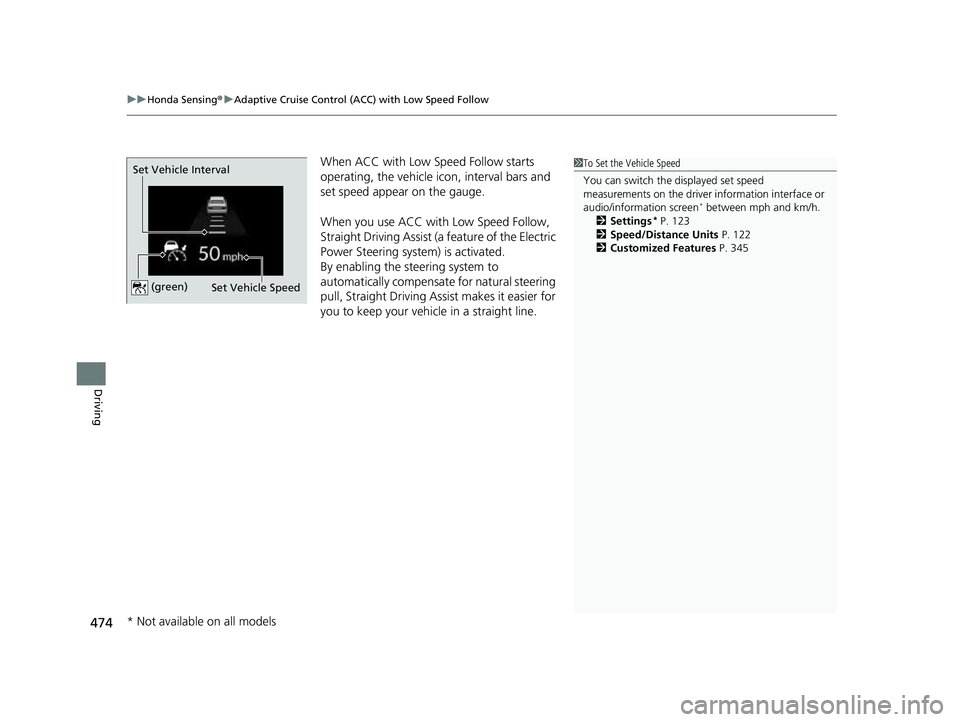
When ACC with Low Speed Follow starts
operating, the vehicle ic on, interval bars and
set speed appear on the gauge.
When you use ACC with Low Speed Follow,
Straight Driving Assist (a feature of the Electric
Power Steering system) is activated.
By enabling the steering system to
automatically compensate for natural steering
pull, Straight Driving Assist makes it easier for
you to keep your vehicl e in a straight line.1To Set the Vehicle Speed
You can switch the displayed set speed
measurements on the driver information interface or
audio/information screen
* between mph and km/h.
2 Settings* P. 123
2 Speed/Distance Units P. 122
2 Customized Features P. 345
Set Vehicle Speed
Set Vehicle Interval (green)
* Not available on all models
23 HR-V-313V06000_01.book 474 ページ 2022年4月4日 月曜日 午前10時49分
Page 494 of 664

uuHonda Sensing ®u Lane Keeping Assist System (LKAS)
492
Driving
When you operate the turn signals to chan ge lanes, the system is suspended, and
resumes after the signals are off.
If you make a lane change without operat ing the turn signals, the LKAS alerts
activate, and torque is applied to the steering.
Provides assistance to keep the vehicle in the center of the lane. When the vehicle
nears a white or yellow line, steering force of the electric power steering will become
stronger.
■Lane Keep Support Function
1 Lane Keeping Assist System (LKAS)
When it fails to detect lanes, the system will
temporarily be canceled. When a lane is detected, the
system will recover automatically.
The LKAS may not function as designed while driving
in frequent stop and go traf fic, or on roads with
sharp curves.
23 HR-V-313V06000_01.book 492 ページ 2022年4月4日 月曜日 午前10時49分
Page 530 of 664
528
Driving
Braking
Brake System
Use the parking brake to keep the vehicle stationary when parked. When the
parking brake is applied, you can ma nually or automatically release it.
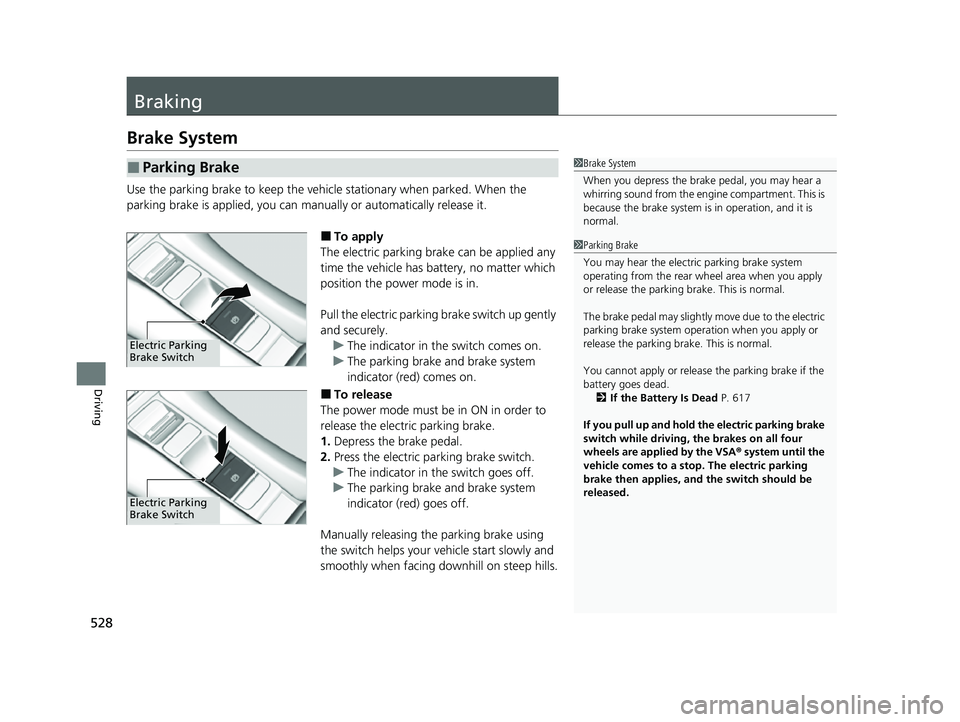
■To apply
The electric parking brake can be applied any
time the vehicle has battery, no matter which
position the power mode is in.
Pull the electric parking brake switch up gently
and securely. u The indicator in the switch comes on.
u The parking brake and brake system
indicator (red) comes on.
■To release
The power mode must be in ON in order to
release the electric parking brake.
1. Depress the brake pedal.
2. Press the electric parking brake switch.
u The indicator in the switch goes off.
u The parking brake and brake system
indicator (red) goes off.
Manually releasing the parking brake using
the switch helps your ve hicle start slowly and
smoothly when facing downhill on steep hills.
■Parking Brake1 Brake System
When you depress the brak e pedal, you may hear a
whirring sound from the engine compartment. This is
because the brake system is in operation, and it is
normal.
Electric Parking
Brake Switch
Electric Parking
Brake Switch
1 Parking Brake
You may hear the electric parking brake system
operating from the rear wh eel area when you apply
or release the parking brake. This is normal.
The brake pedal may slightly move due to the electric
parking brake system opera tion when you apply or
release the parking br ake. This is normal.
You cannot apply or release the parking brake if the
battery goes dead.
2 If the Battery Is Dead P. 617
If you pull up and hold the electric parking brake
switch while driving, the brakes on all four
wheels are applied by the VSA ® system until the
vehicle comes to a stop. The electric parking
brake then applies, and the switch should be
released.
23 HR-V-313V06000_01.book 528 ページ 2022年4月4日 月曜日 午前10時49分
Page 531 of 664

Continued529
uuBraking uBrake System
Driving
■Automatic parking brake feature operation
If the automatic parking brake feature has been activated:
• The parking brake is applied automatically when you set the power mode to
VEHICLE OFF.
• To confirm that the parking brake is applied, check if the parking brake and brake
system indicator (red) is on.
2 Activating and deactivating the automatic parking brake feature P. 530
■To release automatically
Depressing the accelerator pedal releases the parking brake.
Use the accelerator pedal to release the brake when you are starting the vehicle
facing uphill, or in a traffic jam. Gently depress the accelerator pedal.
When on a hill, it may require more
accelerator input to release.u The parking brake and brake system
indicator (red) goes off.
You can release the parking brake
automatically when:
• You are wearing the driver’s seat belt.
• The engine is running.
• The transmission is not in
(P or (N.
1Parking Brake
In the following situations, the parking brake
automatically operates.
•When the vehicle stops more than 10 minutes
while ACC with Low Speed Follow is activated.
•When the driver’s seat belt is unfastened while
your vehicle is stopped au tomatically by ACC with
Low Speed Follow.
•When the power system is turned off while ACC
with Low Speed Follow is activated.
•When the vehicle stops with the automatic brake
hold system activated for more than 10 minutes.
•When the driver’s seat belt is unfastened while
your vehicle is stopped and the brake hold system
is applied.
•When the engine is turned off while the brake hold
is applied.
•When there is a problem with the Brake Hold
System while brake hold is applied.
If the parking brake cannot be released
automatically, release it manually.
When the vehicle is travel ing uphill, the accelerator
pedal may need to be pressed farther to
automatically release the electric parking brake.
The parking brake cannot be released automatically
while the following indicators are on:
•Malfunction indicator lamp•Transmission system indicator
Accelerator Pedal
23 HR-V-313V06000_01.book 529 ページ 2022年4月4日 月曜日 午前10時49分
Page 532 of 664

uuBraking uBrake System
530
Driving
■Activating and deactivating the au tomatic parking brake feature
With the power mode is in ON, carry out th e following steps to either activate or
deactivate the automatic parking brake feature.
1. Put the transmission into
(P.
2. Without depressing the brake pedal, pull up and release the electric parking brake
switch.
u Check that the parking brake and brake system indicator (red) has come on.
3. Pull up and hold the electric parking br ake switch. When you hear a beeping
sound, release the switch and within 3 seconds pull up and hold the switch again.
4. When you hear a sound indicating that the procedure is completed, release the
switch.
u Two beeps indicates that the feature has been activated.
u One beep indicates that the feature has been deactivated.
u When you have completed activating the feature, the parking brake will
remain applied after you turn off the engine.
u To confirm that the parking brake is ap plied, check if the parking brake and
brake system indicator (red) is on.
If you need to temporarily deactivate the feature while putting your vehicle through
a conveyor type car wash, you can follow the procedure explained below.
1. Depress the brake pedal and bring the vehicle to a stop.
2. Set the power mode to VEHICLE OFF and then within 2 seconds push down the
electric parking brake switch.
u Activation and deactivation settings fo r the feature will not be affected.
u Before temporarily deactivating the feat ure, make sure to first turn off both
Adaptive Cruise Control (ACC) with Low Speed Follow and the automatic
brake hold system.
u To confirm that the parking brake is ap plied, check if the parking brake and
brake system indicator (red) is on.
1 Parking Brake
The parking brake may not be released automatically
while the following indicators are on:
•Parking brake and bra ke system indicator
•VSA® system indicator•ABS indicator
•Supplemental restraint system indicator
The parking brake is appl ied while the vehicle is
moving with the electric pa rking brake switch being
pulled.
In cold climates, the parking brake may freeze in
place if applied.
When parking the vehicle, chock the wheels and
make sure the automatic parking brake feature is
deactivated.
Also, when putting your vehicle through a conveyor-
type car wash or when ha ving your vehicle towed,
deactivate the automatic parking brake feature and
leave the parking brake released.
23 HR-V-313V06000_01.book 530 ページ 2022年4月4日 月曜日 午前10時49分
Page 655 of 664
Index
653
Index
Index
A
ABS (Anti-lock Brake System).................. 535
Accessories and Modifications ................ 601
Accessory Power Socket ........................... 196
Adaptive Cruise Control (ACC) with Low
Speed Follow .................................... 99, 471
Additives Coolant .................................................. 570
Engine Oil ............................................... 565
Washer ................................................... 574
Additives, Engine Oil ............................... 565
Adjusting Armrest .................................................. 188
Clock ...................................................... 134
Front Seats.............................................. 180
Head Restraints ....................................... 186
Headlights .............................................. 575
Mirrors.................................................... 178
Rear Seats ............................................... 183
Sound ............................................. 220, 263
Steering Wheel ....................................... 177
Agile Handling Assist ............................... 436
Air Conditioning System (Climate Control System) .................................................... 203
Changing the Mode................ 203, 204, 205
Defrosting the Windshield and Windows .............................................. 206
Dust and Pollen Filter .............................. 595
Recirculation/Fresh Air Mode................... 205
Synchronization Mode ............................ 208
Using Automatic Climate Control............ 203 Air Pressure
....................................... 583, 641
Airbags ........................................................ 50
Advanced Airbags ..................................... 56
Airbag Care ............................................... 69
Event Data Recorder .................................... 0
Front Airbags (SRS) .................................... 53
Indicator .............................................. 66, 93
Knee Airbags ............................................. 58
Passenger Airbag Off Indicator .................. 67
Sensors ...................................................... 50
Side Airbags .............................................. 61
Side Curtain Airbags .................................. 64
All-Wheel Drive (AWD) ............................ 437
AM/FM Radio .................................... 222, 269
Android Auto
TM................................ 240, 308
Anti-lock Brake System (ABS) .................. 535
Indicator .................................................... 93
Apple CarPlay ................................... 236, 301
Armrest ..................................................... 188
Audio ......................................................... 112
Audio Remote Controls ............................ 215
Audio System ............................ 212, 219, 244
Adjusting the Sound ........................ 220, 263
Android Auto
TM............................... 240, 308
Audio/Information Screen ........................ 246
Display Setup ................................... 221, 264
Error Messages ........................................ 314
General Information ................................ 316
Home Screen ........................................... 251
How to Update ........................................ 257
How to Update Wirelessly ........................ 261 How to Update with a USB Device........... 262
iPod ................................................ 224, 284
Limitations for Manual
Operation .............................. 265, 371, 391
MP3/WMA/AAC .............................. 227, 287
Reactivating ............................................ 214
Recommended Devices............................ 317
Remote Controls ..................................... 215
Security Code .......................................... 214
Selecting an Audio Source ....................... 265
Start Up .................................................. 245
Status Area ............................................. 256
System Updates....................................... 257
System Updates Settings ......................... 258
Theft Protection ...................................... 214
USB Flash Drives ...................................... 317
USB Ports ................................................ 213
Wallpaper Setup...................................... 249
Audio/Information Screen ....................... 246
Authorized Manuals ................................ 650
Auto Door Locking/Unlocking ................. 152
Auto High-Beam ....................................... 171
Indicator.................................................... 96
Automatic Brake Hold ............................. 532
Indicator............................................ 90, 532
Automatic Brake Hold System Indicator............................................ 90, 532
Automatic Climate Control Sensors ........ 209
Average Fuel Economy ............................ 110
Average Speed ......................................... 112
AWD Torque Distribution Monitor ......... 117
23 HR-V-313V06000_01.book 653 ページ 2022年4月4日 月曜日 午前10時49分