2023 HONDA HRV Automatic Power
[x] Cancel search: Automatic PowerPage 168 of 664
166
uuOperating the Switches Around the Steering Wheel uLights
Controls
Lights
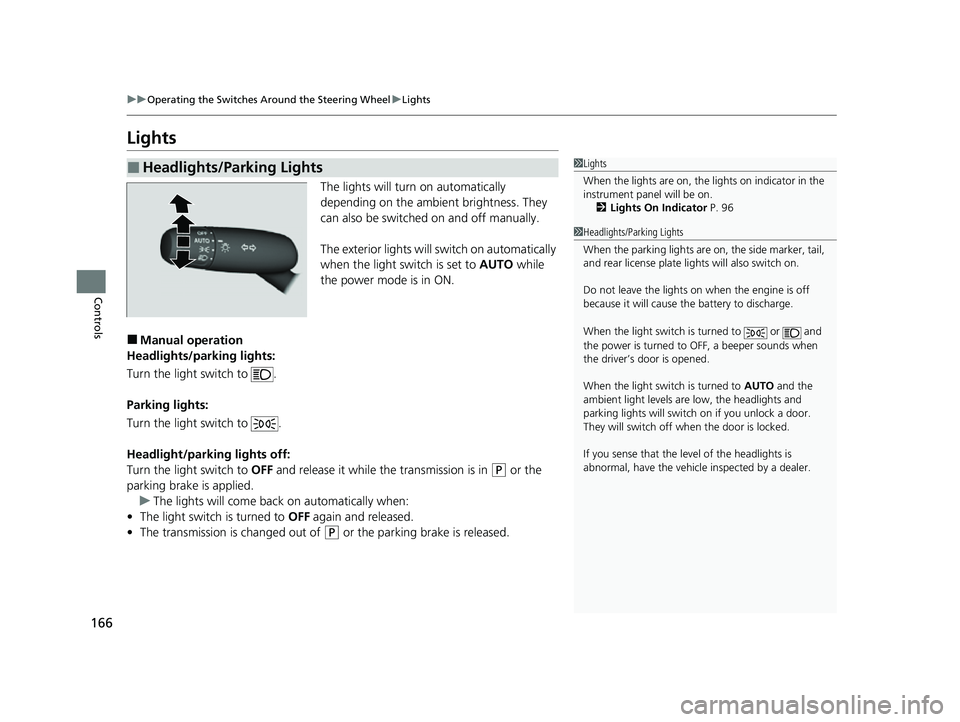
The lights will turn on automatically
depending on the ambient brightness. They
can also be switched on and off manually.
The exterior lights will switch on automatically
when the light switch is set to AUTO while
the power mode is in ON.
■Manual operation
Headlights/parking lights:
Turn the light switch to .
Parking lights:
Turn the light switch to .
Headlight/parking lights off:
Turn the light switch to OFF and release it while the transmission is in
(P or the
parking brake is applied. u The lights will come back on automatically when:
• The light switch is turned to OFF again and released.
• The transmission is changed out of
(P or the parking brake is released.
■Headlights/Parking Lights1Lights
When the lights are on, the lights on indicator in the
instrument pane l will be on.
2 Lights On Indicator P. 96
1Headlights/Parking Lights
When the parking lights are on, the side marker, tail,
and rear license plate li ghts will also switch on.
Do not leave the lights on when the engine is off
because it will cause the battery to discharge.
When the light switch is turned to or and
the power is turned to OFF, a beeper sounds when
the driver’s door is opened.
When the light switch is turned to AUTO and the
ambient light levels are low, the headlights and
parking lights will switch on if you unlock a door.
They will switch off when the door is locked.
If you sense that the le vel of the headlights is
abnormal, have the vehicl e inspected by a dealer.
23 HR-V-313V06000_01.book 166 ページ 2022年4月4日 月曜日 午前10時49分
Page 171 of 664

Continued169
uuOperating the Switches Around the Steering Wheel uLights
Controls
The headlights automatically come on when th e wipers are used several times within
a certain number of intervals with the headlight switch in AUTO.
The headlights automatically go off a few mi nutes later if the wipers are stopped.
The headlights, all other exterior lights, and the instrument panel lights turn off 15
seconds after you set the power mode to VEHICLE OFF, take the remote with you,
and close the driver’s door.
If you set the power mode to VEHICLE OFF with the headlight switch on, but do not
open the door, the lights turn off after 10 minu tes (3 minutes, if the switch is in the
AUTO position).
The lights turn on again when you unlock or open the driver’s door. If you unlock
the door, but do not open it within 15 seconds, the lights go off. If you open the
driver’s door, you will hear a reminder chime alerting you that the lights are on.
■Headlight Integration with Wipers
■Automatic Lighting Off Feature
1 Headlight Integration with Wipers
This feature activates while the headlights are off in
AUTO .
The instrument panel br ightness does not change
when the headlights come on.
At dark ambient light leve ls, the automatic lighting
control feature turns on the headlights, regardless of
the number of wiper sweeps.
You can turn the headlight integration with wipers
function on and off.
2 Settings
* P. 123
2 How to Customize the Vehicle Settings
P. 357
Models with 7-in. Color Touchscreen
Models with 9-in. Color Touchscreen
1 Automatic Lighting Off Feature
You can change the headlight auto off timer setting.
2 Settings
* P. 123
2 How to Customize the Vehicle Settings
P. 357
Models with 7-in. Color Touchscreen
Models with 9-in. Color Touchscreen
* Not available on all models
23 HR-V-313V06000_01.book 169 ページ 2022年4月4日 月曜日 午前10時49分
Page 173 of 664
171
uuOperating the Switches Around the Steering Wheel uAuto High-Beam
Continued
Controls
Auto High-Beam
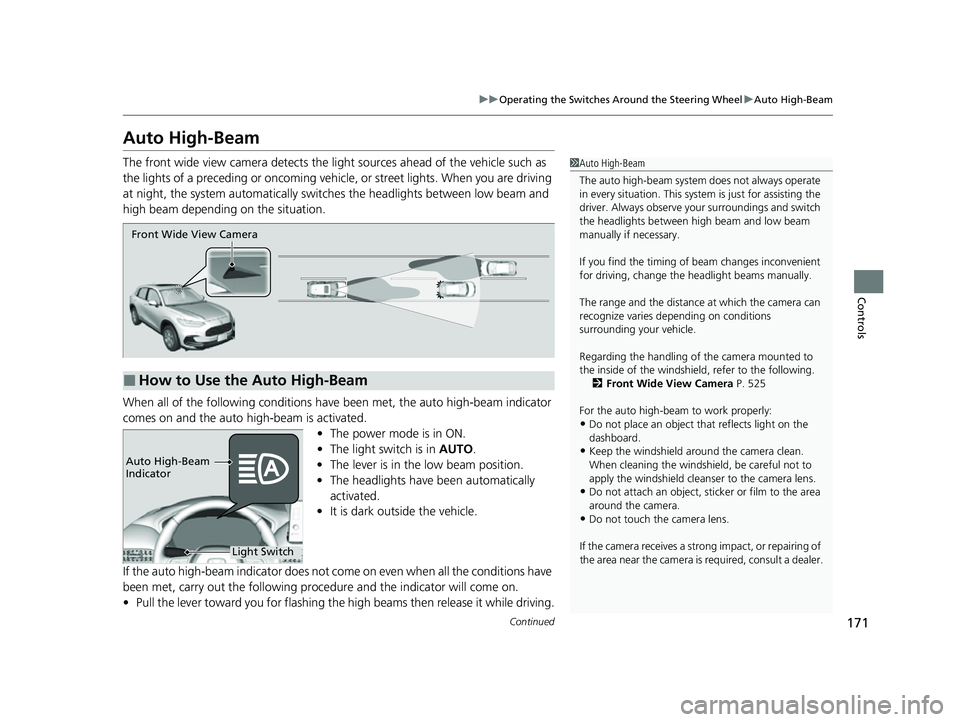
The front wide view camera detects the li ght sources ahead of the vehicle such as
the lights of a preceding or oncoming vehicle, or street lights. When you are driving
at night, the system automa tically switches the headlights between low beam and
high beam depending on the situation.
When all of the following conditions have been met, the auto high-beam indicator
comes on and the auto high-beam is activated.
•The power mode is in ON.
• The light switch is in AUTO.
• The lever is in the low beam position.
• The headlights have been automatically
activated.
• It is dark outside the vehicle.
If the auto high-beam indica tor does not come on even when all the conditions have
been met, carry out the following procedure and the indicator will come on.
• Pull the lever toward you for flashing the high beams then release it while driving.1Auto High-Beam
The auto high-beam system does not always operate
in every situation. This syst em is just for assisting the
driver. Always observe your surroundings and switch
the headlights between high beam and low beam
manually if necessary.
If you find the timing of beam changes inconvenient
for driving, change the headlight beams manually.
The range and the distance at which the camera can
recognize varies de pending on conditions
surrounding your vehicle.
Regarding the handling of the camera mounted to
the inside of the windshiel d, refer to the following.
2 Front Wide View Camera P. 525
For the auto high-beam to work properly:
•Do not place an object that reflects light on the
dashboard.
•Keep the windshield around the camera clean.
When cleaning the windshield, be careful not to
apply the windshield cleans er to the camera lens.
•Do not attach an object, sticker or film to the area
around the camera.
•Do not touch the camera lens.
If the camera receives a st rong impact, or repairing of
the area near the camera is required, consult a dealer.
■How to Use the Auto High-Beam
Front Wide View Camera
Light Switch
Auto High-Beam
Indicator
23 HR-V-313V06000_01.book 171 ページ 2022年4月4日 月曜日 午前10時49分
Page 178 of 664
176
uuOperating the Switches Around the Steering Wheel uRear Defogger/Heated Door Mirror* Button
Controls
Rear Defogger/Heated Door Mirror* Button
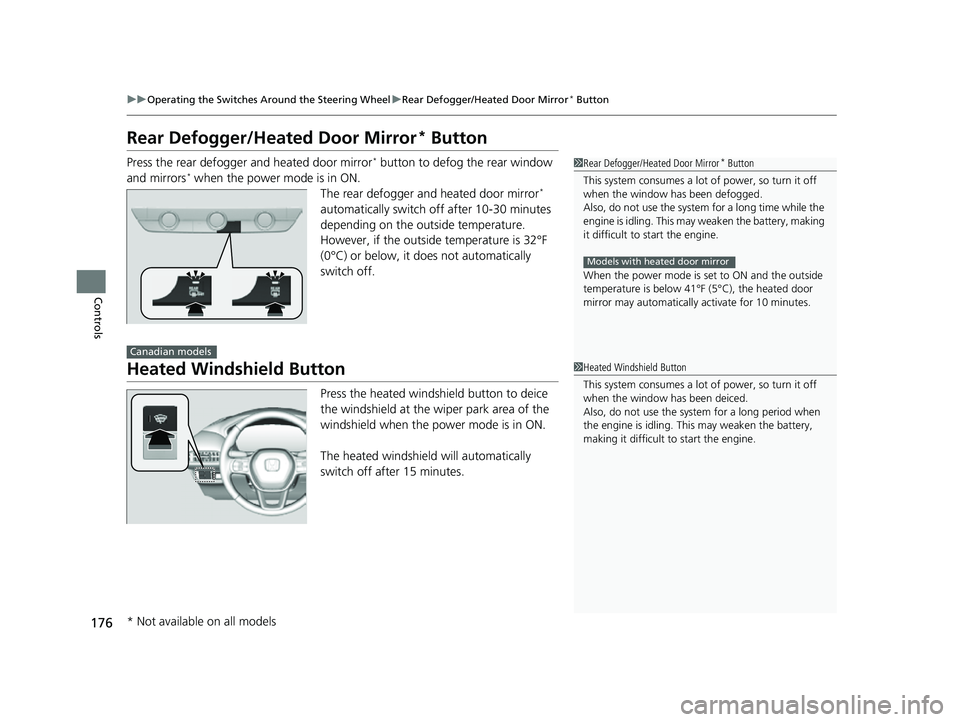
Press the rear defogger and heated door mirror* button to defog the rear window
and mirrors* when the power mode is in ON. The rear defogger and heated door mirror*
automatically switch off after 10-30 minutes
depending on the outside temperature.
However, if the outside temperature is 32°F
(0°C) or below, it does not automatically
switch off.
Heated Windshield Button
Press the heated windshield button to deice
the windshield at the wiper park area of the
windshield when the power mode is in ON.
The heated windshield will automatically
switch off after 15 minutes.
1 Rear Defogger/Heated Door Mirror* Button
This system consumes a lot of power, so turn it off
when the window has been defogged.
Also, do not use the system for a long time while the
engine is idling. This may weaken the battery, making
it difficult to start the engine.
When the power mode is se t to ON and the outside
temperature is below 41°F (5°C), the heated door
mirror may automatically activate for 10 minutes.
Models with heated door mirror
Canadian models
1 Heated Windshield Button
This system consumes a lot of power, so turn it off
when the window has been deiced.
Also, do not use the system for a long period when
the engine is idling. This may weaken the battery,
making it difficult to start the engine.
* Not available on all models
23 HR-V-313V06000_01.book 176 ページ 2022年4月4日 月曜日 午前10時49分
Page 204 of 664

uuInterior Convenience Items uOther Interior Convenience Items
202
Controls
The seat heaters can be used when the power
mode is in ON.
Press the seat heater button:
Once - The HI setting (three indicators on)
Twice - The MID setting (two indicators on)
Three times - The LO setting (one indicator on)
Four times - The OFF se tting (no indicators on)
When the power mode is turned on after it is
turned off, the previous setting is maintained.
■Front Seat Heaters*1Front Seat Heaters*
Do not use the seat heaters even in LO when the
engine is off. Under such conditions, the battery may
be weakened, making the engine difficult to start.
After a certain period of time, the strength setting for
the front seat heaters will automatically be reduced
by one level at a time unt il the front seat heaters
shuts off. The elapsed time varies according to the
interior environment.
3WARNING
Heat induced burns are possible when
using seat heaters.
Persons with a diminished ability to sense
temperature (e.g., persons with diabetes,
lowerlimb nerve damage, or paralysis) or
with sensitive skin should not use seat
heaters.
* Not available on all models
23 HR-V-313V06000_01.book 202 ページ 2022年4月4日 月曜日 午前10時49分
Page 232 of 664
230
uuAudio System Basic Operation uPlaying Bluetooth ® Audio
Features
Playing Bluetooth ® Audio
Your audio system allows you to listen to music from your Bluetooth-compatible
phone.
This function is available when the phone is paired and connected to the vehicle’s
Bluetooth ® HandsFreeLink ® (HFL) system.
2 Phone Setup P. 374
1Playing Bluetooth ® Audio
Not all Bluetooth -enabled phones with streaming
audio capabilities are compatible with the system.
For a list of compatible phones:
•U.S.: Visit automobiles.honda.com/handsfreelink/ ,
or call 1-888-528-7876.
•Canada: For more info rmation on smartphone
compatibility, call 1-855-490-7351.
In some states, it may be il legal to perform some data
device functions while driving.
Only one phone can be used with HFL at a time.
When there is more than one paired phone in the
vehicle, the system automatically connects to the
prioritized phone. You can a ssign priority to a phone
in the Bluetooth Settings menu.
2 HFL Menus P. 372
To change the searched phone manually, select Go
to Device List .
In some cases, the name of the artist, album, or track
may not appear correctly.
Some functions may not be available on some devices.
If a phone is currently conne cted via Apple CarPlay or
Android Auto, Bluetooth® Audio from that phone is
unavailable. However, a se cond previously paired
phone can stream Bluetooth® Audio by selecting
Audio from the Bluetooth® device list.
2 Phone Setup P. 374
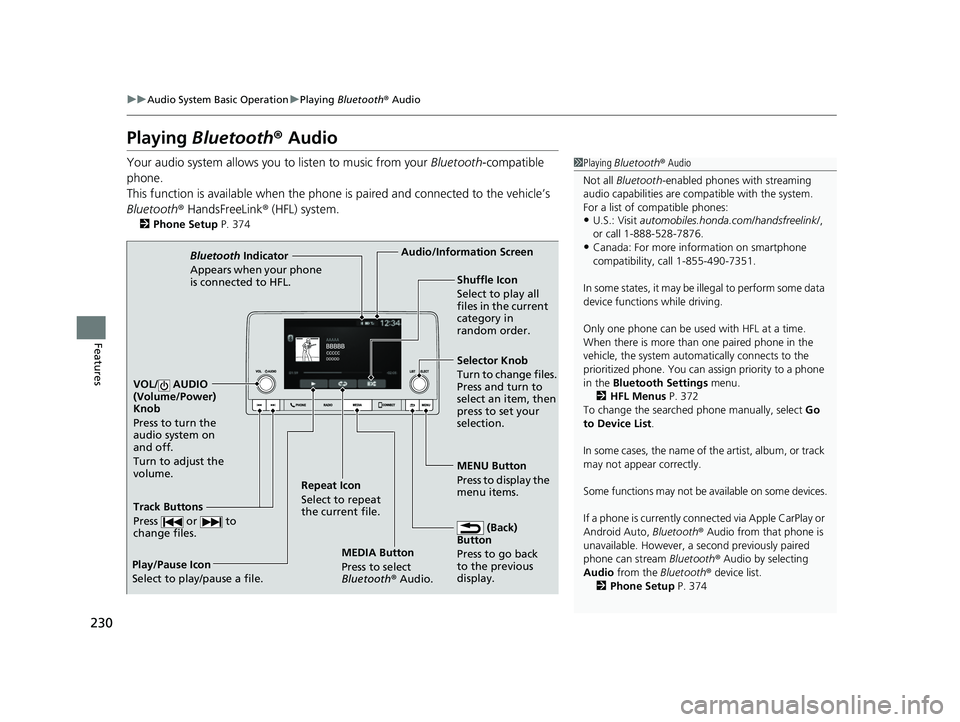
MEDIA Button
Press to select
Bluetooth® Audio.
VOL/ AUDIO
(Volume/Power)
Knob
Press to turn the
audio system on
and off.
Turn to adjust the
volume.
MENU Button
Press to display the
menu items.
Audio/Information Screen
Bluetooth Indicator
Appears when your pho
ne
is connected to HFL.
Track Buttons
Press or to
change files.
Repeat Icon
Select to repeat
the current file. Shuffle Icon
Select to play all
files in the current
category in
random order.
Selector Knob
Turn to change files.
Press and turn to
select an item, then
press to set your
selection.
(Back)
Button
Press to go back
to t he previou
s
display.
Play/Pause Icon
Select to play/pause a file.
23 HR-V-313V06000_01.book 230 ページ 2022年4月4日 月曜日 午前10時49分
Page 247 of 664
245
uuAudio System Basic Operation uStart Up
Features
Start Up
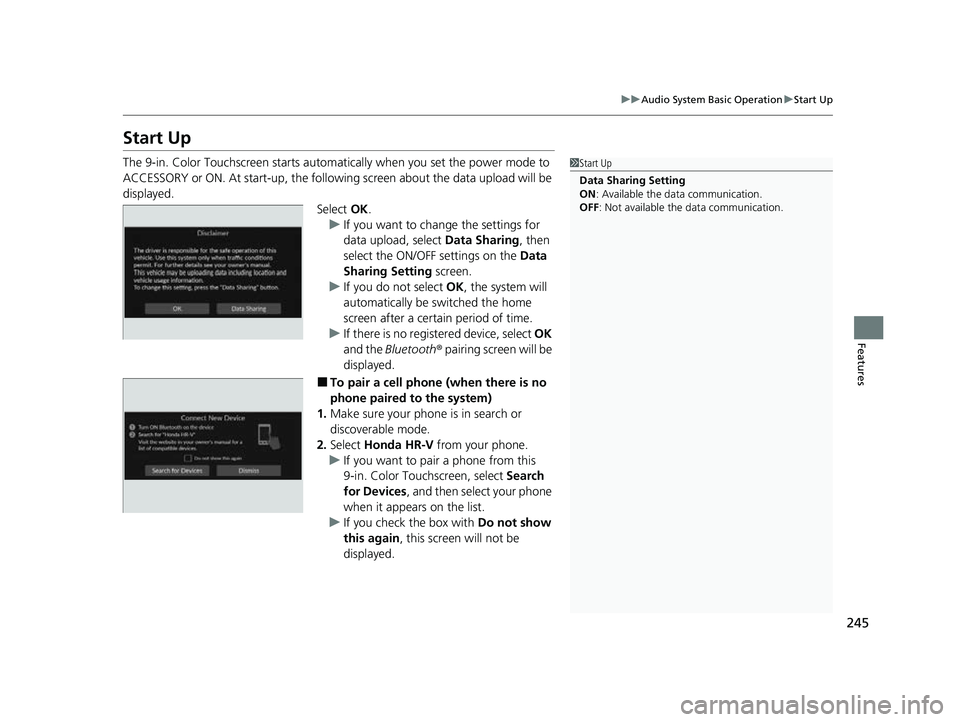
The 9-in. Color Touchscreen starts automa tically when you set the power mode to
ACCESSORY or ON. At start-up, the followi ng screen about the data upload will be
displayed.
Select OK.
u If you want to change the settings for
data upload, select Data Sharing, then
select the ON/OFF settings on the Data
Sharing Setting screen.
u If you do not select OK, the system will
automatically be switched the home
screen after a certain period of time.
u If there is no registered device, select OK
and the Bluetooth® pairing screen will be
displayed.
■To pair a cell phone (when there is no
phone paired to the system)
1. Make sure your phone is in search or
discoverable mode.
2. Select Honda HR-V from your phone.
u If you want to pair a phone from this
9-in. Color Touchscreen, select Search
for Devices , and then select your phone
when it appears on the list.
u If you check the box with Do not show
this again , this screen will not be
displayed.
1 Start Up
Data Sharing Setting
ON : Available the data communication.
OFF: Not available the data communication.
23 HR-V-313V06000_01.book 245 ページ 2022年4月4日 月曜日 午前10時49分
Page 271 of 664
269
uuAudio System Basic Operation uPlaying AM/FM Radio
Continued
Features
Playing AM/FM Radio
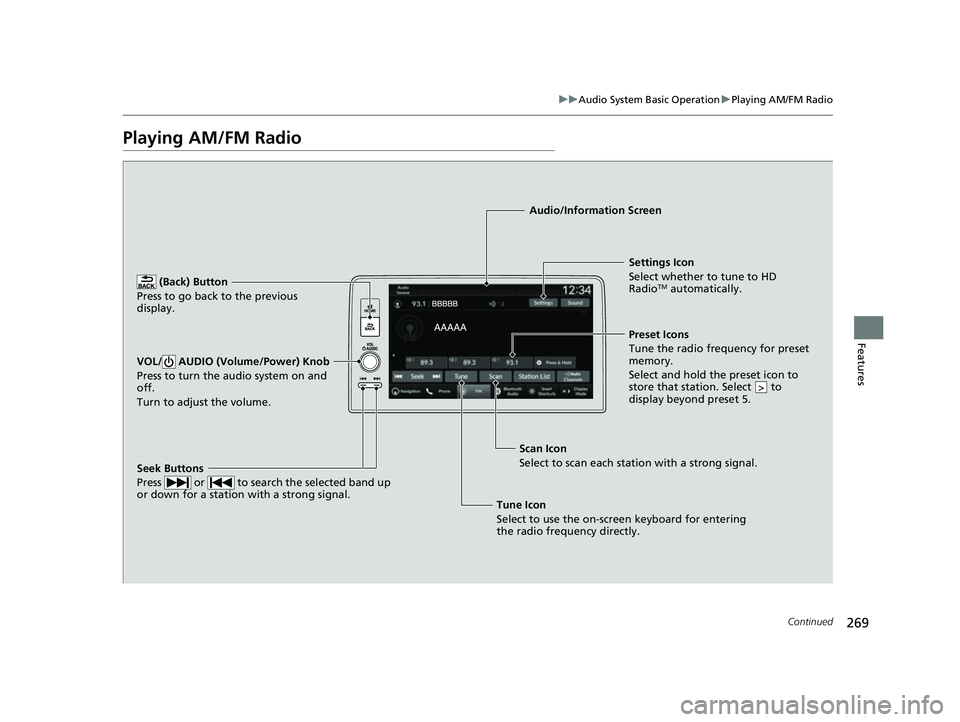
(Back) Button
Press to go back to the previous
display.
Seek Buttons
Press or to search the selected band up
or down for a station with a strong signal.
VOL/ AUDIO (Volume/Power) Knob
Press to turn the audio system on and
off.
Turn to adjust the volume.
Settings Icon
Select whether to tune to HD
Radio
TM automatically.
Tune Icon
Select to use the on-scr een keyboard for entering
the radio frequency directly. Audio/Information Screen
Scan Icon
Select to sca n each
station with a strong signal.Preset Icons
Tune the radio frequency for preset
memory.
Select and hold the preset icon to
store that station. Select to
display beyond preset 5.
>
23 HR-V-313V06000_01.book 269 ページ 2022年4月4日 月曜日 午前10時49分