Page 171 of 719

uuTailgate uOpening/Closing the Power Tailgate*
170
Controls
Press the power tailgate button for more than
one second to operate when the power mode
is in VEHICLE OFF.
u Some exterior lights flash and the beeper
sounds.
If you press the button again while the power
tailgate is moving, it will stop.
Press the button for more than one second,
and the power tailgate will reverse direction.
■Customizing when to open the tailgate
Anytime: The power tailgate unlocks and opens at the same time. This is the
default setting.
When Unlocked: The tailgate opens when all doors are unlocked.
2Settings* P. 135
2 Customized Features P. 376
■Using the Remote Transmitter1Opening/Closing the Power Tailgate*
If you replace the 12-volt battery or the power
tailgate fuse while the tailgate is open, the power
tailgate may be di sabled. The power tailgate resumes
once you manually cl ose the tailgate.
Installing aftermarket com ponents other than Honda
genuine accessories on the power tailgate may
prevent it from fully opening or closing.
Make sure the power tailgate is fully open before you
get your cargo in and out.
The beeper sounds when you start driving while the
power tailgate is still open, or closing.
Power Tailgate
Button
* Not available on all models
Page 177 of 719

176
Controls
Security System
Immobilizer System
This system prevents a key that has not been pre-registered from starting the power
system.
Pay attention to the follo wing when pressing the POWER button:
• Do not allow objects that emit strong radio waves near the POWER button.
• Make sure the key is not covered by or touching a metal object.
• Do not bring a key from another vehi cle’s immobilizer system near the POWER
button.
• Do not put the key near magnetic items. El ectronic device, such as televisions and
audio systems emit strong magnetic fields. Note that even a key chain can
become magnetic.
Security System Alarm
The security system alarm activates when the tailgate, hood, or doors are forcibly
opened. The alarm does not activate if the tailgate or doors are opened with the key,
remote transmitter or keyless access system.
However, the alarm activates if a door is opened with the key and then the hood is
opened before the power mode is set to ON.
1 Immobilizer System
NOTICE
Leaving the key in the vehicl e can result in theft or
accidental movement of the vehicle.
Always take the key with you whenever you leave the
vehicle unattended.
Do not alter the system or add other devices to it.
Doing so may damage the system and make your
vehicle inoperable.
Apply and hold the brake pedal before turning the
vehicle on the first time after the battery has been
disconnected.
Canadian models
1 Security System Alarm
Do not alter the system or add other devices to it.
Doing so may damage the system and make your
vehicle inoperable.
The security system alarm continues for a maximum
of two minutes until the security system alarm
deactivates.
Page 185 of 719

184
Controls
Operating the Switches Around the Steering Wheel
POWER Button
■Changing the Power Mode1POWER Button
POWER Button Operating Range
You can start the power system when the keyless
remote is inside the vehicle.
The power system may also start if the keyless remote
i s c l o s e t o t h e d o o r o r w i n d o w , e v e n i f i t i s o u t s i d e t h e
vehicle.
ON mode:
The POWER button is on (in red), if the power system
is on.
If the battery of the keyless remote is getting low, the
power system may not start when you push the
POWER button. If the power system does not start,
refer to the following link. 2 If the Keyless Remote Battery is Weak
P. 668
Do not leave the power mode in ACCESSORY or ON
when you get out.
Operating Range
VEHICLE OFF
The button is off.
The power to all electrical components is turned off.
ACCESSORY
The button blinks (in red).
Operate the audio system and other accessories
in this position.
ON
The button blinks (in red).
All electrical components can be used.
Without pressing the
brake pedal Press the butto n without the
transmission in
( P. Press the button.
Press the button with the
transmission in
( P. Put the transmission into (
P.
Page 187 of 719

uuOperating the Switches Around the Steering Wheel uPOWER Button
186
Controls
When the power mode is set to any mode
other than OFF and you remove the keyless
remote from the vehicle and shut the door, an
alarm will sound. If th e alarm continues to
sound, place the keyless remote in another
location.
■When the power mode is in ACCESSORY
The alarm will sound from outside the vehicle.
■When the power mode is in ON
An alarm will sound both inside and outside the
vehicle. In addition, a warning indicator will
appear on the instrument panel.
■Keyless Remote Reminder1 Keyless Remote Reminder
When the keyless remote is within the system’s
operational range, and all the doors are closed, the
warning function cancels.
If the keyless remote is taken out of the vehicle after
the power system has be en started, you can no
longer change the power m ode or restart the power
system. Always make sure if the keyless remote is in
your vehicle when you operate the POWER button.
Removing the keyless remote from the vehicle
through a window does not activate the warning
buzzer.
Do not put the keyless remo te on the dashboard or in
the glove box. It may cause the warning buzzer to go
off. Under some other cond itions that can prevent
the vehicle from locating the keyless remote, the
warning buzzer may also go off even if the keyless
remote is within the system’s operational range.
Page 189 of 719
188
uuOperating the Switches Around the Steering Wheel uLight Switches
Controls
Light Switches
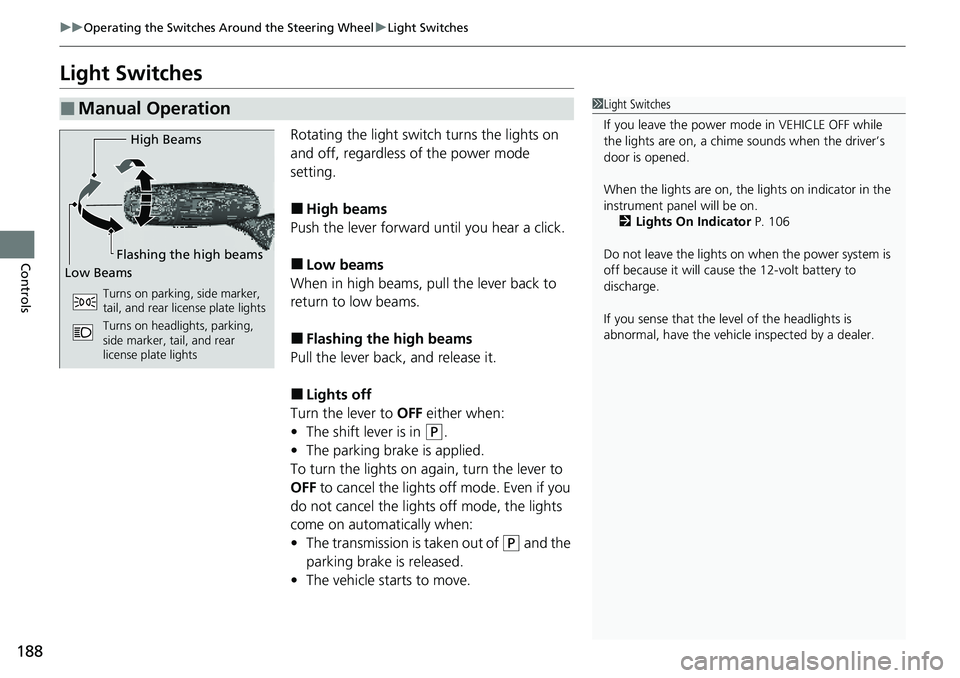
Rotating the light switch turns the lights on
and off, regardless of the power mode
setting.
■High beams
Push the lever forward until you hear a click.
■Low beams
When in high beams, pull the lever back to
return to low beams.
■Flashing the high beams
Pull the lever back, and release it.
■Lights off
Turn the lever to OFF either when:
• The shift lever is in
(P.
• The parking brake is applied.
To turn the lights on again, turn the lever to
OFF to cancel the lights off mode. Even if you
do not cancel the lights off mode, the lights
come on automatically when:
• The transmission is taken out of
(P and the
parking brake is released.
• The vehicle starts to move.
■Manual Operation1Light Switches
If you leave the power mode in VEHICLE OFF while
the lights are on, a chime sounds when the driver’s
door is opened.
When the lights are on, the lights on indicator in the
instrument pane l will be on.
2 Lights On Indicator P. 106
Do not leave the lights on when the power system is
off because it will caus e the 12-volt battery to
discharge.
If you sense that the le vel of the headlights is
abnormal, have the vehicl e inspected by a dealer.
High Beams
Flashing the high beams
Low Beams
Turns on parking, side marker,
tail, and rear license plate lights
Turns on headlights, parking,
side marker, tail, and rear
license plate lights
Page 196 of 719
195
uuOperating the Switches Around the Steering Wheel uAuto High-Beam
Controls
1How to Use the Auto High-Beam
How to turn off the Auto High-Beam System
You can turn the auto high- beam system on and off.
2 Settings
* P. 135
2 Customized Features P. 376
If the Some driver assist systems cannot operate:
Camera temperature too high message appears:
•Use the climate control system to cool down the
interior and, if necessary, also use defroster mode
with the airflow directed toward the camera.
•Start driving the vehicle to lower the windshield
temperature, which cool s down the area around
the camera.
If the Some driver assist systems cannot operate:
Clean front windshield or poor viewing
condition. message appears:
•Park your vehicle in a sa fe place, and clean the
windshield. If the message does not disappear after
you have cleaned the windshield and driven for a
while, have your vehicle checked by a dealer.
* Not available on all models
Page 204 of 719
203
Controls
Mirrors
Interior Rearview Mirror
Adjust the angle of the rearview mirror when you are sitting in the correct driving
position.
Flip the tab to switch the position.
The night position will help to reduce the glare
from headlights behind you when driving
after dark.
When you are driving after dark, the
automatic dimming rearview mirror reduces
the glare from headlights behind you. Press
the AUTO button to turn this function on and
off. When activated, the AUTO indicator
comes on.
■Rearview Mirror with Day and Night Positions*
1 Mirrors
Keep the inside and out side mirrors clean and
adjusted for best visibility.
Adjust the mirrors before you start driving. 2 Front Seats P. 205
Tab
Daytime
Position Night
Position
■Automatic Dimming Rearview Mirror*
Auto Button
Sensor
1
Automatic Dimming Rearview Mirror*
The auto dimming function cancels when the
transmission is in
(R.
* Not available on all models
Page 226 of 719
Continued225
uuInterior Convenience Items uOther Interior Convenience Items
Controls
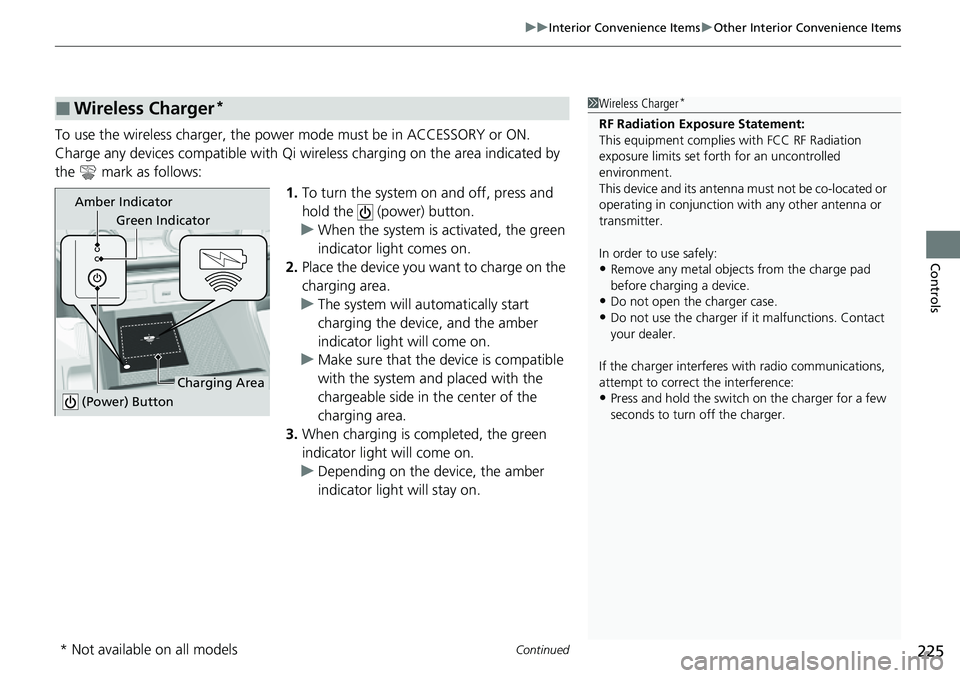
To use the wireless charger, the power mode must be in ACCESSORY or ON.
Charge any devices compatible with Qi wi reless charging on the area indicated by
the mark as follows:
1.To turn the system on and off, press and
hold the (power) button.
u When the system is activated, the green
indicator light comes on.
2. Place the device you want to charge on the
charging area.
u The system will au tomatically start
charging the device, and the amber
indicator light will come on.
u Make sure that the device is compatible
with the system and placed with the
chargeable side in the center of the
charging area.
3. When charging is completed, the green
indicator light will come on.
u Depending on the device, the amber
indicator light will stay on.
■Wireless Charger*1Wireless Charger*
RF Radiation Exposure Statement:
This equipment complies with FCC RF Radiation
exposure limits set forth for an uncontrolled
environment.
This device and its antenna must not be co-located or
operating in conjunction with any other antenna or
transmitter.
In order to use safely:
•Remove any metal objects from the charge pad
before charging a device.
•Do not open the charger case.
•Do not use the charger if it malfunctions. Contact
your dealer.
If the charger interferes with radio communications,
attempt to correct the interference:
•Press and hold the switch on the charger for a few
seconds to turn off the charger.
Green Indicator
Charging Area
(Power) Button
Amber Indicator
* Not available on all models