Page 101 of 719

100
uuIndicators u
Instrument Panel
IndicatorNameOn/BlinkingExplanation
Parking Brake and
Brake System
Indicator (Amber)
●Comes on if there is a problem with a system
related to braking other than the
conventional brake system.●Comes on while driving - Avoid high speeds and
sudden braking. Take the vehicle to a dealer
immediately.
●Comes on if there is a problem with the
electric parking brake system and/or the
automatic brake hold system.●Stays on constantly - Avoid using the parking
brake and have your vehicl e checked by a dealer
immediately.
●Comes on if there is a problem with the
radar sensor.
●Indicator may come on temporarily when the
Maximum Load Limi t is exceeded.
●Make sure the total load is within the Maximum
Load Limit.
2 Maximum Load Limit P. 445●Stays on constantly - Have your vehicle checked by
a dealer.
●Comes on if the brake system is deactivated
temporarily after the 12-volt battery has
been disconnected, then re-connected.●Drive a short distance at more than 12 mph (20
km/h). The indicator should go off. If it does not,
have your vehicle checked by a dealer.
POWER SYSTEM
Indicator
●Comes on if there is a problem with the
electric vehicle system.●Stays on constantly - Have your vehicle checked
by a dealer immediately.
●Do not drive displays on the driver
information interface - Immediately stop in a safe
place and contact a dealer.
READY Indicator●Comes on when the vehicle is ready to drive.2Turning on the Power P. 455
EV Indicator●Comes on when the vehicle is moved by the
motor, and the engine is not operating.—
U.S.
Canada
(Amber)
Page 102 of 719

101
uuIndicators u
Continued
Instrument Panel
IndicatorNameOn/BlinkingExplanation
Automatic Brake
Hold System
Indicator●Comes on when the automatic brake hold
system is on.
2Automatic Brake Hold P. 577
Automatic Brake
Hold Indicator
●Comes on when the automatic brake hold is
activated.
2Automatic Brake Hold P. 577
Malfunction
Indicator Lamp
•After you have set the power mode to ON,
the vehicle performs system checks.
However, if the readiness codes have not
been set by that time, this indicator will blink
five times and then go off.•Readiness codes are part of the on-board
diagnostics for the emissions control systems.
2 Testing of Readiness Codes P. 699
●Comes on if there is a problem with the
emissions control systems or electric vehicle
system.
●Blinks when a misfire in the engine’s
cylinders is detected.
2If the Malfunction Indicator Lamp Comes On
or Blinks P. 678
12-Volt Battery
Charging System
Indicator•Comes on when there is a problem with the
charging system.•Stop in a safe place and contact a dealer
immediately.
2 Checking the 12-Volt Battery P. 640
2 If the 12-Volt Battery Charging System
Indicator Comes On P. 677
U.S.
Canada
Page 115 of 719

114
Instrument Panel
Gauges and Driver Information Interface
Gauges
Gauges include the speedometer, fuel gauge, and other related indicators.
They are displayed when the power mode is in ON.
Displays your driving speed in mph or km/h.
Displays the amount of fuel left in the fuel tank.
Shows the total number of miles or kilome ters that your vehicle has accumulated.
Shows the output of the electric motor.
Shows the degree to which the High Voltage battery is being charged.
When the deceleration paddle selector is being used, it shows the strength of
deceleration.
■Speedometer
■Fuel Gauge
■Odometer
■POWER Gauge
■CHARGE/DECEL Gauge
1 Speedometer
You can change the Speed/Distance units.
2 No Content P. 132
2 Settings
* P. 135
2 Customized Features P. 376
1Fuel Gauge
NOTICE
You should refuel when the reading approaches .
Running out of fuel can cause the engine to misfire,
damaging the cata lytic converter.
The actual amount of remain ing fuel may differ from
the fuel gauge reading.E
* Not available on all models
Page 118 of 719

117
uuGauges and Driver Information Interface uDriver Information Interface
Continued
Instrument Panel
Driver Information Interface
The driver information interface shows information such as the estimated travelable
distance and fuel economy of the vehicle. It also displays messages such as warnings
and other helpful information.
When a warning message displays, please check the message and contact a dealer
to have the vehicle inspected if necessary. Please refer to the pages below if the
Engine oil pressure low, Engine temperature too hot or Limited stopping
power! message is displayed.
2If the Engine oil pressure low Warning Appears P. 676
2 Overheating P. 674
2 If the Limited stopping power Warning Appears P. 677
Press the (home) button, then roll the left selector wheel to scroll to the content
you want to see. Press the left sele ctor wheel to see detailed information.
■Switching the Display1Switching the Display
You can add or delete the meter contents.
2 Gauge Display Settings P. 134
Page 120 of 719
Continued119
uuGauges and Driver Information Interface uDriver Information Interface
Instrument Panel
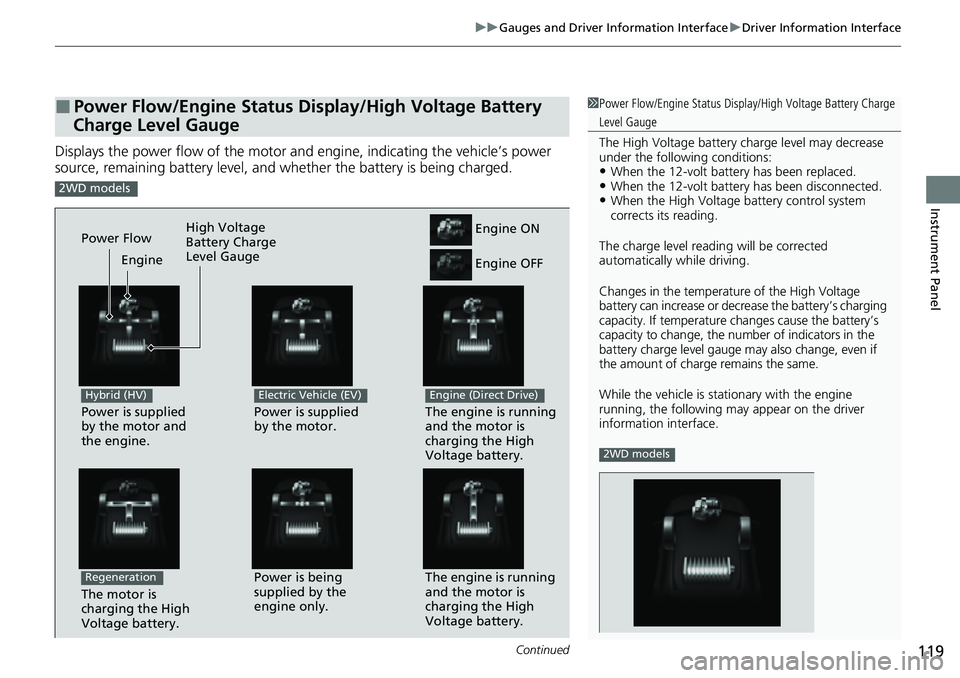
Displays the power flow of the motor an d engine, indicating the vehicle’s power
source, remaining battery level, and whether the battery is being charged.
■Power Flow/Engine Status Display/High Voltage Battery
Charge Level Gauge1 Power Flow/Engine Status Display/High Voltage Battery Charge
Level Gauge
The High Voltage battery ch arge level may decrease
under the following conditions:
•When the 12-volt batter y has been replaced.•When the 12-volt battery has been disconnected.•When the High Voltage battery control system
corrects its reading.
The charge level readin g will be corrected
automatically while driving.
Changes in the temperatur e of the High Voltage
battery can increase or decrease the battery’s charging
capacity. If temperature ch anges cause the battery’s
capacity to change, the num ber of indicators in the
battery charge level gauge may also change, even if
the amount of charge remains the same.
While the vehicle is stat ionary with the engine
running, the following ma y appear on the driver
information interface.
2WD models
2WD models
Power is supplied
by the motor and
the engine.
Hybrid (HV)
The engine is running
and the motor is
charging the High
Voltage battery.Power is being
supplied by the
engine only.
Engine ON
Engine OFF
Power is supplied
by the motor.
Electric Vehicle (EV)
The engine is running
and the motor is
charging the High
Voltage battery.
Engine (Direct Drive)
Power Flow Engine
The motor is
charging the High
Voltage battery.
Regeneration
High Voltage
Battery Charge
Level Gauge
Page 121 of 719
uuGauges and Driver Information Interface uDriver Information Interface
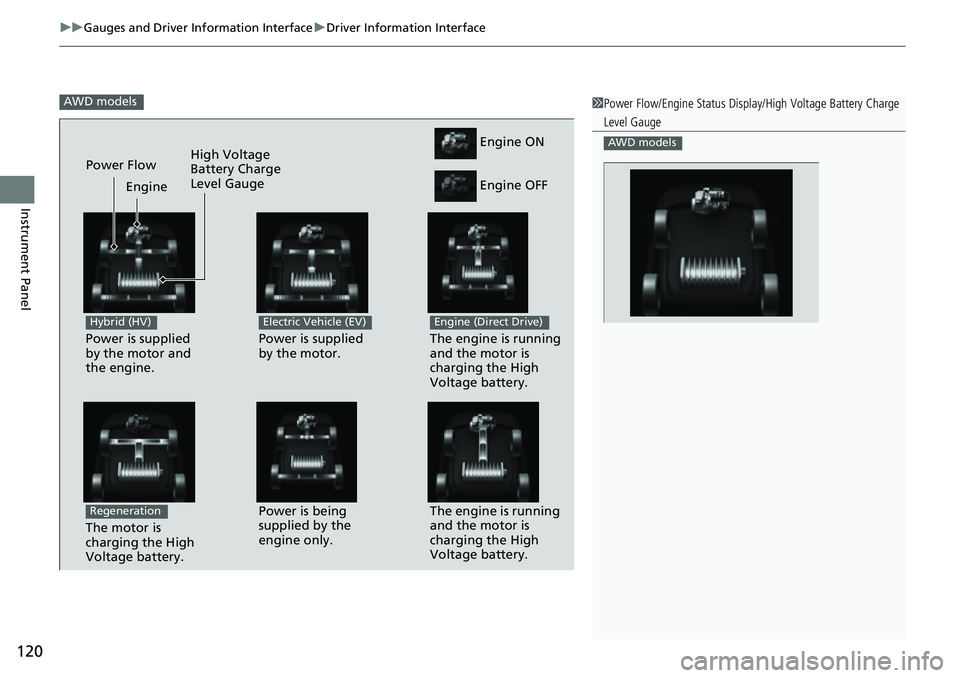
120
Instrument Panel
AWD models1Power Flow/Engine Status Display/High Voltage Battery Charge
Level Gauge
AWD models
Power is supplied
by the motor and
the engine.
Hybrid (HV)
The engine is running
and the motor is
charging the High
Voltage battery.Power is being
supplied by the
engine only.
Engine ON
Engine OFF
Power is supplied
by the motor.
Electric Vehicle (EV)
The engine is running
and the motor is
charging the High
Voltage battery.
Engine (Direct Drive)
Power Flow Engine
The motor is
charging the High
Voltage battery.
Regeneration
High Voltage
Battery Charge
Level Gauge
Page 140 of 719

139
uuGauges and Driver Information Interface uDriver Information Interface
Continued
Instrument Panel
*1:Default Setting Setup Group Customizable Features
Description Selectable Settings
Keyless access
setup Door unlock mode
Changes which doors unlock when you grab the driver’s
door handle. Driver door only
*1/
All
doors
Keyless access light
flash Causes some exterior lights
to flash when you unlock/
lock the doors. ON
*1/
OFF
Keyless access beep Causes the beeper to sound when you unlock/lock the
doors.
ON
*1/
OFF
Remote start system
ON/OFF Turns the remote engine start feature on and off.
ON
*1/OFF
Lighting setup
Auto high-beamTurns the auto high -beam on and off.ON*1/OFF
Interior light dimming
timeChanges the length of time the interior lights stay on
after you close the doors.60sec /30sec*1/ 15sec
Headlight auto off
timerChanges the length of time the exterior lights stay on
after you close the driver’s door.60sec /30sec /15sec*1/0sec
Auto light sensitivity*Changes the timing for th e headlights to come on.Max/High /Mid*1/Low /Min
Auto headlight ON
with wiper ONChanges the settings for the wiper operation when the
headlights automatically come on while the headlight
switch is in the AUTO position.
ON*1/OFF
* Not available on all models
Page 149 of 719

148
Controls
Locking and Unlocking the Doors
Key
This vehicle comes with the following keys:Use the keys to turn on and off the power
system, and to lock and unlock the doors,
tailgate, and fuel fill door.
The built-in key can be used to unlock the
doors when the keyless remote battery
becomes weak and the power door unlock
operation is disabled.
To remove the built-in key, push the release
button and then pull out the key. To reinstall
the built-in key, push th e built-in key into the
keyless remote until it clicks.1 Key
All the keys have an immobilizer system. The
immobilizer system helps to protect against vehicle
theft. 2 Immobilizer System P. 176
Follow the advice below to prevent damage to the
keys:
•Do not leave the keys in direct sunlight, or in
locations with high temperature or high humidity.
•Do not drop the keys or set heavy objects on them.•Keep the keys away from liquids, dust and sand.
•Do not take the keys apart except for replacing the
battery.
If the circuits in the keys are damaged, the power
system may not activate, and the remote transmitter
may not work.
If the keys do not work properly, have them
inspected by a dealer.
You can remotely turn the power system on using the
remote engine start. 2 Remote Engine Start P. 457■Built-in Key
Built-in Key
Release Button