2023 HONDA ACCORD HYBRID warning
[x] Cancel search: warningPage 307 of 627

305
uuGeneral Information on the Audio System uHonda App License Agreement
Continued
Features
E. Information Collection and Storage
1. Information Collection , Use, Transmission and Storage of Data. Consent to Use of Data:
You agree that HONDA and PROVIDERS may
collect and use your information gathered in any manner as part of product support services related to the SOFTWARE or related services.
HONDA may share such information with third parties, including, without limitation, PR OVIDERS, third party software and services
suppliers, their affiliates and/or their designated agents, solely to improve their products or to provide services or technolo gies to you.
HONDA, third party software and syst ems suppliers, their affiliates and/or their de signated agent may disclose this information to others,
but not in a form that pe rsonally identifies you.
2. Information Storage.
Depending on the type of mult imedia system you have in your VEHICLE, certain information may be stored for ease
of use of the SOFTWARE including, without limitation, search hi story, location history in certain applications, previous and saved
destinations, map locations within certain applications, and device numbers and contact information.
(a) Vehicle Health Information.
Your VEHICLE may remotely transmit information re garding the status and health of your VEHICLE
(“VEHICLE INFORMATION”) to HONDA without notification to you. VEHICLE INFORMATION may contain VEHICLE maintenance and
malfunction status that is derived from VEHICLE diagnostic data and includes, but is not limited to, status of powered doors and windows,
battery life data, battery charging data, VE HICLE speed, coolant temperature, air comp ressor revolution, output power, warning codes,
diagnostic trouble codes, fuel injection volume, and engine rotati ons per minute. VEHICLE HEALTH INFORMATION may be used by HON DA
for research and development, to deliver HONDA SERVICES and informat ion to you, and to contact you, and is retained only for a period
of time necessary to fulfill these goals.
(b) VEHICLE Geolocation Data (non-navigation/map based).
If you opt-in to geolocation-based SERVICES, your vehicle’s geolocation data
(latitude and longitude) will be automatically sent from your VEHICLE to HONDA and PROVIDERS.
(c) You understand that the inputting or uploading of information to your VEHICLE’s multimedia system or the SOFTWARE or SERVIC ES is
at your own risk and that HONDA is not responsible for unauthori zed access to or use of any personal or other information. All information
uploaded to the SOFTWARE and SERVICES may be stored on your VEHICLES’s multimedia system and you understand that the security and
safety of your VEHICLE’s multimedia system is your sole responsibility.
23 ACCORD 4D US HEV MAP-3130B6000.book 305 ページ 2022年10月13日 木曜日 午後4時50分
Page 332 of 627

330
uuCustomized Features u
Features
■TPMS Calibration*
■Driver Assist System Setup
*1:Default Setting
Customizable Features DescriptionSelectable Settings
TPMS CalibrationCalibrates the tire pressure monitoring system (TPMS).
2Tire Pressure Monitoring System (TPMS)* P. 393Calibrate
Customizable Features DescriptionSelectable Settings
Forward Collision Warning
DistanceSelects distance for Forward Collision Warning audible and visual
alerts.
2 Collision Mitigation Braking SystemTM (CMBSTM) P. 406
Long/ Normal*1/Short
Head-up Warning*Turns warning light On/Off for head-up flash alert. On*1/Off
ACC Forward Vehicle Detect
BeepTurns audible notification On/Off wh en vehicle has moved in/out of
Adaptive Cruise Control wi th Low Speed Follow range.
2Adaptive Cruise Control (ACC) with Low Speed Follow P. 424
On/Off*1
Road Departure Mitigation
Setting Selects operating mode of the Ro
ad Departure Mitigation system.
2Road Departure Mitigation System P. 465
Narrow/Normal*1/Wide /
Warning only
Lane Keeping Assist
Suspend BeepTurns the LKAS alert On/Off fo r not detecting road lines.
2Lane Keeping Assist System (LKAS) P. 445On /Off*1
Blind Spot Information Turns the blind spot informatio
n system audible alert On/Off.2Blind Spot Information System P. 398
Audible And Visual Alert*1/
Visual Alert
* Not available on all models
23 ACCORD 4D US HEV MAP-3130B6000.book 330 ページ 2022年10月13日 木曜日 午後4時50分
Page 333 of 627

331
uuCustomized Features u
Continued
Features
*1:Default Setting
Customizable Features Description Selectable Settings
Traffic Sign Recognition
System Display SettingDisplays the traffic sign recognition system on instrument panel.
2Traffic Sign Recognition System P. 473On*1/Off
Traffic Sign Recognition
System Speed Limit
Warning Enables over speed limit warning
when speed limit is exceeded.
2Traffic Sign Recognition System P. 473On/Off*1
Speed Limit Warning
Threshold Setting
When Traffic Sign Recognition Sy stem Speed Limit Warning
setting is on, select speed limit warning threshold based on personal
preference.
2 Traffic Sign Recognition System P. 473
Speed Limit*1/
Speed Limit+3mph /
Speed Limit+5mph /
Speed Limit+10mph
(When mph is selected)
Speed Limit
*1/
Speed Limit+5km/h /
Speed Limit+10km/h /
Speed Limit+15km/h
(When km/h is selected)
Driver Attention Monitor Changes the setting for the
driver attention monitor.
2Driver Attention Monitor P. 125
Tactile And Audible Alert*1/
Tactile Alert /Off
Rear Sensor Setting*
Turns the Rear Parking Sensor ON or OFF. This selection will also
affect the rear Low Speed Braking Control*.
2 Parking Sensor System* P. 495
2 Low Speed Braking Control* P. 418
On*1/Off
* Not available on all models
23 ACCORD 4D US HEV MAP-3130B6000.book 331 ページ 2022年10月13日 木曜日 午後4時50分
Page 334 of 627

332
uuCustomized Features u
Features
■Meter/Head-up Display* Setup
*1:Default Setting
Customizable Features Description Selectable Settings
Adjust Outside Temp.
DisplayAdjusts outside temperature reading by a few degrees.
2Outside Temperature P. 113
-5°F ~ ±0°F*1 ~ +5°F (U.S.)
-3°C ~ ±0°C*1 ~ +3°C (Canada)
“Trip A” Reset Timing Selects the timing to reset Trip A.
2
Range/Fuel/Trip Meter P. 121
2 Speed/Time/Trip Meter P. 123When Fully Refueled/IGN Off /
Manually Reset*1
“Trip B” Reset TimingSelects the timing to reset Trip B.
2 Range/Fuel/Trip Meter P. 121
2 Speed/Time/Trip Meter P. 123When Fully Refueled/IGN Off /
Manually Reset*1
Adjust Alarm Volume Changes volume level of all system warnings, door opening
warning, and indicator.
High
/Mid*1/Low
Fuel Efficiency BacklightTurns the ambient meter feature on and off.On*1/Off
Turn By Turn Auto Display Turns the pop-up information
on/off in the turn-by-turn
navigation in the driver information interface.
2Compass/Turn-by-Turn Direction P. 124
On*1/Off
Rear Seat ReminderTurns the Rear Seat Reminder feature on and off.On*1/Off
Speed/Distance Units Selects the speed/distance units.
2
Speed/distance units P. 132
km/h · km/mph · miles*1
(U.S.)
km/h · km
*1/ mph · miles
(Canada)
* Not available on all models
23 ACCORD 4D US HEV MAP-3130B6000.book 332 ページ 2022年10月13日 木曜日 午後4時50分
Page 362 of 627

uuEmergency Call (eCall) uAutomatic emergency call
360
Features
If the eCall system is working properly, the indicator will light up in green.
• Green: eCall system is ready.
• Blinking in green: eCall system is conne cted and making an eCall to a PSAP
operator.
• Repeating a pattern of short flashes of the red light: The eCall system has failed
to connect to an operator. The eCall indica tor will continue this pattern for five
seconds, then it will light up in green.
If the 911-based eCall system is disabled in the event of a critical system failure, the
following warning will be given to the occupants of the vehicle:
• Red or blacked out: A problem with the eC all system has occurred. If the indicator
stays red or blacked out even after you have restarted the vehicle, have the system
check by a dealer.1 Emergency Call (eCall)
Your vehicle may NOT be ab le to connect to a PSAP
operator if:
•The 12V batter y is too low.
•Your vehicle is in an area without adequate cellular
coverage.
•There is a problem with the eCall system itself or its
peripheral equipment such as the microphone or
speakers.
23 ACCORD 4D US HEV MAP-3130B6000.book 360 ページ 2022年10月13日 木曜日 午後4時50分
Page 369 of 627

367
uuBefore Driving uMaximum Load Limit
Continued
Driving
Maximum Load Limit
The maximum load for your vehicl e is 850 lbs (385 kg). See the
Tire and Loading Information la bel attached to the driver’s
doorjamb.
This figure includes the total weig ht of all occupants, cargo, and
accessories, and the tongue load if you are towing a trailer.
Steps for Determining Correct Load Limit -
(1) Locate the statement “The combined weight of occupants and
cargo should never exceed XXX kg or XXX lbs.” on your
vehicle’s placard.
(2) Determine the combined weight of the driver and passengers
that will be riding in your vehicle.
(3) Subtract the combined weight of the driver and passengers
from XXX kg or XXX lbs.
(4) The resulting figure equals the available amount of cargo and
luggage load capacity. For example, if the “XXX” amount
equals 1,400 lbs. and there will be five 150 lb. passengers in
your vehicle, the am ount of available cargo and luggage load
capacity is 650 lbs. (1,400 - 750 (5 x 150) = 650 lbs.)1 Maximum Load Limit
Gross Vehicle Weight Rating (GVWR):
The maximum allowable weight of the vehicle, all
occupants, all accesso ries and all cargo.
2 Specifications P. 602
Gross Axle Weight Rating (GAWR):
The maximum allowable weight of the vehicle axle. 2 Specifications P. 602
3WARNING
Overloading or improper loading
can affect handling and stability
and cause a crash in which you
can be hurt or killed.
Follow all load limits and other
loading guidelines in this manual.
Label Example
23 ACCORD 4D US HEV MAP-3130B6000.book 367 ページ 2022年10月13日 木曜日 午後4時50分
Page 373 of 627
Continued371
uuWhen Driving uTurning on the Power
Driving
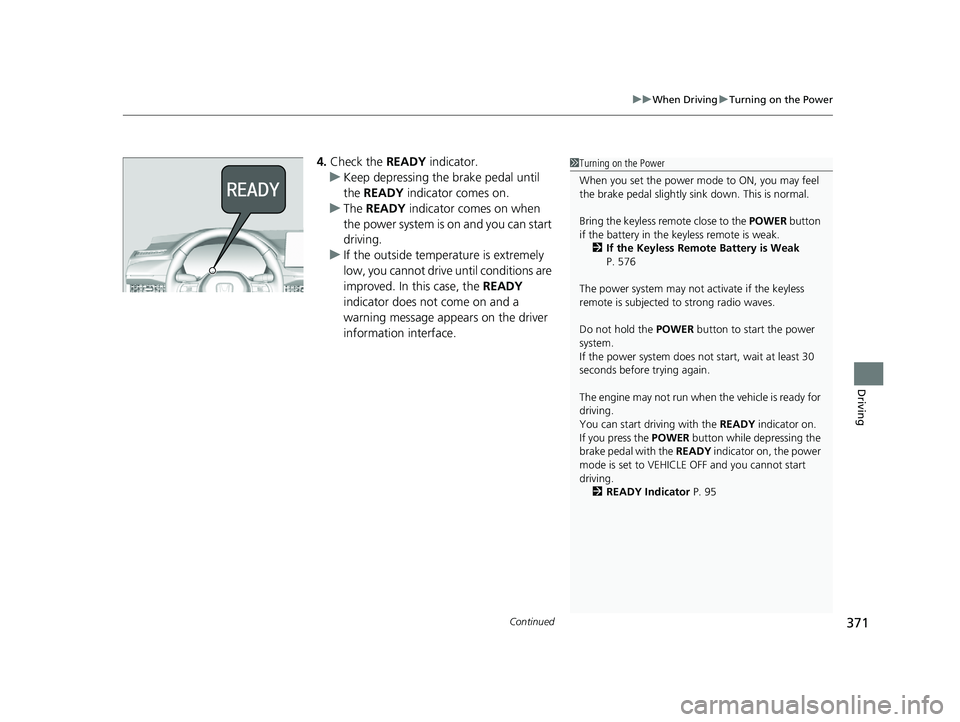
4. Check the READY indicator.
u Keep depressing the brake pedal until
the READY indicator comes on.
u The READY indicator comes on when
the power system is on and you can start
driving.
u If the outside temperature is extremely
low, you cannot drive until conditions are
improved. In this case, the READY
indicator does not come on and a
warning message appears on the driver
information interface.1 Turning on the Power
When you set the power mode to ON, you may feel
the brake pedal slightly si nk down. This is normal.
Bring the keyless remote close to the POWER button
if the battery in the keyless remote is weak.
2 If the Keyless Remote Battery is Weak
P. 576
The power system may not activate if the keyless
remote is subjected to strong radio waves.
Do not hold the POWER button to start the power
system.
If the power system does not start, wait at least 30
seconds before trying again.
The engine may not run when the vehicle is ready for
driving.
You can start driving with the READY indicator on.
If you press the POWER button while depressing the
brake pedal with the READY indicator on, the power
mode is set to VEHICLE OFF and you cannot start
driving. 2 READY Indicator P. 95
23 ACCORD 4D US HEV MAP-3130B6000.book 371 ページ 2022年10月13日 木曜日 午後4時50分
Page 374 of 627

uuWhen Driving uTurning on the Power
372
Driving
You can remotely turn the power sy stem on using the keyless remote.
■To turn the power system on
Press the button, then press and hold
the button.
u Some exterior lights flash once.
If the power system is turned on successfully,
some exterior lights flash six times.
If the power system does not turned on,
exterior lights will not flash.
u Go within the rang e, and try again.
■Remote Engine Start1Remote Engine Start
The remote engine start may violate local laws.
Before using the remote e ngine start, check your
local laws.
If there are buildings an d obstacles between your
vehicle and the keyless re mote, the range will be
reduced.
This distance may vary by external electrical
interference.
3WARNING
Carbon monoxide ga s is toxic and can
rapidly accumulate in closed or even partly
enclosed areas.
Breathing it can cause unconsciousness and
even kill you.
Never use the remote engine starter with
the vehicle parked in a garage or other
areas with limited ventilation.
LED: Blinks when any
button is pressed.
23 ACCORD 4D US HEV MAP-3130B6000.book 372 ページ 2022年10月13日 木曜日 午後4時50分