2023 FORD SUPER DUTY Camera
[x] Cancel search: CameraPage 14 of 738
Parking Aid Indicators...............................285
Parking Aids – Troubleshooting............285
Parking Aids Videos...................................286
Rear View Camera
What Is the Rear View Camera..............287
Rear View Camera Precautions.............287
Locating the Rear View Camera............287
Rear View Camera Guide Lines.............288
Rear View Camera Settings...................288
Rear View Camera Videos......................289
360 Degree Camera
What Is the 360 Degree Camera.........290
How Does the 360 Degree Camera Work.......................................................................290
360 Degree Camera Precautions........290
Locating the 360 Degree Cameras......290
360 Degree Camera Guide Lines..........291
360 Degree Camera Settings................292
Cruise Control
What Is Cruise Control..............................294
Switching Cruise Control On and Off........................................................................294
Setting the Cruise Control Speed........294
Canceling the Set Speed.........................295
Resuming the Set Speed.........................295
Cruise Control Indicators.........................295
Adaptive Cruise Control
How Does Adaptive Cruise Control WithStop and Go Work.................................296
Adaptive Cruise Control Precautions........................................................................296
Adaptive Cruise Control Limitations........................................................................297
Switching Adaptive Cruise Control Onand Off.......................................................299
Adaptive Cruise Control AutomaticCancellation.............................................299
Setting the Adaptive Cruise ControlSpeed.........................................................299
Setting the Adaptive Cruise Control Gap.......................................................................300
Canceling the Set Speed..........................301
Resuming the Set Speed..........................301
Overriding the Set Speed........................302
Adaptive Cruise Control Indicators......303
Switching From Adaptive Cruise Controlto Cruise Control.....................................303
Lane Centering............................................303
Predictive Speed Assist...........................306
Predictive Speed Assist –Troubleshooting.....................................308
Adaptive Cruise Control –Troubleshooting.....................................309
Adaptive Cruise Control Videos.............310
Drive Mode Control
What Is Drive Mode Control......................311
How Does Drive Mode Control Work..........................................................................311
Selecting a Drive Mode...............................311
Drive Modes...................................................312
Drive Mode Control – Troubleshooting.........................................................................314
Speed Limiter
How Does the Speed Limiter Work......316
Switching the Speed Limiter On and Off.........................................................................316
Setting the Speed Limit............................316
Changing the Set Speed Limit...............316
Canceling the Set Speed Limit...............316
Resuming the Set Speed Limit..............316
Intentionally Exceeding the Set SpeedLimit..............................................................316
Speed Limiter Indicators...........................316
Speed Limiter Audible Warnings...........316
10
2023 Super Duty (TFH) Canada/United States of America, enUSA, Edition date: 202211, DOMTable of Contents
Page 36 of 738
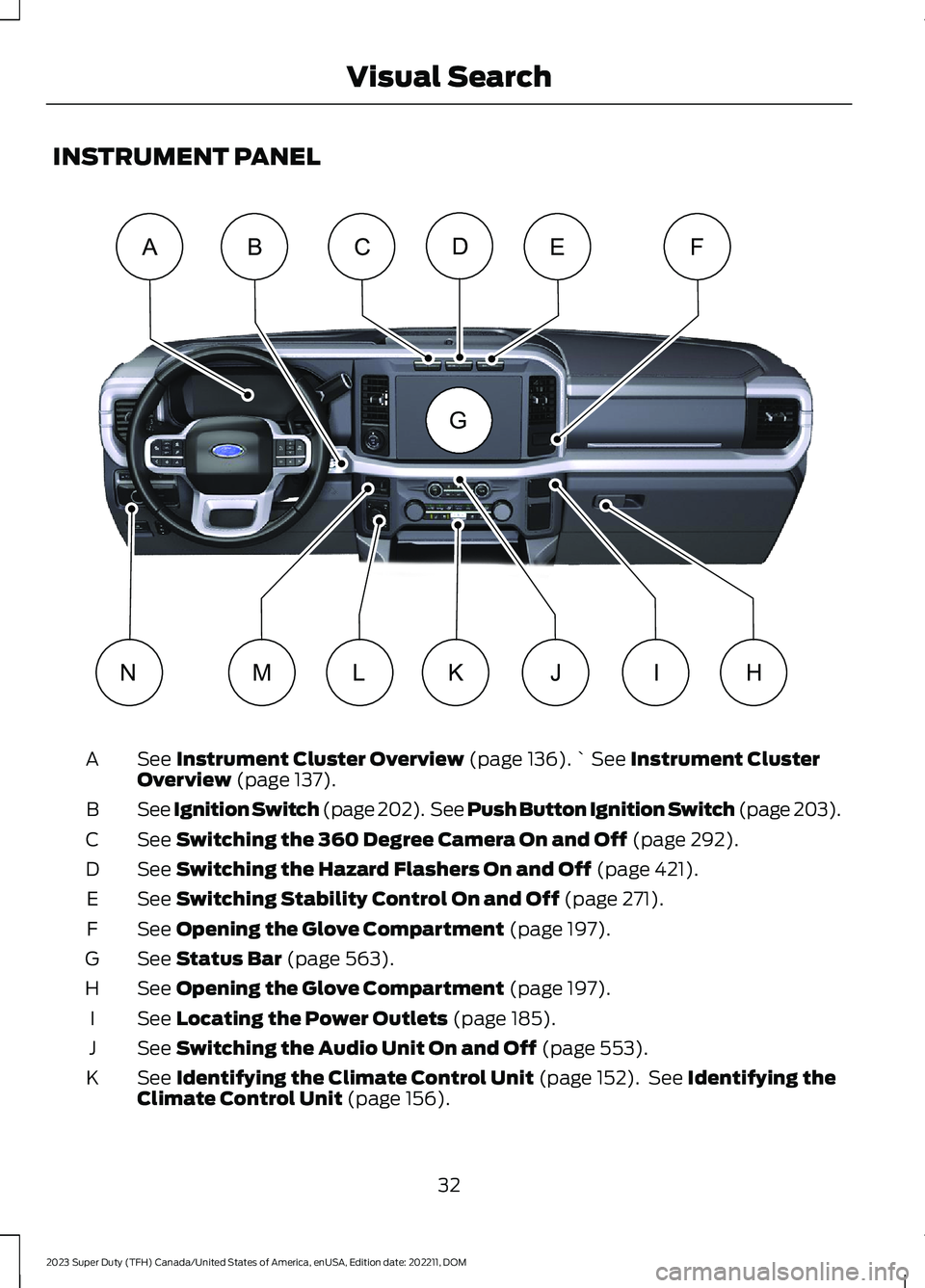
INSTRUMENT PANEL
See Instrument Cluster Overview (page 136).` See Instrument ClusterOverview (page 137).A
See Ignition Switch (page 202). See Push Button Ignition Switch (page 203).B
See Switching the 360 Degree Camera On and Off (page 292).C
See Switching the Hazard Flashers On and Off (page 421).D
See Switching Stability Control On and Off (page 271).E
See Opening the Glove Compartment (page 197).F
See Status Bar (page 563).G
See Opening the Glove Compartment (page 197).H
See Locating the Power Outlets (page 185).I
See Switching the Audio Unit On and Off (page 553).J
See Identifying the Climate Control Unit (page 152). See Identifying theClimate Control Unit (page 156).K
32
2023 Super Duty (TFH) Canada/United States of America, enUSA, Edition date: 202211, DOMVisual SearchABCEFDHLMIJKNG E374895
Page 38 of 738
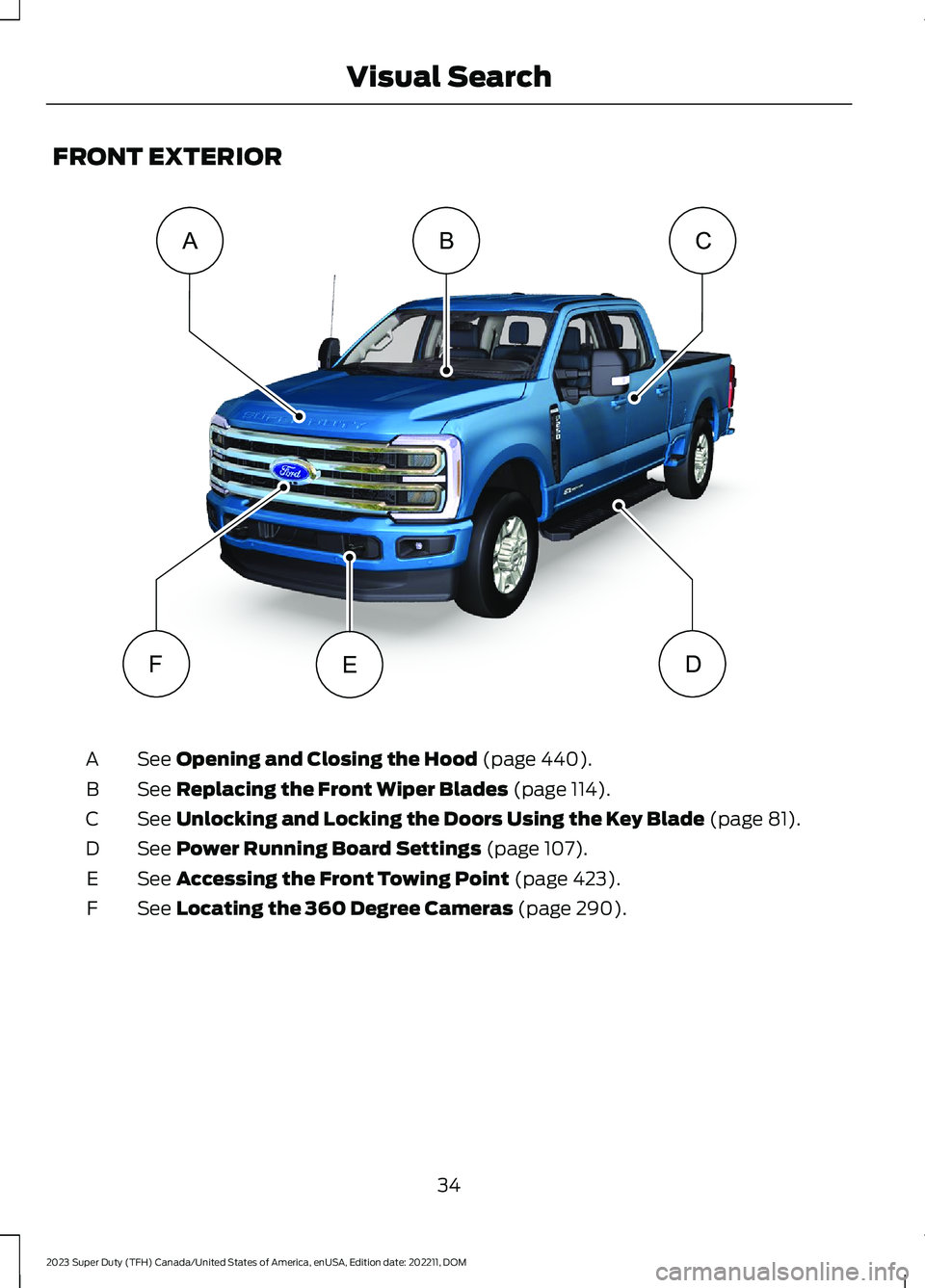
FRONT EXTERIOR
See Opening and Closing the Hood (page 440).A
See Replacing the Front Wiper Blades (page 114).B
See Unlocking and Locking the Doors Using the Key Blade (page 81).C
See Power Running Board Settings (page 107).D
See Accessing the Front Towing Point (page 423).E
See Locating the 360 Degree Cameras (page 290).F
34
2023 Super Duty (TFH) Canada/United States of America, enUSA, Edition date: 202211, DOMVisual SearchBCAFDE E374897
Page 39 of 738
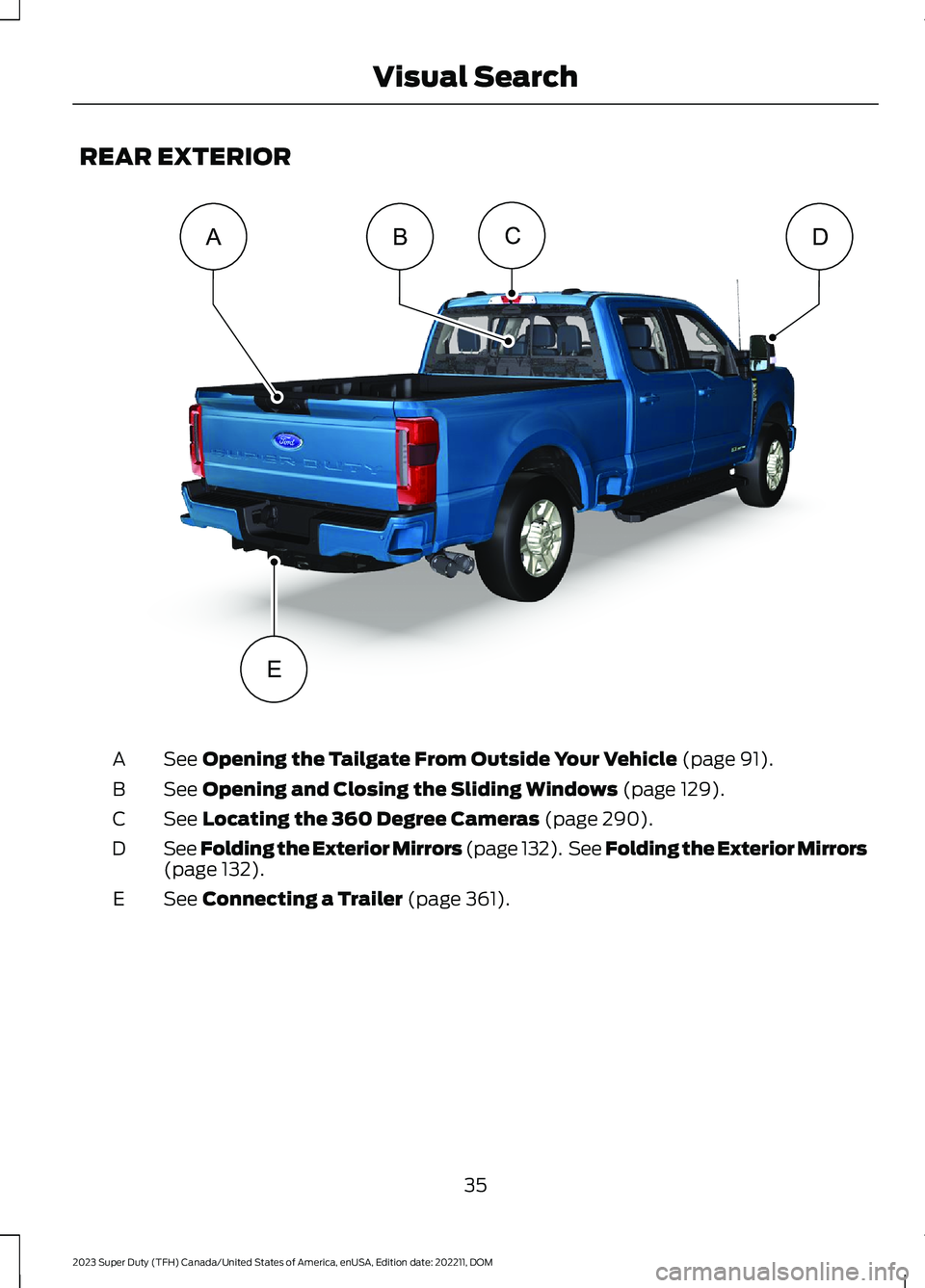
REAR EXTERIOR
See Opening the Tailgate From Outside Your Vehicle (page 91).A
See Opening and Closing the Sliding Windows (page 129).B
See Locating the 360 Degree Cameras (page 290).C
See Folding the Exterior Mirrors (page 132). See Folding the Exterior Mirrors(page 132).D
See Connecting a Trailer (page 361).E
35
2023 Super Duty (TFH) Canada/United States of America, enUSA, Edition date: 202211, DOMVisual SearchCDBAE E374898
Page 126 of 738

EXTERIOR ZONE LIGHTINGSETTINGS
1.Press Features on the touchscreen.
2.Press Zone Lighting.
3.Press the settings menu in the upperright-hand corner.
4.Press a setting.
Enable Autolamp Override
This setting allows your vehicle to overridethe autolamps when using zone lighting.
When you access zone lighting for the firsttime, you can choose this setting. You canchange this setting at any time.
Include Reverse Lamps
This setting turns the reverse lamps onwhen you switch the rear lighting zone on.
Switch this setting off if you have a backupalarm installed to prevent the reverselamps from turning on and sounding thealarm when using zone lighting.
AUTOMATIC HIGH BEAM
CONTROL (IF EQUIPPED)
HOW DOES AUTOMATIC HIGHBEAM CONTROL WORK
Automatic high beam control turns thehigh beams on if it is dark enough and noother traffic is present. If it detects anapproaching vehicle’s headlamps or taillamps, or street lighting ahead, the systemturns the high beams off.
A camera sensor, centrally mountedbehind the windshield of your vehicle,continuously monitors conditions to turnthe high beams on and off.
Without automatic high beamcontrol.A
With automatic high beamcontrol.B
AUTOMATIC HIGH BEAMCONTROL PRECAUTIONS
WARNING: The system does notrelieve you of your responsibility to drivewith due care and attention. You mayneed to override the system if it does notturn the high beams on or off.
122
2023 Super Duty (TFH) Canada/United States of America, enUSA, Edition date: 202211, DOMExterior Lighting E327596
Page 127 of 738
WARNING: The system may notswitch the high beams off if the lights ofoncoming vehicles are hidden byobstacles, for example guard rails.
WARNING: You may need tooverride the system when approachingother road users.
WARNING: In situations with poorvisibility, such as fog, heavy rain or otherinclement weather, you may need tooverride or completely switch off thesystem.
AUTOMATIC HIGH BEAMCONTROL REQUIREMENTS
The system turns the high beams on if allof the following occur:
•You switch the system on.
•You set the lighting control to theautolamps position.
•The ambient light level is low enoughthat you require high beams.
•There is no traffic in front of yourvehicle.
•The vehicle speed is greater thanapproximately 25 mph (40 km/h).
AUTOMATIC HIGH BEAMCONTROL LIMITATIONS
The system turns the high beams off if anyof the following occur:
•You switch the system off.
•You set the lighting control to anyposition except autolamps.
•The ambient light level is high enoughthat you do not require high beams.
•The system detects an approachingvehicle's headlamps or a leadingvehicle's tail lamps.
•The system detects severe rain, snowor fog.
•The system detects street lighting.
•The camera has reduced visibility.
•The vehicle speed falls belowapproximately 19 mph (30 km/h).
SWITCHING AUTOMATIC HIGHBEAM CONTROL ON AND OFF
1.Using the instrument cluster controlson the steering wheel, select Settings.
2.Select Vehicle.
3.Select Lighting.
4.Switch Auto High Beam on or off.
AUTOMATIC HIGH BEAMCONTROL INDICATORS
Illuminates to confirm when thesystem is ready to assist.
OVERRIDING AUTOMATIC HIGHBEAM CONTROL
Push the lever away from you to switchthe high beams on.
Push the lever away from you again toswitch the high beams off.
123
2023 Super Duty (TFH) Canada/United States of America, enUSA, Edition date: 202211, DOMExterior LightingE146105 E308790
Page 128 of 738
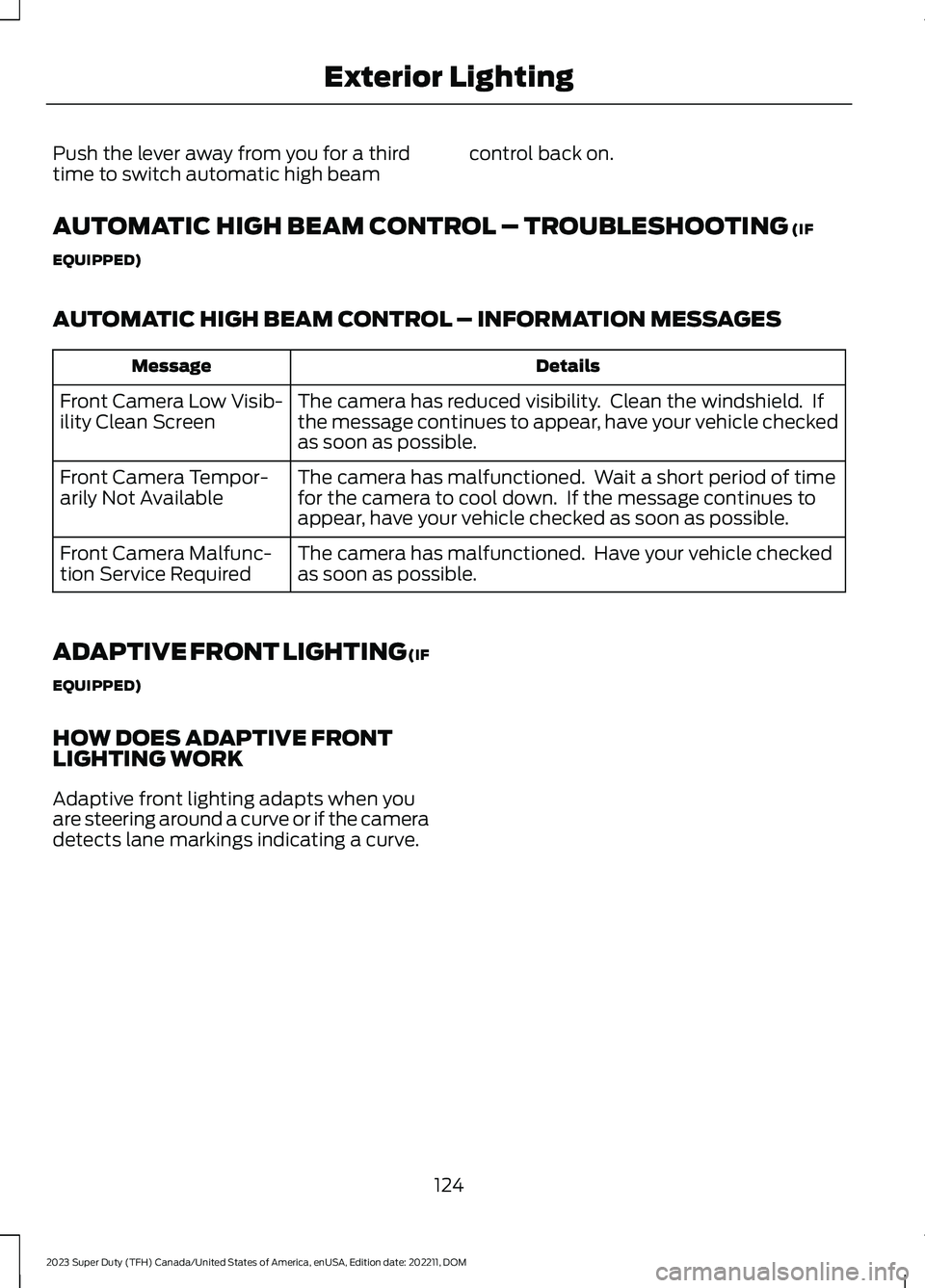
Push the lever away from you for a thirdtime to switch automatic high beamcontrol back on.
AUTOMATIC HIGH BEAM CONTROL – TROUBLESHOOTING (IF
EQUIPPED)
AUTOMATIC HIGH BEAM CONTROL – INFORMATION MESSAGES
DetailsMessage
The camera has reduced visibility. Clean the windshield. Ifthe message continues to appear, have your vehicle checkedas soon as possible.
Front Camera Low Visib-ility Clean Screen
The camera has malfunctioned. Wait a short period of timefor the camera to cool down. If the message continues toappear, have your vehicle checked as soon as possible.
Front Camera Tempor-arily Not Available
The camera has malfunctioned. Have your vehicle checkedas soon as possible.Front Camera Malfunc-tion Service Required
ADAPTIVE FRONT LIGHTING (IF
EQUIPPED)
HOW DOES ADAPTIVE FRONTLIGHTING WORK
Adaptive front lighting adapts when youare steering around a curve or if the cameradetects lane markings indicating a curve.
124
2023 Super Duty (TFH) Canada/United States of America, enUSA, Edition date: 202211, DOMExterior Lighting
Page 263 of 738
Note:The system does not react to smallor moving objects, particularly those closeto the ground.
Note:The system does not operate duringhard acceleration or steering.
Note:If your vehicle sustains damage tothe bumper or fascia leaving it misalignedor bent, it could alter the sensing zonecausing inaccurate measurement ofobstacles or false alerts.
Note:Vehicle loading and suspensionchanges can impact the angle of the sensorsand may change the normal detection zoneof the system resulting in inaccuratemeasurement of obstacles or false alerts.
Note:When you connect a trailer, thesystem may detect the trailer and providean alert, or the system turns off. If thesystem does not turn off, manually switchthe system off after you connect the trailer.
Note:You may experience reduced systemperformance on road surfaces that limitdeceleration. For example, roads with ice,loose gravel, mud or sand.
SWITCHING REVERSE BRAKE
ASSIST ON AND OFF
1.Press Features on the touchscreen.
2.Press Driver Assistance.
3.Switch Reverse Brake Assist on or off.
Note:The system is unavailable when therear parking aid or cross traffic alert is off.
Note:If your vehicle is not equipped withcross traffic alert the reverse braking assistrelies on input from the rear parking aid andrear camera sensors.
OVERRIDING REVERSE BRAKE
ASSIST
There could be instances whenunexpected or unwanted braking occurs.Firmly pressing the accelerator pedal orswitching the feature off overrides thesystem.
REVERSE BRAKE ASSIST
INDICATORS
If the system determines that a collisionwith an obstacle may occur, full brakingmay apply.
A message and warningindicator appear when thesystem applies the brakes.
259
2023 Super Duty (TFH) Canada/United States of America, enUSA, Edition date: 202211, DOMReverse Brake Assist (If Equipped)E293490