2023 FORD SUPER DUTY service
[x] Cancel search: servicePage 327 of 738

•The system does not detect lanemarkings.
•One or both rear radar sensors becomeblocked or faulty.
•You have not configured the attachedtrailer correctly in the trailer tow menusor you attached an unsupported trailer.The system only supports certain trailershapes and dimensions.
Note:Blind spot assist with trailer coveragecould have reduced performance if any ofthe above limitations are present.
Blind spot assist may have difficultydetecting hazards under the followingconditions:
•If a vehicle is approaching in anadjacent lane at a relative speed muchhigher than your vehicle.
•Bad weather conditions are presentthat obstruct the sensors.
•Attaching bike or cargo racks couldcause false alerts due to obstructionof the sensor.
BLIND SPOT ASSIST WITHTRAILER COVERAGE INDICATORS
The lane keeping aid warning lamp or redlane marking in your instrument clusterdisplay indicate blind spot assist activation.In addition, the blind spot informationsystem alert indicator flashes on theexterior mirror on the same side as thedetection. See Blind Spot InformationSystem (page 327).
Blind Spot Assist Information Messages
ActionMessage
Displays if you attach a trailer to your vehicle with the blindspot information system switched off or you have notconfigured the trailer.
Blind Spot Assist NotAvailable TrailerAttached
Displays if your blind spot information system sensors areblocked.Blind Spot Assist NotAvailable Side SensorBlocked
The system has detected a fault that requires service. Haveyour vehicle checked as soon as possible.Blind Spot Assist Systemfault
323
2023 Super Duty (TFH) Canada/United States of America, enUSA, Edition date: 202211, DOMLane Keeping System (If Equipped)E310089
Page 328 of 738
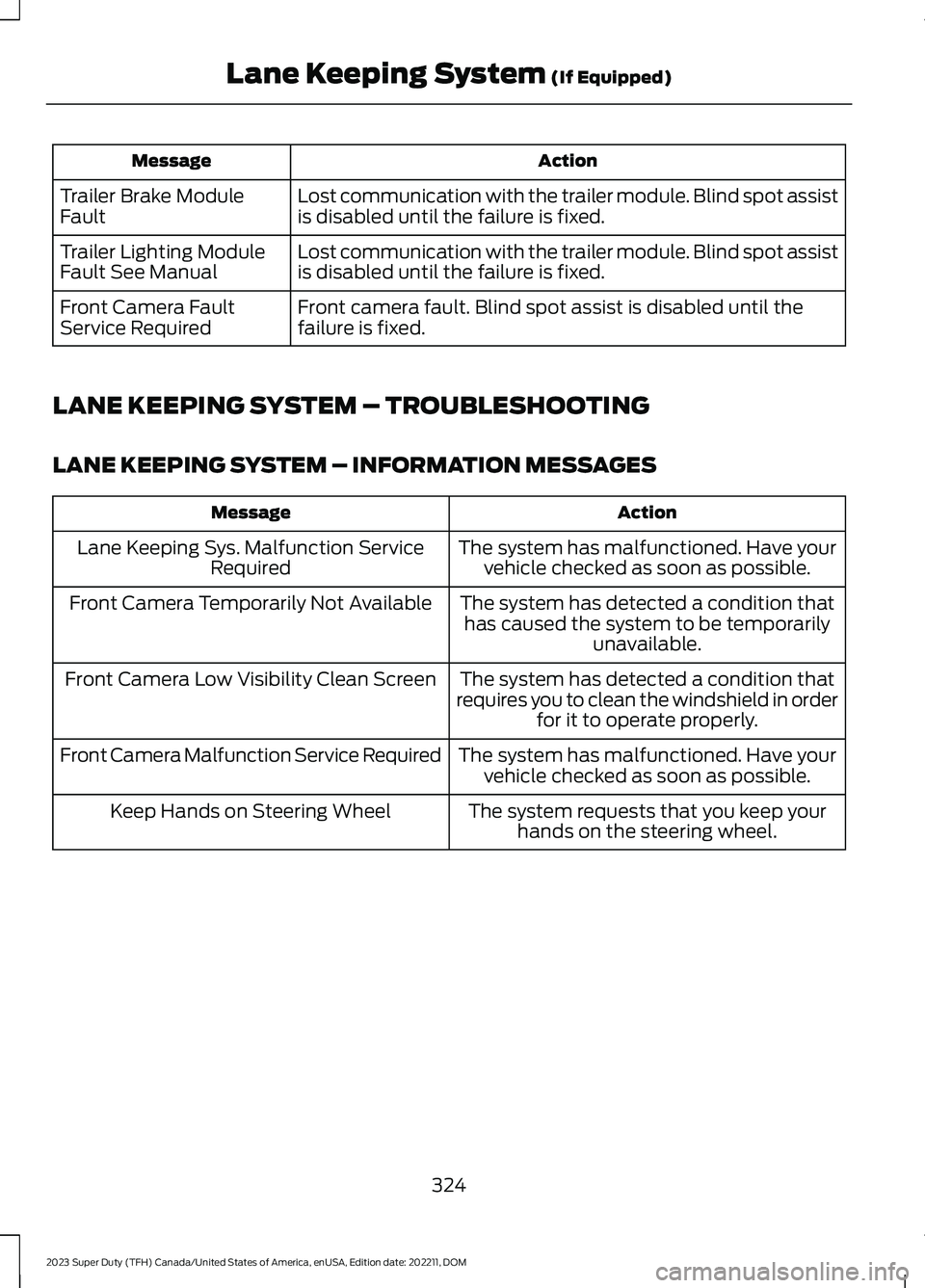
ActionMessage
Lost communication with the trailer module. Blind spot assistis disabled until the failure is fixed.Trailer Brake ModuleFault
Lost communication with the trailer module. Blind spot assistis disabled until the failure is fixed.Trailer Lighting ModuleFault See Manual
Front camera fault. Blind spot assist is disabled until thefailure is fixed.Front Camera FaultService Required
LANE KEEPING SYSTEM – TROUBLESHOOTING
LANE KEEPING SYSTEM – INFORMATION MESSAGES
ActionMessage
The system has malfunctioned. Have yourvehicle checked as soon as possible.Lane Keeping Sys. Malfunction ServiceRequired
The system has detected a condition thathas caused the system to be temporarilyunavailable.
Front Camera Temporarily Not Available
The system has detected a condition thatrequires you to clean the windshield in orderfor it to operate properly.
Front Camera Low Visibility Clean Screen
The system has malfunctioned. Have yourvehicle checked as soon as possible.Front Camera Malfunction Service Required
The system requests that you keep yourhands on the steering wheel.Keep Hands on Steering Wheel
324
2023 Super Duty (TFH) Canada/United States of America, enUSA, Edition date: 202211, DOMLane Keeping System (If Equipped)
Page 345 of 738

LOCATING THE PRE-
COLLISION ASSIST SENSORS
Camera.1.
Radar sensor (if equipped).2.
If a message regarding a blocked sensoror camera appears in the informationdisplay, something is obstructing the radarsignals or camera images. The radar sensoris behind the fascia cover in the center ofthe lower grille. With a blocked sensor orcamera, the system may not function, orperformance may reduce. SeePre-Collision Assist – InformationMessages (page 344).
Note:Proper system operation requires aclear view of the road by the camera. Haveany windshield damage in the area of thecamera's field of view repaired.
Note:If something hits the front end of yourvehicle or damage occurs and your vehiclehas a radar sensor, the radar sensing zonecould change. This could cause missed orfalse vehicle detections. Have your vehicleserviced to have the radar checked forproper coverage and operation.
Note:If your vehicle detects excessive heatat the camera or a potential misalignmentcondition, a message could display in theinformation display indicating temporarysensor unavailability. When operationalconditions are correct, the messagedeactivates. For example, when the ambienttemperature around the sensor decreasesor the sensor recalibrates successfully.
DISTANCE INDICATION
WHAT IS DISTANCE INDICATION
Distance indication displays the gapbetween your vehicle and the vehicleahead of you.
Note:The graphic does not display if youswitch on cruise control or adaptive cruisecontrol.
Time GapDistance GapDistance Indic-ator ColorSystem Sensit-ivityVehicle Speed
Greater than 0.9seconds.Greater than82 ft (25 m).Blue.Normal.62 mph(100 km/h).
0.6-0.9seconds.56–82 ft(17–25 m).Yellow.
Less than 0.6seconds.Less than 56 ft(17 m).Red.
341
2023 Super Duty (TFH) Canada/United States of America, enUSA, Edition date: 202211, DOMPre-Collision Assist (If Equipped)E390505
Page 349 of 738
PRE-COLLISION ASSIST –FREQUENTLY ASKED QUESTIONS
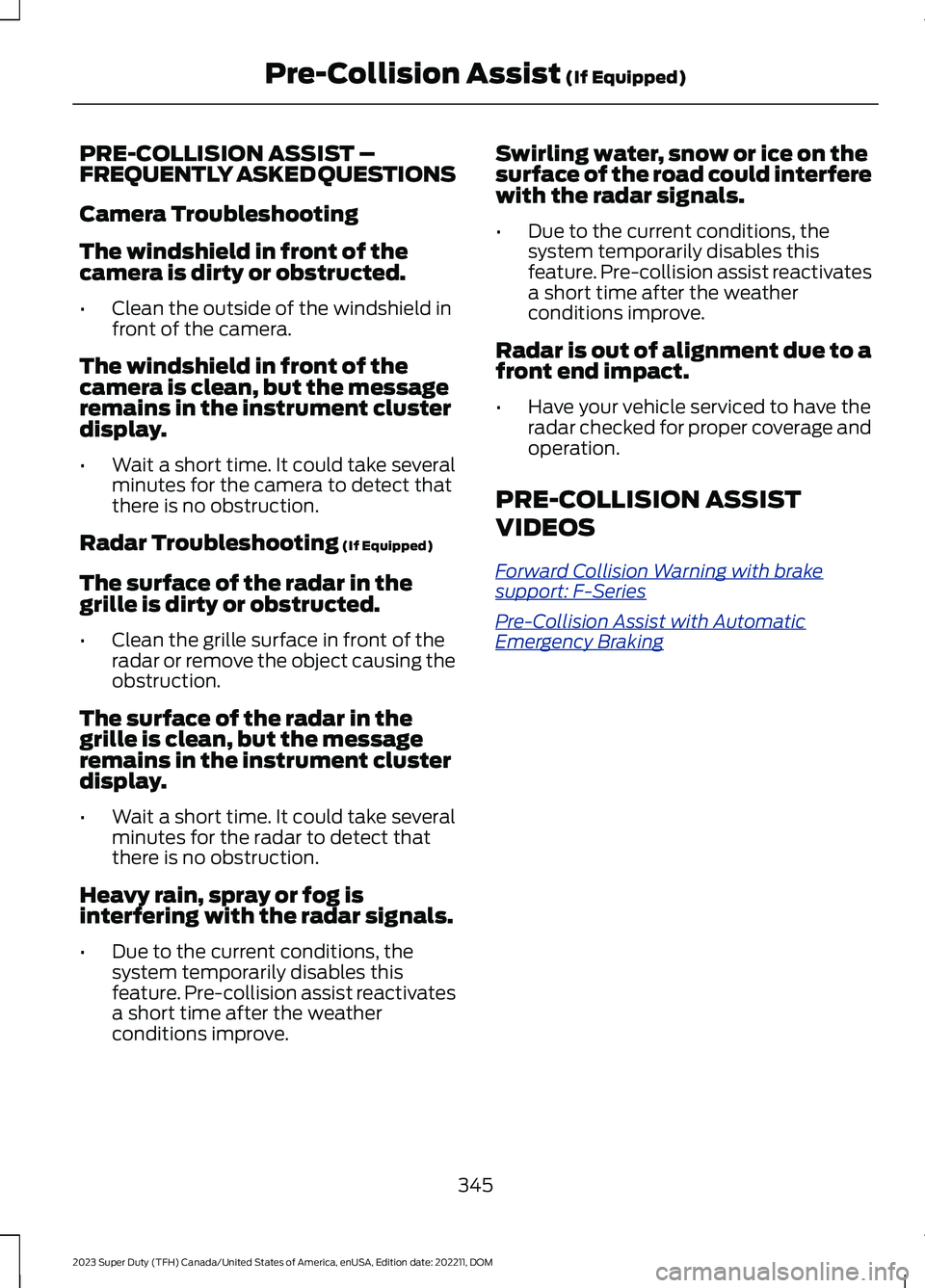
Camera Troubleshooting
The windshield in front of thecamera is dirty or obstructed.
•Clean the outside of the windshield infront of the camera.
The windshield in front of thecamera is clean, but the messageremains in the instrument clusterdisplay.
•Wait a short time. It could take severalminutes for the camera to detect thatthere is no obstruction.
Radar Troubleshooting (If Equipped)
The surface of the radar in thegrille is dirty or obstructed.
•Clean the grille surface in front of theradar or remove the object causing theobstruction.
The surface of the radar in thegrille is clean, but the messageremains in the instrument clusterdisplay.
•Wait a short time. It could take severalminutes for the radar to detect thatthere is no obstruction.
Heavy rain, spray or fog isinterfering with the radar signals.
•Due to the current conditions, thesystem temporarily disables thisfeature. Pre-collision assist reactivatesa short time after the weatherconditions improve.
Swirling water, snow or ice on thesurface of the road could interferewith the radar signals.
•Due to the current conditions, thesystem temporarily disables thisfeature. Pre-collision assist reactivatesa short time after the weatherconditions improve.
Radar is out of alignment due to afront end impact.
•Have your vehicle serviced to have theradar checked for proper coverage andoperation.
PRE-COLLISION ASSIST
VIDEOS
Forward Collision Warning with brakesupport: F-Series
Pre-Collision Assist with AutomaticEmergency Braking
345
2023 Super Duty (TFH) Canada/United States of America, enUSA, Edition date: 202211, DOMPre-Collision Assist (If Equipped)
Page 363 of 738
CONNECTING A TRAILER
PRECAUTIONS
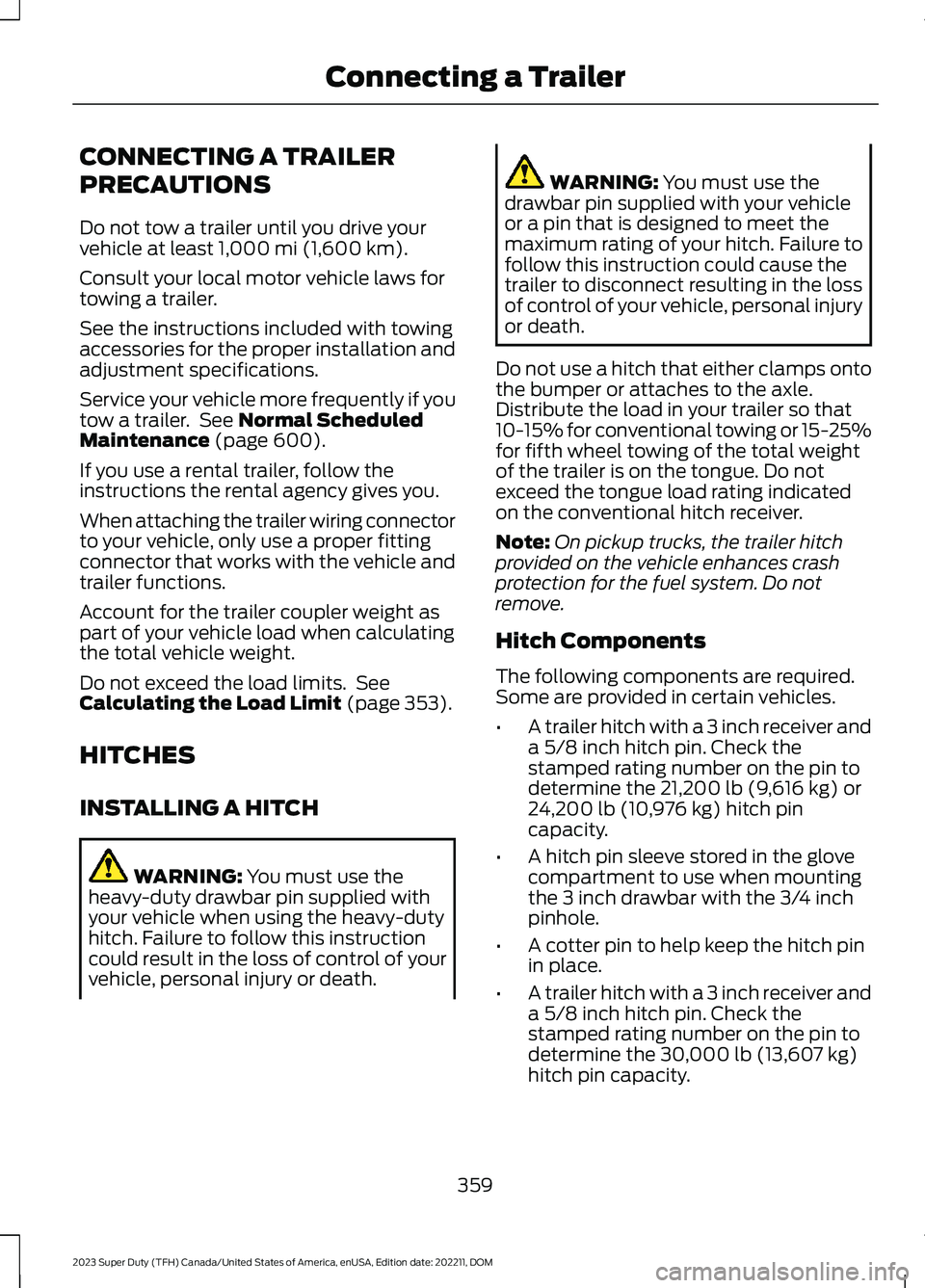
Do not tow a trailer until you drive yourvehicle at least 1,000 mi (1,600 km).
Consult your local motor vehicle laws fortowing a trailer.
See the instructions included with towingaccessories for the proper installation andadjustment specifications.
Service your vehicle more frequently if youtow a trailer. See Normal ScheduledMaintenance (page 600).
If you use a rental trailer, follow theinstructions the rental agency gives you.
When attaching the trailer wiring connectorto your vehicle, only use a proper fittingconnector that works with the vehicle andtrailer functions.
Account for the trailer coupler weight aspart of your vehicle load when calculatingthe total vehicle weight.
Do not exceed the load limits. SeeCalculating the Load Limit (page 353).
HITCHES
INSTALLING A HITCH
WARNING: You must use theheavy-duty drawbar pin supplied withyour vehicle when using the heavy-dutyhitch. Failure to follow this instructioncould result in the loss of control of yourvehicle, personal injury or death.
WARNING: You must use thedrawbar pin supplied with your vehicleor a pin that is designed to meet themaximum rating of your hitch. Failure tofollow this instruction could cause thetrailer to disconnect resulting in the lossof control of your vehicle, personal injuryor death.
Do not use a hitch that either clamps ontothe bumper or attaches to the axle.Distribute the load in your trailer so that10-15% for conventional towing or 15-25%for fifth wheel towing of the total weightof the trailer is on the tongue. Do notexceed the tongue load rating indicatedon the conventional hitch receiver.
Note:On pickup trucks, the trailer hitchprovided on the vehicle enhances crashprotection for the fuel system. Do notremove.
Hitch Components
The following components are required.Some are provided in certain vehicles.
•A trailer hitch with a 3 inch receiver anda 5/8 inch hitch pin. Check thestamped rating number on the pin todetermine the 21,200 lb (9,616 kg) or24,200 lb (10,976 kg) hitch pincapacity.
•A hitch pin sleeve stored in the glovecompartment to use when mountingthe 3 inch drawbar with the 3/4 inchpinhole.
•A cotter pin to help keep the hitch pinin place.
•A trailer hitch with a 3 inch receiver anda 5/8 inch hitch pin. Check thestamped rating number on the pin todetermine the 30,000 lb (13,607 kg)hitch pin capacity.
359
2023 Super Duty (TFH) Canada/United States of America, enUSA, Edition date: 202211, DOMConnecting a Trailer
Page 365 of 738
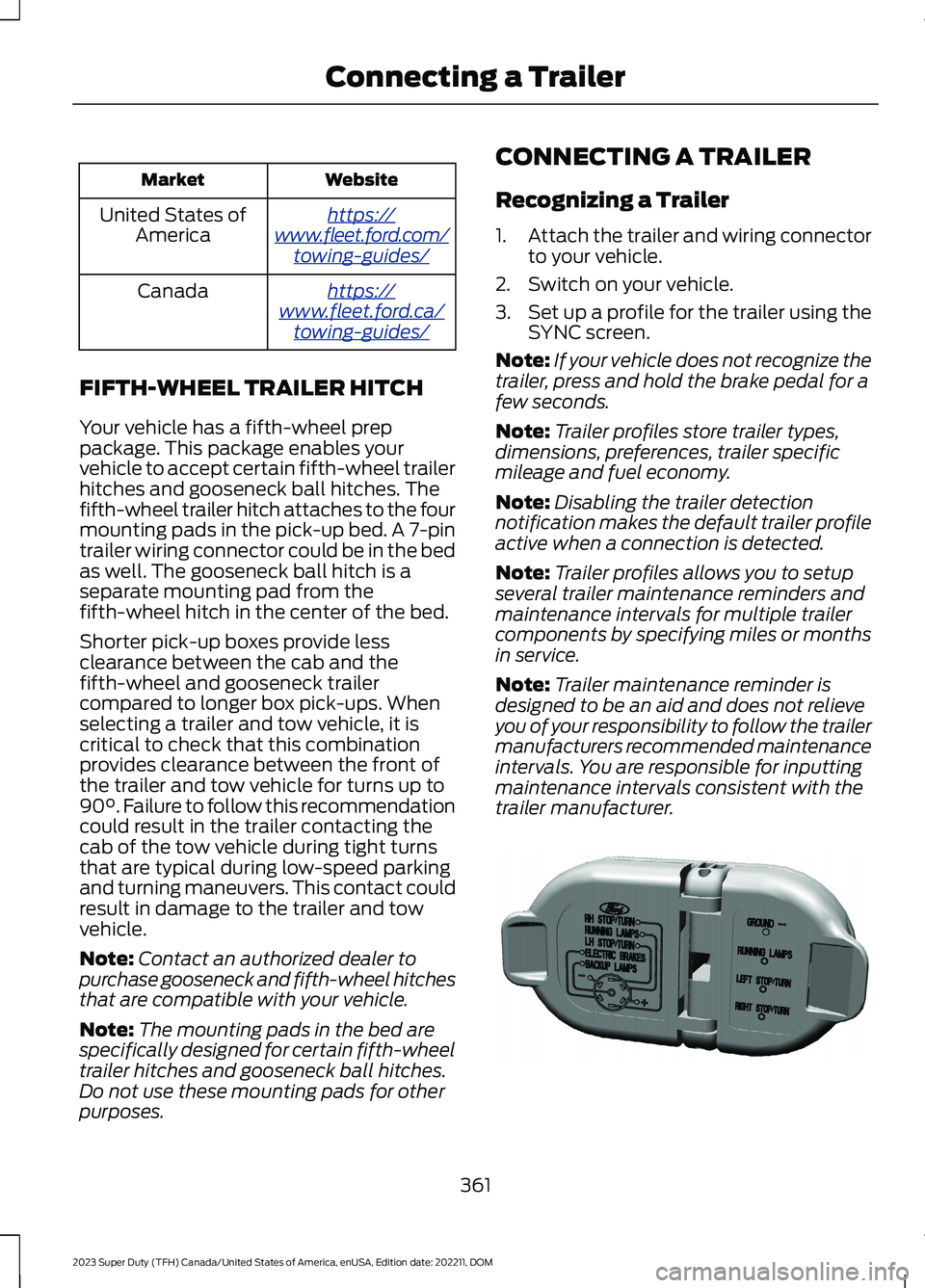
WebsiteMarket
https://www.fleet.ford.com/towing-guides/
United States ofAmerica
https://www.fleet.ford.ca/towing-guides/
Canada
FIFTH-WHEEL TRAILER HITCH
Your vehicle has a fifth-wheel preppackage. This package enables yourvehicle to accept certain fifth-wheel trailerhitches and gooseneck ball hitches. Thefifth-wheel trailer hitch attaches to the fourmounting pads in the pick-up bed. A 7-pintrailer wiring connector could be in the bedas well. The gooseneck ball hitch is aseparate mounting pad from thefifth-wheel hitch in the center of the bed.
Shorter pick-up boxes provide lessclearance between the cab and thefifth-wheel and gooseneck trailercompared to longer box pick-ups. Whenselecting a trailer and tow vehicle, it iscritical to check that this combinationprovides clearance between the front ofthe trailer and tow vehicle for turns up to90°. Failure to follow this recommendationcould result in the trailer contacting thecab of the tow vehicle during tight turnsthat are typical during low-speed parkingand turning maneuvers. This contact couldresult in damage to the trailer and towvehicle.
Note:Contact an authorized dealer topurchase gooseneck and fifth-wheel hitchesthat are compatible with your vehicle.
Note:The mounting pads in the bed arespecifically designed for certain fifth-wheeltrailer hitches and gooseneck ball hitches.Do not use these mounting pads for otherpurposes.
CONNECTING A TRAILER
Recognizing a Trailer
1.Attach the trailer and wiring connectorto your vehicle.
2.Switch on your vehicle.
3.Set up a profile for the trailer using theSYNC screen.
Note:If your vehicle does not recognize thetrailer, press and hold the brake pedal for afew seconds.
Note:Trailer profiles store trailer types,dimensions, preferences, trailer specificmileage and fuel economy.
Note:Disabling the trailer detectionnotification makes the default trailer profileactive when a connection is detected.
Note:Trailer profiles allows you to setupseveral trailer maintenance reminders andmaintenance intervals for multiple trailercomponents by specifying miles or monthsin service.
Note:Trailer maintenance reminder isdesigned to be an aid and does not relieveyou of your responsibility to follow the trailermanufacturers recommended maintenanceintervals. You are responsible for inputtingmaintenance intervals consistent with thetrailer manufacturer.
361
2023 Super Duty (TFH) Canada/United States of America, enUSA, Edition date: 202211, DOMConnecting a TrailerE163167
Page 374 of 738

TOWING A TRAILER – TROUBLESHOOTING
TOWING A TRAILER – INFORMATION MESSAGES
DetailsMessage
The left-hand trailer turn lamp requiresservice.Trailer Left Turn Lamps Fault Check Lamps
The right-hand trailer turn lamp requiresservice.Trailer Right Turn Lamps Fault CheckLamps
The vehicle's battery voltage is low or thereis a fault with your trailer's battery. Yourtrailer's battery voltage is below 8 volts orit is connected in reverse polarity.
Trailer Battery Not Charging See Manual
The system detects a short created by thetrailer lamps. Inspect and repair the trailerwiring, or have the system checked as soonas possible.
Trailer Lighting Module Fault See Manual
The trailer stoplamps require service.Trailer Stop Lamps Fault Check Lamps
The trailer sway control detects trailersway. Reduce the vehicle's speed.Trailer Sway Reduce Speed
Displays when one or more tires on thetrailer is above the recommended temper-ature.
Trailer Tire Over Temperature
One or more tires on your trailer is belowthe specified tire pressure.Trailer Tire Low Specified:
A trailer tire pressure sensor requiresservice. If the warning stays on or continuesto come on, have the system checked assoon as possible.
Trailer Tire Pressure Sensor Fault
The trailer tire pressure monitoring systemrequires service. If the warning stays on orcontinues to come on, have the systemchecked as soon as possible.
Trailer Tire Pressure Monitor Fault
The system cannot detect the trailer tirepressure monitoring system.Trailer Tire Pressure Monitor Capability NotDetected
The trailer tire pressure monitoring systemis not setup.Trailer Tire Pressure Indication Not SetupSee Manual
370
2023 Super Duty (TFH) Canada/United States of America, enUSA, Edition date: 202211, DOMTowing a Trailer
Page 403 of 738

What does it mean if the systemdisplays that it is not available?
There could be a sub-system that thesystem uses that is not correctlyoperating or there could be a batteryvoltage issue. If the system continuesto display it is not available, visit yourauthorized dealer to have your vehiclechecked.
What does it mean if the systemdisplays that driving is required toinitialize steering?
The steering system needs to learninternal parameters to fully turn on thefeature. Drive your vehicle straightforward above 25 mph (40 km/h) forapproximately 5 minutes. This couldalso occur when your vehicle is new,there is a battery voltage issue or if thesteering system has been serviced.
What does it mean if the system doesnot detect a trailer when configuredwith a sensor?
Verify that the sensor is properlyconnected. See Trailer SensorInstallation (page 388). Repeatcalibration on a different route if youhave verified sensor installation.
What does it mean if the systemrequires you to pull forward toinitialize?
This occurs when the vehicle has notmoved during the current key cycleafter you connect and select the trailerin the touchscreen or you operate thesystem at speeds below 1 mph(1 km/h) for an extended period oftime. Drive forward above 2 mph(3 km/h) and the system indicateswhen it initializes.
What does it mean if the trailer is at itsmaximum angle or the systemdeactivated by trailer angle?
You are at the maximum controllabletrailer angle for the system. Place yourvehicle in drive (D) and pull forward toget the truck and trailer back to anin-line position. If this messageconsistently displays, this couldindicate the sensor is incorrectlyinstalled, the trailer needs to berecalibrated or the drawbar or thetrailer dimensions are outside of thesupported range. The system isdesigned to work with drawbars thathave a license plate to hitch ball centermeasurement of 9–18 in (23–46 cm)when installed. The system is designedto work with trailers that have a hitchpoint to center of the axle or axlesmeasurement of 6–33 ft(1.85–10.05 m). Do not attempt to usedrawbars or trailers that have a lengthoutside of this range as the systemperformance degrades and couldcause improper system function.Check that the correct trailer isselected in the touchscreen. Verify thesensor is installed according to theinstructions included in the sensor kitand check that the drawbar and thetrailer dimensions are within theallowed range. Then, delete the trailerfrom the system and repeat the setupprocess to calibrate the trailer.
399
2023 Super Duty (TFH) Canada/United States of America, enUSA, Edition date: 202211, DOMTrailer Backup Assistance (If Equipped)