2023 FORD SUPER DUTY warning light
[x] Cancel search: warning lightPage 125 of 738
Note:Make sure you switch your vehicle on,with the vehicle in accessory mode orrunning.
Note:The spot lamps turn off after 6 mph(10 km/h).
Note:The spot lamps illuminate the areain front of and to the side of your vehicle.
SWITCHING WELCOME LIGHTINGON AND OFF
Welcome lighting turns on the exteriorlamps when you approach your vehiclewith an authenticated device or unlock thedoors.
1.Press Settings on the touchscreen.
2.Press Vehicle Settings.
3.Press Lighting.
4.Switch Welcome Lighting on or off.
EXTERIOR LAMPS ON AUDIBLEWARNING
Sounds when you open the driver door andthe exterior lamps are on.
EXTERIOR ZONE LIGHTING (IF
EQUIPPED)
WHAT IS EXTERIOR ZONELIGHTING
Exterior zone lighting divides the exteriorlighting into zones and allows you to switchthem on and off to provide lighting aroundthe perimeter of your vehicle.
USING THE EXTERIOR ZONELIGHTING
1.Press Features on the touchscreen.
2.Press Zone Lighting.
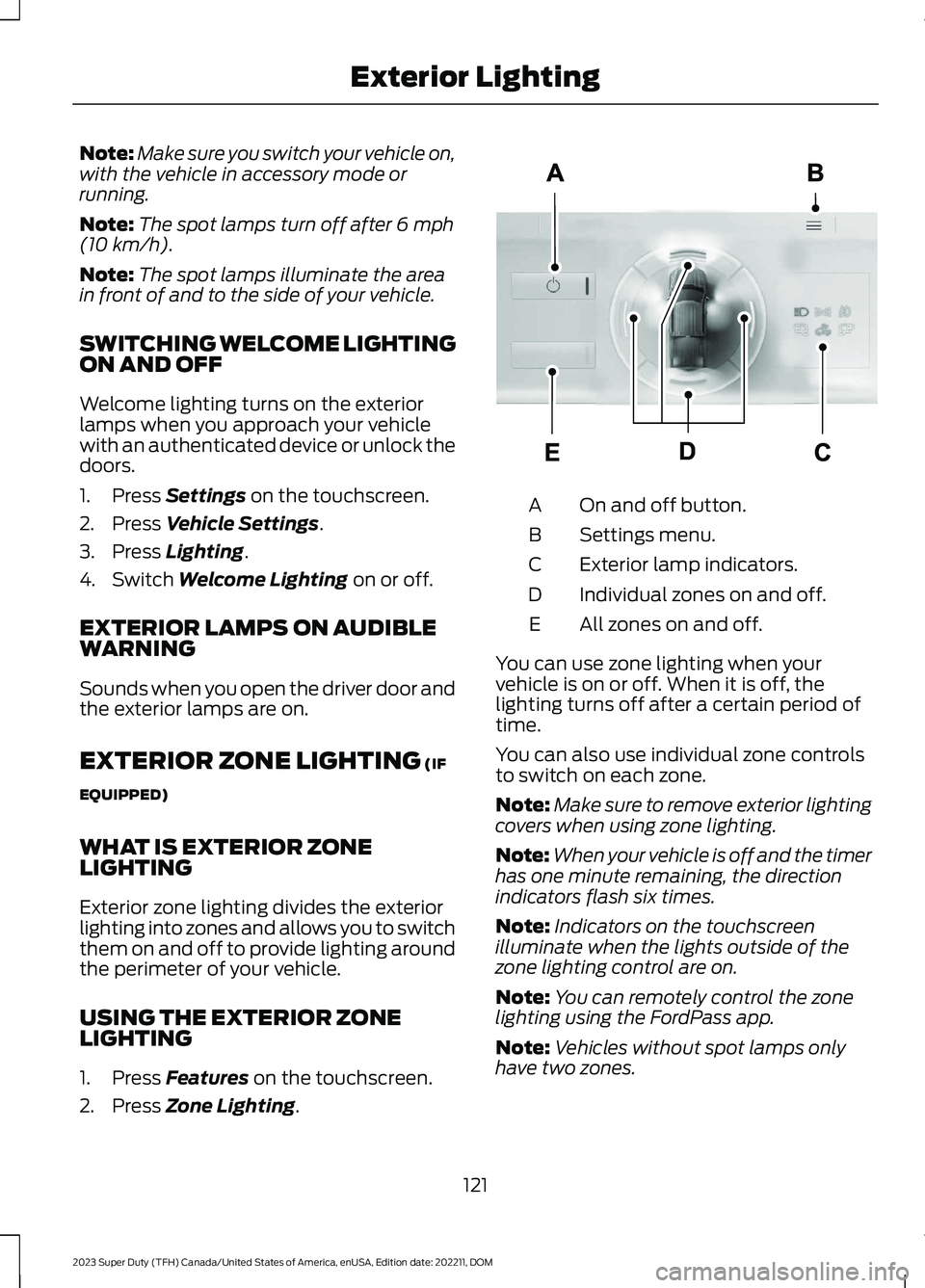
On and off button.A
Settings menu.B
Exterior lamp indicators.C
Individual zones on and off.D
All zones on and off.E
You can use zone lighting when yourvehicle is on or off. When it is off, thelighting turns off after a certain period oftime.
You can also use individual zone controlsto switch on each zone.
Note:Make sure to remove exterior lightingcovers when using zone lighting.
Note:When your vehicle is off and the timerhas one minute remaining, the directionindicators flash six times.
Note:Indicators on the touchscreenilluminate when the lights outside of thezone lighting control are on.
Note:You can remotely control the zonelighting using the FordPass app.
Note:Vehicles without spot lamps onlyhave two zones.
121
2023 Super Duty (TFH) Canada/United States of America, enUSA, Edition date: 202211, DOMExterior LightingE339129
Page 126 of 738

EXTERIOR ZONE LIGHTINGSETTINGS
1.Press Features on the touchscreen.
2.Press Zone Lighting.
3.Press the settings menu in the upperright-hand corner.
4.Press a setting.
Enable Autolamp Override
This setting allows your vehicle to overridethe autolamps when using zone lighting.
When you access zone lighting for the firsttime, you can choose this setting. You canchange this setting at any time.
Include Reverse Lamps
This setting turns the reverse lamps onwhen you switch the rear lighting zone on.
Switch this setting off if you have a backupalarm installed to prevent the reverselamps from turning on and sounding thealarm when using zone lighting.
AUTOMATIC HIGH BEAM
CONTROL (IF EQUIPPED)
HOW DOES AUTOMATIC HIGHBEAM CONTROL WORK
Automatic high beam control turns thehigh beams on if it is dark enough and noother traffic is present. If it detects anapproaching vehicle’s headlamps or taillamps, or street lighting ahead, the systemturns the high beams off.
A camera sensor, centrally mountedbehind the windshield of your vehicle,continuously monitors conditions to turnthe high beams on and off.
Without automatic high beamcontrol.A
With automatic high beamcontrol.B
AUTOMATIC HIGH BEAMCONTROL PRECAUTIONS
WARNING: The system does notrelieve you of your responsibility to drivewith due care and attention. You mayneed to override the system if it does notturn the high beams on or off.
122
2023 Super Duty (TFH) Canada/United States of America, enUSA, Edition date: 202211, DOMExterior Lighting E327596
Page 127 of 738
WARNING: The system may notswitch the high beams off if the lights ofoncoming vehicles are hidden byobstacles, for example guard rails.
WARNING: You may need tooverride the system when approachingother road users.
WARNING: In situations with poorvisibility, such as fog, heavy rain or otherinclement weather, you may need tooverride or completely switch off thesystem.
AUTOMATIC HIGH BEAMCONTROL REQUIREMENTS
The system turns the high beams on if allof the following occur:
•You switch the system on.
•You set the lighting control to theautolamps position.
•The ambient light level is low enoughthat you require high beams.
•There is no traffic in front of yourvehicle.
•The vehicle speed is greater thanapproximately 25 mph (40 km/h).
AUTOMATIC HIGH BEAMCONTROL LIMITATIONS
The system turns the high beams off if anyof the following occur:
•You switch the system off.
•You set the lighting control to anyposition except autolamps.
•The ambient light level is high enoughthat you do not require high beams.
•The system detects an approachingvehicle's headlamps or a leadingvehicle's tail lamps.
•The system detects severe rain, snowor fog.
•The system detects street lighting.
•The camera has reduced visibility.
•The vehicle speed falls belowapproximately 19 mph (30 km/h).
SWITCHING AUTOMATIC HIGHBEAM CONTROL ON AND OFF
1.Using the instrument cluster controlson the steering wheel, select Settings.
2.Select Vehicle.
3.Select Lighting.
4.Switch Auto High Beam on or off.
AUTOMATIC HIGH BEAMCONTROL INDICATORS
Illuminates to confirm when thesystem is ready to assist.
OVERRIDING AUTOMATIC HIGHBEAM CONTROL
Push the lever away from you to switchthe high beams on.
Push the lever away from you again toswitch the high beams off.
123
2023 Super Duty (TFH) Canada/United States of America, enUSA, Edition date: 202211, DOMExterior LightingE146105 E308790
Page 132 of 738
OPENING AND CLOSING THE
WINDOWS
WARNING: Do not leave childrenunattended in your vehicle and do notlet them play with the power windows.Failure to follow this instruction couldresult in personal injury.
WARNING: When closing thepower windows, verify they are free ofobstruction and make sure that childrenand pets are not in the proximity of thewindow openings.
Press the window control switchto open the window. Lift thewindow control switch to closethe window.
Note:The power windows operate with theignition on, and for several minutes after youswitch the ignition off or until you open afront door.
To reduce wind noise or pulsing noise whenone window is open, slightly open theopposite window.
One-Touch Open
Fully press the window control switch andrelease it. Press again or lift it to stop thewindow.
One-Touch Close
Fully lift the window control switch andrelease it. Press again or lift it to stop thewindow.
Resetting One-Touch Close
Carry out all steps within 30 seconds ofstarting the sequence.
1.Close the window.
2.Press and hold the window controlswitch until the window is fully open.Keep the window control switchpressed for a few seconds.
3.Lift and hold the window control switchuntil the window is fully closed. Keepthe window control switch held for afew seconds.
4.Press and hold the window controlswitch until the window is fully open.Keep the window control switchpressed for a few seconds.
5.Lift and hold the window control switchuntil the window is fully closed. Keepthe window control switch held for afew seconds.
Note:Repeat the procedure if the windowdoes not close when you use one-touch.
GLOBAL OPENING
WHAT IS GLOBAL OPENING
You can use the remote control to openthe windows with the ignition off.
USING GLOBAL OPENING
1.Press and release the unlock button onthe remote control.
2.Press and hold the unlock button onthe remote control.
3.Release the button when the windowsstart to open.
Press the lock or the unlock button on theremote control to stop global opening.
Note:You can use global opening for ashort period of time when you unlock yourvehicle using the remote control.
128
2023 Super Duty (TFH) Canada/United States of America, enUSA, Edition date: 202211, DOMWindows
Page 135 of 738
INTERIOR MIRROR
PRECAUTIONS
WARNING: Do not adjust themirrors when your vehicle is moving. Thiscould result in the loss of control of yourvehicle, serious personal injury or death.
Note:Do not clean the mirror housing orglass with harsh abrasives, fuel or otherpetroleum-based cleaning products.
MANUALLY DIMMING THE
INTERIOR MIRROR
Pull the tab below the mirror toward youto reduce glare at night.
AUTO-DIMMING INTERIOR
MIRROR (IF EQUIPPED)
WHAT IS THE AUTO-DIMMINGINTERIOR MIRROR
The mirror dims to reduce the effect ofbright light from behind. It returns tonormal when the bright light from behindis no longer present or if you shift intoreverse (R).
AUTO-DIMMING INTERIORMIRROR LIMITATIONS
Do not block the sensors on the front andback of the mirror.
Note:A rear center passenger or raised rearcenter head restraint could prevent lightfrom reaching the sensor.
131
2023 Super Duty (TFH) Canada/United States of America, enUSA, Edition date: 202211, DOMInterior Mirror
Page 136 of 738
ADJUSTING THE EXTERIOR
MIRRORS
WARNING: Do not adjust themirrors when your vehicle is moving. Thiscould result in the loss of control of yourvehicle, serious personal injury or death.
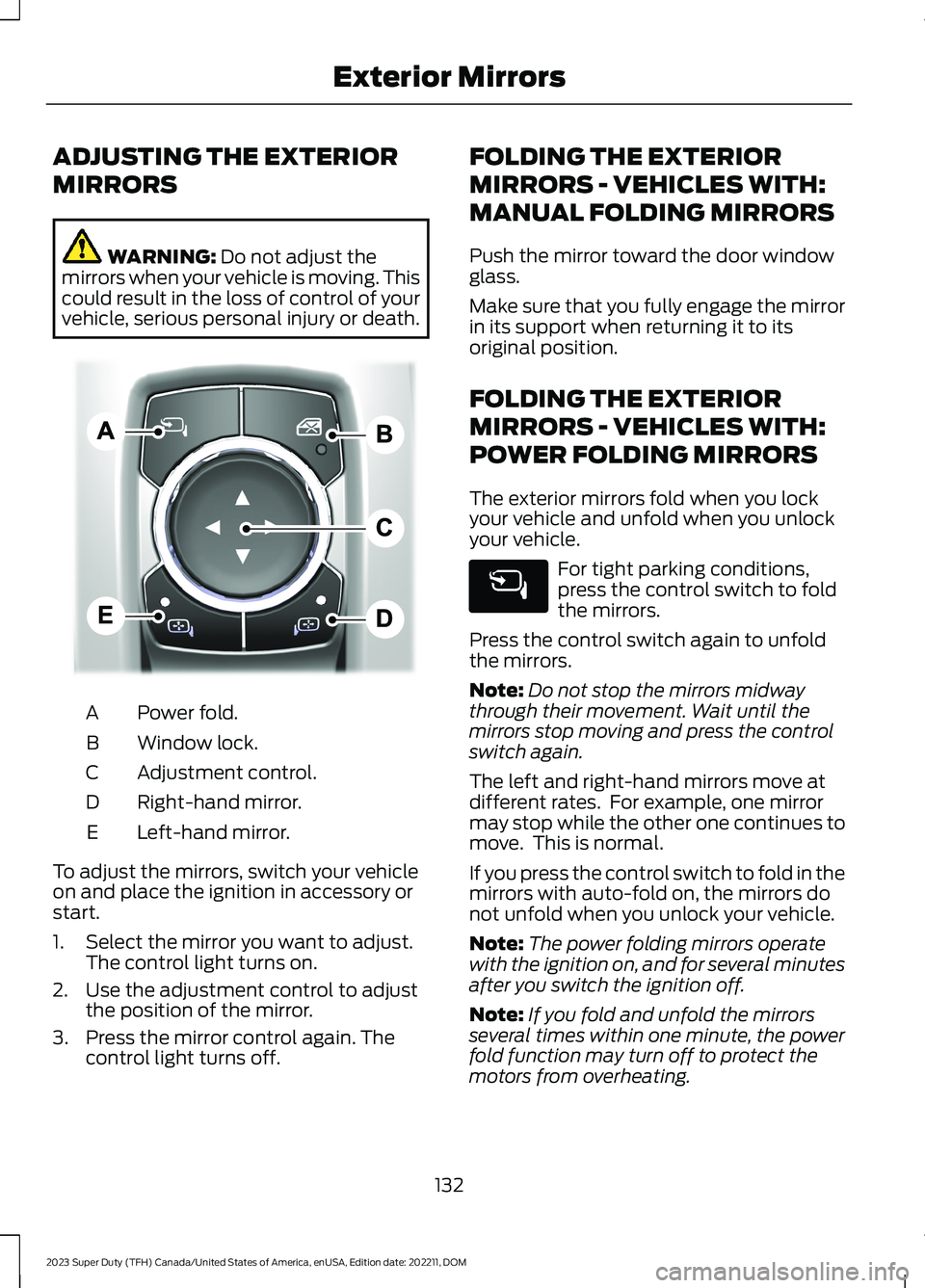
Power fold.A
Window lock.B
Adjustment control.C
Right-hand mirror.D
Left-hand mirror.E
To adjust the mirrors, switch your vehicleon and place the ignition in accessory orstart.
1.Select the mirror you want to adjust.The control light turns on.
2.Use the adjustment control to adjustthe position of the mirror.
3.Press the mirror control again. Thecontrol light turns off.
FOLDING THE EXTERIOR
MIRRORS - VEHICLES WITH:
MANUAL FOLDING MIRRORS
Push the mirror toward the door windowglass.
Make sure that you fully engage the mirrorin its support when returning it to itsoriginal position.
FOLDING THE EXTERIOR
MIRRORS - VEHICLES WITH:
POWER FOLDING MIRRORS
The exterior mirrors fold when you lockyour vehicle and unfold when you unlockyour vehicle.
For tight parking conditions,press the control switch to foldthe mirrors.
Press the control switch again to unfoldthe mirrors.
Note:Do not stop the mirrors midwaythrough their movement. Wait until themirrors stop moving and press the controlswitch again.
The left and right-hand mirrors move atdifferent rates. For example, one mirrormay stop while the other one continues tomove. This is normal.
If you press the control switch to fold in themirrors with auto-fold on, the mirrors donot unfold when you unlock your vehicle.
Note:The power folding mirrors operatewith the ignition on, and for several minutesafter you switch the ignition off.
Note:If you fold and unfold the mirrorsseveral times within one minute, the powerfold function may turn off to protect themotors from overheating.
132
2023 Super Duty (TFH) Canada/United States of America, enUSA, Edition date: 202211, DOMExterior MirrorsE311081
Page 165 of 738
FRONT SEAT PRECAUTIONS
WARNING: Sitting improperly, outof position or with the seatback reclinedtoo far can take weight off the seatcushion and affect the decision of thepassenger sensing system, resulting inserious injury or death in the event of acrash. Always sit upright against yourseat back, with your feet on the floor.
WARNING: Do not recline the seatbackrest too far as this can cause theoccupant to slide under the seatbelt,resulting in personal injury in the eventof a crash.
WARNING: Do not place objectshigher than the top of the seat backrest.Failure to follow this instruction couldresult in personal injury or death in theevent of a sudden stop or crash.
WARNING: Do not adjust the driverseat or seat backrest when your vehicleis moving. This may result in sudden seatmovement, causing the loss of controlof your vehicle.
SITTING IN THE CORRECT
POSITION
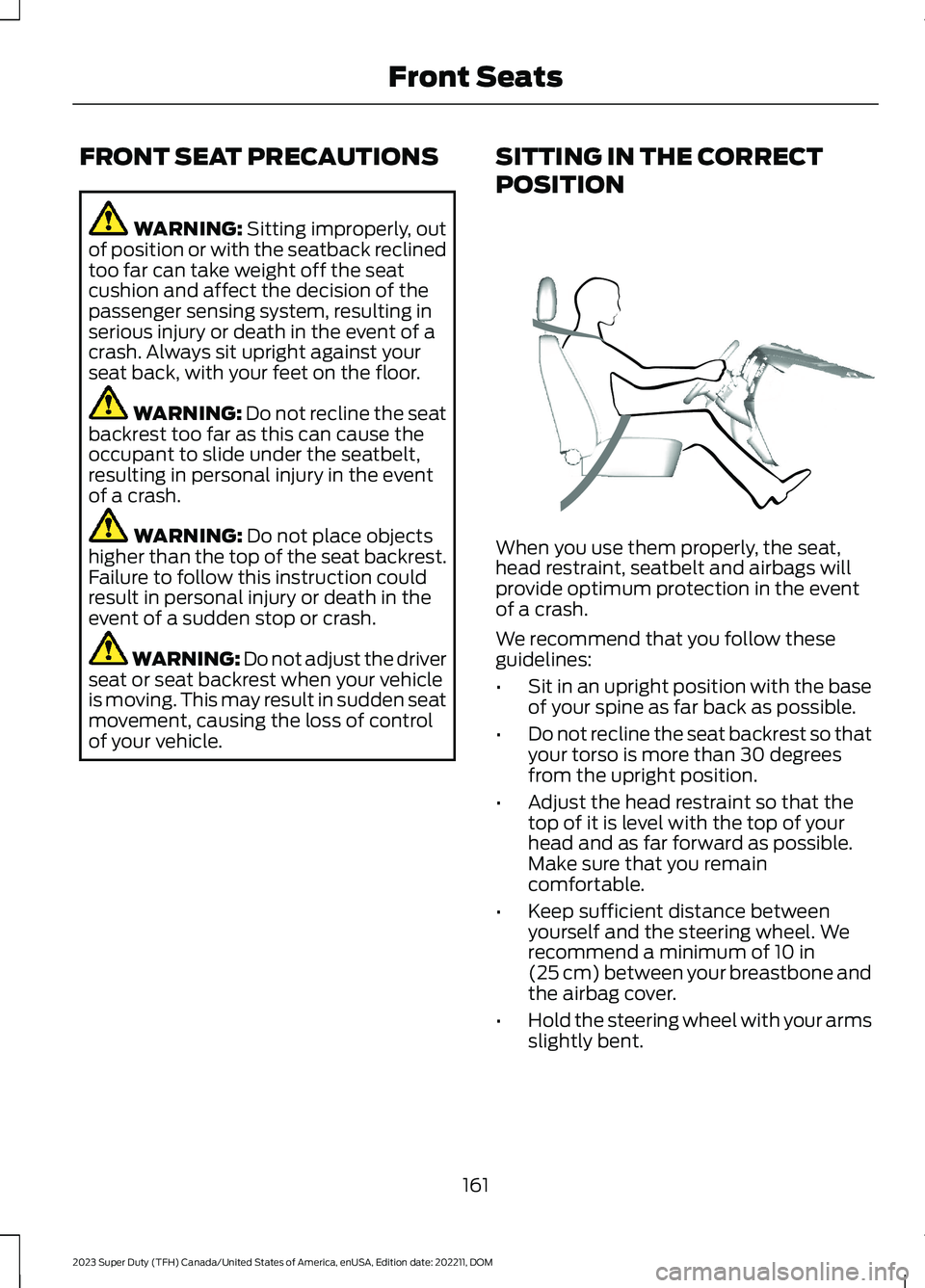
When you use them properly, the seat,head restraint, seatbelt and airbags willprovide optimum protection in the eventof a crash.
We recommend that you follow theseguidelines:
•Sit in an upright position with the baseof your spine as far back as possible.
•Do not recline the seat backrest so thatyour torso is more than 30 degreesfrom the upright position.
•Adjust the head restraint so that thetop of it is level with the top of yourhead and as far forward as possible.Make sure that you remaincomfortable.
•Keep sufficient distance betweenyourself and the steering wheel. Werecommend a minimum of 10 in(25 cm) between your breastbone andthe airbag cover.
•Hold the steering wheel with your armsslightly bent.
161
2023 Super Duty (TFH) Canada/United States of America, enUSA, Edition date: 202211, DOMFront SeatsE68595
Page 166 of 738
•Bend your legs slightly so that you canpress the pedals fully.
•Position the shoulder strap of theseatbelt over the center of yourshoulder and position the lap straptightly across your hips.
Make sure that your driving position iscomfortable and that you can maintain fullcontrol of your vehicle.
MANUAL SEATS
HEAD RESTRAINT COMPONENTS
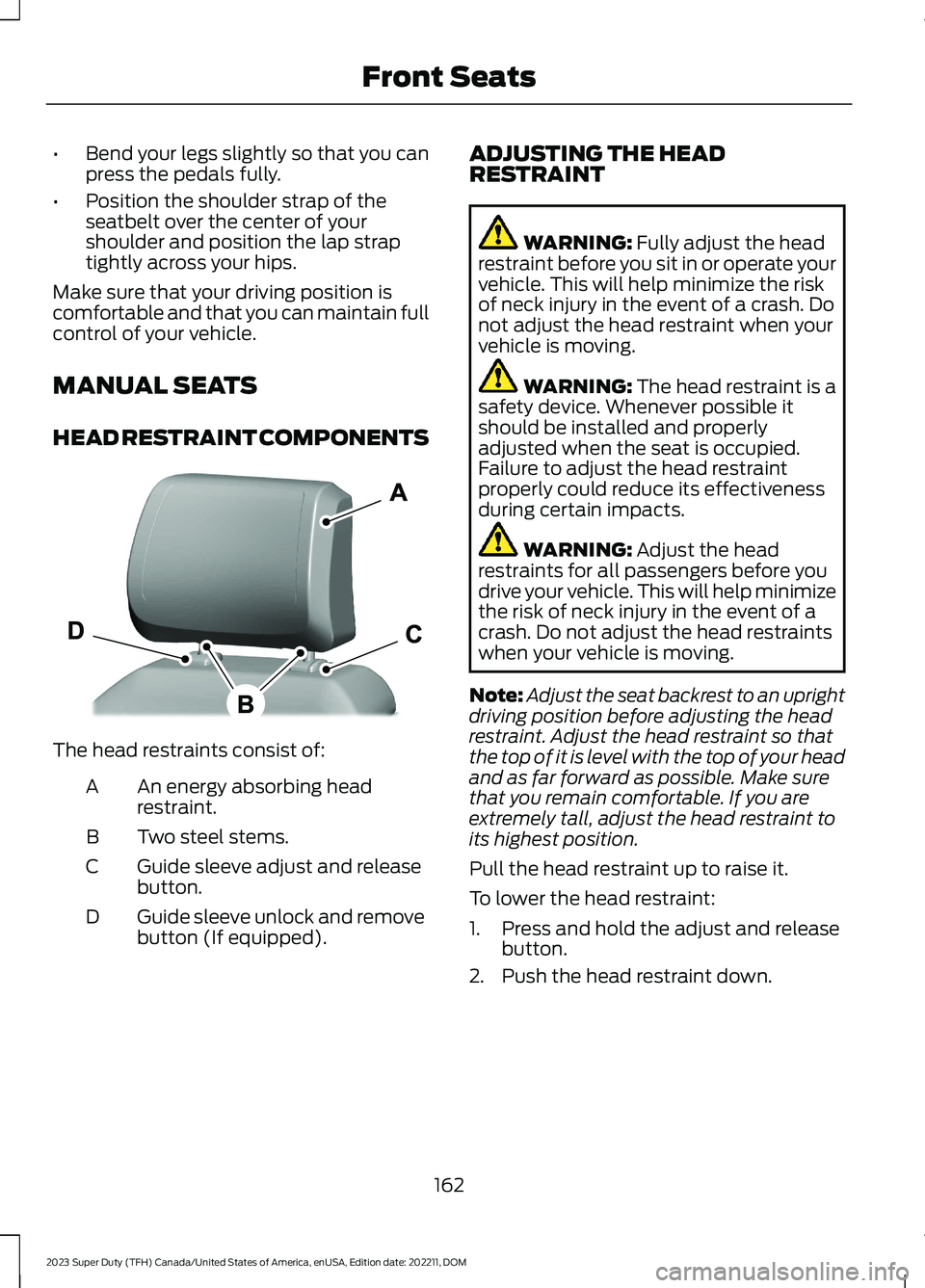
The head restraints consist of:
An energy absorbing headrestraint.A
Two steel stems.B
Guide sleeve adjust and releasebutton.C
Guide sleeve unlock and removebutton (If equipped).D
ADJUSTING THE HEADRESTRAINT
WARNING: Fully adjust the headrestraint before you sit in or operate yourvehicle. This will help minimize the riskof neck injury in the event of a crash. Donot adjust the head restraint when yourvehicle is moving.
WARNING: The head restraint is asafety device. Whenever possible itshould be installed and properlyadjusted when the seat is occupied.Failure to adjust the head restraintproperly could reduce its effectivenessduring certain impacts.
WARNING: Adjust the headrestraints for all passengers before youdrive your vehicle. This will help minimizethe risk of neck injury in the event of acrash. Do not adjust the head restraintswhen your vehicle is moving.
Note:Adjust the seat backrest to an uprightdriving position before adjusting the headrestraint. Adjust the head restraint so thatthe top of it is level with the top of your headand as far forward as possible. Make surethat you remain comfortable. If you areextremely tall, adjust the head restraint toits highest position.
Pull the head restraint up to raise it.
To lower the head restraint:
1.Press and hold the adjust and releasebutton.
2.Push the head restraint down.
162
2023 Super Duty (TFH) Canada/United States of America, enUSA, Edition date: 202211, DOMFront SeatsE327921