2023 FORD SUPER DUTY lock
[x] Cancel search: lockPage 54 of 738
SEATBELT PRECAUTIONS
WARNING: Always drive and ridewith your seatback upright and the lapbelt snug and low across the hips.
WARNING: Children must alwaysbe properly restrained.
WARNING: Do not allow apassenger to hold a child on their lapwhen your vehicle is moving. Failure tofollow this instruction could result inpersonal injury or death in the event of asudden stop or crash.
WARNING: All occupants of yourvehicle, including the driver, shouldalways properly wear their seatbelts,even when an airbag supplementalrestraint system is provided. Failure toproperly wear your seatbelt couldseriously increase the risk of injury ordeath.
WARNING: It is extremelydangerous to ride in a cargo area, insideor outside of a vehicle. In a crash, peopleriding in these areas are more likely to beseriously injured or killed. Do not allowpeople to ride in any area of your vehiclethat is not equipped with seats andseatbelts. Make sure everyone in yourvehicle is in a seat and properly using aseatbelt. Failure to follow this warningcould result in serious personal injury ordeath.
WARNING: In a rollover crash, anunbelted person is significantly morelikely to die than a person wearing aseatbelt.
WARNING: Each seating positionin your vehicle has a specific seatbeltassembly made up of one buckle andone tongue designed to be used as a pair.Use the shoulder belt on the outsideshoulder only. Never wear the shoulderbelt under the arm. Never use a singleseatbelt for more than one person.
WARNING: Even with advancedrestraints systems, properly restrainchildren 12 and under in a rear seatingposition. Failure to follow this couldseriously increase the risk of injury ordeath.
WARNING: Seatbelts and seatsmay be hot in a vehicle that is in thesunshine. The hot seatbelts or seats mayburn a small child. Check seat covers andbuckles before you place a childanywhere near them.
WARNING: If your vehicle isinvolved in a crash, have the seatbeltsand associated components inspectedas soon as possible. Failure to follow thisinstruction could result in personal injuryor death.
All seating positions in this vehicle haveseatbelts. All occupants of the vehicleshould properly wear their seatbelts, evenwhen an airbag supplemental restraintsystem is provided.
The seatbelt system consists of:
•Lap and shoulder seatbelts.
•A shoulder seatbelt with automaticlocking mode, except driver seatbelt.
•Height adjusters at the front outermostseating positions.
•Seatbelt pretensioners at the frontoutermost and rear outermost seatingpositions.
50
2023 Super Duty (TFH) Canada/United States of America, enUSA, Edition date: 202211, DOMSeatbelts
Page 55 of 738

A seatbelt warning light andchime.
Crash sensors and monitoringsystem with readiness indicator.
The seatbelt pretensioners are designedto tighten the seatbelts when activated. Infrontal and near-frontal crashes, theseatbelt pretensioners may be activatedalone or, if the crash is of sufficient severity,together with the front airbags. In sidecrashes and rollovers, the pretensionerswill be activated when the Safety Canopyis activated.
FASTENING AND
UNFASTENING THE
SEATBELTS
WARNING: Always drive and ridewith your seatback upright and the lapbelt snug and low across the hips.
All seatbelts in your vehicle are athree-point combination lap and shoulderseatbelt.
Seatbelt tongue.A
Seatbelt buckle.B
1.Pull the seatbelt out steadily.
Note:It may lock if you pull it sharply or ifthe vehicle is on a slope.
2.Insert the tongue into the buckle.
3.Pull the seatbelt tight to remove anyslack.
Unfastening the Seatbelts
1.Press the red button on the buckle torelease the seatbelt.
2.Hold the seatbelt tongue and let itretract completely and smoothly to itsstowed position.
Using the Seatbelt With CinchTongue
This applies to the front center seatingposition of Super Cab and Crew Cab.
51
2023 Super Duty (TFH) Canada/United States of America, enUSA, Edition date: 202211, DOMSeatbeltsE71880 E67017 BA E338014
Page 56 of 738
The cinch tongue slides up and down theseatbelt webbing when you stow theseatbelt or when you put the seatbelts on.When you buckle the seatbelt, the cinchtongue allows you to shorten the lapportion, but pinches the webbing to keepthe lap portion from getting longer. Thecinch tongue is designed to slip during acrash, so wear the shoulder belt properlyand do not allow any slack in either the lapor shoulder portions.
While you are fastened in the seatbelt, theseatbelt with a cinch tongue adjusts toyour movement. However, if you brakehard, turn hard, or if your vehicle receivesan impact of 5 mph (8 km/h) or more, theseatbelt locks and helps reduce yourforward movement.
SENSITIVE LOCKING MODE
WHAT IS SENSITIVE LOCKINGMODE
Sensitive locking mode is a seatbeltretractor feature that allows shoulder beltlength adjustment according to yourmovements and locking in response tovehicle movement.
HOW DOES SENSITIVE LOCKINGMODE WORK
If the driver suddenly brakes, turns a cornersharply, or the vehicle receives an impactof about 5 mph (8 km/h) or more, theseatbelts lock to help reduce forwardmovement of the driver and passengers.
In addition, the seatbelt retractor locks ifyou pull the seatbelt webbing out tooquickly. If the retractor locks, slowly lowerthe height adjuster to allow the seatbeltto retract.
If the retractor does not unlock, pull theseatbelt out slowly then feed a smalllength of webbing back toward the stowedposition.
AUTOMATIC LOCKING MODE
WHAT IS AUTOMATIC LOCKINGMODE
This feature keeps the seatbeltspre-locked. The belt still retracts to removeany slack in the shoulder belt.
WHEN TO USE AUTOMATICLOCKING MODE
Use this mode any time you install a childrestraint in a front or rear seating position.Properly restrain children 12 years old andunder in a rear seat whenever possible. SeeChild Safety (page 36).
Note:Automatic locking mode is notavailable on the driver seatbelt.
Note:Vehicles with optional front seatcenter may not have this function.
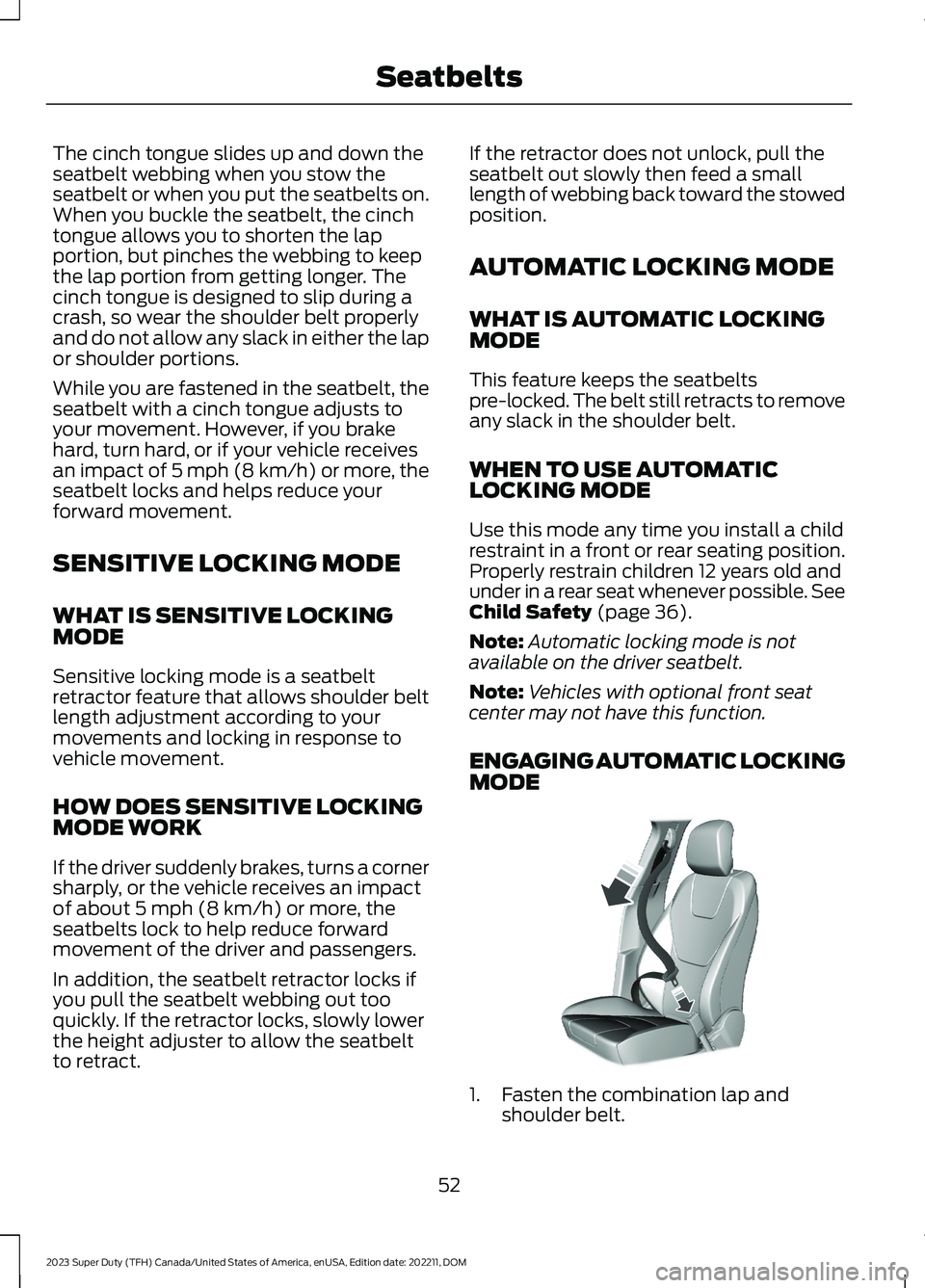
ENGAGING AUTOMATIC LOCKINGMODE
1.Fasten the combination lap andshoulder belt.
52
2023 Super Duty (TFH) Canada/United States of America, enUSA, Edition date: 202211, DOMSeatbeltsE142591
Page 57 of 738
2.Grasp the shoulder portion and pulldownward until you pull the entire beltout.
3.Allow the belt to retract. As the beltretracts, you will hear a clicking sound.This indicates the seatbelt is now in theautomatic locking mode.
DISENGAGING AUTOMATICLOCKING MODE
Unbuckle the combination lap andshoulder belt and allow it to retractcompletely to disengage the automaticlocking mode and activate the vehiclesensitive locking mode.
ADJUSTING THE SEATBELTS
DURING PREGNANCY
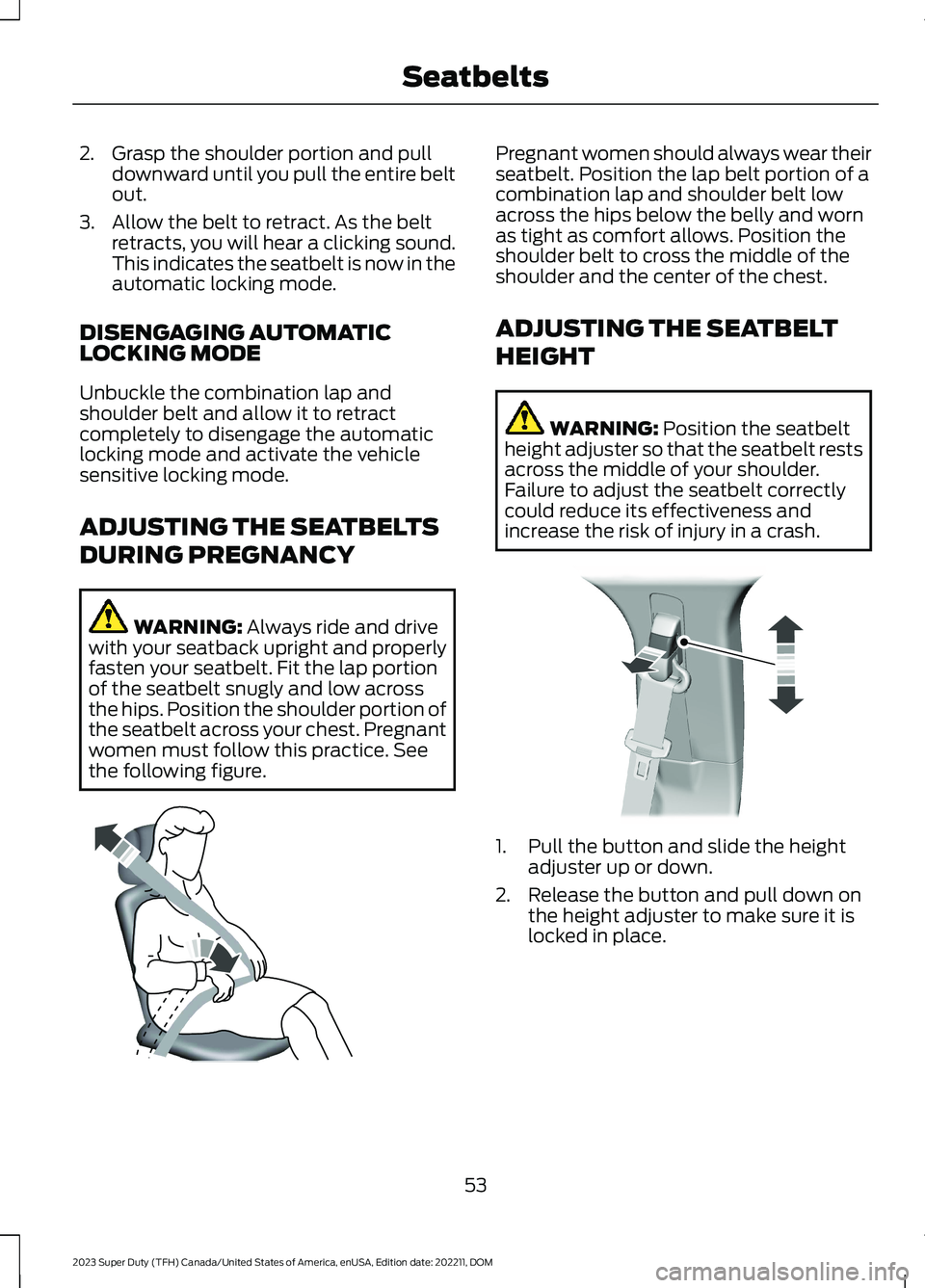
WARNING: Always ride and drivewith your seatback upright and properlyfasten your seatbelt. Fit the lap portionof the seatbelt snugly and low acrossthe hips. Position the shoulder portion ofthe seatbelt across your chest. Pregnantwomen must follow this practice. Seethe following figure.
Pregnant women should always wear theirseatbelt. Position the lap belt portion of acombination lap and shoulder belt lowacross the hips below the belly and wornas tight as comfort allows. Position theshoulder belt to cross the middle of theshoulder and the center of the chest.
ADJUSTING THE SEATBELT
HEIGHT
WARNING: Position the seatbeltheight adjuster so that the seatbelt restsacross the middle of your shoulder.Failure to adjust the seatbelt correctlycould reduce its effectiveness andincrease the risk of injury in a crash.
1.Pull the button and slide the heightadjuster up or down.
2.Release the button and pull down onthe height adjuster to make sure it islocked in place.
53
2023 Super Duty (TFH) Canada/United States of America, enUSA, Edition date: 202211, DOMSeatbeltsE142590 E145664
Page 73 of 738
REMOTE CONTROL
LIMITATIONS
WARNING: Changes ormodifications not expressively approvedby the party responsible for compliancecould void the user's authority to operatethe equipment. The term "IC:" before theradio certification number only signifiesthat Industry Canada technicalspecifications were met.
This device complies with Part 15 of theFCC Rules and with Industry Canadalicense-exempt RSS standard(s).Operation is subject to the following twoconditions: (1) This device may not causeharmful interference, and (2) This devicemust accept any interference received,including interference that may causeundesired operation.
Make sure a valid remote control is within3 ft (1 m) from the front door handles andrear of vehicle.
The system may not function if:
•The remote control remains stationaryfor about a minute.
•The vehicle battery has no charge.
•The remote control battery has nocharge.
•There is interference causing issueswith the remote control frequencies.
•The remote control is too close tometal objects or electronic devices, forexample keys or a cell phone.
USING THE REMOTE CONTROL
Use your remote control to access variousvehicle systems.
Note:The buttons on your remote may varydepending on the vehicle region or options.
Unlock
Press the button to unlock alldoors. See Unlocking andLocking the Doors Using theRemote Control (page 81).
Lock
Press the button to lock alldoors. See Unlocking andLocking the Doors Using theRemote Control (page 81).
Remote Start (If Equipped)
Press the button to remote start.See What Is Remote Start(page 149).
Tailgate (If Equipped)
Press the button to open thetailgate. See Opening theTailgate Using the RemoteControl (page 99).
Panic Alarm (If Equipped)
Press the button to sound thepanic alarm. See Sounding thePanic Alarm (page 74).
USING THE KEY CARDS
Allows you to unlock and start your vehiclewith a compatible key card using near fieldcommunication technology, the sametechnology that powers tap-to-pay cardand mobile device payments. Your vehiclehas key readers that recognize the keycards. Tap your key card on a key readerjust like you would tap a card at a paymentterminal.
69
2023 Super Duty (TFH) Canada/United States of America, enUSA, Edition date: 202211, DOMKeys and Remote ControlsE138629 E138623 E138625 E191530 E138624
Page 74 of 738
Note:Do not leave a key card in hightemperatures. This can damage the keycard, causing it to no longer function.
Locking and Unlocking YourVehicle
Tap your key card on the exteriorkey reader, over the keyless entrykeypad, to lock or unlock thedriver door. If your vehicle is locked and youtap your key card on the key reader, yourvehicle unlocks. If your vehicle is unlockedand you tap your key card on the keyreader, your vehicle locks. See Locatingthe Key Readers (page 73).
Note:The key reader only works when usedin close proximity with a compatible keycard. The key reader may not function if youhold the key card more than 1.6 in (4 cm)away.
Note:Hold your key card over the exteriorkey reader for a few seconds to lock orunlock all doors.
Note:Only Ford issued key cards arecompatible with your vehicle.
Starting Your Vehicle
Using the Exterior Key Reader
You can start your vehicle without havingto tap your key card on the interior keyreader if you press the ignition switchwithin 60 seconds of unlocking yourvehicle using the exterior key reader.
1.Tap your key card on the exterior keyreader, over the keyless entry keypad,to unlock your vehicle. See Locatingthe Key Readers (page 73).
2.Enter your vehicle.
3.Fully press the brake pedal.
4.Press the push button ignition switch.See Starting and Stopping theEngine (page 202).
Using the Interior Key Reader
1.Tap your key card on the key reader. Atone sounds from your vehicle whenthe key reader recognizes the key card.See Locating the Key Readers (page73).
2.Fully press the brake pedal.
3.Press the push button ignition switch.See Starting and Stopping theEngine (page 202).
Adding and Deleting Key Cards
Your vehicle comes with two near fieldcommunication-enabled key cards,referred to as factory key cards.
You can purchase additional key cards andadd them to your vehicle at any time.These are considered user key cards andare not the same as factory key cards.Contact an authorized dealer to purchaseuser key cards.
Note:A single key card can be associatedwith multiple vehicles.
Note:You cannot add or delete factory keycards. Only authorized service technicianscan add or delete factory key cards.
Note:Make sure you install FordPass onyour mobile device and activate FordPassConnect on your vehicle.
Adding a Key Card
1.Start your vehicle with any key.
2.Press Settings on the touchscreen.
3.Press Vehicle.
4.Press Keys.
5.Press Add Key Card.
6.Follow the prompts on thetouchscreen.
70
2023 Super Duty (TFH) Canada/United States of America, enUSA, Edition date: 202211, DOMKeys and Remote ControlsE368487
Page 75 of 738
Deleting a Key Card
1.Start your vehicle with any key exceptthe key you want to delete.
2.Press Settings on the touchscreen.
3.Press Vehicle.
4.Press Keys.
5.Press the trash can icon next to the keyyou want to delete.
6.Follow the prompts on thetouchscreen.
Deleting All User Key Cards
1.Start your vehicle with a factory key.
2.Perform a system reset. SeePerforming a System Reset (page584).
Note:If you have created digital keys, thereset deletes those as well.
USING DIGITAL KEY (IF EQUIPPED)
Digital key allows you to unlock and startyour vehicle with a compatible smartphoneor smartwatch. Devices set up as digitalkeys communicate with key readers in yourvehicle using near field communicationtechnology, the same technology thatpowers tap-to-pay card and mobile devicepayments. Tap your device on a key readerjust like you would tap your device at apayment terminal.
Limitations
•The key reader only recognizes a digitalkey when your device with a digital keyis within 1.6 in (4 cm) of the key reader.A digital key may not be recognized ifthe device is more than 1.6 in (4 cm)away from the key reader.
•Near field communication must beenabled on your device.
•You can still use your device to lock,unlock and start your vehicle for aperiod of time after your device'sbattery has been depleted. Check withyour device's manufacturer for detailson how to operate your digital key onlow power.
•You can enable additionalauthentication for your digital key onyour device. When enabled, your devicerequires authentication each time anaction is requested, such as unlockingthe doors or starting your vehicle. Whenyou enable additional authenticationon your device, you cannot use yourdevice when the battery is depleted.
Setting Up Digital Key
There are two types of digital keys: theowner key and shared keys. There can onlybe one owner key per vehicle. Make sureyou setup the first digital key on yourdevice, also known as the owner phone.By default, the first digital key you set upbecomes the owner key.
You can set up a digital key through theFordPass app.
1.In the FordPass app, select yourvehicle.
2.Select Set Up Digital Key and followthe instructions in FordPass.
Note:You need two factory keys in yourvehicle to complete the setup of a digitalkey. Factory keys are the keys that camewith your vehicle.
Changing the Owner Phone
You can change the owner phone throughthe FordPass app.
1.In the FordPass app, select yourvehicle.
2.Select Change Owner Phone andfollow the instructions in FordPass.
71
2023 Super Duty (TFH) Canada/United States of America, enUSA, Edition date: 202211, DOMKeys and Remote Controls
Page 76 of 738
Note:You need two factory keys in yourvehicle to complete the setup of a digitalkey. Factory keys are the keys that camewith your vehicle.
Sharing a Digital Key
You can share keys to other users from theowner phone by using Apple Wallet orGoogle Wallet.
Note:Check with your device'smanufacturer for the latest information onsharing a key.
Deleting a Digital Key
Deleting Your Own Digital Key
You can delete your digital key from yourown device by using Apple Wallet orGoogle Wallet.
Note:Check with your device'smanufacturer for the latest information ondeleting a key.
Deleting a Shared Key Remotely
You can delete a shared key remotely fromthe owner phone by using Apple Wallet orGoogle Wallet.
Note:Check with your device'smanufacturer for the latest information ondeleting a key.
Deleting All Digital Keys
1.Start your vehicle with a factory key.
Note:A factory key is a key that came withyour vehicle.
2.Perform a system reset. SeePerforming a System Reset (page584).
Note:If you have added user key cards toyour vehicle, the reset deletes those as well.
Locking and Unlocking YourVehicle
Tap your device on the exteriorkey reader, over the keyless entrykeypad, to lock or unlock thedriver door. See Locating the KeyReaders (page 73).
If your vehicle is locked and you tap yourdevice on the key reader, your vehicleunlocks. If your vehicle is unlocked and youtap your device on the key reader, yourvehicle locks.
Note:Hold your device over the exterior keyreader for a few seconds to lock or unlockall doors.
Starting Your Vehicle
Using the Exterior Key Reader
You can start your vehicle without havingto tap your device on the interior key readerif you press the ignition switch within 60seconds of unlocking your vehicle usingthe exterior key reader.
1.
Tap your key card or digitalkey on the key reader, over the keylessentry keypad. See Locating the KeyReaders (page 73).
2.Enter your vehicle.
3.Fully press the brake pedal.
4.Press the push button ignition switch.See Starting and Stopping theEngine (page 202).
Using the Interior Key Reader
1.Fully press the brake pedal.
72
2023 Super Duty (TFH) Canada/United States of America, enUSA, Edition date: 202211, DOMKeys and Remote ControlsE368487 E368487