2023 FORD SUPER DUTY navigation system
[x] Cancel search: navigation systemPage 585 of 738
REPEATING AN INSTRUCTION
Press the turn indicator to hear the lastvoice instruction.
CANCELING ROUTE GUIDANCE
Press the button to cancel routeguidance to the selectedlocation.
TRAILER TOWING
NAVIGATION
The system calculates the best route fortrailer towing by avoiding dangerous roadconditions based on the dimensions of yourtrailer.
Switching Trailer TowingNavigation On and Off
1.Press the Navigation button on thefeature bar.
2.Press the Menu button.
3.Press Trailer Routing.
4.Switch Trailer-optimized Routing onor off.
Entering Trailer Dimensions
1.Press the Navigation button on thefeature bar.
2.Press the Menu button.
3.Press Trailer Routing.
4.Press Towing Menu.
5.Press Add Trailer.
6.Follow the instructions on the screento enter the type and dimensions of thetrailer into the system.
Navigation Alerts
Alerts will appear on the navigation mapwhile driving. An orange alert triangleindicates you should proceed with caution.When not following active guidance to adestination, a red alert triangle may appearand indicates you should avoid the roadand find a detour.
581
2023 Super Duty (TFH) Canada/United States of America, enUSA, Edition date: 202211, DOMNavigation (If Equipped)E280804
Page 682 of 738

TRADEMARKS: This EULA does not grantyou any rights in connection with anytrademarks or service marks of FORDMOTOR COMPANY, its affiliates, and thirdparty software and service providers.
PRODUCT SUPPORT: Please refer toFORD MOTOR COMPANY instructionsprovided in the documentation for theDEVICES product support, such as thevehicle owner guide.
Should you have any questions concerningthis EULA, or if you desire to contact FORDMOTOR COMPANY for any other reason,please refer to the address provided in thedocumentation for the DEVICES.
No Liability for Certain Damages:EXCEPT AS PROHIBITED BY LAW, FORDMOTOR COMPANY, ANY THIRD PARTYSOFTWARE OR SERVICES SUPPLIERS,AND THEIR AFFILIATES SHALL HAVE NOLIABILITY FOR ANY INDIRECT, SPECIAL,CONSEQUENTIAL OR INCIDENTALDAMAGES ARISING FROM OR INCONNECTION WITH THE USE ORPERFORMANCE OF THE SOFTWARE. THISLIMITATION SHALL APPLY EVEN IF ANYREMEDY FAILS OF ITS ESSENTIALPURPOSE. THERE ARE NO WARRANTIESOTHER THAN THOSE THAT MAY BEEXPRESSLY PROVIDED FOR YOUR NEWVEHICLE.
SYNC® Automotive Important SafetyInformation Read and followinstructions:
•Before using your SYNC® system, readand follow all instructions and safetyinformation provided in this end usermanual ("Owner Guide".) Notfollowing precautions found in theOwner Guide can lead to an accidentor other serious injuries.
General Operation
•Voice Command Control: Certainfunctions within the SYNC® systemmay be accomplished using voicecommands. Using voice commandswhile driving helps you to operate thesystem without removing your handsfrom the wheel or eyes from the road.
•Prolonged Views of Screen: Do notaccess any function requiring aprolonged view of the screen while youare driving. Pull over in a safe and legalmanner before attempting to access afunction of the system requiringprolonged attention.
•Volume Setting: Do not raise thevolume excessively. Keep the volumeat a level where you can still hearoutside traffic and emergency signalswhile driving. Driving while unable tohear these sounds could cause anaccident.
•Navigation Features: Any navigationfeatures included in the system areintended to provide turn by turninstructions to get you to a desireddestination. Please make certain allpersons using this system carefullyread and follow instructions and safetyinformation fully.
•Distraction Hazard: Any navigationfeatures may require manual(non-verbal) setup. Attempting toperform such set-up or insert datawhile driving can distract your attentionand could cause an accident or otherserious injury. Stop the vehicle in a safeand legal manner before attemptingthese operations.
•Let Your Judgment Prevail: Anynavigation features are provided onlyas an aid. Make your driving decisionsbased on your observations of localconditions and existing trafficregulations. Any such feature is not a
678
2023 Super Duty (TFH) Canada/United States of America, enUSA, Edition date: 202211, DOMCustomer Information
Page 683 of 738
substitute for your personal judgment.Any route suggestions made by thissystem should never replace any localtraffic regulations or your personaljudgment or knowledge of safe drivingpractices.
•Route Safety: Do not follow the routesuggestions if doing so would result inan unsafe or illegal maneuver, if youwould be placed in an unsafe situation,or if you would be directed into an areathat you consider unsafe. The driver isultimately responsible for the safeoperation of the vehicle and therefore,must evaluate whether it is safe tofollow the suggested directions.
•Potential Map Inaccuracy: Mapsused by this system may be inaccuratebecause of changes in roads, trafficcontrols or driving conditions. Alwaysuse good judgment and common sensewhen following the suggested routes.
•Emergency Services: Do not rely onany navigation features included in thesystem to route you to emergencyservices. Ask local authorities or anemergency services operator for theselocations. Not all emergency servicessuch as police, fire stations, hospitalsand clinics are likely to be contained inthe map database for such navigationfeatures.
Your Responsibilities and Assumptions ofRisk
•You agree to each of the following:(a)Any use of the SOFTWARE whiledriving an automobile or other vehiclein violation of applicable law orotherwise driving in an unsafe mannerpresents a significant risk of distracteddriving and should not be attemptedunder any circumstances;(b) Use ofthe SOFTWARE at excessive volumeposes a significant risk of hearingdamage and should not be attemptedunder any circumstances;(c) TheSOFTWARE may not be compatiblewith new or different versions of anoperating system, third party software,or third party services, and theSOFTWARE may potentially cause acritical failure of an operating system,third party software, or third partyservice.(d) Any third party serviceaccessed by or third party softwareused with the SOFTWARE (I) maycharge an additional fee for access, (ii)may not work correctly, on anuninterrupted basis, or error free, (iii)may change streaming formats ordiscontinue operation, (iv) may containadult, profane or offensive content; and(v) may contain inaccurate, false ormisleading traffic, weather, financialor safety information or other content;and (e) Use of the SOFTWARE maycause you to incur additional chargesfrom your wireless service provider(WSP) and any data or minutecalculators that may be included in thesoftware program are for referenceonly, are not warranted in any way andshould not be relied upon in anyway.
•When using the SOFTWARE, you agreeto be responsible for and assume theentire risk to the items set forth inSection (a) – (e) above.
679
2023 Super Duty (TFH) Canada/United States of America, enUSA, Edition date: 202211, DOMCustomer Information
Page 691 of 738
HERE holds a non-exclusive license fromthe United States Postal Service® topublish and sell ZIP+4® information.
©United States Postal Service® 2014.Prices are not established, controlled orapproved by the United States PostalService®. The following trademarks andregistrations are owned by the USPS:United States Postal Service, USPS, andZIP+4
The Data for Mexico includes certain datafrom Instituto Nacional de Estadística yGeografía.
9.2 End User Terms Required by NAV2(Shanghai) Co., Ltd
The data (“Data”) is provided for yourpersonal, internal use only and not forresale. It is protected by copyright, and issubject to the following terms andconditions which are agreed to by you, onthe one hand, and NAV2 (Shanghai) Co.,Ltd (“NAV2”) and its licensors (includingtheir licensors and suppliers) on the otherhand. 20xx. All rights reserved
Terms and Conditions
Permitted Use. You agree to use this Datatogether with the Telenav Software solelyfor the internal business and personalpurposes for which you were licensed, andnot for service bureau, time-sharing orother similar purposes. Accordingly, butsubject to the restrictions set forth in thefollowing paragraphs, you agree not tootherwise reproduce, copy, modify,decompile, disassemble, create anyderivative works of, or reverse engineer anyportion of this Data, and may not transferor distribute it in any form, for any purpose,except to the extent permitted bymandatory laws.
Restrictions. Except where you have beenspecifically licensed to do so by Telenav,and without limiting the precedingparagraph, you may not use this Data (a)with any products, systems, or applicationsinstalled or otherwise connected to or incommunication with vehicles, capable ofvehicle navigation, positioning, dispatch,real time route guidance, fleetmanagement or similar applications; or (b)with or in communication with anypositioning devices or any mobile orwireless-connected electronic or computerdevices, including without limitationcellular phones, palmtop and handheldcomputers, pagers, and personal digitalassistants or PDAs.
Warning. The Data may containinaccurate or incomplete information dueto the passage of time, changingcircumstances, sources used and thenature of collecting comprehensivegeographic data, any of which may lead toincorrect results.
No Warranty. This Data is provided to you“as is,” and you agree to use it at your ownrisk. Telenav and its licensors (and theirlicensors and suppliers) make noguarantees, representations or warrantiesof any kind, express or implied, arising bylaw or otherwise, including but not limitedto, content, quality, accuracy,completeness, effectiveness, reliability,fitness for a particular purpose, usefulness,use or results to be obtained from thisData, or that the Data or server will beuninterrupted or error-free.
Disclaimer of Warranty: TELENAV ANDITS LICENSORS (INCLUDING THEIRLICENSORS AND SUPPLIERS) DISCLAIMANY WARRANTIES, EXPRESS OR IMPLIED,OF QUALITY, PERFORMANCE,MERCHANTABILITY, FITNESS FOR A
687
2023 Super Duty (TFH) Canada/United States of America, enUSA, Edition date: 202211, DOMCustomer Information
Page 699 of 738
MAKES NO WARRANTY, EXPRESS ORIMPLIED, OF MERCHANTABILITY ORFITNESS FOR A PARTICULAR PURPOSE,SUITABILITY, OR PERFORMANCEREGARDING ANY SERVICES OR GOODS,AND IN NO EVENT SHALL AT&T BELIABLE, WHETHER OR NOT DUE TO ITSOWN NEGLIGENCE, FOR ANY: (A) ACT OROMISSION OF A THIRD PARTY; (B)MISTAKES, OMISSIONS, INTERRUPTIONS,ERRORS, FAILURES TO TRANSMIT,DELAYS, OR DEFECTS IN THE SERVICEPROVIDED BY OR THROUGH THEUNDERLYING CARRIER; (C) DAMAGE ORINJURY CAUSED BY SUSPENSION ORTERMINATION BY THE UNDERLYINGCARRIER; OR (D) DAMAGE OR INJURYCAUSED BY A FAILURE OR DELAY INCONNECTING A CALL TO ANY ENTITY,INCLUDING 911 OR ANY OTHEREMERGENCY SERVICE. TO THE FULLEXTENT ALLOWED BY LAW, THE ENDUSER RELEASES, INDEMNIFIES ANDHOLDS THE UNDERLYING CARRIERHARMLESS FROM AND AGAINST ANYAND ALL CLAIMS OF ANY PERSON ORENTITY FOR DAMAGES OF ANY NATUREARISING IN ANY WAY FROM OR RELATINGTO, DIRECTLY OR INDIRECTLY, SERVICESPROVIDED BY THE UNDERLYING CARRIEROR ANY PERSON’S USE THEREOF,INCLUDING CLAIMS ARISING IN WHOLEOR IN PART FROM THE ALLEGEDNEGLIGENCE OF THE UNDERLYINGCARRIER.
VII. China Territory
Personal Use Only
You agree to use this Data together with[insert name of Client Application] for thesolely personal, non-commercial purposesfor which you were licensed, and not forservice bureau, time-sharing or othersimilar purposes. Accordingly, but subjectto the restrictions set forth in the followingparagraphs, you may copy this Data onlyas necessary for your personal use to (i)
view it, and (ii) save it, provided that youdo not remove any copyright notices thatappear and do not modify the Data in anyway. You agree not to otherwise reproduce,copy, modify, decompile, disassemble orreverse engineer any portion of this Data,and may not transfer or distribute it in anyform, for any purpose, except to the extentpermitted by mandatory laws.
Restrictions
Except where you have been specificallylicensed to do so by NAV2 , and withoutlimiting the preceding paragraph, you maynot (a) use this Data with any products,systems, or applications installed orotherwise connected to or incommunication with vehicles, capable ofvehicle navigation, positioning, dispatch,real time route guidance, fleetmanagement or similar applications; or (b)with or in communication with anypositioning devices or any mobile orwireless-connected electronic or computerdevices, including without limitationcellular phones, palmtop and handheldcomputers, pagers, and personal digitalassistants or PDAs. You agree to ceaseusing this Data if you fail to comply withthese terms and conditions.
Limited Warranty
NAV2 warrants that (a) the Data willperform substantially in accordance withthe accompanying written materials for aperiod of ninety (90) days from the dateof receipt, and (b) any support servicesprovided by NAV2 shall be substantially asdescribed in applicable written materialsprovided to you by NAV2, and NAV2’ssupport engineers will make commerciallyreasonable efforts to solve any problemissues.
695
2023 Super Duty (TFH) Canada/United States of America, enUSA, Edition date: 202211, DOMCustomer Information
Page 707 of 738
ELECTROMAGNETIC
COMPATIBILITY
WARNING: Do not place objectsor mount equipment on or near theairbag cover, on the side of the front orrear seatbacks, or in areas that maycome into contact with a deployingairbag. Failure to follow theseinstructions may increase the risk ofpersonal injury in the event of a crash.
WARNING: Do not fasten antennacables to vehicle wiring, fuel pipes andbrake pipes.
WARNING: Keep antenna andpower cables at least 4 in (10 cm) fromany electronic modules and airbags.
Note:We test and certify your vehicle tomeet electromagnetic compatibilitylegislation. It is your responsibility to makesure that any equipment an authorizeddealer installs on your vehicle complies withapplicable local legislation and otherrequirements. Installation of someaftermarket electronic devices coulddegrade the performance of vehiclefunctions, which use radio frequency signalssuch as broadcast radio receiver, tirepressure monitoring system, push buttonstart,Bluetooth® connectivity or satellitenavigation.
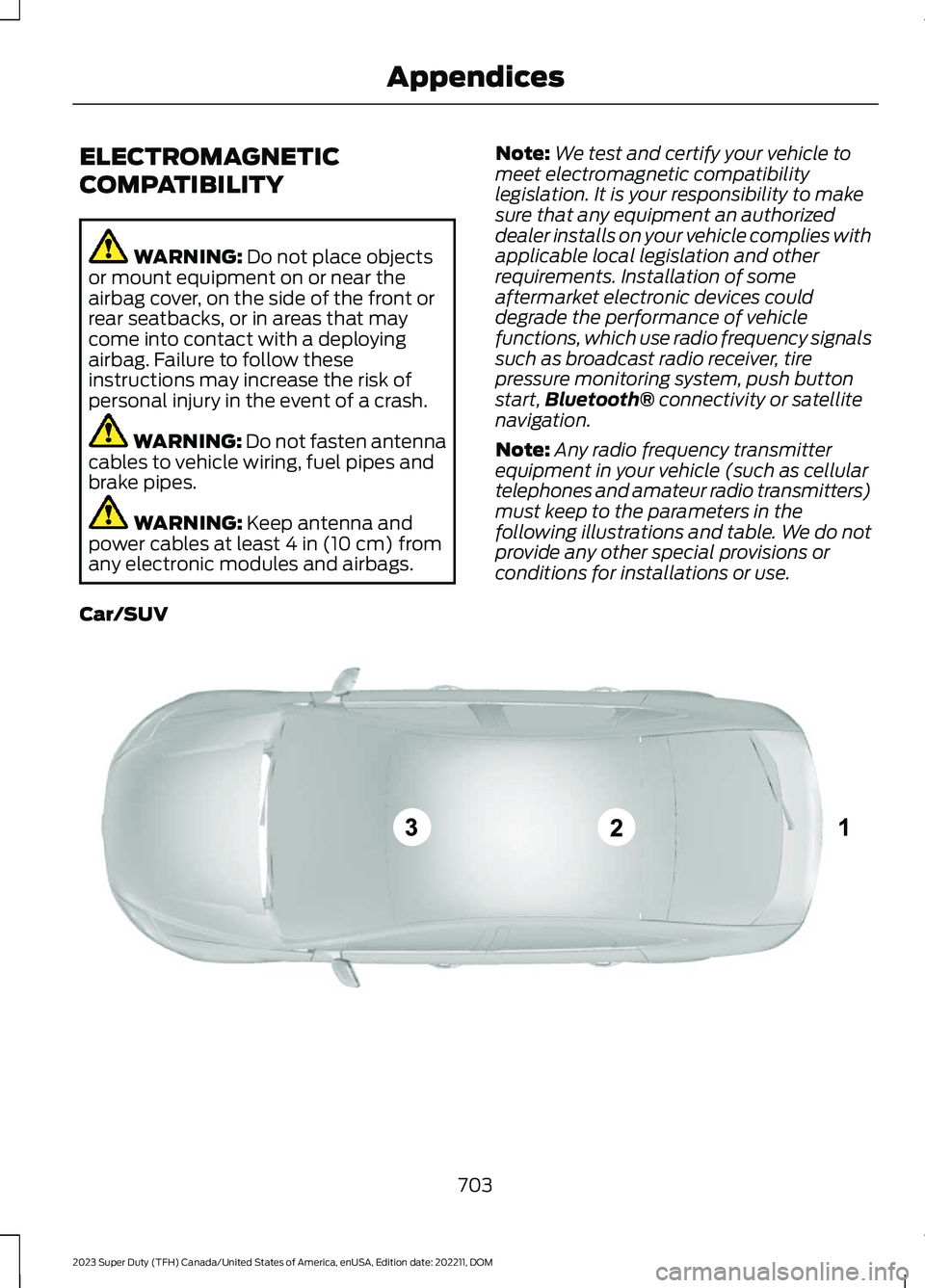
Note:Any radio frequency transmitterequipment in your vehicle (such as cellulartelephones and amateur radio transmitters)must keep to the parameters in thefollowing illustrations and table. We do notprovide any other special provisions orconditions for installations or use.
Car/SUV
703
2023 Super Duty (TFH) Canada/United States of America, enUSA, Edition date: 202211, DOMAppendicesE239120
Page 711 of 738

1
12V Battery.....................................................45612V Battery Precautions..................................456Battery Management SystemLimitations.......................................................457Changing the 12V Battery...............................457How Does the Battery ManagementSystem Work...................................................457Recycling and Disposing of the 12VBattery..............................................................458Resetting the Battery Sensor........................458What Is the Battery ManagementSystem..............................................................45712V Battery – Troubleshooting...............45912V Battery – Information Messages.........45912V Battery – Warning Lamps......................459
3
360 Degree Camera...................................290360 Degree Camera Settings.......................292360 Degree Camera Guide Lines...........291360 Degree Camera Precautions.........290360 Degree Camera Settings.................292Switching the 360 Degree Camera On andOff.......................................................................292Switching the 360 Degree CameraView...................................................................292
4
4WDSee: Four-Wheel Drive.....................................238
9
911 Assist............................................................67911 Assist Videos............................................68
A
A/CSee: Climate Control - Vehicles With:Automatic Temperature Control..............152See: Climate Control - Vehicles With: ManualTemperature Control....................................156About This Publication..................................21
ABSSee: Brakes..........................................................249Accessing Apps.............................................575Accessing Navigation.................................579Accessing the Passive Key BackupPosition........................................................209Accessing the Trip Computer - VehiclesWith: 12 Inch Screen.................................146Accessing the Trip Computer - VehiclesWith: 8 Inch Screen..................................146Accessories....................................................585Adaptive Cruise Control............................296Adaptive Cruise Control –Troubleshooting...........................................309Lane Centering...................................................303Predictive Speed Assist..................................306Predictive Speed Assist –Troubleshooting...........................................308Adaptive Cruise Control AutomaticCancellation...............................................299Adaptive Cruise Control Indicators.......303Adaptive Cruise ControlLimitations...................................................297Adaptive Cruise ControlPrecautions.................................................296Adaptive Cruise Control –Troubleshooting.......................................309Adaptive Cruise Control – InformationMessages........................................................309Adaptive Cruise Control Videos..............310Adaptive Front Lighting..............................124How Does Adaptive Front LightingWork....................................................................124Switching Adaptive Front Lighting On andOff........................................................................125Adjustable Pedals..........................................112Adjusting the Exterior Mirrors...................132Adjusting the Headlamps........................460Adjusting the Instrument Panel LightingBrightness.....................................................127Adjusting the Integrated Trailer BrakeController Mode.........................................374Adjusting the Map.......................................579Changing the Format of the Map................579Zooming the Map In and Out........................579Adjusting the Pedals.....................................112Adjusting the Seatbelt Height...................53Adjusting the Seatbelt Length..................54
707
2023 Super Duty (TFH) Canada/United States of America, enUSA, Edition date: 202211, DOMIndex
Page 724 of 738

What Is Live Traffic............................................579Load Carrying.................................................351Load Carrying Precautions........................351Loading Your Trailer....................................366Locating the 360 DegreeCameras......................................................290Locating the Auxiliary Switches............586Locating the Auxiliary SwitchWiring............................................................586Locating the Blind Spot InformationSystem Sensors........................................328Locating the Brake Fluid Reservoir.......249Locating the Cross Traffic AlertSensors.........................................................336Locating the Exit Warning Sensors.......333Locating the Keyless Entry Keypad.........87Locating the Key Readers............................73Locating the Memory FunctionButtons...........................................................177Locating the Outlets...................................188Locating the Power Outlets......................185Locating the Pre-Collision AssistSensors..........................................................341Locating the Rear View Camera.............287Locating the Safety ComplianceCertification Labels..................................352Locating the Tire label...............................478Locating the USB Ports..............................183Locating the Wireless AccessoryCharger..........................................................195Locating Your Vehicle....................................74Locking the Rear Window Controls.......129
M
Maintenance.................................................44012V Battery...........................................................45612V Battery – Troubleshooting.....................459Coolant.................................................................450Engine Air Filter..................................................445Engine Oil.............................................................444Exterior Bulbs.......................................................461Interior Bulbs......................................................468Maintenance Precautions.......................440Making and Receiving a Phone Call.......571Manually Dimming the InteriorMirror...............................................................131
Manually Releasing the Electric ParkingBrake..............................................................253Manually Shifting Gears............................235Shifting Using the Buttons on the ColumnShifter................................................................235Manual Seats.................................................162Adjusting the Head Restraint.........................162Adjusting the Lumbar Support.....................164Adjusting the Seat Backrest...........................164Folding the Seats.................................................171Head Restraint Components.........................162Installing the Head Restraint.........................163Moving the Seat Backward andForward.............................................................163Removing the Head Restraint........................163Unfolding the Seats.............................................171Massage Seats...............................................167Adjusting the Massage Seat Settings........168Massage Seat Limitations...............................167Memory Function..........................................177Memory Function Precautions.................177Memory Function Videos...........................178Mislock...............................................................82Mislock Limitations..............................................82Switching Mislock On and Off.........................82What Is Mislock.....................................................82Mobile CommunicationsEquipment...................................................674Mobile Device Data........................................29Moonroof Bounce-Back.............................135Overriding Moonroof Bounce-Back.............135What Is Moonroof Bounce-Back..................135Moonroof.........................................................134Moonroof Bounce-Back...................................135Moonroof Videos..........................................135Motorcraft Parts - 6.7L Diesel.................523Motorcraft Parts - 6.8L, Gasoline..........524Motorcraft Parts - 7.3L, Gasoline...........525Muting the Audio.........................................554
N
Navigation Map Updates..........................579Navigation......................................................579Adjusting the Map.............................................579Live Traffic............................................................579Route Guidance.................................................580Setting a Destination........................................579
720
2023 Super Duty (TFH) Canada/United States of America, enUSA, Edition date: 202211, DOMIndex