2023 FORD SUPER DUTY engine
[x] Cancel search: enginePage 59 of 738
•When the ignition is on, a warninginforms the driver about the status ofeach seat, following each seat buckleor unbuckle. You can acknowledge this,or the system will time out after 60seconds.
•If a seatbelt is unfastened, a secondwarning informs the driver about whichseatbelt was unfastened. A warningremains until all occupied seatbelts arefastened.
SEATBELT REMINDERINDICATORS
A warning lamp illuminates if the ignitionis on, a front seat is occupied and theseatbelt has not been fastened.
The warning lamp illuminatesuntil you fasten your seatbelt.
SEATBELT REMINDER AUDIBLEWARNINGS
A warning tone sounds and the warninglamp illuminates if you are not wearingyour seatbelt when your vehicle exceedsa relatively low speed.
The warning tone sounds for a short periodof time or until you fasten your seatbelt.
SWITCHING THE SEATBELTREMINDER ON AND OFF
WARNING: While the systemallows you to deactivate it, this systemis designed to improve your chances ofbeing safely belted and surviving anaccident. We recommend you leave thesystem activated for yourself and otherswho may use the vehicle.
Note:The driver and front passengerwarnings switch off independently. Whenyou perform this procedure for one seatingposition, do not buckle the other position asthis cancels the process.
Read Steps 1 - 4 before proceeding withthe programming procedure.
Make sure that:
•You set the parking brake.
•The transmission is in park (P).
•The ignition is off.
•You close all vehicle doors.
•You unfasten the driver and frontpassenger seatbelts.
1.Switch the ignition on. Do not start theengine.
2.Wait about one minute until theseatbelt warning light switches off.After Step 2, wait an additional fiveseconds before proceeding with Step3. Once you start Step 3, you mustcomplete the procedure within 30seconds.
3.For the seating position you areswitching off, fasten then unfasten theseatbelt three times at a moderatespeed, ending in the unfastened state.After Step 3, the seatbelt warning lightswitches on.
4.When the seatbelt warning light is on,fasten then unfasten the seatbelt. AfterStep 4, the seatbelt warning lightflashes for confirmation.
This switches the feature off for thatseating position if it is currently on.
This switches the feature on for thatseating position if it is currently off.
55
2023 Super Duty (TFH) Canada/United States of America, enUSA, Edition date: 202211, DOMSeatbeltsE71880
Page 74 of 738
Note:Do not leave a key card in hightemperatures. This can damage the keycard, causing it to no longer function.
Locking and Unlocking YourVehicle
Tap your key card on the exteriorkey reader, over the keyless entrykeypad, to lock or unlock thedriver door. If your vehicle is locked and youtap your key card on the key reader, yourvehicle unlocks. If your vehicle is unlockedand you tap your key card on the keyreader, your vehicle locks. See Locatingthe Key Readers (page 73).
Note:The key reader only works when usedin close proximity with a compatible keycard. The key reader may not function if youhold the key card more than 1.6 in (4 cm)away.
Note:Hold your key card over the exteriorkey reader for a few seconds to lock orunlock all doors.
Note:Only Ford issued key cards arecompatible with your vehicle.
Starting Your Vehicle
Using the Exterior Key Reader
You can start your vehicle without havingto tap your key card on the interior keyreader if you press the ignition switchwithin 60 seconds of unlocking yourvehicle using the exterior key reader.
1.Tap your key card on the exterior keyreader, over the keyless entry keypad,to unlock your vehicle. See Locatingthe Key Readers (page 73).
2.Enter your vehicle.
3.Fully press the brake pedal.
4.Press the push button ignition switch.See Starting and Stopping theEngine (page 202).
Using the Interior Key Reader
1.Tap your key card on the key reader. Atone sounds from your vehicle whenthe key reader recognizes the key card.See Locating the Key Readers (page73).
2.Fully press the brake pedal.
3.Press the push button ignition switch.See Starting and Stopping theEngine (page 202).
Adding and Deleting Key Cards
Your vehicle comes with two near fieldcommunication-enabled key cards,referred to as factory key cards.
You can purchase additional key cards andadd them to your vehicle at any time.These are considered user key cards andare not the same as factory key cards.Contact an authorized dealer to purchaseuser key cards.
Note:A single key card can be associatedwith multiple vehicles.
Note:You cannot add or delete factory keycards. Only authorized service technicianscan add or delete factory key cards.
Note:Make sure you install FordPass onyour mobile device and activate FordPassConnect on your vehicle.
Adding a Key Card
1.Start your vehicle with any key.
2.Press Settings on the touchscreen.
3.Press Vehicle.
4.Press Keys.
5.Press Add Key Card.
6.Follow the prompts on thetouchscreen.
70
2023 Super Duty (TFH) Canada/United States of America, enUSA, Edition date: 202211, DOMKeys and Remote ControlsE368487
Page 76 of 738
Note:You need two factory keys in yourvehicle to complete the setup of a digitalkey. Factory keys are the keys that camewith your vehicle.
Sharing a Digital Key
You can share keys to other users from theowner phone by using Apple Wallet orGoogle Wallet.
Note:Check with your device'smanufacturer for the latest information onsharing a key.
Deleting a Digital Key
Deleting Your Own Digital Key
You can delete your digital key from yourown device by using Apple Wallet orGoogle Wallet.
Note:Check with your device'smanufacturer for the latest information ondeleting a key.
Deleting a Shared Key Remotely
You can delete a shared key remotely fromthe owner phone by using Apple Wallet orGoogle Wallet.
Note:Check with your device'smanufacturer for the latest information ondeleting a key.
Deleting All Digital Keys
1.Start your vehicle with a factory key.
Note:A factory key is a key that came withyour vehicle.
2.Perform a system reset. SeePerforming a System Reset (page584).
Note:If you have added user key cards toyour vehicle, the reset deletes those as well.
Locking and Unlocking YourVehicle
Tap your device on the exteriorkey reader, over the keyless entrykeypad, to lock or unlock thedriver door. See Locating the KeyReaders (page 73).
If your vehicle is locked and you tap yourdevice on the key reader, your vehicleunlocks. If your vehicle is unlocked and youtap your device on the key reader, yourvehicle locks.
Note:Hold your device over the exterior keyreader for a few seconds to lock or unlockall doors.
Starting Your Vehicle
Using the Exterior Key Reader
You can start your vehicle without havingto tap your device on the interior key readerif you press the ignition switch within 60seconds of unlocking your vehicle usingthe exterior key reader.
1.
Tap your key card or digitalkey on the key reader, over the keylessentry keypad. See Locating the KeyReaders (page 73).
2.Enter your vehicle.
3.Fully press the brake pedal.
4.Press the push button ignition switch.See Starting and Stopping theEngine (page 202).
Using the Interior Key Reader
1.Fully press the brake pedal.
72
2023 Super Duty (TFH) Canada/United States of America, enUSA, Edition date: 202211, DOMKeys and Remote ControlsE368487 E368487
Page 77 of 738
2.
Tap your key card or digitalkey on the key reader. A tone soundsfrom your vehicle when the device isrecognized. See Locating the KeyReaders (page 73).
3.Press the push button ignition switch.See Starting and Stopping theEngine (page 202).
Frequently Asked Questions
My device's battery is dead, why can Inot use it to unlock or start my vehicle?
•Your device's battery has beendepleted for too long or you haveadditional authentication enabled onyour device. For additional backupsecurity, carry a key card with you.
LOCATING THE KEY READERS
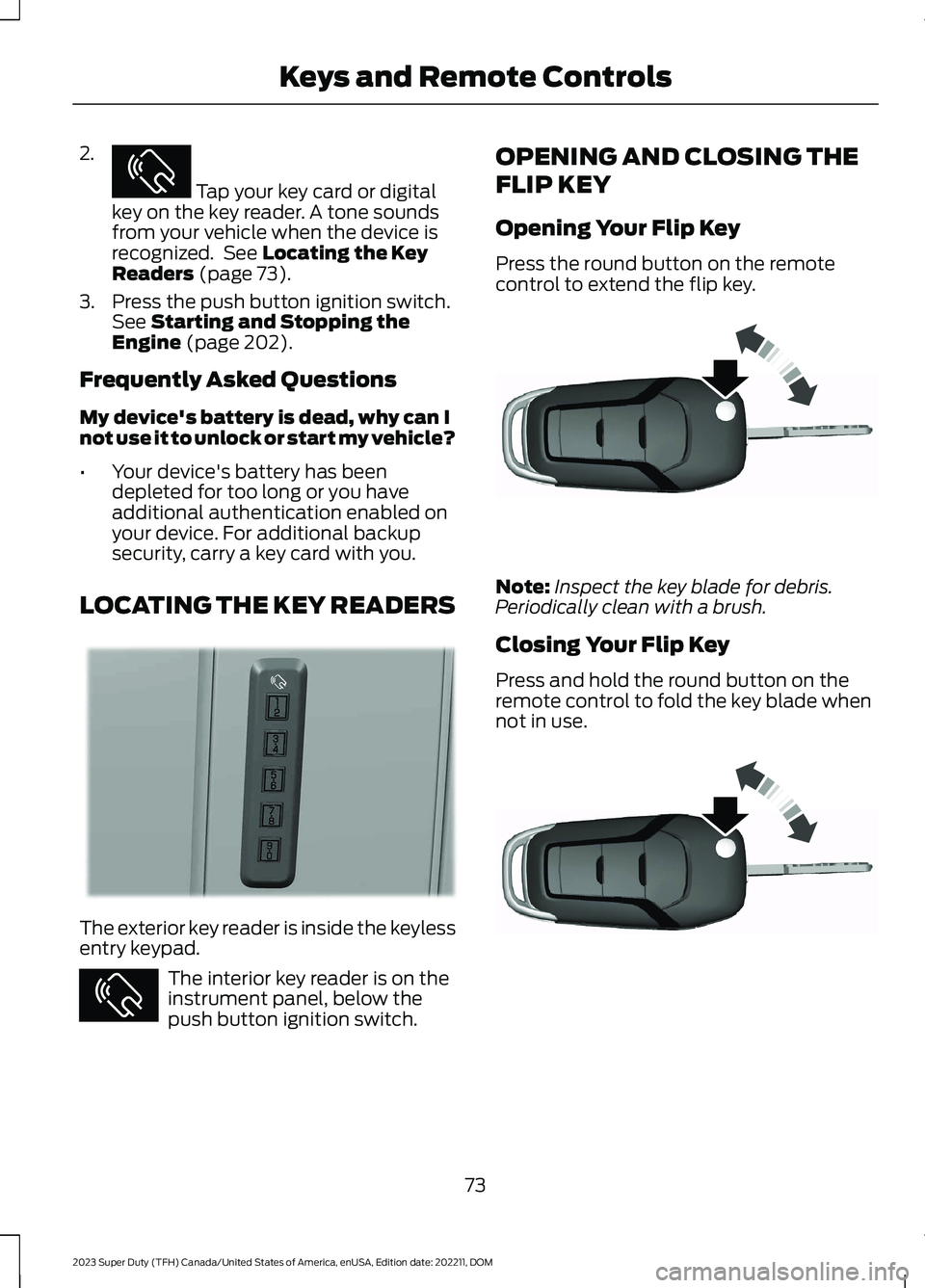
The exterior key reader is inside the keylessentry keypad.
The interior key reader is on theinstrument panel, below thepush button ignition switch.
OPENING AND CLOSING THE
FLIP KEY
Opening Your Flip Key
Press the round button on the remotecontrol to extend the flip key.
Note:Inspect the key blade for debris.Periodically clean with a brush.
Closing Your Flip Key
Press and hold the round button on theremote control to fold the key blade whennot in use.
73
2023 Super Duty (TFH) Canada/United States of America, enUSA, Edition date: 202211, DOMKeys and Remote ControlsE368487 E368488 E368487 E191532 E191532
Page 81 of 738
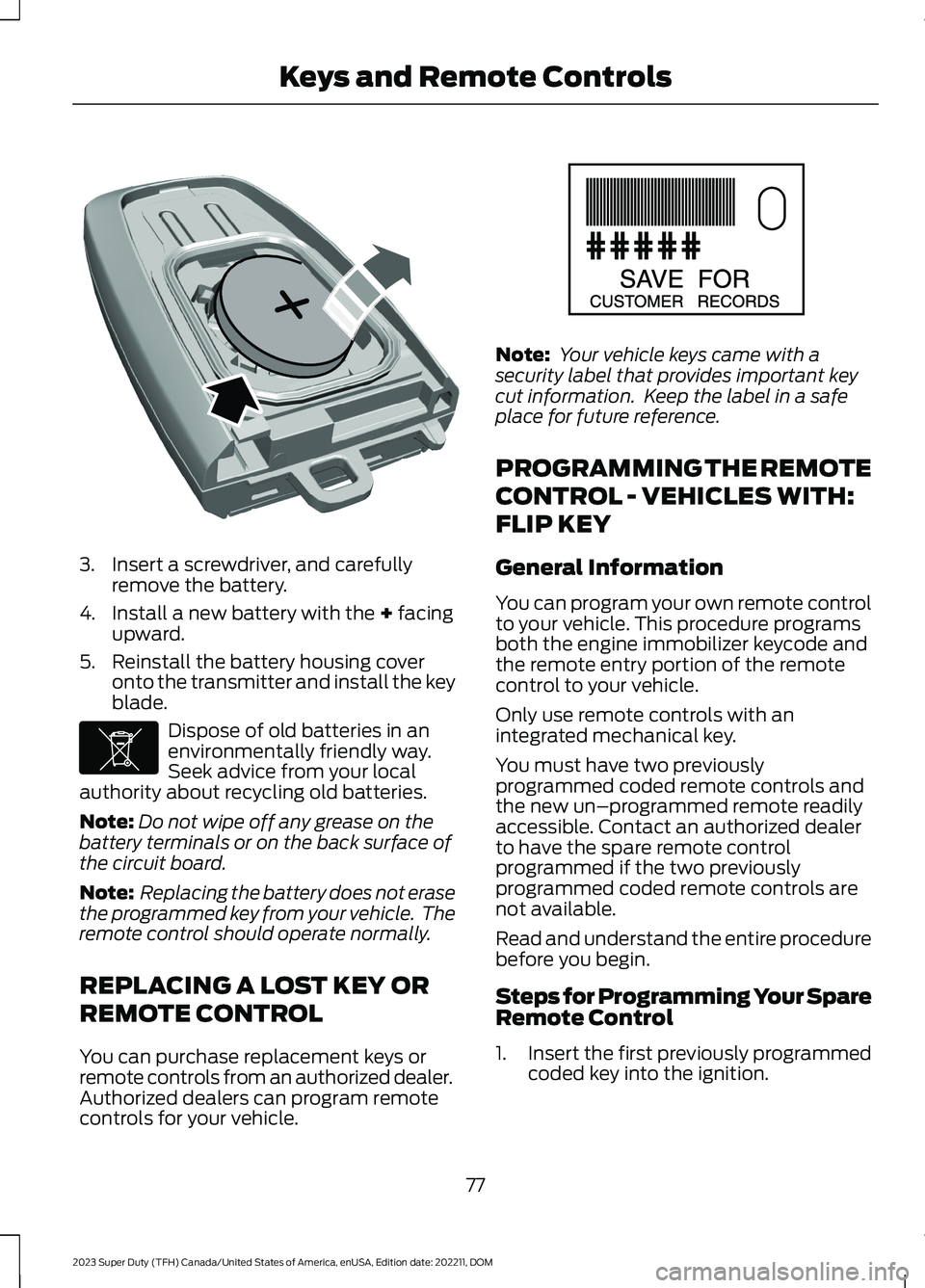
3.Insert a screwdriver, and carefullyremove the battery.
4.Install a new battery with the + facingupward.
5.Reinstall the battery housing coveronto the transmitter and install the keyblade.
Dispose of old batteries in anenvironmentally friendly way.Seek advice from your localauthority about recycling old batteries.
Note:Do not wipe off any grease on thebattery terminals or on the back surface ofthe circuit board.
Note: Replacing the battery does not erasethe programmed key from your vehicle. Theremote control should operate normally.
REPLACING A LOST KEY OR
REMOTE CONTROL
You can purchase replacement keys orremote controls from an authorized dealer.Authorized dealers can program remotecontrols for your vehicle.
Note: Your vehicle keys came with asecurity label that provides important keycut information. Keep the label in a safeplace for future reference.
PROGRAMMING THE REMOTE
CONTROL - VEHICLES WITH:
FLIP KEY
General Information
You can program your own remote controlto your vehicle. This procedure programsboth the engine immobilizer keycode andthe remote entry portion of the remotecontrol to your vehicle.
Only use remote controls with anintegrated mechanical key.
You must have two previouslyprogrammed coded remote controls andthe new un–programmed remote readilyaccessible. Contact an authorized dealerto have the spare remote controlprogrammed if the two previouslyprogrammed coded remote controls arenot available.
Read and understand the entire procedurebefore you begin.
Steps for Programming Your SpareRemote Control
1.Insert the first previously programmedcoded key into the ignition.
77
2023 Super Duty (TFH) Canada/United States of America, enUSA, Edition date: 202211, DOMKeys and Remote ControlsE218402 E107998 E151795
Page 82 of 738
2.Switch the ignition from off to on. Keepthe ignition on for at least threeseconds, but no more than 10 seconds.
3.Switch the ignition off and remove thefirst coded key from the ignition.
4.After three seconds but within 10seconds of switching the ignition off,insert the second previously coded keyinto the ignition.
5.Switch the ignition from off to on. Keepthe ignition on for at least threeseconds, but no more than 10 seconds.
6.Switch the ignition off and remove thesecond previously programmed codedkey from the ignition.
7.After three seconds but within 10seconds of switching the ignition offand removing the previouslyprogrammed coded key, insert the newun–programmed key into the ignition.
8.Switch the ignition from off to on. Keepthe ignition on for at least six secondsuntil you hear the door locks cycle.
9.Remove the newly programmed codedkey from the ignition.
The key starts the engine if programmingis successful. You can operate the keylessremote entry system with the new remotecontrol with integrated key.
If programming was not successful, wait20 seconds and repeat Steps 1 through 8.If you are still unsuccessful, take yourvehicle to an authorized dealer.
Note:You can program a maximum of sixcoded remote controls to your vehicle.
PROGRAMMING THE REMOTE
CONTROL - VEHICLES WITH:
PUSH BUTTON START
General Information
You must have two previouslyprogrammed remote controls inside yourvehicle and the new unprogrammedremote controls readily accessible. Contactan authorized dealer to have the spareremote control programmed if twopreviously programmed remotes are notavailable. Make sure that your vehicle isoff before beginning this procedure. Makesure that you close all the doors beforebeginning and that they remain closedthroughout the procedure. Perform allsteps within 30 seconds of starting thesequence. Stop and wait for at least oneminute before starting again if you performany steps out of sequence.
Read and understand the entire procedurebefore you begin.
Note:You can program a maximum of fourremote controls to your vehicle.
Note:If your programmed remote controlsare lost or stolen and you do not have anextra coded remote, you need to have yourvehicle towed to an authorized dealer. Storean extra programmed remote away fromyour vehicle in a safe place to help preventany inconvenience. Contact an authorizeddealer to purchase additional spare orreplacement remotes.
Steps for Programming Your SpareRemote Control
Note:Your vehicle is equipped with one ofthe following center consoles.
78
2023 Super Duty (TFH) Canada/United States of America, enUSA, Edition date: 202211, DOMKeys and Remote Controls
Page 137 of 738
Switching Auto-fold On and Off
1.Press Settings on the touchscreen.
2.Press Vehicle Settings.
3.Press Mirrors.
4.Switch Autofold on and off.
Loose Mirror
If you manually fold your power-foldingmirrors, they may not work properly evenafter you reposition them. You need toreset them if:
•The mirrors vibrate when you drive.
•The mirrors feel loose.
•The mirrors do not stay in the folded orunfolded position.
•One of the mirrors is not in its normaldriving position.
To reset the mirrors, perform the followingsteps:
1.By hand, fold or retract both mirrors.
2.Using the power folding/powertelescoping mirror control switch,operate the mirrors until you hear anaudible click.
3.Operate the power folding or powertelescoping mirrors an additional 3 to4 times to synchronize the mirrors.
EXTENDING THE EXTERIOR
MIRRORS
This optional feature lets you extend themirror about 3 in (75 mm). It is useful whentowing a trailer. You can manually pull outor push in the mirrors to various positions.
Power Telescoping Mirrors (If
Equipped)
This feature lets you position both mirrorsat the same time.
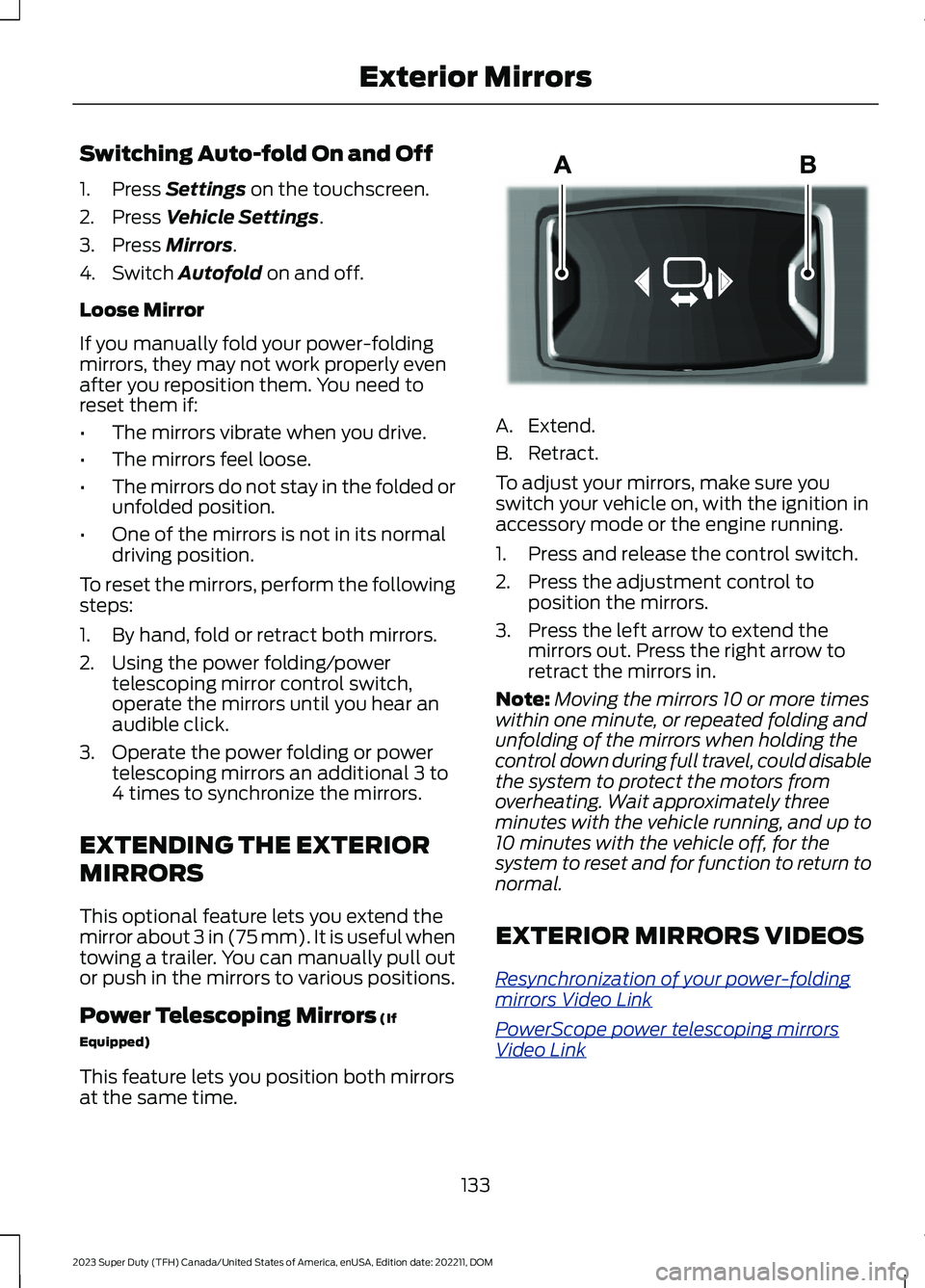
A.Extend.
B.Retract.
To adjust your mirrors, make sure youswitch your vehicle on, with the ignition inaccessory mode or the engine running.
1.Press and release the control switch.
2.Press the adjustment control toposition the mirrors.
3.Press the left arrow to extend themirrors out. Press the right arrow toretract the mirrors in.
Note:Moving the mirrors 10 or more timeswithin one minute, or repeated folding andunfolding of the mirrors when holding thecontrol down during full travel, could disablethe system to protect the motors fromoverheating. Wait approximately threeminutes with the vehicle running, and up to10 minutes with the vehicle off, for thesystem to reset and for function to return tonormal.
EXTERIOR MIRRORS VIDEOS
Resynchronization of your power-foldingmirrors Video Link
PowerScope power telescoping mirrorsVideo Link
133
2023 Super Duty (TFH) Canada/United States of America, enUSA, Edition date: 202211, DOMExterior MirrorsE218902
Page 140 of 738
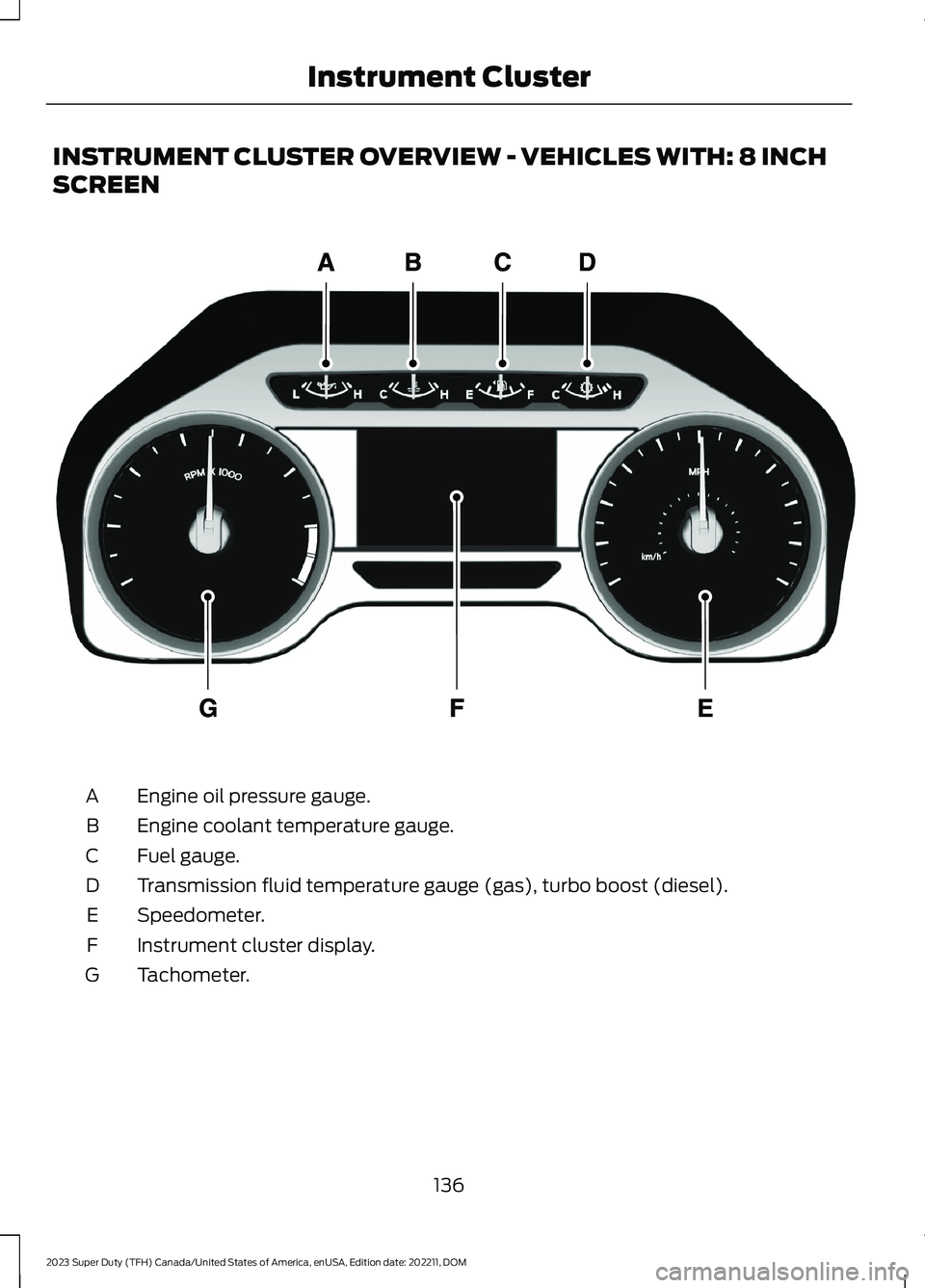
INSTRUMENT CLUSTER OVERVIEW - VEHICLES WITH: 8 INCH
SCREEN
Engine oil pressure gauge.A
Engine coolant temperature gauge.B
Fuel gauge.C
Transmission fluid temperature gauge (gas), turbo boost (diesel).D
Speedometer.E
Instrument cluster display.F
Tachometer.G
136
2023 Super Duty (TFH) Canada/United States of America, enUSA, Edition date: 202211, DOMInstrument ClusterE219638