2023 FORD MUSTANG MACH E ad blue
[x] Cancel search: ad bluePage 179 of 496
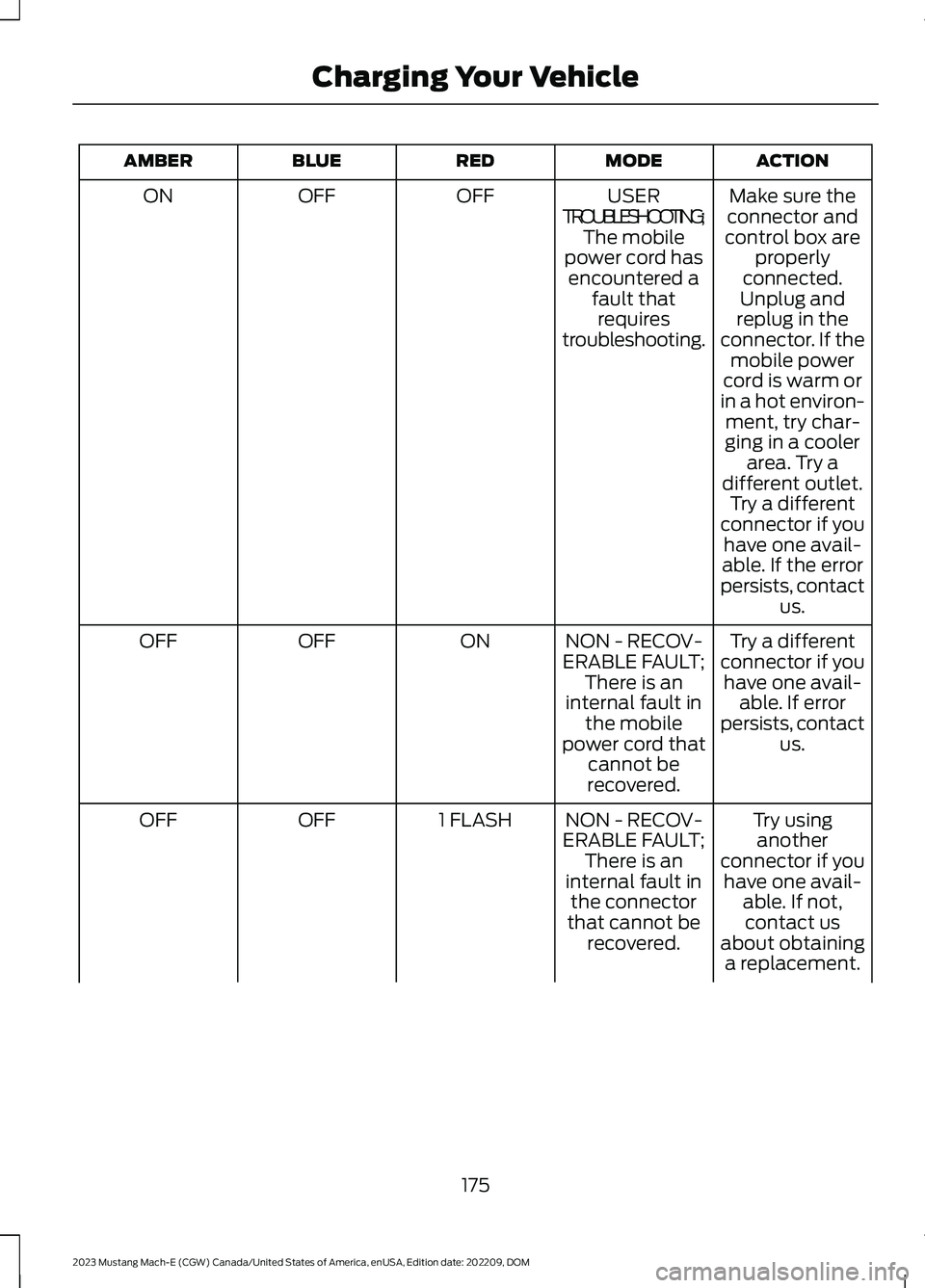
ACTIONMODEREDBLUEAMBER
Make sure theconnector andcontrol box areproperlyconnected.Unplug and
USERTROUBLESHOOTING;The mobilepower cord hasencountered afault thatrequirestroubleshooting.
OFFOFFON
replug in theconnector. If themobile powercord is warm orin a hot environ-ment, try char-ging in a coolerarea. Try adifferent outlet.Try a differentconnector if youhave one avail-able. If the errorpersists, contactus.
Try a differentconnector if youhave one avail-able. If errorpersists, contactus.
NON - RECOV-ERABLE FAULT;There is aninternal fault inthe mobilepower cord thatcannot berecovered.
ONOFFOFF
Try usinganotherconnector if youhave one avail-able. If not,contact us
NON - RECOV-ERABLE FAULT;There is aninternal fault inthe connectorthat cannot berecovered.
1 FLASHOFFOFF
about obtaininga replacement.
175
2023 Mustang Mach-E (CGW) Canada/United States of America, enUSA, Edition date: 202209, DOMCharging Your Vehicle
Page 180 of 496

ACTIONMODEREDBLUEAMBER
If your warrantyhas expired, youcan order areplacementfrom your Forddealer.
Potential shockhazard - immedi-ately turn offcircuit breakerfor the outletwithin home.Discontinue use.Contact usabout obtaininga replacement.
GROUNDLEAKAGEFAULT;Electricalcurrent isleaking througha potentiallyunsafe path.
PULSINGOFFOFF
Note:When plugging into an unfamiliarwall outlet, let the vehicle charge for severalminutes before leaving it unattended. Thered indicator will illuminate if not charging.The unit will turn off if breaker orinfrastructure ground fault circuit interrupter(GFCI) is tripped. You can view vehiclecharging status remotely via the Ford PassApp.
Mobile Power Cord Auto-Restart
Auto-restart helps to make sure that yourvehicle will be charged and ready for usewhen needed. A charge could beinterrupted if errors are detected. Chargingresumes once the error is no longerdetected. The red indicator illuminatesduring an error condition.
The exception to the immediateauto-restart is when the interruption is dueto a charger ground fault circuit interrupter(GFCI) event. The charger attempts torestart 15 minutes after a ground faultcircuit interrupter (GFCI) event. After thefourth attempt to restart, the charger shutsdown and the red indicator stays on.
If the fault persists, do not continue to tryto charge your vehicle. Contact yourauthorized dealer.
MOVING AND STORAGEINSTRUCTIONS
Make sure you wrap the mobile power cordafter charging. Store the mobile powercord in the storage bag supplied with themobile power cord.
When charging is complete, replace themobile power cord in the rear luggagecompartment, under the load floor.
Note:Do not hold the mobile power cordby the power cable. Hold the complete unitand carefully place back in the storage bag.
Note:To remove the connector, firmlygrasp the connector by the cable or plugand pull away from the control box.
176
2023 Mustang Mach-E (CGW) Canada/United States of America, enUSA, Edition date: 202209, DOMCharging Your Vehicle
Page 182 of 496

•When zones A, B, and C illuminate, andzone D is pulsing, the charge is between60-80 percent.
•When zones A, B, C, and D illuminate,and zone E is pulsing, the charge isbetween 80-100 percent.
•When all zones illuminate, the chargeis 100 percent.
Note:When charging stops, the chargestatus indicator shows all the completedzones solidly illuminated in a blue color for30 seconds before turning off. For example,if charging stops at 70 percent, then A, B,and C light up solidly to indicate a batterycharge level of at least 60 percent but lessthan 80 percent. Charging stops whencomplete or when paused due to chargesettings or charge station actions.
Note:If the charge status indicator doesnot light up or pulse after plugging in, pleaseverify that the charge port light setting is On.If you do not wish to have the charge statusindicator light up at all while charging, thenyou can turn it Off. Locate the charge portlight under the vehicle settings on yourin-vehicle touchscreen.
There are three charge port indicator lightcolors, which indicate a specific action:
White is used as a courtesy light to helpwith plugging in and to acknowledgeactions such as plugging in and unplugging.
Blue is used when the vehicle is plugged inand either charging or waiting to charge.
Amber is used to indicate charge faults.
Note:Charging faults are identified by thecolor amber on the charge status indicator.Faults can occur within the vehicle chargingsystem or outside the vehicle, such as withthe mobile power cord, charge station orelectrical supply.
Note:If the system detects a fault in thevehicle charging system at any point in acharge cycle, the entire charge statusindicator illuminates solidly in an ambercolor for 30 seconds and then turns off. Ifthis happens, unplug the charge coupler andthen plug it back into the charge portreceptacle. If the problem persists, haveyour vehicle serviced as soon as possible.
Note:If the system detects a fault outsidethe vehicle, such as with the charge stationor mobile power cord, the entire chargestatus indicator flashes amber continuouslyfor 30 seconds and then turns off. If thishappens check the mobile power cord,charge station or electrical supply.
178
2023 Mustang Mach-E (CGW) Canada/United States of America, enUSA, Edition date: 202209, DOMCharging Your VehicleEDCABE317499 E306677
Page 184 of 496

Note:If charging for your vehicle fails,please contact the Customer RelationshipCenter, or click on Live chat. To ensuresuperior service, please take note of yourserial number when contacting customersupport.
For more information, visitwww.owner.ford.com.
Charging At a Charge Station
1.Put your vehicle in park (P).
Note:Your vehicle must be in park (P) tocharge.
2.Press the center right hand edge of thecharge port door and then release toopen the door.
3.Select the appropriate charge stationcoupler.
4.Plug the charge coupler into the chargeport receptacle on your vehicle.
Note:Make sure the button clicksconfirming that you have completelyengaged the coupler. When you plug in yourvehicle, it starts charging to 100% by defaultunless scheduled charging has been set upfor this location. See Setting the ChargingSchedule and Preferences (page 184).
Note:When the handle is properly engagedthe light ring illuminates. This indicates thebeginning of a normal charge cycle.
Note:There could be a delay in light ringillumination due to vehicle internalcommunications.
Information about public charge stationsis available through the in-vehicle screenas well as the FordPass app with pricing,power levels, and real time availability.Rates for charging varies by power level,provider, location, and time of day.
When charging your vehicle at a BlueOvalCharging Network station, use theFordPass App to activate and pay forcharging. You can also just plug in toactivate charging at Plug & Charge capablestations. If the charging station is not in theBlueOval Charging Network, use thedirections on the charge station to activatethe charger.
For more information, visitwww.owner.ford.com.
180
2023 Mustang Mach-E (CGW) Canada/United States of America, enUSA, Edition date: 202209, DOMCharging Your VehicleE335725 E329078
Page 185 of 496

STOPPING CHARGING
WARNING: To safely discontinuecharging at any time, follow thedisconnect instructions in stoppingcharging. Charging will automatically andsafely come to a stop. The BLUESTATUS indicator remains ON solidwhen the coupler is removed.
Using the mobile power cord:
1.Push the latch and remove the chargecoupler from the vehicle.
2.Remove the connector plug from thewall outlet.
Note:Do not pull the wall plug from thewall or the connector from the mobile powercord control box, while your vehicle ischarging. Doing so could damage the outletand the cord.
Note:You cannot shift your vehicle out ofpark (P) until you remove the chargecoupler.
3.Press the center right-hand edge of thecharge port door to close.
DC CHARGING
CONNECTING THE CHARGER
To charge the high voltage battery:
1.Put the vehicle in park (P).
Note:Your vehicle must be in park (P) tocharge and for the charge status indicatorto illuminate.
2.Press the center right-hand edge of thecharge port door and then release toopen the door.
3.Open the dust cap cover on the chargeport to expose lower connectors.
4.Plug the charge coupler into the chargeport receptacle on your vehicle.
181
2023 Mustang Mach-E (CGW) Canada/United States of America, enUSA, Edition date: 202209, DOMCharging Your VehicleE317333 E306676 E335267
Page 193 of 496

Note:Save your departure settings beforeselecting additional days/times. Theprocess must be repeated in order to addadditional unique departure times andcomfort levels.
Note:Cabin conditioning comfort level mayvary depending on if you plug into a normalhousehold outlet or a higher power outletor charging station. The power available forconditioning is limited to the chargingstation power available. At low ambienttemperatures and low charge power, asmall amount of high voltage battery powerin addition to the charging power could beused to heat the cabin.
Note:The departure and comfort settingscan also be accessed through the separatevehicle settings departure and comfortbutton. Press the edit button from thisscreen to begin the settings process outlinedabove.
USING FORDPASS AND
CHARGING
The FordPass app allows you to do thefollowing:
•Monitor and manage your vehicle'scharging, including charge schedulesand preferences.
•Locate a charger and activate a chargeron the BlueOval Charging Network.
•Plan a trip and charging options alongyour route.
•Check charging station plug availability.
•Initiate a charge session automaticallyat Plug and Charge capable chargestations.
•Control your Ford Connected ChargeStation remotely.
•Override charge preferences andstarting and stopping charging.
For more information, visitwww.owner.ford.com.
CHARGING YOUR VEHICLE
HINTS
Use AC charging when possible andminimize the use of DC charging. It helpsto preserve your high voltage battery'sefficiency and lifespan.
We recommend ending DC charges at80% state of charge.
Note:The system could reduce DC fastcharging rate to preserve the battery. Thisis based on battery temperature, batterystate of charge and battery health.
In cold temperatures, you may notice thatDC charging takes longer when theambient temperature drops below 50°F(10°C). Shutting off climate control orreducing climate control temperature andfan settings for the first 10 to 15 minutes ofDC charging allows the battery to warmup and improve the charging rate.
Note:When the temperature is belowfreezing, fully turning off cabin heat for thefirst 10 to 15 minutes of DC charging couldsignificantly improve the charging rate.
When AC charging, keep your vehicleplugged in when outside temperatures arevery high or low. This enables the systemto maintain the high voltage battery forbest performance.
CHARGING YOUR VEHICLE –
TROUBLESHOOTING
CHARGING YOUR VEHICLE –WARNING LAMPS
Plugged into charger.
189
2023 Mustang Mach-E (CGW) Canada/United States of America, enUSA, Edition date: 202209, DOMCharging Your VehicleE228962
Page 252 of 496
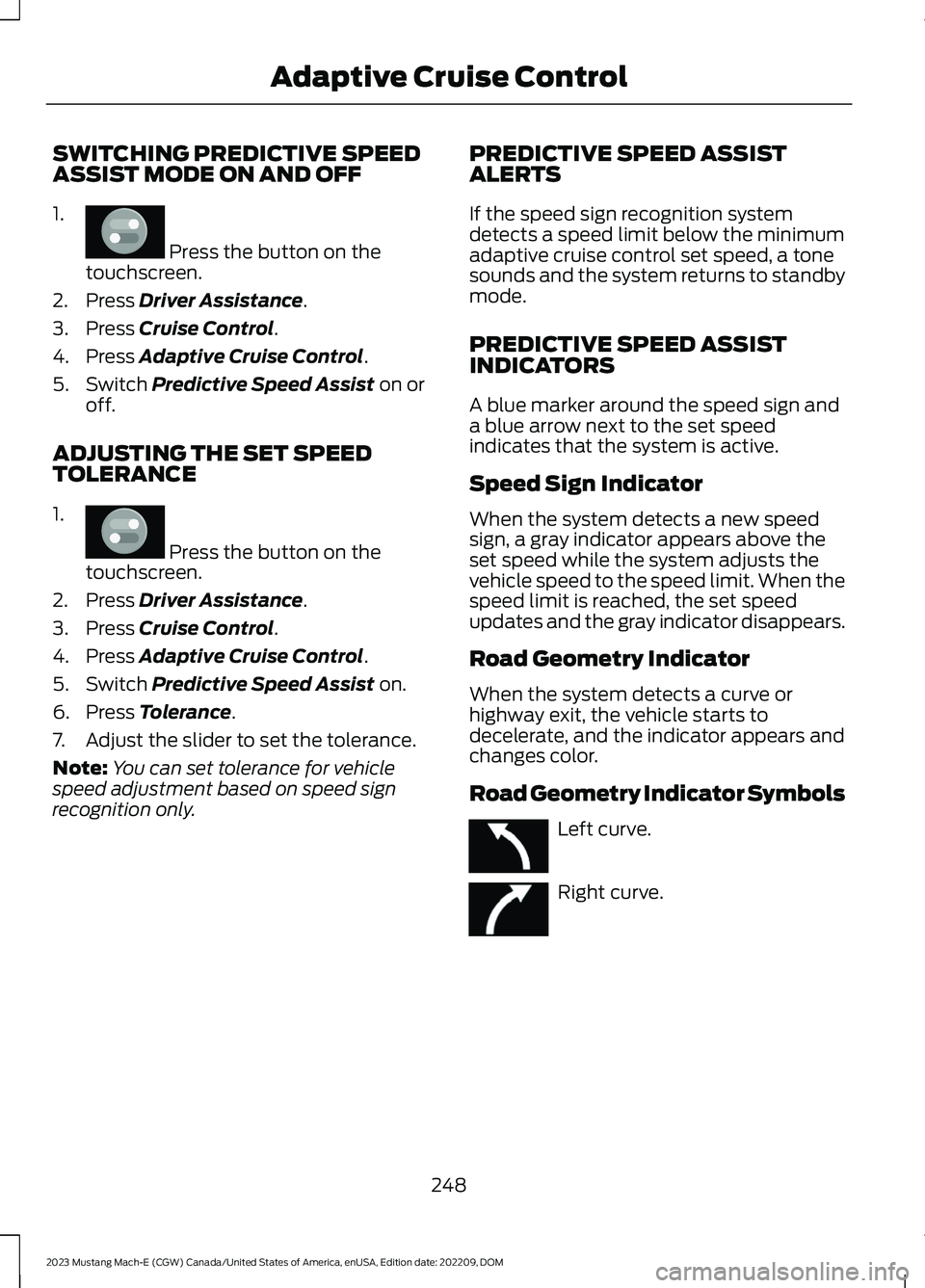
SWITCHING PREDICTIVE SPEEDASSIST MODE ON AND OFF
1.
Press the button on thetouchscreen.
2.Press Driver Assistance.
3.Press Cruise Control.
4.Press Adaptive Cruise Control.
5.Switch Predictive Speed Assist on oroff.
ADJUSTING THE SET SPEEDTOLERANCE
1.
Press the button on thetouchscreen.
2.Press Driver Assistance.
3.Press Cruise Control.
4.Press Adaptive Cruise Control.
5.Switch Predictive Speed Assist on.
6.Press Tolerance.
7.Adjust the slider to set the tolerance.
Note:You can set tolerance for vehiclespeed adjustment based on speed signrecognition only.
PREDICTIVE SPEED ASSISTALERTS
If the speed sign recognition systemdetects a speed limit below the minimumadaptive cruise control set speed, a tonesounds and the system returns to standbymode.
PREDICTIVE SPEED ASSISTINDICATORS
A blue marker around the speed sign anda blue arrow next to the set speedindicates that the system is active.
Speed Sign Indicator
When the system detects a new speedsign, a gray indicator appears above theset speed while the system adjusts thevehicle speed to the speed limit. When thespeed limit is reached, the set speedupdates and the gray indicator disappears.
Road Geometry Indicator
When the system detects a curve orhighway exit, the vehicle starts todecelerate, and the indicator appears andchanges color.
Road Geometry Indicator Symbols
Left curve.
Right curve.
248
2023 Mustang Mach-E (CGW) Canada/United States of America, enUSA, Edition date: 202209, DOMAdaptive Cruise ControlE386797 E386797 E379737 E379738
Page 255 of 496

WHAT IS BLUECRUISE
BlueCruise keeps your vehicle centered inthe lane and offers a hands-free drivingmode in certain situations when usingadaptive cruise control.
HOW DOES BLUECRUISE
WORK
BlueCruise uses cameras to monitor yourvehicle position within a lane and appliessteering support to keep your vehiclecentered in the lane.
Using the cameras and locationinformation, BlueCruise allows you toremove your hands from the steering wheeland offers a hands-free driving mode incertain areas.
When active, BlueCruise uses a driverfacing camera and infrared lighting tomonitor your eyes and head position todetect if you are distracted. If the systemdetermines you are distracted, it alerts youto return your eyes back to the road.
Camera and lighting areas.A
Note:When BlueCruise is active, in certaincrash or near crash-like situations, such asan air bag deployment or hitting a roadobstacle, camera data may record throughthe vehicle event data recorder. See EventData (page 23).
Note:No data records under normal drivingconditions.
BLUECRUISE PRECAUTIONS
WARNING: You are responsible forkeeping your eyes on the road at alltimes. The system is designed to be anaid and does not relieve you of yourresponsibility to drive with due care andattention. Failure to follow thisinstruction could result in the loss ofcontrol of your vehicle, personal injury ordeath.
WARNING: You are responsible forcontrolling your vehicle at all times. Thesystem is designed to be an aid and doesnot relieve you of your responsibility todrive with due care and attention. Failureto follow this instruction could result inthe loss of control of your vehicle,personal injury or death.
WARNING: Obstructions to thedriver facing camera or infrared lightingcould prevent the system from properlyoperating. Keep the camera and lightingareas free from obstruction. Failure tofollow this instruction could result in theloss of control of your vehicle, personalinjury or death.
251
2023 Mustang Mach-E (CGW) Canada/United States of America, enUSA, Edition date: 202209, DOMBlueCruise - Vehicles With: Hands Free DrivingAE319834