2023 FORD MAVERICK transmission
[x] Cancel search: transmissionPage 190 of 556
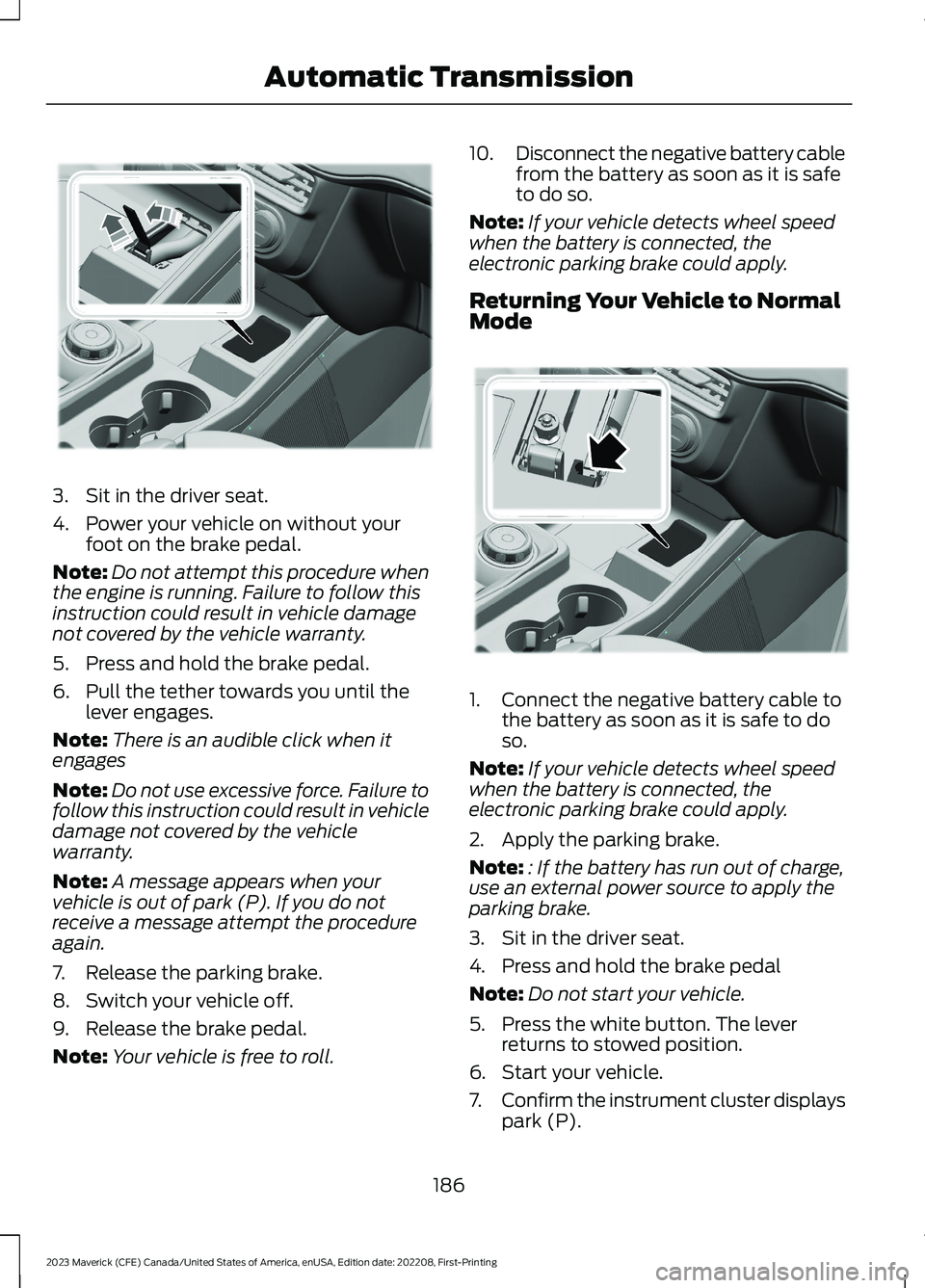
3.Sit in the driver seat.
4.Power your vehicle on without yourfoot on the brake pedal.
Note:Do not attempt this procedure whenthe engine is running. Failure to follow thisinstruction could result in vehicle damagenot covered by the vehicle warranty.
5.Press and hold the brake pedal.
6.Pull the tether towards you until thelever engages.
Note:There is an audible click when itengages
Note:Do not use excessive force. Failure tofollow this instruction could result in vehicledamage not covered by the vehiclewarranty.
Note:A message appears when yourvehicle is out of park (P). If you do notreceive a message attempt the procedureagain.
7.Release the parking brake.
8.Switch your vehicle off.
9.Release the brake pedal.
Note:Your vehicle is free to roll.
10.Disconnect the negative battery cablefrom the battery as soon as it is safeto do so.
Note:If your vehicle detects wheel speedwhen the battery is connected, theelectronic parking brake could apply.
Returning Your Vehicle to NormalMode
1.Connect the negative battery cable tothe battery as soon as it is safe to doso.
Note:If your vehicle detects wheel speedwhen the battery is connected, theelectronic parking brake could apply.
2.Apply the parking brake.
Note:: If the battery has run out of charge,use an external power source to apply theparking brake.
3.Sit in the driver seat.
4.Press and hold the brake pedal
Note:Do not start your vehicle.
5.Press the white button. The leverreturns to stowed position.
6.Start your vehicle.
7.Confirm the instrument cluster displayspark (P).
186
2023 Maverick (CFE) Canada/United States of America, enUSA, Edition date: 202208, First-PrintingAutomatic TransmissionE356795 E356796
Page 191 of 556
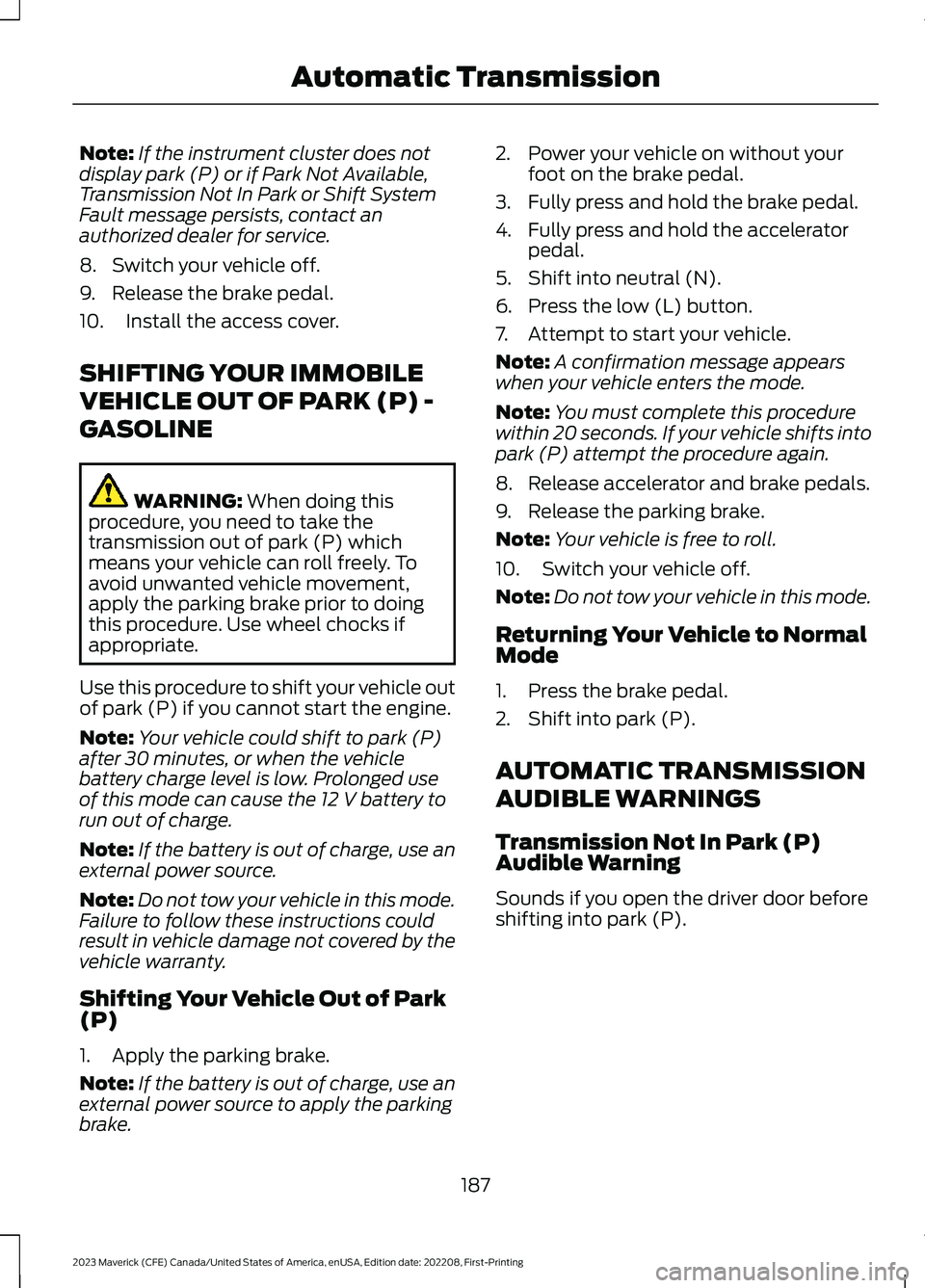
Note:If the instrument cluster does notdisplay park (P) or if Park Not Available,Transmission Not In Park or Shift SystemFault message persists, contact anauthorized dealer for service.
8.Switch your vehicle off.
9.Release the brake pedal.
10.Install the access cover.
SHIFTING YOUR IMMOBILE
VEHICLE OUT OF PARK (P) -
GASOLINE
WARNING: When doing thisprocedure, you need to take thetransmission out of park (P) whichmeans your vehicle can roll freely. Toavoid unwanted vehicle movement,apply the parking brake prior to doingthis procedure. Use wheel chocks ifappropriate.
Use this procedure to shift your vehicle outof park (P) if you cannot start the engine.
Note:Your vehicle could shift to park (P)after 30 minutes, or when the vehiclebattery charge level is low. Prolonged useof this mode can cause the 12 V battery torun out of charge.
Note:If the battery is out of charge, use anexternal power source.
Note:Do not tow your vehicle in this mode.Failure to follow these instructions couldresult in vehicle damage not covered by thevehicle warranty.
Shifting Your Vehicle Out of Park(P)
1.Apply the parking brake.
Note:If the battery is out of charge, use anexternal power source to apply the parkingbrake.
2.Power your vehicle on without yourfoot on the brake pedal.
3.Fully press and hold the brake pedal.
4.Fully press and hold the acceleratorpedal.
5.Shift into neutral (N).
6.Press the low (L) button.
7.Attempt to start your vehicle.
Note:A confirmation message appearswhen your vehicle enters the mode.
Note:You must complete this procedurewithin 20 seconds. If your vehicle shifts intopark (P) attempt the procedure again.
8.Release accelerator and brake pedals.
9.Release the parking brake.
Note:Your vehicle is free to roll.
10.Switch your vehicle off.
Note:Do not tow your vehicle in this mode.
Returning Your Vehicle to NormalMode
1.Press the brake pedal.
2.Shift into park (P).
AUTOMATIC TRANSMISSION
AUDIBLE WARNINGS
Transmission Not In Park (P)Audible Warning
Sounds if you open the driver door beforeshifting into park (P).
187
2023 Maverick (CFE) Canada/United States of America, enUSA, Edition date: 202208, First-PrintingAutomatic Transmission
Page 192 of 556
AUTOMATIC TRANSMISSION
– TROUBLESHOOTING
AUTOMATIC TRANSMISSION –INFORMATION MESSAGES
DescriptionMessage
Displays to confirmthat your vehiclehas entered 30minneutral mode.
30min Neutralmode enabled. Nota tow mode
Displays to confirmthat your vehiclehas entered 30minneutral mode. Pressbrake to unlockshifter.
30min Neutralmode enabled. Nota tow mode. Pressbrake to unlockshifter
Displays when youshift into neutral(N).
To stay in Neutralwhen exitingvehicle select Lbutton
Displays when youshift into neutral(N).
To stay in Neutralwhen exitingvehicle select Mbutton
The electric parkingbrake is not fullyapplied.
Park Brake NotApplied
DescriptionMessage
A reminder to shiftinto park. In addi-tion, this messageis typically afterreconnecting orrecharging thebattery until youcycle the ignition tothe on mode.
Transmission Not inPark
Displays whenthere is a systemfault and the parkbrake needs to bedepressed beforeexiting the vehicle.See your authorizeddealer.
SHIFT SYS FAULTApply Park BrakeBefore Exiting theVehicle
The system hasdetected a faultthat requiresservice. Have yourvehicle checked assoon as possible.
TransmissionMalfunction ServiceNow
188
2023 Maverick (CFE) Canada/United States of America, enUSA, Edition date: 202208, First-PrintingAutomatic Transmission
Page 195 of 556

BRAKE PRECAUTIONS
Wet brakes result in reduced brakingefficiency. Gently press the brake pedal afew times when leaving a car wash ordriving from standing water to dry thebrakes.
Note:Depending on applicable laws andregulations in the country where your vehiclewas originally built, the stoplamps couldflash during heavy braking. The hazardwarning flashers could also turn on whenyour vehicle comes to a stop.
ANTI-LOCK BRAKING SYSTEM
ANTI-LOCK BRAKING SYSTEMLIMITATIONS
The anti-lock braking system does noteliminate the risk of crash when:
•You drive too closely to the vehicle infront of you.
•Your vehicle is hydroplaning.
•You take corners too fast.
•The road surface is poor.
Note: If the system activates, the brakepedal could pulse and travel further.Maintain pressure on the brake pedal.
ANTI-LOCK BRAKING SYSTEMINDICATORS
This system helps you maintain steeringcontrol during emergency stops by keepingthe brakes from locking.
If the warning lamp illuminateswhen you are driving, thisindicates a malfunction. Yourvehicle continues to have normal brakingwithout the anti-lock brake systemfunction. Have your vehicle checked assoon as possible.
The warning lamp also momentarilyilluminates when you switch the ignitionon to confirm the lamp is functional. If itdoes not illuminate when you switch theignition on, or begins to flash at any time,have the system checked by an authorizeddealer.
The warning lamp illuminateswhen you engage the parkingbrake and the ignition is on.
If it illuminates when your vehicleis moving, make sure the parkingbrake is disengaged. If theparking brake is disengaged, this indicateslow brake fluid level or a brake systemfault. Have your vehicle checked as soonas possible.
The warning lamp also momentarilyilluminates when you switch the ignitionon to confirm the lamp is functional. If itdoes not illuminate when you switch theignition on, or begins to flash at any time,have the system checked by an authorizeddealer.
BRAKE OVER ACCELERATOR
In the event the accelerator pedalbecomes stuck or entrapped, apply steadyand firm pressure to the brake pedal toslow the vehicle and reduce engine power.If you experience this condition, apply thebrakes and bring your vehicle to a safestop. Move the transmission to park (P),switch the engine off and apply the parkingbrake. Inspect the accelerator pedal forany interference. If none are found and thecondition persists, have your vehicle towedto the nearest authorized dealer.
LOCATING THE BRAKE FLUID
RESERVOIR
See Under Hood Overview (page 307).
191
2023 Maverick (CFE) Canada/United States of America, enUSA, Edition date: 202208, First-PrintingBrakesE67020 E270480 E67024
Page 207 of 556
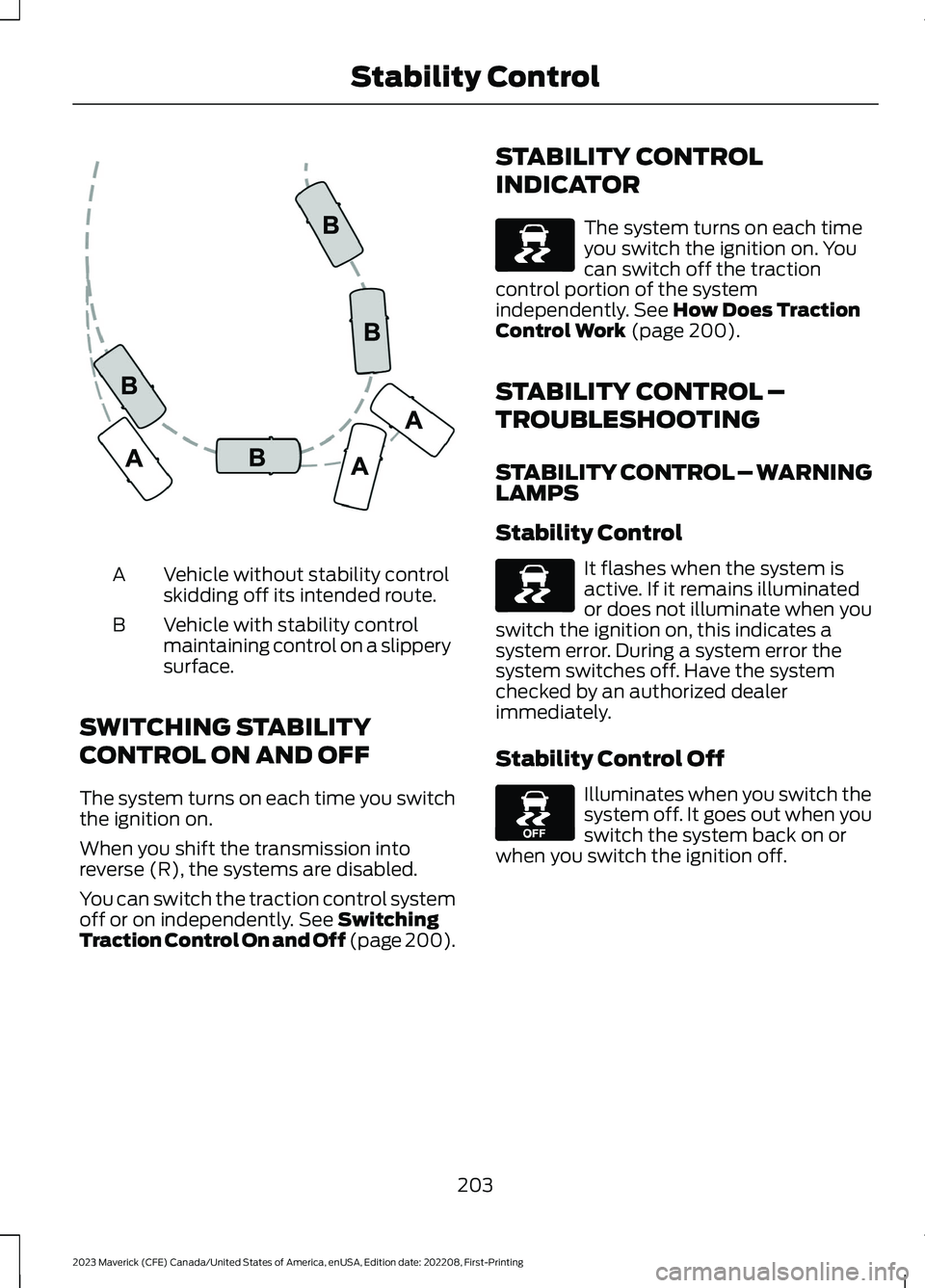
Vehicle without stability controlskidding off its intended route.A
Vehicle with stability controlmaintaining control on a slipperysurface.
B
SWITCHING STABILITY
CONTROL ON AND OFF
The system turns on each time you switchthe ignition on.
When you shift the transmission intoreverse (R), the systems are disabled.
You can switch the traction control systemoff or on independently. See SwitchingTraction Control On and Off (page 200).
STABILITY CONTROL
INDICATOR
The system turns on each timeyou switch the ignition on. Youcan switch off the tractioncontrol portion of the systemindependently. See How Does TractionControl Work (page 200).
STABILITY CONTROL –
TROUBLESHOOTING
STABILITY CONTROL – WARNINGLAMPS
Stability Control
It flashes when the system isactive. If it remains illuminatedor does not illuminate when youswitch the ignition on, this indicates asystem error. During a system error thesystem switches off. Have the systemchecked by an authorized dealerimmediately.
Stability Control Off
Illuminates when you switch thesystem off. It goes out when youswitch the system back on orwhen you switch the ignition off.
203
2023 Maverick (CFE) Canada/United States of America, enUSA, Edition date: 202208, First-PrintingStability ControlE72903 E138639 E138639 E130458
Page 208 of 556
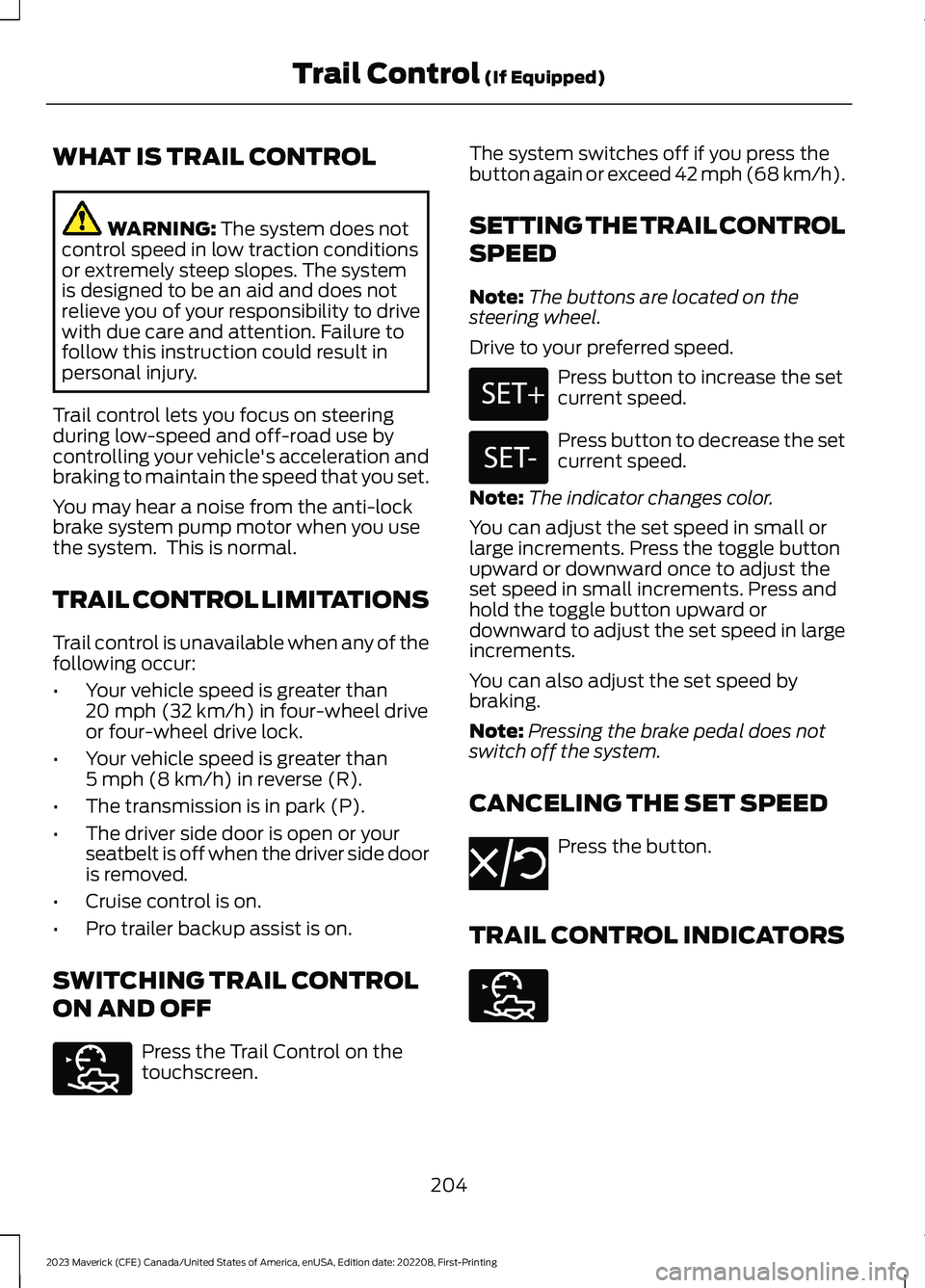
WHAT IS TRAIL CONTROL
WARNING: The system does notcontrol speed in low traction conditionsor extremely steep slopes. The systemis designed to be an aid and does notrelieve you of your responsibility to drivewith due care and attention. Failure tofollow this instruction could result inpersonal injury.
Trail control lets you focus on steeringduring low-speed and off-road use bycontrolling your vehicle's acceleration andbraking to maintain the speed that you set.
You may hear a noise from the anti-lockbrake system pump motor when you usethe system. This is normal.
TRAIL CONTROL LIMITATIONS
Trail control is unavailable when any of thefollowing occur:
•Your vehicle speed is greater than20 mph (32 km/h) in four-wheel driveor four-wheel drive lock.
•Your vehicle speed is greater than5 mph (8 km/h) in reverse (R).
•The transmission is in park (P).
•The driver side door is open or yourseatbelt is off when the driver side dooris removed.
•Cruise control is on.
•Pro trailer backup assist is on.
SWITCHING TRAIL CONTROL
ON AND OFF
Press the Trail Control on thetouchscreen.
The system switches off if you press thebutton again or exceed 42 mph (68 km/h).
SETTING THE TRAIL CONTROL
SPEED
Note:The buttons are located on thesteering wheel.
Drive to your preferred speed.
Press button to increase the setcurrent speed.
Press button to decrease the setcurrent speed.
Note:The indicator changes color.
You can adjust the set speed in small orlarge increments. Press the toggle buttonupward or downward once to adjust theset speed in small increments. Press andhold the toggle button upward ordownward to adjust the set speed in largeincrements.
You can also adjust the set speed bybraking.
Note:Pressing the brake pedal does notswitch off the system.
CANCELING THE SET SPEED
Press the button.
TRAIL CONTROL INDICATORS
204
2023 Maverick (CFE) Canada/United States of America, enUSA, Edition date: 202208, First-PrintingTrail Control (If Equipped)E272858 E246884 E246885 E350925 E272858
Page 210 of 556
WHAT IS HILL DESCENT
CONTROL
Hill descent control allows the driver to setand maintain vehicle speed whiledescending steep slopes in various surfaceconditions.
HOW DOES HILL DESCENT
CONTROL WORK
Hill descent control can maintain vehiclespeeds on downhill slopes between2–20 mph (3–32 km/h). Above 20 mph(32 km/h), the system remains on but thedescent speed cannot be set ormaintained.
Note:The system does not function below2 mph (3 km/h).
The system requires a cool down intervalafter a period of sustained use. Hill descentcontrol provides a warning in the messagecenter when the system is about todisengage for cooling. At this time,manually apply the brakes as needed tomaintain descent speed.
Note:The amount of time that the systemcan remain active before cooling varies withconditions.
HILL DESCENT CONTROL
PRECAUTIONS
WARNING: The system does notcontrol speed in low traction conditionsor extremely steep slopes. The systemis designed to be an aid and does notrelieve you of your responsibility to drivewith due care and attention. Failure tofollow this instruction could result inpersonal injury.
WARNING: Hill descent controlcannot control descent in all surfaceconditions and circumstances, such asice or extremely steep grades. Hilldescent control is a driver assist systemand cannot substitute for good judgmentby the driver. Failure to do so may resultin loss of vehicle control, crash or seriousinjury.
WARNING: The system does notreplace the parking brake. When youleave your vehicle, always apply theparking brake and shift the transmissioninto park (P) for automatic transmissionor first gear for manual transmission.
SWITCHING HILL DESCENT
CONTROL ON AND OFF
Press the button on the centerconsole. The indicatorilluminates when the system isactive.
SETTING THE HILL DESCENT
SPEED
To increase or decrease the descent speed,press the accelerator or brake pedal. Onceyou reach the preferred speed remove yourfeet from the pedals.
HILL DESCENT CONTROL
INDICATOR
Illuminates when you switch hilldescent control on.
206
2023 Maverick (CFE) Canada/United States of America, enUSA, Edition date: 202208, First-PrintingHill Descent Control (If Equipped)E163171 E163171
Page 211 of 556
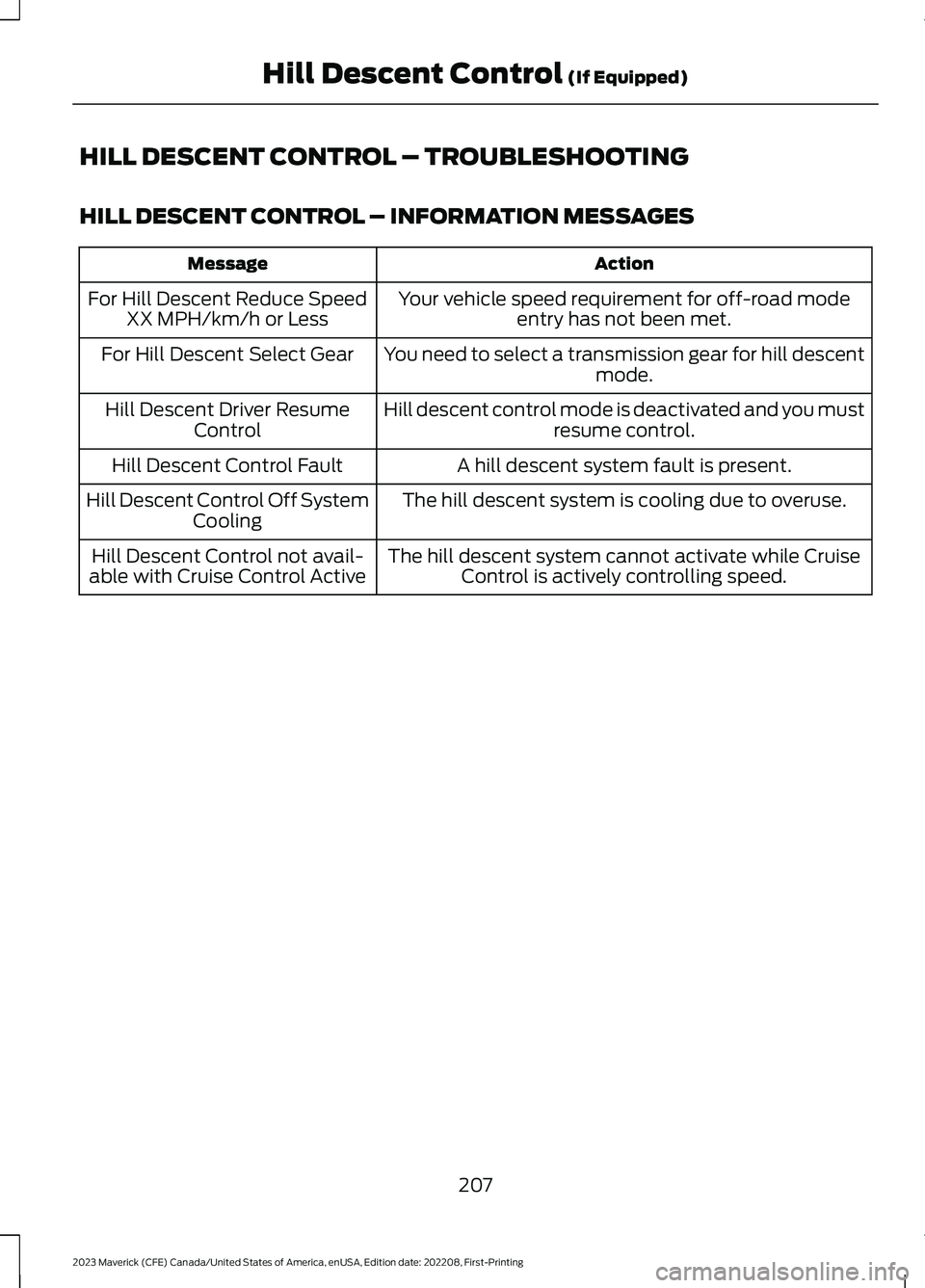
HILL DESCENT CONTROL – TROUBLESHOOTING
HILL DESCENT CONTROL – INFORMATION MESSAGES
ActionMessage
Your vehicle speed requirement for off-road modeentry has not been met.For Hill Descent Reduce SpeedXX MPH/km/h or Less
You need to select a transmission gear for hill descentmode.For Hill Descent Select Gear
Hill descent control mode is deactivated and you mustresume control.Hill Descent Driver ResumeControl
A hill descent system fault is present.Hill Descent Control Fault
The hill descent system is cooling due to overuse.Hill Descent Control Off SystemCooling
The hill descent system cannot activate while CruiseControl is actively controlling speed.Hill Descent Control not avail-able with Cruise Control Active
207
2023 Maverick (CFE) Canada/United States of America, enUSA, Edition date: 202208, First-PrintingHill Descent Control (If Equipped)