2023 FORD MAVERICK light
[x] Cancel search: lightPage 57 of 556
WARNING: Keep the areas in frontof the airbags free from obstruction. Donot affix anything to or over the airbagcovers. Objects could become projectilesduring airbag deployment. Failure tofollow this instruction could result inpersonal injury or death.
WARNING: To reduce risk of injury,do not obstruct or place objects in thedeployment path of the airbag.
WARNING: Do not place arearward facing child restraint in front ofan active airbag. Failure to follow thisinstruction could result in personal injuryor death.
WARNING: Do not attempt toservice, repair, or modify thesupplementary restraint system orassociated components. Failure tofollow this instruction could result inpersonal injury or death.
WARNING: Several airbag systemcomponents get hot after inflation. Toreduce the risk of injury, do not touchthem after inflation.
WARNING: If a supplementaryrestraint system component hasdeployed, it will not function again. Havethe system and associated componentsinspected as soon as possible. Failure tofollow this instruction could result inpersonal injury or death.
PROPERLY ADJUSTING THE
DRIVER AND FRONT
PASSENGER SEATS
WARNING: National HighwayTraffic Safety Administration (NHTSA)recommends a minimum distance of atleast 10 in (25 cm) between anoccupant's chest and the driver airbagmodule.
To properly position yourself away fromthe airbag:
•Move your seat to the rear as far as youcan while still reaching the pedalscomfortably.
•Recline the seat slightly one or twodegrees from the upright position.
After all occupants have adjusted theirseats and put on seatbelts, it is veryimportant that they continue to sitproperly. Properly seated occupants situpright, lean against the seat backrest, andcenter themselves on the seat cushion,with their feet comfortably extended onthe floor. Sitting improperly can increasethe chance of injury in a crash event. Forexample, if an occupant slouches, liesdown, turns sideways, sits forward, leansforward or sideways, or puts one or bothfeet up, the chance of injury during a crashgreatly increases.
CHILDREN AND AIRBAGS
WARNING: Do not place arearward facing child restraint in front ofan active airbag. Failure to follow thisinstruction could result in personal injuryor death.
53
2023 Maverick (CFE) Canada/United States of America, enUSA, Edition date: 202208, First-PrintingAirbags
Page 59 of 556

•When the front passenger sensingsystem enables the front passengerfrontal airbag, the passenger airbagstatus indicator illuminates the onlamp.
If a person of adult size is sitting in the frontpassenger seat, but the passenger airbagstatus indicator off lamp is illuminated, itis possible that the person is not sittingproperly in the seat. If this happens:
•Switch your vehicle off and ask theperson to place the seat backrest in anupright position.
•Have the person sit upright in the seat,centered on the seat cushion, with theperson's legs comfortably extended.
•Restart your vehicle and have theperson remain in this position for abouttwo minutes. This allows the systemto detect that person and enable thepassenger frontal airbag.
•If the indicator off lamp remainsilluminated even after this, advise theperson to ride in the rear seat.
After all occupants have adjusted theirseats and put on seatbelts, it is veryimportant that they continue to sit upright,leaning against the seat backrest, andcentered on the seat cushion, with theirfeet comfortably extended on the floor.
Sitting improperly can increase the chanceof injury in a crash event. For example, ifan occupant slouches, lies down, turnssideways, sits forward, leans forward orsideways, or puts one or both feet up, thechance of injury during a crash greatlyincreases.
If you think that the state of the passengerairbag status indicator lamp is incorrect,check the following:
•Objects lodged underneath the seat.
•Objects between the seat cushion andthe center console.
•Objects hanging off the seat backrest.
•Objects stowed in the seat backrestmap pocket.
•Objects placed on the occupant's lap.
•Cargo interference with the seat
•Other passengers pushing or pulling onthe seat.
•Rear passenger feet and knees restingor pushing on the seat.
The listed conditions could cause theweight of a properly seated occupant tobe incorrectly interpreted by the frontpassenger sensing system. The person inthe front passenger seat could appearheavier or lighter due to the conditionslisted.
Make sure the front passengersensing system is operatingproperly. See Crash Sensorsand Airbag Indicator (page 57).
If the airbag readiness light is on, do thefollowing:
•Pull your vehicle over.
•Switch your vehicle off.
•Check for any objects lodgedunderneath the front passenger seator cargo interfering with the seat.
•Remove the obstruction if found.
•Restart your vehicle.
•Wait at least two minutes and verifythat the airbag readiness light in theinstrument cluster is no longerilluminated.
•If the airbag readiness light in theinstrument cluster remains illuminated,there may be a problem due to thefront passenger sensing system.
Do not attempt to repair or service thesystem. Take your vehicle in for serviceimmediately.
55
2023 Maverick (CFE) Canada/United States of America, enUSA, Edition date: 202208, First-PrintingAirbagsE67017
Page 61 of 556

CRASH SENSORS AND
AIRBAG INDICATOR
WARNING: Modifying or addingequipment to the front of your vehiclecould affect the performance of theairbag system, increasing the risk ofinjury. This includes the hood, bumpersystem, frame, front body structure, towhooks, hood pins, push bar andsnowplows.
Your vehicle has a collection of crash andoccupant sensors. These sensors provideinformation to the restraints controlmodule which deploys the following:
•Seatbelt pretensioners.
•Driver airbag.
•Passenger airbag.
•Knee airbag(s).
•Seat mounted side airbags.
•Safety Canopy.
Based on the type of crash, the restraintscontrol module deploys the appropriatesafety devices.
The restraints control module alsomonitors the readiness of the above safetydevices plus the crash and occupantsensors. The safety system displays anindicator in the instrument cluster when itis ready. The system sends out a tone if itis not working. The airbag does not requireroutine maintenance.
One or more of the following indicates adifficulty with the system:
The readiness light does notimmediately illuminate after youswitch the ignition on.
•The readiness light either flashes orstays on.
•You hear a series of five beeps. Thetone pattern periodically repeats untilthe problem, the light or both arerepaired.
If any of these things happen, evenintermittently, have the supplementalrestraint system serviced at an authorizeddealer immediately. Unless serviced, thesystem may not function properly in theevent of a crash.
The fact that the seatbelt pretensionersor front airbags did not activate for bothfront seat occupants in a crash does notmean that something is wrong with thesystem. Rather, it means the restraintscontrol module determined the accidentconditions (crash severity, seatbelt usage)were not appropriate to activate thesesafety devices.
•The design of the front airbags is toactivate only in frontal and near-frontalcrashes (not rollovers, side impacts orrear impacts) unless the crash causessufficient frontal deceleration.
•The design of the front seatbeltpretensioners is to activate in frontal,near-frontal and side crashes, and inrollovers. The design of the rearseatbelt pretensioners is to activate infrontal crashes, side crashes and inrollovers.
•The design of the knee airbag(s) is todeploy based on crash severity andoccupant conditions.
57
2023 Maverick (CFE) Canada/United States of America, enUSA, Edition date: 202208, First-PrintingAirbagsE67017
Page 84 of 556
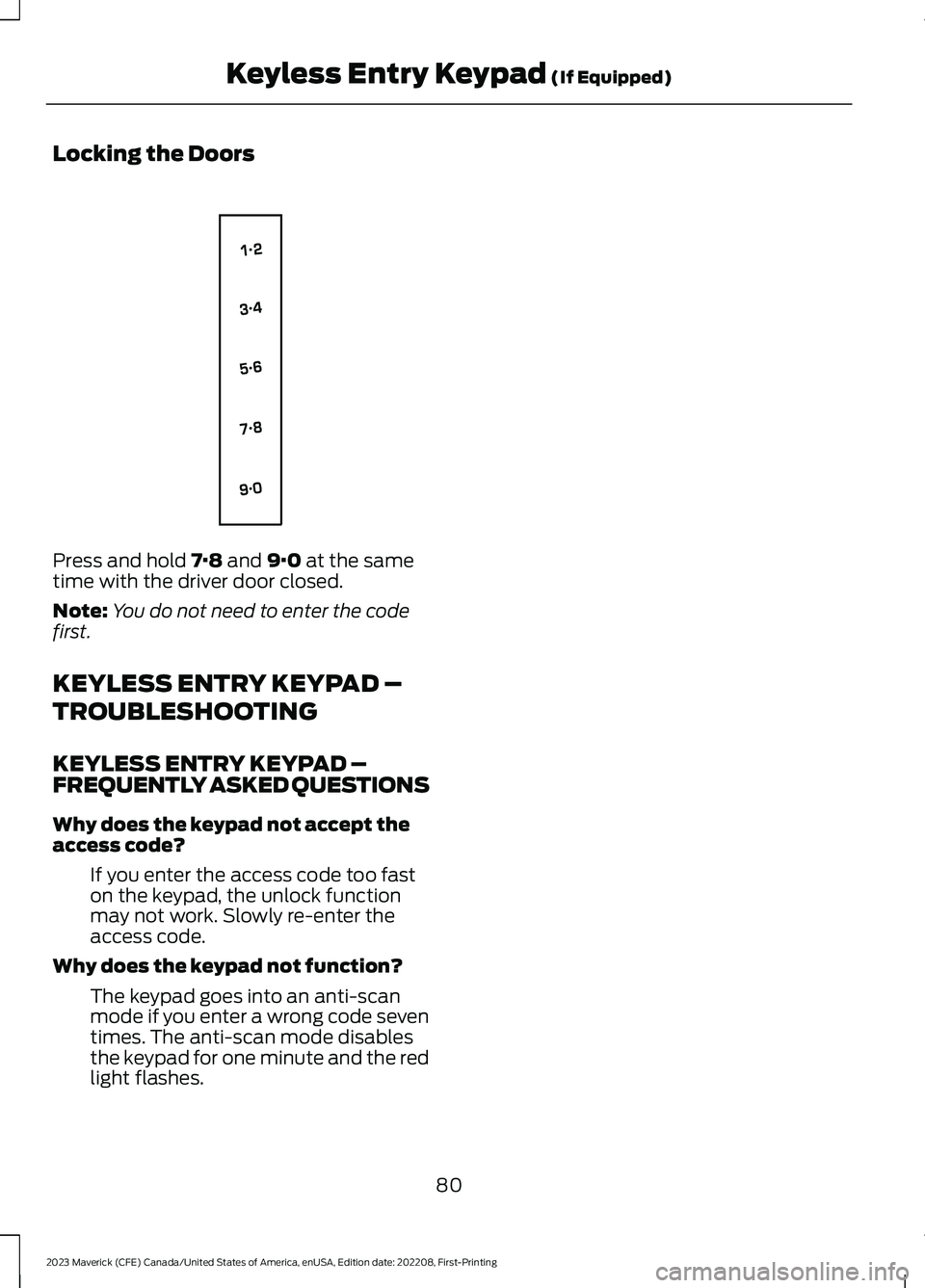
Locking the Doors
Press and hold 7·8 and 9·0 at the sametime with the driver door closed.
Note:You do not need to enter the codefirst.
KEYLESS ENTRY KEYPAD –
TROUBLESHOOTING
KEYLESS ENTRY KEYPAD –FREQUENTLY ASKED QUESTIONS
Why does the keypad not accept theaccess code?
If you enter the access code too faston the keypad, the unlock functionmay not work. Slowly re-enter theaccess code.
Why does the keypad not function?
The keypad goes into an anti-scanmode if you enter a wrong code seventimes. The anti-scan mode disablesthe keypad for one minute and the redlight flashes.
80
2023 Maverick (CFE) Canada/United States of America, enUSA, Edition date: 202208, First-PrintingKeyless Entry Keypad (If Equipped)E138637
Page 85 of 556
TAILGATE PRECAUTIONS
WARNING: It is extremelydangerous to ride in a cargo area, insideor outside of a vehicle. In a crash, peopleriding in these areas are more likely to beseriously injured or killed. Do not allowpeople to ride in any area of your vehiclethat is not equipped with seats andseatbelts. Make sure everyone in yourvehicle is in a seat and properly using aseatbelt. Failure to follow this warningcould result in serious personal injury ordeath.
OPENING THE TAILGATE
OPENING THE TAILGATE FROMOUTSIDE YOUR VEHICLE
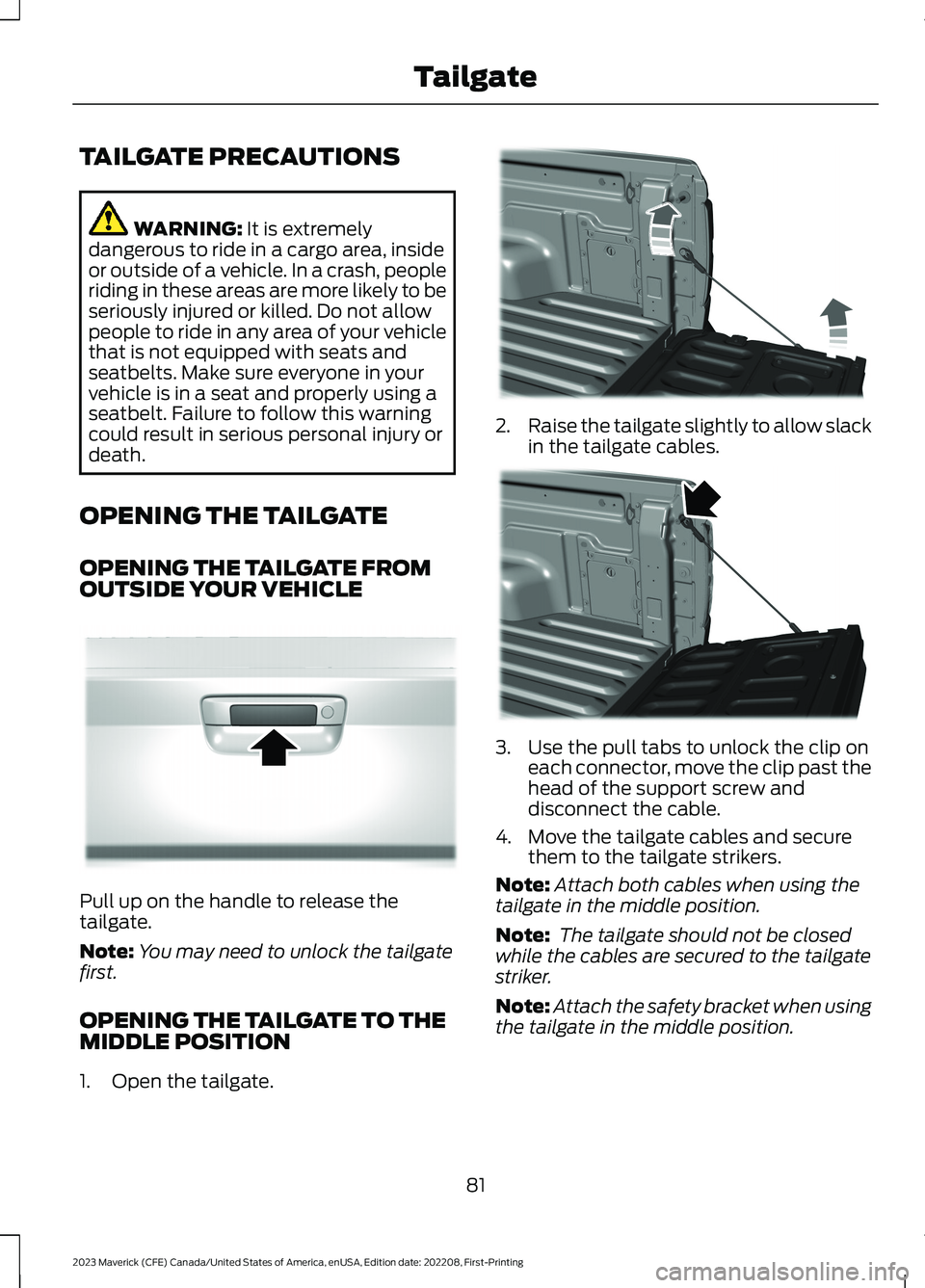
Pull up on the handle to release thetailgate.
Note:You may need to unlock the tailgatefirst.
OPENING THE TAILGATE TO THEMIDDLE POSITION
1.Open the tailgate.
2.Raise the tailgate slightly to allow slackin the tailgate cables.
3.Use the pull tabs to unlock the clip oneach connector, move the clip past thehead of the support screw anddisconnect the cable.
4.Move the tailgate cables and securethem to the tailgate strikers.
Note:Attach both cables when using thetailgate in the middle position.
Note: The tailgate should not be closedwhile the cables are secured to the tailgatestriker.
Note:Attach the safety bracket when usingthe tailgate in the middle position.
81
2023 Maverick (CFE) Canada/United States of America, enUSA, Edition date: 202208, First-PrintingTailgateE348034 E351595 E351596
Page 94 of 556

2.Lift the wiper arms away from thewindshield.
Note:Do not hold the wiper blade to lift thewiper arm.
3.Press the wiper blade locking buttonstogether.
Note:Make sure that the wiper arm doesnot spring back against the glass when thewiper blade is not attached.
4.Slightly rotate the wiper blade.
5.Replace the wiper blade.
Note:Make sure that the wiper blade locksinto place.
6.Lower the wiper arms to thewindshield.
7.Switch the ignition on.
Note:Do not switch the ignition on or turnon the accessory mode when the wiperblades are off the windshield.
8.Cycle the wipers once.
WASHERS
WASHER PRECAUTIONS
WARNING: If you operate yourvehicle in temperatures below 41°F(5°C), use washer fluid with antifreezeprotection. Failure to use washer fluidwith antifreeze protection in coldweather could result in impairedwindshield vision and increase the riskof injury or accident.
Do not operate the washers when thewasher reservoir is empty. This could causethe washer pump to overheat.
Keep the outside of the windshield clean.The rain sensor is very sensitive and thewipers may operate if dirt, mist or insectshit the windshield.
90
2023 Maverick (CFE) Canada/United States of America, enUSA, Edition date: 202208, First-PrintingWipers and WashersE367897 E129990
Page 96 of 556
EXTERIOR LIGHTING
CONTROL
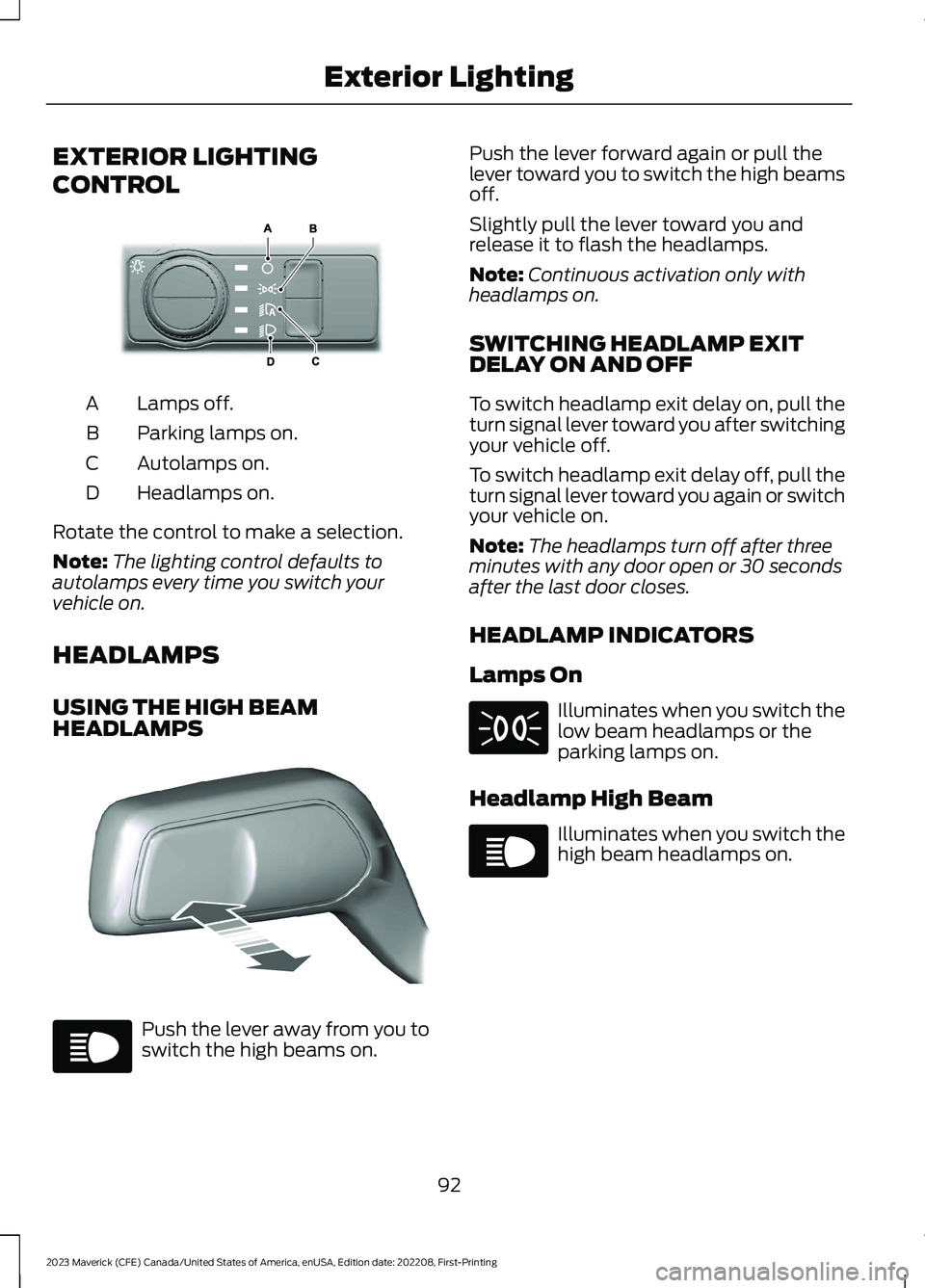
Lamps off.A
Parking lamps on.B
Autolamps on.C
Headlamps on.D
Rotate the control to make a selection.
Note:The lighting control defaults toautolamps every time you switch yourvehicle on.
HEADLAMPS
USING THE HIGH BEAMHEADLAMPS
Push the lever away from you toswitch the high beams on.
Push the lever forward again or pull thelever toward you to switch the high beamsoff.
Slightly pull the lever toward you andrelease it to flash the headlamps.
Note:Continuous activation only withheadlamps on.
SWITCHING HEADLAMP EXITDELAY ON AND OFF
To switch headlamp exit delay on, pull theturn signal lever toward you after switchingyour vehicle off.
To switch headlamp exit delay off, pull theturn signal lever toward you again or switchyour vehicle on.
Note:The headlamps turn off after threeminutes with any door open or 30 secondsafter the last door closes.
HEADLAMP INDICATORS
Lamps On
Illuminates when you switch thelow beam headlamps or theparking lamps on.
Headlamp High Beam
Illuminates when you switch thehigh beam headlamps on.
92
2023 Maverick (CFE) Canada/United States of America, enUSA, Edition date: 202208, First-PrintingExterior LightingE327629 E328253 E67019 E71341 E67019
Page 97 of 556
HEADLAMPS –
TROUBLESHOOTING
HEADLAMPS – FREQUENTLYASKED QUESTIONS
Why is there condensation in theheadlamps?
•Headlamps have vents toaccommodate normal changes in airpressure. Condensation can be anatural by-product of this design.When moist air enters the lampassembly through the vents, there is apossibility that condensation can occurwhen the temperature is cold. Whennormal condensation occurs, a finemist can form on the interior of thelens. The fine mist eventually clearsand exits through the vents duringnormal operation.
How much condensation isacceptable?
•The presence of a fine mist, forexample no streaks, drip marks or largedroplets. A fine mist covers less than50% of the lens.
How long may it take for theacceptable condensation to becleared?
•Clearing time may take as long as 48hours under dry weather conditions.
How much condensation isunacceptable?
•A water puddle inside the lamp.Streaks, drip marks or large dropletspresent on the interior of the lens.
What should I do if unacceptablecondensation is present?
•Have your vehicle checked as soon aspossible.
Why do my headlamps turn offwhen I have them switched onwhen I switch my vehicle off?
•The battery saver turns the headlampsoff after a short period of time after youswitch your vehicle off.
AUTOLAMPS
WHAT ARE AUTOLAMPS
WARNING: The system does notrelieve you of your responsibility to drivewith due care and attention. You mayneed to override the system if it does notturn the headlamps on in low visibilityconditions, for example daytime fog.
Autolamps turn the headlamps on in lowlight situations or when the windshieldwipers operate.
AUTOLAMP SETTINGS
1.Using the instrument cluster controlson the steering wheel, select Settings.
2.Select Vehicle.
3.Select Lighting.
4.Select Autolamp Delay.
5.Select a setting and press the OKbutton.
93
2023 Maverick (CFE) Canada/United States of America, enUSA, Edition date: 202208, First-PrintingExterior Lighting