2023 FORD F150 remote control
[x] Cancel search: remote controlPage 212 of 786

GARAGE DOOR OPENER
INTRODUCTION
HomeLink Wireless ControlSystem
The universal garage door opener replacesthe common handheld garage door openerwith a three-button transmitter integratedinto the driver-side sun visor.
How Does The Garage Door OpenerWork
The system includes two primary features,a garage door opener and a platform forremote activation of devices within thehome. You can program garage doors aswell as entry gate operators, securitysystems, entry door locks and home oroffice lighting.
Additional assistance can be found onlineat www.homelink.com/Ford or by callingthe toll-free help line at 1-800-355-3515.
Garage Door Opener Limitations
Canadian radio-frequency laws requiretransmitter signals to time out, or quit,after several seconds – which may not belong enough for HomeLink to pick up thesignal. U.S. gate operators time-out in thesame manner.
GARAGE DOOR OPENER
PRECAUTIONS AND
FREQUENCIES
Garage Door Opener Precautions
WARNING: Do not use the systemwith any garage door opener that doesnot have the safety stop and reversefeature as required by U.S. FederalSafety Standards (this includes anygarage door opener manufacturedbefore April 1, 1982). A garage dooropener which cannot detect an object,signaling the door to stop and reverse,does not meet current federal safetystandards. Using a garage door openerwithout these features increases the riskof serious injury or death.
FCC and RSS-210 Industry CanadaCompliance
WARNING: Changes ormodifications not expressively approvedby the party responsible for compliancecould void the user's authority to operatethe equipment. The term "IC:" before theradio certification number only signifiesthat Industry Canada technicalspecifications were met.
This device complies with Part 15 of theFCC Rules and with RSS-210 of IndustryCanada. Operation is subject to thefollowing two conditions: (1) this devicemay not cause harmful interference, and(2) this device must accept anyinterference received, includinginterference that may cause undesiredoperation.
208
2023 F-150 (TFD) Canada/United States of America, enUSA, Edition date: 202206, DOMGarage Door Opener (If Equipped)E188211
Page 214 of 786
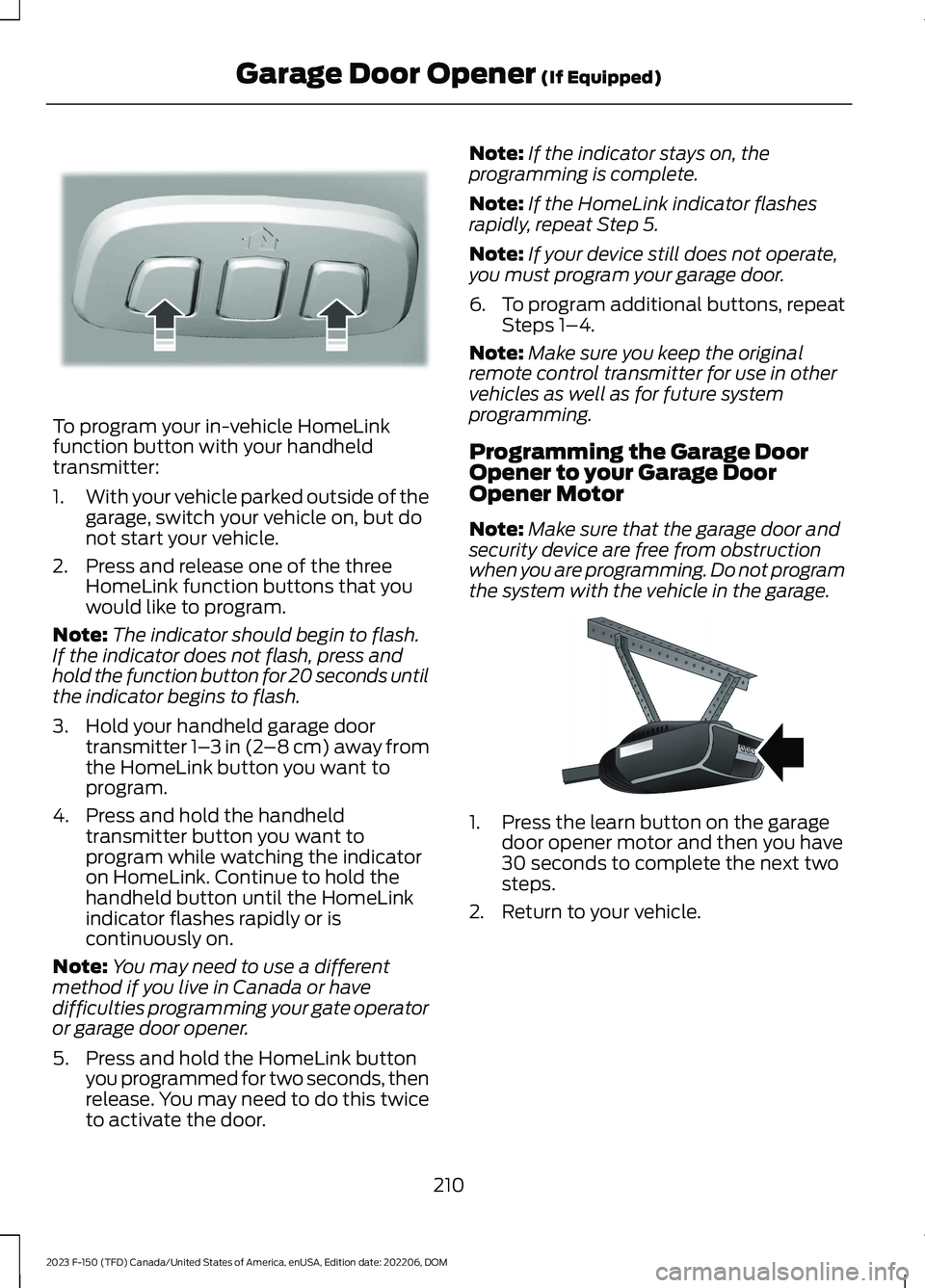
To program your in-vehicle HomeLinkfunction button with your handheldtransmitter:
1.With your vehicle parked outside of thegarage, switch your vehicle on, but donot start your vehicle.
2.Press and release one of the threeHomeLink function buttons that youwould like to program.
Note:The indicator should begin to flash.If the indicator does not flash, press andhold the function button for 20 seconds untilthe indicator begins to flash.
3.Hold your handheld garage doortransmitter 1–3 in (2–8 cm) away fromthe HomeLink button you want toprogram.
4.Press and hold the handheldtransmitter button you want toprogram while watching the indicatoron HomeLink. Continue to hold thehandheld button until the HomeLinkindicator flashes rapidly or iscontinuously on.
Note:You may need to use a differentmethod if you live in Canada or havedifficulties programming your gate operatoror garage door opener.
5.Press and hold the HomeLink buttonyou programmed for two seconds, thenrelease. You may need to do this twiceto activate the door.
Note:If the indicator stays on, theprogramming is complete.
Note:If the HomeLink indicator flashesrapidly, repeat Step 5.
Note:If your device still does not operate,you must program your garage door.
6.To program additional buttons, repeatSteps 1–4.
Note:Make sure you keep the originalremote control transmitter for use in othervehicles as well as for future systemprogramming.
Programming the Garage DoorOpener to your Garage DoorOpener Motor
Note:Make sure that the garage door andsecurity device are free from obstructionwhen you are programming. Do not programthe system with the vehicle in the garage.
1.Press the learn button on the garagedoor opener motor and then you have30 seconds to complete the next twosteps.
2.Return to your vehicle.
210
2023 F-150 (TFD) Canada/United States of America, enUSA, Edition date: 202206, DOMGarage Door Opener (If Equipped)E188213 E142659
Page 232 of 786
WHAT IS THE WIRELESS
ACCESSORY CHARGER
The wireless accessory charger allows youto charge one compatible Qi wirelesscharging device on the charging area.
WIRELESS ACCESSORY
CHARGER PRECAUTIONS
WARNING: Wireless chargingdevices can affect the operation ofimplanted medical devices, includingcardiac pacemakers. If you have anyimplanted medical devices, werecommend that you consult with yourphysician.
Keep the charging area clean and removeforeign objects prior to charging a device.
Do not place items with a magnetic stripor radio-frequency identification chip, forexample passports, parking tickets,transportation passes or credit cards, nearthe charging area when charging a device.Damage could occur to the magnetic stripor radio-frequency identification chip.
Do not place metal objects, for exampleremote controls, coins and candywrappers, on or near the charging areawhen charging a device. Metal objects mayheat up and degrade the chargingperformance, in addition to causinginterruptions in charging.
Charging could be interrupted, degraded,or could stop if any of the following occur:
•The system detects a foreign object.
•The device is misaligned on thecharging area.
•The device moves on the activecharging area when the vehicle is inmotion.
•The vehicle ambient temperature is toohigh.
•You attempt to charge a non-Qicompatible device on the wirelesscharger.
Note:During charging, the device and thecharger could heat up, this is normal. If thebattery gets hotter than usual, the devicemay stop charging.
LOCATING THE WIRELESS
ACCESSORY CHARGER
The charging area is on thecenter console or in the mediabin below the instrument panel.
CHARGING A WIRELESS
DEVICE
Place the device on the center of thecharging surface with the charging sidedown. The charging stops after your devicereaches a full charge.
You can use the charger when the vehicleis in accessory mode, when the vehicle isrunning, or when SYNC is on.
Displays on the status bar whenwireless charging is in progress.
Note:The charging performance may beaffected if your device is in a case. It may benecessary to remove the case to wirelesslycharge your device.
Note:Software and firmware updates mayaffect device compatibility, including theuse of unofficial software or firmware. Youshould verify charging functionality with yourspecific devices in-vehicle.
228
2023 F-150 (TFD) Canada/United States of America, enUSA, Edition date: 202206, DOMWireless Accessory Charger (If Equipped)E297549 E263583
Page 234 of 786
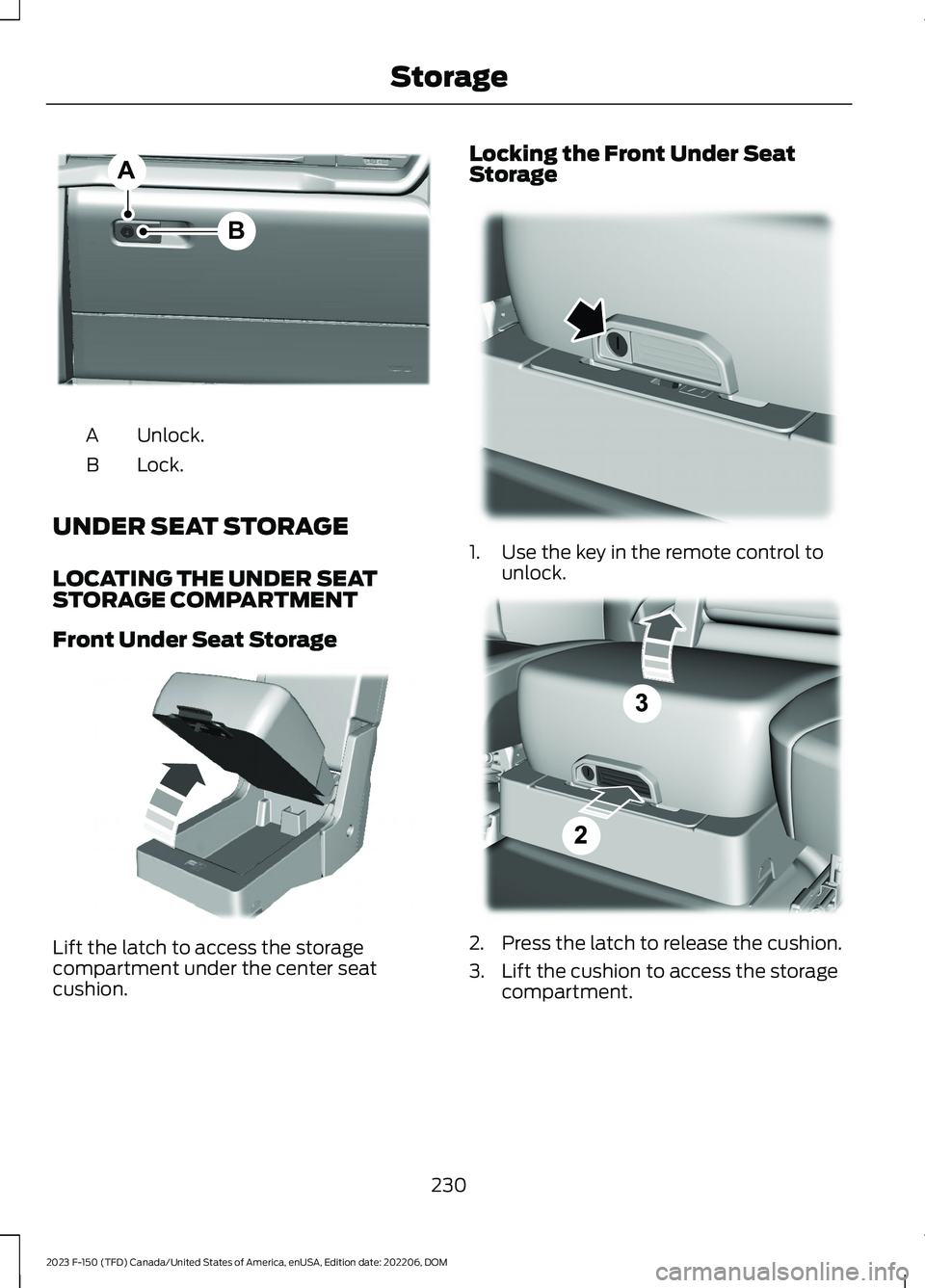
Unlock.A
Lock.B
UNDER SEAT STORAGE
LOCATING THE UNDER SEATSTORAGE COMPARTMENT
Front Under Seat Storage
Lift the latch to access the storagecompartment under the center seatcushion.
Locking the Front Under SeatStorage
1.Use the key in the remote control tounlock.
2.Press the latch to release the cushion.
3.Lift the cushion to access the storagecompartment.
230
2023 F-150 (TFD) Canada/United States of America, enUSA, Edition date: 202206, DOMStorageBAE351063 E306120 E224738 E223578
Page 238 of 786

PUSH BUTTON IGNITION
SWITCH (IF EQUIPPED)
Switching the Ignition Off
When the ignition is on or in accessorymode, press the push button ignitionswitch once without your foot on the brakepedal.
Switching the Ignition toAccessory Mode
When the ignition is off, press the pushbutton ignition switch once without yourfoot on the brake pedal.
All electrical circuits and accessories areoperational and the warning lamps andindicators illuminate.
Note:Your vehicle has a battery saverfeature that shuts your vehicle off when itdetects a certain amount of battery drain,or after approximately 30 minutes ofinactivity in accessory mode.
Note:The system may not function if theremote control is close to metal objects orelectronic devices, for example keys or a cellphone.
Note:You need a valid key inside yourvehicle to switch the ignition on and startthe engine.
STARTING THE ENGINE
STARTING A GASOLINE ENGINE -VEHICLES WITHOUT: PUSHBUTTON START
Before starting your vehicle, check thefollowing:
•Make sure that the headlamps andelectrical accessories are off.
•Make sure that the parking brake is on.
•Make sure that the transmission is inpark (P).
1.Fully press the brake pedal.
Note:Do not touch the accelerator pedal.
2.Turn the key to position III.
Note:The engine may continue crankingfor up to 15 seconds or until it starts.
Note:The engine takes longer to start atlower temperatures. It may crank for severalseconds when very cold.
STARTING A GASOLINE ENGINE -VEHICLES WITH: PUSH BUTTONSTART
Before starting your vehicle, check thefollowing:
•Make sure that the headlamps andelectrical accessories are off.
•Make sure that the parking brake is on.
•Make sure that the transmission is inpark (P).
1.Fully press the brake pedal.
Note:Do not touch the accelerator pedal.
234
2023 F-150 (TFD) Canada/United States of America, enUSA, Edition date: 202206, DOMStarting and Stopping the EngineE321258 E322354
Page 243 of 786
1.With your vehicle running and thetransmission in park (P), press thepolice idle button on the instrumentpanel. See Instrument ClusterIndicators (page 173). An indicatorlamp illuminates to confirm the systemis on.
2.Switch the ignition off and remove thekey.
When the system is on:
•The power window switches turn offand the windows remain in their currentstate.
Note:When the system is on, you can usethe key blade or the remote control to lockand unlock your vehicle.
Switching the System Off
•To disable Police Idle and keep theengine running, insert key and turn tothe run position.
•To disable Police Idle and turn theengine off, press the police idle buttonon the instrument panel.
Note:If you switch the system off beforeswitching the ignition to the run position,your vehicle shuts down.
AUTOMATIC ENGINE STOP -
VEHICLES WITH: KEYLESS
ENTRY AND PUSH BUTTON
START
WHAT IS AUTOMATIC ENGINESTOP
Automatic engine stop is a feature thatswitches the engine off if it has been idlingfor an extended period to help you savefuel.
HOW DOES AUTOMATIC ENGINESTOP WORK
Automatic engine stop turns the engineoff. The ignition also turns off in order tosave battery power. Before the engineshuts down, a message appears in theinformation display showing a timercounting down. If you do not intervenewithin 30 seconds, the engine shuts down.Another message appears in theinformation display to inform you that theengine has shut down in order to save fuel.Start your vehicle as you normally do.
SWITCHING AUTOMATIC ENGINESTOP ON AND OFF
1.Press Settings on the touchscreen.
2.Press Vehicle Settings.
3.Switch 30min Max Idle on or off.
Note:You cannot permanently switch offthe automatic shutdown. If you switch it off,it turns on each time you switch the ignitionon.
OVERRIDING AUTOMATIC ENGINESTOP
You can stop the engine shutdown, or resetthe timer, at any point before the30-second countdown has expired bydoing any of the following:
•Pressing the brake pedal or acceleratorpedal.
•Pressing the OK or RESET buttonduring the countdown.
Note: You cannot permanently switch offthe automatic engine shutdown feature.When you switch it off temporarily, it turnson at the next ignition cycle.
239
2023 F-150 (TFD) Canada/United States of America, enUSA, Edition date: 202206, DOMStarting and Stopping the Engine
Page 244 of 786
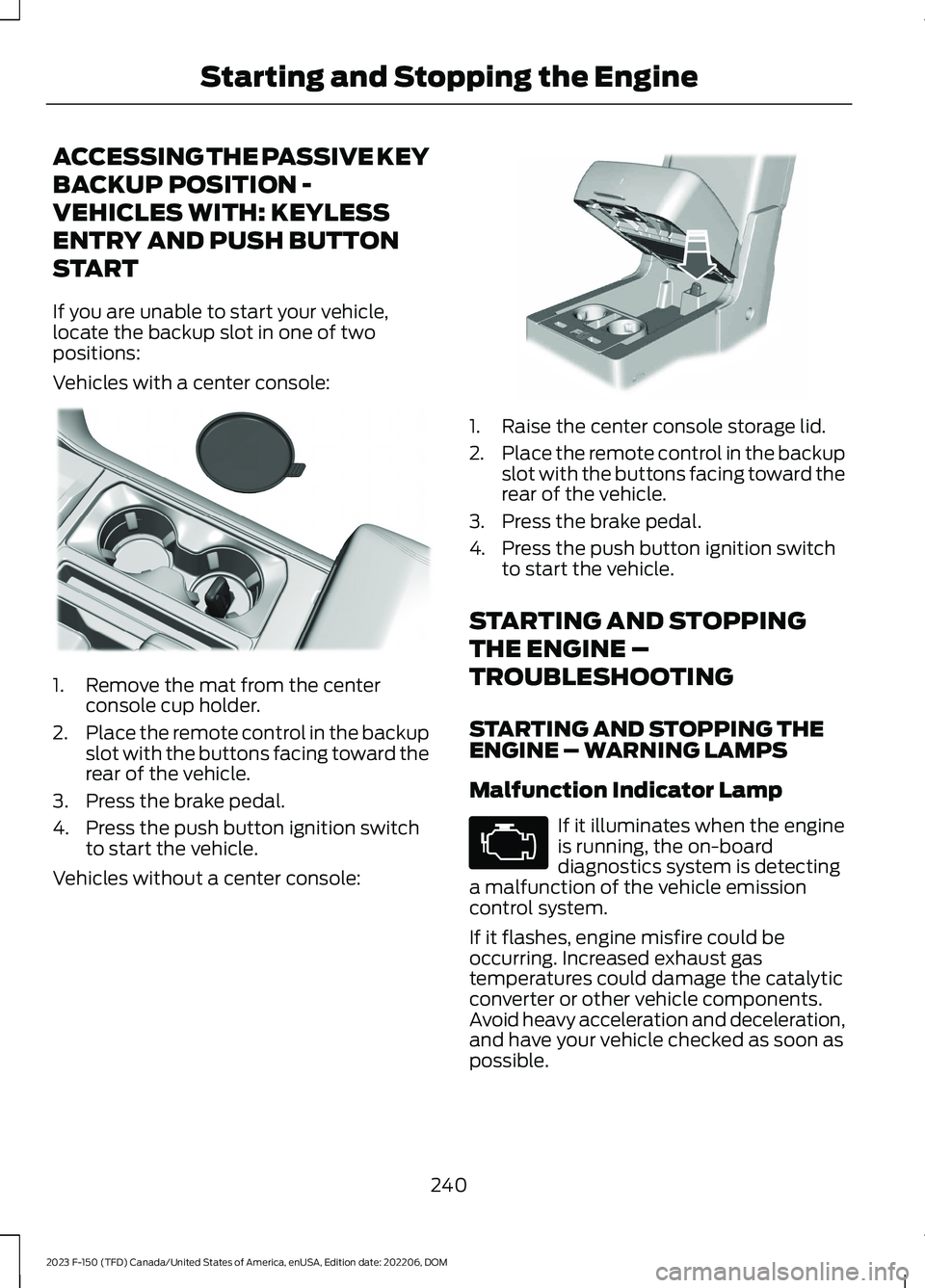
ACCESSING THE PASSIVE KEY
BACKUP POSITION -
VEHICLES WITH: KEYLESS
ENTRY AND PUSH BUTTON
START
If you are unable to start your vehicle,locate the backup slot in one of twopositions:
Vehicles with a center console:
1.Remove the mat from the centerconsole cup holder.
2.Place the remote control in the backupslot with the buttons facing toward therear of the vehicle.
3.Press the brake pedal.
4.Press the push button ignition switchto start the vehicle.
Vehicles without a center console:
1.Raise the center console storage lid.
2.Place the remote control in the backupslot with the buttons facing toward therear of the vehicle.
3.Press the brake pedal.
4.Press the push button ignition switchto start the vehicle.
STARTING AND STOPPING
THE ENGINE –
TROUBLESHOOTING
STARTING AND STOPPING THEENGINE – WARNING LAMPS
Malfunction Indicator Lamp
If it illuminates when the engineis running, the on-boarddiagnostics system is detectinga malfunction of the vehicle emissioncontrol system.
If it flashes, engine misfire could beoccurring. Increased exhaust gastemperatures could damage the catalyticconverter or other vehicle components.Avoid heavy acceleration and deceleration,and have your vehicle checked as soon aspossible.
240
2023 F-150 (TFD) Canada/United States of America, enUSA, Edition date: 202206, DOMStarting and Stopping the EngineE312216 E269950 E67028
Page 268 of 786

AUTOMATIC TRANSMISSION
PRECAUTIONS
WARNING: Apply the parkingbrake, shift into park (P), switch theignition off and remove the key beforeyou leave your vehicle. Failure to followthis instruction could result in personalinjury or death.
WARNING: When your vehicle isstationary, keep the brake pedal fullypressed when shifting gears. Failure tofollow this instruction could result inpersonal injury, death or propertydamage.
WARNING: Do not apply the brakepedal and accelerator pedalsimultaneously. Applying both pedalssimultaneously for more than a fewseconds will limit engine performance,which may result in difficulty maintainingspeed in traffic and could lead to seriousinjury.
AUTOMATIC TRANSMISSION
POSITIONS
PARK (P)
WARNING: Shift into park (P) onlywhen your vehicle is stationary.
In park (P) power is not transmitted to thedriven wheels.
Note:A tone sounds if you attempt to exityour vehicle without the transmission in park(P).
Note:Your vehicle may not shift out of park(P) if the vehicle battery has run out ofcharge.
Note:Your vehicle may not shift out of park(P) if a fuse is blown.
Note:Your vehicle may not shift out of park(P) unless the key or remote control is insideyour vehicle.
Note:The electronic parking brake couldapply when the selector is in park (P). SeeAutomatically Releasing the ElectricParking Brake (page 295).
Note:Your vehicle could shift into park (P)if you attempt to exit your vehicle withoutthe transmission in park (P). See How DoesAutomatic Return to Park (P) Work (page270).
Note:A tone could sound when you selectpark (P).
REVERSE (R)
WARNING: Shift into reverse (R)only when your vehicle is stationary.
In reverse (R) power is transmitted to thedriven wheels.
NEUTRAL (N)
WARNING: In neutral (N) yourvehicle is free to roll.
In neutral (N) power is not transmitted tothe driven wheels.
DRIVE (D)
In drive (D) power is transmitted to thedriven wheels.
264
2023 F-150 (TFD) Canada/United States of America, enUSA, Edition date: 202206, DOMAutomatic Transmission