2023 FORD F150 remote control
[x] Cancel search: remote controlPage 98 of 786
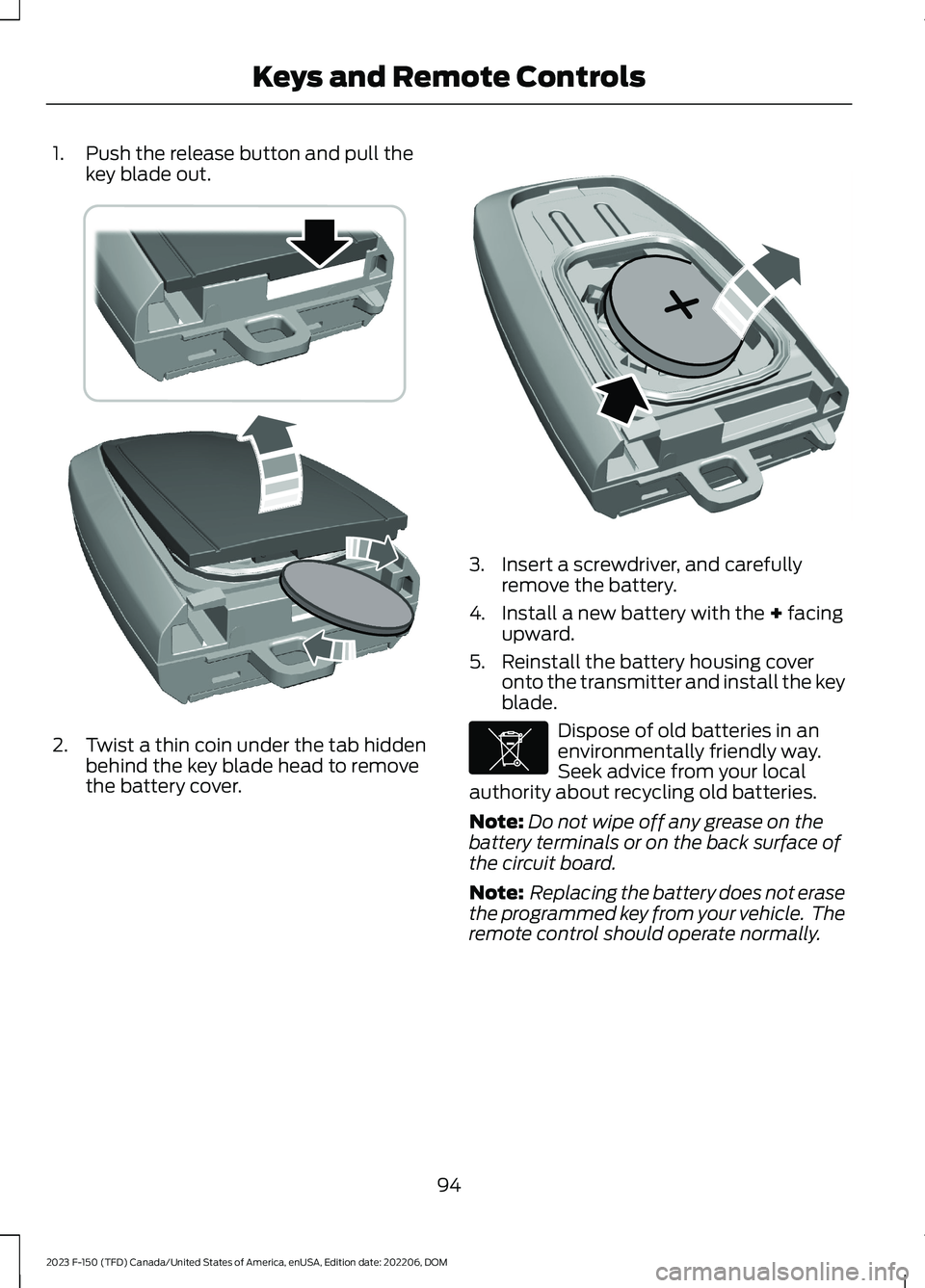
1.Push the release button and pull thekey blade out.
2.Twist a thin coin under the tab hiddenbehind the key blade head to removethe battery cover.
3.Insert a screwdriver, and carefullyremove the battery.
4.Install a new battery with the + facingupward.
5.Reinstall the battery housing coveronto the transmitter and install the keyblade.
Dispose of old batteries in anenvironmentally friendly way.Seek advice from your localauthority about recycling old batteries.
Note:Do not wipe off any grease on thebattery terminals or on the back surface ofthe circuit board.
Note: Replacing the battery does not erasethe programmed key from your vehicle. Theremote control should operate normally.
94
2023 F-150 (TFD) Canada/United States of America, enUSA, Edition date: 202206, DOMKeys and Remote ControlsE303824 E218402 E107998
Page 99 of 786
CHANGING THE REMOTE
CONTROL BATTERY -
VEHICLES WITH: FLIP KEY
WARNING: Keep batteries awayfrom children to prevent ingestion.Failure to follow this instruction couldresult in personal injury or death. Ifingested, immediately seek medicalattention.
WARNING: If the batterycompartment does not securely close,stop using the remote control andreplace it as soon as possible. In themeantime, keep the remote control awayfrom children. Failure to follow thisinstruction could result in personal injuryor death.
Battery Replacement Procedure
The remote control uses one coin-type3-volt lithium battery CR2032 orequivalent.
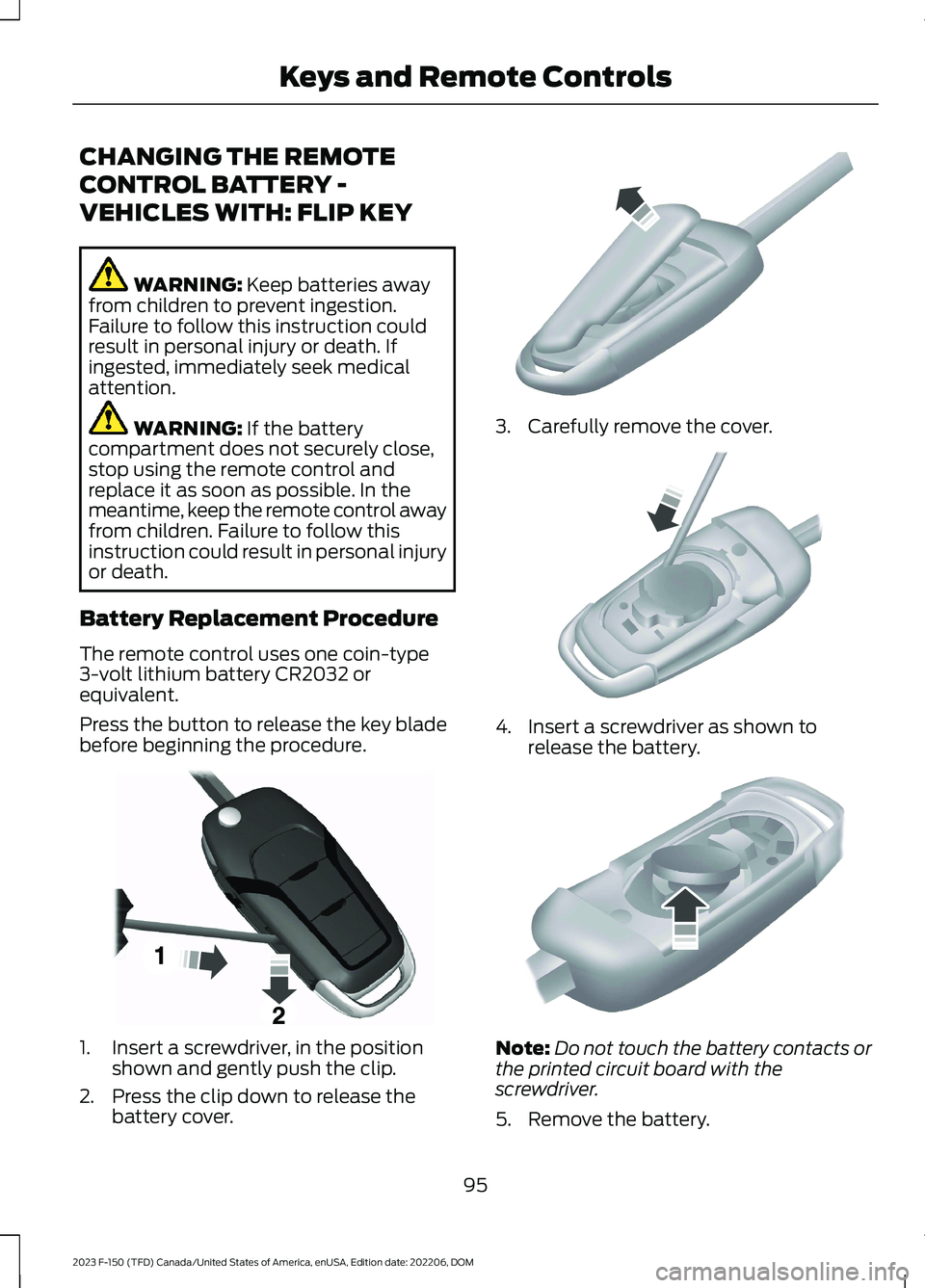
Press the button to release the key bladebefore beginning the procedure.
1.Insert a screwdriver, in the positionshown and gently push the clip.
2.Press the clip down to release thebattery cover.
3.Carefully remove the cover.
4.Insert a screwdriver as shown torelease the battery.
Note:Do not touch the battery contacts orthe printed circuit board with thescrewdriver.
5.Remove the battery.
95
2023 F-150 (TFD) Canada/United States of America, enUSA, Edition date: 202206, DOMKeys and Remote ControlsE191533 E151799 E151800 E151801
Page 100 of 786

6.Install a new battery with the + facingup.
7.Replace the battery cover.
Dispose of old batteries in anenvironmentally friendly way.Seek advice from your localauthority about recycling old batteries.
Note:Do not wipe off any grease on thebattery terminals or on the back surface ofthe circuit board.
Note: Replacing the battery does not erasethe programmed key from your vehicle. Theremote control should operate normally.
REPLACING A LOST KEY OR
REMOTE CONTROL
You can purchase replacement keys orremote controls from an authorized dealer.Authorized dealers can program remotecontrols for your vehicle.
Note: Your vehicle keys came with asecurity label that provides important keycut information. Keep the label in a safeplace for future reference.
PROGRAMMING THE REMOTE
CONTROL - VEHICLES WITH:
PUSH BUTTON START
General Information
You must have two previouslyprogrammed remote controls inside yourvehicle and the new unprogrammedremote controls readily accessible. Contactan authorized dealer to have the spareremote control programmed if twopreviously programmed remotes are notavailable. Make sure that your vehicle isoff before beginning this procedure. Makesure that you close all the doors beforebeginning and that they remain closedthroughout the procedure. Perform allsteps within 30 seconds of starting thesequence. Stop and wait for at least oneminute before starting again if you performany steps out of sequence.
Read and understand the entire procedurebefore you begin.
Note:You can program a maximum of fourremote controls to your vehicle.
Note:If your programmed remote controlsare lost or stolen and you do not have anextra coded remote, you need to have yourvehicle towed to an authorized dealer. Storean extra programmed remote away fromyour vehicle in a safe place to help preventany inconvenience. Contact an authorizeddealer to purchase additional spare orreplacement remotes.
Steps for Programming Your SpareRemote Control
Note:Your vehicle is equipped with one ofthe following center consoles.
96
2023 F-150 (TFD) Canada/United States of America, enUSA, Edition date: 202206, DOMKeys and Remote ControlsE107998 E151795
Page 101 of 786

Programming Backup Location
1.Place the first programmed remote inthe backup slot inside the cup holderor center console with your foot off thebrake pedal, press and release the pushbutton ignition switch.
2.Wait five seconds and then press andrelease the push button ignition switchagain.
3.Remove the remote control.
4.Within 10 seconds, place a secondprogrammed remote control in thebackup slot. Press and release thepush button ignition switch.
5.Wait five seconds and then press andrelease the push button ignition switchagain. Keep the ignition on for at leastthree seconds, but no more than 10seconds.
6.Remove the remote control.
7.Place the unprogrammed remotecontrol in the backup slot and pressand release the push button ignitionswitch.
Programming is now complete. With yourfoot on the brake pedal, press the pushbutton ignition switch to verify the remotecontrol functions operate and your vehiclestarts with the new remote control.
If programming was not successful, wait10 seconds and repeat Steps 1 through 7.If you are still unsuccessful, take yourvehicle to an authorized dealer.
PROGRAMMING THE REMOTE
CONTROL - VEHICLES WITH:
FLIP KEY
General Information
You can program your own remote controlto your vehicle. This procedure programsboth the engine immobilizer keycode andthe remote entry portion of the remotecontrol to your vehicle.
Only use remote controls with anintegrated mechanical key.
You must have two previouslyprogrammed coded remote controls andthe new un–programmed remote readilyaccessible. Contact an authorized dealerto have the spare remote controlprogrammed if the two previouslyprogrammed coded remote controls arenot available.
Read and understand the entire procedurebefore you begin.
Steps for Programming Your SpareRemote Control
1.Insert the first previously programmedcoded key into the ignition.
97
2023 F-150 (TFD) Canada/United States of America, enUSA, Edition date: 202206, DOMKeys and Remote ControlsE312216 E269950
Page 102 of 786

2.Switch the ignition from off to on. Keepthe ignition on for at least threeseconds, but no more than 10 seconds.
3.Switch the ignition off and remove thefirst coded key from the ignition.
4.After three seconds but within 10seconds of switching the ignition off,insert the second previously coded keyinto the ignition.
5.Switch the ignition from off to on. Keepthe ignition on for at least threeseconds, but no more than 10 seconds.
6.Switch the ignition off and remove thesecond previously programmed codedkey from the ignition.
7.After three seconds but within 10seconds of switching the ignition offand removing the previouslyprogrammed coded key, insert the newun–programmed key into the ignition.
8.Switch the ignition from off to on. Keepthe ignition on for at least six secondsuntil you hear the door locks cycle.
9.Remove the newly programmed codedkey from the ignition.
The key starts the engine if programmingis successful. You can operate the keylessremote entry system with the new remotecontrol with integrated key.
If programming was not successful, wait20 seconds and repeat Steps 1 through 8.If you are still unsuccessful, take yourvehicle to an authorized dealer.
Note:You can program a maximum of sixcoded remote controls to your vehicle.
KEYS AND REMOTE CONTROLS – TROUBLESHOOTING
KEYS AND REMOTE CONTROLS – INFORMATION MESSAGES
ActionMessage
Replace remote control battery.Key Battery Low ReplaceSoon
98
2023 F-150 (TFD) Canada/United States of America, enUSA, Edition date: 202206, DOMKeys and Remote Controls
Page 104 of 786

Audio System Volume Limit
The audio system maximum volumereduces. A message appears on thetouchscreen if you attempt to exceed thevolume limit. Automatic volume controlturns off.
911 Assist
If you set 911 assist to always on, youcannot switch it off with a MyKey.
Do Not Disturb
If you set do not disturb to always on, youcannot switch it off with a MyKey.
Note:If a phone is connected using AppleCarPlay or Android Auto while driving witha MyKey, the driver can receive phone callsand text messages even if the do not disturbrestriction is on. And if the vehicle comeswith satellite radio, there is no restriction onthe adult content.
Traction and Stability Control
If you set traction control or stabilitycontrol to always on, you cannot switch itoff with a MyKey.
CREATING A MYKEY
Vehicles with a center console shifter:
1.Remove the mat from the centerconsole cup holder.
2.Remove the key blade from the remotecontrol.
3.Place the remote control in the backupslot with the buttons facing toward therear of the vehicle.
4.Switch the ignition on using the key youwant to create as MyKey.
5.Press Settings on the touchscreen.
6.Press Vehicle Settings.
7.Press MyKey.
8.Press Create MyKey.
9.Press Yes.
10.Switch the ignition off.
Note:You successfully created a MyKey.We recommend that you label this key soyou can distinguish it from the admin keys.
Note:The programmed restrictions applywhen you switch the vehicle off, open andclose the driver door and restart your vehiclewith the programmed key or remote control.
Vehicles with a column shifter:
1.Raise the center console storagecompartment lid.
2.Remove the key blade from the remotecontrol.
100
2023 F-150 (TFD) Canada/United States of America, enUSA, Edition date: 202206, DOMMyKey™ - Vehicles With: MyKey (If Equipped)E312216 E269950
Page 105 of 786

3.Place the remote control in the backupslot with the buttons facing toward therear of the vehicle.
4.Switch the ignition on using the key youwant to create as MyKey.
5.Press Settings on the touchscreen.
6.Press Vehicle Settings.
7.Press MyKey.
8.Press Create MyKey.
9.Press Yes.
10.Switch the ignition off.
Note:You successfully created a MyKey.We recommend that you label this key soyou can distinguish it from the admin keys.
Note:The programmed restrictions applywhen you switch the vehicle off, open andclose the driver door and restart your vehiclewith the programmed key or remote control.
PROGRAMMING A MYKEY
You can program any remote control tobecome a restricted MyKey, but you mustleave one unmodified as an admin key.
1.Switch the vehicle on using an adminkey.
2.Press Settings on the touchscreen.
3.Press Vehicle Settings.
4.Press MyKey.
5.Select and configure the settings.
CLEARING ALL MYKEYS
When you clear all MyKeys, you remove allrestrictions and return all MyKeys to theiroriginal admin key status.
1.Switch the vehicle on using an adminkey.
2.Press Settings on the touchscreen.
3.Press Vehicle Settings.
4.Press MyKey.
5.Press Clear All MyKeys.
6.Press Yes.
CHECKING MYKEY SYSTEM
STATUS
You can find information about thedistance traveled using a MyKey, and thenumber of admin keys and MyKeys createdfor your vehicle.
1.Switch the vehicle on.
2.Press Settings on the touchscreen.
3.Press Vehicle Settings.
4.Press MyKey.
5.Press MyKey Information.
USING MYKEY WITH REMOTE
START SYSTEMS (IF EQUIPPED)
MyKey is not compatible with unapproved,aftermarket remote start systems. If youchoose to install a remote start system,see an authorized dealer for an approvedremote start system.
101
2023 F-150 (TFD) Canada/United States of America, enUSA, Edition date: 202206, DOMMyKey™ - Vehicles With: MyKey (If Equipped)
Page 108 of 786

OPERATING THE DOORS
FROM OUTSIDE YOUR
VEHICLE
UNLOCKING AND LOCKING THEDOORS USING THE REMOTECONTROL
You can only use the remote control whenyour vehicle is stationary.
Unlocking the Doors
Press the button to unlock alldoors. One long flash of the turnsignal lamps confirms that yourvehicle has unlocked.
One-Stage Unlocking
Press the button to unlock alldoors.
Two-Stage Unlocking (If Equipped)
Press the button to unlock thedriver's door. Press the buttonagain within three seconds tounlock all doors.
Locking the Doors
Press the button to lock alldoors. One short flash of theturn signal lamps confirms yourvehicle is locked.
Note:For more information on operatingthe doors from outside your vehicle SeeKeyless Entry Keypad (page 110).
UNLOCKING AND LOCKING THEDOORS USING THE KEY BLADE
If there is a power door lock fault you canuse the key blade to lock and unlock thedoors.
Lock.A
Unlock.B
OPERATING THE DOORS
FROM INSIDE YOUR VEHICLE
UNLOCKING AND LOCKING THEDOORS USING THE CENTRALLOCKING
The power door lock control is on the frontdoors.
Press the button to unlock alldoors.
Press the button to lock alldoors.
Note:The central locking only operates ifthe front doors are fully closed.
OPENING THE DOORS FROMINSIDE YOUR VEHICLE
Pull the interior door handle twice tounlock and open a rear door. The first pullunlocks the door and the second pullopens the door.
104
2023 F-150 (TFD) Canada/United States of America, enUSA, Edition date: 202206, DOMDoors and LocksE267112 E138629 E138629 E267111 E333745 E267112 E267111