2023 FORD F150 clock
[x] Cancel search: clockPage 578 of 786
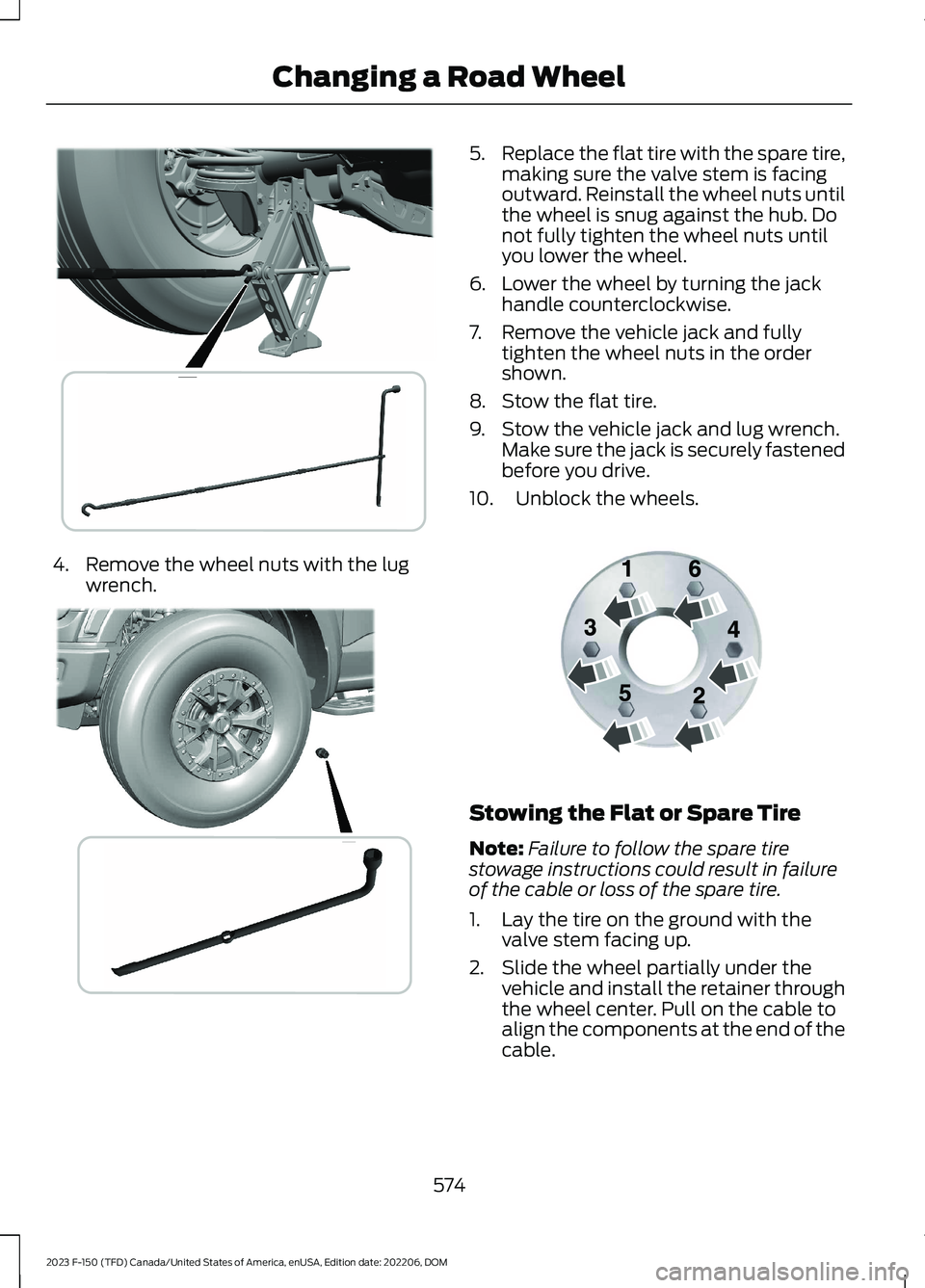
4.Remove the wheel nuts with the lugwrench.
5.Replace the flat tire with the spare tire,making sure the valve stem is facingoutward. Reinstall the wheel nuts untilthe wheel is snug against the hub. Donot fully tighten the wheel nuts untilyou lower the wheel.
6.Lower the wheel by turning the jackhandle counterclockwise.
7.Remove the vehicle jack and fullytighten the wheel nuts in the ordershown.
8.Stow the flat tire.
9.Stow the vehicle jack and lug wrench.Make sure the jack is securely fastenedbefore you drive.
10.Unblock the wheels.
Stowing the Flat or Spare Tire
Note:Failure to follow the spare tirestowage instructions could result in failureof the cable or loss of the spare tire.
1.Lay the tire on the ground with thevalve stem facing up.
2.Slide the wheel partially under thevehicle and install the retainer throughthe wheel center. Pull on the cable toalign the components at the end of thecable.
574
2023 F-150 (TFD) Canada/United States of America, enUSA, Edition date: 202206, DOMChanging a Road Wheel E376830 E376829 E166719
Page 579 of 786

3.Turn the jack handle clockwise untilyou raise the tire to its stowed positionunderneath the vehicle. The effort toturn the jack handle increasessignificantly and the spare tire carrierratchets or slips when you raise the tireto the maximum tightness. Tighten tothe point where the ratchet or slipoccurs a minimum of three times, asindicated by an audible click each time.The spare tire carrier does not allowyou to overtighten. If the spare tirecarrier ratchets or slips with little effort,have your vehicle checked as soon aspossible.
4.Check that the tire lies flat against theframe and you properly tighten it. Tryto push or pull, then turn the tire to besure it does not move. Loosen andretighten, if necessary. Failure toproperly stow the spare tire couldresult in failure of the winch cable andloss of the tire.
5.Repeat this tightness check procedurewhen servicing the spare tire pressure,every six months, as per your scheduledmaintenance information, or at anytime that the spare tire gets disturbedthrough service of other components.
6.If removed, install the spare tire lockinto the bumper drive tube with thespare tire lock key and jack handle.
Stowing the Vehicle Jack and ToolBag
1.Turn the lead screw eyelet to adjustthe jack up or down until the stowagemarkings on the upper channel alignwith the lower channel.
2.Place the tools inside of the tool bag.
575
2023 F-150 (TFD) Canada/United States of America, enUSA, Edition date: 202206, DOMChanging a Road Wheel E323394 E323393 E327653
Page 580 of 786

3.Install the tool bag through the vehiclejack load rest.
4.Restow the extension block and wingbolt to the jack bracket.
5.Secure the jack tool bag straps aroundthe vehicle jack.
6.Place the jack and tool bag back ontothe jack bracket.
7.Turn the wing bolt on the jack bracketclockwise until you secure the jack andtools to the jack bracket.
WHEEL NUTS
WARNING: When you install awheel, always remove any corrosion, dirtor foreign materials present on themounting surfaces of the wheel or thesurface of the wheel hub, brake drum orbrake disc that contacts the wheel. Makesure to secure any fasteners that attachthe rotor to the hub so they do notinterfere with the mounting surfaces ofthe wheel. Installing wheels withoutcorrect metal-to-metal contact at thewheel mounting surfaces can cause thewheel nuts to loosen and the wheel tocome off while your vehicle is in motion,resulting in loss of vehicle control,personal injury or death.
lb.ft (Nm)1Bolt Size
150 lb.ft (204 Nm)M14 x 1.5
1 Torque specifications are for nut and boltthreads free of dirt and rust. Use only ourrecommended replacement wheel nutsand or wheel bolts.
576
2023 F-150 (TFD) Canada/United States of America, enUSA, Edition date: 202206, DOMChanging a Road WheelE323386 E327654 E323384
Page 632 of 786

Occupancy Mode (If Equipped)
1.Press Settings on the touchscreen.
2.Press Sound Settings.
3.Press Occupancy Mode.
4.Press a setting.
Sound Mode (If Equipped)
1.Press Settings on the touchscreen.
2.Press Sound Settings.
3.Press Sound Mode.
4.Press a setting.
SETTING THE CLOCK AND
DATE
1.Press Settings on the touchscreen.
2.Press Clock Settings.
3.Set the time.
Note:The AM and PM options are notavailable if 24-hour mode is on.
Switching Automatic TimeUpdates On and Off
1.Press Settings on the touchscreen.
2.Press Clock Settings.
3.Switch Auto Time Update on or off.
AM/FM RADIO
AM/FM RADIO LIMITATIONS
The further you travel from an AM or FMstation, the weaker the signal and theweaker the reception.
Hills, mountains, tall buildings, bridges,tunnels, freeway overpasses, parkinggarages, dense tree foliage andthunderstorms can interfere with thereception.
When you pass a ground-based broadcastrepeating tower, a stronger signal mayovertake a weaker one and result in theaudio system muting.
SELECTING A RADIO STATION
Manually Selecting a RadioStation
Turn to search through the radio frequencyband.
Using Direct Tune
1.Press Direct Tune to open the numberpad.
2.Enter the station you prefer.
Note:You can only enter a valid station forthe audio source you are currently listeningto.
Using Seek
Press either button. The systemstops at the first station it findsin that direction.
628
2023 F-150 (TFD) Canada/United States of America, enUSA, Edition date: 202206, DOMAudio SystemE270235
Page 777 of 786

Selecting a Channel..........................................631What Is Satellite Radio...................................630Saving a Preset Position...........................207Scheduled Maintenance...........................667Seatbelt Extensions........................................71Seatbelt Precautions....................................64Seatbelt Reminder........................................68How Does the Seatbelt ReminderWork.....................................................................68Seatbelt Reminder Audible Warnings..........70Seatbelt Reminder Indicators..........................70Switching the Seatbelt Reminder On andOff.........................................................................70Seatbelts...........................................................64Automatic Locking Mode..................................66Seatbelt Reminder..............................................68Sensitive Locking Mode.....................................66Security.............................................................134Anti-Theft Alarm System................................134Anti-Theft Alarm System Settings..............135Passive Anti-Theft System.............................134Security – Troubleshooting............................136Security – Troubleshooting......................136Security – Frequently AskedQuestions..........................................................137Security – Information Messages................136Selecting a Drive Mode - King Ranch/Lariat/Limited/Platinum/XL/XLT.................................................................363Selecting a Drive Mode - Raptor...........364Selecting a Four-Wheel Drive Mode -Excluding: Raptor......................................276Selecting a Four-Wheel Drive Mode -Raptor............................................................277Selecting a Personal Profile....................653Selecting the Audio Source.....................626Sending and Receiving a TextMessage.......................................................647Sensitive Locking Mode..............................66How Does Sensitive Locking ModeWork.....................................................................66What is Sensitive Locking Mode....................66Service Data.....................................................30Setting a Destination.................................654Setting a Destination Using a Point ofInterest.............................................................655Setting a Destination Using a PredictiveDestination......................................................655
Setting a Destination Using a RecentDestination......................................................655Setting a Destination Using a SavedDestination......................................................655Setting a Destination Using the MapScreen...............................................................655Setting a Destination Using the Text EntryScreen...............................................................654Setting a Memory Preset..........................627Settings Data....................................................31Setting the Adaptive Cruise ControlGap................................................................346Setting the Adaptive Cruise ControlSpeed............................................................345Setting the Blower Motor Speed............185Setting the Clock and Date.....................628Setting the Cruise Control Speed.........340Setting the Hill Descent Speed...............318Setting the Speed Sign RecognitionSpeed Tolerance.......................................402Setting the Speed Sign RecognitionSpeed Warning..........................................402Setting the Temperature...........................185Setting the Trail Control Speed...............312Setting Up the Trailer Backup Assistancefor a Conventional Trailer......................439Applying the Trailer Reversing AidSticker................................................................441Calibrating the System....................................442Configuring the Trailer.....................................439Trailer Sensor Installation...............................441Setting Up Trailer Reverse Guidance fora Conventional Trailer.............................454Applying the Trailer Reverse AidSticker...............................................................456Calibrating the System....................................457Configuring the Trailer.....................................454Trailer Sensor Installation..............................456Shifting Your Vehicle Into Gear - PoliceResponder...................................................266Shifting Your Vehicle Into Gear -Raptor...........................................................265Shifting Your Vehicle Into Gear..............265Side Parking Aid...........................................326Locating the Side Parking AidSensors.............................................................326Side Parking Aid Audible Warnings.............327Side Parking Aid Limitations.........................326
773
2023 F-150 (TFD) Canada/United States of America, enUSA, Edition date: 202206, DOMIndex