2023 FORD F150 ECO mode
[x] Cancel search: ECO modePage 115 of 786
All personal codes erase and only thefive-digit master code works.
Anti-Scan Feature
The keypad goes into an anti-scan modeif you enter the wrong code seven times.This mode turns off the keypad for oneminute and the keypad lamp flashes.
The anti-scan feature turns off after:
•One minute of keypad inactivity.
•You press the unlock button on theremote control.
•You switch the ignition on.
•You unlock your vehicle using keylessentry.
USING THE KEYLESS ENTRY
KEYPAD
Unlocking the Doors
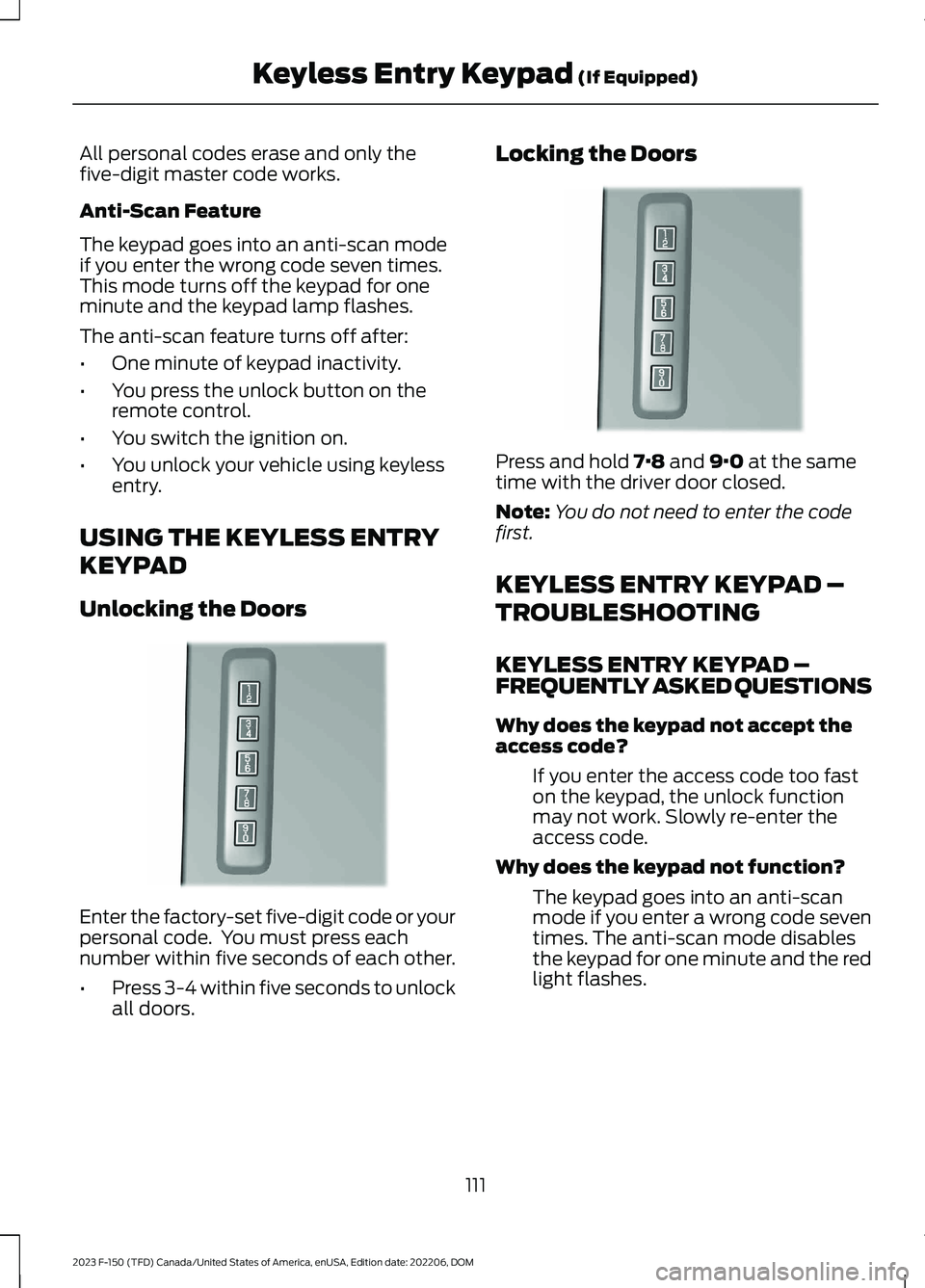
Enter the factory-set five-digit code or yourpersonal code. You must press eachnumber within five seconds of each other.
•Press 3-4 within five seconds to unlockall doors.
Locking the Doors
Press and hold 7·8 and 9·0 at the sametime with the driver door closed.
Note:You do not need to enter the codefirst.
KEYLESS ENTRY KEYPAD –
TROUBLESHOOTING
KEYLESS ENTRY KEYPAD –FREQUENTLY ASKED QUESTIONS
Why does the keypad not accept theaccess code?
If you enter the access code too faston the keypad, the unlock functionmay not work. Slowly re-enter theaccess code.
Why does the keypad not function?
The keypad goes into an anti-scanmode if you enter a wrong code seventimes. The anti-scan mode disablesthe keypad for one minute and the redlight flashes.
111
2023 F-150 (TFD) Canada/United States of America, enUSA, Edition date: 202206, DOMKeyless Entry Keypad (If Equipped)E190936 E190936
Page 116 of 786
HOW DOES EASY ENTRY AND
EXIT WORK
Easy entry and exit moves the driver seatrearward up to 2 in (5 cm) and the steeringcolumn up when you switch the ignitionoff. The driver seat and steering columnreturn to their previous positions when youswitch the ignition on.
Note:Depending on your vehicle, thecolumn may move up and in.
SWITCHING EASY ENTRY AND
EXIT ON AND OFF
1.Press Settings on the touchscreen.
2.Press Vehicle.
3.Select Easy Entry/Exit.
If you press any adjustment or memorybutton when in easy exit mode, the systemcancels the operation.
112
2023 F-150 (TFD) Canada/United States of America, enUSA, Edition date: 202206, DOMEasy Entry and Exit (If Equipped)
Page 123 of 786
TAILGATE PRECAUTIONS
WARNING: It is extremelydangerous to ride in a cargo area, insideor outside of a vehicle. In a crash, peopleriding in these areas are more likely to beseriously injured or killed. Do not allowpeople to ride in any area of your vehiclethat is not equipped with seats andseatbelts. Make sure everyone in yourvehicle is in a seat and properly using aseatbelt. Failure to follow this warningcould result in serious personal injury ordeath.
OPENING THE TAILGATE
OPENING THE TAILGATE FROMINSIDE YOUR VEHICLE
The vehicle must be in park (P) to operatethe power tailgate.
Press the button on theinstrument panel.
Note:A tone sounds while the tailgateopens.
Note:The tailgate stops and reverses if itdetects an obstruction when opening.
Note:An alert sounds if the electronictailgate is in manual mode.
Note:A pop-up message appears on thetouchscreen if the tailgate is in manualmode asking if you want to change back topower mode.
OPENING THE TAILGATE FROMOUTSIDE YOUR VEHICLE
1.Unlock the vehicle with the remotecontrol or power door unlock control.
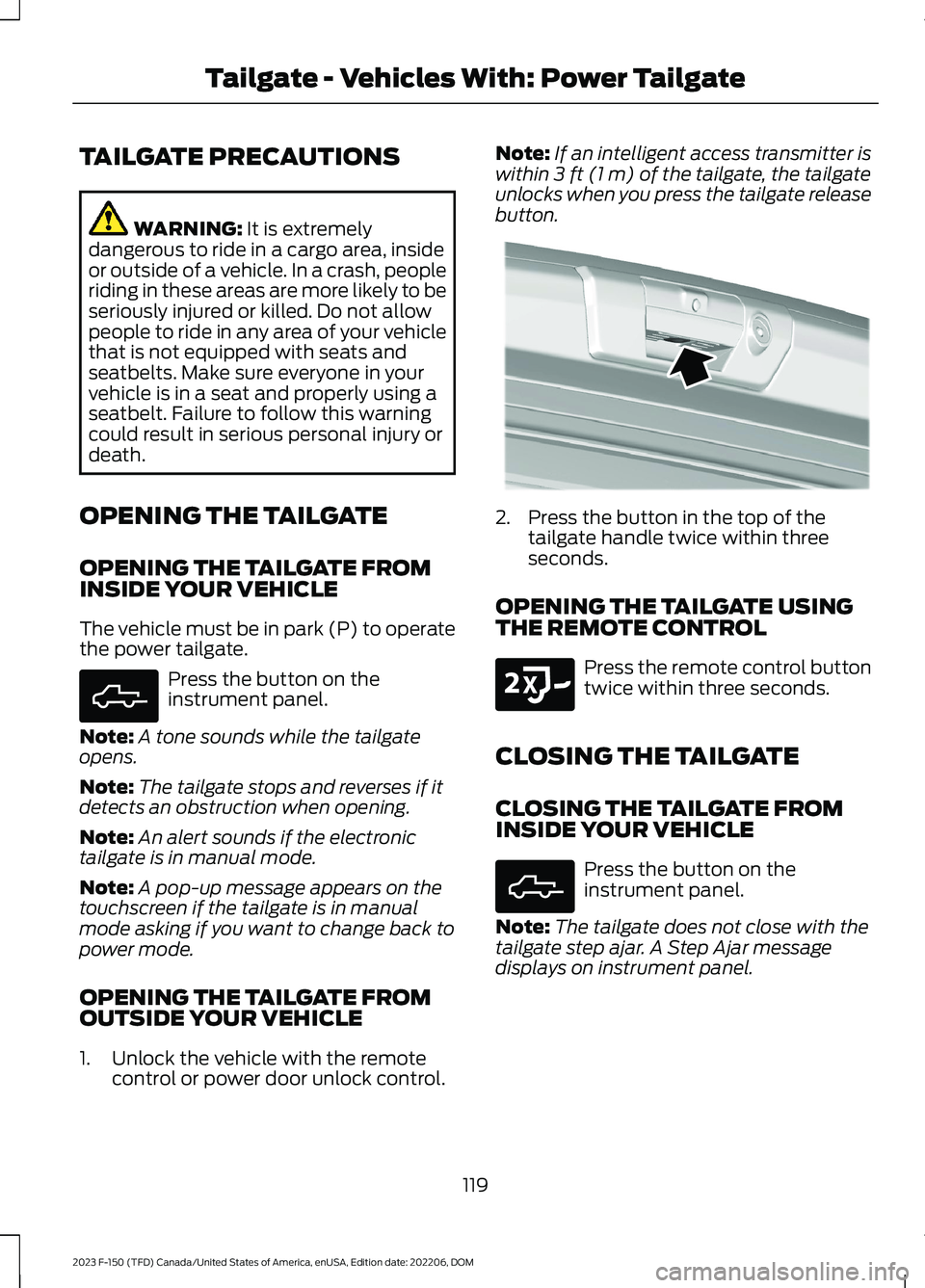
Note:If an intelligent access transmitter iswithin 3 ft (1 m) of the tailgate, the tailgateunlocks when you press the tailgate releasebutton.
2.Press the button in the top of thetailgate handle twice within threeseconds.
OPENING THE TAILGATE USINGTHE REMOTE CONTROL
Press the remote control buttontwice within three seconds.
CLOSING THE TAILGATE
CLOSING THE TAILGATE FROMINSIDE YOUR VEHICLE
Press the button on theinstrument panel.
Note:The tailgate does not close with thetailgate step ajar. A Step Ajar messagedisplays on instrument panel.
119
2023 F-150 (TFD) Canada/United States of America, enUSA, Edition date: 202206, DOMTailgate - Vehicles With: Power TailgateE308661 E346998 E191530 E308661
Page 124 of 786
CLOSING THE TAILGATE FROMOUTSIDE YOUR VEHICLE
You can close the power tailgate by:
•Pressing the tailgate button on yourremote control twice within threeseconds.
•Pressing the button on the tailgateonce.
Note:A tone sounds while the tailgatecloses.
Note:The tailgate stops and reverses if itdetects an obstruction when closing.
Lift-to-Close
To close the tailgate automatically usinglift-to-close, lift the tailgate approximately4 in (10 cm) and hold it for a few seconds.
Note:If the tailgate position is more thanhalfway open, it may not closeautomatically.
Manual Close
You can close the tailgate manually whenyou lift the tailgate in a continuous motion.
If you stop the tailgate motion, thelift-to-close feature engages and powercloses the tailgate.
Putting the Tailgate in Manual Mode
You can put the tailgate in manual modethrough the vehicle settings in yourtouchscreen.
Note:In manual mode, the tailgate onlyopens by the tailgate release button on thetailgate and messaging is reduced.
Note:A pop-up message appears on thetouchscreen if you press the tailgate buttonon the instrument panel when the tailgateis in Manual mode.
CLOSING THE TAILGATE USINGTHE REMOTE CONTROL
Press the remote control buttontwice within three seconds.
REMOVING AND INSTALLING
THE TAILGATE
WARNING: Always properly securecargo to prevent shifting cargo or cargofalling from the vehicle. Failure to do socould result in compromised vehiclestability and serious personal injury tovehicle occupants or others.
WARNING: The tailgate is heavy.Removal of the tailgate requires twoadults. Failure to follow this instructioncould result in personal injury or propertydamage.
1.Put the tailgate into manual mode byaccessing the vehicle settings using thetouchscreen.
2.Open the tailgate.
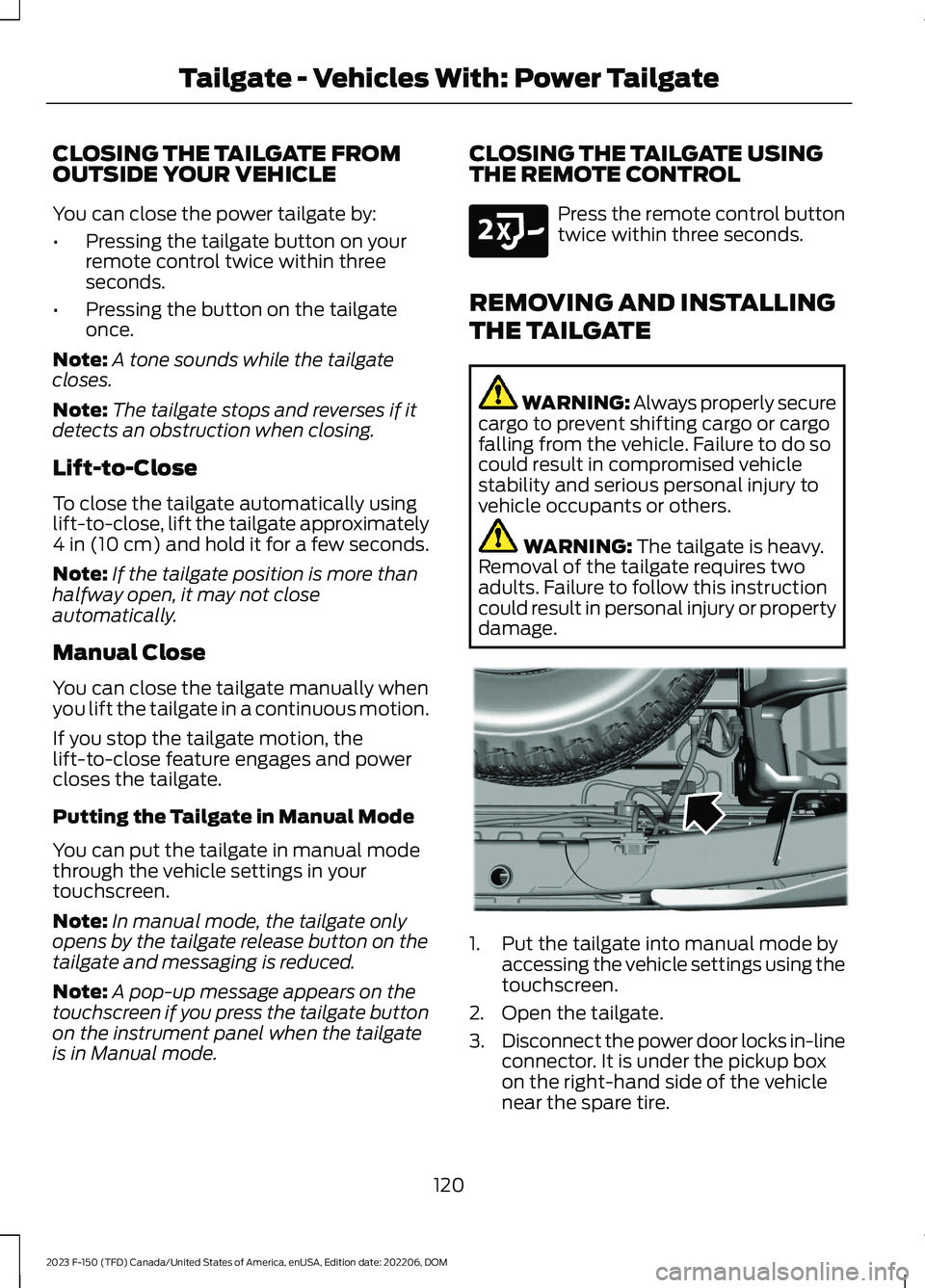
3.Disconnect the power door locks in-lineconnector. It is under the pickup boxon the right-hand side of the vehiclenear the spare tire.
120
2023 F-150 (TFD) Canada/United States of America, enUSA, Edition date: 202206, DOMTailgate - Vehicles With: Power TailgateE191530 E189556
Page 139 of 786

WHAT ARE THE INCLINATIONSENSORS (If Equipped)
The inclination sensor is designed to detectan attempt to raise your vehicle, forexample to remove a wheel or to tow itaway.
ARMING THE ANTI-THEFT ALARMSYSTEM
The alarm is ready to arm when yourvehicle is switched off.
Lock your vehicle with your remote controlto arm the alarm.
DISARMING THE ANTI-THEFTALARM SYSTEM
Disarm the alarm by performing any of thefollowing actions:
•Unlock the doors or luggagecompartment with the remote control.
•Switch your vehicle on or start yourvehicle.
ANTI-THEFT ALARM SYSTEM
SETTINGS (IF EQUIPPED)
WHAT ARE THE ALARM SECURITYLEVELS
You can select two levels of alarm security,motion sensors on and motion sensors off.
Motion Sensors On
Motion sensors on is the standard setting.
In motion sensors on, all equipped sensorsare on when you arm the alarm.
Note:Do not arm the alarm with motionsensors on if passengers, animals or othermoving objects are inside your vehicle.
Motion Sensors Off
In motion sensors off, the interior sensorand the inclination sensor are off when youarm the alarm.
All the other equipped sensors activatewhen you arm the alarm in this mode.
SETTING THE ALARM SECURITYLEVEL
1.Press Settings on the touchscreen.
2.Press Vehicle.
3.Press Alarm System.
4.Press Motion Sensors.
5.Press a setting.
WHAT IS ASK ON EXIT
You can choose which level of security yourequire after you switch the ignition off.
Note:If you do not choose a setting, thesystem defaults to all sensors.
SWITCHING ASK ON EXIT ON ANDOFF
1.Press Settings on the touchscreen.
2.Press Vehicle.
3.Press Alarm System.
4.Switch Ask on Exit on or off.
135
2023 F-150 (TFD) Canada/United States of America, enUSA, Edition date: 202206, DOMSecurity
Page 142 of 786
POWER RUNNING BOARD
PRECAUTIONS
WARNING: In extreme climates,excessive ice buildup may occur, causingthe running boards not to deploy. Makesure that the running boards havedeployed, and have finished movingbefore attempting to step on them. Therunning boards will resume normalfunction once the blockage is cleared.
WARNING: Switch off the runningboards before jacking or placing anyobject under your vehicle. Never placeyour hand between the extended runningboard and your vehicle. A moving runningboard may cause injury.
Do not use the running boards, front andrear hinge assemblies, running boardmotors, or the running board underbodymounts to lift your vehicle when jacking.Use proper jacking points.
The running boards could move slower incold temperatures.
POWER RUNNING BOARD
SETTINGS
1.Press Features on the touchscreen.
2.Press Power Running Board.
3.Press SETTINGS.
Power Boards Modes
Note:When the vehicle speed is more than3 mph (5 km/h), the option to select themodes disables, to avoid unintendedoperation.
Note:The power running boards reversedirection and move to the end of travel ifthey encounter an object when moving.Keep the power running boards andbrackets clean for optimum performance.
Off
The power running boards remain stowed,regardless of door position.
Auto
The power running boards deploy whenyou approach your vehicle with a remotecontrol, unlock the door or open the door.
The power running boards stow:
•After a few seconds when you closethe doors.
•Instantly after you close and lock thedoors.
•If you unlock the door but do not openit, after the timeout.
•If you have switched approachdetection on and do not open a doorbefore the auto timer setting expires.
•When the vehicle speed is more than3 mph (5 km/h).
Note:When you select this mode, an optiondisplays that allows you to select how longthe running boards stay deployed withoutopening the door.
Out
The power running boards remaindeployed, regardless of door position. Thepower running boards stow when thevehicle speed is more than 5 km/h, and themode changes to auto. You need to selectOut mode again if you want the powerrunning boards to stay deployed at the endof each trip.
138
2023 F-150 (TFD) Canada/United States of America, enUSA, Edition date: 202206, DOMPower Running Boards (If Equipped)
Page 182 of 786
BRAKE COACH - HYBRID
ELECTRIC VEHICLE (HEV)
The brake coach appears after the vehiclehas come to a stop. It coaches you to brakein a manner that maximizes the amountof energy returned through theregenerative braking system.
The percent displayed indicates theregenerative braking efficiency, with 100%representing the maximum amount ofenergy recovery.
Note:While regenerative braking works inall drive modes, brake coach display maynot be available in all drive modes.
You can switch brake coach on or off in thesettings menu on your touchscreen.
1.Press Settings.
2.Press Instrument Cluster.
3.Switch Brake Coach on or off.
TRIP SUMMARY
Displays the trip summary when you switchoff your vehicle. The values are cumulativesince you last started your vehicle.
178
2023 F-150 (TFD) Canada/United States of America, enUSA, Edition date: 202206, DOMInstrument Cluster Display
Page 185 of 786
WHAT IS REMOTE START
The system allows you to remotely startyour vehicle and to adjust the interiortemperature according to the settings thatyou chose.
REMOTE START
PRECAUTIONS
WARNING: Do not start the enginein a closed garage or in other enclosedareas. Exhaust fumes are toxic. Alwaysopen the garage door before you startthe engine. Failure to follow thisinstruction could result in personal injuryor death.
WARNING: Do not keep electricaldevices plugged in the power pointwhenever the device is not in use. Powerpoints power up during remote start.
WARNING: Do not keep electricaldevices plugged into the power outletwhenever the device is not in use. Theoutlet provides power when the vehicleis on. Failure to follow this instructioncould result in personal injury.
REMOTE START LIMITATIONS
Remote start does not work under thefollowing conditions:
•The alarm horn is sounding.
•The hood is open.
•The transmission is not in park (P).
•The ignition is on.
•The battery voltage is below theminimum operating voltage.
•Remote start is not enabled.
Note:Do not use remote start if the fuellevel is low.
ENABLING REMOTE START
1.Press Settings on the touchscreen.
2.Press Vehicle.
3.Press Remote Start Setup.
4.Switch Remote Start on or off.
Note:To remote start with FordPass, makesure that the modem is enabled. SeeConnecting FordPass to the Modem(page 621).
REMOTELY STARTING AND
STOPPING THE VEHICLE
Remotely Starting the Vehicle
Press the button on the remotecontrol.
Within three seconds, press thebutton on the remote control.
Within three seconds, press thebutton again.
Note:You can also use FordPass to startthe vehicle.
Note:The vehicle doors lock when yousuccessfully remote start your vehicle.
Note:The turn signal lamps flash twice.
Note:The parking lamps turn on when thevehicle is running.
Note:The horn sounds if the system failsto start.
Note:All other vehicle systems remain offwhen you have remotely started the vehicle.
Note:The vehicle remains secured whenyou have remotely started the vehicle. Avalid key must be inside your vehicle toswitch the ignition on and drive your vehicle.
181
2023 F-150 (TFD) Canada/United States of America, enUSA, Edition date: 202206, DOMRemote Start (If Equipped)E138623 E138625