2023 FORD EXPLORER display
[x] Cancel search: displayPage 6 of 573

Creating a MyKey..........................................65
Clearing All MyKeys......................................66
Checking MyKey System Status.............66
Using MyKey With Remote StartSystems........................................................67
MyKey – Troubleshooting..........................67
Doors and Locks
Locking and Unlocking...............................68
Keyless Entry....................................................71
Liftgate
Power Liftgate.................................................73
Security
Passive Anti-Theft System.........................77
Anti-Theft Alarm............................................77
Steering Wheel
Adjusting the Steering Wheel - VehiclesWith: Manual Adjustable SteeringColumn..........................................................79
Adjusting the Steering Wheel - VehiclesWith: Power Adjustable SteeringColumn..........................................................79
Audio Control...................................................81
Voice Control...................................................81
Cruise Control - Vehicles With: CruiseControl...........................................................81
Cruise Control - Vehicles With: Stop andGo....................................................................82
Information Display Control......................82
Heated Steering Wheel...............................82
Horn....................................................................82
Wipers and Washers
Windshield Wipers.......................................83
Autowipers......................................................83
Windshield Washers....................................84
Rear Window Wiper and Washers..........85
Lighting
General Information....................................86
Lighting Control.............................................86
Autolamps.......................................................87
Instrument Lighting Dimmer.....................87
Headlamp Exit Delay...................................87
Daytime Running Lamps - Vehicles With:Configurable Daytime Running Lamps..........................................................................88
Daytime Running Lamps - Vehicles With:Daytime Running Lamps (DRL).........88
Front Fog Lamps...........................................88
Adaptive Headlamps..................................89
Direction Indicators......................................89
Interior Lamps................................................90
Ambient Lighting - Vehicles With: 8 InchCenter Display Screen............................90
Ambient Lighting - Vehicles With: 10.1Inch Center Display Screen....................91
Automatic High Beam Control
What Is Automatic High Beam Control..........................................................................92
Switching Automatic High Beam ControlOn and Off...................................................92
Automatic High Beam Control Indicators..........................................................................93
Overriding Automatic High Beam Control..........................................................................93
Windows and Mirrors
Power Windows............................................94
Global Opening..............................................95
Exterior Mirrors - Excluding: ST................95
Exterior Mirrors - ST.....................................96
Interior Mirror..................................................98
Sun Visors........................................................98
Sun Shades.....................................................99
Moonroof.........................................................99
2
2023 Explorer (CTW) Canada/United States of America, enUSA, Edition date: 202209, First-PrintingTable of Contents
Page 7 of 573

Instrument Cluster
Gauges - Vehicles With: 6.5 InchInstrument Cluster Display Screen..........................................................................101
Gauges - Vehicles With: 12.3 InchInstrument Cluster Display Screen.........................................................................102
Gauges - Vehicles With: 4.2 InchInstrument Cluster Display Screen........................................................................104
Warning Lamps and Indicators..............105
Audible Warnings and Indicators..........109
Information Displays
General Information - Vehicles With: 6.5Inch Instrument Cluster Display Screen..........................................................................110
General Information - Vehicles With: 12.3Inch Instrument Cluster Display Screen..........................................................................112
General Information - Vehicles With: 4.2Inch Instrument Cluster Display Screen..........................................................................115
Personalized Settings..................................117
Information Messages................................119
Climate Control
Automatic Climate Control......................137
Hints on Controlling the Interior Climate.........................................................................139
Rear Passenger Climate Controls.........140
Heated Windshield......................................141
Heated Rear Window.................................142
Heated Exterior Mirrors..............................142
Remote Start.................................................142
Interior Air Quality
What Is the Cabin Air Filter......................143
Replacing the Cabin Air Filter..................143
Seats
Sitting in the Correct Position.................144
Head Restraints...........................................144
Manual Seats................................................146
Power Seats...................................................147
Memory Function........................................150
Rear Seats.......................................................151
Heated Seats................................................156
Ventilated Seats...........................................157
Rear Occupant Alert System
What is the Rear Occupant Alert System.........................................................................158
How Does the Rear Occupant AlertSystem Work.............................................158
Rear Occupant Alert System Precautions.........................................................................158
Rear Occupant Alert System Limitations.........................................................................158
Switching Rear Occupant Alert SystemOn and Off.................................................158
Rear Occupant Alert System Indicators.........................................................................159
Rear Occupant Alert System AudibleWarnings.....................................................159
Garage Door Opener
What Is the Garage Door Opener.........160
How Does the Garage Door Opener Work........................................................................160
Garage Door Opener Precautions........160
Garage Door Opener Limitations..........160
Programming the Garage Door Openerto Your Hand-Held Transmitter..........161
Programming the Garage Door Openerto Your Garage Door Opener Motor..........................................................................161
Programming the Garage Door Openerto Your Gate Opener Motor.................162
Clearing the Garage Door Opener.........162
Reprogramming the Garage Door Opener.........................................................................163
Garage Door Opener Radio Frequencies.........................................................................163
3
2023 Explorer (CTW) Canada/United States of America, enUSA, Edition date: 202209, First-PrintingTable of Contents
Page 22 of 573
MOBILE DEVICE DATA
If you connect a mobile device to yourvehicle, you can display data from yourdevice on the touchscreen for example,music and album art. You can share yourvehicle data with mobile apps on yourdevice through the system. See Apps(page 455).
The mobile apps function operates by yourconnected device sending data to us in theUnited States. The data is encrypted andincludes, for example, the vehicleidentification number of your vehicle, theSYNC module serial number, odometer,enabled apps, usage statistics anddebugging information. We retain it onlyas long as necessary to provide the service,to troubleshoot, for continuousimprovement and to offer you productsand services that may be of interest to youaccording to your preferences and whereallowed by law.
If you connect a cell phone to the system,the system creates a profile that links tothat cell phone. The cell phone profileenables more mobile features and efficientoperation. The profile contains, forexample data from your phonebook, readand unread text messages and call history,including history of calls when your cellphone was not connected to the system.
If you connect a media device, the systemcreates and retains a media device indexof supported media content. The systemalso records a short diagnostic log ofapproximately 10 minutes of all recentsystem activity.
The cell phone profile, media device indexand diagnostic log remain in your vehicleunless you delete them and are generallyaccessible only in your vehicle when youconnect your cell phone or media device.If you no longer plan to use the system oryour vehicle, we recommend you use themaster reset function to erase the storedinformation. See Settings (page 458).
System data cannot be accessed withoutspecial equipment and access to yourvehicle's module.
For additional information about ourprivacy policy, refer to the local Fordwebsite.
Note:To find out if your vehicle hasconnectivity technology, visitwww.FordConnected.com.
EMERGENCY CALL SYSTEM
DATA
When the emergency call system is active,it may disclose to emergency services thatyour vehicle has been in a crash involvingthe deployment of an airbag or activationof the fuel pump shut-off. Certain versionsor updates to the emergency call systemmay also be capable of electronically orverbally disclosing to emergency servicesoperators your vehicle location or otherdetails about your vehicle or crash to assistemergency services operators to providethe most appropriate emergency services.If you do not want to disclose thisinformation, do not activate the emergencycall system.
Note:You cannot deactivate emergencycall systems that are required by law.
18
2023 Explorer (CTW) Canada/United States of America, enUSA, Edition date: 202209, First-PrintingData Privacy
Page 25 of 573
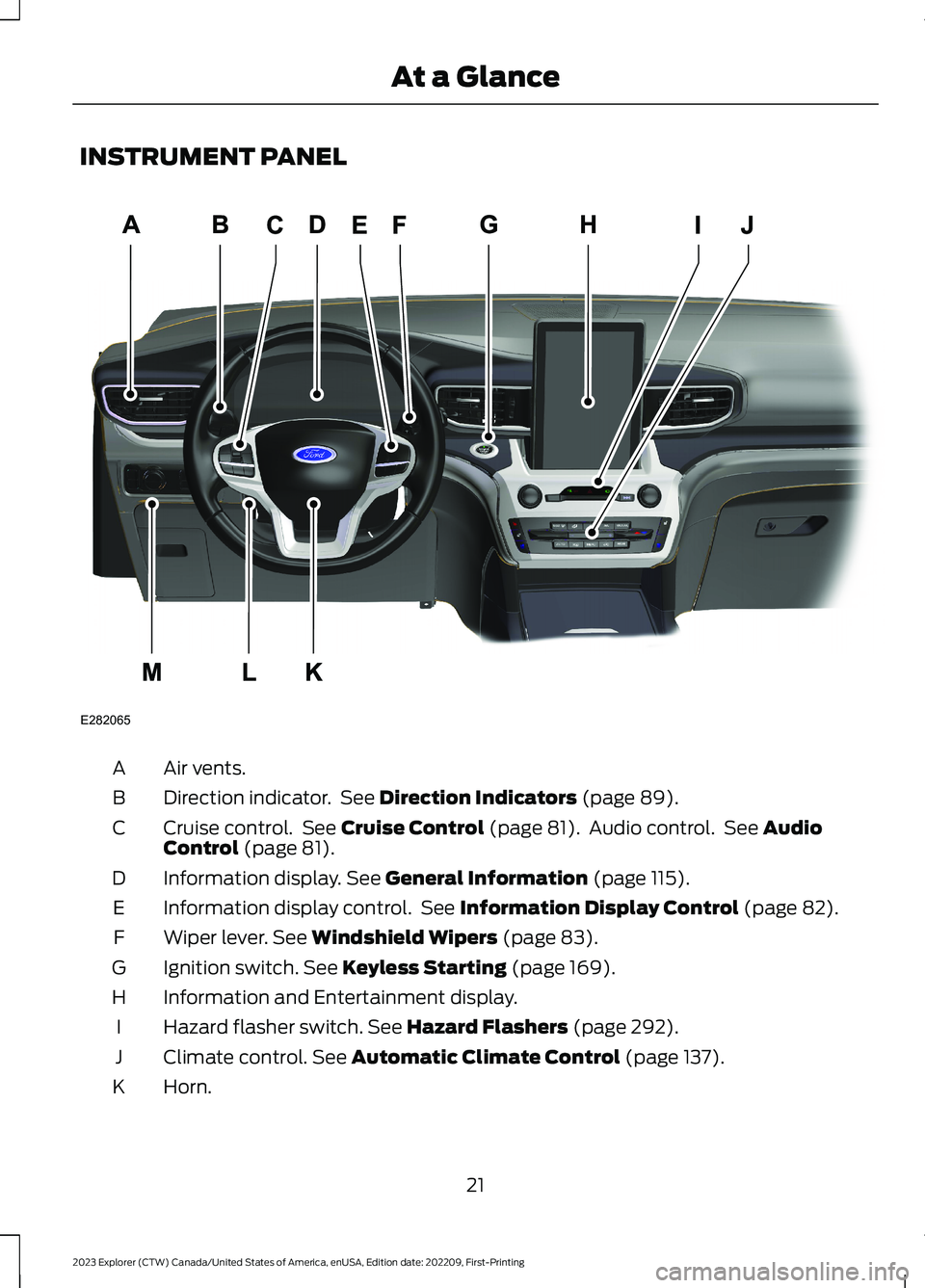
INSTRUMENT PANEL
Air vents.A
Direction indicator. See Direction Indicators (page 89).B
Cruise control. See Cruise Control (page 81). Audio control. See AudioControl (page 81).C
Information display. See General Information (page 115).D
Information display control. See Information Display Control (page 82).E
Wiper lever. See Windshield Wipers (page 83).F
Ignition switch. See Keyless Starting (page 169).G
Information and Entertainment display.H
Hazard flasher switch. See Hazard Flashers (page 292).I
Climate control. See Automatic Climate Control (page 137).J
Horn.K
21
2023 Explorer (CTW) Canada/United States of America, enUSA, Edition date: 202209, First-PrintingAt a GlanceE282065A
Page 46 of 573
SEATBELT REMINDER
WARNING: The system will onlyprovide protection when you use theseatbelt correctly.
This system monitors all seating positionsand provides audio and graphic feedback.
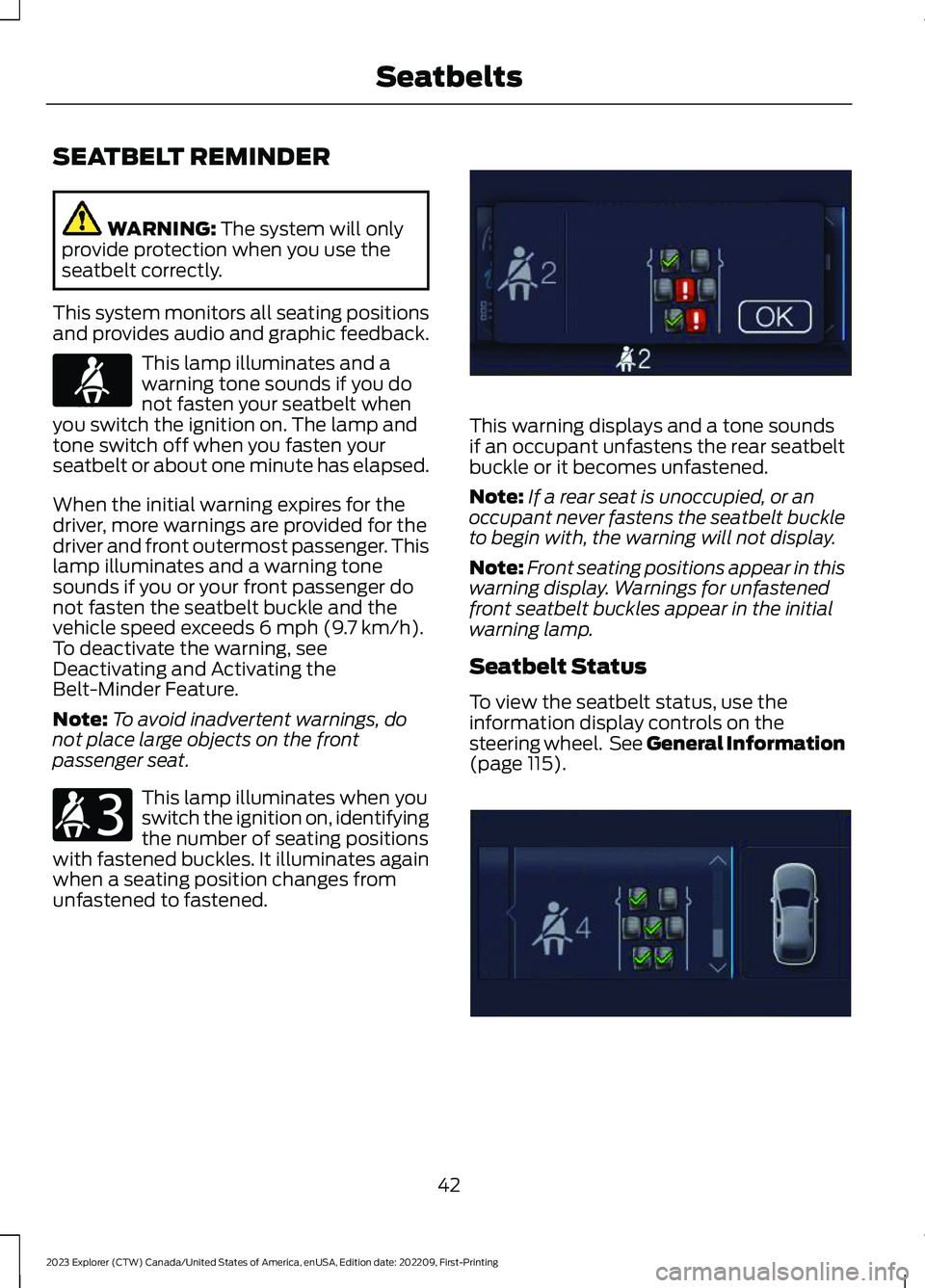
This lamp illuminates and awarning tone sounds if you donot fasten your seatbelt whenyou switch the ignition on. The lamp andtone switch off when you fasten yourseatbelt or about one minute has elapsed.
When the initial warning expires for thedriver, more warnings are provided for thedriver and front outermost passenger. Thislamp illuminates and a warning tonesounds if you or your front passenger donot fasten the seatbelt buckle and thevehicle speed exceeds 6 mph (9.7 km/h).To deactivate the warning, seeDeactivating and Activating theBelt-Minder Feature.
Note:To avoid inadvertent warnings, donot place large objects on the frontpassenger seat.
This lamp illuminates when youswitch the ignition on, identifyingthe number of seating positionswith fastened buckles. It illuminates againwhen a seating position changes fromunfastened to fastened.
This warning displays and a tone soundsif an occupant unfastens the rear seatbeltbuckle or it becomes unfastened.
Note:If a rear seat is unoccupied, or anoccupant never fastens the seatbelt buckleto begin with, the warning will not display.
Note:Front seating positions appear in thiswarning display. Warnings for unfastenedfront seatbelt buckles appear in the initialwarning lamp.
Seatbelt Status
To view the seatbelt status, use theinformation display controls on thesteering wheel. See General Information(page 115).
42
2023 Explorer (CTW) Canada/United States of America, enUSA, Edition date: 202209, First-PrintingSeatbeltsE71880 E206718 E274569 E274570
Page 60 of 573

•A connected Bluetooth® enabledphone must have adequate networkcoverage, battery power and signalstrength.
•The vehicle must have battery powerand be located in the U.S., Canada orin a territory in which 911 is theemergency number.
Note:If any user sets 911 Assist to on or off,that setting applies for all paired phones. If911 Assist is switched off and the phone isconnected to SYNC, an icon displays on thestatus bar.
Note:Every phone operates differently.While SYNC 911 Assist works with mostcellular phones, some may have troubleusing this feature.
EMERGENCY CALL
LIMITATIONS
The SYNC 911 Assist feature only operatesin the U.S., Canada or in a territory in which911 is the emergency number.
•Your cellular phone or 911 Assisthardware sustains damage in a crash.
•The vehicle's battery or the SYNCsystem has no power.
•The phone(s) thrown from your vehicleare the ones paired and connected tothe system.
56
2023 Explorer (CTW) Canada/United States of America, enUSA, Edition date: 202209, First-Printing911 Assist
Page 63 of 573
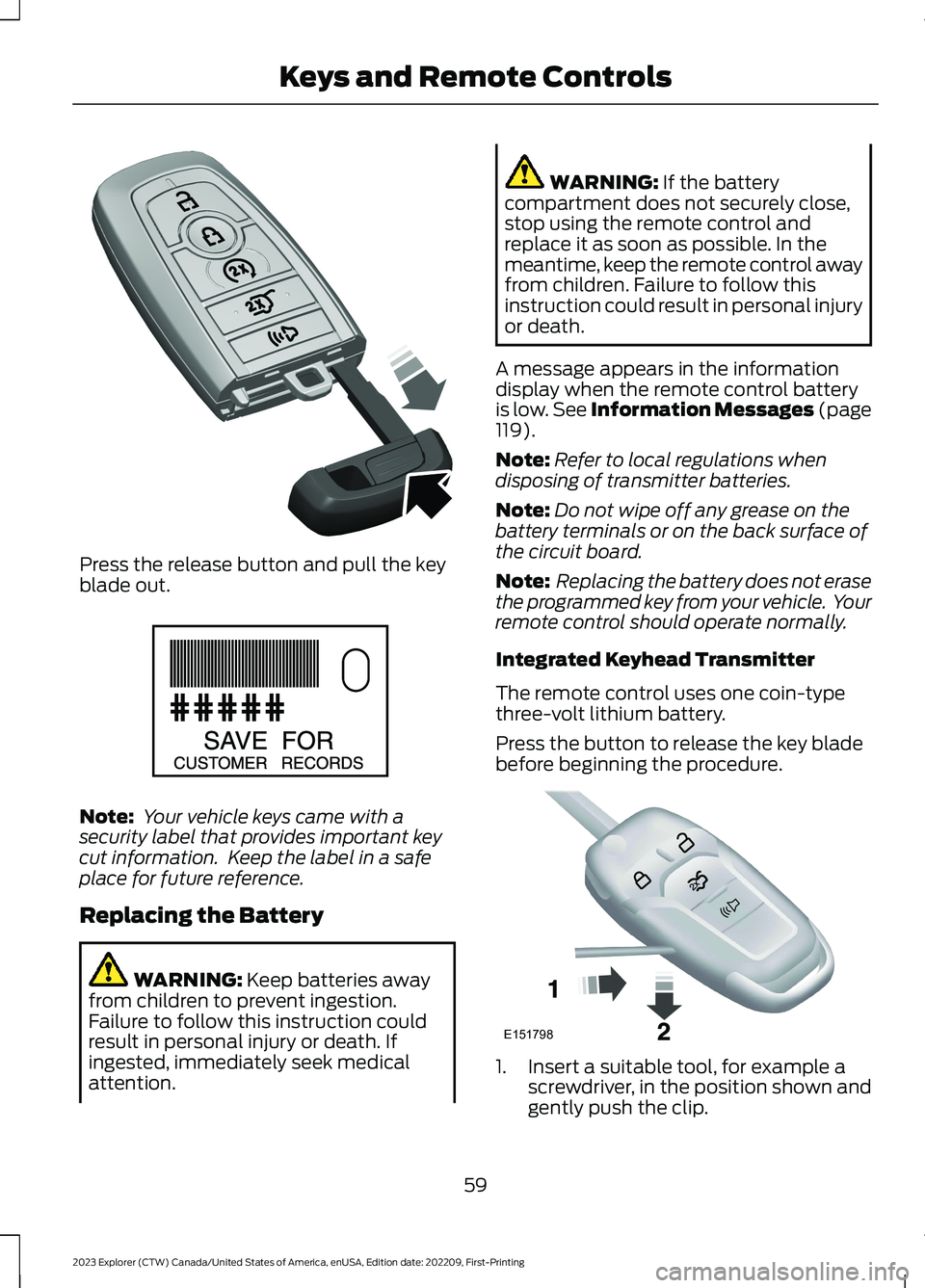
Press the release button and pull the keyblade out.
Note: Your vehicle keys came with asecurity label that provides important keycut information. Keep the label in a safeplace for future reference.
Replacing the Battery
WARNING: Keep batteries awayfrom children to prevent ingestion.Failure to follow this instruction couldresult in personal injury or death. Ifingested, immediately seek medicalattention.
WARNING: If the batterycompartment does not securely close,stop using the remote control andreplace it as soon as possible. In themeantime, keep the remote control awayfrom children. Failure to follow thisinstruction could result in personal injuryor death.
A message appears in the informationdisplay when the remote control batteryis low. See Information Messages (page119).
Note:Refer to local regulations whendisposing of transmitter batteries.
Note:Do not wipe off any grease on thebattery terminals or on the back surface ofthe circuit board.
Note: Replacing the battery does not erasethe programmed key from your vehicle. Yourremote control should operate normally.
Integrated Keyhead Transmitter
The remote control uses one coin-typethree-volt lithium battery.
Press the button to release the key bladebefore beginning the procedure.
1.Insert a suitable tool, for example ascrewdriver, in the position shown andgently push the clip.
59
2023 Explorer (CTW) Canada/United States of America, enUSA, Edition date: 202209, First-PrintingKeys and Remote ControlsE305199 E151795 E151798
Page 67 of 573

To remote start your vehicle:
1.Press the lock button to lock all thedoors.
2.Press the remote start button twice.The exterior lamps flash twice.
The horn sounds if the system fails to start,unless quiet start is on. Quiet start runsthe blower fan at a slower speed to reducenoise. You can switch it on or off in theinformation display.
Note:If you have remote started yourvehicle with an integrated keyheadtransmitter, you must switch on the ignitionbefore driving your vehicle. With anintelligent access transmitter, you mustpress the brake pedal before driving yourvehicle.
The power windows do not work duringremote start and the radio does not turnon automatically.
The parking lamps remain on and yourvehicle runs for 5, 10 or 15 minutes,depending on the setting.
Extending the Engine Running Time
Repeat Steps 1 and 2 with the vehicle stillrunning to extend the run time for anotherremote start period. If you have theduration set to 15 minutes, the durationextends by another 15 minutes. Forexample, if the vehicle has run from thefirst remote start for five minutes, thevehicle continues to run now for a total of30 minutes. You can extend the remotestart up to a maximum of 35 minutes.
Wait at least five seconds before remotestarting after the engine stops running.
Turning Your Vehicle Off After RemoteStarting
Press the button once. Yourvehicle and the parking lampsturn off.
You may have to be closer to your vehiclethan when starting due to ground reflectionand the added noise of your runningvehicle.
You can switch this feature on or off in theinformation display.
REPLACING A LOST KEY OR
REMOTE CONTROL
Replacement keys or remote controls canbe purchased from an authorized dealer.Authorized dealers can program remotecontrols for your vehicle.
63
2023 Explorer (CTW) Canada/United States of America, enUSA, Edition date: 202209, First-PrintingKeys and Remote ControlsE138626 E138625