2023 FORD EXPEDITION brake light
[x] Cancel search: brake lightPage 425 of 658

If you replace the battery make sure itmatches the electrical requirements ofyour vehicle.
If you disconnect or replace the batteryand your vehicle has an automatictransmission, it must relearn its adaptivestrategy. Because of this, the transmissionmay shift firmly when first driven. This isnormal operation while the transmissionfully updates its operation to optimumshift feel.
Battery Sensor Reset
When you install a new battery, reset thebattery sensor by doing the following:
1.Switch the ignition on, and leave theengine off.
Note:Complete Steps 2 and 3 within 10seconds.
2.Flash the high beam headlamps fivetimes, ending with the high beams off.
3.Press and release the brake pedal threetimes.
The battery warning lamp flashes threetimes to confirm that the reset issuccessful.
Battery Management System (If
Equipped)
The system monitors battery conditionsand takes actions to extend battery life. Ifexcessive battery drain is detected, thesystem temporarily disables someelectrical systems to protect the battery.
Systems included are:
•Heated rear window.
•Heated seats.
•Climate control.
•Heated steering wheel.
•Audio unit.
•Navigation system.
A message may appear in the informationdisplay to alert you that battery protectionactions are active. This message is only fornotification that an action is taking place,and not intended to indicate an electricalproblem or that the battery requiresreplacement.
After battery replacement, or in somecases after charging the battery with anexternal charger, the battery managementsystem requires eight hours of vehicle sleeptime to relearn the battery state of charge.During this time, your vehicle must remainfully locked with the ignition switched off.
Note:Prior to relearning the battery stateof charge, the battery management systemmay temporarily disable some electricalsystems.
Electrical Accessory Installation
To make sure the battery managementsystem works correctly, do not connect anelectrical device ground connectiondirectly to the battery negative post. Thiscan cause inaccurate measurements ofthe battery condition and potentialincorrect system operation.
Note:If you add electrical accessories orcomponents to the vehicle, it may adverselyaffect battery performance and durability.This may also affect the performance ofother electrical systems in the vehicle.
Remove and Reinstall the Battery
Install a battery approved for use by ourspecifications. See Capacities andSpecifications (page 463).
To disconnect or remove the battery, dothe following:
1.Apply the parking brake and switch theignition off.
2.Switch all electrical equipment off, forexample lights and radio.
421
2023 Expedition (TB8) Canada/United States of America, enUSA, Edition date: 202207, DOMMaintenance
Page 439 of 658
PREPARING YOUR VEHICLE
FOR STORAGE
If you plan on storing your vehicle for 30days or more, the following maintenancerecommendations ensures your vehiclestays in good operating condition.
Under various conditions, long-termstorage may lead to degraded engineperformance or failure unless you usespecific precautions to preserve yourvehicle.
General
•Store all vehicles in a dry, ventilatedplace.
•If vehicles are stored outside, theyrequire regular maintenance to protectagainst rust and weather damage.
•Make sure all linkages, cables, leversand pins under your vehicle are coveredwith grease to prevent rust.
•Move vehicles at least 25 ft (7.5 m)every 15 days to lubricate working partsand prevent corrosion.
•Fill the fuel tank with high-quality fueluntil the first automatic shutoff of thefuel pump nozzle.
Engine
•Change the engine oil and filter prior tostorage because used engine oilcontains contaminants which maycause engine damage.
•Start the engine every 15 days for aminimum of 15 minutes. Run at fastidle with the climate controls set todefrost until the engine reaches normaloperating temperature.
•With your foot on the brake, shiftthrough all the gears while the engineis running.
Body
•Wash your vehicle thoroughly toremove dirt, grease, oil, tar or mud fromexterior surfaces, rear wheel housingsand the underside of front fenders.
•Periodically wash your vehicle if it isstored in exposed locations.
•Touch-up exposed or primed metal toprevent rust.
•Cover chrome and stainless steel partswith a thick coat of auto wax to preventdiscoloration. Rewax as necessarywhen you wash your vehicle.
•Lubricate all hood, door and luggagecompartment hinges and latches witha light grade oil.
•Cover interior trim to prevent fading.
•Keep all rubber parts free from oil andsolvents.
12 Volt Battery
•When storing your vehicle for greaterthan 30 days the state of chargeshould be approximately 50%.Additionally, we recommenddisconnecting the 12v battery whichwill reduce system loads on thebattery.
•Check and recharge as necessary. Keepconnections clean.
Note:It is necessary to reset memoryfeatures if you disconnect the batterycables.
Brakes
Make sure the brakes and parking brakerelease fully.
Note:If you intend on parking your vehiclefor an extended period after cleaning thewheels with a wheel cleaner, drive yourvehicle for a few minutes before doing so toreduce the risk of increased corrosion of thebrake discs, brake pads and linings.
435
2023 Expedition (TB8) Canada/United States of America, enUSA, Edition date: 202207, DOMStoring Your Vehicle
Page 460 of 658

CHANGING A FLAT TIRE
If you get a flat tire when driving, do notapply the brake heavily. Instead, graduallydecrease your speed, hold the steeringwheel firmly and slowly move to a safeplace on the side of the road.
Have the flat serviced by an authorizeddealer to prevent damage to the systemsensors. See Tire Pressure MonitoringSystem (page 452). Replace the spare tirewith a road tire as soon as possible. Duringrepairing or replacing of the flat tire, havethe authorized dealer inspect the systemsensor for damage.
Note:Only use tire sealants in roadsideemergencies as they may cause damage tothe tire pressure monitoring system sensor.
Note:The tire pressure monitoring systemindicator light illuminates when the sparetire is in use. To restore the full function ofthe monitoring system, all road wheels withtire pressure monitoring sensors must bemounted on this vehicle.
Dissimilar Spare Wheel and TireAssembly Information
WARNING: Failure to follow theseguidelines could result in an increasedrisk of loss of vehicle control, injury ordeath.
If you have a dissimilar spare wheel andtire, then it is intended for temporary useonly. This means that if you need to use it,you should replace it as soon as possiblewith a road wheel and tire assembly thatis the same size and type as the road tiresand wheels that were originally provided.If the dissimilar spare tire or wheel isdamaged, it should be replaced rather thanrepaired.
A dissimilar spare wheel and tire assemblyis defined as a spare wheel and tireassembly that is different in brand, size orappearance from the other road tires andwheels on your vehicle.
Full-size dissimilar spare
When driving with the full-size dissimilarspare wheel and tire assembly, do not:
•Exceed 70 mph (113 km/h).
•Use more than one dissimilar sparewheel and tire assembly at a time.
•Use snow chains on the end of thevehicle with the dissimilar spare wheeland tire assembly.
When driving with the full-size dissimilarspare wheel and tire assembly, it isrecommended that you do not:
•Exceed 50 mph (80 km/h) infour-wheel drive.
•Engage four-wheel drive unless thevehicle is stationary.
•Use four-wheel drive on dry pavement.
Using a dissimilar spare wheel and tireassembly can compromise theeffectiveness of the following:
•Handling, stability and brakingperformance.
•Comfort and noise.
•Ground clearance and parking at curbs.
•Winter weather driving capability.
•Wet weather driving capability.
•Four-wheel driving capability.
When driving with the full-size dissimilarspare wheel and tire assembly additionalcaution should be given to:
•Towing a trailer.
•Driving vehicles equipped with acamper body.
•Driving vehicles with a load on thecargo rack.
456
2023 Expedition (TB8) Canada/United States of America, enUSA, Edition date: 202207, DOMChanging a Road Wheel
Page 462 of 658
WARNING: Do not attempt tochange a tire on the side of the vehicleclose to moving traffic. Pull far enoughoff the road to not obstruct the flow oftraffic and avoid the danger of being hitwhen operating the jack or changing thewheel.
1.Park the vehicle on firm, level groundand activate the hazard flashers.
2.Apply the parking brake, place thetransmission in park (P) and switch theignition off.
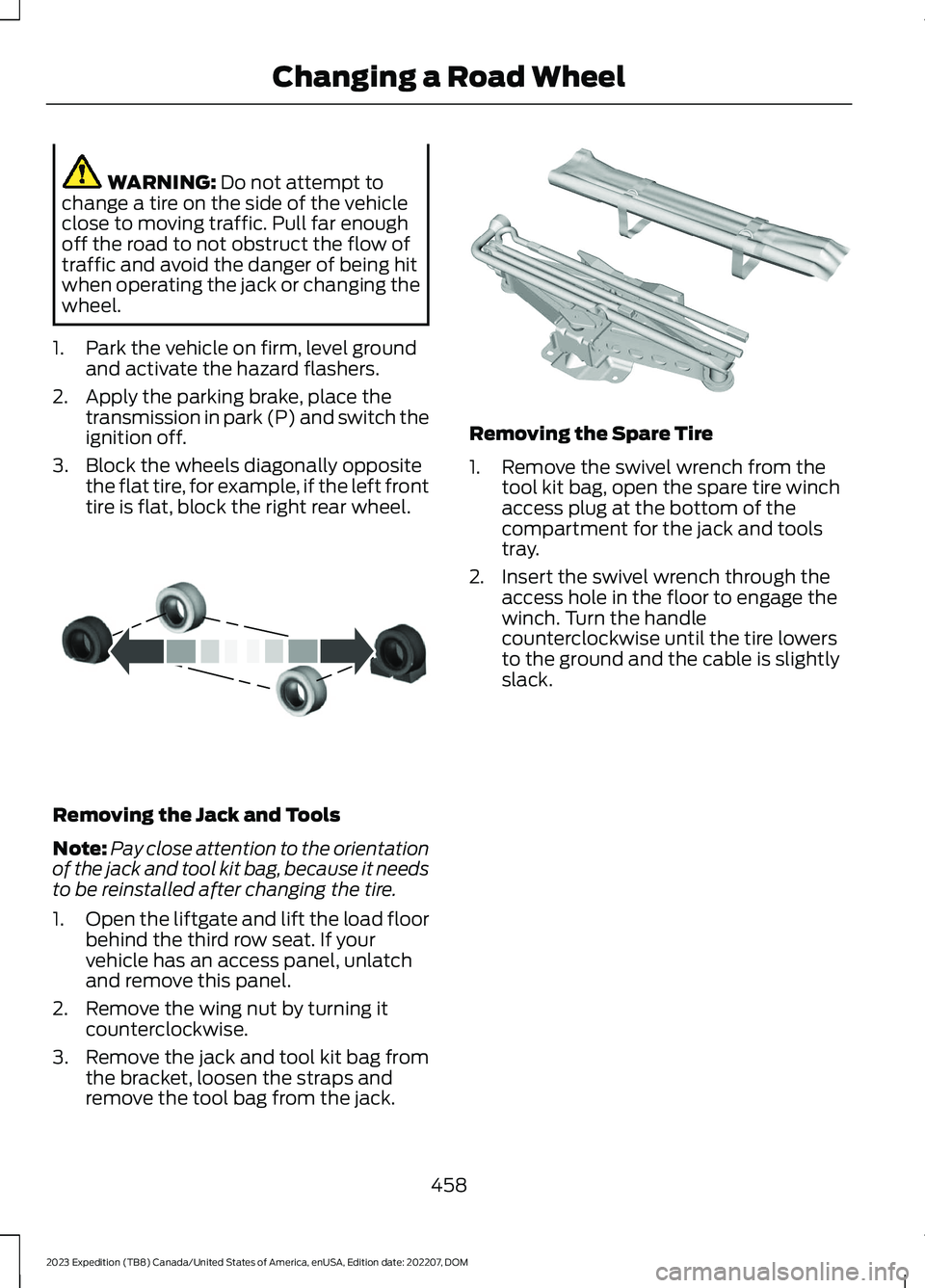
3.Block the wheels diagonally oppositethe flat tire, for example, if the left fronttire is flat, block the right rear wheel.
Removing the Jack and Tools
Note:Pay close attention to the orientationof the jack and tool kit bag, because it needsto be reinstalled after changing the tire.
1.Open the liftgate and lift the load floorbehind the third row seat. If yourvehicle has an access panel, unlatchand remove this panel.
2.Remove the wing nut by turning itcounterclockwise.
3.Remove the jack and tool kit bag fromthe bracket, loosen the straps andremove the tool bag from the jack.
Removing the Spare Tire
1.Remove the swivel wrench from thetool kit bag, open the spare tire winchaccess plug at the bottom of thecompartment for the jack and toolstray.
2.Insert the swivel wrench through theaccess hole in the floor to engage thewinch. Turn the handlecounterclockwise until the tire lowersto the ground and the cable is slightlyslack.
458
2023 Expedition (TB8) Canada/United States of America, enUSA, Edition date: 202207, DOMChanging a Road WheelE175447 E252435
Page 633 of 658
3
360 Degree Camera...................................269360 Degree Camera Settings.........................271360 Degree Camera Guide Lines...........270360 Degree Camera Limitations...........269360 Degree Camera Precautions.........269360 Degree Camera Settings...................271Switching the 360 Degree Camera On andOff........................................................................271Switching the 360 Degree CameraView.....................................................................271
4
4WDSee: Four-Wheel Drive......................................219
9
911 Assist...........................................................65
A
A/CSee: Climate Control - Vehicles With: 12 InchScreen................................................................148See: Climate Control - Vehicles With: 15 InchScreen................................................................153About This Publication..................................21ABSSee: Brakes...........................................................229Accessing Apps............................................522Accessing Feature Drawers.....................503Accessing Navigation.................................526Accessing the Passive Key BackupPosition.........................................................198Accessories....................................................536Active Park Assist.........................................273Active Park Assist – Troubleshooting.........275Active Park Assist Precautions...............273Active Park Assist –Troubleshooting........................................275Active Park Assist – Frequently AskedQuestions.........................................................275Active Park Assist – InformationMessages..........................................................275
Adaptive Cruise Control............................279Adaptive Cruise Control –Troubleshooting............................................295Intelligent Adaptive Cruise Control.............292Lane Centering...................................................289Adaptive Cruise Control AutomaticCancellation................................................282Adaptive Cruise ControlIndicators.....................................................288Adaptive Cruise ControlLimitations..................................................280Adaptive Cruise ControlPrecautions.................................................279Adaptive Cruise Control –Troubleshooting........................................295Adaptive Cruise Control – InformationMessages.........................................................295Adjustable Pedals........................................108Adjusting the Exterior Mirrors..................130Adjusting the Headlamps.........................422Adjusting the Instrument Panel LightingBrightness....................................................126Adjusting the Integrated Trailer BrakeController Mode........................................366Adjusting the Luggage CompartmentDivider...........................................................352Adjusting the Luggage CompartmentLoad Floor.....................................................351Adjusting the Map.......................................526Changing the Format of the Map................526Zooming the Map In and Out........................526Adjusting the Pedals...................................108Adjusting the Seatbelt Height....................51Adjusting the Seatbelts DuringPregnancy.......................................................51Adjusting the Sound Settings.................482Adjusting the Steering Wheel - VehiclesWith: Manual Adjustable SteeringColumn..........................................................106Adjusting the Steering Wheel - VehiclesWith: Power Adjustable SteeringColumn..........................................................106Adjusting the Volume................................482Aid Mode..........................................................312How Does Aid Mode Work...............................312What Is Aid Mode................................................312Airbag Precautions........................................58
629
2023 Expedition (TB8) Canada/United States of America, enUSA, Edition date: 202207, DOMIndex
Page 634 of 658

Airbags...............................................................56Front Passenger Sensing System..................60Air ConditioningSee: Climate Control - Vehicles With: 12 InchScreen................................................................148See: Climate Control - Vehicles With: 15 InchScreen................................................................153Air Conditioning System Capacity andSpecification..............................................468Alert and Aid Mode......................................312How Does Alert and Aid Mode Work...........312What Is Alert and Aid Mode............................312Alert Mode........................................................311Adjusting the Steering Wheel VibrationIntensity..............................................................311How Does Alert Mode Work............................311What Is Alert Mode.............................................311Alexa Built-In.................................................507Alexa Built-In Requirements...................507Alexa Built-In Settings...............................507AM/FM Radio................................................483AM/FM Radio Limitations..............................483Selecting a Radio Station...............................483Ambient Lighting..........................................126Adjusting Ambient Lighting............................126Switching Ambient Lighting On andOff........................................................................126Anti-Lock Braking System........................229Anti-Lock Braking SystemLimitations......................................................229Anti-Theft Alarm System.........................100Arming the Anti-Theft Alarm System.........101Disarming the Anti-Theft AlarmSystem................................................................101How Does the Anti-Theft Alarm SystemWork...................................................................100What Are the Inclination Sensors.................101What Are the Interior Sensors.......................100What Is the Anti-Theft AlarmSystem..............................................................100What Is the Perimeter Alarm.........................100Anti-Theft Alarm System Settings.........101Setting the Alarm Security Level...................101Switching Ask on Exit On and Off.................101What are the Alarm Security Levels.............101What Is Ask on Exit.............................................101Appendices....................................................625
Applying the Electric ParkingBrake..............................................................232Applying the Electric Parking Brake in anEmergency...................................................232App Precautions...........................................522App Requirements......................................522Apps..................................................................522Audio System.................................................481AM/FM Radio......................................................483Audio System – Troubleshooting...............488Digital Radio........................................................484Satellite Radio....................................................485Audio System Precautions.......................481Audio System – Troubleshooting.........488Audio System – InformationMessages........................................................488Auto-Dimming Exterior Mirror...................131What Is the Auto-Dimming ExteriorMirror....................................................................131Auto-Dimming Interior Mirror...................129Auto-Dimming Interior MirrorLimitations.......................................................129What Is the Auto-Dimming InteriorMirror..................................................................129Auto Hold........................................................243Auto Hold Indicators...................................243Autolamps.......................................................116Autolamp Settings..............................................116What Are Autolamps.........................................116Autolock............................................................82Autolock Requirements.....................................82What Is Autolock..................................................82Automatically Releasing the ElectricParking Brake..............................................233Automatic Crash Shutoff..........................397Automatic Crash ShutoffPrecautions.....................................................397Re-Enabling Your Vehicle...............................397What Is Automatic Crash Shutoff...............397Automatic Emergency Braking...............335Switching Automatic Emergency BrakingOn and Off.......................................................336What Is Automatic EmergencyBraking..............................................................335Automatic Engine Stop..............................197How Does Automatic Engine StopWork...................................................................198Overriding Automatic Engine Stop..............198
630
2023 Expedition (TB8) Canada/United States of America, enUSA, Edition date: 202207, DOMIndex
Page 643 of 658
Installing and Removing the LuggageCompartment Cargo Net......................350Installing Child Restraints............................41Combining the Seatbelt and Lower Anchorsfor Attaching Child Restraints....................45Installing a Child Restraint in a CenterSeat......................................................................44Using Lower Anchors and Tethers forChildren...............................................................43Using Seatbelts......................................................41Using Tether Straps.............................................45Instrument Cluster Display.......................140Trip Computer - Vehicles With: 8 InchScreen/12 Inch Screen..................................141Instrument Cluster Display Main Menu -Vehicles With: 12 Inch Screen.................141Instrument Cluster Display Main Menu -Vehicles With: 8 Inch Screen................140Instrument Cluster Indicators..................138Instrument Cluster.......................................134Fuel Gauge............................................................135Instrument Cluster Overview - VehiclesWith: 12 Inch Screen..................................135Instrument Cluster Overview - VehiclesWith: 8 Inch Screen...................................134Instrument Cluster WarningLamps............................................................136Instrument Panel - Vehicles With: 12 InchScreen..............................................................32Instrument Panel - Vehicles With: 15 InchScreen..............................................................33Integrated Trailer Brake Controller........365Integrated Trailer Brake Controller –Troubleshooting............................................367Integrated Trailer Brake ControllerPrecautions.................................................365Integrated Trailer Brake Controller –Troubleshooting........................................367Integrated Trailer Brake Controller –Frequently Asked Questions....................368Integrated Trailer Brake Controller –Information Messages.................................367Intelligent Adaptive Cruise Control.......292Adjusting the Set Speed Tolerance............293How Does Intelligent Adaptive CruiseControl Work...................................................292Intelligent Adaptive Cruise ControlAlerts.................................................................294
Intelligent Adaptive Cruise ControlIndicators.........................................................294Intelligent Adaptive Cruise ControlLimitations......................................................293Intelligent Adaptive Cruise ControlPrecautions.....................................................293Intelligent Adaptive Cruise ControlRequirements.................................................293Switching Intelligent Mode On andOff.......................................................................293Interior Air Quality........................................160Interior Bulbs..................................................427Interior Bulb Specification Chart..................427Interior Lamp Function...............................125Switching the Interior Lamp Function Onand Off...............................................................125What Is the Interior Lamp Function.............125Interior Lighting..............................................125Ambient Lighting................................................126Interior Lamp Function.....................................125Interior Lighting – Troubleshooting.............126Interior Lighting – Troubleshooting.......126Interior Lighting – Frequently AskedQuestions.........................................................126Interior Mirror..................................................129Auto-Dimming Interior Mirror.........................129Interior Mirror Precautions........................129Introduction.......................................................21
J
Jump Starting the Vehicle........................394Jump Starting Precautions............................394Jump Starting the Vehicle..............................395Preparing the Vehicle.......................................395
K
Keyless Entry...................................................85Keyless Entry – Troubleshooting...................86Keyless Entry Keypad....................................87Keyless Entry Keypad –Troubleshooting..............................................89Keyless Entry Keypad Limitations............87Keyless Entry Keypad Master AccessCode.................................................................87Keyless Entry Keypad Personal AccessCodes..............................................................88
639
2023 Expedition (TB8) Canada/United States of America, enUSA, Edition date: 202207, DOMIndex