Page 109 of 658
DEPLOYING AND STOWING
THE POWER RUNNING
BOARDS
The power running boards deploy whenyou open the door and stow when youclose the door.
Note:The power running boards reversedirection and move to the end of travel ifthey encounter an object when moving.
POWER RUNNING BOARDS –
TROUBLESHOOTING
POWER RUNNING BOARDS –FREQUENTLY ASKED QUESTIONS
Why is there unwanted noise comingfrom my power running boards?
The power running board mechanismcould trap debris such as mud, dirt,snow, ice and salt. If this happens, setthe running boards to the deployedposition. Then, wash the system, inparticular the front and rear hingearms, with a high-pressure car washwand.
105
2023 Expedition (TB8) Canada/United States of America, enUSA, Edition date: 202207, DOMPower Running Boards (If Equipped)
Page 113 of 658

WIPERS
WIPER PRECAUTIONS
Do not operate the wipers on a drywindshield. This could scratch the glass ordamage the wiper blades. Use thewindshield washers before wiping a drywindshield.
Fully defrost the windshield before youswitch the windshield wipers on.
Switch the windshield wipers off beforeentering a car wash.
SWITCHING WINDSHIELD WIPERSON AND OFF
High-speed wipe.A
Low-speed wipe.B
Auto Wipe/Intermittent wipe.C
Off.D
Use the rotary control.
AUTOWIPERS (IF EQUIPPED)
WHAT ARE AUTOWIPERS
Autowipers turns on and controls thespeed and frequency of the windshieldwipers.
AUTOWIPERS SETTINGS -VEHICLES WITH: 12 INCH SCREEN
1.Press Settings on the touchscreen.
2.Press Vehicle Settings.
3.Press Wipers.
4.Switch Rain Sensing on or off.
Note:When you switch the feature off, thewipers do not operate based on the rainsensor. When you switch on the windshieldwipers to the intermittent wipe position withthe feature off, the wipers use the wipespeed set by the rotary control.
AUTOWIPERS SETTINGS -VEHICLES WITH: 15 INCH SCREEN
1.Access the vehicle drawer on thetouchscreen.
2.Press SETTINGS.
3.Press Vehicle.
4.Press Wipers.
5.Switch Rain Sensing on or off.
Note:When you switch the feature off, thewipers do not operate based on the rainsensor. When you switch on the windshieldwipers to the intermittent wipe position withthe feature off, the wipers use the wipespeed set by the rotary control.
109
2023 Expedition (TB8) Canada/United States of America, enUSA, Edition date: 202207, DOMWipers and WashersE383137 E270969
Page 114 of 658

ADJUSTING THE SENSITIVITY OFTHE RAIN SENSOR
Low sensitivity.A
High sensitivity.B
Use the rotary control to set the rain sensorsensitivity.
Note:Use intermittent wipe positions toadjust the rain sensor sensitivity.
When you select low sensitivity, the wipersoperate when the sensor detects a largeamount of water on the windshield.
When you select high sensitivity, the wipersoperate when the sensor detects a smallamount of water on the windshield.
SWITCHING THE REAR
WINDOW WIPER ON AND OFF
Rotate the control away from you for along wipe interval.
Rotate the control toward you for a shortwipe interval.
REVERSE WIPE
WHAT IS REVERSE WIPE
Reverse wipe turns on the rear windowwiper when you shift into reverse (R) andthe windshield wipers are on.
REVERSE WIPE SETTINGS -VEHICLES WITH: 12 INCH SCREEN
1.Press Settings on the touchscreen.
2.Press Vehicle Settings.
3.Press Wipers.
4.Switch Rear Wiper On (when inReverse) on or off.
REVERSE WIPE SETTINGS -VEHICLES WITH: 15 INCH SCREEN
1.Access the vehicle drawer on thetouchscreen.
2.Press SETTINGS.
3.Press Vehicle.
4.Press Wipers.
5.Switch Reverse Wiper on or off.
110
2023 Expedition (TB8) Canada/United States of America, enUSA, Edition date: 202207, DOMWipers and WashersE383614 E340280
Page 119 of 658
EXTERIOR LIGHTING
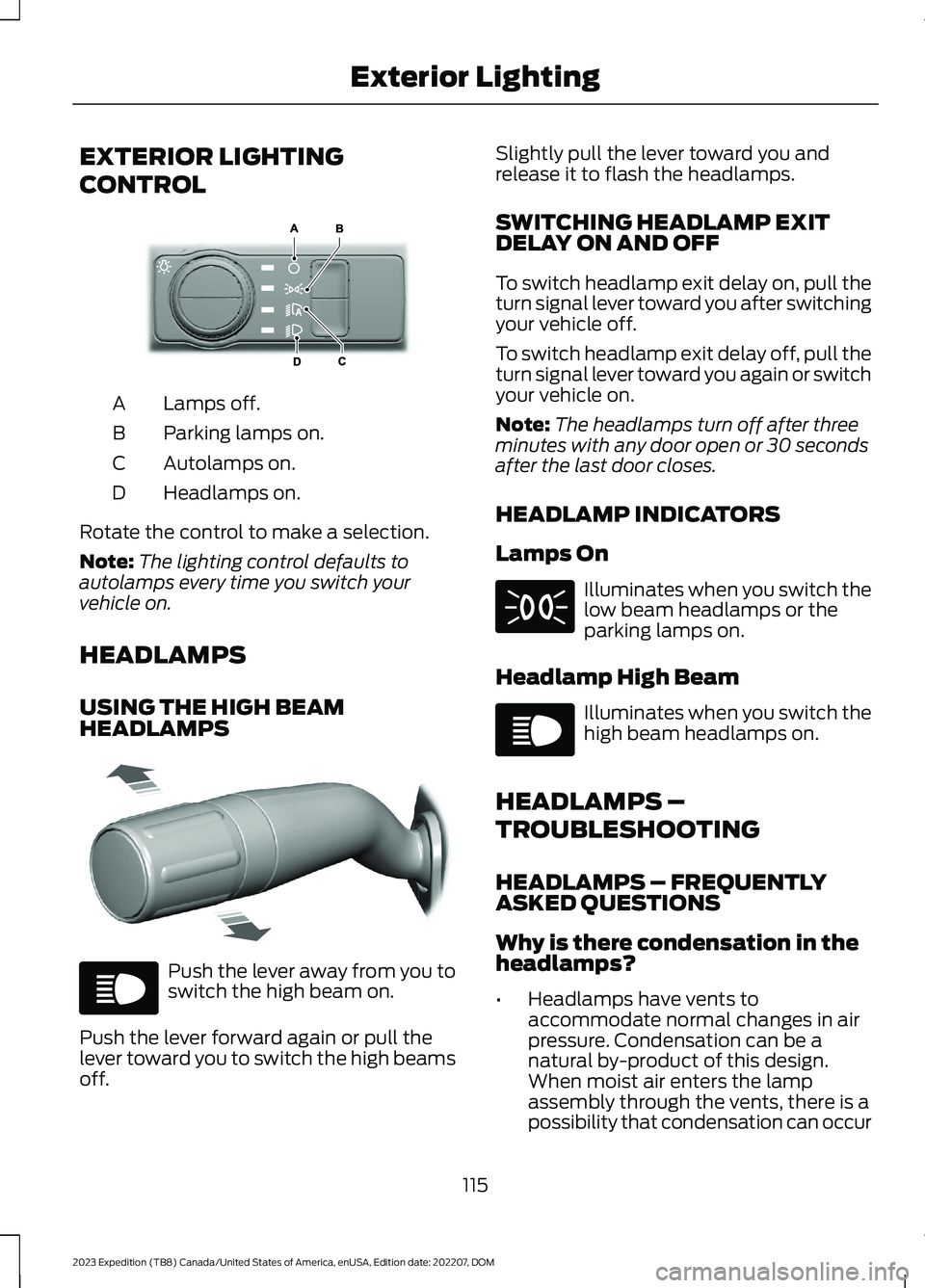
CONTROL
Lamps off.A
Parking lamps on.B
Autolamps on.C
Headlamps on.D
Rotate the control to make a selection.
Note:The lighting control defaults toautolamps every time you switch yourvehicle on.
HEADLAMPS
USING THE HIGH BEAMHEADLAMPS
Push the lever away from you toswitch the high beam on.
Push the lever forward again or pull thelever toward you to switch the high beamsoff.
Slightly pull the lever toward you andrelease it to flash the headlamps.
SWITCHING HEADLAMP EXITDELAY ON AND OFF
To switch headlamp exit delay on, pull theturn signal lever toward you after switchingyour vehicle off.
To switch headlamp exit delay off, pull theturn signal lever toward you again or switchyour vehicle on.
Note:The headlamps turn off after threeminutes with any door open or 30 secondsafter the last door closes.
HEADLAMP INDICATORS
Lamps On
Illuminates when you switch thelow beam headlamps or theparking lamps on.
Headlamp High Beam
Illuminates when you switch thehigh beam headlamps on.
HEADLAMPS –
TROUBLESHOOTING
HEADLAMPS – FREQUENTLYASKED QUESTIONS
Why is there condensation in theheadlamps?
•Headlamps have vents toaccommodate normal changes in airpressure. Condensation can be anatural by-product of this design.When moist air enters the lampassembly through the vents, there is apossibility that condensation can occur
115
2023 Expedition (TB8) Canada/United States of America, enUSA, Edition date: 202207, DOMExterior LightingE327629 E327570 E67019 E71341 E67019
Page 133 of 658
INTERIOR MIRROR
PRECAUTIONS
WARNING: Do not adjust themirrors when your vehicle is moving. Thiscould result in the loss of control of yourvehicle, serious personal injury or death.
Note:Do not clean the mirror housing orglass with harsh abrasives, fuel or otherpetroleum-based cleaning products.
MANUALLY DIMMING THE
INTERIOR MIRROR
Pull the tab below the mirror toward youto reduce glare at night.
AUTO-DIMMING INTERIOR
MIRROR (IF EQUIPPED)
WHAT IS THE AUTO-DIMMINGINTERIOR MIRROR
The mirror dims to reduce the effect ofbright light from behind. It returns tonormal when the bright light from behindis no longer present or if you shift intoreverse (R).
AUTO-DIMMING INTERIORMIRROR LIMITATIONS
Do not block the sensors on the front andback of the mirror.
Note:A rear center passenger or raised rearcenter head restraint could prevent lightfrom reaching the sensor.
129
2023 Expedition (TB8) Canada/United States of America, enUSA, Edition date: 202207, DOMInterior Mirror
Page 134 of 658
ADJUSTING THE EXTERIOR
MIRRORS
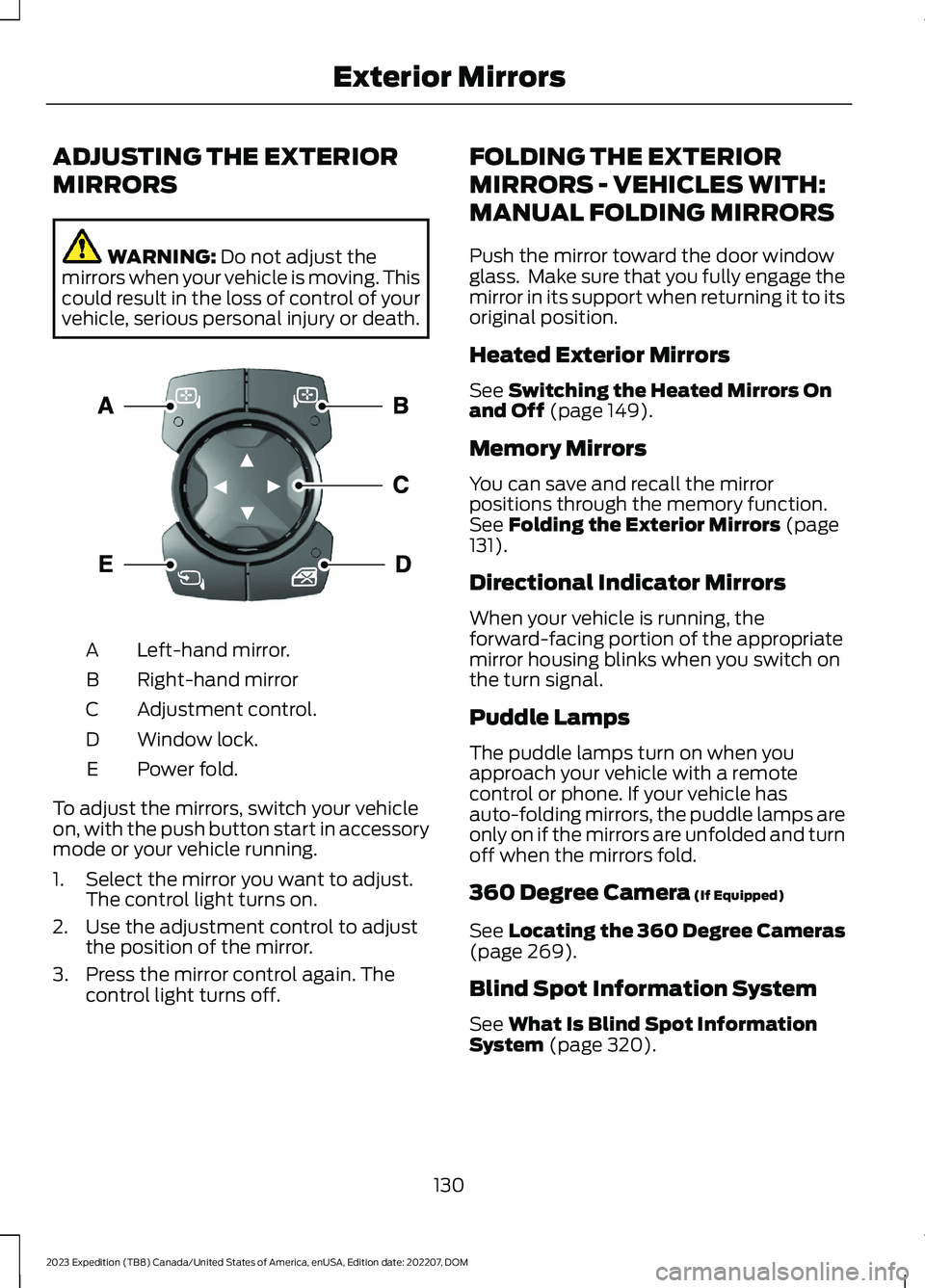
WARNING: Do not adjust themirrors when your vehicle is moving. Thiscould result in the loss of control of yourvehicle, serious personal injury or death.
Left-hand mirror.A
Right-hand mirrorB
Adjustment control.C
Window lock.D
Power fold.E
To adjust the mirrors, switch your vehicleon, with the push button start in accessorymode or your vehicle running.
1.Select the mirror you want to adjust.The control light turns on.
2.Use the adjustment control to adjustthe position of the mirror.
3.Press the mirror control again. Thecontrol light turns off.
FOLDING THE EXTERIOR
MIRRORS - VEHICLES WITH:
MANUAL FOLDING MIRRORS
Push the mirror toward the door windowglass. Make sure that you fully engage themirror in its support when returning it to itsoriginal position.
Heated Exterior Mirrors
See Switching the Heated Mirrors Onand Off (page 149).
Memory Mirrors
You can save and recall the mirrorpositions through the memory function.See Folding the Exterior Mirrors (page131).
Directional Indicator Mirrors
When your vehicle is running, theforward-facing portion of the appropriatemirror housing blinks when you switch onthe turn signal.
Puddle Lamps
The puddle lamps turn on when youapproach your vehicle with a remotecontrol or phone. If your vehicle hasauto-folding mirrors, the puddle lamps areonly on if the mirrors are unfolded and turnoff when the mirrors fold.
360 Degree Camera (If Equipped)
See Locating the 360 Degree Cameras(page 269).
Blind Spot Information System
See What Is Blind Spot InformationSystem (page 320).
130
2023 Expedition (TB8) Canada/United States of America, enUSA, Edition date: 202207, DOMExterior MirrorsE369398
Page 143 of 658
Front Fog Lamp
See Using the Front FogLamps (page 118).
High Beam
See Using the High BeamHeadlamps (page 115).
Hill Descent
See Hill Descent Control (page256).
Lamps On
See Exterior Lighting (page115).
Reverse Braking Assist
See Reverse Braking Assist(page 235).
Stability Control and TractionControl
See Traction Control (page245). See Stability Control(page 247).
Turn Signal Lamps
See Using the Turn SignalLamps (page 117).
Tow Haul
See Automatic High BeamControl (page 121).
139
2023 Expedition (TB8) Canada/United States of America, enUSA, Edition date: 202207, DOMInstrument Cluster E67019 E163171 E71341 E293490 E138639 E130458 E67018 E246592
Page 144 of 658
USING THE INSTRUMENT
CLUSTER DISPLAY CONTROLS
WARNING: Driving while distractedcan result in loss of vehicle control, crashand injury. We strongly recommend thatyou use extreme caution when using anydevice that may take your focus off theroad. Your primary responsibility is thesafe operation of your vehicle. Werecommend against the use of anyhand-held device while driving andencourage the use of voice-operatedsystems when possible. Make sure youare aware of all applicable local lawsthat may affect the use of electronicdevices while driving.
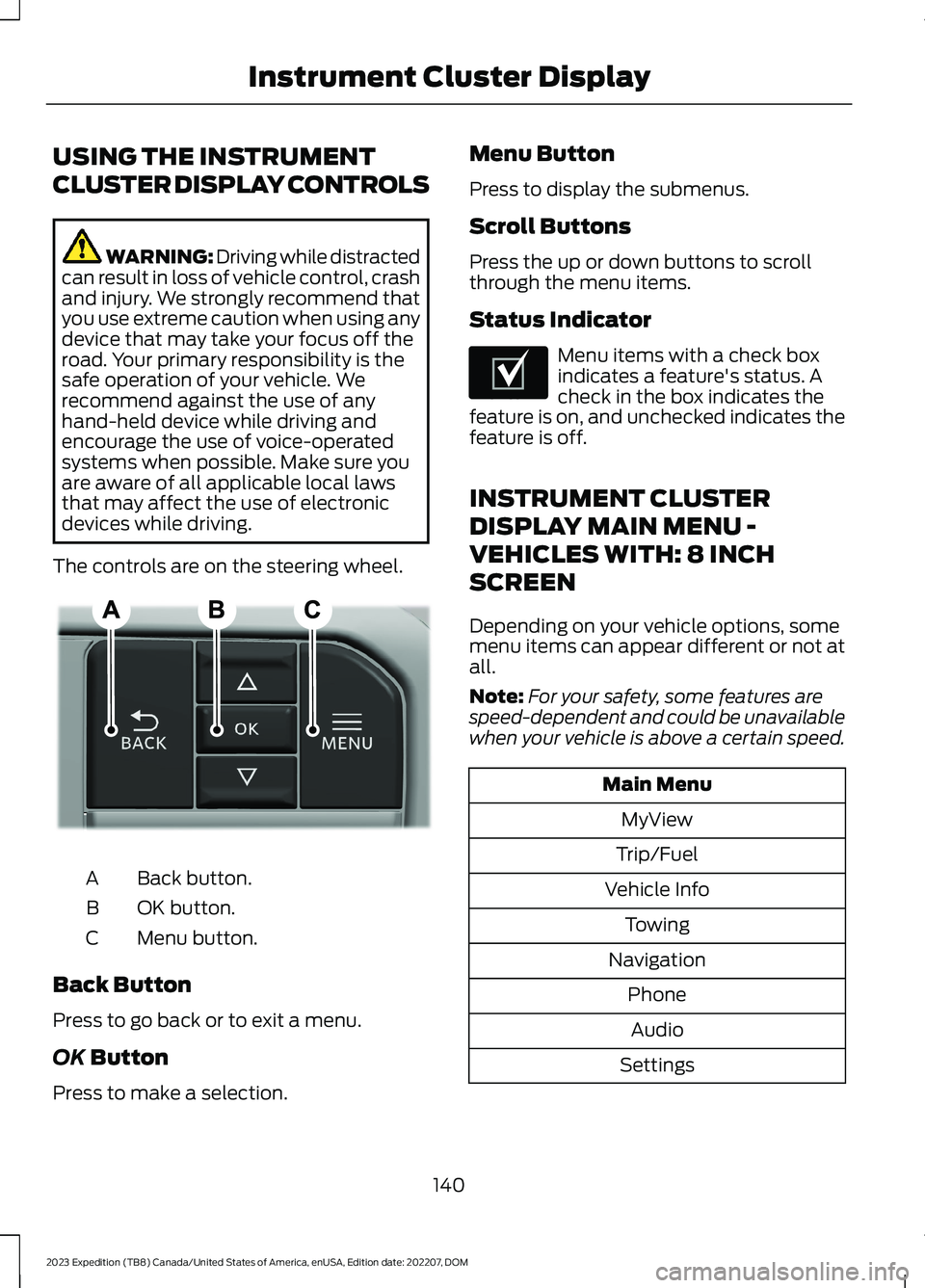
The controls are on the steering wheel.
Back button.A
OK button.B
Menu button.C
Back Button
Press to go back or to exit a menu.
OK Button
Press to make a selection.
Menu Button
Press to display the submenus.
Scroll Buttons
Press the up or down buttons to scrollthrough the menu items.
Status Indicator
Menu items with a check boxindicates a feature's status. Acheck in the box indicates thefeature is on, and unchecked indicates thefeature is off.
INSTRUMENT CLUSTER
DISPLAY MAIN MENU -
VEHICLES WITH: 8 INCH
SCREEN
Depending on your vehicle options, somemenu items can appear different or not atall.
Note:For your safety, some features arespeed-dependent and could be unavailablewhen your vehicle is above a certain speed.
Main Menu
MyView
Trip/Fuel
Vehicle Info
Towing
Navigation
Phone
Audio
Settings
140
2023 Expedition (TB8) Canada/United States of America, enUSA, Edition date: 202207, DOMInstrument Cluster DisplayE309379 E204495