2023 FORD EXPEDITION phone
[x] Cancel search: phonePage 198 of 658

Switching the Ignition On
Turn the key to position II. All electricalcircuits and accessories are operationaland the warning lamps and indicatorsilluminate.
PUSH BUTTON IGNITION
SWITCH (IF EQUIPPED)
Switching the Ignition Off
When the ignition is on or in accessorymode, press the push button ignitionswitch once without your foot on the brakepedal.
Switching the Ignition toAccessory Mode
When the ignition is off, press the pushbutton ignition switch once without yourfoot on the brake pedal.
All electrical circuits and accessories areoperational and the warning lamps andindicators illuminate.
Note:Your vehicle has a battery saverfeature that shuts your vehicle off when itdetects a certain amount of battery drain,or after approximately 30 minutes ofinactivity in accessory mode.
Note:The system may not function if theremote control is close to metal objects orelectronic devices, for example keys or a cellphone.
Note:You need a valid key inside yourvehicle to switch the ignition on and startthe engine.
STARTING THE ENGINE
STARTING A GASOLINE ENGINE -VEHICLES WITHOUT: PUSHBUTTON START
Before starting your vehicle, check thefollowing:
•Make sure that the headlamps andelectrical accessories are off.
•Make sure that the parking brake is on.
•Make sure that the transmission is inpark (P).
1.Fully press the brake pedal.
Note:Do not touch the accelerator pedal.
2.Turn the key to position III.
Note:The engine may continue crankingfor up to 15 seconds or until it starts.
Note:The engine takes longer to start atlower temperatures. It may crank for severalseconds when very cold.
STARTING A GASOLINE ENGINE -VEHICLES WITH: PUSH BUTTONSTART
Before starting your vehicle, check thefollowing:
•Make sure that the headlamps andelectrical accessories are off.
•Make sure that the parking brake is on.
•Make sure that the transmission is inpark (P).
1.Fully press the brake pedal.
Note:Do not touch the accelerator pedal.
194
2023 Expedition (TB8) Canada/United States of America, enUSA, Edition date: 202207, DOMStarting and Stopping the EngineE321258 E322354
Page 209 of 658
FUEL AND REFUELING
PRECAUTIONS
WARNING: Do not overfill the fueltank. The pressure in an overfilled tankmay cause leakage and lead to fuel sprayand fire.
WARNING: The fuel system maybe under pressure. If you hear a hissingsound near the fuel filler inlet, do notrefuel until the sound stops. Otherwise,fuel may spray out, which could causeserious personal injury.
WARNING: Fuels can cause seriousinjury or death if misused or mishandled.
WARNING: Fuel may containbenzene, which is a cancer-causingagent.
WARNING: When refueling alwaysshut the engine off and never allowsparks or open flames near the fuel tankfiller valve. Never smoke or use a cellphone while refueling. Fuel vapor isextremely hazardous under certainconditions. Avoid inhaling excess fumes.
WARNING: Read and follow all theinstructions on the pump island.
Follow these guidelines when refueling:
•Extinguish all smoking materials andany open flames before refueling yourvehicle.
•Switch the engine off before refueling.
•Automotive fuels can be harmful orfatal if swallowed. Fuel is highly toxicand if swallowed can cause death orpermanent injury. If fuel is swallowedimmediately call a physician, even if nosymptoms are immediately apparent.The toxic effects of fuel may not beapparent for hours.
•Avoid inhaling fuel vapors. Inhaling fuelvapor can lead to eye and respiratorytract irritation. In severe cases,excessive or prolonged breathing offuel vapor can cause serious illness andpermanent injury.
•Avoid getting fuel in your eyes. If yousplash fuel in your eyes, immediatelyremove contact lenses, if worn, flushwith water for 15 minutes and seekmedical attention. Failure to seekproper medical attention could lead topermanent injury.
•Fuels can be harmful if absorbedthrough the skin. If you splash fuel onyour skin, clothing or both, promptlyremove contaminated clothing andthoroughly wash your skin with soapand water. Repeated or prolonged skincontact causes skin irritation.
•Be particularly careful if you are takingAntabuse or other forms of Disulfiramfor the treatment of alcoholism.Breathing fuel vapors could cause anadverse reaction, serious personalinjury or sickness. Immediately call aphysician if you experience any adversereactions.
205
2023 Expedition (TB8) Canada/United States of America, enUSA, Edition date: 202207, DOMFuel and Refueling
Page 212 of 658
Note:If your vehicle runs out of fuel add aminimum of 1.3 gal (5 L) of fuel to restartthe engine.
Note:You may need to switch the ignitionfrom off to on several times after refuelingto allow the fuel system to pump the fuelfrom the tank to the engine. Whenrestarting, cranking time takes a fewseconds longer than normal.
Note:Extra funnels can be purchased froman authorized dealer if you choose todispose of the funnel.
REFUELING
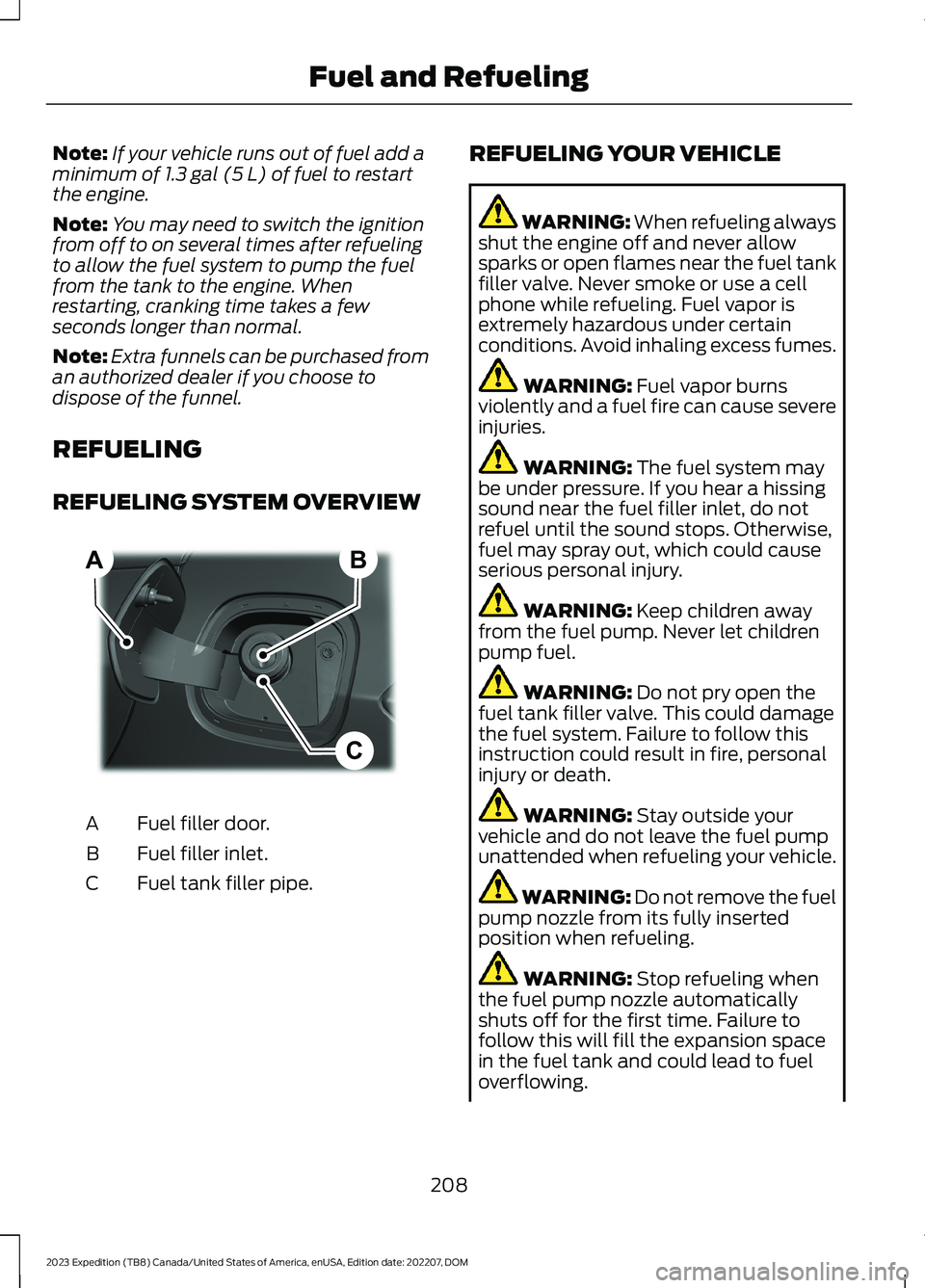
REFUELING SYSTEM OVERVIEW
Fuel filler door.A
Fuel filler inlet.B
Fuel tank filler pipe.C
REFUELING YOUR VEHICLE
WARNING: When refueling alwaysshut the engine off and never allowsparks or open flames near the fuel tankfiller valve. Never smoke or use a cellphone while refueling. Fuel vapor isextremely hazardous under certainconditions. Avoid inhaling excess fumes.
WARNING: Fuel vapor burnsviolently and a fuel fire can cause severeinjuries.
WARNING: The fuel system maybe under pressure. If you hear a hissingsound near the fuel filler inlet, do notrefuel until the sound stops. Otherwise,fuel may spray out, which could causeserious personal injury.
WARNING: Keep children awayfrom the fuel pump. Never let childrenpump fuel.
WARNING: Do not pry open thefuel tank filler valve. This could damagethe fuel system. Failure to follow thisinstruction could result in fire, personalinjury or death.
WARNING: Stay outside yourvehicle and do not leave the fuel pumpunattended when refueling your vehicle.
WARNING: Do not remove the fuelpump nozzle from its fully insertedposition when refueling.
WARNING: Stop refueling whenthe fuel pump nozzle automaticallyshuts off for the first time. Failure tofollow this will fill the expansion spacein the fuel tank and could lead to fueloverflowing.
208
2023 Expedition (TB8) Canada/United States of America, enUSA, Edition date: 202207, DOMFuel and RefuelingBCA E267248
Page 484 of 658
4.Select a frequency.
CHANGING THE VEHICLE WI-
FI HOTSPOT NAME OR
PASSWORD - VEHICLES WITH:
15 INCH SCREEN
Tap the vehicle drawer on the top left ofthe screen.
1.Press Vehicle Hotspot.
2.Press Settings under the VehicleHotspot menu.
3.Press Edit.
4.Press Change Network Name.
5.Enter your required network name.
6.Press enter to save the network name.
7.Press Change Password.
8.Enter your required password.
9.Press enter to save the password.
Changing the Wi-Fi HotspotFrequency
Note:The vehicle hotspot frequency bandis selectable depending upon your devicecapabilities. You will not be able to connectyour device to the vehicle hotspot if it doesnot support the selected frequency band.
Tap the vehicle drawer on the top left ofthe screen.
1.Press Vehicle Hotspot.
2.Press Settings under the VehicleHotspot menu.
3.Press Edit.
4.Select a frequency.
VEHICLE WI-FI HOTSPOT –
TROUBLESHOOTING
VEHICLE WI-FI HOTSPOT –FREQUENTLY ASKED QUESTIONS
Why can I not see the Wi-Fi hotspotname when I search for Wi-Finetworks on my cell phone or otherdevice?
•Make sure Wi-Fi hotspot visibility is on.
•The system does not provide a Wi-Fihotspot at this time.
•Check what frequency the hotspot istransmitting in the vehicle hotspotsettings menu. If the frequency is 5 GHzand your device cannot see thenetwork, change the frequency to 2.4GHz.
480
2023 Expedition (TB8) Canada/United States of America, enUSA, Edition date: 202207, DOMVehicle Wi-Fi Hotspot
Page 503 of 658

CENTER DISPLAY
PRECAUTIONS
WARNING: Driving while distractedcan result in loss of vehicle control, crashand injury. We strongly recommend thatyou use extreme caution when using anydevice that may take your focus off theroad. Your primary responsibility is thesafe operation of your vehicle. Werecommend against the use of anyhand-held device while driving andencourage the use of voice-operatedsystems when possible. Make sure youare aware of all applicable local lawsthat may affect the use of electronicdevices while driving.
CENTER DISPLAY
LIMITATIONS
Speed-restricted Features
For your safety, some features are notavailable while the vehicle is in motion ator above 5 mph (8 km/h). Settings thatare not critical while driving your vehicleare shown as restricted on your display.Some of these settings include:
•Software updates.
•Personal profiles setup.
•Valet mode setup.
•Driver assistance settings.
•MyKey setup.
•Door keypad code setup.
These restricted features becomeavailable when your vehicle is no longer inmotion.
STATUS BAR
SYNC4 Features
The bar is on top of the display andindicates the status of your vehicle'sfeatures.
Audio System
Audio system muted.
Connected Device
Cell phone microphone muted.
Phone call in progress.
Media player connected usingBluetooth®.
Cell phone network signalstrength.
Cell phone roaming.
Text message received.
Unread email message.
Automatic crash notificationsystem off.
Cell phone battery status.
Vehicle Data
Wi-Fi available.
Wi-Fi connected.
499
2023 Expedition (TB8) Canada/United States of America, enUSA, Edition date: 202207, DOMCenter Display Overview - Vehicles With: 12 Inch ScreenE353221 E353213 E353208 E335295 E353216 E335293 E353219
Page 504 of 658

Vehicle data sharing on.
Vehicle data sharing off.
Vehicle location sharing on.
Vehicle data and vehicle locationsharing on.
Vehicle Software Update
Vehicle software updateavailable.
Vehicle software update requiresschedule.
Vehicle software update requiresconsent.
Vehicle software update requiresWi-Fi.
Vehicle software updateschedule reminder.
Vehicle software update notsuccessful.
Vehicle software updatesuccessful.
Wireless Accessory Charger
Wireless accessory chargeractive.
FEATURE BAR
The feature bar is located on the bottomof the display and allows you to accessvehicle features.
Press to use the radio, a USB, amedia player or a Bluetooth®device.
Press to make calls and accessthe phonebook on your cellphone.
Press to use the navigationsystem.
Press to replace this button witha shortcut to a feature or setting.
Press to search for and usecompatible apps on your iOS orAndroid device.
Press to adjust system settings.
Press to view features.
Note:The icon may be different dependingon your vehicle.
INFORMATION ON DEMAND
SCREEN
The information on demand screendisplays cards on the side of the displayand allows you to see information fromdifferent features.
Press the button to view the nextcard.
500
2023 Expedition (TB8) Canada/United States of America, enUSA, Edition date: 202207, DOMCenter Display Overview - Vehicles With: 12 Inch Screen E335292 E327789 E327785 E327786 E353217 E327787 E327788 E353218 E353214 E100027 E358432 E353220 E280315 E353210 E335299 E335300 E347104 E353212
Page 506 of 658

CENTER DISPLAY
PRECAUTIONS
WARNING: Driving while distractedcan result in loss of vehicle control, crashand injury. We strongly recommend thatyou use extreme caution when using anydevice that may take your focus off theroad. Your primary responsibility is thesafe operation of your vehicle. Werecommend against the use of anyhand-held device while driving andencourage the use of voice-operatedsystems when possible. Make sure youare aware of all applicable local lawsthat may affect the use of electronicdevices while driving.
CENTER DISPLAY
LIMITATIONS
Speed-restricted Features
For your safety, some features are notavailable while the vehicle is in motion ator above 5 mph (8 km/h). Settings thatare not critical while driving your vehicleare shown as restricted on your display.Some of these settings include:
•Software updates.
•Personal profiles setup.
•Valet mode setup.
•Driver assistance settings.
•MyKey setup.
•Door keypad code setup.
These restricted features becomeavailable when your vehicle is no longer inmotion.
STATUS BAR
SYNC4 Features
The bar is on top of the display andindicates the status of your vehicle'sfeatures. It also contains the Vehicle andApplication drawers. See Changing theLanguage (page 143).
Status Area
The status area is on the right side of thestatus bar and provides information aboutvehicle features.
Audio System
Audio system muted.
Connected Device
Cell phone microphone muted.
Phone call in progress.
Media player connected usingBluetooth®.
Cell phone network signalstrength.
Cell phone roaming.
Text message received.
Unread email message.
Automatic crash notificationsystem off.
Cell phone battery status.
502
2023 Expedition (TB8) Canada/United States of America, enUSA, Edition date: 202207, DOMCenter Display Overview - Vehicles With: 15 Inch ScreenE353221 E353213 E353208 E335295 E353216 E335293
Page 508 of 658
FORD ASSISTANT
USING FORD ASSISTANT -VEHICLES WITH: 12 INCH SCREEN
The digital assistant allows you to controlvehicle features using conversationalrequests.
To begin a voice interaction using the wakeword, say the selected wake word, thensay your command.
Press the voice interactionbutton on the steering wheel. Atone sounds before you can sayyour command.
Note:You may need to enable yourvehicle's modem to use certain voicecommands. See Enabling and Disablingthe Modem (page 475).
Note:When you are not driving, additionalcommands are available by using popularchat applications. Use FordPass to setup aconversation with your Ford assistant.
Voice Command Examples
To see examples of what voice commandsyou can use with different features:
Press the button on thetouchscreen.
1.Press Ford Assistant.
2.Press Voice Command Help.
3.Select a feature.
USING FORD ASSISTANT -VEHICLES WITH: 15 INCH SCREEN
The digital assistant allows you to controlvehicle features using conversationalrequests.
To begin a voice interaction using the wakeword, say the selected wake word, thensay your command.
Press the voice interactionbutton on the steering wheel. Atone sounds before you can sayyour command.
Note:You may need to enable yourvehicle's modem to use certain voicecommands. See Enabling and Disablingthe Modem (page 475).
Note:When you are not driving, additionalcommands are available by using popularchat applications. Use FordPass to setup aconversation with your Ford assistant.
Voice Command Examples
To see examples of what voice commandsyou can use with different features:
1.Access the vehicle drawer on thetouchscreen.
2.Press SETTINGS.
3.Press Ford Assistant.
4.Press Voice Command Help.
5.Select a feature.
FORD ASSISTANT SETTINGS -VEHICLES WITH: 12 INCH SCREEN
To access the settings menu:
Press the button on thetouchscreen.
1.Press Ford Assistant.
From the settings menu you can do thefollowing:
•Switch listen for wake word on or off.
•Set the preferred wake word.
•Switch advance mode on or off.
•Switch phone confirmation on or off.
•Switch the commands list on or off.
•View the commands help menu.
504
2023 Expedition (TB8) Canada/United States of America, enUSA, Edition date: 202207, DOMVoice InteractionE142599 E280315 E142599 E280315