2023 FORD EXPEDITION phone
[x] Cancel search: phonePage 70 of 658

•A connected Bluetooth® enabledphone must have adequate networkcoverage, battery power and signalstrength.
•The vehicle must have battery powerand be located in the U.S., Canada orin a territory in which 911 is theemergency number.
Note:If any user sets 911 Assist to on or off,that setting applies for all paired phones. If911 Assist is off and the phone connectedto SYNC, an icon displays on the status bar.
Note:Every phone operates differently.While SYNC 911 Assist works with mostcellular phones, some may have troubleusing this feature.
EMERGENCY CALL
LIMITATIONS
The SYNC 911 Assist feature only operatesin the U.S., Canada or in a territory in which911 is the emergency number. The followingare limitations of this feature:
•Your cellular phone or 911 Assisthardware sustains damage in a crash.
•The vehicle's battery or the SYNCsystem has no power.
•The phone(s) thrown from your vehicleare the ones paired and connected tothe system.
66
2023 Expedition (TB8) Canada/United States of America, enUSA, Edition date: 202207, DOM911 Assist
Page 71 of 658

REMOTE CONTROL
LIMITATIONS
WARNING: Changes ormodifications not expressively approvedby the party responsible for compliancecould void the user's authority to operatethe equipment. The term "IC:" before theradio certification number only signifiesthat Industry Canada technicalspecifications were met.
This device complies with Part 15 of theFCC Rules and with Industry Canadalicense-exempt RSS standard(s).Operation is subject to the following twoconditions: (1) This device may not causeharmful interference, and (2) This devicemust accept any interference received,including interference that may causeundesired operation.
Make sure a valid remote control is within3 ft (1 m) from the front door handles andrear of vehicle.
The system may not function if:
•The remote control remains stationaryfor about a minute.
•The vehicle battery has no charge.
•The remote control battery has nocharge.
•There is interference causing issueswith the remote control frequencies.
•The remote control is too close tometal objects or electronic devices, forexample keys or a cell phone.
USING THE REMOTE CONTROL
Use your remote control to access variousvehicle systems.
Note:The buttons on your remote may varydepending on the vehicle region or options.
Unlock
Press the button to unlock alldoors. See Unlocking andLocking the Doors Using theRemote Control (page 81).
Lock
Press the button to lock alldoors. See Unlocking andLocking the Doors Using theRemote Control (page 81).
Remote Start (If Equipped)
Press the button to remote start.See Remotely Starting andStopping the Vehicle (page144).
Liftgate (If Equipped)
Press the button to open or closethe liftgate. See Liftgate (page91).
Panic Alarm (If Equipped)
Press the button to sound thepanic alarm. See Sounding thePanic Alarm (page 68).
OPENING AND CLOSING THE
FLIP KEY
Opening Your Flip Key
Press the round button on the remotecontrol to extend the flip key.
67
2023 Expedition (TB8) Canada/United States of America, enUSA, Edition date: 202207, DOMKeys and Remote ControlsE138629 E138623 E138625 E267940 E138624
Page 80 of 658

Audio System Volume Limit
The audio system maximum volumereduces. A message appears on thetouchscreen if you attempt to exceed thevolume limit. Automatic volume controlturns off.
911 Assist
If you set 911 assist to always on, youcannot switch it off with a MyKey.
Do Not Disturb
If you set do not disturb to always on, youcannot switch it off with a MyKey.
Note:If a phone is connected using AppleCarPlay or Android Auto while driving witha MyKey, the driver can receive phone callsand text messages even if the do not disturbrestriction is on. And if the vehicle comeswith satellite radio, there is no restriction onthe adult content.
Traction and Stability Control
If you set traction control or stabilitycontrol to always on, you cannot switch itoff with a MyKey.
CREATING A MYKEY -
VEHICLES WITHOUT: PUSH
BUTTON START
1.Switch the ignition on using the key youwant to create as MyKey.
2.Press Settings on the touchscreen.
3.Press Vehicle Settings.
4.Press MyKey.
5.Press Create MyKey.
6.Press Yes.
7.Switch the ignition off.
Note:You successfully created a MyKey.We recommend that you label this key soyou can distinguish it from the admin keys.
Note:The programmed restrictions applywhen you switch the vehicle off, open andclose the driver door and restart your vehiclewith the programmed key or remote control.
CREATING A MYKEY -
VEHICLES WITH: PUSH
BUTTON START
1.Raise the center console storagecompartment lid.
2.Place the remote control in the backupslot with the buttons facing toward therear of the vehicle.
3.Switch the ignition on using the key youwant to create as MyKey.
76
2023 Expedition (TB8) Canada/United States of America, enUSA, Edition date: 202207, DOMMyKey™ E256153
Page 89 of 658

WHAT IS KEYLESS ENTRY
The system allows you to lock and unlockyour vehicle without taking the passive keyout of your pocket or purse.
KEYLESS ENTRY LIMITATIONS
Make sure your remote control is within 3 ft(1 m) from the front door handles and thetailgate.
The system could not function if:
•The remote control remains stationaryfor about a minute.
•The vehicle battery has no charge.
•The remote control battery has nocharge.
•There is interference causing issueswith the remote control frequencies.
•The remote control is too close tometal objects or electronic devices, forexample keys or a cell phone.
KEYLESS ENTRY SETTINGS
Switching Keyless Entry On andOff
1.Switch the ignition on using an originalkey that has not been created as aMyKey.
2.Press Settings on the touchscreen.
3.Press Vehicle Settings.
4.Press Locks.
Reprogramming the UnlockingFunction
You can enable two-stage unlockingfunction allowing you to unlock only thedriver door when you touch the unlocksensor.
Press and hold both the lock and unlockbuttons on the remote control for fourseconds to disable or enable two-stageunlocking.
If you program the unlocking function sothat only the driver door unlocks, you canunlock all of the other doors from insideyour vehicle using the power door lockcontrol. You can unlock individual doorsby pulling the interior door handles onthose doors.
USING KEYLESS ENTRY
Unlocking the Doors
With your passive key within 3 ft (1 m) ofyour vehicle, touch the unlock sensor onthe back of the door handle for a briefperiod and then pull on the door handle tounlock, being careful not to touch the locksensor at the same time or pull on the doorhandle too quickly. The intelligent accesssystem requires a brief delay toauthenticate your intelligent access key.
85
2023 Expedition (TB8) Canada/United States of America, enUSA, Edition date: 202207, DOMKeyless Entry (If Equipped)E248553
Page 134 of 658
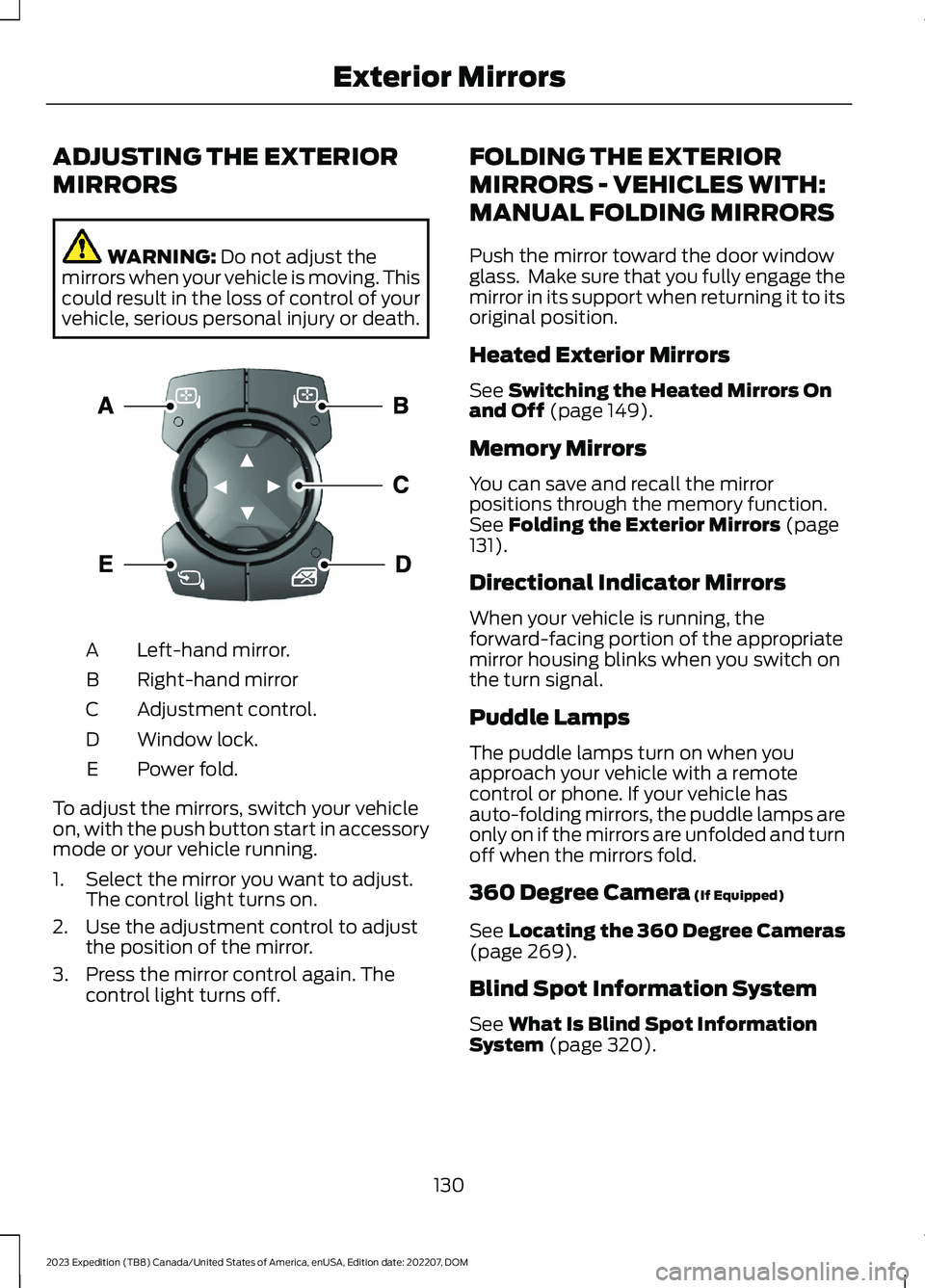
ADJUSTING THE EXTERIOR
MIRRORS
WARNING: Do not adjust themirrors when your vehicle is moving. Thiscould result in the loss of control of yourvehicle, serious personal injury or death.
Left-hand mirror.A
Right-hand mirrorB
Adjustment control.C
Window lock.D
Power fold.E
To adjust the mirrors, switch your vehicleon, with the push button start in accessorymode or your vehicle running.
1.Select the mirror you want to adjust.The control light turns on.
2.Use the adjustment control to adjustthe position of the mirror.
3.Press the mirror control again. Thecontrol light turns off.
FOLDING THE EXTERIOR
MIRRORS - VEHICLES WITH:
MANUAL FOLDING MIRRORS
Push the mirror toward the door windowglass. Make sure that you fully engage themirror in its support when returning it to itsoriginal position.
Heated Exterior Mirrors
See Switching the Heated Mirrors Onand Off (page 149).
Memory Mirrors
You can save and recall the mirrorpositions through the memory function.See Folding the Exterior Mirrors (page131).
Directional Indicator Mirrors
When your vehicle is running, theforward-facing portion of the appropriatemirror housing blinks when you switch onthe turn signal.
Puddle Lamps
The puddle lamps turn on when youapproach your vehicle with a remotecontrol or phone. If your vehicle hasauto-folding mirrors, the puddle lamps areonly on if the mirrors are unfolded and turnoff when the mirrors fold.
360 Degree Camera (If Equipped)
See Locating the 360 Degree Cameras(page 269).
Blind Spot Information System
See What Is Blind Spot InformationSystem (page 320).
130
2023 Expedition (TB8) Canada/United States of America, enUSA, Edition date: 202207, DOMExterior MirrorsE369398
Page 144 of 658
USING THE INSTRUMENT
CLUSTER DISPLAY CONTROLS
WARNING: Driving while distractedcan result in loss of vehicle control, crashand injury. We strongly recommend thatyou use extreme caution when using anydevice that may take your focus off theroad. Your primary responsibility is thesafe operation of your vehicle. Werecommend against the use of anyhand-held device while driving andencourage the use of voice-operatedsystems when possible. Make sure youare aware of all applicable local lawsthat may affect the use of electronicdevices while driving.
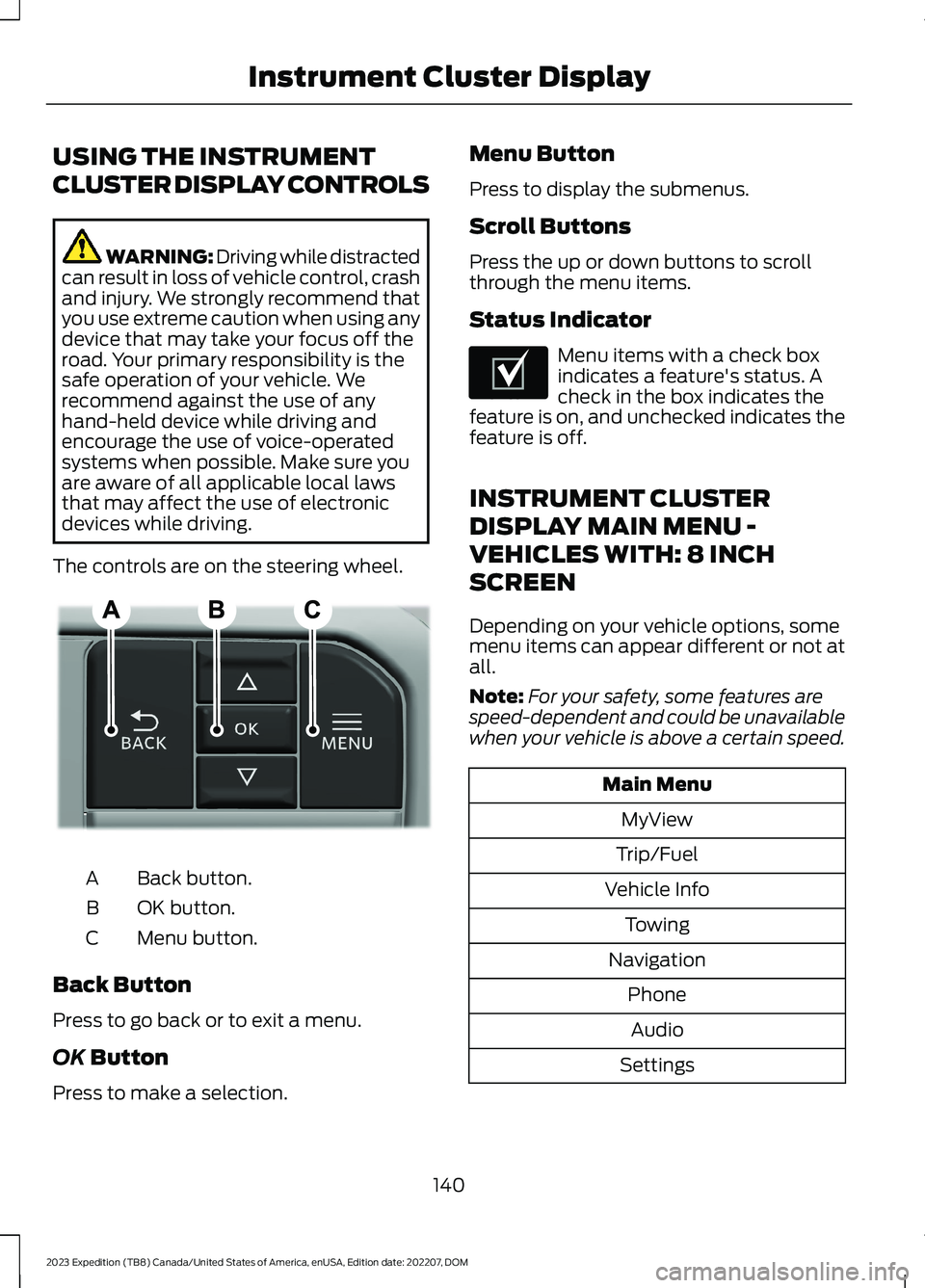
The controls are on the steering wheel.
Back button.A
OK button.B
Menu button.C
Back Button
Press to go back or to exit a menu.
OK Button
Press to make a selection.
Menu Button
Press to display the submenus.
Scroll Buttons
Press the up or down buttons to scrollthrough the menu items.
Status Indicator
Menu items with a check boxindicates a feature's status. Acheck in the box indicates thefeature is on, and unchecked indicates thefeature is off.
INSTRUMENT CLUSTER
DISPLAY MAIN MENU -
VEHICLES WITH: 8 INCH
SCREEN
Depending on your vehicle options, somemenu items can appear different or not atall.
Note:For your safety, some features arespeed-dependent and could be unavailablewhen your vehicle is above a certain speed.
Main Menu
MyView
Trip/Fuel
Vehicle Info
Towing
Navigation
Phone
Audio
Settings
140
2023 Expedition (TB8) Canada/United States of America, enUSA, Edition date: 202207, DOMInstrument Cluster DisplayE309379 E204495
Page 145 of 658
INSTRUMENT CLUSTER
DISPLAY MAIN MENU -
VEHICLES WITH: 12 INCH
SCREEN
Depending on your vehicle options, somemenu items can appear different or not atall.
Note:For your safety, some features arespeed-dependent and could be unavailablewhen your vehicle is above a certain speed.
Main Menu
MyView
Trip/Fuel
Vehicle Information
Towing
Navigation
Phone
Audio
Settings
TRIP COMPUTER - VEHICLES
WITH: 8 INCH SCREEN/12 INCH
SCREEN
ACCESSING THE TRIP COMPUTER
1.Select Trip/Fuel.
2.Select This Trip,Trip 1 or Trip 2.
RESETTING THE TRIP COMPUTER
1.Select Trip/Fuel.
2.Select Trip 1 or Trip 2.
3.Press and hold the OK button for a fewseconds.
Note:This Trip resets every time you startyour vehicle.
CUSTOMIZING THE
INSTRUMENT CLUSTER
DISPLAY
Adding Screens Using MyView
1.Using the information display controlson the steering wheel, select MyView.
2.Select Configure MyView.
3.Select a screen.
4.Press the OK button.
Note:The number of screens you can addis limited. If the selected screen does notappear you must deselect screens from theMyView menu.
Configuring Gauges
1.Select Settings.
2.Select Configure Gauges.
3.Select to swap or change left-handside and right-hand side gauges.
141
2023 Expedition (TB8) Canada/United States of America, enUSA, Edition date: 202207, DOMInstrument Cluster Display
Page 148 of 658
WHAT IS REMOTE START
The system allows you to remotely startyour vehicle and to adjust the interiortemperature according to the settings thatyou chose.
REMOTE START
PRECAUTIONS
WARNING: Do not start the enginein a closed garage or in other enclosedareas. Exhaust fumes are toxic. Alwaysopen the garage door before you startthe engine. Failure to follow thisinstruction could result in personal injuryor death.
WARNING: Do not keep electricaldevices plugged in the power pointwhenever the device is not in use. Powerpoints power up during remote start.
WARNING: Do not keep electricaldevices plugged into the power outletwhenever the device is not in use. Theoutlet provides power when the vehicleis on. Failure to follow this instructioncould result in personal injury.
REMOTE START LIMITATIONS
Remote start does not work under thefollowing conditions:
•The alarm horn is sounding.
•The hood is open.
•The transmission is not in park (P).
•The ignition is on.
•The battery voltage is below theminimum operating voltage.
•Remote start is not enabled.
Note:Do not use remote start if the fuellevel is low.
ENABLING REMOTE START -
VEHICLES WITH: 12 INCH
SCREEN
1.Press Settings on the touchscreen.
2.Press Vehicle.
3.Press Remote Start Setup.
4.Switch Remote Start on or off.
Note:To remote start with FordPass, makesure that the modem is enabled. SeeConnecting FordPass to the Modem(page 475).
ENABLING REMOTE START -
VEHICLES WITH: 15 INCH
SCREEN
1.Access the vehicle drawer on thetouchscreen.
2.Press SETTINGS.
3.Press Vehicle.
4.Press Remote Start Setup.
5.Switch Remote Start on or off.
Note:To remote start with FordPass orPhone as a Key, make sure that the modemis enabled and Phone as a Key is setup. SeeEnabling and Disabling the Modem (page475). See Remote Start Settings (page145).
REMOTELY STARTING AND
STOPPING THE VEHICLE
Remotely Starting the Vehicle
Press the button on the remotecontrol.
144
2023 Expedition (TB8) Canada/United States of America, enUSA, Edition date: 202207, DOMRemote Start (If Equipped)E138623