2023 FORD EXPEDITION height
[x] Cancel search: heightPage 443 of 658
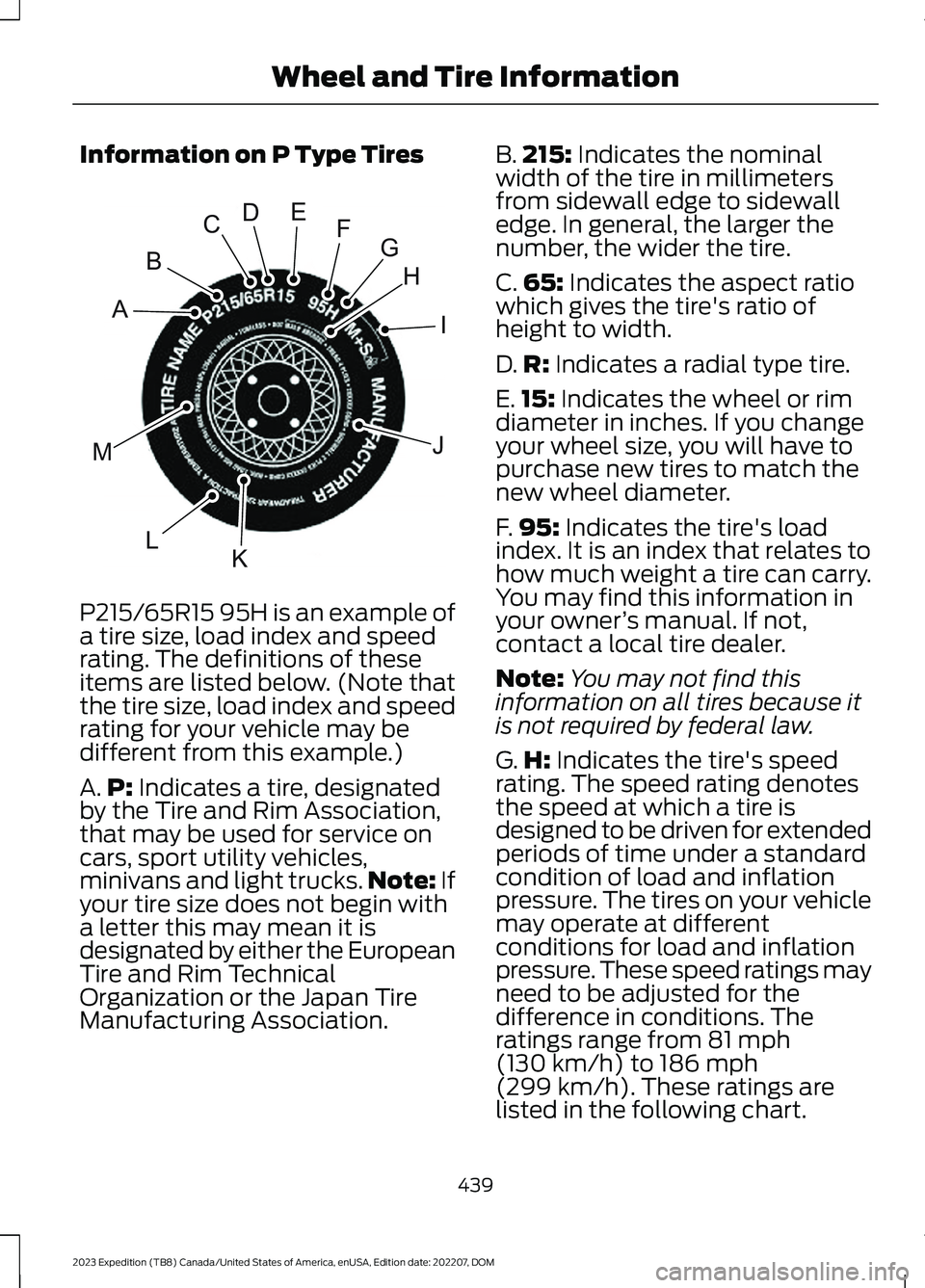
Information on P Type Tires
P215/65R15 95H is an example of
a tire size, load index and speedrating. The definitions of theseitems are listed below. (Note thatthe tire size, load index and speedrating for your vehicle may bedifferent from this example.)
A.P: Indicates a tire, designatedby the Tire and Rim Association,that may be used for service oncars, sport utility vehicles,minivans and light trucks.Note: Ifyour tire size does not begin witha letter this may mean it isdesignated by either the EuropeanTire and Rim TechnicalOrganization or the Japan TireManufacturing Association.
B.215: Indicates the nominalwidth of the tire in millimetersfrom sidewall edge to sidewalledge. In general, the larger thenumber, the wider the tire.
C.65: Indicates the aspect ratiowhich gives the tire's ratio ofheight to width.
D.R: Indicates a radial type tire.
E.15: Indicates the wheel or rimdiameter in inches. If you changeyour wheel size, you will have topurchase new tires to match thenew wheel diameter.
F.95: Indicates the tire's loadindex. It is an index that relates tohow much weight a tire can carry.You may find this information inyour owner’s manual. If not,contact a local tire dealer.
Note:You may not find thisinformation on all tires because itis not required by federal law.
G.H: Indicates the tire's speedrating. The speed rating denotesthe speed at which a tire isdesigned to be driven for extendedperiods of time under a standardcondition of load and inflationpressure. The tires on your vehiclemay operate at differentconditions for load and inflationpressure. These speed ratings mayneed to be adjusted for thedifference in conditions. Theratings range from 81 mph(130 km/h) to 186 mph
(299 km/h). These ratings arelisted in the following chart.
439
2023 Expedition (TB8) Canada/United States of America, enUSA, Edition date: 202207, DOMWheel and Tire InformationHIJKLMABCDEFGE142543
Page 447 of 658
C.80: Indicates the aspect ratiowhich gives the tire's ratio ofheight to width. Numbers of 70 orlower indicate a short sidewall.
D.D: Indicates a diagonal type tire.
R: Indicates a radial type tire.
E.16: Indicates the wheel or rimdiameter in inches. If you changeyour wheel size, you will have topurchase new tires to match thenew wheel diameter.
GLOSSARY OF TIRE
TERMINOLOGY
*Tire label: A label showing theoriginal equipment tire sizes,recommended inflation pressureand the maximum weight thevehicle can carry.
*Tire Identification Number(TIN): A number on the sidewallof each tire providing informationabout the tire brand andmanufacturing plant, tire size anddate of manufacture. Also referredto as DOT code.
*Inflation pressure: A measureof the amount of air in a tire.
*Standard load: A class ofP-metric or Metric tires designedto carry a maximum load at setpressure. For example: ForP-metric tires 35 psi (2.4 bar) andfor Metric tires 36 psi (2.5 bar).Increasing the inflation pressurebeyond this pressure will not
increase the tire’s load carryingcapability.
*Extra load: A class of P-metricor Metric tires designed to carry aheavier maximum load at 42 psi(2.9 bar). Increasing the inflationpressure beyond this pressure willnot increase the tire’s loadcarrying capability.
*kPa: Kilopascal, a metric unit ofair pressure.
*PSI: Pounds per square inch, astandard unit of air pressure.
*Cold tire pressure: The tirepressure when the vehicle hasbeen stationary and out of directsunlight for an hour or more andprior to the vehicle being driven for1 mi (1.6 km).
*Recommended inflationpressure: The cold inflationpressure found on the SafetyCompliance Certification Label(affixed to either the door hingepillar, door-latch post, or the dooredge that meets the door-latchpost, next to the driver's seatingposition), or Tire Label located onthe B-Pillar or the edge of thedriver door.
* B-pillar: The structural memberat the side of the vehicle behindthe front door.
*Bead area of the tire: Area ofthe tire next to the rim.
* Sidewall of the tire: Areabetween the bead area and thetread.
443
2023 Expedition (TB8) Canada/United States of America, enUSA, Edition date: 202207, DOMWheel and Tire Information
Page 453 of 658
INSPECTING THE TIRE FOR
WEAR
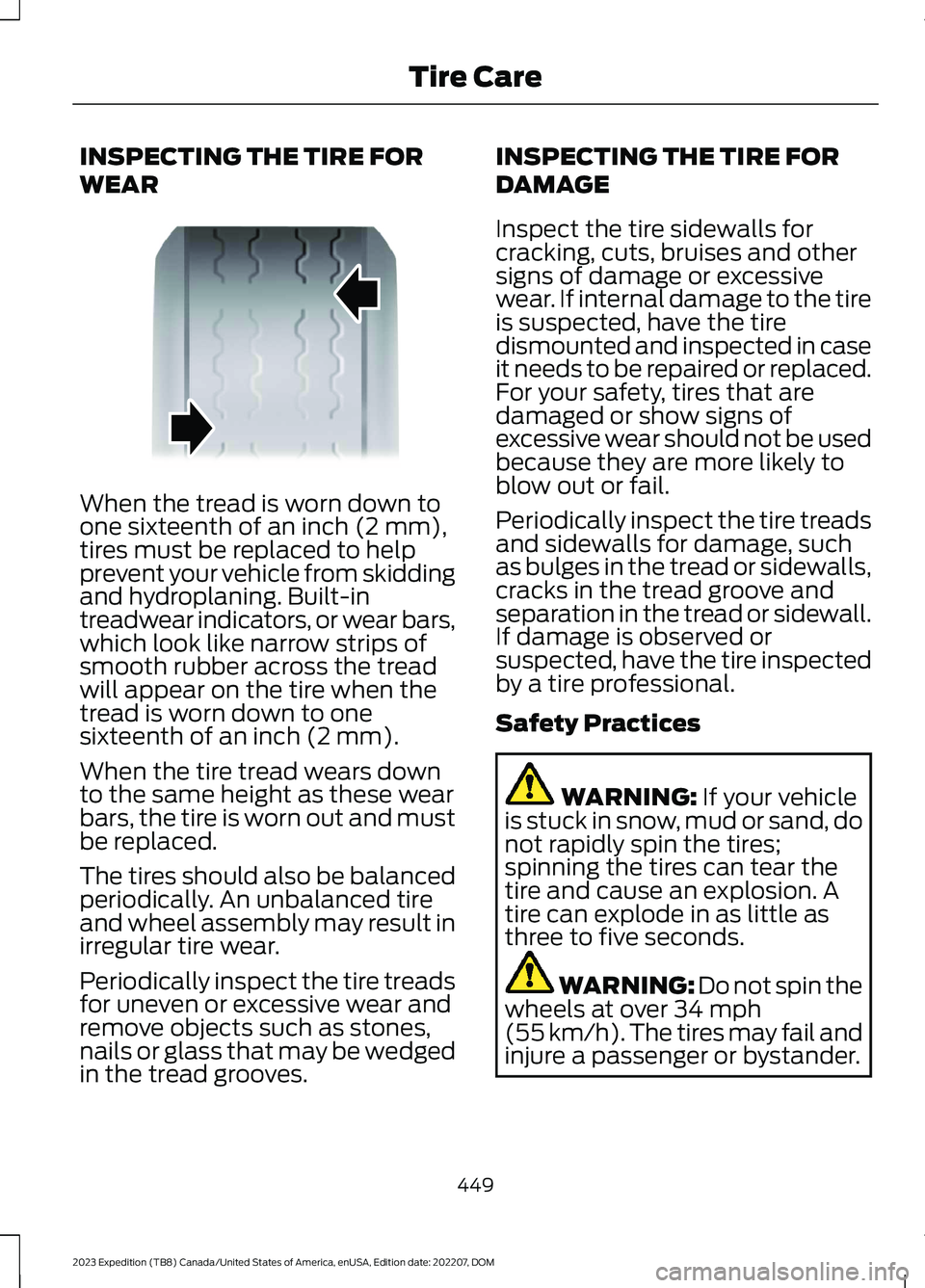
When the tread is worn down toone sixteenth of an inch (2 mm),tires must be replaced to helpprevent your vehicle from skiddingand hydroplaning. Built-intreadwear indicators, or wear bars,which look like narrow strips ofsmooth rubber across the treadwill appear on the tire when thetread is worn down to onesixteenth of an inch (2 mm).
When the tire tread wears downto the same height as these wearbars, the tire is worn out and mustbe replaced.
The tires should also be balancedperiodically. An unbalanced tireand wheel assembly may result inirregular tire wear.
Periodically inspect the tire treadsfor uneven or excessive wear andremove objects such as stones,nails or glass that may be wedgedin the tread grooves.
INSPECTING THE TIRE FOR
DAMAGE
Inspect the tire sidewalls forcracking, cuts, bruises and othersigns of damage or excessivewear. If internal damage to the tireis suspected, have the tiredismounted and inspected in caseit needs to be repaired or replaced.For your safety, tires that aredamaged or show signs ofexcessive wear should not be usedbecause they are more likely toblow out or fail.
Periodically inspect the tire treadsand sidewalls for damage, suchas bulges in the tread or sidewalls,cracks in the tread groove andseparation in the tread or sidewall.If damage is observed orsuspected, have the tire inspectedby a tire professional.
Safety Practices
WARNING: If your vehicleis stuck in snow, mud or sand, donot rapidly spin the tires;spinning the tires can tear thetire and cause an explosion. Atire can explode in as little as
three to five seconds.
WARNING: Do not spin thewheels at over 34 mph(55 km/h). The tires may fail andinjure a passenger or bystander.
449
2023 Expedition (TB8) Canada/United States of America, enUSA, Edition date: 202207, DOMTire CareE142546
Page 633 of 658
3
360 Degree Camera...................................269360 Degree Camera Settings.........................271360 Degree Camera Guide Lines...........270360 Degree Camera Limitations...........269360 Degree Camera Precautions.........269360 Degree Camera Settings...................271Switching the 360 Degree Camera On andOff........................................................................271Switching the 360 Degree CameraView.....................................................................271
4
4WDSee: Four-Wheel Drive......................................219
9
911 Assist...........................................................65
A
A/CSee: Climate Control - Vehicles With: 12 InchScreen................................................................148See: Climate Control - Vehicles With: 15 InchScreen................................................................153About This Publication..................................21ABSSee: Brakes...........................................................229Accessing Apps............................................522Accessing Feature Drawers.....................503Accessing Navigation.................................526Accessing the Passive Key BackupPosition.........................................................198Accessories....................................................536Active Park Assist.........................................273Active Park Assist – Troubleshooting.........275Active Park Assist Precautions...............273Active Park Assist –Troubleshooting........................................275Active Park Assist – Frequently AskedQuestions.........................................................275Active Park Assist – InformationMessages..........................................................275
Adaptive Cruise Control............................279Adaptive Cruise Control –Troubleshooting............................................295Intelligent Adaptive Cruise Control.............292Lane Centering...................................................289Adaptive Cruise Control AutomaticCancellation................................................282Adaptive Cruise ControlIndicators.....................................................288Adaptive Cruise ControlLimitations..................................................280Adaptive Cruise ControlPrecautions.................................................279Adaptive Cruise Control –Troubleshooting........................................295Adaptive Cruise Control – InformationMessages.........................................................295Adjustable Pedals........................................108Adjusting the Exterior Mirrors..................130Adjusting the Headlamps.........................422Adjusting the Instrument Panel LightingBrightness....................................................126Adjusting the Integrated Trailer BrakeController Mode........................................366Adjusting the Luggage CompartmentDivider...........................................................352Adjusting the Luggage CompartmentLoad Floor.....................................................351Adjusting the Map.......................................526Changing the Format of the Map................526Zooming the Map In and Out........................526Adjusting the Pedals...................................108Adjusting the Seatbelt Height....................51Adjusting the Seatbelts DuringPregnancy.......................................................51Adjusting the Sound Settings.................482Adjusting the Steering Wheel - VehiclesWith: Manual Adjustable SteeringColumn..........................................................106Adjusting the Steering Wheel - VehiclesWith: Power Adjustable SteeringColumn..........................................................106Adjusting the Volume................................482Aid Mode..........................................................312How Does Aid Mode Work...............................312What Is Aid Mode................................................312Airbag Precautions........................................58
629
2023 Expedition (TB8) Canada/United States of America, enUSA, Edition date: 202207, DOMIndex
Page 647 of 658

Power Running Boards..............................104Power Running Boards –Troubleshooting.............................................105Power Running Boards –Troubleshooting.........................................105Power Running Boards – Frequently AskedQuestions.........................................................105Power Seats...................................................164Adjusting the Head Restraint.........................164Adjusting the Lumbar Support.....................166Adjusting the Seat Backrest...........................166Adjusting the Seat Cushion............................166Adjusting the Seat Height...............................166Folding the Seat Backrest................................174Head Restraint Components.........................164Installing the Head Restraint.........................165Moving the Seat Backward andForward.............................................................165Removing the Head Restraint.......................165Unfolding the Seat Backrest...........................175Pre-Collision Assist Limitations.............329Pre-Collision Assist Precautions...........328Pre-Collision Assist.....................................328Automatic Emergency Braking.....................335Distance Alert......................................................335Distance Indication............................................332Evasive Steering Assist....................................336Pre-Collision Assist –Troubleshooting.............................................337Pre-Collision Assist –Troubleshooting........................................337Pre-Collision Assist – Frequently AskedQuestions........................................................338Pre-Collision Assist – InformationMessages..........................................................337Pre-Collision Assist – WarningLamps................................................................337Preparing Your Vehicle forStorage.........................................................435Programming a MyKey..................................77Programming the Garage DoorOpener...........................................................182Programming the Remote Control -Vehicles With: Flip Key...............................72Programming the Remote Control -Vehicles With: Push Button Start..........73Properly Adjusting the Driver and FrontPassenger Seats..........................................59
PunctureSee: Changing a Flat Tire...............................456Push Button Ignition Switch....................194
R
Radio Frequency CertificationLabels.............................................................551Blind Spot Information SystemSensors..............................................................551Body Control Module........................................557Cruise Control Module....................................560Keys and Remote Controls............................564Passive Anti-Theft System............................570Radio Transceiver Module..............................574SYNC.......................................................................577Tire Pressure Monitoring SystemSensors.............................................................582Wireless Accessory ChargingModule.............................................................588Rear Auto Mode............................................159Switching Rear Auto Mode On andOff.......................................................................159Rear Axle Fluid Capacity andSpecification................................................471Rear Cross Traffic BrakingSee: Cross Traffic Braking...............................239Rear Exterior.....................................................36Rear Occupant Alert System AudibleWarnings.......................................................178Rear Occupant Alert SystemIndicators......................................................178Rear Occupant Alert SystemLimitations....................................................177Rear Occupant Alert SystemPrecautions...................................................177Rear Occupant Alert System....................177Rear Parking Aid...........................................262Locating the Rear Parking AidSensors.............................................................262Rear Parking Aid Audible Warnings............262Rear Parking Aid Limitations.........................262What is the Rear Parking Aid.........................262Rear Passenger Climate ControlIndicators......................................................159Rear Passenger Climate Control............158Rear Auto Mode..................................................159
643
2023 Expedition (TB8) Canada/United States of America, enUSA, Edition date: 202207, DOMIndex
Page 649 of 658
Filling a Portable Fuel Container..................207
S
Satellite Radio..............................................485Locating the Satellite Radio IdentificationNumber............................................................486Satellite Radio Limitations............................485Satellite Radio Settings..................................486Selecting a Channel.........................................486Setting an Alert..................................................487What Is Satellite Radio...................................485Saving a Preset Position............................179Scheduled Maintenance..........................539Seatbelt Extensions......................................54Seatbelt Precautions....................................48Seatbelt Reminder.........................................52How Does the Seatbelt ReminderWork.....................................................................52Seatbelt Reminder Audible Warnings..........53Seatbelt Reminder Indicators..........................52Switching the Seatbelt Reminder On andOff.........................................................................53Seatbelts...........................................................48Automatic Locking Mode..................................50Seatbelt Reminder...............................................52Sensitive Locking Mode.....................................50Security............................................................100Anti-Theft Alarm System...............................100Anti-Theft Alarm System Settings...............101Passive Anti-Theft System............................100Security – Troubleshooting............................102Security – Troubleshooting......................102Security – Frequently AskedQuestions.........................................................103Security – Information Messages................102Selecting a Drive Mode.............................303Selecting a Four-Wheel DriveMode.............................................................220Selecting the Audio Source......................481Sending and Receiving a TextMessage........................................................514Sensitive Locking Mode..............................50How Does Sensitive Locking ModeWork.....................................................................50What is Sensitive Locking Mode....................50Service Data......................................................27
Setting a Destination.................................526Setting a Destination Using a Point ofInterest..............................................................527Setting a Destination Using a PredictiveDestination......................................................527Setting a Destination Using a RecentDestination......................................................527Setting a Destination Using a SavedDestination......................................................527Setting a Destination Using the MapScreen................................................................527Setting a Destination Using the Text EntryScreen...............................................................526Setting a Memory Preset..........................482Settings Data...................................................28Setting the Adaptive Cruise Control Gap- Vehicles With: 12 Inch Screen............285Setting the Adaptive Cruise Control Gap- Vehicles With: 8 Inch Screen.............284Setting the Adaptive Cruise ControlSpeed - Vehicles With: 12 InchScreen...........................................................283Setting the Adaptive Cruise ControlSpeed - Vehicles With: 8 InchScreen...........................................................282Setting the Blower Motor Speed............149Setting the Clock and Date.....................483Setting the Cruise Control Speed...........277Setting the Hill Descent Speed..............256Setting the Liftgate Opening Height.......93Setting the Speed Sign RecognitionSpeed Tolerance - Vehicles With: 12Inch Screen.................................................342Setting the Speed Sign RecognitionSpeed Tolerance - Vehicles With: 15Inch Screen.................................................342Setting the Speed Sign RecognitionSpeed Warning - Vehicles With: 12 InchScreen...........................................................342Setting the Speed Sign RecognitionSpeed Warning - Vehicles With: 15 InchScreen...........................................................342Setting the Temperature...........................149Setting the Trail Control Speed.............250Setting Up the Trailer Backup Assistancefor a Conventional Trailer......................370Applying the Trailer Reversing AidSticker.................................................................371
645
2023 Expedition (TB8) Canada/United States of America, enUSA, Edition date: 202207, DOMIndex