2023 FORD EXPEDITION wheel
[x] Cancel search: wheelPage 513 of 658
WHAT IS ALEXA BUILT-IN
Allows you to use Alexa in your vehicle forauto specific use cases on the road andgives you access to an ever evolvingnumber of skills that help to make your lifemore productive, entertaining, andconnected while using your vehicle.
ALEXA BUILT-IN
REQUIREMENTS
To use Alexa, all of the following mustoccur:
•Your vehicle modem is enabled.
•You are logged into an existing Amazonaccount.
•Vehicle location services are enabled.
•Vehicle connectivity and vehicle datasharing is enabled.
SIGNING INTO YOUR
ACCOUNT
Press the button in the statusbar and follow the on-screenprompts.
To sign in using the settings menu:
1.Access the vehicle drawer.
2.Press SETTINGS.
3.Press Amazon Alexa.
4.Press Get Started.
5.Sign into the Amazon account by eitherscanning the QR code or entering theon-screen code into the Amazonwebsite.
6.Once logged in, follow the on-screenprompts.
7.When complete, the vehicle informsyou that Alexa is ready to be used inthe vehicle.
Signing Out of Your Account
1.Access the vehicle drawer.
2.Press SETTINGS.
3.Press Amazon Alexa.
4.Press Sign Out.
USING ALEXA BUILT-IN
To use Alexa, say “Alexa” or press the voiceinteraction button on the steering wheeland then say “Alexa” to invoke Alexa tostart listening.
Note:If the wake word is not enabled, youcan only use the voice interaction button.
You can use Alexa for the following andmore:
•Entertainment.
•Hands-free calling.
•Traffic and navigation.
•Vehicle controls.
•Smart home device control.
•Weather and news information.
ALEXA BUILT-IN SETTINGS
Enabling the Wake Word
1.Access the vehicle drawer.
2.Press SETTINGS.
3.Press Amazon Alexa.
4.Switch Listen for Wake Word on or off.
Note:If the wake word is not enabled, youcan only use the voice interaction button.
Contact List
Displays a list of connected phones andcontact sharing status for each phone.
To change the contact sharing status:
1.Access the vehicle drawer.
509
2023 Expedition (TB8) Canada/United States of America, enUSA, Edition date: 202207, DOMAlexa Built-In - Vehicles With: 15 Inch ScreenE368039
Page 517 of 658
MAKING AND RECEIVING A
PHONE CALL
Making Calls
To call a number in your contacts,select:
Action and DescriptionMenu Item
You can then select thename of the contact youwant to call. Any numbersstored for that contactdisplay along with anystored contact photos. Youcan then select thenumber that you want tocall. The system begins thecall.
Contacts
To call a number from your recent calls,select:
Action and DescriptionMenu Item
You can then select anentry that you want to call.The system begins the call.
Recent CallList
To call a number from your favorites,select:
Action and DescriptionMenu Item
You can then select anentry that you want to call.The system begins the call.
Favorites
To call a number that is not stored inyour phone, select:
Action and DescriptionMenu Item
Select the digits of thenumber you wish to call.PhoneKeypad
The system begins the call.Call
Pressing the backspace button deletes thelast digit you typed.
Receiving Calls
During an incoming call, an audible tonesounds. Caller information appears in thedisplay if it is available.
To accept the call, select:
Menu Item
Accept
Note:You can also accept the call bypressing the phone button on the steeringwheel.
To reject the call, select:
Menu Item
Reject
Ignore the call by doing nothing. Thesystem logs it as a missed call.
During a Phone Call
During a phone call, the contacts nameand number display on the screen alongwith the call duration.
The phone status items are also visible:
•Signal Strength.
•Battery.
You can select any of the following duringan active phone call:
513
2023 Expedition (TB8) Canada/United States of America, enUSA, Edition date: 202207, DOMPhone - Vehicles With: 12 Inch Screen
Page 518 of 658
Item
Immediately end aphone call. You canalso press thebutton on thesteering wheel.
End Call
Press this to accessthe phone keypad.Keypad
Item
MuteYou can switch themicrophone off sothe caller does nothear you.
Transfer the phonecall audio to thecell phone or backto the touchscreen.
Privacy
SENDING AND RECEIVING A TEXT MESSAGE
DescriptionMenu Item
Hear the text message.Hear It
View the text message.View
Call the sender.Call
Reply to the text message with a standard text message.Reply
514
2023 Expedition (TB8) Canada/United States of America, enUSA, Edition date: 202207, DOMPhone - Vehicles With: 12 Inch Screen
Page 521 of 658
MAKING AND RECEIVING A
PHONE CALL
Making Calls
To call a number in your contacts,select:
Action and DescriptionMenu Item
You can then select thename of the contact youwant to call. Any numbersstored for that contactdisplay along with anystored contact photos. Youcan then select thenumber that you want tocall. The system begins thecall.
Contacts
To call a number from your recent calls,select:
Action and DescriptionMenu Item
You can then select anentry that you want to call.The system begins the call.
Recent CallList
To call a number from your favorites,select:
Action and DescriptionMenu Item
You can then select anentry that you want to call.The system begins the call.
Favorites
To call a number that is not stored inyour phone, select:
Action and DescriptionMenu Item
Select the digits of thenumber you wish to call.PhoneKeypad
The system begins the call.Call
Pressing the backspace button deletes thelast digit you typed.
Receiving Calls
During an incoming call, an audible tonesounds. Caller information appears in thedisplay if it is available.
To accept the call, select:
Menu Item
Accept
Note:You can also accept the call bypressing the phone button on the steeringwheel.
To reject the call, select:
Menu Item
Reject
Ignore the call by doing nothing. Thesystem logs it as a missed call.
During a Phone Call
During a phone call, the contacts nameand number display on the screen alongwith the call duration.
The phone status items are also visible:
•Signal Strength.
•Battery.
You can select any of the following duringan active phone call:
517
2023 Expedition (TB8) Canada/United States of America, enUSA, Edition date: 202207, DOMPhone - Vehicles With: 15 Inch Screen
Page 522 of 658
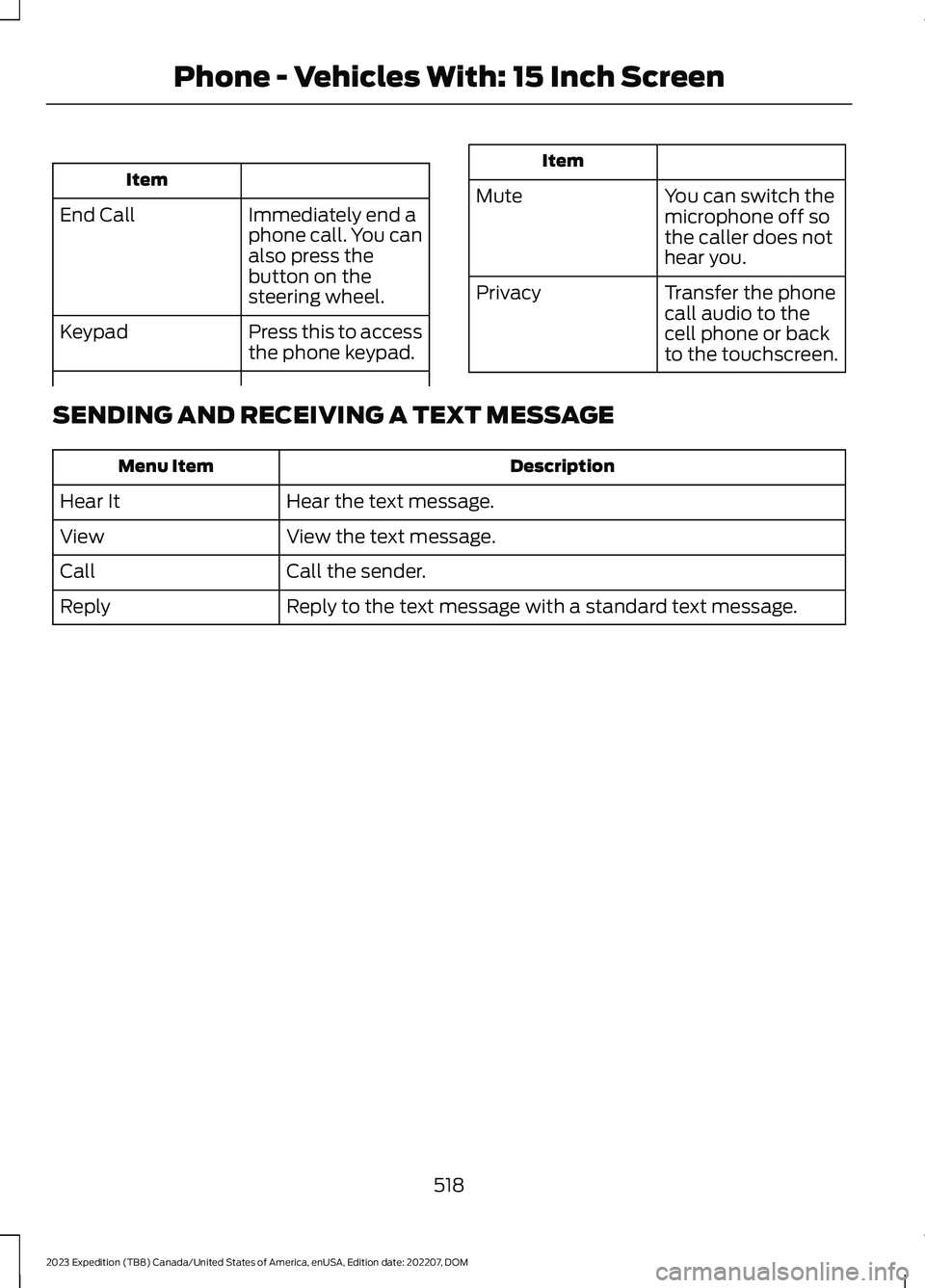
Item
Immediately end aphone call. You canalso press thebutton on thesteering wheel.
End Call
Press this to accessthe phone keypad.Keypad
Item
MuteYou can switch themicrophone off sothe caller does nothear you.
Transfer the phonecall audio to thecell phone or backto the touchscreen.
Privacy
SENDING AND RECEIVING A TEXT MESSAGE
DescriptionMenu Item
Hear the text message.Hear It
View the text message.View
Call the sender.Call
Reply to the text message with a standard text message.Reply
518
2023 Expedition (TB8) Canada/United States of America, enUSA, Edition date: 202207, DOMPhone - Vehicles With: 15 Inch Screen
Page 547 of 658
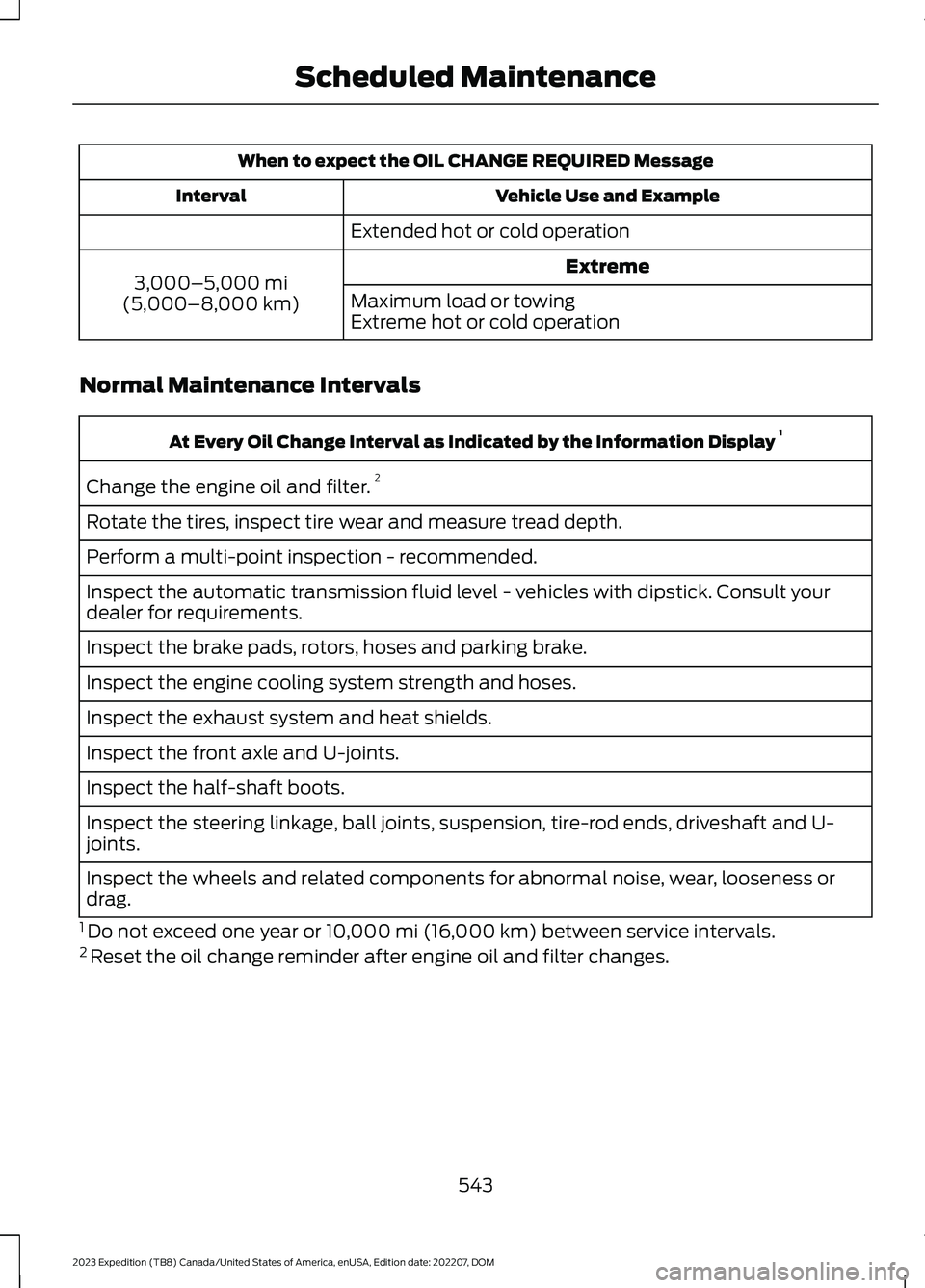
When to expect the OIL CHANGE REQUIRED Message
Vehicle Use and ExampleInterval
Extended hot or cold operation
Extreme3,000–5,000 mi(5,000–8,000 km)Maximum load or towingExtreme hot or cold operation
Normal Maintenance Intervals
At Every Oil Change Interval as Indicated by the Information Display 1
Change the engine oil and filter.2
Rotate the tires, inspect tire wear and measure tread depth.
Perform a multi-point inspection - recommended.
Inspect the automatic transmission fluid level - vehicles with dipstick. Consult yourdealer for requirements.
Inspect the brake pads, rotors, hoses and parking brake.
Inspect the engine cooling system strength and hoses.
Inspect the exhaust system and heat shields.
Inspect the front axle and U-joints.
Inspect the half-shaft boots.
Inspect the steering linkage, ball joints, suspension, tire-rod ends, driveshaft and U-joints.
Inspect the wheels and related components for abnormal noise, wear, looseness ordrag.
1 Do not exceed one year or 10,000 mi (16,000 km) between service intervals.2 Reset the oil change reminder after engine oil and filter changes.
543
2023 Expedition (TB8) Canada/United States of America, enUSA, Edition date: 202207, DOMScheduled Maintenance
Page 548 of 658

Brake Fluid Maintenance1
Change the brake fluid.2Every Three Years
1 Perform this maintenance item every three years. Do not exceed the designated timefor the interval.2 Brake fluid servicing requires special equipment available at your authorized dealer.
Other Maintenance Items 1
Replace the cabin air filter.Every 20,000 mi (32,000 km)
Replace the engine air filter.Every 30,000 mi (48,000 km)
Replace the spark plugs.Every 100,000 mi (160,000 km)Inspect the accessory drive belt(s).2
Change the automatic transmission fluid.
Every 150,000 mi (240,000 km)
Change the front axle fluid - Four-wheel drivevehicles.
Change the rear axle fluid.
Change the transfer case fluid - Four-wheeldrive vehicles.
Replace the accessory drive belt(s).
Change the engine coolant.3Every 200,000 mi (320,000 km)
1 Perform these maintenance items within 5,000 mi (4,800 km) of the last engine oil andfilter change. Do not exceed the designated distance for the interval.2 After initial inspection, inspect every other oil change until replaced.3 Initial replacement at 10 years or 200,000 mi (320,000 km), then every 5 years or100,000 mi (160,000 km).
544
2023 Expedition (TB8) Canada/United States of America, enUSA, Edition date: 202207, DOMScheduled Maintenance
Page 549 of 658

SPECIAL OPERATING
CONDITIONS SCHEDULED
MAINTENANCE
If you operate your vehicle primarily in anyof the following conditions, you need toperform extra maintenance, as indicated.If you operate your vehicle occasionallyunder any of these conditions, it is notnecessary to perform the extramaintenance. For specificrecommendations, see your dealershipservice advisor or technician.
Perform the services shown in thefollowing tables when specified or within3,000 mi (4,800 km) of the messageappearing in the instrument cluster displayprompting you to change your oil.
•Example 1: The message comes on at28,751 mi (46,270 km). Perform the30,000 mi (48,000 km) automatictransmission fluid replacement.
•Example 2: The message has notcome on, but the odometer reads30,000 mi (48,000 km) (for example,the Intelligent Oil-Life Monitor wasreset at 25,000 mi (40,000 km)).Perform the engine air filterreplacement.
Towing a Trailer or Using a Car-top Carrier
Change engine oil and filter as indicated by the instrumentcluster display and perform services listed in the NormalScheduled Maintenance chart.
As required
Inspect and lubricate U-joints (if equipped with greasefittings).Inspect frequently, serviceas required
See axle maintenance items under Exceptions.
Change transfer case fluid (Four-wheel drive vehicles).Every 60,000 mi(96,000 km)Replace spark plugs.
Extensive Idling or Low-speed Driving for Long Distances, as in Heavy Commercial Use(Such as Delivery, Taxi, Patrol Car or Livery)Short Trips that do not allow the engine to get to operating temperature causing fueldilution and an increase of the engine oil level
Change engine oil and filter as indicated by the instrumentcluster display and perform services listed in the NormalScheduled Maintenance chart.
As required
Replace engine air filter.Inspect frequently, serviceas requiredReplace cabin air filter.
Change transfer case fluid (Four-wheel drive vehicles).Every 60,000 mi(96,000 km)Replace spark plugs.
545
2023 Expedition (TB8) Canada/United States of America, enUSA, Edition date: 202207, DOMScheduled Maintenance